Hey marketbiz,
To remove the new products section on the empty cart page add this css to your Quick CSS:
.woocommerce-cart .wp-block-woocommerce-empty-cart-block .wp-block-product-new,.woocommerce-cart .wp-block-woocommerce-empty-cart-block .wp-block-heading:not(.wc-block-cart__empty-cart__title) {
	display:none;
}
Then to add the button add this code to the end of your child theme functions.php file in Appearance ▸ Editor:
function custom_script() { ?>
  <script>
(function($){
  var button = $('<div class="avia-button-wrap av-m6cpztd3-7c60bd307536e2939b17d69a432c4593-wrap avia-button-center  avia-builder-el-56  el_after_av_button  avia-builder-el-last "><style type="text/css" data-created_by="avia_inline_auto" id="style-css-av-m6cpztd3-7c60bd307536e2939b17d69a432c4593">#top #wrap_all .avia-button.av-m6cpztd3-7c60bd307536e2939b17d69a432c4593{border-radius:20px 20px 20px 20px;transition:all 0.4s ease-in-out;}#top #wrap_all.avia-button.av-m6cpztd3-7c60bd307536e2939b17d69a432c4593:hover .avia_button_background{border-radius:20px 20px 20px 20px;}</style><a href="#" class="avia-button av-m6cpztd3-7c60bd307536e2939b17d69a432c4593 av-link-btn avia-icon_select-no avia-size-x-large avia-position-center avia-color-dark" title="Dashboard" aria-label="Dashboard"><span class="avia_iconbox_title">Dashboard</span></a></div>');
  if ($("body").hasClass("woocommerce-cart") && $(".wp-block-woocommerce-empty-cart-block .wc-block-grid").hasClass("wp-block-woocommerce-product-new") == true) {
  $(button).appendTo('.wp-block-woocommerce-cart');
  } else {}
})(jQuery);
</script>
  <?php
}
add_action( 'wp_footer', 'custom_script', 99 );
Please ensure to copy the code from the forum and not an email notification so the symbols are not converted.
Then adjust the button URL to suit.

Best regards,
Mike
f.e.:
input[type="checkbox"]:not(:checked),
input[type="checkbox"]:checked {
    position: relative;
    pointer-events: none;
    opacity: 0;
    width: 3.4rem !important
}

.input_checkbox_label .required {
    position: relative !important;
    left: 0 !important;
}

input[type="checkbox"] ~ label {
    position: relative !important;
    display:  block;
    min-height: 2rem !important;
}

input[type="checkbox"] ~ label::before {
    position: absolute ;
    display: block !important;
    content: "";
    top: 0;
    left: 0 !important;
    width: 3.0rem !important;
    height: 1.6rem !important;
    pointer-events: all;
    border-radius: 0.8rem;
    background-color: #fff;
    border: #adb5bd solid 1px;
}

input[type="checkbox"] ~ label::before {
    transition: background-color .15s ease-in-out,border-color .15s ease-in-out,box-shadow .15s ease-in-out;
}

input[type="checkbox"]:checked ~  label::before {
    color: #fff;
    border-color: #adb5bd;
    background-color: #fff;
}

input[type="checkbox"]  ~ label::after {
    content: "";
    position: absolute !important;
    display: block;
    width: 1.4rem !important;
    height: 1.4rem !important;
    top: 0.16rem;
    left: 0.25rem;
    background-color: #832c32 !important;
    border-radius: 50%;
    transition: background-color .15s ease-in-out,border-color .15s ease-in-out,box-shadow .15s ease-in-out,-webkit-transform .15s ease-in-out;
    transition: transform .15s ease-in-out,background-color .15s ease-in-out,border-color .15s ease-in-out,box-shadow .15s ease-in-out;
    transition: transform .15s ease-in-out,background-color .15s ease-in-out,border-color .15s ease-in-out,box-shadow .15s ease-in-out,-webkit-transform .15s ease-in-out;
    background: no-repeat 50%/50% 50%;
}

input[type="checkbox"]:checked ~ label::after {
    background-color: #00841b !important;
    -webkit-transform: translateX(1.2rem);
    transform: translateX(1.2rem);
}
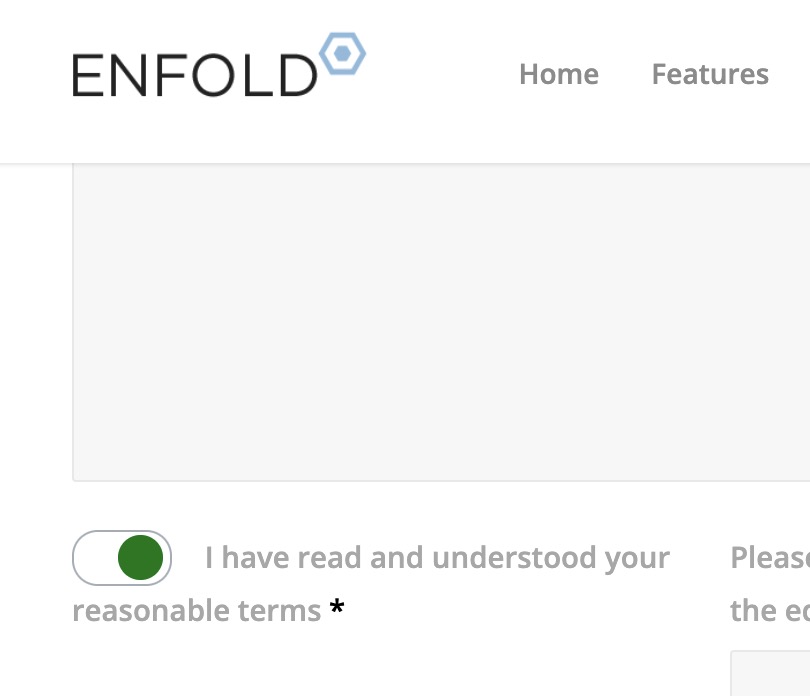
PS: on that demo page this is working on the scratch – but it might be necessary to adjust display option and left positioning. Depends on setup.
these settings are all browser controlled.
There is only the way to have a background-color from external css – see: https://kriesi.at/support/topic/info-about-radios-or-checkboxes-background-color/
Styling the radios or checkboxes could be achieved – if you put the f.e. checkbox to opacity : 0 and then place a styled version to replace it:
see : https://webers-testseite.de/kontakt/
or see: https://www.w3schools.com/howto/tryit.asp?filename=tryhow_css_custom_checkbox
you see this is always based on :
input {
  opacity: 0;
  cursor: pointer;
  height: 0;
  width: 0;
}
you find different solutions in the internet – f.e. on https://getcssscan.com/css-checkboxes-examples
and also, i would like to hide (on certain pages only) the “phone number/extra info” from the top bar.
-
This reply was modified 1 year, 2 months ago by
 rvga.
rvga.
Hello,
I have 2 menus – main and second.
I’d like to hide the secondary one that appears on the top bar on the right.
But I want to disable it for certain pages only.
How can I acheive this please?
Thx for your replies.
Hi,
Thank you for the update.
You can apply a large top-left border radius to the column element and position it relative to the parent container. Please create a test page, add a Color Section, insert two 1/2 Column elements inside the section, add Text or Special Heading in the first column and Video in the second. Then we’ll provide you with the modifications needed to create the shape and adjust the position of the video.
Best regards,
Ismael
Hey bemodesign,
Thank you for the inquiry.
You can add this css code to adjust the height of the slider on mobile view.
@media only screen and (max-width: 767px) {

  /* Add your Mobile Styles here */
  .avia-slideshow.av-k5zwtv35-191253da2a907a8438f9e3ea5aa30763 .avia-slideshow-slide,
  .avia-slideshow.av-k5zwtv35-191253da2a907a8438f9e3ea5aa30763 .avia-slideshow-slide>div {
    min-height: 330px;
  }

  .avia-slideshow.av-k5zwtv35-191253da2a907a8438f9e3ea5aa30763 .avia-slideshow-slide img {
    width: 100%;
    height: 100%;
    object-fit: cover;
    min-height: 330px;
  }

  #top #wrap_all .avia-slideshow .av-slideshow-caption.av-k5zwtv35-191253da2a907a8438f9e3ea5aa30763__0 .avia-caption-title {
    font-size: 30px;
  }

  #top .avia-slideshow .av-slideshow-caption.av-k5zwtv35-191253da2a907a8438f9e3ea5aa30763__0 .avia-caption-content p {
    font-size: 20px;
  }
}
Best regards,
Ismael
How can I create a home page top area with video, like the one attached. And it looks good on mobile view.
Hi,
Try this CSS in your Enfold Theme Options ▸ General Styling ▸ Quick CSS field:
#top.page-id-16 .av-horizontal-gallery-slider {
    display: flex;
    justify-content: center;
}

Best regards,
Mike
Hi both site health and woocommerce system info show the 4gb max limit. I set 2gb because 4gb is too large and overkill.
We run our own dedicated servers so it’s no issue with the provider. We set our own settings.
I can confirm that there is nothing wrong with the PHP, MySQL, mariadb or Plesk config.
The issue is for some reason some actions in the enfold builder are unable to allocate the required memory.
My suggested solution forces WordPress to recognise the correct memory limit.
As above the problem does not occur in php8 but started in php8.1 and above. I also checked the individual php fpm memory settings for each version.
Adding the memory limit to the wp-config forces WordPress to accept the new value and appears to stop the process hitting a false memory limit.
If this has fixed the problem then you guys need to investigate a possible memory leak or bug in the Avia builder in php8.1 and above.
Why not using the code tag for your code? Link
No one can copy paste the code for his own use.
Hi Rikard,
We used query monitor – It doesnt tell us anything useful.
It appears there is a memory leak somewhere or something in Enfold is picking up the wrong memory limit when it isnt specified.
For our site we just had to tell wordpress what the memory limits are by adding the following to wp-config.php
For us the 2gb limit per action looks like this:
define('WP_MEMORY_LIMIT', '2048M');
define('WP_MAX_MEMORY_LIMIT', '2048M');
For some reason the error code in the console was suggesting that the memory limit was around 512mb (written in bytes).
For context we actually have a 4gb memory limit – So there shouldnt have been a problem anyway but specifying a figure in wp-config seems to have solved the issue. I’ll report back if I can recreate it again.
The problem does not occur in PHP 8.0 but does occur in all versions above this.
With this in place the problem seems to have stopped and we are running PHP 8.2 again now. So it looks like there is an issue with the memory allocated to some actions in Enfolds interface not able to use the available ram fully.
Someone else reported a simillar issue here:
I was writing a reply on the post above explaining this when you closed it too early!!!!
Can you reopen it and add my suggestion above!
Hi,
Great, I’m glad that you found a solution and thanks for sharing it. Please let us know if you should need any further help on the topic, or if we can close it.
Best regards,
Rikard
Hey Günter,
as we were unable to reproduce the issue after our clients fix until now I cannot validate your fix.
In any way, when it happens again, I will get back to your suggestion and give you feedback here.
Let’s close this topic for now.
Thank you very much anyway!
yes – and your mentioned code above : a.cart_dropdown_link leads me to the wrong direction.
But better is to post the link to that page – so i can inspect it there. – is it the priver page?
(f.e. the demo page Enfold Shop does not have that account login icon inside main nav. it is on header_top.)
#top #header .av-main-nav  #menu-item-wc-account-icon > a {
  color: #f19809;
  font-size: 28px;
}
or if you like to have a hover effect on this:
#top #header .av-main-nav  #menu-item-wc-account-icon > a {
  color: #f19809;
  font-size: 28px;
  transition: color 0.7s ease;
}

#top #header .av-main-nav  #menu-item-wc-account-icon > a:hover {
  color: #1c60c7;
}
the data-av_icon is on the following span tag:
#top a.cart_dropdown_link {
  right: 15px;
}

#top a.cart_dropdown_link span[data-av_icon] {
  font-size: 28px;
  color: var(--enfold-header-color-color);
}

/* === to influence the counter === */
#top a.cart_dropdown_link span.av-cart-counter {
  height: 20px;
  left: 64%;
  font-size: 18px;
  line-height: 20px;
  border-radius: 50%;
  background: var(--enfold-header-color-primary);
  color: var(--enfold-header-color-constant-font);
  margin: -22px 0 0 2px;
  padding: 2px 6px;
}
i inserted above the default colors – change them to your needs
Hi,
Thank you for the update.
Regarding the scroll-top-top button, you can override the footer.php file in your child theme. Look for this line of code and adjust as necessary.
<a href='#top' title='<?php _e( 'Scroll to top', 'avia_framework' ); ?>' id='scroll-top-link' <?php echo av_icon_string( 'scrolltop' ); ?> tabindex='-1'><span class="avia_hidden_link_text"><?php _e( 'Scroll to top', 'avia_framework' ); ?></span></a>
Best regards,
Ismael
Hi,
Glad to hear that you have this sorted out, shall we close this topic?
Please open a new thread for each issue as it will help the Mods and future users.
Best regards,
Mike
Hi,
Thanks for the update. If you need further help with something which is not on this topic, then please open a new thread.
Best regards,
Rikard
Hey Janel,
I see that you are running an old version of the theme, could you try to update to the latest version (6.0.8) to see if that helps please? The update to 6.0.8 has to be done manually from the version you are running, please refer to my replies in this thread: https://kriesi.at/support/topic/enfold-4-5-theme-update-update-failed-download-failed-a-valid-url-was-not-pro/#post-1021541
You can either update manually via FTP: https://kriesi.at/documentation/enfold/how-to-install-enfold-theme/#theme-update, or upload the theme as if it was new under Appearance->Themes->Add New Theme.
If that doesn’t work then please try to delete the whole theme folder, then replace it with the new version. Make sure that you have backups of the site before starting updating.
Also please read this after you have updated: https://kriesi.at/documentation/enfold/
Best regards,
Rikard
Hi there and thank you for getting back to me… I had created a handful of styles (both for desktop and mobile breakpoints) for the logo, text description, and screenshot… All of which included details regarding positioning and size… None of them are loading anymore. There’s no connection between the css lightbox styles and any element in the light box since updating the theme… Do I need to put these styles in a different location other than in the the ‘quick CSS’ section of the Enfold ‘general style’ settings?
some css style examples that are no longer loading:
.lightbox_content_left
{
width:200px;
float:none;
display:block;
clear:both;
font-weight:normal;
font-size:2em;
line-height:1.4em;
text-transform: none;
color:#685f5f;
}
img.lightbox_logo {
display: block;
clear:both;
float: none;
padding: 0px 0px 15px;
width: 45%;
}
-
This reply was modified 1 year, 2 months ago by
 nulrick.
Hey Ismael, thank you very much for again answering so fast.
I’m afraid that this is not the solution yet, as you can see in the screenshot. 
(or I didn’t do it correctly).
Ismael, since I’ve already spent so much time cleaning up my site in terms of accessibility (as I already mentioned, only for testing purposes), I’ve decided to design this part of the site differently and do it without the link with the sonar-effect-icon (there are enough sonar effects there anyway…).
Thank you very much for the idea you had!
I probably have to start a new thread for this – but I dare to ask the following: as you can see in the screenshot in the bottom right corner, Wave also throws up an error regarding the scroll-to-top link. Wave complains that the title (scroll-top) is the same as the text.
“Redundant title text
Title attribute text is the same as text or alternative text.”
<span class=”avia_hidden_link_text”>
Scroll-top
</span>
How (I mean, where) can I change the title of the scroll-to-top link in Enfold so that the error message no longer appears?
I would appreciate it if you could help me.
Best regards
Grobi
I changed it to main and that worked. thanks
would u mind taking a look at this ticket please?
Hello,
We have an image heavy website we manage with over 2K images. When Enfold creates additional images, they become too many and take a lot of hosting space. What is the best way to disable Enfold autogenerated images in the future (or decide which to keep)?
We have researched some of the previous similar issues (see the links), but after applying the code and testing, we saw no changes. For any new uploaded image, Enfold creates several and they are 17-18 again.
Please advise.
Here are the forum links we were referring to:
FYI: The website we are talking about is hosted in WP Engine.
Thank you in advance for the assistance.
Best Regards,
Elefant Team
Hi,
Thank you for the update.
You can use this css code and adjust the values as needed:
#top #wrap_all #footer .social_bookmarks {
    height: 80px;
}

#top #footer .social_bookmarks li {
    height: 100%;
    width: 80px;
}

#top #footer .social_bookmarks li a {
    font-size: 48px;
    height: 48px;
    width: 80px;
    line-height: 60px;
}
Best regards,
Ismael
Hey Grobi,
Thank you for the inquiry.
You might need to manually apply the link to the parent element instead of the icon, then add an invisible element with text (Mail):
Example:
<a href="mailto: (Email address hidden if logged out) " style=”text-align: center;”>[av_font_icon icon='ue805' font='entypo-fontello' style='border' caption='Questions on all topics' link='mailto: (Email address hidden if logged out) ' linktarget='' size='70px' position='center' animation='' color='white' sonar_effect_effect='1' sonar_effect_color='white' sonar_effect_duration='1' sonar_effect_scale='1.5' sonar_effect_opac='0.2' animation=''id='' custom_class='' av_uid='av-5rzj40' admin_preview_bg=''][/av_font_icon]<span class="hidden visually-hidden">Mail</span></a>
Best regards,
Ismael
Hi Enfold team.
Hopefully you had a good start to 2025.
To test how I can achieve digital accessibility on my site, i.e. remove the barriers, I am currently trying out WAVE.
I have embedded an av_font_icon on my Enfold site and provided it with a link (a mailto:-link to my email address). Wave finds this problem with my av_font_icon:
“Empty link
A link contains no text.”
I don’t even know what kind of text should be there at the moment (that will be my next research step), but given the special syntax of the av_font_icons, I do not have an idea how and where I have to insert something like text or whatever. Or – asked you in another way: which element can I integrate into the av-font-icon-syntax to solve my “no-text-issue”?
<p style=”text-align: center;”>[av_font_icon icon='ue805' font='entypo-fontello' style='border' caption='Questions on all topics' link='mailto: (Email address hidden if logged out) ' linktarget='' size='70px' position='center' animation='' color='white' sonar_effect_effect='1' sonar_effect_color='white' sonar_effect_duration='1' sonar_effect_scale='1.5' sonar_effect_opac='0.2' animation=''id='' custom_class='' av_uid='av-5rzj40' admin_preview_bg=''][/av_font_icon]</p>
Can you give me a tip on what I need to do?
Best regards
Grobi
Hi,
Thank you for your kindness.
Please close this topic.
Best regards,
Megmi
Hi,
Thanks for the update. Please let us know if you should need any further help on the topic, or if we can close it.
Best regards,
Rikard
Hi,
Thanks for the update. Please let us know if you should need any further help on the topic, or if we can close it.
Best regards,
Rikard



