Viewing 30 results - 141,751 through 141,780 (of 142,928 total)
  • Author
    Search Results
  • #126245

    Hi,

    So your question is how do you enable that? That is an effect that I think is automatic with the theme. So if you add an image element to a page and link it somewhere, the image, that effect will be attached to that image on its own. Images in advanced layout elements such as portfolios, gallerys, sliders, thumbnails… they all have this functionality attached automatically. It is CSS manipulated by jquery basically. looks like this

    <a href="http://kriesi.at/" data-rel="grid-1" class="grid-image" style="height: auto; opacity: 1; position: relative; overflow: hidden;">

    <img width="495" height="400" src="http://kriesi.at/dash_glass2-495x400.jpg" class="attachment-portfolio wp-post-image">

    <span class="image-overlay overlay-type-extern" style="opacity: 0.7; left: 0px; top: 0px; display: block; height: 276px; width: 342px;">

    <span class="image-overlay-inside"></span>

    </span>

    </a>

    Was there something specific you wanted to use it for that you couldn’t?

    Thanks,

    Nick

    #126064

    In reply to: Header size

    Hi,

    Do you remember which post said that?

    Please add this css to your /css/custom.css file

    .fixed_header #main {
    padding-top: 42px;
    }

    Thanks,

    Nick

    #126190

    I downloaded enfold 1.7, and I think that the child style.css is still added before ‘avia-dynamic’ and ‘avia-custom’.

    It no big deal, now that I know how to fix it, but you might want to look into it again.

    This is how I adjusted functions.php:

    /*

    * Use custom “register frontend javascripts” to set correct include order on child_theme style.css:

    */

    if(!function_exists(‘avia_register_frontend_scripts’))

    {

    if(!is_admin()){

    add_action(‘wp_enqueue_scripts’, ‘avia_register_frontend_scripts’);

    }

    function avia_register_frontend_scripts()

    {

    $template_url = get_template_directory_uri();

    $child_theme_url = get_stylesheet_directory_uri();

    //register js

    wp_register_script( ‘avia-compat’, $template_url.’/js/avia-compat.js’, array(‘jquery’), 1, false ); //needs to be loaded at the top to prevent bugs

    wp_register_script( ‘avia-default’, $template_url.’/js/avia.js’, array(‘jquery’), 1, true );

    wp_register_script( ‘avia-shortcodes’, $template_url.’/js/shortcodes.js’, array(‘jquery’), 1, true );

    wp_register_script( ‘avia-prettyPhoto’, $template_url.’/js/prettyPhoto/js/jquery.prettyPhoto.js’, ‘jquery’, “3.1.5”, true);

    wp_register_script( ‘avia-html5-video’, $template_url.’/js/mediaelement/mediaelement-and-player.min.js’, ‘jquery’, “1”, true);

    wp_enqueue_script( ‘jquery’ );

    wp_enqueue_script( ‘avia-compat’ );

    wp_enqueue_script( ‘avia-default’ );

    wp_enqueue_script( ‘avia-shortcodes’ );

    wp_enqueue_script( ‘avia-prettyPhoto’ );

    wp_enqueue_script( ‘avia-html5-video’ );

    if ( is_singular() && get_option( ‘thread_comments’ ) ) { wp_enqueue_script( ‘comment-reply’ ); }

    //register styles

    wp_register_style( ‘avia-style’ , $child_theme_url.”/style.css”, array(), ‘1’, ‘screen’ ); //register default style.css file. only include in childthemes. has no purpose in main theme

    wp_register_style( ‘avia-grid’ , $template_url.”/css/grid.css”, array(), ‘1’, ‘screen’ );

    wp_register_style( ‘avia-base’ , $template_url.”/css/base.css”, array(), ‘1’, ‘screen’ );

    wp_register_style( ‘avia-layout’, $template_url.”/css/layout.css”, array(), ‘1’, ‘screen’ );

    wp_register_style( ‘avia-scs’, $template_url.”/css/shortcodes.css”, array(), ‘1’, ‘screen’ );

    wp_register_style( ‘avia-custom’, $template_url.”/css/custom.css”, array(), ‘1’, ‘screen’ );

    wp_register_style( ‘avia-prettyP’, $template_url.”/js/prettyPhoto/css/prettyPhoto.css”, array(), ‘1’, ‘screen’ );

    wp_register_style( ‘avia-media’ , $template_url.”/js/mediaelement/skin-1/mediaelementplayer.css”, array(), ‘1’, ‘screen’ );

    //register styles

    wp_enqueue_style( ‘avia-grid’);

    wp_enqueue_style( ‘avia-base’);

    wp_enqueue_style( ‘avia-layout’);

    wp_enqueue_style( ‘avia-scs’);

    wp_enqueue_style( ‘avia-prettyP’);

    wp_enqueue_style( ‘avia-media’);

    global $avia;

    $safe_name = avia_backend_safe_string($avia->base_data);

    if( get_option(‘avia_stylesheet_exists’.$safe_name) == ‘true’ )

    {

    $avia_upload_dir = wp_upload_dir();

    $avia_dyn_stylesheet_url = $avia_upload_dir . ‘/dynamic_avia/’.$safe_name.’.css’;

    wp_register_style( ‘avia-dynamic’, $avia_dyn_stylesheet_url, array(), ‘1’, ‘screen’ );

    wp_enqueue_style( ‘avia-dynamic’);

    }

    wp_enqueue_style( ‘avia-custom’);

    if($child_theme_url != $template_url)

    {

    wp_enqueue_style( ‘avia-style’);

    }

    }

    }

    #125758

    Hi,

    Please add this css to your /css/custom.css file OR to Quick CSS located in Enfold > Layout Styling… the text area at the bottom of the page

    .avia-slider-testimonials.avia-testimonial-wrapper .avia-testimonial-row {
    height: 125px !important;
    }
    @media only screen and (max-width: 980px) {
    .avia-slider-testimonials.avia-testimonial-wrapper .avia-testimonial-row {
    height: 175px !important;
    }}
    @media only screen and (max-width: 767px) {
    .avia-slider-testimonials.avia-testimonial-wrapper .avia-testimonial-row {
    height: 375px !important;
    }}

    Your testimonials are causing the lower part of the page to jiggle and jump.. This stabilizes it.

    —-

    That table has got to go. Tables are for data like if you were to show how many people in each city of the world own this product, then you would use a table. Can’t use tables to prop up the page’s layout or the div design police will come.

    Instead use an image gallery with small images option. Stick all 6 images in it, and add your text as a tooltip, be nice and animated and responsive as well.

    View post on imgur.com

    looks good on small phones and rearranges itself properly

    http://www.clipular.com/c?8224023=DSxT87g0svAM0J2q6Wht60Q9MVc&f=.png

    this is how I added the gallery with these settings

    http://www.clipular.com/c?8229018=MbJFLRKUz3IiwDSwA9oAq-z4iWI&f=.png

    and here is where you set the tool tips that pop out

    http://www.clipular.com/c?8233017=nsSMeYJCS6s_QuxnjVZsM-XlgDY&f=.png

    Here is the css you will need to add to make the gallery look good on iphone and ipad.

    @media only screen and (max-width: 980px) {
    #top #wrap_all .avia-gallery-thumb a {
    width: 25%;
    }
    }
    @media only screen and (max-width: 767px) {
    #top #wrap_all .avia-gallery-thumb a {
    width: 31% !important;
    }}

    Good luck,

    Nick

    #126127

    Hi,

    Please add this css to your /css/custom.css file OR to quick css located in Enfold > Layout Styling… the text area at the bottom of that page.

    @media only screen and (max-width: 767px){
    .responsive #top .slide-entry {
    width: 100%;
    margin-left: 0%;
    }
    .avia-content-slider .slide-entry-wrap {
    margin-bottom: 0px;
    }}

    Thanks,

    Nick

    #126273

    Hi,

    What solution? Those lines of code you pasted are lines 425-429 of functions-set-avia-frontend.php

    I am guessing you are following this post? https://kriesi.at/support/topic/retina-logo-on-homepage#post-115183 , Do you have a url where you placed this code because you should have uploaded the logo at size 400x200px if you are now displaying at 200x100px, which sounds too even numbered so something isn’t right. Please show the code so we can look at the sizes and get to bottom of this.

    Thanks,

    Nick

    #25345

    Topic: Tab Link Location

    in forum Enfold
    joe88
    Participant

    Hello. I’m using a link in my footer to link to a page that contains a list of tabs (left side tabs). The URL uses the Tab, which works great. The link takes you directly to the location where the tab control is located. However, is it possible to force the view to the top of the page, instead of where the tabs are located on the page? Thanks.

    #125531

    Hey!

    Yes, sorry currently there is no way around that behavior. Sections are intended to be fullwidth, so sidebars will always be placed below the section, along with other elements that are located bellow the section.

    If you need to display some widgets on a page with a section I would recomment to create a 3/4 – 1/4 column layout within the section and add a widget area element to the smaller column ;)

    ukcommsdigital
    Participant

    I am working in the Enfold theme and I have two questions:

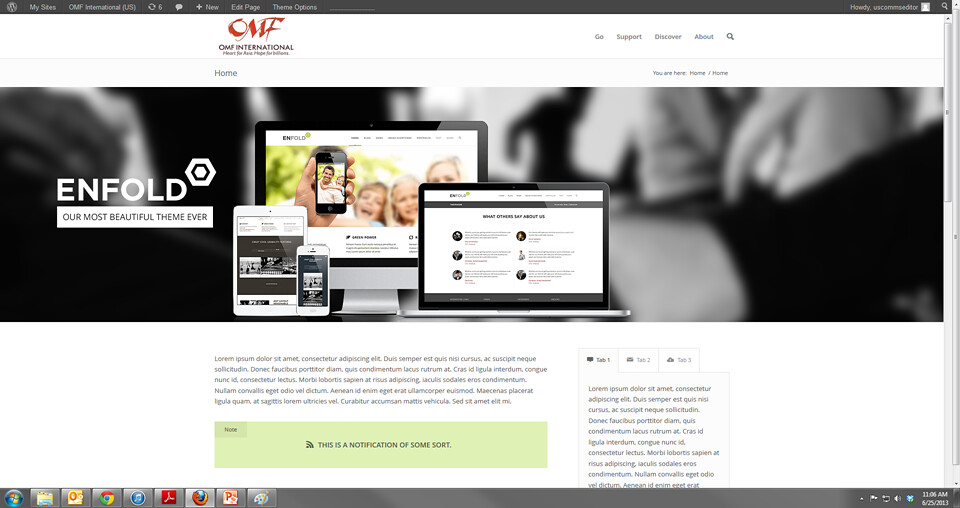
    (a) For some reason, I cannot seam to get rid of the two vertical scroll bars when viewing any page (http://farm4.staticflickr.com/3795/9137162284_4511f8a668_b.jpg). How do I get rid of the inner scroll bar?

    (b) Also, could you aid in how to create a home/landing page like the one featured in the Enfold demo page (http://kriesi.at/themes/enfold/)? We would like to have a landing page that does not have the Title Bar at top as well as the three section columns below the slider.

    Please advise as soon as possible.

    Sincere Thanks!

    #126434

    Hi,

    2). Your developer is correct. https://kriesi.at/support/topic/i-have-some-issues-with-translation-issues-and-with-the-contact-form#post-114535 This post has instructions on what to do.

    3) Its possible but its also experimental. You can turn on the advanced layout builder for posts. That will allow you to add a featured image which will be seen on the main blog page (or wherever you add the blog element to a page) , but on the individual blog posts the feature image will not show, and you will be able to either add it as an image element, or add a slider or have no image, since you will be able to use all the elements available , same as on pages.

    To add the layout elements to posts open config-templatebuilder/avia-template-builder/config/meta.php and change line 5 to look like

    array( 'title' =>__('Avia Layout Builder','avia_framework' ), 'id'=>'avia_builder', 'page'=>array('portfolio','page,'post''), 'context'=>'normal', 'priority'=>'high', 'expandable'=>true ),

    You will also need to replace template-builder.php in the main folder with https://gist.github.com/meishern/bfbf909055e7b967dd5b this file. Without it, posts with layout elements will not have meta data or comments. This form will also add comments functionality to portfolio items.

    Thanks,

    Nick

    #125916

    Hey!

    I am sorry, the ajax portfolio does not yet support videos. It works in a much different way than the other themes we used til now, so it will take some time to add this functionality ;)

    Feel free to add any suggestions and wishes to our feature request thread: https://kriesi.at/support/topic/enfold-feature-requests

    #126145

    Hi,

    Put

    <a name="gazebo"></a>

    a bit above , in front of

    <a href="#pavilion">Kidston Pavilion</a>

    This way the top part will be accounted for. And in mobile browsers the small difference will still make it visible. And do similar for the other anchors, just place them a bit earlier , Since i dont think there is another way to ofset the destination of an anchor.

    Thanks,

    nick

    #126527

    In reply to: TWO EMAIL ADDRESSES

    Separate the email adresses at the top of the contact form with a comma, like this:

    (Email address hidden if logged out) , (Email address hidden if logged out)

    Hi dekkert,

    No not at the moment but I’ll add the idea to the feature request topic.

    Regards,

    Devin

    #126433

    Hi AndyGadge,

    For #1, that page was created using the Advanced Layout Editor and the blog elements inside layout elements. So there is no need to modify any code to get that layout (or *any* layout done in the demo as its all created using the theme options).

    2) Yes, there are some issues with cyrillic support but I don’t have experience with them off hand. I’ve tagged the topic for another of the support crew who does and should be able to offer some additional help.

    3) No, not at the moment as far as I know.

    Regards,

    Devin

    #126163

    Hi unitedwc,

    I’ll tag the topic for Kriesi to take a look at as its ultimately up to him to add in support for other third party plugins.

    Regards,

    Devin

    #125820

    In reply to: Enfold custom.css

    You can send the information to my email at DevinVinson (at) gmail.com. Make sure to include a link to this topic so that my spam filter doesn’t grab it :)

    #126377

    Hi Andy,

    I’m not sure why the topic was closed early but for step 2, you just put that immediately after the get_author line in step one.

    The issue however is that we really can’t give step by step walk through directions for stuff like that and offer support on those new customizations. We’ll sometimes go as far as Ismael did and give a rough basic walk-through but it depends on current queue length and if we happen to have a good idea on how to accomplish it off hand.

    Otherwise we would be supporting an infinite amount of customizations beyond the basic theme.

    So if the directions above don’t really make sense for you I would recommend looking into a freelance developer or digging in deeper to basic php structure and its output. I’m not even really sure if the above will get you 100% of the way there but it is a good start in just replacing the gravatar variable with the data variable.

    Regards,

    Devin

    #126202

    Hi, thanks for answer. Look at it http://www.pakietyedukacyjne.pl/, the button stop is changed to png #top .ls-nav-stop::before{

    content: url(http://pakietyedukacyjne/wp-content/themes/enfold/images/layout/dalej.png);} Opera see something but “blink” (something like bad hover or transition effect, when I put content url to hover – it duplicate image) IE and Firefox show empty area, Chrome – broken image icon. When You look at Enfold theme in IE You should see black squares instead of stop-start icons, side navi is not visible at all. Maybe is another way to set this navigation under IE, for example: the visibility of side buttons will be good solution for me. Regards. Krzysztof G.

    Hi,

    http://wordpress.org/plugins/bwp-minify/ is usually what adds the question marks to static resources. There is an option in the panel for that plugin to stop doing that. If you are using jetpack, it is notorious for adding and removing lots of things. It is not done by the theme or wordpress, so one of your plugins is doing it.

    There is also an option in the above plugin as to whether you want to enqueue the javascript at the start or at the end. The only things that really should be in the front is the main jquery.js and avia.js . The rest of javascript all can go in the back.

    Thanks,

    Nick

    #126026

    Hi Peter,

    first, thanks for all the great help from all of you. :)

    Second, the border top css did work, but somehow it appears a little shadow with 3px width at this place when I add the border. How can I fix this?

    Thanks & best regard,

    Martin

    #123705

    In reply to: Header Font Wieght

    Try to add a !important tag like:

    h1, h2, h3, h4, h5, h6, tr.pricing-row td, #top .portfolio-title, .callout .content-area, .avia-big-box .avia-innerbox {
    font-weight: bold !important;
    }

    Btw – the font weight “heavy” doesn’t exist – see: http://www.w3schools.com/cssref/pr_font_weight.asp

    Hey!

    Unfortunately this is currently not possible because of a bug in the wordpress core: https://kriesi.at/support/topic/is-it-possible-to-create-two-completely-seperate-portfolios – probably WP3.7 will fix it.

    Regards,

    Peter

    the solution for me now is:

    I removed everything after

    echo "<div class='entry-content clearfix main_color {$post_format}-content'>";

    until

    echo '</span>';
    echo '</span>';

    So now there is no meta on top of the post – this looks OK – I would like to include the meta, but only inside the “container_wrap” DIV.

    Thanks for your help and hopefully your patch will make it into the next release.

    Cheers,

    Detlef

    #125757

    Hi Devin,

    Thanks for the help. I have updated the theme, and now the HTML issue is fixed. I have done some experimenting on a test page: http://www.pctuneupcenter.com/test_page/ to try and work out how to implement an alternative to Tablepress. Things aren’t as easy as I had hoped…

    The table on the bottom of the test page renders fine on my laptop, but isn’t displayed properly on my smart-phone. [It’s broken into one continuous column]. How can I make the table display properly on a small screen like on my smart-phone? Is this possible?

    Cheers.

    James

    #126025

    Hi!

    1) Yes

    2) Try following css code

    .title_container {
    border-top: 3px solid #fff;
    }

    Best regards,

    Peter

    #126428

    In reply to: Translation of Enfold

    Hi,

    You need to use WPML plugin.

    Refer to this link: http://wpml.org/documentation/

    And a heads up tip: https://kriesi.at/support/topic/callout-translation-wpml#post-77814

    Regards,

    Ismael

    #126492

    Hi,

    You’re slider is not loading even on desktop. Please recreate the slider from scratch. Download Enfold 1.7 on your themeforest account. Override the theme files via FTP.

    Regards,

    Ismael

    #126292

    In reply to: button in menu

    Hi,

    What type of header do you have?

    I tested this on using header with bottom navigation. Edit header.php, find this code

    <?php do_action('ava_main_header'); ?>

    <div class='container'>

    Add the avia_button code below, something like this

    <a href="http://www.google.com" class="menu-button-header avia-button avia-icon_select-yes avia-color-theme-color avia-size-small" target="_blank"><span class="avia_button_icon avia-font-entypo-fontello"></span><span class="avia_iconbox_title">Click me</span></a>

    Add this on your custom.css or Quick CSS

    .menu-button-header {
    position: absolute;
    left: 300px;
    top: 62px;
    }

    Adjust the left and top position, depends on the number of menu.

    Regards,

    Ismael

    #25322
    peymangg
    Participant

    I am using the latest version of WordPress and the latest version of Enfold theme. I have deleted and reinstalled from scratch several times and continue to get the same error.

    Warning: session_start() [function.session-start]: open(/var/chroot/home/content/61/8377861/tmp/sess_pr028k1fv4ug118u4hullql9p5, O_RDWR) failed: No such file or directory (2) in /home/content/61/8377861/html/wp-content/themes/enfold/config-templatebuilder/avia-shortcodes/portfolio.php on line 27

    Warning: session_start() [function.session-start]: Cannot send session cookie – headers already sent by (output started at /home/content/61/8377861/html/wp-content/themes/enfold/config-templatebuilder/avia-shortcodes/portfolio.php:27) in /home/content/61/8377861/html/wp-content/themes/enfold/config-templatebuilder/avia-shortcodes/portfolio.php on line 27

    Warning: session_start() [function.session-start]: Cannot send session cache limiter – headers already sent (output started at /home/content/61/8377861/html/wp-content/themes/enfold/config-templatebuilder/avia-shortcodes/portfolio.php:27) in /home/content/61/8377861/html/wp-content/themes/enfold/config-templatebuilder/avia-shortcodes/portfolio.php on line 27

    There were closed topics with similar issues and it was advised to contact my hoster to check the server configuration (session data folder is writable & exists, etc.). I contacted my domain host which is godaddy and they ran some tests and said its something on my end with compatibility issues…

    What should I do??

Viewing 30 results - 141,751 through 141,780 (of 142,928 total)