Hello,
I am trying to make some changes to the style/format of my website:
http://practiceexcel.com/personaltouchdental.com/
1) On top of the logo there is a purple bar that goes all the way across, I think this is where header text would go, I need to remove this so the logo is at the very top
2)I need to replace the area that has the social icons (currently an envelop) with my own image, where would i do this?
3)I need to change the bg color of the menu to be transparent
4) How would I remove the search bar
5) I need to center my footer menu
Let me know if you need anything, thanks!
hi Ismael, what CSS would you use to change the main menu (top navigation) color and hover color? and for mega menu drop downs, the bullet color as well? thanks!
Hey!
1) Please add following codes to Quick CSS as well
#av_section_1 { min-height: 50px; height: 80px; }
div.iconbox_content { padding-top: 26px; }
2) Phone here http://i.imgur.com/WmHZkSS.jpg
and Cart here http://i.imgur.com/3qeUStU.jpg
No need to touch the files :)
Regards,
Yigit
https://kriesi.at/support/topic/icon-list-malfunction/
This guy was having the same issue but that is all I have found so far and no solution to my knowledge.
Hello DavyE!
Someone reported a logo problem with 2.2 ( https://kriesi.at/support/topic/enfold-2-2-breaks-site-logo-image/ ) and I fixed the issue with an updated avia.js file (you can download it here: https://gist.github.com/InoPlugs/ff21a064c574fc154794 ). Replace the entire code in enfold/js/avia.js with the code from the github gist and check if this solves your problem.
Cheers!
Peter
Hi!
Please add following code to Quick CSS in Enfold theme options under Styling
.main_menu ul:first-child > li a { line-height: 60px!important; }
Then flush browser cache and refresh your page a few times.
Best regards,
Yigit
Hey!
1) Please add following code to Quick CSS in Enfold theme options
div.iconbox_content { padding-top: 20px; }
2) Add 42nd line here to Phone Number section
And edit Cart page and change page title with 44th line http://i.imgur.com/DhfCZXG.jpg
3)
.entry-content ul { list-style: none; }
.widget_nav_menu ul:first-child>.current-menu-item>a, .widget_nav_menu ul:first-child>.current_page_item>a { color: #719430!important; }
.widget_nav_menu a { color: gray!important; }
4)
div#text-4.widget { margin-top: -25px; }
Best regards,
Yigit
I should mention that I tried Phil C’s solution to disable the lightbox:
http://wordpress.org/support/topic/replacing-woocommerce-lightbox
It works when using the Twenty Thirteen theme, but not with Enfold.
Best regards, Staff
Help please!
I have another problem guys – my site ( http://www.mltcreative.com ) is near complete and out of the blue yesterday I am no longer able to edit my existing site pages! When I click “Edit Page” it opens the “Edit” page – yet the editor/layout builder NEVER stops spinning and the editable space to make changes to the page never loads – it simply spins until it times out.
I need to make some edits to my pages ASAP but have my hands tied now. Please advise me and my team if you have any idea what’s wrong and most importantly, how to fix it.
Thanks guys!
Hey Gian!
Yes i do :) Please add following code to Quick CSS
#top .avia-post-nav { display: none!important; }
Regards,
Yigit
Hey!
In other topic you mentioned that you are experiencing some other issues and not this one any longer, so i’m closing this topic :)
Cheers!
Yigit
Hi!
Ja ich weiß, aber leider ist der Quellcode obfuscated und/oder komprimiert und da ich das Plugin schon einmal installiert hatte um mir das Problem des anderen Users anzusehen (siehe: https://kriesi.at/support/topic/pagination-doesnt-work-2/ ) kann ich es auch nicht mehr im Testzeitraum nützen. Natürlich gibt es Mittel und Wege all diese Hindernisse zu umgehen nur möchte ich es nicht, weil es mir unnötig Zeit stiehlt und zumindest nach Ansicht des Plugin Autors illegal ist ( AGB: 1.5: http://wpseo.de/terms/ – btw aber sehr zweifelhaft, da große Teile seines Codes derivativ der GPL Lizenz unterliegen). Daher ist das Plugin leider alles andere als “frei erhältlich” und ohne Mitwirkung des Plugin Autors macht es keinen Sinn, weil ich 1) seinen Code nicht kenne und 2) dadurch nicht weiß, wie sich sein Code auf unseren auswirkt.
Cheers!
Peter
Hey!
Kriesi added these two lines to avoid “content flashes” which can occur with older versions of Chrome – see: https://kriesi.at/support/topic/retina-images-and-fonts-in-portfolio-grid-theme-enfold/#post-164007
If you want to remove them open up /wp-content/themes/enfold/css/layout.css and search for
-webkit-perspective: 1000;
-webkit-backface-visibility: hidden;
– then delete both lines.
Best regards,
Peter
Hello,
Please also look at the topic ‘URL LayerSlider only works on first slider’
It’s closed but the problem still exsists. I’ve got the latest wordpress version and the latest theme version.
Can you please take a look at the problem?
Gr. Jeen
Hi,
I tried to disable the Next/Prev portfolio navigation, as Dude suggested here: https://kriesi.at/support/topic/disable-nextprevious-portfolio-navigation/#post-130274 but it doesn’t work.
Any other suggestion?
Hi Wizards of Enfold,
Not sure if this is a WordPress or Enfold question. I need to edit the navigation bar. Where do I find the top-level items, and where do I find the drop-down items? Thanks.
The problem is I can’t follow your instructions as you suggested here (https://kriesi.at/support/topic/how-to-translate-enfold-site-with-wpml-correctly/#post-162796) cos when I try to rescan I got an Access Error message (nothing else).
I dont’ care about those errors, just mentioned them to resolve the main issue which is I cannot use the plugin.
Hi Peter,
leider hat es nicht so geklappt wie erhofft. Die einzige Änderung die ich damit vornehme ist die Farbe der Unterstrichenen Linie zu ändern, welche bei einer Mausberührung/hover sichtbar wird. Aber nicht die Frabe der Schrift selbst. Diese bleibt in ihrer eigenen Farbe.
Um es für dich besser sichbar zu machen habe ich den Farbwert #c3512f (orange) momentan ausgewählt.
Ich hab nun also folgendes im Quick CSS stehen:
#top .avia_textblock a:hover{
color: #c3512f !important;
}
Hello crevlon!
Du solltest die Hover Farbe mit folgenden CSS Code hinzufügen können
#top .avia_textblock a:hover{
color: #aaa;
}
Falls der Code nicht funktioniert, versuche den !important tag anzuhängen
#top .avia_textblock a:hover{
color: #aaa !important;
}
Regards,
Peter
Hello!
Actually I used a similar solution to calculate the menu width and the logo width and to adjust the menu width dynamically based on the logo & menu container width. The difference though is that my function does not switch to the mobile menu but it tries to reduce the paddings and the logo image width based on the screen resolution. Tbh I think the mobile menu should only be displayed on very small screens.
The code was added with theme update 2.2 and I improved the code now ( see: https://kriesi.at/support/topic/enfold-2-2-breaks-site-logo-image/#post-165531 ) – the new code will be part of the 2.3 update. The updated version supports all types of logos (different aspect ratios, etc.) and it will calculate the padding for each menu item individually whereas my first version of the script just applied the paddings of the first item to all menu items.
Best regards,
Peter
Hi,
I would like to add the Layout Builder to a custom post type, using a child theme. I have checked out this video and the changes only work when applied to the main enfold theme, not the child theme.
I guess Dude’s response to another thread explains in a different context, however I have not spent too long looking at structures of the theme and therefore not sure on the code I should use.
Thx
Hi!
1.) This is a css to make a large part of the icon box clickable.
.iconbox_content_title a {
display: block;
position: relative;
width: 200px;
height: 200px;
z-index: 9999;
}

.iconbox_content p {
position: absolute;
top: 20px;
}
2.) You need to use “Fixed Header with Social Icons and additional Navigation” as the Header Type then we can modify the css positioning of the contact number and the social icons.
Best regards,
Ismael
Hey zerozendesign!
1.) You can add this on your custom.css or Quick CSS to define the active menu color:
#top .header_color .current-menu-item a {
color: red !important;
}
2.) What is the code you added to adjust the header height?
Cheers!
Ismael
Hi!
You can adjust the position of the language selector using this:
#lang_sel_list {
position: relative;
left: 40%;
top: 60px;
}
Best regards,
Ismael
Hi web4smallbusiness!
You can add this on your custom.css or Quick CSS:
body .column-top-margin {
margin-top: 20px;
}

.avia-slideshow {
position: relative;
margin: 20px 0;
}
Regards,
Ismael
Hi Ismael – I essentially wanted to move the right sidebar to the left and have it look exactly the same – left align with indents the same. I did some digging:
– Changed everything to the left sidebar
– Added this to the quick css:
#top .sidebar_left .widget_nav_menu ul ul li:before {
left: 0;
}
.sidebar_left.sidebar {
text-align: left;
}
This got everything to the left (including the bullets), but any levels beyond the second aren’t indenting correct. If you look at this image the words Venacure 1470 Laser should be indented one level more because the parent page is the Venacure EVLT System above it:
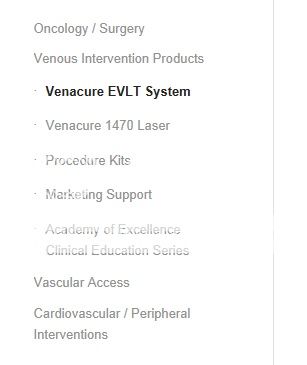
Thoughts?
Thank you!
Hi Reidable!
You can add this on your custom.css or Quick CSS:
#top div div.product .woocommerce-tabs ul.tabs li a {
min-width: 100px;
}
Cheers!
Ismael
Hi!
The sidebar nav text is aligned to the right. It is only logical for the indent to be on the right side. You modify the navigation using this:
#top .widget_nav_menu ul ul li:before {
content: "";
}

#top .sidebar_left .widget_nav_menu ul ul li {
list-style: disc inside;
margin-right: -10px;
}
Cheers!
Ismael



