
-
AuthorSearch Results
-
December 10, 2013 at 5:42 am #198414
In reply to: Enfold > non-fixed small header > transparency
Hi David!
Your header background is already transparent. Please add this on your custom.css or Quick CSS to move the content upwards:
#main {
margin-top: -80px;
}
Cheers!
IsmaelDecember 10, 2013 at 5:35 am #198411In reply to: Transparent Main Menu with Full Screen Slider
Hi Ismael – when I add that it fixes the bottom of the site, but the image no longer displays under the menu.
I tried it with both removing the current ‘#main {padding-top: 0 !important;}’ and leaving it in with no luck.December 10, 2013 at 5:29 am #198408In reply to: Transparent Main Menu with Full Screen Slider
Hi!
Please add this on your custom.css or Quick CSS:
#main {
margin-top: -1px;
}
Adjust the negative top margin if necessary.
Best regards,
IsmaelDecember 10, 2013 at 12:54 am #198316In reply to: Changing Image a:hover Effect for Specific Pages
So I believe this is a step in the right direction, as when I hover in certain areas around/over the image, it will start to rotate but then just stops. It still utilizes the default a:hover css.
I guess the better question is: what css file would I look in to disable/comment out the default image a:hover css for the entire theme?
Ive tried to inspect element in my browser, but cannot seem to find the specific class or it’s location.
December 10, 2013 at 12:40 am #198308In reply to: Enfold Feature Requests
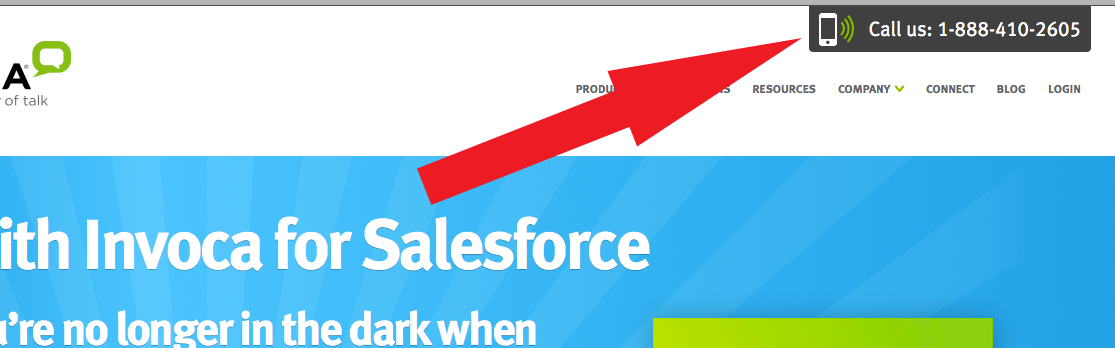
HAVE A CALL TO ACTION AT THE TOP RIGHT OF THE MENU
I suggest that all my clients have a call to action on the top right of their website, yet because I have this them I dont even have one. I think it would be really cool if you could incorporate it alot of people would appreciate this feature.
I was looking at one website and theirs were at the top of their sticky.
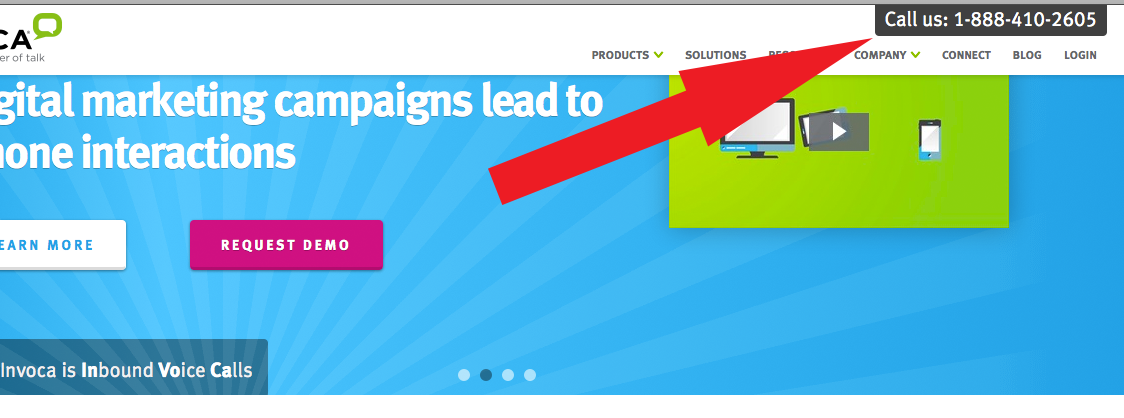
And when you scroll up and the sticky menu shrinks the call to action shrinks as well:
 December 10, 2013 at 12:10 am #198284
In reply to: Footer Widgets(Incarnation Theme)
Hi!
Please add following code to Quick CSS as well
.widget_nav_menu a, .widget_nav_menu ul:first-child>.current-menu-item, .widget_nav_menu ul:first-child>.current_page_item { border-top-style: none; border-bottom-style: none; }Regards,
YigitEDIT: Please add following code to change background on hover
#top .widget ul li a:hover { background-color: inherit; }-
This reply was modified 12 years, 3 months ago by
Yigit.
December 9, 2013 at 11:52 pm #198267In reply to: Few Css modifications. Please help
Hello again :)
2. Worked but I think you missed the code for the top part with the menu and the logo. The background remains white 100% tried some myself but no luck. Please please check :)
3. Worked!
4. Worked!
5. Worked!Thank you for your time!
AndreasDecember 9, 2013 at 11:38 pm #198256Topic: Transparent Main Menu with Full Screen Slider
in forum Enfoldsundialstudios
ParticipantHi – I found a previous post to make my main menu transparent using the following:
.header_bg {
    background: rgba(255, 255, 255, 0.6) !important;
}
#main {
    padding-top: 0 !important;
}
My issue is now the slider isn’t totally full-screen. It looks like changing the top padding to 0 has slid the content that is under the full-screen slider up and now it is always visible. Is there a way to fix?
The site under development is at http://sundialdev.com/ocgirlslax/
December 9, 2013 at 11:23 pm #198250In reply to: Ajax Portfolio – full width individual image
Hi!
1)You are going to need to hire a freelance developer for that kind of customization as it is beyond the scope of support we can provide. You can also request quote here.
2) Please add following code to Quick CSS as well#top .portfolio-preview-image .avia-gallery .avia-gallery-big { pointer-events: none; cursor: default; }Regards,
YigitDecember 9, 2013 at 11:06 pm #198241In reply to: Footer Widgets(Incarnation Theme)
Hi!
Please add following code to Quick CSS in Incarnation theme options under Styling tab
#top .widget_nav_menu { padding-top: 30px; }
.flex_column h3,  #top .widgettitle { color: white!important; }
Cheers!
YigitDecember 9, 2013 at 9:01 pm #198193In reply to: Ajax Portfolio – full width individual image
Hi!
Please add following code to Quick CSS in Enfold theme options under Styling tab
.portfolio-preview-content { display: none; }
.portfolio-preview-image { width: 100%; }
#top .portfolio-preview-image .avia-gallery .avia-gallery-big { height: auto!important; }
Best regards,
YigitDecember 9, 2013 at 7:32 pm #198164In reply to: Customization Questions
Hey!
Please add following code to Quick CSS in Enfold theme options under Styling tab
@media only screen and (max-width: 1010px) { #top #main .sidebar { display: none; }}
@media only screen and (max-width: 989px) and (min-width: 768px) {
.responsive .container .nine.units {
width: 670px; border: none!important; }}
Cheers!
YigitDecember 9, 2013 at 7:29 pm #198163In reply to: include php detection script not in header
thanks josue, although this code will redirect me from teh mobile to the desktop then back to the mobile instantly. I think i may have to tool this a bit or write something more extensive to fit different scenarios. thanks for your help so far
December 9, 2013 at 7:08 pm #198153In reply to: Few Css modifications. Please help
Hi!
Please add following code to Quick CSS as well
2).socket_color { background: rgba(255, 250, 250, 0.5) url(https://caleche.gr/wp-content/themes/enfold/images/background-images/dashed-cross-dark.png) center center repeat scroll;} #footer { background-color: rgba(255, 250, 250, 0.5); }3)
#header_main { height: 89px; }
.content { padding-top: 20px; }
and please remove Horizontal ruler element from your page to decrease the space between text and lamp http://i.imgur.com/Utplp4Y.jpg
4).header_color .main_menu ul:first-child > li > a { font-weight: normal; } .header_color .main_menu ul:first-child > li.current-menu-item > a, .header_color .main_menu ul:first-child > li.current_page_item > a { font-weight: bold!important; }5)
.socket_color a { color: red; font-weight: normal; }Cheers!
YigitDecember 9, 2013 at 6:34 pm #198140This reply has been marked as private.December 9, 2013 at 6:11 pm #198128In reply to: Tweak the blog posts – excerpts, formatting, etc.
Hey!
1)Please add following code to Quick CSS in Enfold theme options under Styling tab
.single-post .image-overlay { display: none!important; }
.single-post .fullsize .big-preview.single-big { pointer-events: none; cursor: default; }
2)
.page-id-2457 .big-preview img { width: 700px; }3) Please refer to this post https://kriesi.at/support/topic/remove-comments/#post-188106
Best regards,
YigitDecember 9, 2013 at 5:34 pm #198091In reply to: Move menu in header down lower
Hi!
Please add following code to Quick CSS as well
.main_menu { margin-top: -30px; }
.header-scrolled .main_menu { margin-top: 0; }
Best regards,
YigitDecember 9, 2013 at 4:24 pm #198061In reply to: Partner/Logo Element – Heading Alignment
Hi 500Webmaster!
Please add following code to Quick CSS in Enfold theme options under Styling tab
#top .avia-smallarrow-slider-heading> div { text-align: center; }Best regards,
YigitDecember 9, 2013 at 4:03 pm #198044Yigit, your image looks right, but after applying your code with the previous, all it seems to do is shrink the logo. Here’s my current code:
/* Post top spacing fix */
@media only screen and (max-width: 480px) {
	.logo, .logo a, .logo img {
		max-width: 75px !important;
	}
}

@media only screen and (max-width: 767px) {
	#header_main {
		max-height: 100px;
	}

	.mobile_active #advanced_menu_toggle {
		top: 50px;
	}

	.responsive .mobile_slide_out .logo {
		position: relative;
		top: 5px;
	}

	.responsive.social_header .phone-info {
		margin-top: 10px;
	}
}
December 9, 2013 at 3:57 pm #198036In reply to: Masonry Portfolio
Hi!
Just an FYI to how our forums/queue system works: topics are shown to support by the oldest posted response. So each time you self bump it actually pushes your topic to the end of the queue and does not bring it to our attention any quicker.
As for the issue when I re-set the permalinks and refreshed them a couple of times it seems to be working without issue now. My guess is WordPress just had its htaccess corrupted which happens from time to time.
You can read more about it on the codex here: http://codex.wordpress.org/Using_Permalinks#Fixing_Permalink_Problems
Cheers!
DevinDecember 9, 2013 at 3:19 pm #198029Hello Ismael
Thanks for your latest response and for the extra CSS.
I am happy with the overall width of things I just want to reduce the spacing properly as outlined above.
I tried adding the latest CSS elements outlined above to reduce the spacing and it doesn’t work properly when I add it, so I’ve removed the latest CSS as outlined in your latest response.
The bottom section of this post is the current CSS I have in my Child Theme.
When I added the code below for example, the responsive menu also sat on the far right with no space which doesn’t look good.
Adjust the menu right margin using this:
#header_main_alternate .container {
margin: 0;
}Can I maybe send you the WP login info and get you to have a look. If so, please let me know where to send this privately, thanks.
CSS CODE BELOW DOTS:
……………………………………….
/*
Theme Name: Enfold Child
Description: A Child Theme for the Enfold WordPress Theme. If you plan to do a lot of file modifications we recommend to use this Theme instead of the original Theme. Updating will be much easier then.
Version: 1.0
Author: Kriesi
Author URI: http://kriesi.at
Template: enfold
*//*Add your own styles here:*/
.social_header .phone-info span {
font-weight: normal;
margin-top: 0px;
margin-right: 0;
margin-bottom: 0;
margin-left: 0px;
padding-top: 0px;
padding-right: 0;
padding-bottom: 0;
padding-left: 0px;
font-size: 11px;
}.responsive #header_meta .social_bookmarks {
padding-bottom: 0px;
width: 100%;
}.main_color .heading-color, .main_color h1, .main_color h2, .main_color h3, .main_color h4, .main_color h5, .main_color h6, .main_color .sidebar .current_page_item > a, .main_color .sidebar .current-menu-item > a, .main_color .pagination .current, .main_color .pagination a:hover, .main_color strong.avia-testimonial-name, .main_color .heading, .main_color .toggle_content strong, .main_color .toggle_content strong a, .main_color .tab_content strong, .main_color .tab_content strong a, .main_color .asc_count, .main_color .avia-testimonial-content strong, .main_color div .news-headline {
color: #90d200;
font-weight: normal;
}p + h3, p + h4, p + h5, p + h6 {
margin-top: 0px;
}.title_container { display: none; }
#top .main_menu .menu > li:last-child > a {
padding-right: 13px;
}.logo img {
display: block;
height: auto;
max-height: 100%;
padding: 0;
width: auto;
}/* #Desktop – Large
================================================== */@media only screen and (min-width: 1140px) {
.responsive .boxed#top {
width: 960px;
}
.responsive .container {
width: 860px;
}
.responsive .container .one.unit,
.responsive .container .one.units {
width: 20px;
}
.responsive .container .two.units {
width: 30px;
}
.responsive .container .three.units {
width: 120px;
}
.responsive .container .four.units {
width: 210px;
}
.responsive .container .five.units {
width: 300px;
}
.responsive .container .six.units {
width: 390px;
}
.responsive .container .seven.units {
width: 480px;
}
.responsive .container .eight.units {
width: 570px;
}
.responsive .container .nine.units {
width: 660px;
}
.responsive .container .ten.units {
width: 750px;
}
.responsive .container .eleven.units {
width: 840px;
}
.responsive .container .twelve.units {
width: 930px;
}
.responsive #top.boxed .stretch_full {
width: 960px;
}
.responsive #top .offset-by-one {
padding-left: 90px;
}
.responsive #top .offset-by-two {
padding-left: 180px;
}
.responsive #top .offset-by-three {
padding-left: 270px;
}
.responsive #top .offset-by-four {
padding-left: 360px;
}
.responsive #top .offset-by-five {
padding-left: 450px;
}
.responsive #top .offset-by-six {
padding-left: 540px;
}
.responsive #top .offset-by-seven {
padding-left: 630px;
}
.responsive #top .offset-by-eight {
padding-left: 720px;
}
.responsive #top .offset-by-nine {
padding-left: 810px;
}
.responsive #top .offset-by-ten {
padding-left: 900px;
}
.responsive #top .offset-by-eleven {
padding-left: 990px;
}
}@media only screen and (max-width: 767px) {
.responsive.social_header .phone-info {
position: relative;
top: 10px;
}
}.bottom_nav_header.social_header .main_menu ul:first-child > li a {
border-right-style: solid;
border-right-width: 1px;
font-size: 12px;
font-family: Arial, Helvetica, sans-serif;
color: #666666;
text-transform: uppercase;
font-weight: bold;
}December 9, 2013 at 11:21 am #197999In reply to: Background with white page floating above?
I may have found a solution to this. If I use “margintop: -300px:, the extra space on the page goes away. Can you confirm if this is still a correct way to style it??
Thanks,
GDecember 9, 2013 at 10:58 am #197994In reply to: Remove default Enfold logo from header, permanently
Hi Peter.
That’s awesome, except that not everyone needs a child theme. You guys do such a good job on making everything awesome, that in my case (and my friends case), there is no need for editing the parent.
That said, as I understand it, you need to make the child theme BEFORE you create your site – thus it will reset everything:
kriesi.at/support/topic/enfold-child-theme-2/It’s a pretty big deal for removing something that, in my opinion, shouldn’t be there in the first place – or as a minimum should be something to deactivite in the backend (Like: Show default ENFOLD Logo or Site name) :)
Jesper =)
December 9, 2013 at 10:55 am #197993Topic: Enfold header telephone number left alignment
in forum EnfoldGlyphism
ParticipantHi guys is there a trick to making the telephone number, located at the very top inside #header_meta, align to the left? I have tried a bunch of different approaches but none of them work. This is what I amy trying
#header_meta .phone-info {
float: left;
}
December 9, 2013 at 10:36 am #197989In reply to: Background with white page floating above?
Ismael, this may achieve exactly what I need. The only issue with it is that it is leaving big gaps further down the page. Does this mean that every content section on the page needs to have the same top setting of -300px? is that the correct way to do it, and wouldn’t this then leave a big 300px white space at the very bottom??
December 9, 2013 at 10:10 am #197976In reply to: remove credit to Kreisi in footer
Hi!
If you want to change the border color use this css code
#top .main_color a.av-masonry-entry{ border-color: #444444; }You can insert it into the quick css field.
Best regards,
PeterDecember 9, 2013 at 7:46 am #197947In reply to: Disable image hover effect and add border instead
the “you are here” heading is visible when i add the code at the top of my quick css.
December 9, 2013 at 7:45 am #197946In reply to: Disable image hover effect and add border instead
NM i added it to the top but there are some options that are showing up that i have hid before. Is there a correct order in which i should apply my quick css codes so they all work properly?
December 9, 2013 at 6:57 am #197938In reply to: Putting links in the header
Hey!
Please choose one of header type with additional menu and create a new menu in Appearance > Menus and add your pages that you would like to display on the top right side of your website and make sure to check Enfold secondary menu http://i.imgur.com/NoGshmw.jpg
Cheers!
Yigit -
This reply was modified 12 years, 3 months ago by
-
AuthorSearch Results
Viewing 30 results - 136,291 through 136,320 (of 142,846 total)
-
Search Results
-
Hi – I found a previous post to make my main menu transparent using the following:
.header_bg { background: rgba(255, 255, 255, 0.6) !important; } #main { padding-top: 0 !important; }My issue is now the slider isn’t totally full-screen. It looks like changing the top padding to 0 has slid the content that is under the full-screen slider up and now it is always visible. Is there a way to fix?
The site under development is at http://sundialdev.com/ocgirlslax/


