I’ve added all of the code you suggested but it doesn’t seem to make any difference:
This is now in the Quick CSS
@media only screen and (max-width: 479px) {.responsive #top .slideshow_caption h2 {
font-size: 14px;}
.caption_framed .slideshow_caption .avia-caption-content p, .caption_framed .slideshow_caption .avia-caption-title, .avia-caption .avia-caption-content p, .avia-caption .avia-caption-title { padding: 2px; }}
@media only screen and (max-width: 990px) and (min-width: 768px) {div .slideshow_caption h2 { font-size: 18px; }}
@media only screen and (max-width: 990px) and (min-width: 768px) {div .slideshow_caption h2 { font-size: 18px !important; }}
@media only screen and (max-width: 500px) { .caption_framed .slideshow_caption .avia-caption-content p, .caption_framed .slideshow_caption .avia-caption-title, .avia-caption .avia-caption-content p, .avia-caption .avia-caption-title { padding: 2px!important; }
I’ve checked against the screen shots I sent but nothing looks any different. The Nexus screen shot above doesn’t seem to work so I’ve added it here again:
https://www.dropbox.com/s/2yq8nhzccg4ussd/Screenshot_2014-03-28-13-08-35.png
Is there a conflict with what has been put into the custom.css?
Mobile Styles
================================================== */
/* Note: Add new css to the media query below that you want to only effect the Mobile and Tablet Portrait view */

@media only screen and (max-width: 767px) {
  /* Add your Mobile Styles here */
}

@media only screen and (max-width: 767px) {
.avia-slideshow .avia-caption .avia-caption-title { font-size: 18px; padding: 2px; }
}

@media only screen and (max-width: 480px) {
.avia-caption{ padding: 0; bottom: 3px; }
.avia-caption .avia-caption-content p {padding: 2px;}
}
Cheers
Hi!
I have tested your website on my iphone 4 and it does work fine on my end – http://i.imgur.com/GWVc3Mc.png
Regards,
Yigit
Hi!
Can you post the link to your website and point out the section so we can take a look?
Please also try adding following code to Quick CSS
.container_wrap { border-top-style: none; }
Cheers!
Yigit
-
This reply was modified 12 years ago by
 Yigit.
Hey!
@garbath Can you post the link to your website so we can take a look and provide you more accurate custom CSS code?
Best regards,
Yigit
Hey!
Please try adding !important rule as following
@media only screen and (max-width: 989) and (min-width: 767px) {
#top .avia-logo-element-container .slide-entry {
float: left !important;
clear: right !important;
width: 50% !important;
}}
Cheers!
Yigit
Hi!
You can add following code to Quick CSS as well
#header_meta { margin-top: -30px; }
.html_header_top.html_header_sticky #top #wrap_all #main { padding-top: 132px; }
Cheers!
Yigit
Good morning, I’ve got some questions about my webpage: can you help me to solve this problems.
Regards!
Site: http://thomasgraziani.com
1) In the sidebar, the iconbox of “donate” section is “cutted”. As you can see, there is no right border. Can I fix this? I added che box code in a “text” widget. The code is:
[av_icon_box icon='ue911' font='entypo-fontello' style='margin: 20px' title='' position='top' link='' linktarget='']
[/av_icon_box]
2) I tried to add a simple ADsense code in the sidebar. I’ve added the code in a text widget. But above the ad box appeared two dots (?!?). Can I fix this?
3) I think a SEO best practice linking my site to my google+ author profile. In this tutorial (http://www.wpbeginner.com/wp-tutorials/how-to-get-googles-verified-authorship-for-your-wordpress-blog) I’ve read I have to add code to head section and in functions.php page. How can I do that without having problems with Enfold? I’ve installed also Yoast Seo plugin.
Thank you for your help.
Regards
Hi Peter!
Thank you for your help.
3. I know that I can use icons, but I need some pictures with hover effect (for example for flags – I don’t use WPML but have different sites on different domains and want to use top menu as a navigation between them) – Menu Image Plugin worked great for me… Is there a way to do this?
Cheers,
Globema
I have amended the Meta.php file as instructed here https://kriesi.at/support/topic/how-to-add-advanced-layout-manager-to-blog-posts/ but all I get is some shortcodes. Has anyone come across the same problem? Is there a solution? Many thanks, Tim.
http://www.bowlandwalks.co.uk
This reply has been marked as private.
What specifically with your custom queries isn’t working? Is there an example we can see?
This is the first topic I’ve seen about it and testing on my live dev install just now I had no issue.
The official Scope of support can be found here: https://kriesi.at/support/register/
Hi.
I tried integrating this code that I found in your forum into the Quick CSS, but it doesn’t work.
#top.page-id-xx {
background-image: url(http://www.xx.com);
}
Of course, I filled the xx with the proper values.
Is there any other code or way of doing it? Thanks.
The Layout Builder on our Enfold install just stopped working. When we open pages, we get a blank layout and no layout builder option; however, the previously built pages appear to display correctly. Nevertheless, neither previously-built pages nor new pages present with layout builder when attempting to edit the page. In fact, new and previously-built pages appear blank in the editor.
Thanks. This moved the social bookmark and phone info down, but how do I make the top nav area, which is blank, 0px tall?
Hi,
I want to make a double line in the same line of the title with vertical align middle, when the toggle is active,
and a single line when the toggle is closed
as
– Toogle 1 ==========================================
lorem ipsum sit dolor et, ……
+ Toogle 1 ———————————————————————————-
Is that possible? – with few steps, or have I do a complete change of code. I use a child theme.
I tried to insert the following code in the firebug:
<p data-fake-id=”#toggle-id-1″ class=”toggler activeTitle” itemprop=”headline”>Privatumzug<span class=”toggle_icon”> <span class=”vert_icon”></span><span class=”hor_icon”></span></span>
<div class=”title-sep-container”> <div class=”title-sep”> </div> </div>
</p>
I put the code <div class="title-sep-container"> <div class="title-sep"> </div> </div> inside the p-tag, but
when I closed the editing-modus of firebug, the container was put outside the p-tag.
The CSS:
In dependence of active/nonactive toggler the title-sep includes border-top and border-bottom or only border-top.
.toggler .title-sep-container {
display: table-cell;
vertical-align: middle;
width: 100%;
position: relative;
height: 1px;
}
.toggler.activeTitle .title-sep-container {
height: 6px;
}
.toggler .title-sep {
display:block;
border-top: 1px solid #e0dede;
border-bottom: none;
width: 100%;
position: relative;
height: 1px;
}
.toggler.activeTitle .title-sep{
border-bottom: 1px solid #e0dede;
height: 6px;
}
Thank you very much,
Daniela
Hey Enfold.
Is there an issue with your icons placed in a colour section not ‘linking’ to their destination with iPad or other tablets? A page we’ve set up works fine on smartphones, and desktops, but we’re having issues with tablets. The icons are not ‘splashing’ and appear static with no linking ability.
Thank you.
Well,
The custom css field looked promising but alas I cannot get this to work. I think I have tried everything. The dotted overlay class has to be position:absolute; ( and that blows up everything ) as well there is a z-index: issue that I can’t seem to resolve — can’t spend any more time on it. I guess there is always a revslider ( it has build in style for it ) But seems like a lot of unnecessary code for just banners.
Has anyone else tried this and wants to help, please do? It would be a nice upgrade feature to the theme; this a very common client request.
As well I have tried to implement this on the Layer Slider WP – but the z-index issue is still a problem – the background image always covers the dotted overlay!
I should also note that, most implementations of the dotted overlay, position a styled div absolute – I don’t see how we can achieve the same results here…
Revslider: does this to achieve the result
<div class="tp-dottedoverlay threexthree"></div>
.tp-dottedoverlay.threexthree {
background: url(../assets/gridtile_3x3.png);
}

.tp-dottedoverlay {
background-repeat: repeat;
width: 100%;
height: 100%;
position: absolute;
top: 0px;
left: 0px;
z-index: 1;
}
Thanks for your help, maybe there is work-around?
This reply has been marked as private.
Hi guys,
I’ve reverted to a previous (pre new header) version as my site is an active business site so I want to be able to correct the issues immediately on update. If you know of these issues or how to correct without seeing live on my site that would be amazing.
The horizontal rulers with whitespace, when updated to the new version, are much larger whitespace than previously. Do you know what would be causing this? I have them throughout the main page of my site and you can see their locations on the current live site.
Secondly, in the past, to stop the page from moving up and down as my testimonials increased/decreased in length, I added the following code to custom css which fixed this:
#info div.flex_column:nth-child(4){
	height:100px;
}
After the update the problem has returned even with this code remaining in custom.css.
Thanks for your help on both of the above! Really appreciate it.
Best,
Jonathan
Thanks Josue,
what I was hoping for was having the text inside a colored background. It could be white.
Can that be done?
Basically the content in the boxes would float over top the the stone background and not be see through.
I haven’t figured out how to do that yet.
You guys haven’t let me down yet. I hope you can help me through this one.
thanks – joe
Hi Ryan!
Refer to this topic on how to change when the page goes mobile mode:
https://kriesi.at/support/topic/mobile-menu-tablet-breakpoint/#post-136706
Best regards,
Josue
Thanks, Yigit. That’s a very useful tool. Thanks for that.
It was part of the Avia framework, that’s why I was unable to find it through the Code Editor.
I have another request, don’t know if you can help me with it. It’s quite important, so if you can, please take a look: https://kriesi.at/support/topic/image-edit-fix-messes-up-icons/
Thanks.
Thanks Devin!
I tried adding the following to my child theme’s css but see no changes. Although it’s a post, I tried it with ‘page’ as you described above as well.
#top.post-id-332 .alternate_color {
background-color: #9dd09f;
color: #5b3b01;
}
Unfortunately, I’ve seen no change. Did I miss something?
http://marcaarons.me/portfolio-item/seo-web-design-health-consulting/
Best,
Marc
Hi de-sign-us!
You can use the page id in your selector to target a specific page: http://en.support.wordpress.com/pages/#how-to-find-the-page-id
Ex:
#top.page-id-200 .alternate_color {
background-color: #9dd09f;
color: #5b3b01;
}
Best regards,
Devin
I added the following css and all is good:
#top.single-post .entry-content .slideshow_container {
display: none;
}
#top.category .entry-content .slideshow_container {
display: none;
}
.single .big-preview.multi-big, .single .small-preview {
display: none;
}
Yigit,
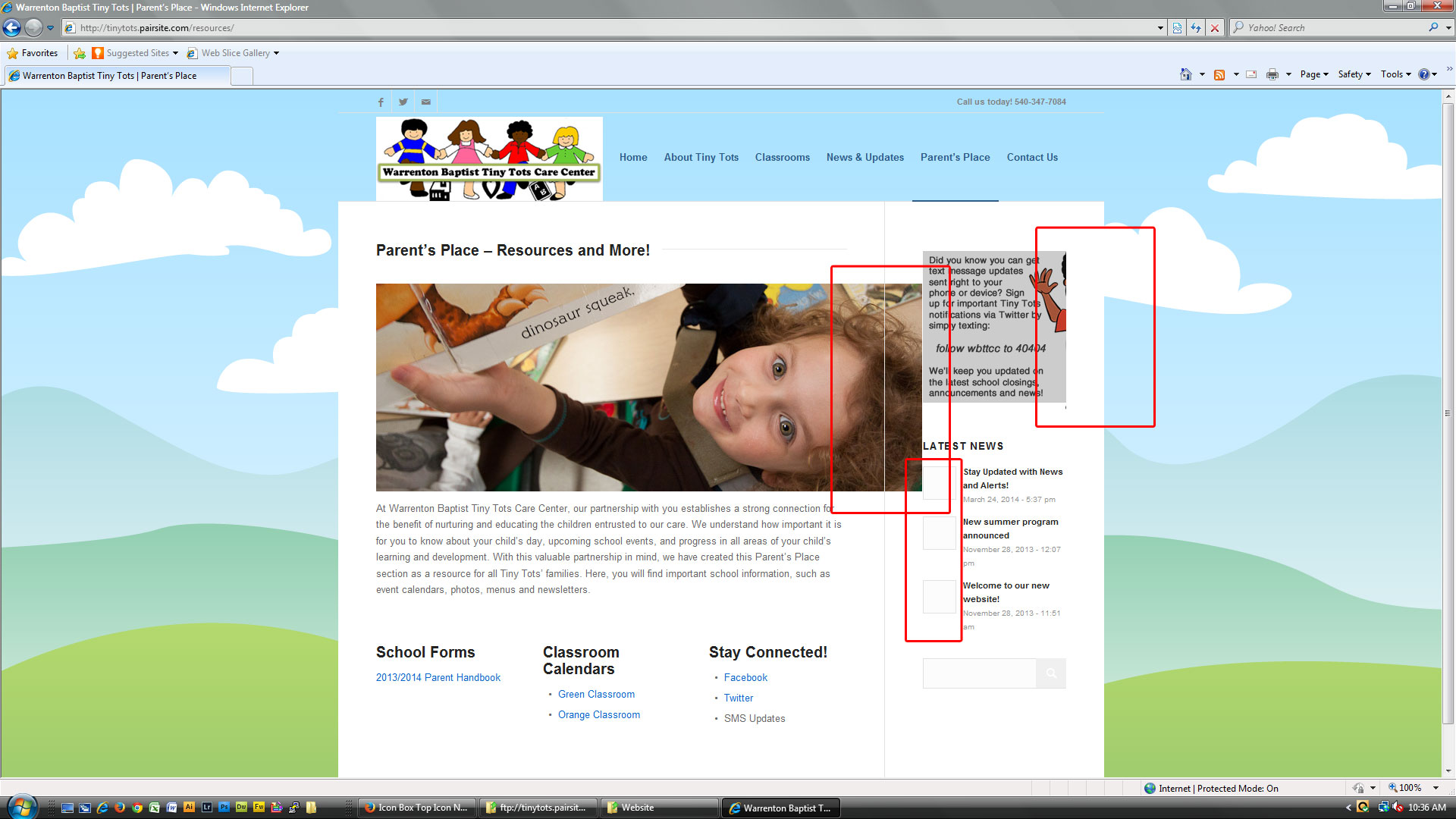
Thanks. The icon box is fixed. Please see the following issues with IE. This is IE version 9.0.8112.16421.
– header background
– dropdown menu background
– slide bullets and arrows
– social media icons (on fist load)
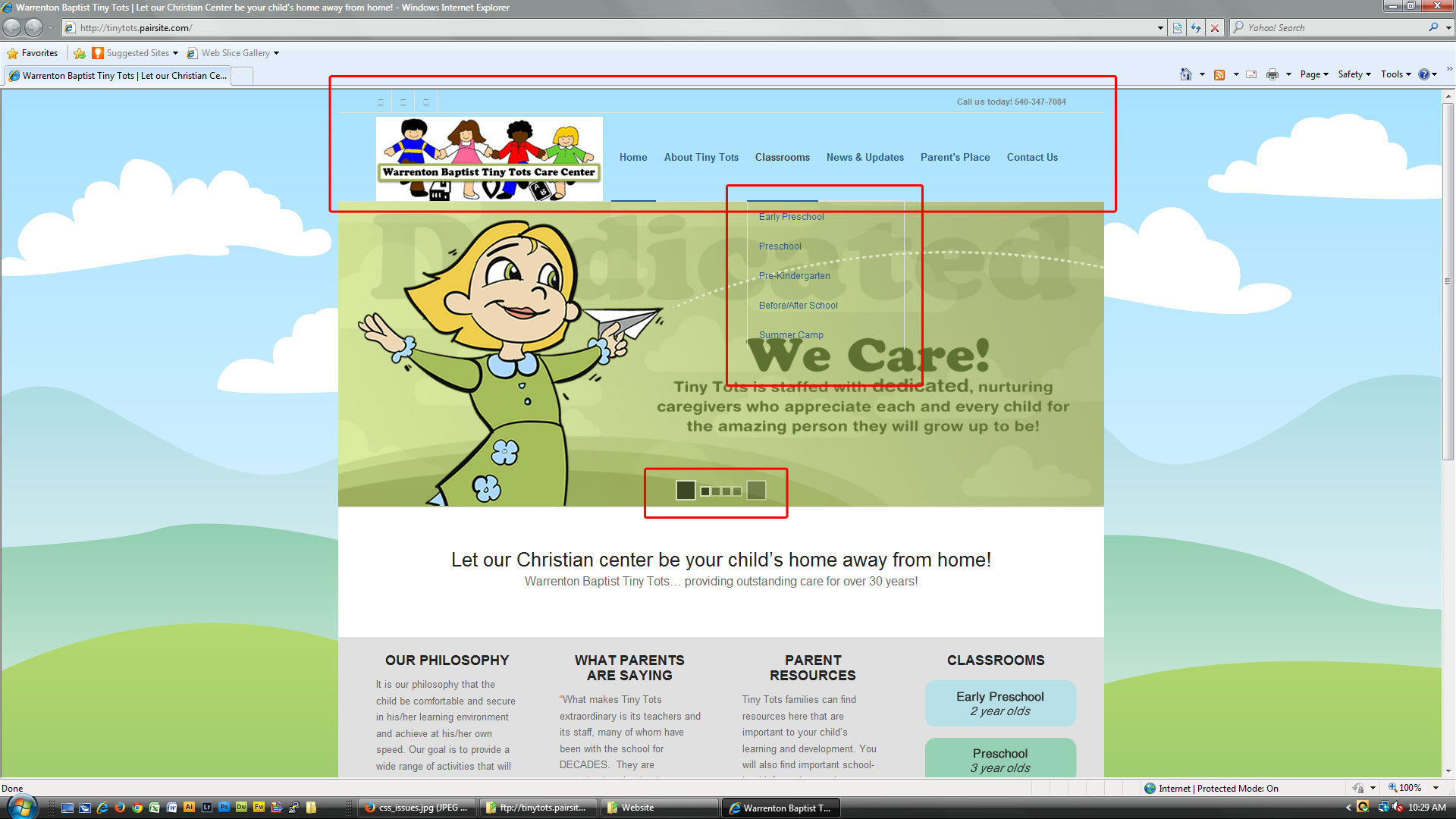
– Image sizing
– news icons (removed in quick css with “.image_size_widget .news-thumb { display: none; }”
Hi ladies and gents,
I may need your help for a work in progress as I experience basic issues trying to change the top and bottom margins of one single element (image):
There is one single image on this page:
http://restauration-arts.com/wordpress/activites/restaurer-le-support/
When I try the following customs CSS:
.avia-align-center.avia_image.avia-builder-el-no-sibling{
margin-top:20px;
margin-bottom:30px;
}
… it alters the the top and bottom margins of other sitewide images.
Troubleshouting this should be easy, I guess, but I coudn’t find how to change this specific item CSS only. Any help?
Thx,
A.
-
This topic was modified 12 years ago by
 Alexoidea.



