Hey!
Glad it is working.
Please add this one:
div.phone-info a img {
margin-top: -5px;
}

div.phone-info h4 + a {
position: relative;
top: -8px;
}
Best regards,
Ismael
Found it here (there are some other suggestions on this page also that might be better):
http://wordpress.org/support/topic/remove-related-products-from-bottom-of-product-pages
-
This reply was modified 11 years, 12 months ago by
 cryscryb.
Hey nerkasa!
Looks like your syntax may just be off. If your custom class is “my-call-to-action-element” then your css would be:
#top .my-call-to-action-element {
/*the css*/
}
The “effect” is the class name and since you don’t have one in your html then the rules would just not be applied to anything. The css declarations (whats inside the brackets) is what does the styling to whatever selectors (the class and #top) are.
The :after and :before are the pseudo classes on whatever your custom class name is.
Cheers!
Devin
I tried adding
query_posts(‘order=ASC’);
to the loop on index-loop.php
While that did change the order, it was not restricted to posts within that category. It was listing the first post ever posted at the top of every single category. Is there any other way to change the default order of normal blog posts within this theme?
I have 79 categories and 1500+ posts. Manually changing their dates to get the order I need is not practical.
Any help would be appreciated.
Hey!
Please add following code to Quick CSS in Enfold theme options under General Styling tab
.html_header_top.html_logo_center .logo {
left: auto!important;
-webkit-transform: none;
-moz-transform: none;
-ms-transform: none;
transform: none;
}
Regards,
Yigit
This reply has been marked as private.
Hi!
No, the sliders should remain there, even if they don’t you can always import/export them.
But you’d need to disable the bundled LS that comes with Enfold:
https://kriesi.at/support/topic/disable-layerslider-failed/
Best regards,
Josue
Hello,
I’m starting on a new site: http://ahddesigns.com/ – However it’s in “Coming Soon” mode so you cannot see it.
I have other sites using LayerSlider 5.1.1 (Enfold Version 2.7) and it works. Also I tried this method that came from another post: https://kriesi.at/support/topic/since-the-update-layer-slider-cannot-be-edited-at-all/
Please try to install LayerSlider as a standalone plugin. Copy the folder enfold\config-layerslider\LayerSlider into the plugins directory (wp-content/plugins) and switch to another theme (i.e. TwentyThirteen). Then go to Plugins > All Plugins, activate LayerSlider and then re-activate the Enfold theme. Afterwards check if you can save the slideshow properly.
I activated the TwentyThirteen WP theme and was able to user LayerSlider (although was quite messy due to not working within your theme) but when I activated your theme again I still could not do anything – import, adding a new slide, etc.
I have also tried to remove the entire theme & upload it again via FTP – it still hasn’t worked.
Is this a permission issue? If so, what permissions do I need to set? If not, what else can I do?
Thanks,
Brian
Hi!
Can we see the site and issue live? As far as I know there was no change in the blog post image thumb size.
As a general fyi, our queue system goes by oldest post to newest so each time you self bump a post it actually pushes the topic to the end of our queue.
Regards,
Devin
kriesi, i am having the same problem so i will post a private reply with a screencast of the error occurring. but in summary, the first time i open a text block, the visual editor works fine. the second time opening a text block (it could be the same one, or another), i get an error in the console:
NS_ERROR_UNEXPECTED: wp-tinymce.php:5
and that row 5 is:
}function i(){“undefined”!=typeof console&&console.log&&console.log(“Failed to load: “+e)}var o=r,a,s;s=o.uniqueId(),a=document.createElement(“script”),a.id=s,a.type=”text/javascript”,a.src=e,”onreadystatechange”in a?a.onreadystatechange=function(){/loaded|complete/.test(a.readyState)&&n()}:a.onload=n, [continues….]
i previously posted to the longer thread about this here: https://kriesi.at/support/topic/visual-editor-not-working-after-update-to-wp-3-9/
i’ve done all the regular things like clearing caches, fresh install of WP, no plugins, etc. there are many threads about similar issues on wordpress.org and luckily for some people, it’s an easy fix when they just disable a plugin. i’ve also checked the master list of conflicts here (http://wordpress.org/support/topic/wordpress-39-master-list?replies=6) but i don’t see any components of enfold that could be causing it.
Hi!
Depending on the tablet and browser the parallax effect may be disabled if its unable to render. I checked on this for another user and Kriesi responded to verify here: https://kriesi.at/support/topic/no-parallax-effect-in-mobile-devices/#post-259000
For the other issue, can we see the page live?
Best regards,
Devin
I am attempting to integrate ninja forms into our site and want the input boxes to fill 100% of the container. I can achieve this using developer tools in Chrome and editing:
#top input[type="text"]{
   width: 210px;
}
to
#top input[type="text"]{
   width: 100%;
}
I tried to edit the custom.css file by adding the css, but when I refresh the page nothing from the file is used. I tried to add the css to the general and desktop areas of the file, but neither of them made a difference.
Is there something I am missing? Is there something that has to be enabled within wordpress that I didn’t see? Thanks for any help.
correction, display the excerpt for the TOP entry. I’d like to display excerpts for all entries.
Hello Yigit,
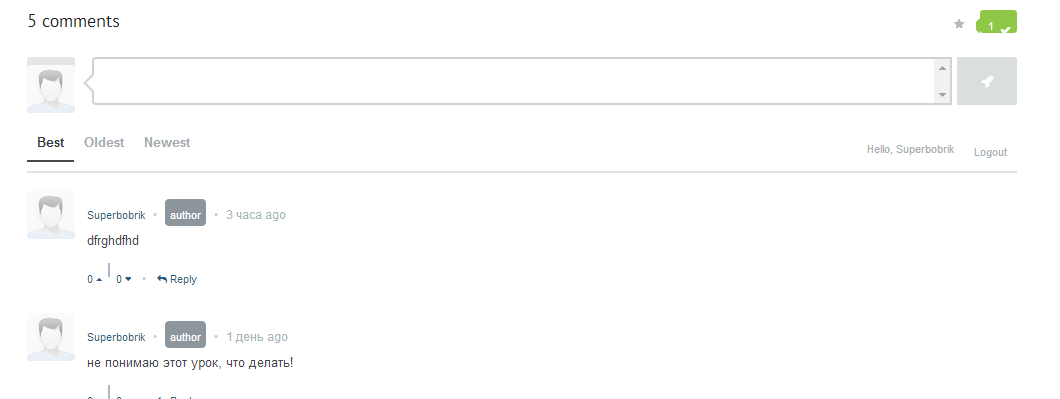
That helped a lot and almost fixed everything. The only thing left is the green button on the top right:
http://i.gyazo.com/febe2c1d92b1930fbac6f4592fd0586d.png
(ot s seen via link tht I gave in https://kriesi.at/support/topic/enfold-and-commentarot-plugin/#post-258971)
I am sorry to ask to fix that in case you are not commonly fix issues regarding other plugins. I would appreciate any help and if not- that is not a problem, anyway you are great support)
Hi!
I have just checked your website on my iphone 4 and font is the same as it is on desktop – http://i.imgur.com/P3pKtOT.png
Can you post a screenshot from your ipad?
Regards,
Yigit
This reply has been marked as private.
Hey Guys
Is there a way to create a splash page that has no menu bar on the top that would then take you to the full site with menu bar?
This is an example of what I am trying to do.
http://www.the-hil.com
When you click on picture it takes you to full site. let me know thanks
Thank you so much
It’s looking almost perfect I just cant figure out how to get the phone number, button and calendar icon to all be center aligned?
can you help?
iotaip: By no means was I saying you couldn’t view this topic. I was just saying that your post didn’t relate to the issue at hand, so you might get better support if you started a fresh thread with your question…plus it will be searchable by other people if they’re experiencing the same issue you are.
Best wishes…
:) jonathan
You are welcome to visit any support thread that is in the public view. I will open another one but you can stop by any time.
Good luck with all your issues. Ciao!
Hey grpetz!
Please add following code to Quick CSS in Enfold theme options under General Styling tab and adjust as needed
.cart_dropdown { top: 300%; }
and please see – http://kriesi.at/documentation/enfold/change-icon-used-for-standard-theme-elements/
Best regards,
Yigit
Hey!
Please add following code to Quick CSS in Enfold theme options under General Styling tab
#top .avia-content-slider, #top .avia-content-slider-inner, #top .avia-content-slider-inner .slide-entry-wrap {
-webkit-transform-style: flat;
}
Best regards,
Yigit
Enfold version 2.7.
For iphone 5, when i switch from portrait to landscape mode, about half of the footer is covered with white stripe, i.e. that part of the screen does not seem to be refreshed properly with the color of the footer.
To see this effect, go to http://www.ipinform.ca/ on iphone 5 using portrait mode, scroll down so that the line “Feel Free to Drop Us a Line” is at the top of the screen, now turn to landscape orientation, you will see the above effect wherein the copyright line in the footer is covered with white stripe.
The slider-options are set as you said…
To fix the problem I activated the responsive layout. Now the slider looks right :-)
Another question: Now, on mobile-view, the nav button in the top is layered on top of my logo. How can I get my logo on mobile-devices a bit smaller?
http://www,timourban.de/coming-soon/
-
This reply was modified 11 years, 12 months ago by
 TimoUrban.
Hi, I used a Partner/logo element below a fullscreen slider. But on the mobile devices, the partner/logo element was hidden under the slider. Could you help me to make it show overtop the fullscreen slider.
Thanks~

Please check the normal effect that I want at here: http://www.wholeren.com/
Hey!
Please add following code to Quick CSS
.iconbox_content_title, body .av-special-heading .av-special-heading-tag {
font-family: 'trebuchet ms', geneva!important;
}
and remove the code Ismael posted here – https://kriesi.at/support/topic/font-change-again/#post-258095 and i posted here – https://kriesi.at/support/topic/font-change-5/#post-255116
Best regards,
Yigit
When we try and edit any page in the Avia layout builder, the page will not load the content – site just sits there thinking about it trying to load the content. I’ve had our server-side guys take a look and there’s nothing stopping it that end.
Site: http://www.tracks360.com
This is a simple but important site for us.
Thanks NFC Group.
Hi!
Please add following code to Quick CSS as well
.phone-info h4 { float: left; }
.social_header .phone-info { width: 100%; }
.sub_menu { width: 45%; }
.phone-info a { margin-left: 15px; }
Cheers!
Yigit