-
Search Results
-
Hi.
I am using the plugin WP Google Reviews Slider Global PHP Snippet.
This is used in conjunction with WPCode Lite Snippet and a global php snippet to display the shortcode on every page right above the footer.
The Google Reviews display fully on a desktop.
Note: there is an Inconsistent Mobile Mode Load issue where on some pages it loads on a phone at the bottom of the page as it should:
Examples:
https://blgenvironmental.com/
https://blgenvironmental.com/free-consultation/But not on other pages and instead I see the space where it should display as a big long white space:
Examples:
https://blgenvironmental.com/residential/
https://blgenvironmental.com/gallery/This inconsistency was tesed on both a Samsung Galaxy s24 and Iphone SE.
Can you please investigate and do you know why there is an inconsistency?
Hello,
Hope you are doing well.
We have the same reoccuring issue that we’ve had in the past with threads we’ve opened. Many elements keep not loading across the website and only reappear on reload, and not always fully.
We’ve cleared the cache on Object Cache Pro. We’ve also added Enfold theme as an exclusion for the Async plug-in. I don’t know if there could be issues such as conflicts between Async and Autoptimize. We’ve also set exclusions between them.
The issue happens more and more often and at times it seems like the whole page doesn’t load until the reload. We’ve disabled lazy load on Enfold, but have it on Autoptimize because we don’t see the option to turn it off.
Is there anything we can do?
Thank you in advance,
VladHi, I used the Enfold Medical template, and the slider image is mostly covered up on a mobile (small screen). I unticked the option to display it, and half of the first content box is missing (the top half). So either way, it looks dreadful. I checked the medial template on my phone to see if the same issue happened for you, and I noticed the box was further down, so more of the slider image was visible. How can I do that for my website?
Cheers Kinnear
HI.
I have a layout for the home page that looks perfect in Desktop mode but compressed in Tablet mode and looks terrible in mobile mode. The Margins or padding left and right for the rows that begin with: Working With Us is Easy and Hi. I’m Robert are the rows in question.
Note: The row beginning with: Do Your Outdoor Areas Need a Makeover? looks very nice in all modes. I worked with Chat GPT in Appearance…Customize…CSS to resolve the layout issues for this row. Chat GPT seems unable to resolve the other two rows,
Please review this screenshot video: https://www.awesomescreenshot.com/video/41493405?key=78aeb216a83b4cc7d4c8017d672fef92
It presents the problem at hand.
I would appreciate it if you could please advise me on how to fix the problems with the layout with these columns on the home page.
Hi
here is a severe issue: “Taxonomy tags of masonry element incomplete”1: Open gwup.org
2: Scroll down until “Vollständige Artikel”
3: Find this list of filterable tags (taxonomy) – it is NOT COMPLETE
4: Click on the button” “Mehr laden”
5: NOW you see the complete list.See video here:
[video src="https://www.gwup.org/temporaer/taxonomy-issue.mp4" /]This is a severe issue.
Please tell us how to fix it!Here is the code:
[av_masonry_entries link='category,2780,2781,2779,2782,2793,2797,2783,2784,2798,2799,2800,2801,2785,2786,2787,2788,2802,2792,2789,2803,2804,2805,2790' term_rel='' wc_prod_visible='' wc_prod_hidden='hide' wc_prod_featured='' prod_order_by='' prod_order='' date_filter='' date_filter_start='' date_filter_end='' date_filter_format='yy/mm/dd' period_filter_unit_1='1' period_filter_unit_2='year' page_element_filter='skip_current' sort='yes-tax' query_orderby='date' query_order='DESC' caption_elements='title excerpt' caption_styling='' caption_display='on-hover' img_copyright='' size='fixed masonry' orientation='' image_size='masonry' gap='large' columns='4' av-desktop-columns='' av-medium-columns='' av-small-columns='' av-mini-columns='' items='12' paginate='load_more' color='custom' custom_bg='' img_copyright_font='' av-desktop-font-img_copyright_font='' av-medium-font-img_copyright_font='' av-small-font-img_copyright_font='' av-mini-font-img_copyright_font='' img_copyright_color='' img_copyright_bg='' animation='active' animation_duration='' animation_custom_bg_color='' animation_custom_bg_color_multi_list='' animation_z_index_curtain='100' overlay_fx='active' img_scrset='' lazy_loading='disabled' av-small-hide='aviaTBav-small-hide' av-mini-hide='aviaTBav-mini-hide' alb_description='' id='' custom_class='' template_class='' av_uid='av-m7i3btdw' sc_version='1.0']
[av_masonry_entries link='category,2780,2781,2779,2782,2793,2797,2783,2784,2798,2799,2800,2801,2785,2786,2787,2788,2802,2792,2789,2803,2804,2805,2790' term_rel='' wc_prod_visible='' wc_prod_hidden='hide' wc_prod_featured='' prod_order_by='' prod_order='' date_filter='' date_filter_start='' date_filter_end='' date_filter_format='yy/mm/dd' period_filter_unit_1='1' period_filter_unit_2='year' page_element_filter='skip_current' sort='yes-tax' query_orderby='date' query_order='DESC' caption_elements='title excerpt' caption_styling='' caption_display='on-hover' img_copyright='' size='fixed masonry' orientation='' image_size='masonry' gap='large' columns='4' av-desktop-columns='' av-medium-columns='' av-small-columns='' av-mini-columns='' items='3' paginate='load_more' color='custom' custom_bg='' img_copyright_font='' av-desktop-font-img_copyright_font='' av-medium-font-img_copyright_font='' av-small-font-img_copyright_font='' av-mini-font-img_copyright_font='' img_copyright_color='' img_copyright_bg='' animation='active' animation_duration='' animation_custom_bg_color='' animation_custom_bg_color_multi_list='' animation_z_index_curtain='100' overlay_fx='active' img_scrset='' lazy_loading='disabled' av-desktop-hide='aviaTBav-desktop-hide' av-medium-hide='aviaTBav-medium-hide' alb_description='' id='' custom_class='' template_class='' av_uid='av-m7rio00o' sc_version='1.0']
mfg
AndrèDear Enfold Team,
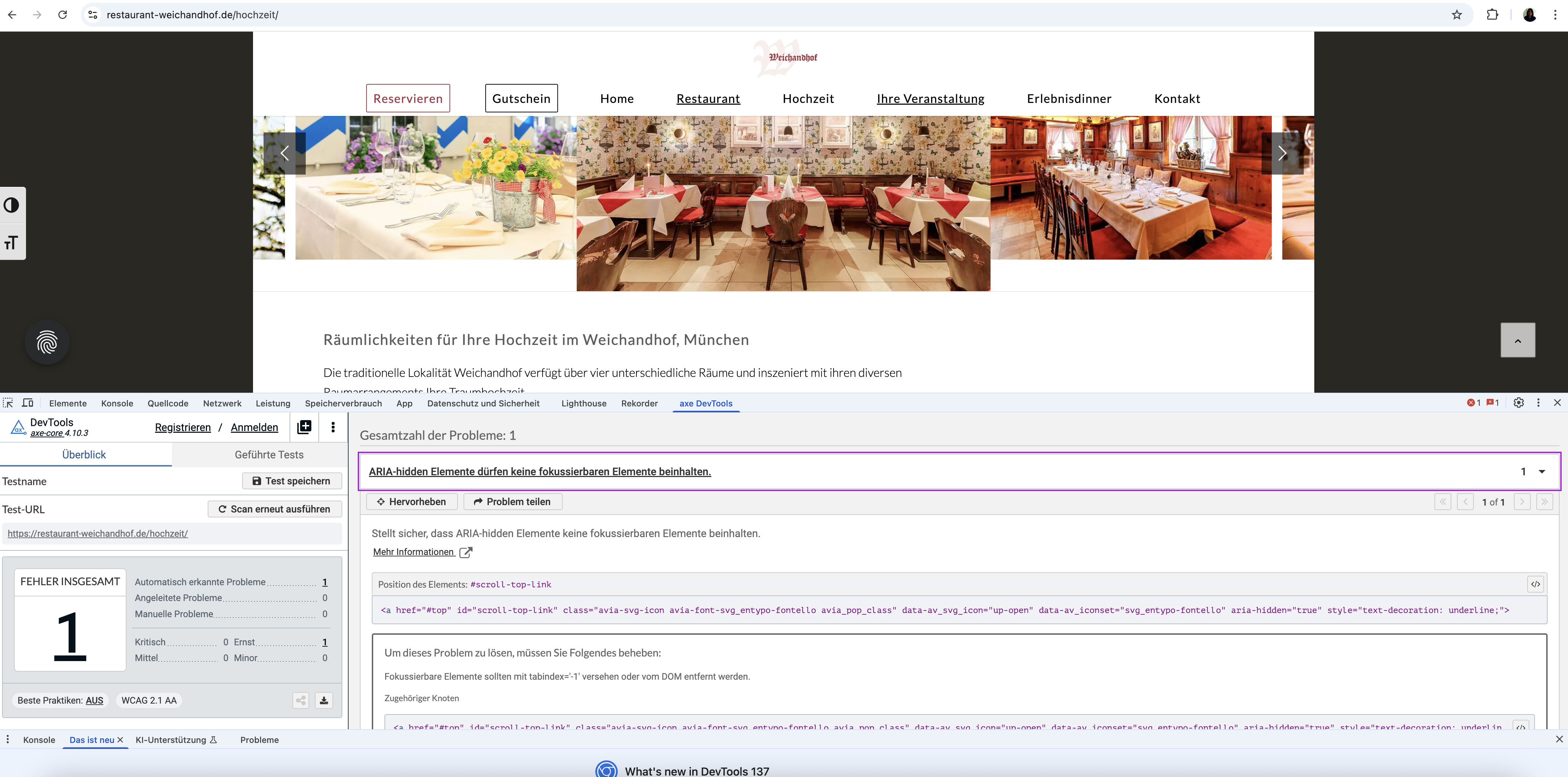
During accessibility testing of our website (https://restaurant-weichandhof.de) built with the Enfold theme, the AXE tool reported an issue concerning the built-in Scroll-to-Top button.
Specifically, the tool flags an error indicating that an element with aria-hidden=”true” is focusable. This error appears when the page is scrolled before starting the test (so the Scroll-to-Top button is visible). If the page is not scrolled prior to testing, the button is not visible and the error does not appear. This suggests the issue exists on every page but is only flagged depending on test conditions. This error really appears in EVERY SITE. Is there a way to fix it by not changing the ENDOLD-php-Code (> not consistent solutions for updates) ?
So I kindly ask you to review this ARIA issue and advise on how to ensure the Scroll-to-Top button meets WCAG 2.1 AA requirements.
Thank you in advance for your support.
Best regards, Diana
Viewing 30 results - 1,231 through 1,260 (of 142,836 total)