
-
AuthorSearch Results
-
August 11, 2025 at 12:44 pm #1487842
In reply to: Flux checkout styling problem
Hi,
I dont see any changes in checkout. It must looks like sk domain: https://img.savvyify.com/image/2025-07-30-07-55-14-SSK.yy4aO
Beside this, homepage on test.stoporex.cz is broken.
Regards
August 11, 2025 at 12:01 pm #1487838In reply to: Upgrade path very old Enfold theme
Hey rmoestl,
The update to 7.1.1 has to be done manually from the version you are running, please refer to my replies in this thread: https://kriesi.at/support/topic/enfold-4-5-theme-update-update-failed-download-failed-a-valid-url-was-not-pro/#post-1021541
You can either update manually via FTP: https://kriesi.at/documentation/enfold/how-to-install-enfold-theme/#theme-update, or upload the theme as if it was new under Appearance->Themes->Add New Theme.
If that doesn’t work then please try to delete the whole theme folder, then replace it with the new version. Make sure that you have backups of the site before starting updating.
Also please read this after you have updated: https://kriesi.at/documentation/enfold/theme-registration/Best regards,
RikardAugust 11, 2025 at 9:46 am #1487834In reply to: Text around images
But you know that you do not have to do that by inserting code to text-block element?
Place your text-block element – and open it. – Insert your text. After that put the cursor (1) to that place where you like to insert the image.
Click (2) on “Add Media”.
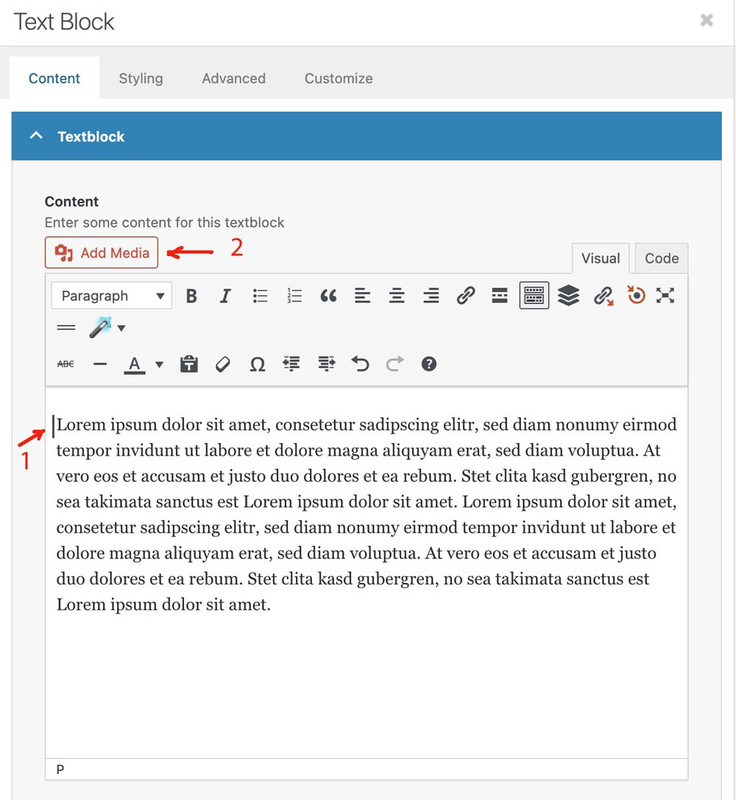
Now it opens the media-library in a popup. Choose your image (3) and set the properties on the right (4). You see here the already the alignment and the lightbox option (link to media file).
Now press “insert into page” button.
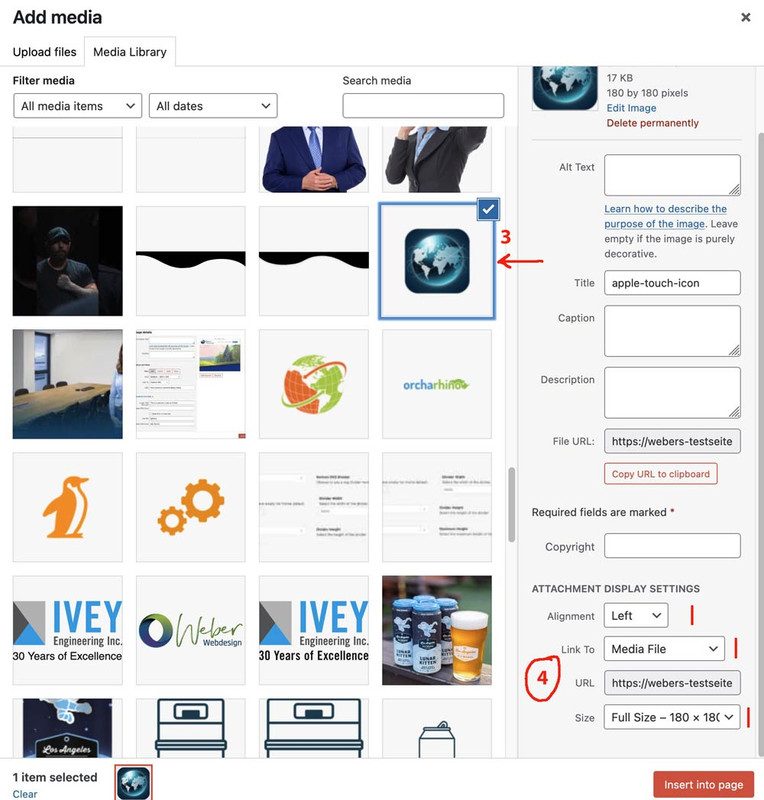
You will see now a preview. You can pull now one edge of the image to make it bigger.
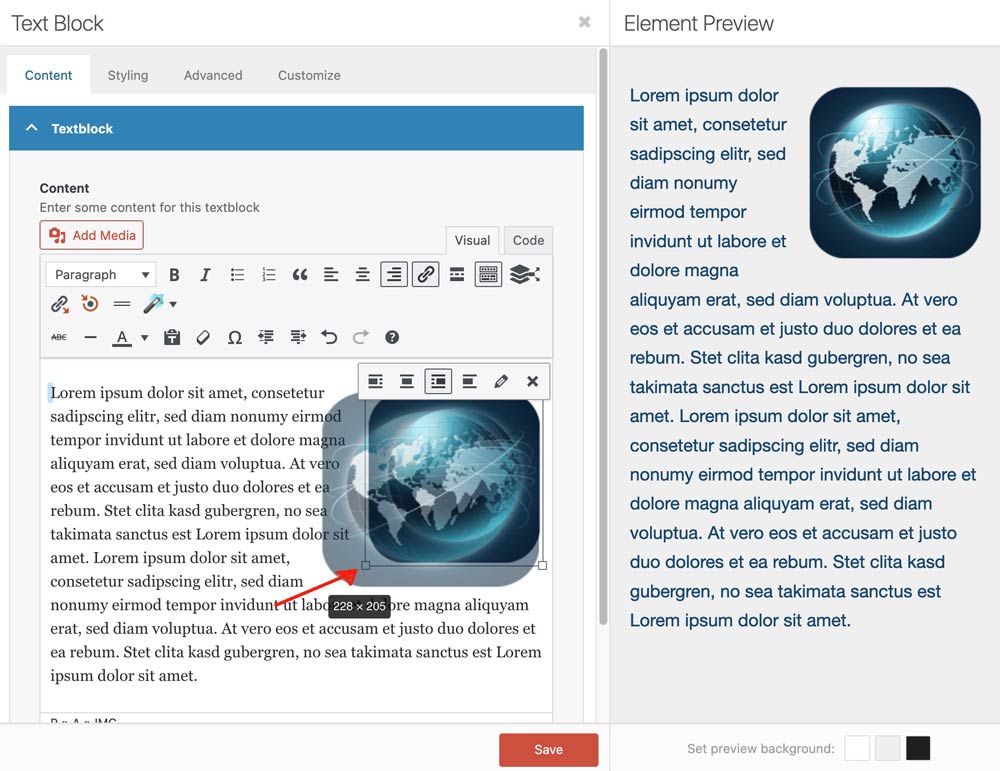
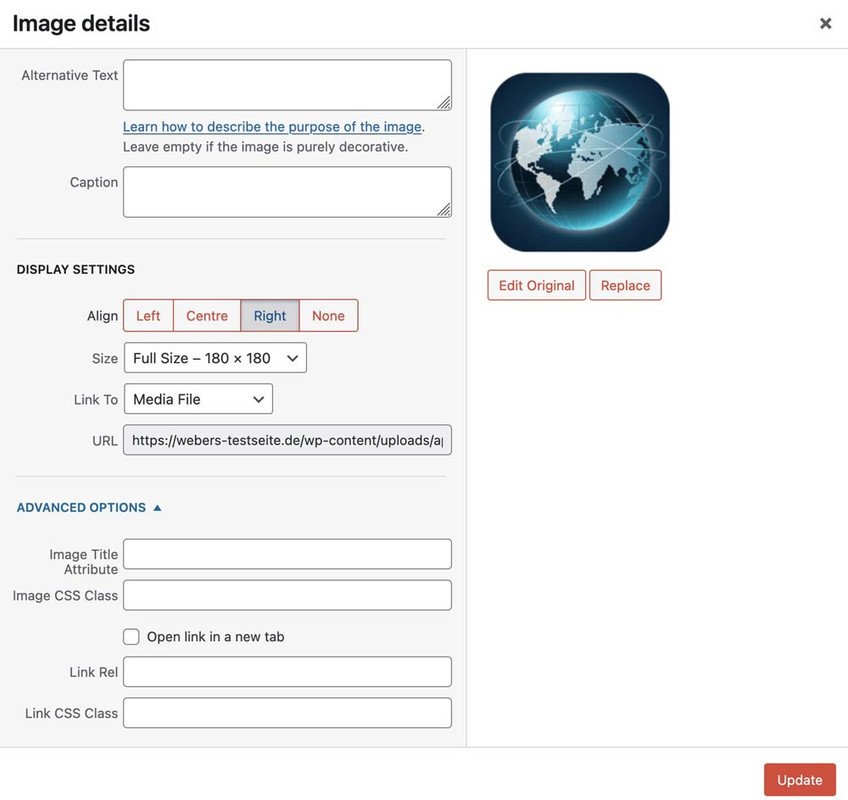
if you like to change some settings on that image – click on the image – you can see now an icon bar on top. Click that pencil button to have another popup.
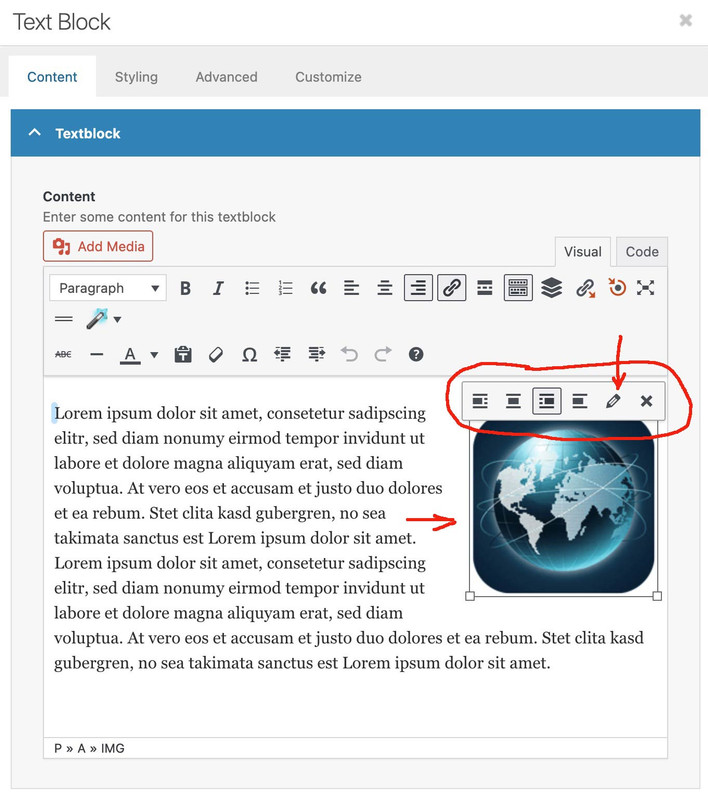
and
 August 11, 2025 at 5:12 am #1487824
In reply to: CLS issue color section
Hi,
Yes, both the background image and the overlay image contribute to the LCP. While the report flags the background image as the main culprit, any unoptimized images or content on the page can affect loading speed and directly impact the LCP.
Currently, home_backround-keil-mobile.svg is still quite large for mobile view at 96 KB. We recommend either removing it completely from the #av_section_7 section or removing the duplicates of this section completely, keeping only one version for both mobile and desktop views.
Please note that images in these sections still affect the page’s performance, even if they are hidden on mobile view. The minified resources generated by the plugin WPFC also affect the page rendering. Try temporarily disabling the plugin and make sure the Enfold > Performance > File Compression settings are disabled as well.
Let us know if this makes any difference.
Best regards,
IsmaelAugust 10, 2025 at 8:28 pm #1487814In reply to: Iconbox Icon Smaller
Hi,
Try adjusting the size like this:#iconstyle .iconbox_icon.avia-svg-icon img[is-svg-img=true], .iconbox_icon.avia-svg-icon svg:first-child { height: 0.3em; width: 0.3em; top: -10px; position: relative; } #top #iconstyle .avia-font-entypo-fontello, body #iconstyle .avia-font-entypo-fontello, html body #iconstyle [data-av_iconfont='entypo-fontello']:before { font-family: 'entypo-fontello'; line-height: .3em; display: block; top: 0; position: relative; font-size: 0.3em; }Best regards,
MikeAugust 10, 2025 at 6:54 pm #1487810In reply to: The pages don’t have title
Check what page-id is it where you do not like to show it – and then :
#top.page-id-12345 .my_title_container {
  display: none;
}
However, if you only want this feature on all pages but not on archive or post pages, for example, you can modify the snippet accordingly.
August 10, 2025 at 3:41 pm #1487804In reply to: The pages don’t have title
Hi Guenni007.
Unfortunately, the site isn’t live yet, so I can’t send you a link right now.
So I checked the page, and this is the change I made to the code you suggested that works for me:#top .container_wrap_first {
border: none !important;
}Your input was important in this case too.
Thanks for your time.August 9, 2025 at 11:34 am #1487777In reply to: The pages don’t have title
have a look if this is the default border-top of container_wrap – try:
#top .container_wrap {
  border: none !important;
}
August 9, 2025 at 2:55 am #1487773Topic: Contact Form not sending email
in forum Enfoldjamesreimers
ParticipantHi, emails have stopped being received when a query is sent via the contact form. When submitted, the next page loads acknowledging that the query has been sent, but no email is received and I have checked the junk and spam folders. It was working fine but stopped for no reason a few weeks ago.
August 8, 2025 at 8:56 pm #1487763In reply to: styling For blog grid colors
Hi,
For the borders (lines) try this css:#top .main_color .slide-content span, #top .main_color .slide-meta, #top .main_color .slide-meta div { border-color: #fff; }After applying the css, please clear your browser cache and check.
Best regards,
MikeAugust 8, 2025 at 8:37 pm #1487755In reply to: Iconbox Icon Smaller
Hi,
It looks like your “custom class” iconstyle is actually a ID, perhaps you added it to the wrong field in the developer tab.
To correct the above css, try this:#iconstyle .iconbox_icon.avia-svg-icon img[is-svg-img=true], .iconbox_icon.avia-svg-icon svg:first-child { height: 0.5em; width: 0.5em; top: -8px; position: relative; } #top #iconstyle .avia-font-entypo-fontello, body #iconstyle .avia-font-entypo-fontello, html body #iconstyle [data-av_iconfont='entypo-fontello']:before { font-family: 'entypo-fontello'; line-height: 1.5em; display: block; top: 0; position: relative; font-size: 0.6em; }After applying the css, please clear your browser cache and check.
Best regards,
MikeAugust 8, 2025 at 4:56 pm #1487751In reply to: Flux checkout styling problem
August 8, 2025 at 3:25 pm #1487742In reply to: Flux checkout styling problem
Hi,
Thanks for the update. From which thread did you copy the CSS that is working? https://kriesi.at/support/profile/napsteris/topics/
Best regards,
RikardAugust 8, 2025 at 3:12 pm #1487741In reply to: Infinite loadiing, block editor 403 ajax error
Hi,
Great, I’m glad to hear that you found a solution. Please let us know if you should need any further help on the topic, or if we can close it.
Best regards,
RikardAugust 8, 2025 at 6:58 am #1487729In reply to: Multiple Transparent Headers
One problem that could arise is if you have different logotypes. For example, the standard logo and alternative logo are SVG files, but the one on this page should be a PNG instead. As long as you stick to one type, there shouldn’t be a problem.
the color of the menu you can redeclared like this :
( because i do not see private content area – here with example page-id’s)#top.page-id-44112 #header.header_color.av_header_transparency .av-main-nav > li > a .avia-menu-text { color: red; } #top.page-id-44112 #header.header_color.av_header_transparency .av-main-nav > li > a:hover .avia-menu-text { color: yellow; }you can replace the alternate logo (that for transparency) : you need to know the ID – if you replace a svg with a png file you had to know the url too of that replacement logo.
put this to your child-theme functions.php (replace the page-id and the other parameters)function av_change_transparency_settings($header){ if( is_page('44112') ){ // add class to the #header for using alternate logo (It's important to leave a space at the beginning within the quotation marks.) $header['header_class'] .= ' av_alternate_logo_active'; // url of the replacement logo $header['header_replacement_logo'] = "/wp-content/uploads/globe-color.png"; // the id of the replacement logo - check on media library list view $header['header_replacement_logo_id'] = 49022; } return $header; } add_filter('avf_header_setting_filter','av_change_transparency_settings');setting that extra class av_alternate_logo_active is not needed if you have a standard transparency logo set on enfold options.
maybe: you had to set some extra css for png logo on width and height on responsive casesee example page here: https://webers-testseite.de/bg-video/
PS: you see on my other pages (f.e. the landing page/home) of that example installation – that i do not use the transparent logo. Because i use svg files – i can fill the letters differently for transparent header. That is the reason why i had to add that extra class on that example page.
August 7, 2025 at 8:01 pm #1487712In reply to: Missing previous/next on blog posts
Hi,
It’s hidden by default on small screens. Please try adding this to Quick CSS if you want to display it:
@media only screen and (max-width: 767px) {
  .responsive #top .avia-post-nav {
    display: block;
  }
}
Best regards,
RikardAugust 7, 2025 at 7:19 pm #1487711In reply to: Iconbox Icon Smaller
Thanks. I went ahead and added a custom class. Is this correct? and than the class is iconstyle
.iconstyle .iconbox_icon.avia-svg-icon img[is-svg-img=true], .iconbox_icon.avia-svg-icon svg:first-child {
    height: 0.5em;
    width: 0.5em;
    top: -8px;
    position: relative;
}

.iconstyle #top .avia-font-entypo-fontello, body .avia-font-entypo-fontello, html body [data-av_iconfont='entypo-fontello']:before {
    font-family: 'entypo-fontello';
    line-height: 1.5em;
    display: block;
    top: 0;
    position: relative;
    font-size: 0.6em;
}
August 7, 2025 at 4:02 pm #1487694In reply to: Missing previous/next on blog posts
Thank you! That was helpful. I see it on desktop but not on mobile. Is that normal or is there another setting I must adjust? Thanks again!!!
August 7, 2025 at 11:53 am #1487690In reply to: Upgrade Enfold 3.X to 7.x
Hey Annelies,
The update to 7.1.1 has to be done manually from the version you are running, please refer to my replies in this thread: https://kriesi.at/support/topic/enfold-4-5-theme-update-update-failed-download-failed-a-valid-url-was-not-pro/#post-1021541
You can either update manually via FTP: https://kriesi.at/documentation/enfold/how-to-install-enfold-theme/#theme-update, or upload the theme as if it was new under Appearance->Themes->Add New Theme.
If that doesn’t work then please try to delete the whole theme folder, then replace it with the new version. Make sure that you have backups of the site before starting updating.
Also please read this after you have updated: https://kriesi.at/documentation/enfold/theme-registration/Best regards,
RikardAugust 7, 2025 at 4:28 am #1487680In reply to: Background color form payment step
Hi,
Thank you for the link.
You can use this css code to adjust the style of the checkout form fields.
.main_color div.product .woocommerce-tabs ul.tabs li.active a, .main_color .cart_dropdown .dropdown_widget .widget_shopping_cart_content, .main_color .cart_dropdown_link, .main_color .inner_product_header, .main_color .avia-arrow, #top .main_color .variations select, #top .main_color .variations input, #top .main_color #reviews input[type='text'], #top .main_color #reviews input[type='email'], .main_color #reviews .comment-text, .main_color #reviews #comment, .main_color .single-product-main-image .images a, #top .main_color .shop_table.cart .input-text, #top .main_color form.login .input-text, #top .main_color form.register .input-text, .main_color .chosen-container-single .chosen-search, .main_color .products .product-category h3:before, #top .main_color .quantity input.qty {
    background-color: #4f79e3;
}

#top div.woocommerce-message {
    border-color: #acb6ce;
    background-color: #4f79e3;
    color: #ffffff;
}

#top label span, #top legend span {
    font-weight: 400;
    font-size: 13px;
    color: #ffffff;
}
Best regards,
IsmaelAugust 7, 2025 at 4:11 am #1487678In reply to: Adding Button To Header
Hey Caitlin,
Thank you for the inquiry.
Before proceeding, we kindly ask you to register on the forum using the purchase code associated with your theme license. Please use the following link: https://kriesi.at/support/register/
Once registered, you can open a new thread using the form here: https://kriesi.at/support/forum/enfold/#new-post
To add a button to the header widget area, you can use the Text widget, then add this shortcode:
[av_button label=' (Email address hidden if logged out) ' icon_select='yes' icon='mail' font='svg_entypo-fontello' title_attr='' button_type='' link='manually,mailto: (Email address hidden if logged out) ' link_dynamic='' link_target='' download_file='https://' attachment='' attachment_size='' downloaded_file_name='' size='small' position='center' label_display='' size-text='' av-desktop-font-size-text='' av-medium-font-size-text='' av-small-font-size-text='' av-mini-font-size-text='' margin='' margin_sync='true' padding='' padding_sync='true' av-desktop-margin='' av-desktop-margin_sync='true' av-desktop-padding='' av-desktop-padding_sync='true' av-medium-margin='' av-medium-margin_sync='true' av-medium-padding='' av-medium-padding_sync='true' av-small-margin='' av-small-margin_sync='true' av-small-padding='' av-small-padding_sync='true' av-mini-margin='' av-mini-margin_sync='true' av-mini-padding='' av-mini-padding_sync='true' color_options='' color='theme-color' custom_bg='#444444' custom_font='#ffffff' btn_color_bg='theme-color' btn_custom_grad_direction='vertical' btn_custom_grad_1='#000000' btn_custom_grad_2='#ffffff' btn_custom_grad_3='' btn_custom_grad_opacity='0.7' btn_custom_bg='#444444' btn_color_bg_hover='theme-color-highlight' btn_custom_bg_hover='#444444' btn_color_font='theme-color' btn_custom_font='#ffffff' btn_color_font_hover='white' btn_custom_font_hover='#ffffff' border='' border_width='' border_width_sync='true' border_color='' border_radius='' border_radius_sync='true' box_shadow='' box_shadow_style='0px,0px,0px,0px' box_shadow_color='' animation='' animation_duration='' animation_custom_bg_color='' animation_z_index_curtain='100' hover_opacity='' sonar_effect_effect='' sonar_effect_color='' sonar_effect_duration='1' sonar_effect_scale='' sonar_effect_opac='0.5' css_position='' css_position_location=',,,' css_position_z_index='' av-desktop-css_position='' av-desktop-css_position_location=',,,' av-desktop-css_position_z_index='' av-medium-css_position='' av-medium-css_position_location=',,,' av-medium-css_position_z_index='' av-small-css_position='' av-small-css_position_location=',,,' av-small-css_position_z_index='' av-mini-css_position='' av-mini-css_position_location=',,,' av-mini-css_position_z_index='' id='' custom_class='' template_class='' av_uid='av-me0reo0x' sc_version='1.0' admin_preview_bg='']You can also use this html:
<div class="avia-button-wrap av-me0reo0x-af6ff2d8373030c9c60f62b386b56008-wrap avia-button-center  avia-builder-el-0  el_before_av_slideshow_accordion  avia-builder-el-no-sibling "><a href="mailto: (Email address hidden if logged out) " class="avia-button av-me0reo0x-af6ff2d8373030c9c60f62b386b56008 av-link-btn avia-icon_select-yes-left-icon avia-size-small avia-position-center avia-color-theme-color" aria-label=" (Email address hidden if logged out) "><span class="avia_button_icon avia_button_icon_left avia-svg-icon avia-font-svg_entypo-fontello" data-av_svg_icon="mail" data-av_iconset="svg_entypo-fontello"><svg version="1.1" xmlns="http://www.w3.org/2000/svg" width="29" height="32" viewBox="0 0 29 32" preserveAspectRatio="xMidYMid meet" aria-labelledby="av-svg-title-4" aria-describedby="av-svg-desc-4" role="graphics-symbol">
<title id="av-svg-title-4">Mail</title>
<desc id="av-svg-desc-4">Mail</desc>
<path d="M0.96 8.448q-1.024-0.576-0.896-1.28 0.064-0.448 0.832-0.448h27.072q1.216 0 0.64 1.024-0.256 0.448-0.768 0.704-0.448 0.192-6.144 3.264t-5.824 3.136q-0.512 0.32-1.472 0.32-0.896 0-1.472-0.32-0.128-0.064-5.824-3.136t-6.144-3.264zM28.16 11.648q0.64-0.32 0.64 0.32v11.776q0 0.512-0.544 1.024t-1.056 0.512h-25.6q-0.512 0-1.056-0.512t-0.544-1.024v-11.776q0-0.64 0.64-0.32l12.288 6.4q0.576 0.32 1.472 0.32t1.472-0.32z"></path>
</svg></span><span class="avia_iconbox_title"> (Email address hidden if logged out) </span></a></div>
Best regards,
IsmaelAugust 7, 2025 at 3:56 am #1487676In reply to: Extra Elements Phone and Email stacked on mobile
Hey vrhgmt744p,
Thank you for the inquiry.
Please add this css code to adjust the phone info field on smaller screens:
@media only screen and (max-width: 768px) { /* Add your Mobile Styles here */ #top #header_meta .phone-info div { display: block; } #top #header_meta .phone-info div .avia-icon-pos-left { top: 2px; } }Best regards,
IsmaelAugust 7, 2025 at 3:51 am #1487675In reply to: styling For blog grid colors
Hey vrhgmt744p,
Thank you for the inquiry.
Try to add this css code to change the color of the content to white and background of the button to #d5b76a.
.html_elegant-blog .avia-content-slider .slide-entry-excerpt { color: #ffffff; } .html_elegant-blog #top .post-entry .post-meta-infos, .html_elegant-blog .avia-content-slider .slide-meta, .html_elegant-blog .avia-content-slider .slide-meta a { color: #ffffff; } .html_elegant-blog .more-link { background: #d5b76a; color: #ffffff; }Best regards,
IsmaelAugust 7, 2025 at 3:45 am #1487674In reply to: Iconbox Icon Smaller
Hey vrhgmt744p,
Thank you for the inquiry.
You can use the following css code to adjust the size of the icon inside the iconbox.
.iconbox_icon.avia-svg-icon img[is-svg-img=true], .iconbox_icon.avia-svg-icon svg:first-child {
    height: 0.5em;
    width: 0.5em;
    top: -8px;
    position: relative;
}

#top .avia-font-entypo-fontello, body .avia-font-entypo-fontello, html body [data-av_iconfont='entypo-fontello']:before {
    font-family: 'entypo-fontello';
    line-height: 1.5em;
    display: block;
    top: 0;
    position: relative;
    font-size: 0.6em;
}
If you need this applied to specific icons, try adding a custom css class to the element. Please refer to the documentation below.
— https://kriesi.at/documentation/enfold/add-custom-css/#enable-custom-css-class-name-support
Best regards,
IsmaelAugust 6, 2025 at 7:24 pm #1487662In reply to: Updating Themes in WordPress Site
Hey Heather,
The update to 7.1.1 has to be done manually from the version you are running, please refer to my replies in this thread: https://kriesi.at/support/topic/enfold-4-5-theme-update-update-failed-download-failed-a-valid-url-was-not-pro/#post-1021541
You can either update manually via FTP: https://kriesi.at/documentation/enfold/how-to-install-enfold-theme/#theme-update, or upload the theme as if it was new under Appearance->Themes->Add New Theme.
If that doesn’t work then please try to delete the whole theme folder, then replace it with the new version. Make sure that you have backups of the site before starting updating.
Also please read this after you have updated: https://kriesi.at/documentation/enfold/theme-registration/Best regards,
RikardAugust 6, 2025 at 1:17 pm #1487644In reply to: Columns Not Stacking on iPad in Color Section
Hi,
To fix the header overlap issue, you can add this css code:
.html_header_transparency #main { padding-top: 90px!important; }Best regards,
IsmaelAugust 6, 2025 at 12:15 pm #1487635In reply to: Columns Not Stacking on iPad in Color Section
Hi,
Thank you for the update.
Did you try the second set of css rules without the UID av-4hiz9z-633b1e0ab579d3c11a88073322c9de8f?
You can also apply a unique css class name to the Grid Row element where the modification is needed, for example “av-custom-grid-eq-height”, and then use the following css code.
.responsive #top #wrap_all .av-layout-grid-container.av-custom-grid-eq-height {
    display: flex;
}

.responsive #top #wrap_all .av-custom-grid-eq-height .flex_cell.av_one_half .flex_cell_inner,
.responsive #top #wrap_all .av-custom-grid-eq-height .flex_cell.av_one_half .flex_cell_inner .avia-image-container,
.responsive #top #wrap_all .av-custom-grid-eq-height .flex_cell.av_one_half .flex_cell_inner .avia-image-container div,
.responsive #top #wrap_all .av-custom-grid-eq-height .flex_cell.av_one_half .flex_cell_inner .avia-image-container div div,
.responsive #top #wrap_all .av-custom-grid-eq-height .flex_cell.av_one_half .flex_cell_inner .avia-image-container div div img {
    width: 100%;
    height: 100%;
    display: block;
    object-fit: cover;
}
— https://kriesi.at/documentation/enfold/add-custom-css/#enable-custom-css-class-name-support
Best regards,
IsmaelAugust 6, 2025 at 11:25 am #1487632In reply to: Columns Not Stacking on iPad in Color Section
Hello, it works at the bottom of the homepage but it is not working at the top of the pages “ÜBER MICH” and “RAHMENBEDINGUNGEN”. Kind regards Andrea
August 6, 2025 at 11:23 am #1487631In reply to: Different menu
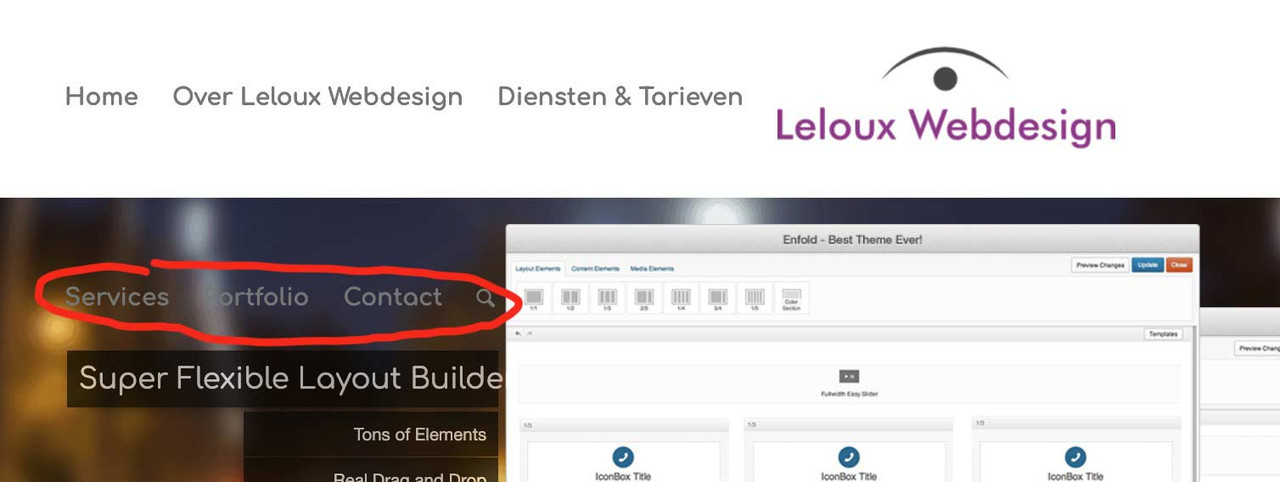
think of css adjustment: https://kriesi.at/support/topic/different-menu-2/#post-1487625
 August 6, 2025 at 11:05 am #1487625
In reply to: Different menu
i switched that installation right now tol WP6.8.2 and Enfold 7.1.1
everything works well.
PS: you had to switch earlier to the burger menu.in this case change it to new media query option:
@media only screen and (max-width: 1070px) {
    #top #header .av-main-nav > li.menu-item  {
        display: none!important;
    }
    #top #header .av-burger-menu-main {
        cursor: pointer;
        display: block!important;
    }
}
you had to synchronise it with the media query above:@media only screen and (min-width: 1070px) { #top .av-logo-container .logo { opacity: 0; } #top .main_menu { left: 0; width: 100%; } #top .main_menu .avia-menu.av-main-nav-wrap { position: relative; left: 50%; -webkit-transform: translateX(-50%); transform: translateX(-50%); } #top #menu-item-logo svg, #top #menu-item-logo img { max-height: 120px; /**** depends on your choosen header height - on shrinking headers it will be set by that enfold shrink script ******/ width: auto; position: relative; top: 50%; -webkit-transform: translateY(-50%); transform: translateY(-50%); } } #av-burger-menu-ul .menu-item-logo { display: none } -
AuthorSearch Results
Viewing 30 results - 1,021 through 1,050 (of 142,836 total)
-
Search Results


