
-
AuthorSearch Results
-
January 3, 2017 at 6:02 pm #729086
In reply to: Button size and bullets not showing up
I am a little confuse why this will require customizations. Have you read my issues clearly? These are standard theme issues.
I am trying to build 3 columns and have an image with some bullet points to the right and a button below (see mockup). However, I am having the following issues:
1- Bullets are not showing up
2- My button is very big (although I have selected the “small” button size)
3- Also at the very top of that column, there is an extra horizontal line across which I would like to remove.
Please take a look at my screenshot for more clarifications.
Live Site – http://staging.wsmsnyc.org.s167849.gridserver.com/our-magazine/
Mockup – https://s30.postimg.org/674d5nzkh/our_magazine.jpg
-
This reply was modified 9 years, 2 months ago by
navindesigns.
January 3, 2017 at 5:43 pm #729078In reply to: testimonial text suddenly not in center again
on my android phone it looks ok.
For my frontpage: On normal dekstop version/pc it is not ok.
For my frontpage and booking page as resized from pc: The text is a little bit to the right but it´s almost ok.
January 3, 2017 at 4:45 pm #729057In reply to: Margin Top Padding above Logo
The thing is, if I put
@media only screen and (max-width: 767px) {
.responsive #top {
margin-top: 5px;
vertical-align: centered !important;
}}into quick css, it looks like this on mobile
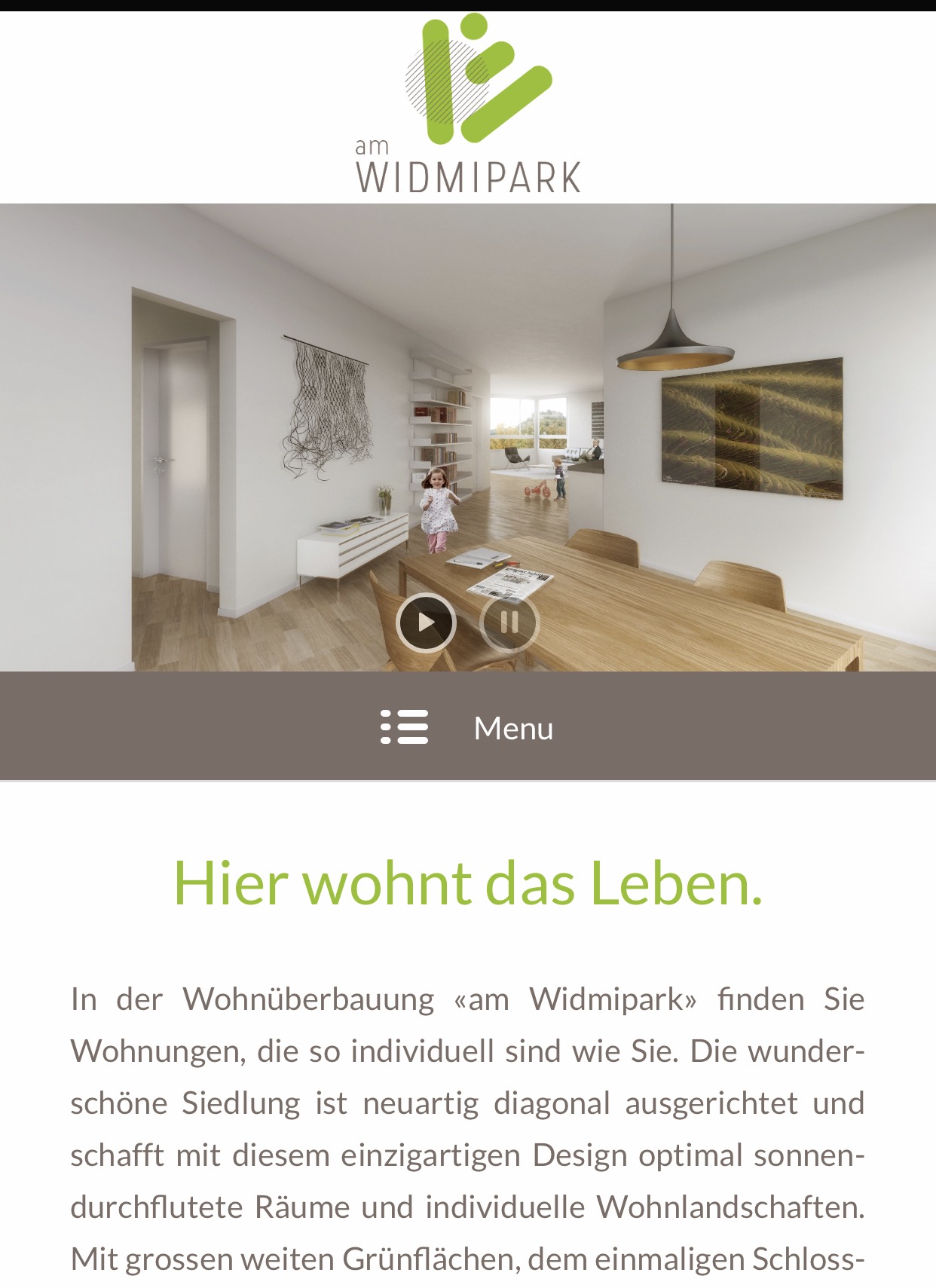 and even after adding
#wrap_all {
background-color: #ffffff;
}it’s still black. If I set a header height for mobile only and vertically center the logo, same thing happens. I just can’t get the background white or transparent. I thought that the socket background could have something to do with the background color of the whole website (e.g. on another website of mine, where to socket background is grey, the background of the whole website is grey as well).
Long story short, I want some (white) top margin to prevent the logo from sticking all the way on top.
Thanks for your support and best regards,
Michel-
This reply was modified 9 years, 2 months ago by
realit-treuhand.
January 3, 2017 at 4:31 pm #729048Happy New Year :)
Unfortunatelly although I am satisfied with the result on my screen, on a wider desktop screen the things are still messy. Any further ideas?Thanks in advance,
FaniJanuary 3, 2017 at 3:35 pm #729025In reply to: Hide submenu's
Hi Yigit,
Thank you for your quick reply.
I don’t think that is what I mean. I found a simular question on the forum
June 14, 2015 at 10:31 pm
#459034
Topic: Hide submenu on certain pagesand you have to put a CSS code somewhere but I don’t know where I should put
the code.
My website is http://www.dutch3ddesign.nl and I don’t want any submenu’s like I have right now.
Like when you hover over “kindertekening” the submenu’s fold out and I don’t want that.Kind regards,
MarchaJanuary 3, 2017 at 2:44 pm #729011In reply to: Include a container on multiple pages
Hi BigBossMedia!
You can refer to this post – https://kriesi.at/support/topic/how-to-add-a-line-of-text-at-top-of-footer/#post-725119 however we would recommend saving elements as template and loading on desired pages :)
Regards,
YigitJanuary 3, 2017 at 2:42 pm #729008In reply to: center menu
Hey wbitsolutions,
Please try adding this code to the Quick CSS section under Enfold > General Styling or to your child themes style.css file:
@media only screen and (min-width: 1440px) {
.html_header_top.html_main_nav_header #top .av_menu_left .main_menu {
    left: 15%;
}}
Best regards,
YigitJanuary 3, 2017 at 2:10 pm #728998In reply to: Responsive background images
Hi,
as I wrote: When I remove the code, every image appears correctly in the mobile version, but in 2 very narrow columns, as you can see in the screenshot from Nov 14 above.
That’s why I want to use the code for having only 1 column, but something that causes the issue maybe is missing or something else has to be changed. I checked everything and it is as Ismael wrote on Dec 19: Grid row with 2 cell positions changes one after another from left to right and appear on top of each orher in 1 column in the mobile version.
But still there is no reason why the 2 images get lost and everything else is fine. That’s the only question unanswered.
Best regards,
DirkJanuary 3, 2017 at 1:52 pm #728989Topic: Different icon for hamburger menu
in forum EnfoldEvilMuelli
ParticipantOn http://kriesi.at/themes/enfold-creative-studio/ you’re using a hamburger menu icon (on desktop). I would like to change this icon to a waveform: http://i.imgur.com/IlAjEsg.png
like your Entypo Fontello icon (ue8ce). How can I do this?I think the problem is that you’re not using a real icon as hamburger menu icon, but CSS. Could I style the lines in a different way so I get three waves instead of three straight lines?
Thanks a lot for your awesome work!
January 3, 2017 at 1:12 pm #728966In reply to: Footer Height & Menu changes problem
Hi,
Sorry, I can’t see that anything has changed, I want the top and bottom of the footer to be tighter to the text. At the moment the top and bottom gaps between the text are too big…. The problem with the menu is still there, the text colours are also different on the blog single posts compared to the rest of the site (You can compare this to the colours in the menu on the right hand side of the single posts).
The Envato theme update has also not been done? Could you advise me whether i can do this safely without deleting everything i have done so far.
thanks
January 3, 2017 at 12:12 pm #728938Hi
Found any solution for this topic?January 3, 2017 at 11:57 am #728934In reply to: Post page costumization
Hey wbitsolutions,
a) Refer to: https://kriesi.at/support/topic/rollover-disc-arrow-replacement-part-2/#post-121206
b) Use this code inside Quick CSS field:
.blog-categories.minor-meta {
display: none !important;
}
c+d) I can’t find the elements in question on the link you’ve provided. Please check.
e) Use this code:
.av-vertical-delimiter {
display: none !important;
}
Best regards,
AndyJanuary 3, 2017 at 11:36 am #728921In reply to: Mobile menu and logo are hover
Hey wbitsolutions,
Try adding this css code in Quick CSS (located in Enfold > General Styling):
@media only screen and (max-width:767px) {
  .responsive #top .logo {
    width: 100%;
  }

  .responsive .logo a img {
    margin: 0 auto;
    padding: 10px;
  }
}
Let us know if this helps :)
Best regards,
NikkoJanuary 3, 2017 at 11:27 am #728917In reply to: background image
hi andy
well, oif course i used png, but the transparant part went white, dont know why.
so , i had to fill up the transparant part with the green color i wanted.
this is now oke, but what in the future my client would like to have some opacity change, from dark to light (top to bottom for example).
i did it now like this, see below.i hope it looks oke now, and the ‘chessboard’ banners on the left and right are stuck to the upper left and right hand of your screen.
on http://quirktools.com/ ive looked, seems to be good, but when i look on my own Lenovo tablet i dont see no banners in Chrome at all!
strange…-
This reply was modified 9 years, 2 months ago by
yampieters.
January 3, 2017 at 11:26 am #728915In reply to: Reduce Logo Padding
Hey Todd,
Try adding this code in Quick CSS (located in Enfold > General Styling):
#header_main #text-2 {
    display: none;
}

#header_meta {
    position: absolute;
    right: 0;
    background: #fff !important;
}

#top #header_meta a,
#top #header_meta li,
#top #header_meta .phone-info {
    color: #333;
}
Just adjust the values as you see fit. Hope this helps :)
Best regards,
Nikko-
This reply was modified 9 years, 2 months ago by
Yigit. Reason: corrected a typo
January 3, 2017 at 11:03 am #7289102. Is it set to autoplay? yes
January 3, 2017 at 10:34 am #728895In reply to: Margin Top Padding above Logo
Hi Ismael,
unfortunatley this didn’t solve the issue but I figured out that the black background – when setting a positive margin-top – comes from the socket background. E.g. when I zoom in on my iphone and move the site left and right, the background is black as the socket.
Do you have any ideas to change this without changing the socket color?
Best regards,
MichelJanuary 3, 2017 at 10:24 am #728889Hi,
1. Please post us your login credentials (in the “private data” field), so we can take a look at your backend.
Login credentials include:
- The URL to the login screen.
- A valid username (with full administration capabilities).
- As well as a password for that username.
- permission to deactivate plugins if necessary.
2. Is it set to autoplay?
Best regards,
NikkoJanuary 3, 2017 at 10:03 am #728883In reply to: Responsive background images
Hi,
I removed this code:
@media only screen and (max-width:1024px) and (min-width:768px) {
  #top .custom-gridrow .av_one_half {
    display: flex;
    width: 100%;
    padding: 50px 100px 20px !important;
  }
and afterwards all images appear (in 2 columns). But I need to have only 1 column.
So still the same question why only the 2 images are missing in the mobile version and the rest works fine?
Best regards,
DirkJanuary 3, 2017 at 9:25 am #728882Anyhow.. just debugging what might be wrong. Error messages are way too simple so I just cannot see more what is going wrong.
If you Enfold devs just test this feature more and even try to talk with MailChimp this endless forum messaging will stop. If I calculated correctly your customers have been trying to report issues over 10-100 times and mostly nothing is happening.1) Account + API key is working correctly with Enfold
2) Problems starts when you have multiple list on one account on MailChimp
– If you combine example two list on MailChimp everything seems to work ok as supposed?January 3, 2017 at 9:00 am #728878Topic: Reduce Logo Padding
in forum Enfoldbrowntodde
ParticipantHey there –
Probably a basic question but I searched the forum best I could and didn’t find the answer so I’m hoping someone here can help.
I’m just looking to reduce the white space around my logo on this page: http://toddbrownservices.com
While I’m at it, any way to move the social and phone number from the top to the extreme right of the menu bar? Or even on the right side of the white logo space if easier.
Thanks in advance!
ToddJanuary 3, 2017 at 8:51 am #728877In reply to: Footer Copyright & Link Problem
Hi Prembo,
Great, glad you got it working! Let us know if you should have any further problem on the topic of if we can close it.
Best regards,
RikardJanuary 3, 2017 at 8:27 am #728873In reply to: progress bar with link to pop up text
Hi,
You can make the text smaller in it by adjusting the code I gave and add a font-size property, it would look like this:
.js_active .top_tab .tab {
    font-size: 9px !important;
    padding-left: 24px;
    padding-right: 24px;
}
However, I don’t think making it smaller than it is, is a good idea. I have checked the text in the tab which is Vejledende pris and I can see it fit perfectly even without the code I gave. The screenshot you gave http://imgur.com/a/qDKTF also shows that it doesn’t overlap or have some text being hidden.
Best regards,
NikkoJanuary 3, 2017 at 7:37 am #728867In reply to: Several Questions and costumizations
Hey wbitsolutions,
Thank you for using Enfold.
1.) Please add this in the Quick CSS field.
#top .av_seperator_big_border .av-main-nav > li:last-child > a, #top .av_seperator_big_border .av-main-nav > #menu-item-search > a {
    border-left-style: solid;
    border-left-width: 1px;
    border-right: 0;
}
2.) Use this css.
#top .main_menu .menu li:first-child {
    border-right-style: solid;
    border-right-width: 1px;
}
3.) Please try the following plugin. The plugin will enable you to sort the items manually.
// https://wordpress.org/plugins/post-types-order/
Please create a separate topic for each inquiry. Thank you.
Best regards,
IsmaelJanuary 3, 2017 at 7:13 am #728864In reply to: Mouse Over masonry elements in mobile
Hi,
Thank you for using Enfold.
I’m sorry but this is not possible because the caption or title container will only display on mouse hover. If you want to remove it on mobile, use this css code.
.avia_desktop .av-caption-on-hover .av-masonry-item-with-image .av-inner-masonry-content {
    display: none !important;
}
Best regards,
IsmaelJanuary 3, 2017 at 7:03 am #728860In reply to: Row is suddenly set to display:none
Hi,
I’m not sure how the inline styling is being applied but you can override it with this custom css.
@media only screen and (max-width: 767px) {
   .responsive #top .container .av-content-small, .responsive #top #wrap_all .flex_column, .responsive #top #wrap_all .av-flex-cells .no_margin {
       display: block !important;
   }
}
Did you add any custom script to the theme? It might be a plugin issue so a quick plugin toggle test will help.
Best regards,
IsmaelJanuary 3, 2017 at 6:23 am #728853Hi,
Move the css modification inside a css media query so that it won’t affect smaller screens. Example.
@media only screen and (min-width: 989px) {
  /* Add your Desktop Styles here */

  /* Moves the MENU inward, Flush with body content */
  .main_menu {
    right: 23%;
  }

  /* Logo moved far left margin, previously -25, now pushed towards the RIGHT */
  .logo {
    margin-left: 570px;
  }
}
Best regards,
IsmaelJanuary 3, 2017 at 6:01 am #728846In reply to: Create Horizontal Full Width Sections Demo
Hi Jas,
Please see below:
[av_section min_height='50' min_height_px='500px' padding='huge' shadow='no-border-styling' bottom_border='no-border-styling' id='' color='main_color' custom_bg='' src='https://kriesi.at/themes/enfold-shop/files/2015/03/people_town.jpg' attachment='577' attachment_size='full' attach='parallax' position='bottom center' repeat='stretch' video='' video_ratio='16:9' overlay_enable='aviaTBoverlay_enable' overlay_opacity='0.7' overlay_color='#6786a1' overlay_pattern='' overlay_custom_pattern='']
[av_headline_rotator before_rotating='WE SIMPLY OFFER THE BEST' after_rotating='IN LOS ANGELES' multiline='aviaTBmultiline' interval='3' animation='reverse' tag='h3' size='60' align='center' custom_title='#ffffff']
[av_rotator_item title='SHOPPING EXPERIENCE' link='' linktarget='' custom_title='#253849']
[av_rotator_item title='CUSTOMER CARE' link='' linktarget='' custom_title='#253849']
[av_rotator_item title='ONLINE STORE' link='' linktarget='' custom_title='#253849']
[av_rotator_item title='DESIGNER CLOTHES' link='' linktarget='' custom_title='#253849']
[/av_headline_rotator]
[/av_section]

[av_layout_row border='' min_height='600px' color='main_color' mobile='av-flex-cells' id='']
[av_cell_one_half vertical_align='middle' padding='150px' padding_sync='true' background_color='#ffffff' src='' attachment='' attachment_size='' background_attachment='scroll' background_position='top left' background_repeat='no-repeat']

[av_heading tag='h3' padding='10' heading='How it all begann - our idea of the perfect clothing store' color='' style='blockquote modern-quote' custom_font='' size='30' subheading_active='' subheading_size='15' custom_class=''][/av_heading]

[av_hr class='custom' height='50' shadow='no-shadow' position='left' custom_border='av-border-fat' custom_width='50px' custom_border_color='' custom_margin_top='30px' custom_margin_bottom='30px' icon_select='no' custom_icon_color='' icon='ue808' font='entypo-fontello']

[av_textblock size='' font_color='' color='']
Lorem ipsum dolor sit amet, consectetuer adipiscing elit. Aenean commodo ligula eget dolor. Aenean massa. Cum sociis natoque penatibus et magnis dis parturient montes, nascetur ridiculus mus. Donec quam felis, ultricies nec, pellentesque eu, pretium quis, sem. Nulla consequat massa quis enim.
[/av_textblock]

[/av_cell_one_half][av_cell_one_half vertical_align='top' padding='50px' padding_sync='true' background_color='' src='https://kriesi.at/themes/enfold-shop/files/2015/03/hipster-girls-working.jpg' attachment='554' attachment_size='full' background_attachment='scroll' background_position='center center' background_repeat='stretch']

[/av_cell_one_half]
[/av_layout_row]

[av_layout_row border='' min_height='600px' color='main_color' mobile='av-flex-cells' id='']
[av_cell_one_half vertical_align='middle' padding='50px' padding_sync='true' background_color='' src='https://kriesi.at/themes/enfold-shop/files/2015/03/couple-sitting.jpg' attachment='546' attachment_size='full' background_attachment='scroll' background_position='center left' background_repeat='stretch']

[/av_cell_one_half][av_cell_one_half vertical_align='middle' padding='150px' padding_sync='true' background_color='' src='' attachment='' attachment_size='' background_attachment='scroll' background_position='top left' background_repeat='no-repeat']

[av_heading tag='h3' padding='10' heading='Growing from 2 single founders to 5 big stores with 50 team members' color='' style='blockquote modern-quote' custom_font='' size='30' subheading_active='' subheading_size='15' custom_class=''][/av_heading]

[av_hr class='custom' height='50' shadow='no-shadow' position='left' custom_border='av-border-fat' custom_width='50px' custom_border_color='' custom_margin_top='30px' custom_margin_bottom='30px' icon_select='no' custom_icon_color='' icon='ue808' font='entypo-fontello']

[av_textblock size='' font_color='' color='']
Lorem ipsum dolor sit amet, consectetuer adipiscing elit. Aenean commodo ligula eget dolor. Aenean massa. Cum sociis natoque penatibus et magnis dis parturient montes, nascetur ridiculus mus. Donec quam felis, ultricies nec, pellentesque eu, pretium quis, sem. Nulla consequat massa quis enim.
[/av_textblock]

[/av_cell_one_half]
[/av_layout_row]

[av_layout_row border='' min_height='600px' color='main_color' mobile='av-flex-cells' id='']
[av_cell_one_half vertical_align='middle' padding='150px' padding_sync='true' background_color='#6786a1' src='' attachment='' attachment_size='' background_attachment='scroll' background_position='top left' background_repeat='no-repeat']

[av_heading tag='h3' padding='10' heading='The Future of the Enfold Franchise - nothing can stop us :)' color='custom-color-heading' style='blockquote modern-quote' custom_font='#ffffff' size='30' subheading_active='' subheading_size='15' custom_class=''][/av_heading]

[av_hr class='custom' height='50' shadow='no-shadow' position='left' custom_border='av-border-fat' custom_width='50px' custom_border_color='#ffffff' custom_margin_top='30px' custom_margin_bottom='30px' icon_select='no' custom_icon_color='' icon='ue808' font='entypo-fontello']

[av_textblock size='' font_color='custom' color='#ffffff']
<p>Lorem ipsum dolor sit amet, consectetuer adipiscing elit. Aenean commodo ligula eget dolor. Aenean massa. Cum sociis natoque penatibus et magnis dis parturient montes, nascetur ridiculus mus. Donec quam felis, ultricies nec, pellentesque eu, pretium quis, sem. Nulla consequat massa quis enim.</p>
[/av_textblock]

[/av_cell_one_half][av_cell_one_half vertical_align='top' padding='50px' padding_sync='true' background_color='' src='https://kriesi.at/themes/enfold-shop/files/2015/03/people_town.jpg' attachment='577' attachment_size='full' background_attachment='scroll' background_position='center center' background_repeat='stretch']

[/av_cell_one_half]
[/av_layout_row]

[av_section min_height='' min_height_px='500px' padding='large' shadow='no-border-styling' bottom_border='no-border-styling' id='' color='alternate_color' custom_bg='' src='' attachment='' attachment_size='' attach='scroll' position='top left' repeat='no-repeat' video='' video_ratio='16:9' overlay_opacity='0.5' overlay_color='' overlay_pattern='' overlay_custom_pattern='']
[av_heading tag='h3' padding='10' heading='What every single one of our stores offers you' color='' style='blockquote modern-quote modern-centered' custom_font='' size='30' subheading_active='' subheading_size='15' custom_class=''][/av_heading]

[av_hr class='custom' height='50' shadow='no-shadow' position='center' custom_border='av-border-fat' custom_width='50px' custom_border_color='' custom_margin_top='30px' custom_margin_bottom='30px' icon_select='no' custom_icon_color='' icon='ue808' font='entypo-fontello']

[av_one_half first]

[av_icon_box position='left_content' boxed='' icon='ue8b1' font='entypo-fontello' title='Worldwide delivery' link='' linktarget='' linkelement='' font_color='' custom_title='' custom_content='' color='' custom_bg='' custom_font='' custom_border='']
Lorem ipsum dolor sit amet, consectetuer adipiscing elit. Aenean commodo ligula eget dolor.
[/av_icon_box]

[/av_one_half][av_one_half]

[av_icon_box position='left_content' boxed='' icon='ue8e2' font='entypo-fontello' title='Free shipping' link='' linktarget='' linkelement='' font_color='' custom_title='' custom_content='' color='' custom_bg='' custom_font='' custom_border='']
Aenean massa. Cum sociis natoque penatibus et magnis dis parturient montes, nascetur ridiculus mus.
[/av_icon_box]

[/av_one_half][av_one_half first]

[av_icon_box position='left_content' boxed='' icon='ue824' font='entypo-fontello' title='Secure Payment' link='' linktarget='' linkelement='' font_color='' custom_title='' custom_content='' color='' custom_bg='' custom_font='' custom_border='']
Donec quam felis, ultricies nec, pellentesque eu, pretium quis, sem. Nulla consequat massa quis enim.
[/av_icon_box]

[/av_one_half][av_one_half]

[av_icon_box position='left_content' boxed='' icon='ue805' font='entypo-fontello' title='Sales Notifications' link='' linktarget='' linkelement='' font_color='' custom_title='' custom_content='' color='' custom_bg='' custom_font='' custom_border='']
Lorem ipsum dolor sit amet, consectetuer adipiscing elit. Aenean commodo ligula eget dolor.
[/av_icon_box]

[/av_one_half][av_one_half first]

[av_icon_box position='left_content' boxed='' icon='ue8cf' font='entypo-fontello' title='Credit Cards accepted' link='' linktarget='' linkelement='' font_color='' custom_title='' custom_content='' color='' custom_bg='' custom_font='' custom_border='']
Lorem ipsum dolor sit amet, consectetuer adipiscing elit. Aenean commodo ligula eget dolor.
[/av_icon_box]

[/av_one_half][av_one_half]

[av_icon_box position='left_content' boxed='' icon='ue830' font='entypo-fontello' title='30 Days money back' link='' linktarget='' linkelement='' font_color='' custom_title='' custom_content='' color='' custom_bg='' custom_font='' custom_border='']
Lorem ipsum dolor sit amet, consectetuer adipiscing elit. Aenean commodo ligula eget dolor.
[/av_icon_box]

[/av_one_half][av_one_half first]

[av_icon_box position='left_content' boxed='' icon='ue8b9' font='entypo-fontello' title='24/7 Support' link='' linktarget='' linkelement='' font_color='' custom_title='' custom_content='' color='' custom_bg='' custom_font='' custom_border='']
enean leo ligula, porttitor eu, consequat vitae, eleifend ac, enim. Aliquam lorem ante, dapibus.
[/av_icon_box]

[/av_one_half][av_one_half]

[av_icon_box position='left_content' boxed='' icon='ue827' font='entypo-fontello' title='Regular sales' link='' linktarget='' linkelement='' font_color='' custom_title='' custom_content='' color='' custom_bg='' custom_font='' custom_border='']
enean leo ligula, porttitor eu, consequat vitae, eleifend ac, enim. Aliquam lorem ante, dapibus.
[/av_icon_box]

[/av_one_half]
[/av_section]

[av_section min_height='' min_height_px='500px' padding='default' shadow='no-shadow' bottom_border='no-border-styling' id='sign-up' color='main_color' custom_bg='' src='https://kriesi.at/themes/enfold-shop/files/2015/03/hipster-girls-working.jpg' attachment='554' attachment_size='full' attach='parallax' position='top center' repeat='stretch' video='' video_ratio='16:9' overlay_enable='aviaTBoverlay_enable' overlay_opacity='0.7' overlay_color='#6786a1' overlay_pattern='' overlay_custom_pattern='']

[av_heading tag='h3' padding='10' heading='Want to stay up to date? Subscribe to our Newsletter!' color='custom-color-heading' style='blockquote modern-quote modern-centered' custom_font='#ffffff' size='30' subheading_active='' subheading_size='15' custom_class=''][/av_heading]

[av_one_fifth first]

[/av_one_fifth][av_three_fifth]

[av_contact  (Email address hidden if logged out) ' title='' button='Subscribe' on_send='' sent='Thanks! You will receive an email soon!' link='page,74' subject='' autorespond='' captcha='' hide_labels='aviaTBhide_labels' color='av-custom-form-color av-light-form']
[av_contact_field label='Name' type='text' options='' check='is_empty' width='element_third' multi_select=''][/av_contact_field]
[av_contact_field label='E-Mail' type='text' options='' check='is_email' width='element_third' multi_select=''][/av_contact_field]
[/av_contact]

[/av_three_fifth][av_one_fifth]

[/av_one_fifth][/av_section]
Best regards,
RikardJanuary 3, 2017 at 5:59 am #728845In reply to: Icons side by side on mobile
Hey newpappa,
Thank you for using Enfold.
Please decrease the width of the icon container on mobile.
@media only screen and (max-width: 767px) {
    #top .av_font_icon a {
        width: 60px !important;
    }
}
Best regards,
IsmaelJanuary 3, 2017 at 5:50 am #728843In reply to: Mobile Alignment Problems
-
This reply was modified 9 years, 2 months ago by
-
AuthorSearch Results
-
Search Results
-
On http://kriesi.at/themes/enfold-creative-studio/ you’re using a hamburger menu icon (on desktop). I would like to change this icon to a waveform: http://i.imgur.com/IlAjEsg.png
like your Entypo Fontello icon (ue8ce). How can I do this?I think the problem is that you’re not using a real icon as hamburger menu icon, but CSS. Could I style the lines in a different way so I get three waves instead of three straight lines?
Thanks a lot for your awesome work!
Topic: Reduce Logo Padding
Hey there –
Probably a basic question but I searched the forum best I could and didn’t find the answer so I’m hoping someone here can help.
I’m just looking to reduce the white space around my logo on this page: http://toddbrownservices.com
While I’m at it, any way to move the social and phone number from the top to the extreme right of the menu bar? Or even on the right side of the white logo space if easier.
Thanks in advance!
Todd


