you should shift not the button but the p-tag that has that button.
because pseudo class :has is already for most browsers usable we can do:
.page-id-15 p.form_element:has(.av-recaptcha-submit) {
  margin-top: -20px;
}
or if you are able to give a custom-class to that p-tag use that instead for better browser support.
i can see both images on mobile ( dev tools setting ). So autoplay works on my end here
i did not check if real mobile device shows it.
Hi,
I can see this text in a Color Section with a green background both on the front- and backend: Best of Cleveland Award winner 17 years in a row!
Did you manage to get it working? If you have questions which is not on the original topic, then please open new threads for each of them.
Best regards,
Rikard
This reply has been marked as private.
Hi,
We can now see the fading slider. If you need this to be visible on tablet view, please add this css code:
@media screen and (max-width: 1024px) {
    .responsive.av-no-preview #top #wrap_all #slider-gebaede-frueher-heute {
        display: block !important;
    }
}
Let us know the result.
Best regards,
Ismael
Hi,
This only seems to hide the empy item om the “News” page (https://regenboogalliantie.nl/nieuws/)
The same issue is visible in the masonry element on the page https://regenboogalliantie.nl/nieuws/
The links above look the same. Can you provide the correct link to the other page? For the home page, you can add this css code:
#top .av-mfb8b6h9-903a18144fa2874ec5abc87835770ec5 .av-masonry-container .av-masonry-entry:first-child,
#top .av-mfgqr9vd-8ed003c43d554c716ccad992e0119c66 .av-masonry-container .av-masonry-entry:first-child {
    display: none !important;
}
If you’re planning to add more Masonry elements in the future, go to Advanced > Developer Settings, add a Custom CSS Class name “av-masonry-no-empty-items”, then add this css code:
#top .av-masonry-no-empty-items .av-masonry-container .av-masonry-entry:first-child {
    display: none !important;
}
For the read more link, try to replace the previous script with this:
(function($){
    $(document).ready(function() {
        $('.av-masonry:not([class*="-gallery"]) .av-masonry-entry').each(function() {
            var more = $(this).find('.av-masonry-read-more');
            var cont = $(this).find('.av-masonry-entry-content');

            if (more.length == 1) return;
            cont.append('<div class="av-masonry-read-more">Lees meer ></div>');
        });

        $(window).trigger('resize av-height-change');
    });
})(jQuery);
Best regards,
Ismael
Hey zimbo,
Thank you for the inquiry.
This css should adjust the alignment of the social svg icons.
#top .social_bookmarks li.avia-svg-icon svg:first-child, #top .social_bookmarks li.avia-svg-icon img[is-svg-img=true] {
    height: 1em;
    width: auto;
    margin-top: 6px;
}
Then, add this css rule to change the color to blue.
.header_color .team-social a.avia-svg-icon svg:first-child, .header_color .meta-heading .avia-svg-icon svg:first-child, .header_color .social_bookmarks .avia-svg-icon a svg:first-child {
    stroke: #2f3191;
    fill: #2f3191;
}

Best regards,
Ismael
Hi,
Thank you for the info.
The color section has no border, even when we toggle or disable your custom css modifications. The borders are already removed by this css rule.
#top #wrap_all #main .avia-no-border-styling {
    border: none;
}
Best regards,
Ismael
I have tried to add the themeforest-eTIYN1qt-enfold-responsive-multipurpose-theme-zip through WordPress, but I get an error message that says that there is no style.css file. I have unzipped the file to be sure that there is indeed a style.css file. Your instructions say I am supposed to upload the themeforest zip file, is this incorrect? Am I supposed to upload the enfold.zip file. I realize that I am new to this. I went through all of the support files (I used search to limit the files), and couldn’t find anything on this topic
My client has not given me access to FTP, so I cannot upload the files that way.
Please advise. Thank you in advance.
Ismael,
Thank you for your thought. I had checked that, but these are set to no as default. I found multiple support tickets looking for the same issue, and they all had various ideas, of which I tried them all. Because of a caching plugin, I was not getting an accurate return to diagnose, so I need to take some time to figure out which one I need. I surely don’t need all:
/* removes grey line under color sections */
.container_wrap { border-top: none !important; }
.container_wrap { border-bottom: none !important; }
.avia-section {
border-top: 0px;
}
#after_section_1 {
border-top-width: 0 !important;
}
/*
.avia-section {
border-bottom:10px solid white;
}
*/
————-
It would sure be nice if the layout/ border setting would actually work as designed with the border set to off as default, because I can’t imagine why someone would need that function. Just a thought.
Thanks
I’m trying to migrate to SVG social icons as per the recommendation in Theme Options. I have changed X and Instagram on the ‘dev’ test site (see below) and you can see the problem with SVG versions – too ‘low’ and wrong color.
The fix for the lowered icons is, I think:
#top .social_bookmarks li.avia-svg-icon svg:first-child {
    margin-top: 6px;}
from the default of 9px – please confirm this is the right CSS to target to get the SVG icons higher.
I cannot however find the code that is making the SVG icons display grey (#808080, the secondary font color) instead of blue.
I have this CSS in my child theme style.css to change the old/existing icons to the site’s main blue colour:
.header_color .social_bookmarks a {
	color: #2e3192 !important;}
This code is still being loaded but is being ignored by the SVG icons. How can I get the SVG icons displaying blue?
[There is additional CSS to format the social icons, as below, but I don’t think this is relevant, it’s just FYI:
.html_bottom_nav_header #top .av-logo-container .social_bookmarks {
right: 83px; margin-top: -30px;}
#top .social_bookmarks li {
width: 36px;}
#top .social_bookmarks li a {
font-size: 20px;}
]
Hi,
Great, I’m glad that Mike could help you out. Please let us know if you should need any further help on the topic, or if we can close it.
Best regards,
Rikard
Hey Rikard,
I’d like to see the featured image also on the blog post itself. On the desktop version it works, on the mobile version not.

Kind regards
Uli
Hi
After a recent theme update, my website stopped loading due to a critical error. I restored the theme from a previous backup, and the site is now partially working, but I’m facing the following issue:
Main pages (e.g. /contact, /team, etc.) display the message:
“No results found. We’re sorry, but no results could be found for your request.”
Subpages inside these main pages open correctly.
I’ve already tried the following troubleshooting steps:
Regenerated permalinks.
Checked and rebuilt the .htaccess file.
Verified that the correct pages are assigned under Settings → Reading and Enfold → Theme Options.
Cleared all caches and tested with minimal active plugins.
Created new test pages (they also show the same “No results” message).
It seems that Enfold is interpreting static pages as empty search or blog results, even though they’re correctly configured.
Could you help me?
Thank you very much for your help and support.
I can provide temporary access or additional information if needed.
Best regards,
-
This topic was modified 6 months, 1 week ago by
 Protohill.
Hey Alexandre,
Please try the following in Quick CSS under Enfold->General Styling:
.page-id-15 .av-recaptcha-submit {
  margin-top: -20px;
}
Best regards,
Rikard
This reply has been marked as private.
Hi,
Thank you for the info.
We disabled the script and added this code in the Quick CSS field to hide the empty masonry item without an image.
#top .av-memr40p2-4e918060ab6ff669ef638e6ba94ae4db .av-masonry-container .av-masonry-entry:first-child {
    display: none !important;
}
Best regards,
Ismael
Hey milkrow,
Thank you for the inquiry.
There is no built-in option for this by default. You’ll need to edit each portfolio entry manually, switch to the Advanced Layout Builder and add the custom element template. There is a workaround, but it requires manually adding a code to your functions.php file and adjust it according to your requirements.
— https://kriesi.at/support/topic/importing-lots-of-data-to-scf-custom-posts-all-having-same-template/#post-1473195
Best regards,
Ismael
It looks like this issue is recurring in Enfold 7.1.2 when ‘Use first slides caption as permanent caption’ is selected.
-
This topic was modified 6 months, 1 week ago by
 caorda.
No, I believe I’m running the bundled version. The only thing separately downloaded was a slider template to build on top of.
Hey sitesme,
Try this css:
.avia_transform #top .avia-slideshow .avia-slideshow-slide .av-slideshow-caption {
	opacity: 0;
}
.avia_transform #top .avia-slideshow .avia-slideshow-slide.active-slide .av-slideshow-caption {
  animation-name: delayedSlideUp;
  animation-duration: 2s; /* 1s delay + 1s animation */
  animation-fill-mode: forwards;
  opacity: 0;
}

@keyframes delayedSlideUp {
  /* 0% to 50% is the 1-second delay period */
  0% {
    transform: translate3d(0, 100%, 0);
    visibility: hidden;
    opacity: 0;
  }
  50% {
    transform: translate3d(0, 100%, 0);
    visibility: visible ;
    opacity: 1;
  }
  /* 50% to 100% is the 1-second slide-up animation */
  100% {
    transform: translate3d(0, 0, 0);
    visibility: visible ;
    opacity: 1;
  }
}
After applying it, please clear your browser cache and check.
Best regards,
Mike
That is very strange. I have also now check on another computer and the button is not clickable.
The button that says “To Corporate” site.
The symbol lays on top of everything and that is why I need the button to lay on top.
Hey PhatJ,
Typically creating a popup lightbox doesn’t require changing the avia.js
Try following these steps.
Best regards,
Mike
Hi,
i used this one cool slide over effect from you what looks really great on the desktop, for the mobile version i used instead a slideshow what i like too. But on the i pad i have a big white space and just one photo is showing up. Any idea why the 2 pictures in the slider don`t show up?
Many regards rixi
-
This topic was modified 6 months, 1 week ago by
 rixi.
rixi.
Hey sitesme,
To make the font size 14px on both pages, add this css:
#top .av-inner-masonry-content .av-inner-masonry-content-pos-content .av-masonry-entry-content.entry-content {
	font-size: 14px;
}
After applying the css, clear your browser cache and check.
Best regards,
Mike
Hi,
Try this css:
#top.page-id-431 #main,
#top.page-id-431 #av_section_2.avia-section {
	background-color: transparent;
}
After applying clear your browser cache and check.
Best regards,
Mike
This is the code in the functions.php which I am referring to:
// Verwijder lege masonry items (zonder afbeelding) en herbereken de layout
function regenboog_fix_empty_masonry_items() {
    ?>
    <script type="text/javascript">
    jQuery(document).ready(function($){
        var $container = $('.av-masonry');

        if ($container.length) {
            // Loop door alle masonry entries
            $container.find('.av-masonry-entry').each(function() {
                // Als er geen afbeelding in de entry staat, verwijderen
                if ($(this).find('img').length === 0) {
                    $(this).remove();
                }
            });

            // Na een kleine vertraging Masonry opnieuw laten rekenen
//             setTimeout(function() {
//                 $container.isotope('layout');
//             }, 300);
        }
    });
    </script>
    <?php
}
add_action('wp_footer', 'regenboog_fix_empty_masonry_items', 100);
When I remove this piece of code, the masonry grid looks like the screenshot in the Dropbox (link in Private Content)
 Verena Pichler
Guest
Hello Support Team,
I’m following up again regarding the ongoing issue on the page:
👉 https://raphaelaplasch.at/einblicke-und-referenzen/
Previous thread:
👉 https://kriesi.at/support/topic/issue-recap-blocks-displayed-side-by-side-instead-of-below-each-other-on-einblicke-und-referenzen/?avia_support_contact=avs_68e6650791b160.76062793_1489958
Summary of the issue
The main content and footer blocks are displayed next to each other instead of below each other.
The text in the main content block cannot be edited anymore.
The issue originally affected one user, then a second one, and now all users, but only on this one page.
The page worked perfectly fine for about two years before this started happening.
What I’ve already tried
I’ve deleted the affected text blocks and rebuilt them from scratch several times.
Each time, the page worked fine for a while — but after some time, the same issue came back again.
I have made sure that there is no invalid HTML or unclosed tags in the content.
Request
Could you please take another look at this?
It seems like something deeper might be causing the problem, since it keeps reappearing even after rebuilding the blocks.
Would you need temporary login access to inspect the page directly?
If yes, I can ask my friend (the theme owner) to provide it.
Thank you so much again for your time and patience!
Best regards,
Verena Pichler
In order to get to the code, I turned on block editing for code and found code below. It did put the button in a widget, but the font is supposed to be white on the button even on hover. The button background colors are right, the link work, but the font isn’t white. Any ideas?
[av_button label='Book A Discovery Call' icon_select='yes-right-icon' icon='forward' font='svg_entypo-fontello' title_attr='' button_type='' link='manually,https: (Email address hidden if logged out) /meetingtype/SVRwCe7HMUGxuT6WGxi68g2?bookingcode=be576115-ff4a-4f42-bc3c-696a8c305e44&anonymous&ep=mlink' link_dynamic='' link_target='' download_file='https://' attachment='' attachment_size='' downloaded_file_name='' size='large' position='center' label_display='' size-text='22' av-desktop-font-size-text='' av-medium-font-size-text='' av-small-font-size-text='' av-mini-font-size-text='' margin='' margin_sync='true' padding='15' padding_sync='true' av-desktop-margin='' av-desktop-margin_sync='true' av-desktop-padding='' av-desktop-padding_sync='true' av-medium-margin='' av-medium-margin_sync='true' av-medium-padding='' av-medium-padding_sync='true' av-small-margin='' av-small-margin_sync='true' av-small-padding='' av-small-padding_sync='true' av-mini-margin='' av-mini-margin_sync='true' av-mini-padding='' av-mini-padding_sync='true' color_options='color_options_advanced' color='theme-color' custom_bg='#444444' custom_font='#ffffff' btn_color_bg='theme-color-highlight' btn_custom_grad_direction='vertical' btn_custom_grad_1='#000000' btn_custom_grad_2='#ffffff' btn_custom_grad_3='' btn_custom_grad_opacity='0.7' btn_custom_bg='#444444' btn_color_bg_hover='theme-color' btn_custom_bg_hover='#444444' btn_color_font='theme-color' btn_custom_font='#ffffff' btn_color_font_hover='white' btn_custom_font_hover='#ffffff' border='' border_width='' border_width_sync='true' border_color='' border_radius='' border_radius_sync='true' box_shadow='' box_shadow_style='0px,0px,0px,0px' box_shadow_color='' animation='' animation_duration='' animation_custom_bg_color='' animation_z_index_curtain='100' hover_opacity='' sonar_effect_effect='' sonar_effect_color='' sonar_effect_duration='1' sonar_effect_scale='' sonar_effect_opac='0.5' css_position='' css_position_location=',,,' css_position_z_index='' av-desktop-css_position='' av-desktop-css_position_location=',,,' av-desktop-css_position_z_index='' av-medium-css_position='' av-medium-css_position_location=',,,' av-medium-css_position_z_index='' av-small-css_position='' av-small-css_position_location=',,,' av-small-css_position_z_index='' av-mini-css_position='' av-mini-css_position_location=',,,' av-mini-css_position_z_index='' id='' custom_class='' template_class='' element_template='4431' one_element_template='' av_uid='av-2g3zwf' sc_version='1.0' admin_preview_bg='']
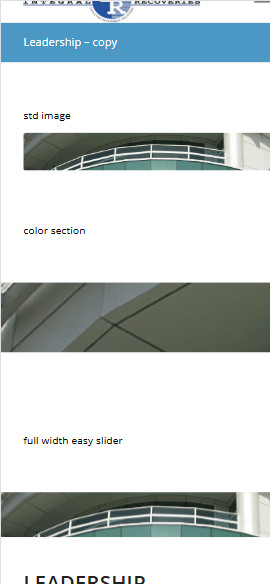
Thank you. However, if you look at the middle image, three options example look what it does to the image.
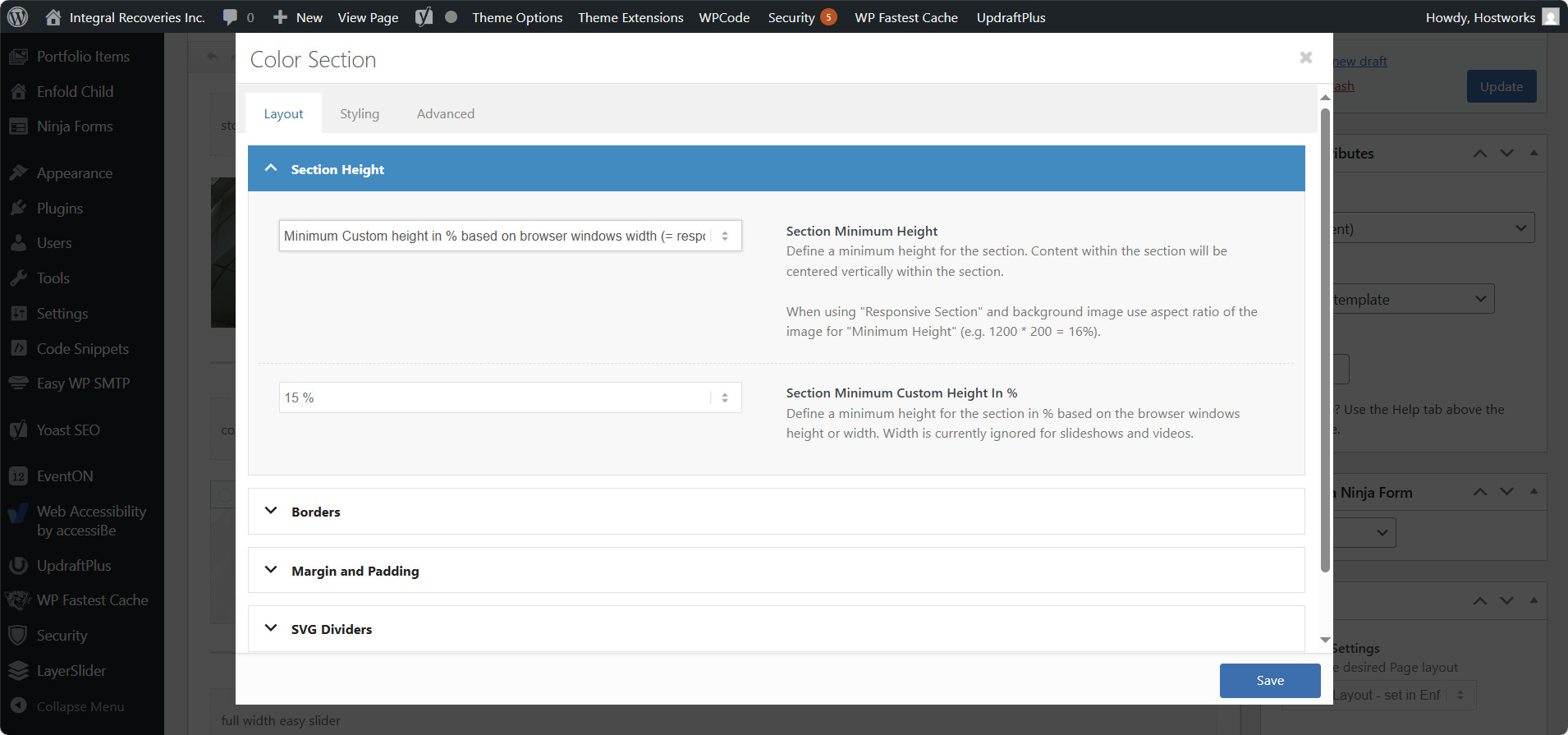
These are the settings I’m using for the color section example.
color section settings
The third image is the full width slider, which operates as I would expect, but I can’t us that. I need the color section background to work as advertised.
I have no content going on top of this element. I’m just trying get an image to display full width.