Code d’achat: 59d5c028-68a2-43ec-8b8d-e795b17edc44 – 21 janvier 2020
Copie: https://www.topopyrenees.com/wp-content/uploads/2005/09/Soutien-Enfold.jpg
Bonjour,
Je suis content de pouvoir dialoguer avec interlocuteur.
Ma question est simple, j’étais avec la version 5.6.6 sans problème depuis 2 ans, et depuis que j’ai installé la version 5.6.8 j’ai dans tous les articles du site topopyrenees.com un message et un lien en bas de toutes les pages: Share on Twitter (avec une croix vers un lien sur Twitter)
Je ne pense pas être le seul et avant de pouvoir télécharger la nouvelle version avec le correctif, pourrai-je avoir le lien pour que je puisse télécharger l’ancienne version 5.6.6 de façon à résoudre provisoirement mon problème.
Malheureusement, je n’ai plus cette version en stock
J’espère que j’aurai une réponse
Hi,
Great, I’m glad that Ismael could help you out. Please let us know if you should need any further help on the topic, or if we can close it.
Best regards,
Rikard
Hi,
Thanks for that.
2. You have this under Appearance->Customize->Extra CSS:
#top .av_toggle_section a {
  color: #dac7a6!important;
}
Please change to the correct colour there.
4. It looks correct on my end, please see screenshot: https://snipboard.io/EO2cfl.jpg. Please try clearing your browser cache, or try opening the site in a private browser window.
Best regards,
Rikard
Hi,
Great, I’m glad that Nikko could help you out. Please let us know if you should need any further help on the topic, or if we can close it.
Best regards,
Rikard
Hey Helen,
I have replied to your question already: https://kriesi.at/support/topic/updated-licence-2/#post-1423790.
If you need help with updating a specific site, then we would need access to it.
Best regards,
Rikard
Hi,
Great, I’m glad that you found a solution. Please let us know if you should need any further help on the topic, or if we can close it.
Best regards,
Rikard
Es gibt einen hook, in den du ein Bild oder eventuell besser noch ein svg setzen könntest: wp_body_open
Es sollte nicht schwer sein das Bild so mit einem z-index zu belegen, der dann den eigentlichen Inhalt überdeckt. Eine getimete Animation der Transformation sollte dann auch möglich sein.
Also für die child-theme functions.php:
add_action('wp_body_open', function() {
if(is_front_page()){
  echo '<div class="body-overlay"></div>';
}
});
für das Quick css:
.body-overlay {
  position: fixed;
  display: block;
  width: 100vw;
  height: 100vh;
  top: 0;
  left: 0;
  z-index: 5000;
  animation: transformUp 3s ease 2s forwards;  /** for shortform see: https://www.w3schools.com/cssref/css3_pr_animation.php ***/
}

.body-overlay {
  background-image: url(/wp-content/uploads/test-london.jpg);
  background-repeat: no-repeat;
  background-size: cover;
}

@keyframes transformUp {
   0% {
       transform: translate(0px, 0px);
   }
   100% {
       transform: translate(0px, -102vh);
   }
}
see: https://webers-testseite.de/
Ismael,
So, that also didn’t work.
I wanted to see if I could be of any help. One of the things I looked at was the hex code in the blocks that needed to be fixed. I checked the theme settings. The Socket Background Color in the General Styling was the culprit.
That leaves me wondering, in changing the Socket Background Color, where else might I see changes? If you could let me know if I need to make any changes, that would be great.
Also, the calendar header currently looks like this. (The inspect element is there so you can see which element is at play).
When I disable the #top .av_inherit_color * so that it was not set to inherit, I get a more presentable appearance, as you can see. Can you tell me how to set the CSS so it tdoesn’t inherit the #top .av_inherit_color *
Thank you!
to this topic possibly one more. I have made the experience that plugins like : Post Types Order could interfere here.
Hi,
Thanks for the update. Please let us know if you should need any further help on the topic, or if we can close it.
Best regards,
Rikard
Hi,
That is totally fine, we deserve it. No request should be left unanswered for that long, we should improve on that for sure.
Please try this CSS as well to remove the grey border:
.container_wrap {
    border-top-width: 0;
}
Best regards,
Rikard
Hi ops79,
Can you try adding this CSS Code in Enfold > General Styling > Quick CSS:
@media only screen and (max-width:1140px) {
  .responsive #top .av_mobile_menu_tablet .av-main-nav .menu-item {
    display: none;
  }

  .responsive #top .av_mobile_menu_tablet .av-main-nav .menu-item-avia-special {
    display: block;
  }
}
This will hide the main menu and replace it with a mobile menu on a screen size that will overlap the logo and main menu.
Hope it helps.
Best regards,
Nikko
Hey schweg33,
Thank you for the inquiry.
You can add this css code to adjust the position of the social icon bookmarks.
#top .social_bookmarks {
    position: relative;
    top: 42px;
    right: 50px;
}

#top .header_color .social_bookmarks a {
    color: #ffffff;
}
And if you want to hide the top header, add this css.
#header_meta, #header_meta .container {
    min-height: 0;
    height: 0;
    margin-top: -30px;
}

.html_header_top.html_header_sticky #top #wrap_all #main {
    padding-top: 55px;
}
Best regards,
Ismael
Hi gfriend70,
There’s no known issue for what you described. I believe the issue maybe more of Woocommerce as you have mentioned.
I looked up to our forum for issues regarding Apple Pay / Google Pay but it’s more of a display issue but not functionality:
– https://kriesi.at/support/topic/proceed-to-checkout-button-not-working-on-mobile-devices/
– https://kriesi.at/support/topic/woocommerce-digital-wallet-default-store-and-paypal-buttons-alignment-spacing/
Best regards,
Nikko
Hi diogovareta,
also how can I place the terms inside the boxes?
Please check on the other thread: https://kriesi.at/support/topic/change-the-word-site-in-the-wordpress-comments-form-box/#post-1423858
Best regards,
Nikko
Hey soltner,
Thank you for the inquiry.
We can’t reproduce the issue on our end. What is the actual model of the device where the screenshot was taken? If the issue persists, please try adding this css code.
@media only screen and (max-width: 489px) {

  /* Add your Mobile Styles here */
  .avia-chrome .avia-gallery-thumb {
    display: flex;
    flex-direction: row;
    flex-wrap: wrap;
  }

  #top #wrap_all .avia-gallery .avia-gallery-thumb a {
    display: block;
    float: none;
  }
}
Best regards,
Ismael
Is there yet any facility to create global ELEMENTS? i.e. elements which can be used throughout a site, on multiple pages, yet only need updating in one place. Maybe call this an element template?
example:
An accordion element is used to display a list of upcoming events, perhaps with 6 or 7 toggle items. This element needs to be shown on 5 different pages of the site (and often in a different position on different pages). It is a real pain to have to update each accordion on five separate pages. So it would be good to have a global ELEMENT TEMPLATE which can be amended in one place but which automatically updates all instances of the element template across anyn pages where it is used.
This idea was partially discussed in this thread 4 years ago…
Has anything happened in the last 4 years? Has this idea been developed?
regards
Hugh
Hey dreamreader,
To edit the menu item subline, first ensure that you have the Screen Options ▸ Description check box enable at the Screen Options at the top of the menu page:

Then you will see the menu item subline:

Best regards,
Mike
Hi,
Great, I’m glad that we could help. Please let us know if you should need any further help on the topic, or if we can close it.
Best regards,
Rikard
Hi,
Thanks for the update. Please let us know if you should need any further help on the topic, or if we can close it.
Best regards,
Rikard
Hi,
Great, I’m glad that you found the problem. Please let us know if you should need any further help on the topic, or if we can close it.
Best regards,
Rikard
Hi,
I’ve finally had to bite the bullet and update PHP. I’ve chosen 8.1 to be safe and it seems to be working fine except this warning in the error log:
[26-Oct-2023 10:19:10 UTC] PHP Warning: Undefined array key “desktop” in /home/blah/public_html/wp-content/themes/enfold/config-templatebuilder/avia-template-builder/php/base-classes/class-popup-templates-responsive.php on line 460
[26-Oct-2023 10:19:10 UTC] PHP Warning: Undefined array key “desktop” in /home/blah/public_html/wp-content/themes/enfold/config-templatebuilder/avia-template-builder/php/base-classes/class-popup-templates-responsive.php on line 462
[26-Oct-2023 10:19:16 UTC] PHP Warning: Undefined array key “desktop” in /home/blah/public_html/wp-content/themes/enfold/config-templatebuilder/avia-template-builder/php/base-classes/class-popup-templates-responsive.php on line 460
[26-Oct-2023 10:19:16 UTC] PHP Warning: Undefined array key “desktop” in /home/blah/public_html/wp-content/themes/enfold/config-templatebuilder/avia-template-builder/php/base-classes/class-popup-templates-responsive.php on line 462
[26-Oct-2023 10:19:35 UTC] PHP Warning: Undefined array key “desktop” in /home/blah/public_html/wp-content/themes/enfold/config-templatebuilder/avia-template-builder/php/base-classes/class-popup-templates-responsive.php on line 460
[26-Oct-2023 10:19:35 UTC] PHP Warning: Undefined array key “desktop” in /home/blah/public_html/wp-content/themes/enfold/config-templatebuilder/avia-template-builder/php/base-classes/class-popup-templates-responsive.php on line 462
[26-Oct-2023 10:19:49 UTC] PHP Warning: Undefined array key “desktop” in /home/blah/public_html/wp-content/themes/enfold/config-templatebuilder/avia-template-builder/php/base-classes/class-popup-templates-responsive.php on line 460
[26-Oct-2023 10:19:49 UTC] PHP Warning: Undefined array key “desktop” in /home/blah/public_html/wp-content/themes/enfold/config-templatebuilder/avia-template-builder/php/base-classes/class-popup-templates-responsive.php on line 462
[26-Oct-2023 10:20:57 UTC] PHP Warning: Undefined array key “desktop” in /home/blah/public_html/wp-content/themes/enfold/config-templatebuilder/avia-template-builder/php/base-classes/class-popup-templates-responsive.php on line 460
[26-Oct-2023 10:20:57 UTC] PHP Warning: Undefined array key “desktop” in /home/blah/public_html/wp-content/themes/enfold/config-templatebuilder/avia-template-builder/php/base-classes/class-popup-templates-responsive.php on line 462
[26-Oct-2023 10:20:58 UTC] PHP Warning: Undefined array key “desktop” in /home/blah/public_html/wp-content/themes/enfold/config-templatebuilder/avia-template-builder/php/base-classes/class-popup-templates-responsive.php on line 460
[26-Oct-2023 10:20:58 UTC] PHP Warning: Undefined array key “desktop” in /home/blah/public_html/wp-content/themes/enfold/config-templatebuilder/avia-template-builder/php/base-classes/class-popup-templates-responsive.php on line 462
Is there something I’m missing? I’ve flushed caches, compiled CSS, JS, etc.
Thanks,
Paul.
Hi Mike
Looks like «Real Cookie Banner» can handle with Mulitlanguage WP Sites:
https://wordpress.org/support/topic/real-cookie-banner-and-multilingual-wordpresses/
Thank you
Steve
Everything fine and ready to close the topic. Thank you!
Hi,
Great, I’m glad to hear that you got things working. Please let us know if you should need any further help on the topic, or if we can close it.
Best regards,
Rikard
Hi,
Great, I’m glad to hear that things are working as expected for you now. Please let us know if you should need any further help on the topic, or if we can close it.
Best regards,
Rikard
i think ismaels code should work.
on looking for this from docu:
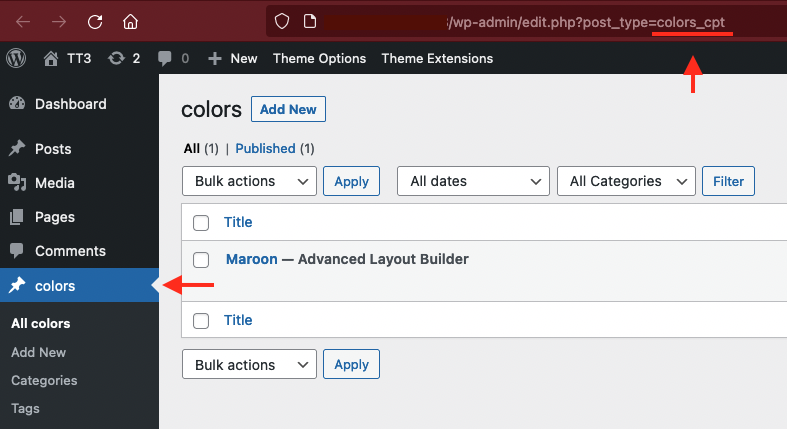
click on your CPT on dashboard and look to the url window on top – what post-type you see there
f.e. on portfolio ( which is a CPT too ). you see: edit.php?post_type=portfolio
try a shortform – then with the info you get from that url window
add_filter("avia_post_slide_query", function($query) {
    unset($query["post_type"]["vacature"]);
    return $query;
}, 10, 1);
Hey Michael,
Please try the following in Quick CSS under Enfold->General Styling:
@media only screen and (max-width: 400px) {
#top .avia_ajax_form .text_input {
    width: 90%;
    display: table;
    margin: 0 auto;
}
}
Best regards,
Rikard



