hallo @mofix – you can see here an updated snippet that will pull out the enfold options to determine the content width.
https://kriesi.at/support/topic/non-fullwidth-portfolio-or-grid-row-gets-colored-sides/#post-1491061
Hi,
Thanks for the update. Please let us know if you should need any further help on the topic, or if we can close it.
Best regards,
Rikard
You’re talking about the grid row element, right?
Edit: sadly you did not post a link to your page – but your screenshot is clear enough – i found your site now.
Because it looks exactly the same when you set a grid-row by css to to be not full-width, I thought you had used this element.
____________
So – why don’t you put the portfolio grid inside a 1/1 Container
The Color-Section can have the one background-color – and the 1/1 Container a different one.
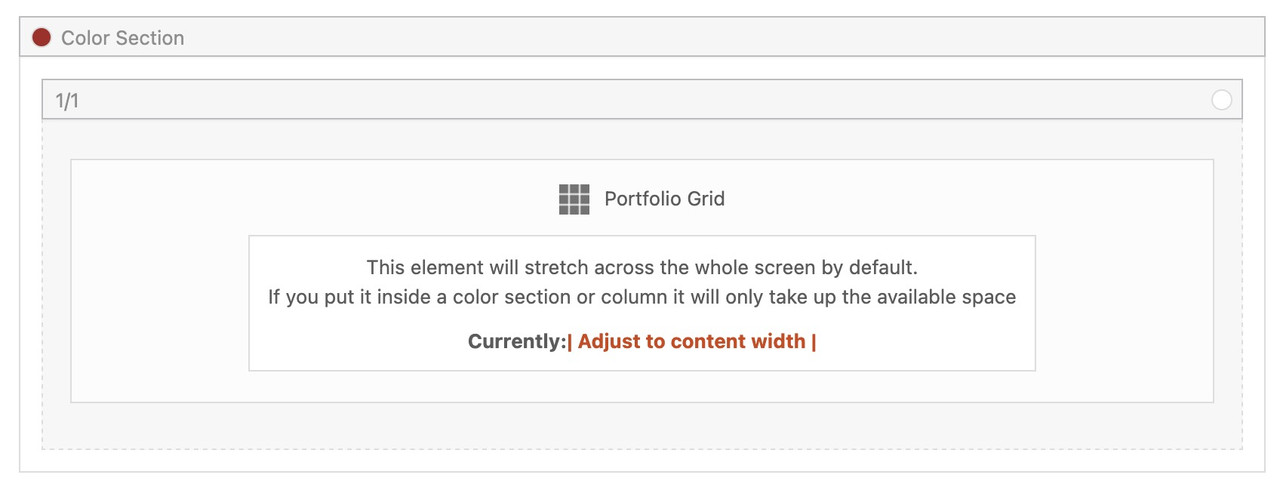
if you then do not want on top and bottom of the 1/1 Container the background-color of the Section just remove padding-top and padding-bottom of 50px.
did you try out my suggestions? https://kriesi.at/support/topic/video-on-home-page-2/
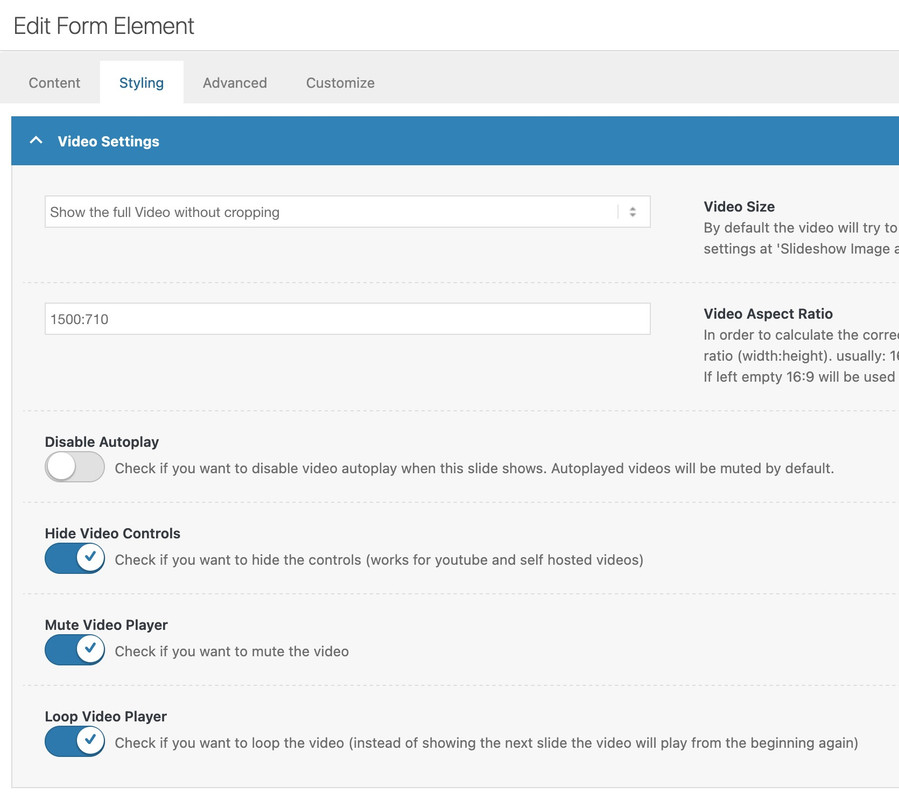
and again see your video placed on one of my testpages: https://webers-testseite.de/lara-video/
the only thing you had to know is the aspect ratio of your video ( in your case 1500:710 ) and this is not 16/9
this belongs to paragraph margin setting. So maybe it is enogh to only get rid of default margin-top value on first p tag.
#top p:first-child {
  margin-top: 0 ;
}
Filesize is on original jpg small enough – so you can insert the full image. Maybe that is a bit sharper then.
And maybe you switch earlier to hamburger menu :
@media only screen and (max-width: 1200px) {
    #top #header .av-main-nav > li.menu-item  {
        display: none!important;
    }
    #top #header .av-burger-menu-main {
        cursor: pointer;
        display: block!important;
    }
}
Hi there,
When using the next and previous buttons in a standard post, I’d like the next or previous post to be from the same category.
I found this filter (in a topic from 2017 …) but that doesn’t work for me:
add_filter(‘avia_post_nav_categories’, ‘use_same_category_filter’);
function use_same_category_filter($same_category)
{
$same_category = true;
return $same_category;
}
Is there another solution maybe?
Beste regards,
Steven
Hi Rikard,
Yes, I did try both Chrome and Safari. I just tried a private window on Safari and I still get the spinning wheel when trying to access the Avia layout builder elements (see screen shot). BTW, this happens on other pages using the AviaLayout Builder instead of Default. Pushing this further, I managed to finally get to see the elements and modify them after logging out and logging back in. But this trick only last a little while since I need to repeat this step if I stop working for a while and I wish to get back to it.
I have also noticed that I have problems saving changes when working on modifying attributes or changes in variations on product pages. I must use the same trick as described above to regain access to product editing.
It’s very puzzling. Can you take a second look?
Thanks in advance.
Philip
Hi,
Thanks for the update. Please let us know if you should need any further help on the topic, or if we can close it.
Best regards,
Rikard
hm – if so – then it had to be a part of your layerslider – because on my testpage i got an advanced layerslider too on top – but ajax search acts normal.
https://webers-testseite.de
or https://webers-testseite.de/advanced-layerslider/
sorry Typo in link
Hi Yigit, i am still searching for the root cause, as time is very limited right now. What i found is: If i remove the LayerSlider at the top it does not looses focus anymore. It only happens if the layer slider is there after a slide is switched and it starts to show the text on the new slide. If i have any more Updates ill post here.
How can I change the style here? I would like to: 1. Change this text to German. 2. Change the appearance here so that it looks like 3 (black background, white text).
4. I would like the header on the homepage to be invisible and only appear when scrolling in the mobile view. And it should also be like this in the desktop view – currently, the header doesn’t appear at all when scrolling (desktop view).
Thanks, Alex
Hi,
We create a horizontal scroll for small screens:
Could be possible that when the page loading the scroll will be in the middle?
Many thanks.
BR
Hello,
I was able to fix the image problem with additional CSS.
There is still an issue with the search box in the top right corner of the nav bar. When you enter search terms, a drop-down appears with results; however, it closes really quickly, and you cannot click any of the results. How do I fix this?
Also, when you go to a product detail page, it use to show the details, but after an update, you now have to click details like it’s a button. How can I make it always visible again?
Example: https://dpfsource.com/product/ct350-da/
Thanks
css depends on the place where you show it – f.e. in the top header:
#top #wrap_all .av-social-link-bluesky:hover a {
    color: #fff;
    background-color: #1185fe;
}
#top #wrap_all .av-social-link-bluesky a svg * {
    fill: var(--enfold-header_replacement_menu_color);
}
#top #wrap_all .av-social-link-bluesky a:hover svg * {
    fill: #FFF
}
Hi, I’d like the logo on my website https://www.avvocatoambienteesicurezza.it to be visible only in the mobile version.
I added the code .logo { display: none !important; } to the CSS, but obviously it hides the logo everywhere, even in the desktop version. Can you please help? Thanks, Gianluca.
Hi,
Please also keep in mind my previous post about how caching plugins work with javascript and the limitations with screen sizes.
Best regards,
Mike
 Uta Gleiser
Guest
Dear Kriesi Team, I am using the Enfold Child Theme 1.0
When my homepage was built in 2018, I paid the Enfold Theme costs to the person who built it, but I never received the license.
The site is still running on Version 1.0, but there are now difficulties with PHP updates.
I guess it’s because I never updated the Enfold theme. Is it possible to buy a new license and update my site? Please let me know. Then I will buy a new one.
Hey Uta,
Quintuple post, closing.
Best regards,
Rikard
What does: Quintuple post, closing. mean?
How can I get the new update? How can I pay for it? And how much does it cost? I cannot find any help on this topic on your site. Please let me know how i can purchase an update for my homepage and if a new update will fix the PHP problem?
Thanks Uta
you can try:
#top .avia-featureimage-slideshow .avia-caption-title a {
  display: inline-block;
  line-height: 1.4em;
  background-color: rgba(0,0,0,0.3);
  backdrop-filter: blur(4px);
  padding: 5px 8px;
  border: 2px solid #FFF;
  border-radius: 5px
}
Just leave out the border styling if you don’t like to have it. I’ve now adjusted it so that it fits the button.
Hi,
Thanks for the update. Please let us know if you should need any further help on the topic, or if we can close it.
Best regards,
Rikard
Hi,
Thanks for the update. Please let us know if you should need any further help on the topic, or if we can close it.
Best regards,
Rikard
the position of those arrows is set in testimonials.css by:
#top .av-large-testimonial-slider .avia-slideshow-arrows a {
  margin-top: -1px
}
so if you like them above the content area – try:
@media only screen and (max-width:767px) {
  #top .avia-testimonial-wrapper {
    overflow: visible !important;
  }
  #top #wrap_all .av-large-testimonial-slider .avia-slideshow-arrows a {
    margin-top: -50px;
    opacity: 0.5;
  }
}
but you had to be shure that the content from above the testimonials does not come into conflict with that area.
Hey mntsrvcs,
Thank you for the inquiry.
This is possible, but you will need to directly modify the includes > loop-search.php file. Please check the links below for more info.
— https://kriesi.at/support/topic/add-featured-image-to-search-results/#post-249161
— https://kriesi.at/support/topic/change-layout-search-results/#post-1359284
Best regards,
Ismael
Hello,
I purchased extended support for my current site. My site is running Woocommerce and I am trying to add product images to the search results page. I have tried using the Advanced Woo Search plugin, but it is not working, and I believe it is due to a conflict with the Enfold theme.
Also, I have a search box in the top right corner of the nav bar. When you enter search terms, a drop-down appears with results; however, it closes really quickly, and you cannot click any of the results. How do I fix this?
Hi
I have a variable product (see below) on my site but the price span is not showing up.
I disabled all plugins to check but that didn’t change anything.
Added this code:
#top .price span {
display: inline !important;
}
but same result. Only the first price is there.
Can you see what’s wrong?
thanks
Nancy
Hi Mike,
Thank you very much. I removed custom-slider-nav
But dot not showing on mobile with
/* Hide dot navigation on desktop devices */
@media only screen and (min-width: 768px) {
.avia-slideshow-dots {
display: none !important;
}
}
/* Hide arrow navigation on mobile devices */
@media only screen and (max-width: 767px) {
.avia-slideshow-arrows a {
display: none !important;
}
/* Optional: Ensure the dots are visible on mobile if they were hidden by another setting */
.avia-slideshow-dots {
display: block !important;
}
}
see my edit above – posting the same time
try:
#top picture.avia_image {
  display: flex !important;
}
and maybe you like to have more contrast on hovering the images:
#top a.avia_image .av-image-caption-overlay-center {
  position: absolute;
  top: 50%;
  transform: translateY(-50%);
  display:  grid;
  margin: 5px 25px;
  font-size: 1.2em
}

#top a.avia_image:hover .av-image-caption-overlay-center {
  color: #940000;
  background-color: rgba(255,255,255,0.6);
  backdrop-filter: blur(4px);
}

#top .av-image-caption-overlay-center p {
  margin: 10px 0 !important;
}



