Viewing 30 results - 391 through 420 (of 142,921 total)
  • Author
    Search Results
  • #1493702

    Hi,

    Thank you for the inquiry.

    Did you toggle the visibility of the image elements using Advanced > Responsive > Element Visibility settings? If you need to exclude the image from the lightbox, you may need to create a duplicate of the entire section — one for desktop and another for smaller screens.

    Best regards,
    Ismael

    #1493698

    how did you insert that image to your page? as image element – or inside a text-block element or via masonry gallery etc. pp.
    why do i ask this : if you can separate these images to different sections – then they will not group together. And you can set the responsive visibility on the section.

    but if you have the images inside a common section then –
    see: https://webers-testseite.de/munford-lightbox/

    sadly for that setting of some images are grouped – some are not ( the layout image is a lightbox image too) the solution of Mike does not work here

    see : https://kriesi.at/support/topic/accordion-slider-stop-allowing-all-images-to-show-in-slider/#post-1435313

    Don’t worry, the script only runs if groups are actually set on the page, otherwise the script will abort.

    #1493693

    In reply to: Main Content

    ho provato a creare una “Immagine in evidenza Slider”
    ho agganciato la categoria come immagine ma non le carica tutte e poi vorrei vedere le immagine + piccole.

    Eventualmente “Accordion Slider” le immagini non si posso far vedere + grandi ?
    Devo cercare di creare bene o male la stessa cosa ..
    https://imgur.com/a/consiglio-tsd2SF3

    è importante per favore chiedo assistenza..

    #1493692

    In reply to: Masonry falls apart

    Thank you – but I recommend using the unscaled images

    f.e.:
    http://www.interior-collection.de/wp-content/uploads/2025/12/IMG_7870-1.jpg : 135kb
    http://www.interior-collection.de/wp-content/uploads/2025/12/IMG_7870-1-529×705.jpg : 285kb (imgSize: masonry – 705×705)

    so better resolution but less file size.

    background on that : search for : avf_jpeg_quality
    e.g: https://kriesi.at/support/topic/enfold-creating-images-larger-than-the-orginal/#post-1488786

    #1493691
    ThorstenFB
    Guest

    Hi,

    is it possible to have 7 rows in the portfolio masonry?

    This tip no longer seems to be valid for the current Enfold version:

    I would be glad if you could help!
    Thanks, Thorsten

    ThorstenFB
    Guest

    Hi,

    to open portfolio links in a new tab, I followed the instructions here: https://kriesi.at/support/topic/portfolio-custom-link-target_blank/#post-715795

    This works quite well so far. But portfolio entries that are loaded afterward (via the “load more” button) are still opened in the same tab.

    I would therefore appreciate your help.
    Thanks a lot!

    Thorsten

    #1493687

    In reply to: Masonry falls apart

    One thing is that your images you use are not wide enogh to fill the column width.

    you can test my suggestion on placing this to your quick css for that section on that page:

    #top.postid-3536 #av_section_3 .av-masonry-image-container img {
      width: 100%;
    }

    or use the non scaled images ( original sizes ) : No Scaling (Original Width X Original Height)

    #1493678

    Hey Johannes,

    Thank you for the inquiry.

    You have to edit the cells with the background image, go to Advanced > Developer Settings, and apply the Custom CSS Class name “av-cell-with-image”. After that, add the following css in the Enfold > General Styling > Quick CSS field code to set a minimum height for the cell, which will also enlarge the image.

    @media only screen and (max-width: 767px) {
    
      /* Add your Mobile Styles here */
      .responsive #top #wrap_all .av-flex-cells .av-cell-with-image {
        min-height: 300px;
      }
    }

    Please check this link for more info on adding custom css class names to builder elements.

    https://kriesi.at/documentation/enfold/add-custom-css/#enable-custom-css-class-name-support

    Best regards,
    Ismael

    #1493664

    In reply to: EnfoldVersie: 4.1.2

    Hey theovh,

    The update to 7.1.3 has to be done manually from the version you are running, please refer to my replies in this thread: https://kriesi.at/support/topic/enfold-4-5-theme-update-update-failed-download-failed-a-valid-url-was-not-pro/#post-1021541
    You can either update manually via FTP: https://kriesi.at/documentation/enfold/how-to-install-enfold-theme/#theme-update, or upload the theme as if it was new under Appearance->Themes->Add New Theme.
    If that doesn’t work then please try to delete the whole theme folder, then replace it with the new version. Make sure that you have backups of the site before starting updating.
    Also please read this after you have updated: https://kriesi.at/documentation/enfold/theme-registration/

    Best regards,
    Rikard

    #1493649

    Hi,

    Thank you for the clarification.

    For the logo gallery, please try this css code:

    
    @media only screen and (max-width: 767px) {
    
      /* Add your Mobile Styles here */
      #top .avia-gallery.av-mjabjuis-f54f34654bc47b429b2e48aacd63c8d1 .avia-gallery-thumb a {
        width: 100%;
      }
    }

    Let us know how it goes.

    Best regards,
    Ismael

    #1493644

    In reply to: portfolio grid styling

    for the bar under the images try:

    .avia_transform #top .avia-fullwidth-portfolio .grid-content,
    .avia_transform #top .avia-fullwidth-portfolio .grid-entry-title,
    .avia_transform #top .avia-fullwidth-portfolio .avia-arrow {
      background-color:  var(--enfold-main-color-primary) !important;   /* ==== or any color you like === */
    } 
    
    .avia_transform #top .avia-fullwidth-portfolio .grid-entry-title{
      color: #FFF
    }
    #1493629

    In reply to: update Enfold theme

    Hey Robert,

    Theme licenses are valid for life. The update to 7.1.3 has to be done manually from the version you are running, please refer to my replies in this thread: https://kriesi.at/support/topic/enfold-4-5-theme-update-update-failed-download-failed-a-valid-url-was-not-pro/#post-1021541
    You can either update manually via FTP: https://kriesi.at/documentation/enfold/how-to-install-enfold-theme/#theme-update, or upload the theme as if it was new under Appearance->Themes->Add New Theme.
    If that doesn’t work then please try to delete the whole theme folder, then replace it with the new version. Make sure that you have backups of the site before starting updating.
    Also please read this after you have updated: https://kriesi.at/documentation/enfold/theme-registration/

    Best regards,
    Rikard

    #1493623

    Hi,

    Thank you for the update.

    For the product page, try to add the solution provided in this thread: https://kriesi.at/support/topic/enfold-sidebar-on-single-product-pages/#post-1162484

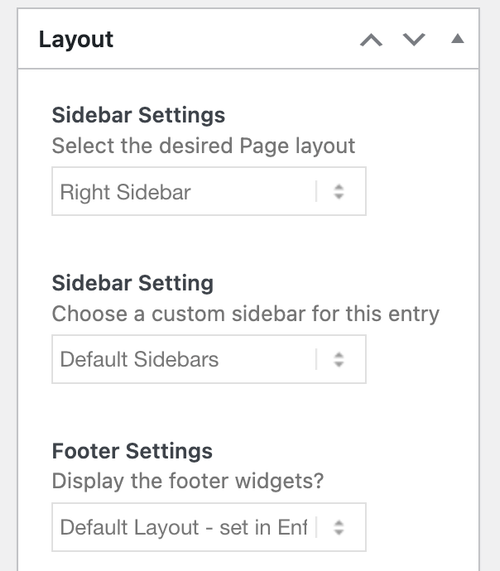
    And for the home page, make sure to adjust Layout > Sidebar Settings.

    fh4cBKF.md.png

    Let us know the result.

    Best regards,
    Ismael

    Hi,

    I’ve revised the test page for the Liberty radiator — the dropdowns now correctly match the finish and the corresponding image in the slider.

    Some product pages will include both colour and size variants and will therefore require three dropdowns. Other pages will only have a size variant and will just need a single dropdown.

    If this setup isn’t possible, is there a way to use the native WooCommerce variation images instead of the Enfold slider, while still keeping the other content elements on the page — effectively a hybrid approach?

    I came across this support topic, which suggests it may be possible:

    Enfold / WooCommerce product variations

    I can provide guest login access to the dev site if required.

    Please advise.

    Thanks

    Hi,

    Thanks for the update. I’ve imported the content for the top level pages for you, please review your site. Please note that the theme settings and images are not included. Let us know if you should need anything more from the demo.

    Best regards,
    Rikard

    #1493600
    blaircomm1
    Participant

    Hi, Is there any way to stick the social icons to the bottom in a fixed frame layout, left sidebar menu? I have tried everything.

    The icons appear stacked right under the menu with top and side white borders. It would be a great asset if they could be sticky to the bottom of the sidebar, (header), menu. On desktop, tablet, and mobile. Compatible across devices.

    Thanks — Michael

    #1493595

    In reply to: RE: Theme auto-update?

    Hey Matt,

    If you don’t own a license, then I would recommend that you purchase one since you need a purchase code to access the support forum, and a token to receive updates. You can get a license here: https://themeforest.net/item/enfold-responsive-multipurpose-theme/4519990

    Once you have access to the theme files, then the update to 7.1.3 has to be done manually from the version you are running, please refer to my replies in this thread: https://kriesi.at/support/topic/enfold-4-5-theme-update-update-failed-download-failed-a-valid-url-was-not-pro/#post-1021541
    You can either update manually via FTP: https://kriesi.at/documentation/enfold/how-to-install-enfold-theme/#theme-update, or upload the theme as if it was new under Appearance->Themes->Add New Theme.
    If that doesn’t work then please try to delete the whole theme folder, then replace it with the new version. Make sure that you have backups of the site before starting updating.
    Also please read this after you have updated: https://kriesi.at/documentation/enfold/theme-registration/

    Best regards,
    Rikard

    #1493591
    Matt
    Guest

    This is a reply to the thread here:

    I am unable to reply to the original thread because we do not have an account. I am unable to create an account because I do not have the original purchase code, which is required for account creation. In any case, sorry for double-posting.

    Thank you for your reply! Please bear with us for a little while longer while we sort this out…

    1. We do not have a Themeforest account. The website was created by a freelance developer who is no longer able to provide support. We do not have any information about his actual theme purchase – we just have the finished product.

    2. We are willing to do whatever we need to in order to get the website set up to auto-update. If this means re-purchasing a theme or subscription, we really have no other option. We are a non-profit for addiction recovery and are unable to have developers on staff – our original goal was a webpage that can maintain itself without intervention. (Hence the hosting at wordpress.com to automatically take care of updates, etc.).

    Please let us know how we need to go forward – knowing that we have none of the original purchase info – so that we can auto-update. We are limited technically, so any support you can offer would be appreciated. It sounds like a simple job but we’re afraid to get in over our heads!

    Thanks very much for your help.

    #1493588
    ThorstenFB
    Guest

    Hi,

    the gallery is displayed on mobile devices with the same number of rows as in the desktop view. I have already checked the forum but couldn’t find a solution for my website. For example, the following solution does not work: https://kriesi.at/support/topic/change-gallery-grid-in-mobile/

    I would really appreciate it if you could help me.

    Cheers
    Thorsten

    #1493574

    here we go – Edit: i think this is the better way to do it :
    https://kriesi.at/support/topic/layerslider-translation-into-german-does-not-work/#post-1493597
    ________________________
    (just for standalone plugin – not for the included layerslider)

    /**
     * LayerSlider: Auto-Patch for Select Option of lang files
     */
    
    // 1. Daily auto-patch
    function child_theme_layerslider_auto_patch() {
        if (!defined('LS_ROOT_PATH')) {
            return;
        }
        
        // Check only once a day
        $last_check = get_option('layerslider_patch_last_check', 0);
        if (time() - $last_check < DAY_IN_SECONDS) {
            return;
        }
        
        child_theme_patch_layerslider_template();
        update_option('layerslider_patch_last_check', time());
    }
    add_action('admin_init', 'child_theme_layerslider_auto_patch', 999);
    
    // 2. Patch-Function
    function child_theme_patch_layerslider_template() {
        $template_file = LS_ROOT_PATH . '/templates/tmpl-plugin-settings.php';
        $locales_dir = LS_ROOT_PATH . '/locales';
        
        if (!file_exists($template_file) || !is_dir($locales_dir)) {
            return false;
        }
        
        // Find available languages
        $available_languages = child_theme_get_available_languages($locales_dir);
        
        if (empty($available_languages)) {
            return false;
        }
        
        $content = file_get_contents($template_file);
        
        // language names
        $language_names = [
            'de_DE' => 'Deutsch',
            'de_DE_formal' => 'Deutsch (Sie)',
            'de_CH' => 'Deutsch (Schweiz)',
            'de_CH_informal' => 'Deutsch (Schweiz, Du)',
            'de_AT' => 'Deutsch (Österreich)',
            // add lang names needed for your uploaded lang files
        ];
        
        // protected default languages 
        $protected_languages = ['auto', 'en_US', 'fr_FR', 'hu_HU', 'uk'];
        
        $modified = false;
        
        // PART 1: Adding missing languages
        $new_options = '';
        foreach ($available_languages as $locale) {
            if (strpos($content, 'value="' . $locale . '"') !== false) {
                continue;
            }
            
            $language_name = isset($language_names[$locale]) ? $language_names[$locale] : $locale;
            $new_options .= "\n\t\t\t\t\t\t<option value=\"" . $locale . "\" <?php echo ( \$custom_locale === '" . $locale . "' ) ? 'selected' : ''?>>" . $language_name . "</option>";
            $modified = true;
        }
        
        if (!empty($new_options)) {
            $search = '<option value="auto" <?php echo ( $custom_locale === \'auto\' ) ? \'selected\' : \'\'?>><?php _e(\'Site default\', \'LayerSlider\') ?></option>';
            $replace = $search . $new_options;
            $content = str_replace($search, $replace, $content);
        }
        
        // PART 2: Removing languages that no longer exist
        foreach ($language_names as $locale => $name) {
            if (in_array($locale, $protected_languages)) {
                continue;
            }
            
            if (strpos($content, 'value="' . $locale . '"') !== false && !in_array($locale, $available_languages)) {
                $pattern = '/\s*<option value="' . preg_quote($locale, '/') . '"[^>]*>.*?<\/option>/';
                $new_content = preg_replace($pattern, '', $content);
                
                if ($new_content !== $content) {
                    $content = $new_content;
                    $modified = true;
                }
            }
        }
        
        if (!$modified) {
            return true;
        }
        
        // Back up and save
        file_put_contents($template_file . '.backup-' . date('Y-m-d-His'), file_get_contents($template_file));
        file_put_contents($template_file, $content);
        
        return true;
    }
    
    // 3. helper function
    function child_theme_get_available_languages($locales_dir) {
        $languages = [];
        $files = glob($locales_dir . '/LayerSlider-*.mo');
    
        if (!$files) {
            return $languages;
        }
    
        foreach ($files as $file) {
            $filename = basename($file, '.mo');
            $locale = str_replace('LayerSlider-', '', $filename);
            if (!empty($locale)) {
                $languages[] = $locale;
            }
        }   
        return $languages;
    }
    
    // 4. Automatically patch after plugin update
    function child_theme_layerslider_after_update($upgrader_object, $options) {
        if ($options['action'] !== 'update' || $options['type'] !== 'plugin') {
            return;
        }
        
        if (!isset($options['plugins'])) {
            return;
        }
        
        foreach ($options['plugins'] as $plugin) {
            if (strpos($plugin, 'layerslider') !== false || strpos($plugin, 'LayerSlider') !== false) {
                delete_option('layerslider_patch_last_check');
                child_theme_patch_layerslider_template();
                break;
            }
        }
    }
    add_action('upgrader_process_complete', 'child_theme_layerslider_after_update', 10, 2);
    
    /**
     * END of LayerSlider: Auto-Patch for Select Option of lang files
     */

    Summary of the final solution:
    ✅ Upload language files to /LayerSlider/assets/locales/
    ✅ Automatic patch after 24 hours
    ✅ Automatic patch after plugin updates
    ✅ when needed: delete_option(‘layerslider_patch_last_check’); – for immediate patch

    these snippets will inspect each day – if there are additional lang files for LayerSlider

    PS: You can force the patcher by temporarily inserting the following to your child-theme functions.php: delete_option('layerslider_patch_last_check');
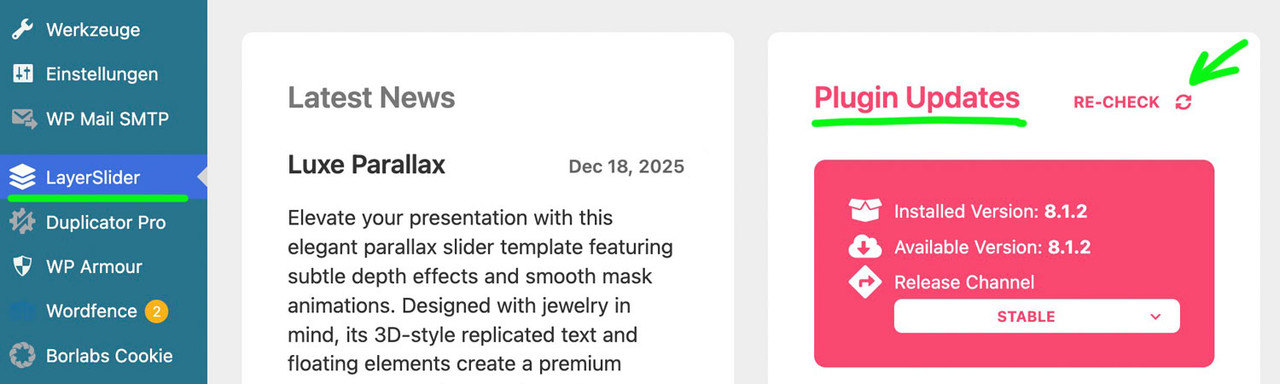
    after that goto Layerslider Dashboard and : Plugin Updates – Re-Check

    #1493565
    a10plus
    Participant

    Hi, text transform to none doesn’t work anywhere in my site.
    (not in quick css not in advanced style (https://www.buurtoppeil.nl)

    none of the usual things work?!

    Kind regards Pieter Kuiper

    #1493515

    Hey omnicnc,

    I see that you are running an old version of the theme, could you try to update to the latest version (7.1.3) to see if that helps please? The update to 7.1.3 has to be done manually from the version you are running, please refer to my replies in this thread: https://kriesi.at/support/topic/enfold-4-5-theme-update-update-failed-download-failed-a-valid-url-was-not-pro/#post-1021541
    You can either update manually via FTP: https://kriesi.at/documentation/enfold/how-to-install-enfold-theme/#theme-update, or upload the theme as if it was new under Appearance->Themes->Add New Theme.
    If that doesn’t work then please try to delete the whole theme folder, then replace it with the new version. Make sure that you have backups of the site before starting updating.
    Also please read this after you have updated: https://kriesi.at/documentation/enfold/theme-registration/

    Best regards,
    Rikard

    #1493505

    In reply to: upgrade version

    Hey Ondrej,

    The update to 7.1.3 has to be done manually from the version you are running, please refer to my replies in this thread: https://kriesi.at/support/topic/enfold-4-5-theme-update-update-failed-download-failed-a-valid-url-was-not-pro/#post-1021541
    You can either update manually via FTP: https://kriesi.at/documentation/enfold/how-to-install-enfold-theme/#theme-update, or upload the theme as if it was new under Appearance->Themes->Add New Theme.
    If that doesn’t work then please try to delete the whole theme folder, then replace it with the new version. Make sure that you have backups of the site before starting updating.
    Also please read this after you have updated: https://kriesi.at/documentation/enfold/theme-registration/

    Best regards,
    Rikard

    Hi Guenni007, thank you so much for the heads-up! I’ve just added both entries via wp_head as you suggested. I’ll update the topic! Thanks for your help and Merry Christmas

    #1493489

    Hi,
    Thanks for the login and your patience, I set your main menu: mainnavigation_mm and your secondary menu: secondarymenu and enabled the Header Secondary Menu in the theme options, and it seems to be working correctly. The Secondary Menu (10 items) is displayed in the top bar of the header, and the main menu is displayed under the logo, as per your theme settings. Please see the screenshot below.
    If this is not what you want, please advise, perhaps a mockup screenshot would help.

    Best regards,
    Mike

    #1493486

    Hi,
    Thanks for sharing your solution, shall we close this thread then? If you have questions on a different topic feel free to open a new thread.

    Best regards,
    Mike

    although you have the grid the different “images” are placed in a slide-loop and the slides are numbered – starting at number 1 from left to right – to to bottom : slide-loop-1, slide-loop-2, slide-loop-3 etc.

    so you can address the “image” via that class – why i do note it as “image” these are background-images – no img tag here !
    So a padding will not bring you to your wanted result.

    but try f.e.:

    #top .avia-logo-grid .slide-entry-wrap .slide-loop-6 .av-partner-fake-img {
      background-size: 80% !important;
      background-position: center;
      background-color: inherit;
    }

    if you want it for only that element – give a custom ID or class to the partner-logo element.
    e.g. with my-custom-class

    #top .avia-logo-grid.my-custom-class .slide-entry-wrap .slide-loop-6 .av-partner-fake-img {
      background-size: 50% !important;
      background-position: center;
      background-color: inherit;
    }

    if you use a jpg for that slide – change the background-color to the background of that jpg.

    #1492761

    Hey dotsystem,

    Thank you for the inquiry.

    Try to add this css code to adjust the order of the sidebar and product content in the mobile view.

    .responsive #top #main .container_wrap.container_wrap_first.main_color.sidebar_left.template-shop .container {
        display: flex;
        flex-direction: column;
    }
    
    .responsive #top #main .sidebar.smartphones_sidebar_active {
        order: 1;
    }
    
    .responsive #top #main main.template-shop.content.av-content-small.units {
        order: 3;
        padding-left: 0;
        padding-top: 0;
    }

    Best regards,
    Ismael

    #1492759
    dotsystem
    Participant

    Hello
    How do I set the category sidebar in the shop tab on mobile so that it displays at the top above the products and not at the bottom at the end of the page behind the products?

    But on computers I would like the sidebar with categories to still be displayed on the left.

    Hi,
    I would expect the script to work on mobile also, but we will be testing on desktop to start.
    The size of the images should not matter, but each product needs to have the same number of images as the variations.

    Best regards,
    Mike

Viewing 30 results - 391 through 420 (of 142,921 total)