Viewing 30 results - 3,181 through 3,210 (of 142,851 total)
  • Author
    Search Results
  • #1470911

    I think I have solved the issue with the following CSS code;
    @media only screen and (max-width: 1170px) and (max-height: 844px), only screen and (max-width: 375px) and (max-height: 812px) {
    #top #wrap_all .avia-slideshow .av-slideshow-caption.av-19l7r0yx-f4a9287caa6e093433c04f70226b8e0c__1 .avia-caption-title {
    margin-top: 10px !important;
    font-size: 38px !important;
    }
    }

    #1470910
    rvga
    Participant

    Hi guys,
    I’ve followed Josue’s replies and install his code in my function.php.
    Unfortunately I got 4 warnings in my page where i put the short code: [sc_post_meta]
    Warning: Undefined variable $the_id in /home/clients/ca7e2af87e8817d7beea16693c3493d9/sites/esprit_colo/wp-content/themes/enfold-child/functions.php on line 46
    Warning: Undefined variable $the_id in /home/clients/ca7e2af87e8817d7beea16693c3493d9/sites/esprit_colo/wp-content/themes/enfold-child/functions.php on line 48
    Warning: Undefined variable $the_id in /home/clients/ca7e2af87e8817d7beea16693c3493d9/sites/esprit_colo/wp-content/themes/enfold-child/functions.php on line 48
    Warning: Undefined variable $the_id in /home/clients/ca7e2af87e8817d7beea16693c3493d9/sites/esprit_colo/wp-content/themes/enfold-child/functions.php on line 56
    Where am I wrong?
    I don’t know how to fix that.
    Any help will be appreciated.
    Thx

    P.S I’m currently with an old version 4.8.8 (I will upgrade it later) maybe it is an explanation…

    • This topic was modified 1 year, 4 months ago by rvga.
    #1470906

    Please review the latter part of post #1470028.

    I removed the 495px image from the equation to simplify matters.

    The question now is why is Remote Debug for Android devices indicating that Android is loading the Full size (700x394px) image and not the Square (180x101px) specified? Yet on PC desktop the correct 180px image is being loaded. Or is Remote Debug wrong?

    #1470903

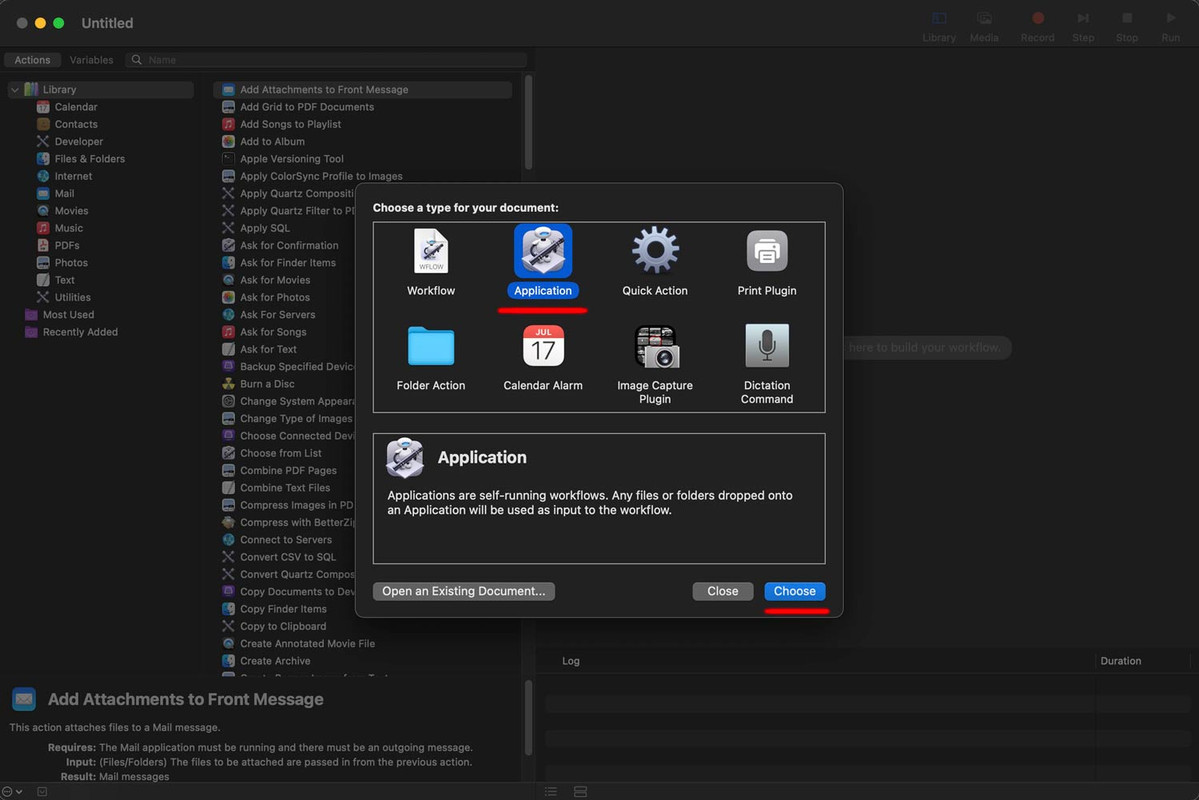
    open automator application:
    Select Application

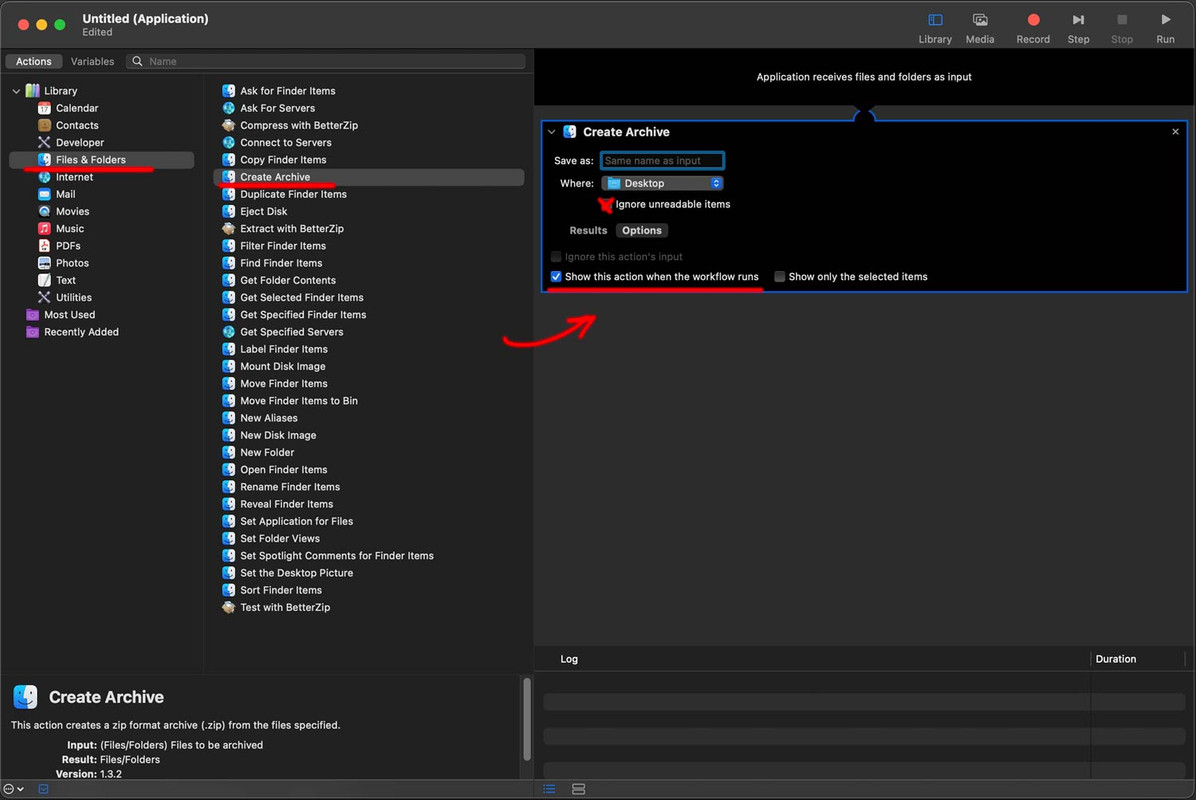
    then choose on the left side – “Files and Folders” – “Create Archive” – double click – then you have on the right side the options for it.

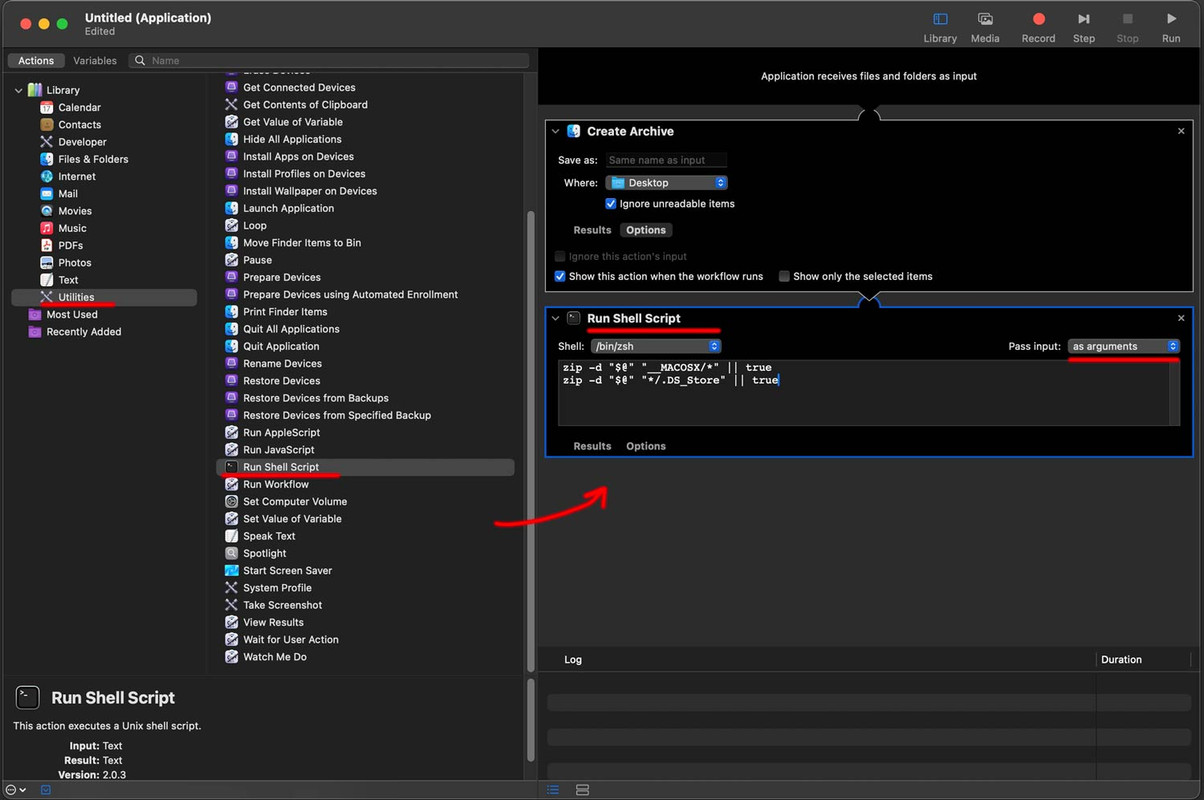
    Next: choose on the left side “Utilities” and then “Run Shell Script – double click (or drag and drop to right side)


    erase the pre set content and insert:

    zip -d "$@" "__MACOSX/*" || true
    zip -d "$@" "*/.DS_Store" || true

    pay attention to have it “as arguments”

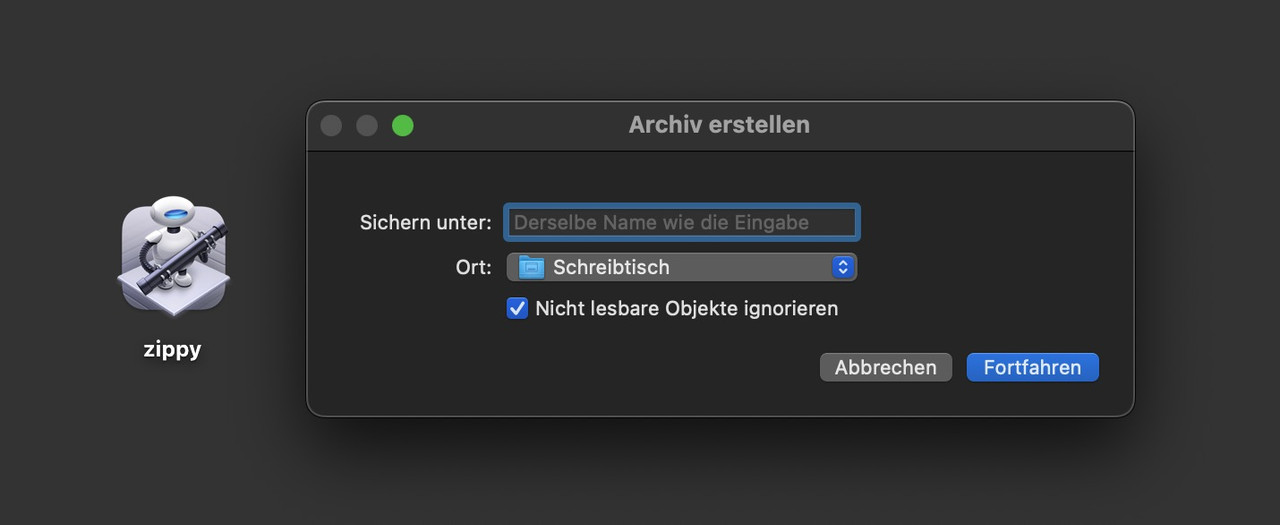
    Save that on your desktop ( close it will ask yor for a name )

    now you got an icon on your desktop like:

    you drag&drop now your files/folders to it to have zip-files without those annoying hidden system files

    #1470902
    LentzOtto
    Participant

    Hi Enfold-Support,

    how can I get the sticky Element on top of the page to cover all other page elements? Z-Index to 99999 did not work… It’s set to position: relative.

    Any help highly appreciated

    Thanks,
    Matthias

    #1470900

    In reply to: Update after purchase

    Hey Paweł,

    You will need access to the Themeforest account which was used to purchase your license, otherwise you will have to purchase another license. Once you have access to the theme files, then the update to 6.0.6 has to be done manually from the version you are running, please refer to my replies in this thread: https://kriesi.at/support/topic/enfold-4-5-theme-update-update-failed-download-failed-a-valid-url-was-not-pro/#post-1021541
    You can either update manually via FTP: https://kriesi.at/documentation/enfold/how-to-install-enfold-theme/#theme-update, or upload the theme as if it was new under Appearance->Themes->Add New Theme.
    If that doesn’t work then please try to delete the whole theme folder, then replace it with the new version. Make sure that you have backups of the site before starting updating.
    Also please read this after you have updated: https://kriesi.at/documentation/enfold/

    Best regards,
    Rikard

    #1470897

    In reply to: Header

    This reply has been marked as private.
    #1470895
    This reply has been marked as private.
    #1470894

    i try to create now a better automator script – just wait a few minutes! …

    based on: https://stackoverflow.com/questions/10924236/mac-zip-compress-without-macosx-folder/#answer-47880361

    https://webers-testseite.de/zip-it.zip

    Unfortunately OSX reports that the origin of the programme cannot be verified. This is due to the SIP of OSX.
    ( System Integrity Protection (SIP) in macOS ). For those who have confidence in me, you can declare the exception in the system settings – privacy and security – at the bottom of the list.

    For those who do not …
    i had to describe now how you will get that for your desktop: …

    #1470892

    and command line means using : terminal
    Btw: the __MACOSX had to be ignored too.

    can you test it:
    but if you know how to create an automator script you can have a drag&drop symbol on your desctop to zip without any hidden OSX file.
    on default it will create a zip file with same name as the object ( folder or file ) – but it will ask you to enter a filename. Let the mark on

    you can download that little program on : https://webers-testseite.de/zip-it.zip

    Can you download it – and test it – because on all docus about automator it says that this method will exclude hidden osx system files ( not the hidden files)

    #1470869

    In reply to: Header

    Hey Lene,

    Thank you for the inquiry.

    We edited the css rules in the Appearance > Customize > Extra CSS panel:

    
    .topKnap a {
        width: 140px;
        height: 52px;
        color: #fff;
        display: inline-block;
        text-align: center;
        text-decoration: none;
        margin-right: 6px;
        padding: 21px 50px;
        font-weight: 700;
        font-size: 15px;
        position: relative;
        float: right;
        min-width: 200px;
        letter-spacing: 0.05em;
        background-color: #55726f;
        border-radius: 50px;
        -moz-transition: 200ms all ease-in-out;
        -o-transition: 200ms all ease-in-out;
        -webkit-transition: 200ms all ease-in-out;
        transition: 200ms all ease-in-out;
    }
    
    .topKnap a:hover {
        background-color: #55726f;
        color: #fff;
    }
    
    .responsive #top #header #header_main .inner-container .widget .fas {
        color: #55726f !important;
    }

    Best regards,
    Ismael

    #1470862
    dreyerjm
    Participant

    Good Evening, I have some columns on my website and have it so the button is at the bottom of the column (see private for screenshot of the website on desktop). It looks great on desktop but on tablet it starts to show white space after the button. What is the best way of setting this up so the button is always at the bottom and columns equal. I added whitespace element on the column after the text so the buttons would all be at the bottom. I do have this column with button on the bottom on multiple pages. I have included those.

    #1470856
    Christof_Deinhard
    Participant

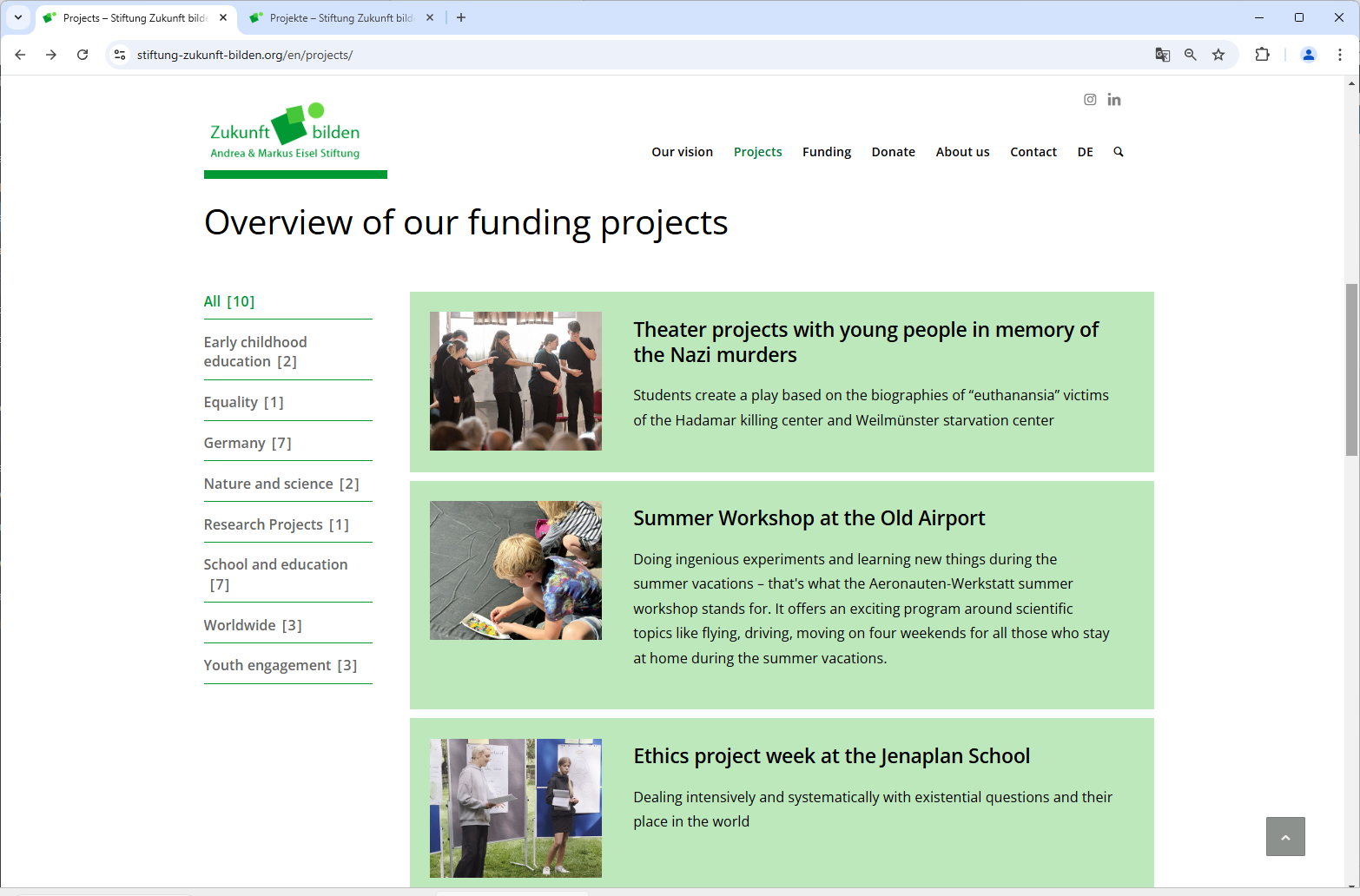
    On a website we use the portfolio grid. Please take a look at the overview of the funding projects: https://www.stiftung-zukunft-bilden.org/en/projects/. Please note: I did some CSS to display the sort_width_container as a sidebar on the left (desktop only) and to show the numbers of items per category ( .av-cat-count {display: inline-block} ). Some projects are assigned to several categories, ‘All’ shows the actual number of projects.

    We currently have 26 projects, soon they will be much more. So, I did some experiments with the pagination function. For example, the numbers of projects per page should be ten. See screenshot: Screenshot portfolio grid with pagination I am very surprised that the filter container refers only to the current page. The displayed number of articles per category does not correspond to the total number and some categories are missing. “Support of families” does not happen to have an entry in the top ten.
    My goal is to limit the number of projects displayed at once, but display the information about all projects in the category filter list. This must therefore always show all categories. Is this possible, what can I do?

    For me it seems that the portfolio grid works in the wrong order: first it selects the portfolio items per page and after that it analyses the categories of the actual items. The better way would be: first all items should be considered when calculating the category filter list and only then the number of displayed items in the container should be reduced.

    As far as I know the portfolio grid has no option for a SHOW-MORE button or something like that.

    Best regards, Christof

    Hi,

    So here’s the thing. I used to use the theme’s File Compression And Merging feature but no longer do, it is now disabled.

    Am I right in thinking therefore that I can delete this file as it is no longer needed?

    You say it is added to my child theme CSS. How do I need to re-load/re-build that file to make sure the avia-style code is not included anymore to stop the ‘interference’ with FlexSlider?

    zimbo
    Participant

    I use MetaSlider to create slideshows.

    For years MetaSlider offered several different libraries to create shows, including Flexslider, Nivo Slider, Coin Slider, and Responsive Slides. I have been using NivoSlider without problems for nearly a decade. A few months ago the plugin author decided to focus all development efforts on FlexSlider. Support for NivoSlider (and others) has been retained in the plugin but new features will be FlexSlider-only.

    Because of this I recently decided to look into switching to FlexSlider.

    See this post.

    The top slideshow is a NivoSlider and as you can see it displays perfectly. I duplicated the slideshow and then changed the type to FlexSlider with no other changes and added it as a second slider. You will see the formatting is messed up. The plugin author refuses to look into this, saying there is some custom CSS in Enfold that is causing this (I’m assuming because he believes FlexSlider works and has no bugs). I decided to take a look.

    In my child theme directory there is a file called avia-style.min.css. I do not recall adding this file to the directory and it is not part of the child theme ZIP download at kriesi.at/documentation/enfold/child-theme/

    In this CSS file is this declaration:

    .entry-content-wrapper li {
        margin-left: 2em !important;
    }

    If I disable this line in Dev Tools, the FlexSlider displays as it should. Try it.

    #1. What is this CSS file, what does it do and why is it in the child directory?

    #2. What is the purpose of that CSS declaration and why is it interfering with the FlexSlider?

    #3. Whilst I can turn off the margin-left instruction in Dev Tools, adding

    .entry-content-wrapper li {
        margin-left: 0em !important;
    }

    to my child theme CSS file does not work. My 0em declaration is loaded but the 2em declaration is still loaded the line above. I have left this in the code on the page so you can verify. How do I turn off, or override, the margin-left instruction on the live post to get FlexSlider to display properly?

    #1470846

    Hi,

    Thanks for the update. Please let us know if you should need any further help on the topic, or if we can close it.

    Best regards,
    Rikard

    #1470838

    maybe it will be the easiest way to not show the sub-menu on different pages ;)

    #top:not(.page-id-41084) .sort.menu-item .sub-menu {
      display: none !important;
    }
    #1470837

    see example page again
    https://webers-testseite.de/masonry-blog/
    – but did this for now only for that page. Not coming from a different page. From different page it first starts with all sorting.

    However, in my opinion, the decision to place the sorting near the masonry makes more sense than the navigation solution.

    function transfer_click_to_sort_options() { 
    ?>
    <script type="text/javascript">
    window.addEventListener("DOMContentLoaded", function () { 
    	(function($){
    		$('.sort .sub-menu a').click(function() {
    			var linkPath = $(this).attr('href');
    			var linkHash = linkPath.split('#')[1];
    			$('#top').find('.av-sort-by-term a[data-filter="'+ linkHash +'"]').trigger('click');
    		});
    	})(jQuery);
    });
    </script>
    <?php 
    }
    add_action('wp_footer', 'transfer_click_to_sort_options');

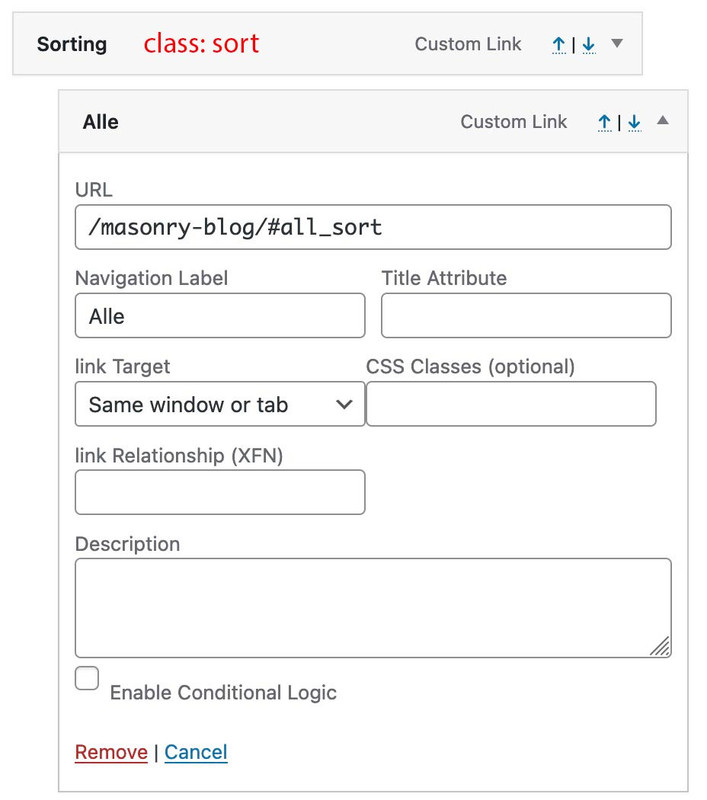
    create your main menu with individual links – link is the page with your masonry and that hash value of the sorting. (the data-filter on the sorting are built by NAME_sort and for all it is all_sort)
    to better select the first level domain i give a custom class to (Sorting) : sort

    i have no solution of coming from a different page to open the masonry directly with that sorting.

    #1470833
    Woutski
    Participant

    Hi, I have a few icons.svg in a page. They are not to big. When I see them on my telephone they are much bigger than on the laptop
    I want to controle the size of these icons.svg to make it acceptable on the telephone as well. Can you please think with me?

    Cheers Woutski

    Sample is included in private content

    #1470832

    Hi @all,
    thank you for your help, @Guenni007: Indeed, a dropdown on the top of the page would be perfect, but thanks a lot for sharing your solution anyway.
    Any tipps for a plugin which could be a solution are welcome ;-)
    Kind regards
    Uli

    #1470827

    Otherwise great. Fantastic, all the things that are possible with CSS. Its just the top image that needs to come back. See my message above. Otherwise its great.

    #1470809

    Hey ColinWalton,

    Thank you for the inquiry.

    This might be related to the following thread:

    // https://kriesi.at/support/topic/avia-builder-only-slightly-visible-appear-far-right/#post-1467634

    Please try using the provided code in the functions.php file:

    function ava_custom_admin_styles() {
        echo '
        <style>
            #postbox-container-2 { clear: left; }
            .index-php #postbox-container-2 { clear: none; }
        </style>
        ';
    }
    add_action('admin_head', 'ava_custom_admin_styles');
    

    Best regards,
    Ismael

    #1470806

    Hey MysticMimi,

    Thank you for the inquiry.

    1.) There is no option for this by default, but you can try this code in the functions.php fil:

    add_filter('avia_post_slide_query', 'avia_post_slide_query_mod');
    
    function avia_post_slide_query_mod($query)
    {
        $query['orderby'] = 'date';
        $query['order'] = 'DESC';
    
        return $query;
    }
    

    2.) We discussed this here: https://kriesi.at/support/topic/trying-to-build-blog-with-grid-layout/#post-1470721

    Best regards,
    Ismael

    #1470798

    Hi,

    Thank you for the update.

    1.) To display a read more link, edit the Blog Posts element, then set the Define Blog Grid Layout to Title + Excerpt and Read More Link.

    2.) And to display the excerpt, make sure that the posts are created using the default editor. If the Advance Layout Builder is active, you have to define the excerpt manually.

    3.) To move the meta info after the headline, try to add this script in the functions.php file:

    function ava_custom_move_slide_meta_script()
    { ?>
        <script>
            (function($) {
                $(document).ready(function() {
                    $('.avia-content-slider-inner .slide-entry-wrap .slide-entry').each(function() {
                        var $entry = $(this);
                        var $meta = $entry.find('.slide-meta');
                        var $title = $entry.find('.slide-entry-title');
                        
                        if ($meta.length && $title.length) {
                            $meta.insertAfter($title);
                        }
                    });
                });
            }(jQuery));
        </script>
    <?php
    }
    add_action('wp_footer', 'ava_custom_move_slide_meta_script', 99);
    

    If you have any additional questions at this time we kindly ask that you open them up in a separate thread. The longer threads get in the forum, they become more difficult to support as they tend to drift off topic and they also make it troublesome for users trying to search for solutions. Keeping threads relevant to their original inquiry ensures that we can keep better track of what has been resolved and that users can more effectively find answers to similar issues they might be experiencing.

    Thanks!

    Best regards,
    Ismael

    #1470790

    Ok that worked. Somewhat.
    1. After i put in your css, the background image of the top colorsection disappeared. Why might this be? Please can I have it back.
    2. the titels of the images in the masonry gallery are aligned to the left. I tried to align them to the center by changing the css but then they moved to the right. Is it possible to have them centered?

    Best

    #1470783

    Hi,

    Please try this instead:

    #top #header .av-main-nav li#menu-item-691:hover a .avia-menu-text {
      color: #fff !important;
    }

    Best regards,
    Rikard

    #1470778
    MysticMimi
    Participant

    Hello,

    I have 2 questions:

    1) How can I control the order of Blog Posts?

    2) Is there a way to have regular page stuff on top of a blog page? For example, the page on my site called “My Take”…. I would like that to be on top of the page, and the blog underneath it. When I tried that, the blog was just the whole page. Is this sort of thing allowed?

    Thanks for your help!

    #1470769

    Hi. Thanks, I got the advanced editor to work by following your instructions…

    I do have 3 questions…, one of my blogs is not showing the initial text after the headline, and 2nd question, none of the blogs is showing the “READ MORE” copy and link.

    How do I fix that?

    Thirdly, I am trying to format it so the author, date, and original publication is on the top, but the formatting does not seem to be coming thru… it is just running into the type. I linked the original publication, but that is not showing linked either. I think I am supposed to show that importantly so no-one thinks it’s plagiarism.
    Screenshot 2024-11-06 at 10.02.15 AM.png

    #1470753

    Hi,

    Please try the following in Quick CSS under Enfold->General Styling:

    #top #header .av-main-nav li#menu-item-691:hover a {
      color: #fff !important;
    }

    Best regards,
    Rikard

    #1470748

    Hi!

    @guenn007i: I think he’s using the default editor.

    Enfold Child > Blog Layout > Blog Layout > Use Advanced Layout Editor to build your own (but I cannot use ALE once I’m in there because I use the ALE for my Pages, so I’m forced to use the Default Editor for each post . . . I still do not understand why I cannot use ALE on both, but I know that it breaks something)

    // https://kriesi.at/support/topic/append-all-blog-posts-with-updated-mm-dd-yyyy/#post-1470539

    Regards,
    Ismael

Viewing 30 results - 3,181 through 3,210 (of 142,851 total)