Hey langanger,
Thank you for the inquiry.
You can change the background color of the top header by adjusting the value of the Enfold > General Styling > Logo Area > Alternate Background Color field. You may need to toggle or temporarily disable the Enfold > Performance > File Compression settings to make sure that the changes take effect.
Best regards,
Ismael
by the way dear mods / dev
how to use the filter : avf_allow_wp_hooks_dependency
can i load f.e. avia-snippet-sidebarmenu.js on a single page only?
Why? https://enfold.webers-webdesign.de/
Default header is on that installation is header : top; logo: left; menu: right
This page : https://enfold.webers-webdesign.de/enfold-consulting/ is changed to sidebar menu – by:
function av_change_header_style($header){
    if( is_page(45368) ){
		$header['header_position'] = "header_left header_sidebar";
		$header['header_class'] = " all_colors header_color light_bg_color av_header_left av_header_sidebar av_conditional_sticky av_always_sticky";
    }
    return $header;
}
add_filter('avf_header_setting_filter','av_change_header_style');
i do not add header classes here – but replace by those of the demo page.
because of conditionally loading of the sidebar-menu script:
$condition = ( isset( $options['header_position'] ) && $options['header_position'] != 'header_top' );
i can not load that script for that page – because the default header_position is top.
what can i do to load it anyway?
-
This reply was modified 1 year, 4 months ago by
 Guenni007.
if you are in the edit mode of the page/post you can decide it on the right side inside the layout-box a drop-down:
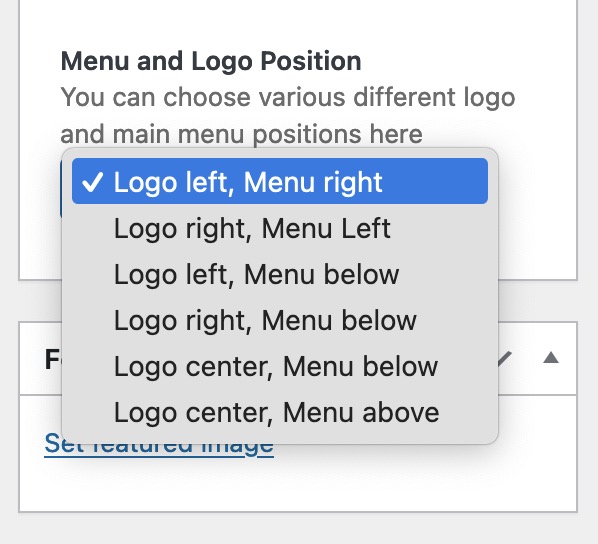
place that code snippet to your child-theme functions.php:
function register_meta_elements($avf_builder_elements){
$avf_builder_elements[] = array(
  "slug"  => "layout",
  "name"  => __("Menu and Logo Position", 'avia_framework'),
  "desc"  => __("You can choose various different logo and main menu positions here", 'avia_framework'),
  "id"  => "header_layout",
  "type"  => "select",
  "std"   => "",
  "no_first"=>true,
  "subtype" => array( __('Logo left, Menu right', 'avia_framework')   =>'logo_left main_nav_header menu_right',
            __('Logo right, Menu Left', 'avia_framework') =>'logo_right main_nav_header menu_left',
            __('Logo left, Menu below', 'avia_framework')   =>'logo_left bottom_nav_header menu_left',
            __('Logo right, Menu below', 'avia_framework')  =>'logo_right bottom_nav_header menu_center',
            __('Logo center, Menu below', 'avia_framework') =>'logo_center bottom_nav_header menu_right',
            __('Logo center, Menu above', 'avia_framework') =>'logo_center bottom_nav_header top_nav_header menu_center',
            ));
return $avf_builder_elements;
}
add_filter('avf_builder_elements', 'register_meta_elements', 10, 1);
but for some options – there had to be additional header classes added. So there had to follow some Postprocessing.
see for example this based on Enfold Parallax: https://enfold.webers-webdesign.de/
under Main Menu “Front Page” click “Enfold Consulting” ;)
Hi,
Great, I’m glad to hear that you got things working, and thanks for the updates. Please let us know if you should need any further help on the topic, or if we can close it.
Best regards,
Rikard
Dear Team,
the topic title describes was I want to do.
Please see page here: https://www.eth-solutions.de/jobs/#aktuell
Below “Aktuelle Jobs – wir suchen zur Zeit:”I used 2 Magazine grids. The last 3 items have a different category vs the ones above and shall have a different font color.
An idea / advice how to get this done would be great.
thx a lot & best regards Tilman
Hey dillionline,
To have a different logo on different pages please see this post
To change the menu color for a page, this can be done with css, but we will need to know the page ID, please link to the page that you want to have a white menu.
Best regards,
Mike
Hey koomo,
It’s possible to select a date and to type, but the styling of the text is set to the same colour as the background. Please try this in Quick CSS to adjust the colours:
#top .avia-datepicker-div a {
  color: blue;
}

#top .main_color input[type="text"] {
  color: green;
}
Best regards,
Rikard
maybe it is just the fact that the new WP 6.7 switches back to block editor as standard.
Goto Enfold – Theme Options – Select your Editor : and switch back to classic Editor.
or is the problem that you want to use the block editor – but had no enfold elements anymore?
By the way. I can see the button at the top to activate the advanced layout editor – but the active click area is only on the half right. (as if only this part of the standard editor button area is active)
It is that field on the left that overlaps the Enfold button.

______________
not necessary:
it starts with ALB editor even in Block Editor Mode if you got this in your child-theme functions.php:
function trigger_alb_on_load(){
?>
<script>
(function($){
    $(window).on('load', function(){
      setTimeout(function() {
        $("#avia-builder-button").trigger('click');
      }, 300);
    });
})(jQuery);
</script>
<?php
}
add_action('admin_head-post-new.php', 'trigger_alb_on_load');
Hi,
Form doesn’t work anymore
Ex. at the bottom https://privatetours.jp/japan-luxury-tours/highlights-japan/
Can’t fill name or email address. Date picker result doesn’t show.
Already added
#top .avia-datepicker-div a {
color:#666666;
background-color: #fcfcfc;
}
#top .avia-datepicker-div a.ui-state-hover {
color: #000!important;
}
#top .main_color textarea, #top .main_color select {
color:#666666;}
Too much hack…form doesn’t work with child theme.
Any help?
Thank you
Xavier
-
This topic was modified 1 year, 4 months ago by
 koomo.
-
This topic was modified 1 year, 4 months ago by koomo.
it concerns the “how i add value” icons ?
@media only screen and (max-width: 767px) {
  #top.page-id-289 img[src*=".svg"] {
    width: 150px;
  }
}
another hint:
i wouldn’t have for each an own color-section.
You can do that all “how i add value” in one color section. To better select the color section give a custom class to it and tell the img to have a specific width.
___________________
this is a bit offtopic
because you do not have a script that converts img svgs to inline svgs – the following does not affect you directly. But if you also work with svgs as inline svgs, you have to think about the graphic styles:
btw: as inline svg files this would not work – because all these svg files got the same classes inside – but with different declarations!
( new illustrator standard class: cls-index ) so they will disturb each other
/***** claritymatters-icons_icon-compelling-story.svg *****/

.cls-1 {
  fill: none;
  stroke: #fff;
  stroke-linecap: round;
  stroke-linejoin: round;
  stroke-width: 4px;
}

.cls-2 {
  fill: #2ec4ed;
}

/***** claritymatters-content-roadmap.svg  *****/
.cls-1 {
  fill: #fff;
}

.cls-2, .cls-3 {
  fill: none;
  stroke: #fff;
  stroke-linecap: round;
  stroke-linejoin: round;
  stroke-width: 4px;
}

.cls-4 {
  fill: #2ec4ed;
}

.cls-3 {
  stroke-dasharray: 12;
}
Hi,
Thanks for the update. Please let us know if you should need any further help on the topic, or if we can close it.
Best regards,
Rikard
Hi,
Thanks for that. I see that you are running an old version of the theme, could you try to update to the latest version (6.0.6) to see if that helps please? The update to 6.0.6 has to be done manually from the version you are running, please refer to my replies in this thread: https://kriesi.at/support/topic/enfold-4-5-theme-update-update-failed-download-failed-a-valid-url-was-not-pro/#post-1021541
You can either update manually via FTP: https://kriesi.at/documentation/enfold/how-to-install-enfold-theme/#theme-update, or upload the theme as if it was new under Appearance->Themes->Add New Theme.
If that doesn’t work then please try to delete the whole theme folder, then replace it with the new version. Make sure that you have backups of the site before starting updating.
Also please read this after you have updated: https://kriesi.at/documentation/enfold/theme-registration/
Also make sure that you running the latest version of WordPress, and consider updating your PHP version to 8.x.
Best regards,
Rikard
So the General Styling tab > Advanced Options: Customize Typography Settings don’t work?
The Advanced Styling options don’t provide responsive font size control (desktop, tablet, mobile). That’s why I’m trying to use the Customize Typography Settings. If they don’t work, why are they offered?
Hello, how can I place the “full” image on top of a blog post with the original dimensions instead of a cropped version?
THANKS
Hey!
That;’s odd. It’s trying to render a color section inside the wc-block-components-product-metadata container. Did you install another extension for the cart page?
<div class="wc-block-components-product-metadata__description">

<p><!-- close content main element -->

</p><div id="av_section_1" class="avia-section av-1kyp15-9030148cefa3c746e7eea48a2f9eff09 main_color avia-section-default avia-no-border-styling avia-bg-style-scroll container_wrap fullsize">
<div class="container av-section-cont-open">
<div class="template-page content  av-content-full alpha units">
<div class="post-entry post-entry-type-page post-entry-16">
<div class="entry-content-wrapper clearfix">
<p>#top .av-special-heading.av-m36hux32-30fb6fe0a6b72a7cec61b44773014a1f{<br>
padding-bottom:10px;<br>
}<br>
body .av-special-heading.av-m36hux32-30fb6fe0a6b72a7cec61b44773014a1f .av-special-heading-tag .heading-char{<br>
font-size:25px;<br>
}<br>
.av-special-heading.av-m36hux32-30fb6fe0a6b72a7cec61b44773014a1f .av-subheading{<br>
font-size:15px;<br>
}</p></div></div></div></div></div></div>
Best regards,
Ismael
Correction, General Styling tab > Advanced Options: Customize Typography Settings is what is not appearing to take affect. The Advanced Styling only sets a generic font size for all devices. The General Styling tab offers font sizes for desktop, tablet portrait, tablet landscape and mobile—and that’s what’s not overriding the Advanced Styling generic setting.
Hi, Ismael,
Yes, I tried the fullwidth easy slider, but it cuts off both the top and bottom of the image. Please help!
Thanks,
Justine
Hi,
We can not login to your site because a additional htaccess login is required and your didn’t post a user name with the psaaword, please provive the user & password1 for both logins and disable your Autoptimize plugin. It looks like you have a custom negative margin for the header but it is hard to tell with the Autoptimize plugin active.
Best regards,
Mike
Hi there,
I’ve run into an issue with a site I’m working on where a specific page just randomly stopped saving edits beyond a specific point.
The page has a fair amount of content (text/images) utilizing a tab section and while modifying the final tab, the page just gave up on saving edits beyond a specific point (ie: it would save fine, and if I tried adding an additional image and attempted to save, it would not). I assumed that it might be related to the PHP Memory Limit, so we had that increased to 512MB to no avail. Also tried disabling all plugins to no avail.
Any thoughts on what the issue might be?
Thanks in advance!
That new code has removed the 495px image, thanks.
Next problem: Remote Debug for Android says (I think) that the image actually being loaded on Android (the Intrinsic Size) is now the Full size image, 700x394px at 37.1kB, and not any of the smaller thumbnails in srcset.
Why is Android loading the Full size image (and not Square, 180x101px at 5kB, as the page states) – or am I incorrectly interpreting Remote Debug? https://imgur.com/gallery/hotel-nevada-LAGkc3e
Dev Tools says desktop PC correctly loads the 180px size in responsive mode.
This reply has been marked as private.
First : how about your WordPress Version – does it need an update too?
if there is a big difference – a major Update in WordPress too … make a Backup of your Installation – and maybe prepare your theme allready for that newest WP – see: Unfortunately, the theme is no longer set as sticky regarding the adaptation to newer php versions / WordPress versions. But that is not necessary and can be done afterwards
What php Version you are running on your system – there are a few changes that need to be taken into account. Especially the changes from php7.x to php8.x and the implementation of jQuery 3.x …
I have never had any problems with WPML updates and Enfold updates. However, I agree with you that plugins that interfere with many areas of a theme always carry update risks.
That’s why I already have a good backup plugin installed for most sites for other reasons. Even the free version of Duplicator is a very good program.
This program creates a complete backup in two files. A zip file with the contents, and an installation file for restoring the backup. Btw. this can also be used for migration.
So if major updates are planned, I create a Duplicator backup beforehand and can then make the updates without losing the status quo.
________________
Updating the theme – additionally you can update the theme by ftp upload : https://kriesi.at/support/topic/some-hints-and-advice-to-update-enfold/#post-1056107
Uploading the new theme takes a little time; if all goes well, the page will only be offline for the small amount of time that it will be renamed. You have the old installation as fallback. (there is no overwriting of the old theme)
Update via ftp.
- download installable newest Enfold : unzip the file – you will have an enfold folder now
- Rename that downloaded newest version to enfold-new
- Upload that enfold-new folder to the themes folder
- Rename your (existing) enfold folder to f.e. enfold-old / in your ftp client (f.e. filezilla)
- Rename your enfold-new folder to enfold / again: in your ftp client (f.e. filezilla)
- Go to dashboard – enfold(-child) – and refresh your merged/cached files on performance tab
- Check if all your theme and existing settings work to your full satisfaction.
- Yes – then stop here
- No – delete or rename back the enfold folder back to enfold-new
- rename the enfold-old folder back to enfold
Hi,
Thank you for the update.
We adjusted the css code a bit. Please try it again:
@media only screen and (max-width: 767px) {
	.responsive #top .logo {
		height: 66px !important;
		width: 100%;
		display: flex;
		justify-content: center;
	}

	.responsive .logo img,
	.responsive .logo svg {
		margin: 0;
		max-height: 66px !important;
	}

        .responsive #top .av-logo-container .avia-menu {
                height: 100%;
                margin-top: -30px;
        }
}
Best regards,
Ismael
Hey Jak73,
Thank you for the inquiry.
1.) You can add this css code to adjust the height of the slider images on mobile view:
@media only screen and (max-width: 767px) {
	/* Add your Mobile Styles here */
	#top .avia-slideshow li img {
		min-height: 600px;
		object-fit: cover;
	}
}
2.) To adjust the height of the section, try including this css rule inside the media query above:
.home #av_section_1 .template-page {
    padding: 10px 0;
}
Best regards,
Ismael
Hi,
Than kyou for the update.
Padding should be adjusted to:
The text in the button is not vertically aligned when we apply the padding. You can try it yourself by adjusting the css rule in the Appearance > Customize > Extra CSS panel. To adjust the position of the contact info, you can add this css code:
#top .topKontakt {
    left: -100px;
    position: relative;
}
Best regards,
Ismael
Hi,
I am having an issue with the hero image at https://fiestapoolsandspas.com/. It’s the Black Friday Sale at the top of the page. My issue is that it doesn’t show the whole image on a desktop or resize on a cellphone. Can you please advise?
Thank you!
Justine
Hey Tanja,
This CSS in Quick CSS is causing that to happen:
@media only screen and (max-width: 767px) {
  .responsive #top .logo {
    height: 66px !important;
    width: 100%;
    display: flex;
    justify-content: center;
  }
}
Please try removing or adjusting the height.
Best regards,
Rikard
The header logo is cut off in mobile, though it looks good on desktop. A lesser issue, the menu items are too low on mobile. Some CSS already manages header logo and menu button. What is the correction needed to have the full logo visible and the menu items up in the great area on mobile?
there is a lot of inline code to handle the toggler ? why?
For my part, I find it confusing that the open toggle moves to the top. For example, I have a plugin, pageScroll2ID, which unfortunately wanted to do the same thing. Fortunately, I was able to exclude the toggles from that behavior.



