
Viewing 30 results - 3,061 through 3,090 (of 142,851 total)
  • Author
    Search Results
  • #1471877

    Hi,

    Thanks for the updates. Please let us know if you should need any further help on the topic, or if we can close it.

    Best regards,
    Rikard

    #1471874
    whdsolutions
    Participant

    We have a problem!
    We need to mpve the shoping cart icon and box left and the burger menu also, but doing so the hover and click of the cart icon makes the burger menu appear.
    How can we fix this?
    The site needs to be signed off n the nex couple of hours, or I don’t get paid :-(
    Sorry!
    you will need to be logged in to see the store, so I have added a login for you!

    This is the code we have added:

    `/* CART AND BURGER MENU */
    .cart_dropdown_first .cart_dropdown_link {
    display: block;
    padding: 0 0 0 0;
    text-decoration: none;
    line-height: 44px;
    font-size: 20px;
    position: absolute;
    z-index: 2;
    width: 100%;
    height: 100%;
    background: #dad2c7 !important;
    }
    @media only screen and (max-width: 1650px) {
    .responsive #top .cart_dropdown {
    margin-right: 20px !important;
    }
    }

    Screenshot-2024-11-21-191254

    #1471866

    In reply to: text below logo

    Hi,
    When I test the css that I posted above:

    @media only screen and (max-width: 767px) {
        .responsive #top #wrap_all #header {
            height: 190px;
        }
    }

    the mobile looks like this:
    Enfold Support 6546
    I added it to the top of your Enfold Theme Options ▸ General Styling ▸ Quick CSS field and it now works, please clear your browser cache and check.

    Best regards,
    Mike

    #1471848

    Hi Rikard,

    I cleared the cache using WP-Optimize as suggested, but it hasn’t changed anything. As a data point, the site shows fine on desktop. Nothing about the layout has changed. On mobile, it’s as if there is no active design or theme at all. Trouble is, about 95% of my traffic is on mobile. I’ll provide info for further assistance. Thanks.

    #1471834

    Hi,

    Please try this instead:

    #header_main_alternate {
      width: 300px;
      top: 35px; 
    }

    Best regards,
    Rikard

    #1471823
    Sachs
    Participant

    Hi support
    For the display of the slide content in mobile view, I need to move to text more to the right.
    Current the setup is right oriented, however is needs to be more to the right especially with Iphones 14 and up.

    How can this be adjusted?

    I think your team has already inserted a css-code, as we have worked with this topic some years ago.

    Best regards
    Lene

    #1471806

    In reply to: text below logo

    Hi Mike,

    Not sure how to attach a screenshot on here. Your screenshot looks correct, but that looks like the desktop version. It’s the mobile version where I’m having issues. There’s two much white space between the logo/30 years text and the gray box. I’ve cleared the browser cache several times.

    #1471792
    NicomIT
    Participant

    I have a number of accordions on the page linked below. Each of them has a ID set to them so you can click on the associated link at the top of the page to jump down to the accordion with the terms that are from that letter of the alphabet. All of them work fine, except for the one for “S”. The letter “S” is displaying overlapping the accordion and there is a gap between the first and second items in the accordion. Clicking on the first item in the accordion doesn’t open it, bur instead takes you back to the top of the page. Clicking on “S” at the top of the page does the same thing, instead of jumping down the page to the area where the ID is placed.

    All the other accordions, links and IDs are set-up the same and work fine. So I don’t know why there is a problem with this one. Any help would be great. Thanks.

    #1471790

    In reply to: Footer and menu

    #top #footer {
      padding: 5px 0 ;
    }
    
    #top #footer .widget {
      margin: 10px 0 ;
    }
    
    #top #socket .container {
      padding-top: 10px !important;
      padding-bottom: 10px !important;
    }
    #1471789

    In reply to: Left side menu layout

    Hi Rikard.
    About this topic your team has been very fast and effective.
    But I’ve another topic still open without a solution.

    Could you be so kind to take a look, please?

    #1471784

    next : you got this inside your css:

    add_filter('wf_pklist_alter_additional_fields', 'wf_pklist_alter_additional', 10, 3);
    
    function wf_pklist_alter_additional($extra_fields, $template_type, $order) {
    	if ($template_type ==='packinglist' && !empty($extra_fields)) {
    		if ('No'===$extra_fields['Copia Literal']) {
    			unset($extra_fields['Copia Literal'])
    		}
    
    		if('No'===$extra_fields['Copia en PDF']) {
    			unset($extra_fields['Copia en PDF'])
    		}
    
    		ksort($extra_fields)
    	}
    
    	return $extra_fields
    }
    
    add_filter('weglot_replace_url', 'th9e_weglot_replace_url', 99, 3);
    
    function th9e_weglot_replace_url($replaced_url,$url,$language){
    if(strpos($url, 'thwcfe_uploads') !==false) {
    	return $url
    }
    
    return $replaced_url
    }

    this is not meant for css. These are code snippets that belong to a functions.php ( best for child-theme functions.php)

    and that is placed twice – remove that too (both):

    .html_header_top.html_header_sticky #header {
    	position: sticky !important
    }
    #1471767
    presse365
    Participant

    Hello,
    I have a WordPress installation which uses Enfold and has Toolset Types installed which I now try to remove. I could disable everything except Toolset Types. If I do the editor stops working properly. I have attached a link to a screenshot below

    Any idea why this is happening?

    Best regards,
    Jan

    #1471746

    In reply to: Various adjustments

    thank you, please close the topic

    #1471734

    Hey Kelly,

    The keg images seems to have a lot of white space on top, could you try removing that to see if it helps?

    Best regards,
    Rikard

    #1471732

    What I meant is “Product slider”, that is located in “Avia builder ” -> Plugins addons -> Product slider. The integrated filter is useful to define which products are to be displayed, but I was unsuccesfully trying to sort these filtered data by a custom meta, which I have availble for my products (e.g. date).
    Anyway, if this not useful for anyone else, we can close the topic, as I have approached this by a small plugin which I based on swiper.js which I can fully control.

    #1471730

    Hey bellwetherroofing,

    Please try the following in Quick CSS under Enfold->General Styling:

    #top #header .av-main-nav > li#menu-item-54:hover > a {
      background-color: red;
    }
    
    #top #header .av-main-nav > li#menu-item-57:hover > a {
      background-color: yellow;
    }
    
    #top #header .av-main-nav > li#menu-item-55:hover > a {
      background-color: green;
    }
    
    #top #header .av-main-nav > li#menu-item-58:hover > a {
      background-color: green;
    }

    Best regards,
    Rikard

    #1471725

    In reply to: Left side menu layout

    Hi,

    Thanks for the update. Please let us know if you should need any further help on the topic, or if we can close it.

    Best regards,
    Rikard

    #1471720

    Following on from this

    I can 100% confirm this was the cause of our server issues.

    Essentially ALL Enfold websites with WooCommerce installed will gradually use up the ram and see mysql memory usage rise until the server crashes.

    The bots getting stuck crawling all of the ?avia_extended_shop_select=yes queries includes:
    Even with the rel-nofollow:
    Bing bot
    Google bot
    A majority of major search engines
    AI crawlers – New aggressive bots that ignore all instructions

    See screenshot of the before and after. Our Ram use fell from almost 90GB of ram used to 8GB used on average.
    Physical Ram usage screenshot
    https://www.dropbox.com/scl/fi/tw8p399gfdr9cclorc5j9/ramuse-screenshot.PNG?rlkey=d9ty4xvui4w3m2ycb9b9ez94s&st=28aameqn&dl=0
    Mysql memory usage screenshot
    https://www.dropbox.com/scl/fi/iixhdd5vpe7253tbavbxf/mysql-memory-usage.PNG?rlkey=15061shf0haiu3d36cdy0be3t&st=ep9fncx5&dl=0

    SOLUTION
    I propose that Enfold removes the custom sort by options and reinstates the default Woocommerce ones.
    The defaults use form fields and JS so there are no a href links in the default woo sort by dropdown. Bots cannot follow these links because there are no urls in the HTML.

    In your child theme functions.php add the following to remove the enfold filters and reinstate the woo ones.

    // remove the enfold sort by filters
    function avia_woocommerce_frontend_search_params()
    {
       return;
    }
    // reinstate the woo default sort by filters
    add_action( 'woocommerce_before_shop_loop', 'woocommerce_catalog_ordering', 20 );

    Add the following CSS to quick CSS and tweak depending on your sidebar position:

    .sort-param-count {
    display:none;
    }
    .product-sorting {
    padding-top:0px;
    }
    div .product-sorting ul, div .product-sorting li {
    font-size: 16px;
    }
    div .product-sorting ul {
    width: 200px;
    }
    .main_color .sort-param a {
        color: #000000;
    }
    .sort-param-sort a, ul.sort-param-order {
    border: 1px;
    border-color: #969696;
    border-style: solid;
    }
    @media only screen and (max-width: 767px) {
        .responsive #top .woocommerce-ordering {
            position: relative;
            float: left;
            clear: both;
            margin: 0;
            padding-bottom: 25px;
            padding-top: 15px;
            top: 0px;
        }
    }
    @media only screen and (min-width: 768px) {
        .responsive #top .woocommerce-ordering {
            position: relative;
            float: left;
            clear: both;
            margin: 0;
            padding-bottom: 25px;
            padding-top: 15px;
            top: 0px;
        }
    }
    #top.woocommerce-page .woocommerce-ordering select {
    width: 100%;
    font-size:16px;
    }

    Install the Redirection Plugin:

    Add the following RegEX expression to redirect the queries so that the URL redirects BEFORE the query runs on the DB

    Source URL: ^/(.*?)/\?avia_extended_shop_select=.*
    Enable: Ignore Case, Regex and Ignore Slash
    Target URL: /$1/
    Hit Save
    This will redirect any attempt to crawl the enfold filters back to the current category

    #1471704
    bellwetherroofing
    Participant

    Howdy Enfold Team, I added some code from a thread when I could center the logo and make the menu navigation right. It works but the menu is on 2 lines on desktop. Is some code I could add that would make menu one line?

    #1471691

    In reply to: Footer and menu

    It works!
    Thanks for your time Guenni007.
    About Mike’s proposal “A color section added padding/margin to the footer page, or you can try adding the 3 columns without a color section in your footer page.”
    Footer height remains an issue.

    Using only widgets consisting of 3 lines of text and a title, there is a huge amount of empty space both above and below.
    https://img.savvyify.com/image/image.97nP6

    if I use a page by replacing the footer and socket, the space at the top is just right, but there is too much unused space below.
    A footer like this is not aesthetically pleasing.
    https://img.savvyify.com/image/image.97BAh

    #1471688
    thinkjarvis
    Participant

    Hi guys,

    I have discovered a huge problem with the way avia queries run on woocommerce sites.

    We noticed that some of our smaller much lower traffic sites were suddenly causing mysql memory use to climb out of control – Where the longer the server is running the more memory is used.

    We are talking going from about 8gb usage to 80gb usage and climbing as more and more bots get stuck crawling the queries

    Bots are getting stuck following the queries in the dropdown like:
    ?avia_extended_shop_select=yes&product_order=relevance
    They are crawling every single query string on every single paginated page.

    This is causing excessive memory usage.

    Anything we can do to stop crawlers hitting these pages?
    I can see rel=nofollow in the links but this doesnt seem to be stopping bots.

    In comparison the default woocommerce filters are not actual hyperlinks they are a form submission. Therefore bots dont crawl them.

    This is a serious problem.

    #1471679
    chiller3
    Participant

    Liebes Kriesi-Team,

    Ich habe folgendes Anliegen: Auf dieser Startseite habe ich eine Auswahl von Produkten (Betten, Sofas, etc.).
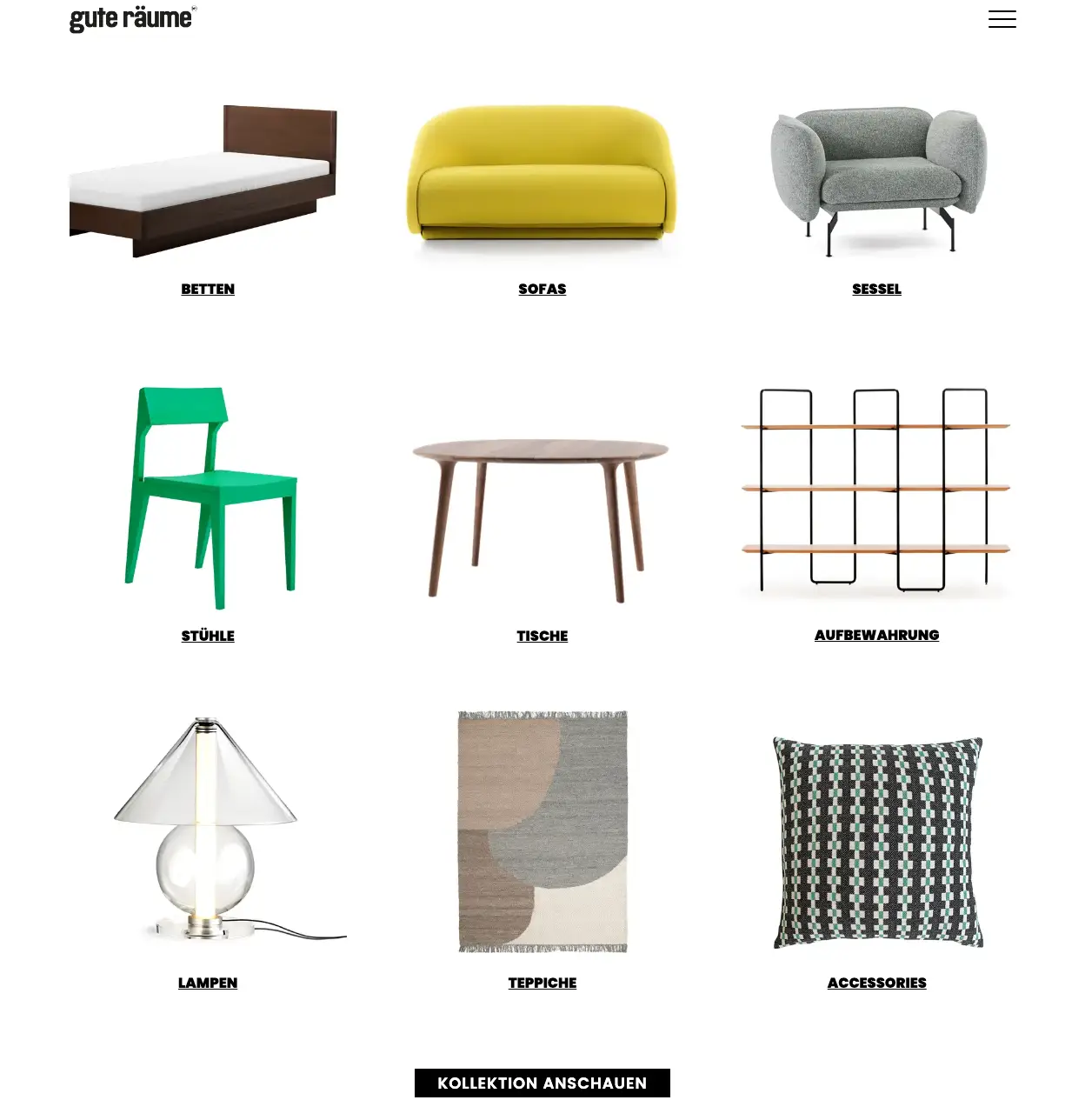
    Startseite Produkte

    Wenn der Besucher nun auf eines dieser Produkte klickt, kommt er auf die Unterseite “Kollektion”.
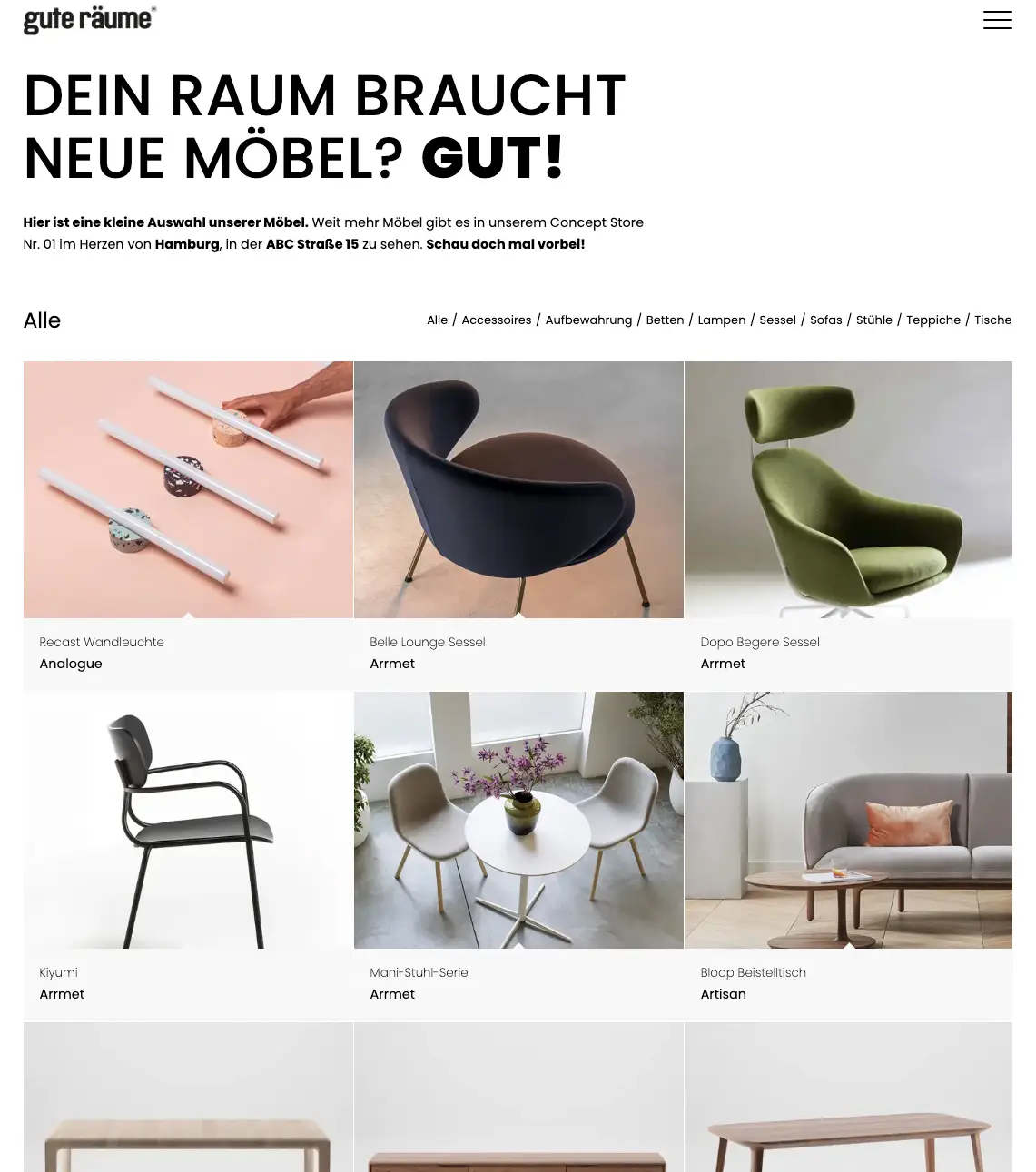
    Kollektion Übersicht

    Ich möchte allerdings, dass die Kategorie, die der Besucher geklickt hat, bereits vorausgewählt ist. Also zum Beispiel so:
    “…/kollektion#betten”
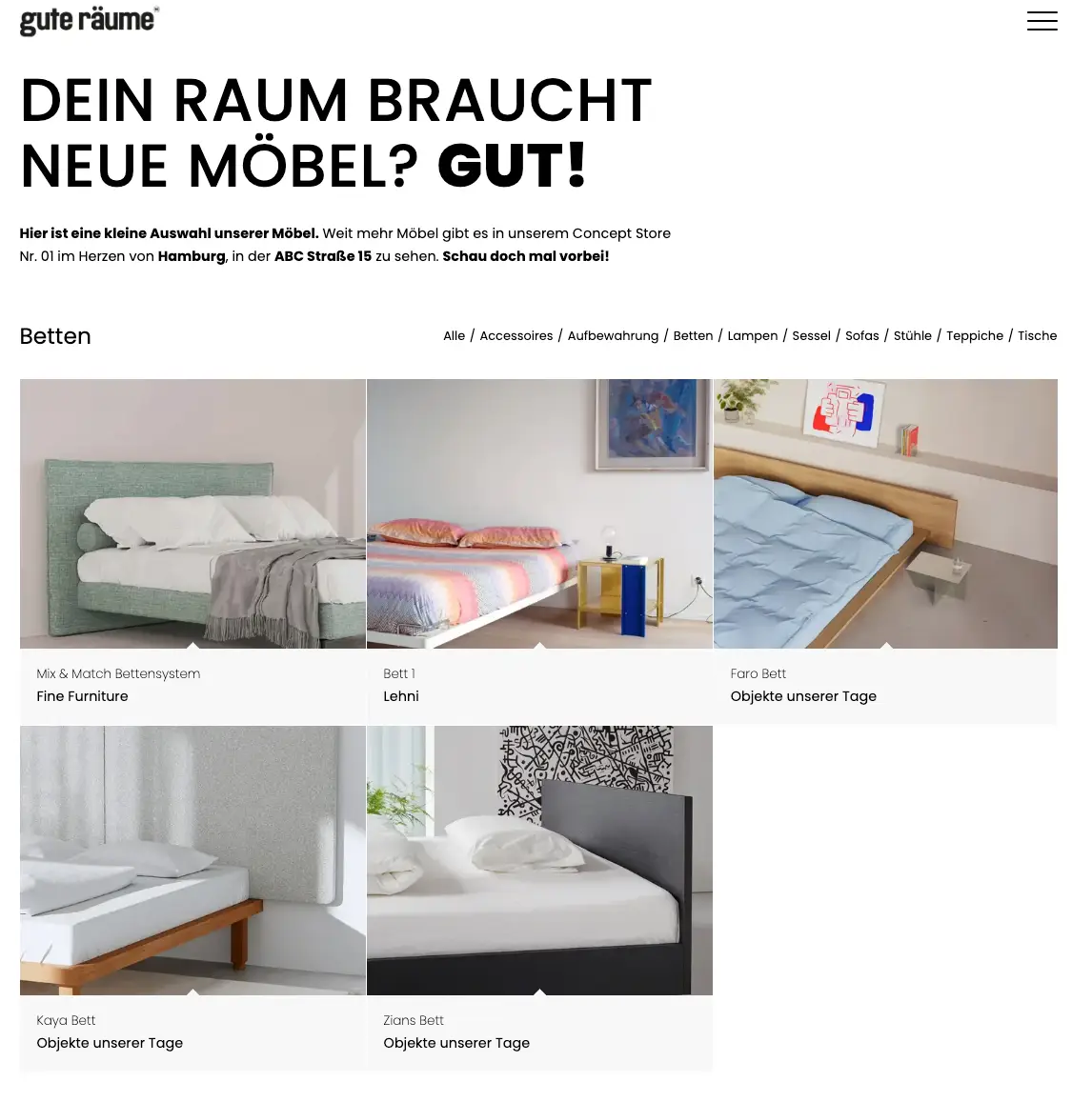
    Kollektion Betten

    Wichtig: Ich möchte keine separaten Mansonry-Galerien für die verschiedenen Kategorien erstellen, sondern es soll IMMER auf die Seite “…/Kollektion” verlinkt werden, nur das eben die jeweils angeklickte Kategorie bereits gefiltert sein soll. Ist dies möglich?

    Ich habe schon das Forum durchsucht und diverse Lösungsansätze gefunden und ausprobiert, leider ohne Erfolg. Dieser Lösungsansatz hat z.B. leider nicht funktioniert:

    Bei Fragen stehe ich gerne zur Verfügung!

    Vielen Dank für die Hilfe und beste Grüße
    Moritz

    • This topic was modified 1 year, 4 months ago by chiller3.
    #1471669

    Hey UPON,
    Try this CSS in your Enfold Theme Options ▸ General Styling ▸ Quick CSS field:

    #top #av-burger-menu-ul {
        vertical-align: text-top;
        padding: 0 20px !important;
        text-align: left;
    }

    After applying the css, please clear your browser cache and check.

    Best regards,
    Mike

    #1471660
    UPON
    Participant

    Hello everyone
    first of all: We have been working with Enfold for many years and did over 200 websites with it. We absolutely love it, thanks for the great work!

    At the moment we are facing a small challenge: What we wanna achieve: on mobile a burger menu with full page overlay. The text should not be displayed centered, but at the top left. We have provided an example in the private content.

    Thanks for helping out & have a great day.

    • This topic was modified 1 year, 4 months ago by UPON.
    #1471657

    The topic can be closed, thanks!

    #1471655

    You can close this topic. Thank you for investigating it for me.

    #1471654

    Hi,

    Thanks for the update. Please let us know if you should need any further help on the topic, or if we can close it.

    Best regards,
    Rikard

    #1471652

    In reply to: Enfold Photography

    Hey Norbert,

    Enfold is compatible with the latest versions of PHP and WordPress. The update to 6.0.6 has to be done manually from the version you are running, please refer to my replies in this thread: https://kriesi.at/support/topic/enfold-4-5-theme-update-update-failed-download-failed-a-valid-url-was-not-pro/#post-1021541
    You can either update manually via FTP: https://kriesi.at/documentation/enfold/how-to-install-enfold-theme/#theme-update, or upload the theme as if it was new under Appearance->Themes->Add New Theme.
    If that doesn’t work then please try to delete the whole theme folder, then replace it with the new version. Make sure that you have backups of the site before starting updating.
    Also please read this after you have updated: https://kriesi.at/documentation/enfold/theme-registration/

    Best regards,
    Rikard

    #1471646
    Norbert Blume
    Guest

    Hello,
    after updating to WordPress 6.7 and switching to Php 8.2, a critical error has occurred. The website https://klassisch-barock-trainer.de is no longer accessible.
    I am the new webmaster for this domain.
    The debug log points to an error with Enfold Photoprahy.
    My customer is willing to purchase another license. However, under Themeforest it says that support up to WordPress 6.6.x is given.
    Is support for WordPress 6.7 guaranteed?
    Kind regards

    Norbert Blume

    #1471631

    Hey Tanja,

    Please try the following in Quick CSS under Enfold->General Styling:

    @media only screen and (max-width: 400px) {
      .responsive #top #header_main #menu-item-548 a {
        padding: 0 0 0 10px;
        font-size: 12px;
      }
    }

    Best regards,
    Rikard

Viewing 30 results - 3,061 through 3,090 (of 142,851 total)