Hi,
After updating from php 7.4 to php 8 I got a critical error. I did a clean install of WP and the latest version of Enfold (no plugins) but also a critical error here.
WordPress versie 5.8.1
Huidig thema: Enfold (versie 4.8.7.1)
Huidige plugin: (versie )
PHP versie 8.0.11
Thanks!
Regards,
Frans
Hello Rikard,
I have switched to PHP 7.4, you can see it in the Health website. After the change, I saved the Enfold settings again. But that doesn’t change anything – CSS compression still doesn’t work.
Perhaps one of your teammates knows the problem or can provide tips?
 Ali Darwich
Guest
Hello Christian!
My name is Ali and I work in the support team for The Events Calendar plugin:
We recently received reports of the following issue appearing when updating their plugins to the latest version:
An error of type E_ERROR was caused in line 558 of the file /home1/avondam6/public_html/wp-content/themes/enfold/config-gutenberg/class-avia-gutenberg.php. Error message: Uncaught Error: Call to undefined function gutenberg_can_edit_post() in /home1/avondam6/public_html/wp-content/themes/enfold/config-gutenberg/class-avia-gutenberg.php:558
Stack trace:
#0 /home1/avondam6/public_html/wp-content/themes/enfold/config-gutenberg/class-avia-gutenberg.php(721): Avia_Gutenberg->can_use_block_editor(Object(WP_Post))
#1 /home1/avondam6/public_html/wp-includes/class-wp-hook.php(303): Avia_Gutenberg->handler_add_edit_link(Array, Object(WP_Post))
#2 /home1/avondam6/public_html/wp-includes/plugin.php(189): WP_Hook->apply_filters(Array, Array)
#3 /home1/avondam6/public_html/wp-admin/includes/class-wp-posts-list-table.php(1526): apply_filters(‘post_row_action…’, Array, Object(WP_Post))
#4 /home1/avondam6/public_html/wp-content/plugins/events-calendar-pro/src/Tribe/Admin/Manager/Events_Table.php(61): WP_Posts_List_Table->handle_row_actions(Object(WP_Post), ‘title’, ‘title’)
#5 /home1/avondam6/public_html/wp-content/plugins/events-calendar-pro/src/Tribe/Admin/Manager/Shortcode.php(316): Tribe
So I was wondering if there’s a chance you could provide us with a developer’s license or something similar to look into this and hopefully improve our integration with your theme?
I’ll be looking forward to your reply.
Thanks!
-Ali
Hi Enfold Team,
We met a issue that when we created two pages with the “blog post” element.
We defined the Page A to show the post with category A and Page B to show the post with category B.
When the visitors visit the page A and Page B, the menu item is highlighted correctly.
Please see the image below
https://ibb.co/fXh1q7H (page A)
https://ibb.co/dK3jQ6m (page B)
However, when the visitors visit the post from Page A or Page B, the menu item will only highlight the Page A.
https://ibb.co/qRNvQBx (before visiting the post content)
https://ibb.co/2sjpd9X (after clicked the “read more” button)
Would i have any suggestion or patch on this behaviour?
As this may affect the user experience when they are reading the content and find out the highlighted menu item is not corresponding to the content.
Many thanks.
For addition information,
we have located the behaviour is due to the logic for applying the “current-menu-item” css class in file “helper-responsive-megamenu.php”.
But we are not sure how to change it to align our customer expectation. therefore we need some advise on this.
Thank you very much.
you can increase the Column Count number there at the drop-down by making appropriate changes in the portfolio.php.
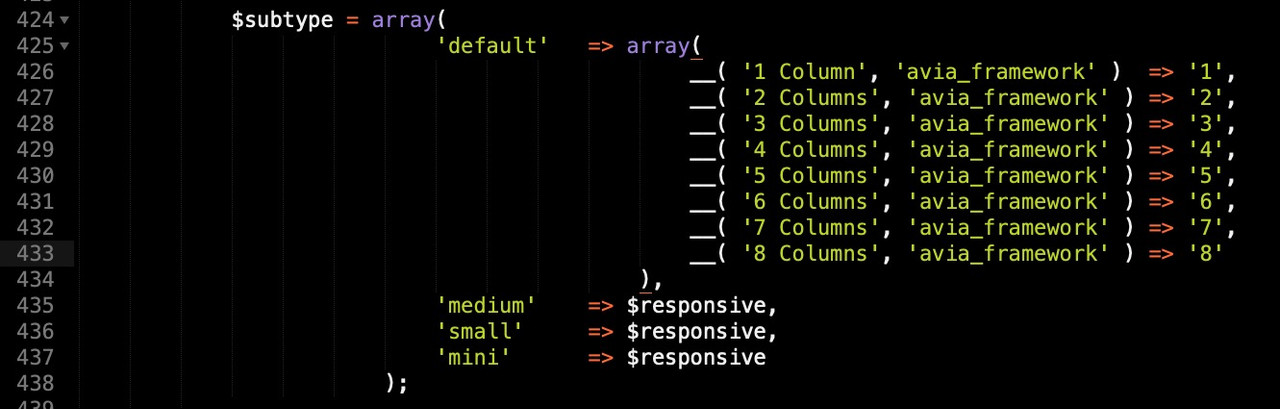
you can download the whole portfolio.php from pastebin:
( this is on basis of enfold 4.8.7.1)
look: https://pastebin.com/v1s9sdQb
download: https://pastebin.com/dl/v1s9sdQb
This new portfolio.php you can upload via ftp to a folder named shortcodes in your child-theme folder:
child-theme/shortcodes
To load those edited child-theme alb elements ( see docu ) – you had to place that snippet in your child-theme functions.php:
function avia_include_shortcode_template($paths){
  $template_url = get_stylesheet_directory();
      array_unshift($paths, $template_url.'/shortcodes/');
  return $paths;
}
add_filter('avia_load_shortcodes', 'avia_include_shortcode_template', 15, 1);
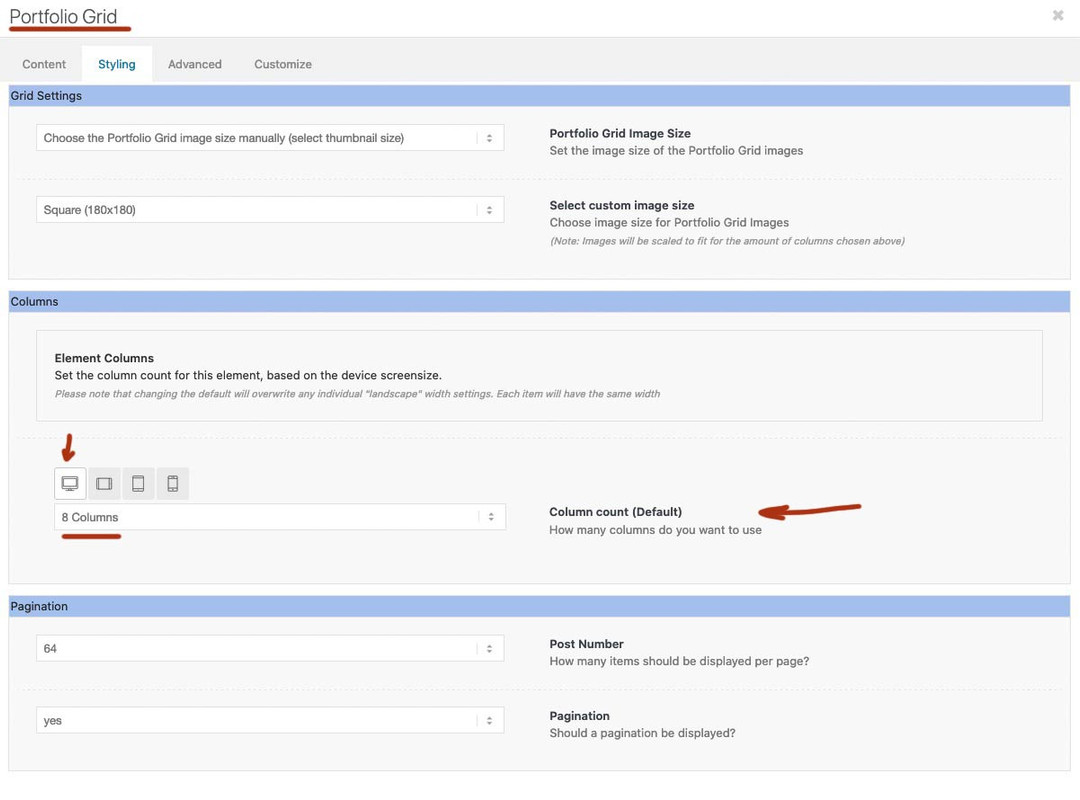
after that in the dom the portfolio will have that extra class : grid-col-8 ( in your case )
now you only have to put this to your quick css ( or something similar ):
.grid-col-8 .grid-entry {
  width: calc(12.5% - 8.75px) !important;
  padding: 0;
  margin: 0 10px 10px 0 !important;
}

.grid-col-8 .grid-entry:nth-child(8n) {
  margin-right: 0 !important;
}
ps: 8.75px because 8cols will have 7 spaces between with a setting of 10px it is 70px total space 70px/8 = 8.75px
This reply has been marked as private.
I’m running Enfold 4.8.7.1 on WordPress 5.8.1 on PHP 7.4.25 and whenever I try to save any option(s) in the Enfold > Theme Options, the screen updates and flashes the
All Right!
All Options saved, no problems whatsoever.
But when I refresh the Theme Options page, the value(s) did not change.
I’ve deactivated all plugins and tried making changes, but the problem persists.
I’ve performed a hard refresh and cache delete, but the problem persists.
It seems as though when the jQuery code is updating the values, it isn’t really communicating with the database.
I created an Admin login (details in the Private Content).
Please advise.
Clay
-
This topic was modified 4 years, 5 months ago by
 scottmclay.
Hi,
Now I updated the site to the last version 4871 and now I get this erreur !!
Warning: require_once(/kunden/214043_96450/rp-hosting/14781/43642/webseiten/ac/wp-content/themes/enfold/config-layerslider/LayerSlider/assets/classes/class.km.autoupdate.plugins.v3.php): failed to open stream: No such file or directory in /kunden/214043_96450/rp-hosting/14781/43642/webseiten/ac/wp-content/themes/enfold/config-layerslider/LayerSlider/assets/init.php on line 62
Fatal error: require_once(): Failed opening required ‘/kunden/214043_96450/rp-hosting/14781/43642/webseiten/ac/wp-content/themes/enfold/config-layerslider/LayerSlider/assets/classes/class.km.autoupdate.plugins.v3.php’ (include_path=’.:/usr/local/lib/php’) in /kunden/214043_96450/rp-hosting/14781/43642/webseiten/ac/wp-content/themes/enfold/config-layerslider/LayerSlider/assets/init.php on line 62
Une erreur critique est survenue sur ce site. Veuillez consulter la boite de réception de l’e-mail d’administration de votre site pour plus d’informations.
Hey ashleyknow,
Thank you for your question, I believe that this is due to your outdated PHP version on your webhost server, I see you are using PHP v5.6.40 with WordPress v5.8.1 that requires a minimum of v7.4 you can see this on your site health panel linked below

Please ask your webhost to update the server, the next issue is that you are using Enfold v4.5.4 with WordPress v5.8.1 This version of Enfold should be updated, but the old Envato API is deprecated so you will need to go to your Theme Forest account and create a Envato Token to update, or you can download the latest version from your Theme Forest account and manually update though the WordPress theme panel.
You will want to update because the Block editor is conflicting with the Advanced Layout Builder in this version, as you see both are showing on your page, this should not be

you could disable the Block editor at Enfold Theme Options ▸ Select Your Editor but you could still have issues, I copied your page and tested it on my demo and it worked fine so I believe you need to follow these update steps, please update your server PHP first.
Best regards,
Mike
This reply has been marked as private.
Hi,
I am trying to use adapted sitemaps to warm the W3TC cache. Most is working fine, but I noticed some issues with the resulting (standard WP) sitemaps, namely:
1. need to remove the Blog taxonomy from the sitemaps
These links point to /category/blog/ instead of /blog/, so point to archive instead of real blog.
2. need to remove the Portfolio taxonomies from the sitemaps
These links point to /portfolio_entries/category/ instead of /portfolio/category/, so point to archive instead of the real portfolio.
I tried to fix it in my child theme functions.php (line 760-840), but that code either doesn’t yield the proper result or gives an error in the logs.
I cannot seem to get this right. So I definitely need some help here from someone more knowledgeable than me :-)
Thank you for taking a look. much appreciated as always.
Login token for dev site and details in private box.
Rob
-
This topic was modified 4 years, 5 months ago by
 rob2701. Reason: fixed typo
Hi, I have installed a plugin Query monitor. the error I see:
https://larixsibirica.com/wp-content/uploads/dynamic_avia/avia-merged-styles-50c9356778f4fe60b2080cac21fa4afd—61862793c8b8b.css cURL error 28: Connection timed out after 5001 milliseconds
aviaAssetManager->generate_file()
wp-content/themes/enfold_211006/config-templatebuilder/avia-template-builder/php/class-asset-manager.php:588
aviaAssetManager->merge()
wp-content/themes/enfold_211006/config-templatebuilder/avia-template-builder/php/class-asset-manager.php:214
aviaAssetManager->try_minifying_scripts()
wp-content/themes/enfold_211006/config-templatebuilder/avia-template-builder/php/class-asset-manager.php:101
do_action(‘wp_enqueue_scripts’)
wp-includes/plugin.php:470
wp_enqueue_scripts()
wp-includes/script-loader.php:2083
do_action(‘wp_head’)
wp-includes/plugin.php:470
wp_head()
wp-includes/general-template.php:3015
load_template(‘wp-content/themes/enfold_211006/header.php’)
wp-includes/template.php:770
locate_template()
wp-includes/template.php:716
get_header()
wp-includes/general-template.php:48
where can be a problem? thanks..
I got a message from JetPack that the scan found the following: The threat known as Suspicious.Files has been found in /home/customer/www/sheilacrewinteriors.com/public_html/wp-content/themes/enfold/framework/php/avia_shortcodes/av-prev.php
Threat found
The threat occured after I updated my ForestTheme to the 4.8.7.1 on yesterday around 12:43pm. The threat was found by JetPack
at 8pm last night. Has anyone else had this problem and if so what did you to fix it.
I looked at my host site, Siteground scan and there were no threats found on their end.
Thank you.
Sheila
This reply has been marked as private.
And where did you replace on Enfold Options that logo ?
for transparency headers : header – transparency options – Transparency Logo
or for non transparent Headers on : Theme Options – Logo
________
you can use the logo subtext for that in child-theme functions.php
f.e. showing bloginfo name ( that is the text you insert on apearance – customise for Site Title )
function kriesi_logo_addition($sub){
  $sub .= "<span class='logo-title'>";
  $sub .= get_bloginfo( 'name', 'display' );
  $sub .= "</span>";
  return $sub;
}
add_filter('avf_logo_subtext', 'kriesi_logo_addition');
OR use any text you like in additon:
function kriesi_logo_addition($sub){
  $sub .= "<span class='logo-title'>";
  $sub .= "Your LogoText";
  $sub .= "</span>";
  return $sub;
}
add_filter('avf_logo_subtext', 'kriesi_logo_addition');
Then on quick css:
.logo img, .logo svg {
  display: none;
}

.logo .subtext .logo-title {
  font-size: 36px;
  font-weight: 700;
  color: #fff
}
/*** if you need different colors on your text after scrolling on shrinking header ***/
.header-scrolled .logo .subtext .logo-title {
  color: #000
}
if you do not have shrinking header you can differ between transparent and non transparent header on that header class: av_header_transparency
-
This reply was modified 4 years, 5 months ago by
 Guenni007.
Hi,
Thanks @Guenni007.
Added it to core – extended code that svg show viewBox content in dimension column.
I added filter ‘avf_media_gallery_sortable_filesize’ ( https://github.com/KriesiMedia/enfold-library/blob/master/actions%20and%20filters/Images%20and%20Lightbox/avf_media_gallery_sortable_filesize.php ) because you have to “fill” filesize postmeta for all media elements before sorting works correct.
Best regards,
Günter
Hello Nikko,
sorry that I was so hasty. It works now again with PHP 7.4. But what do I have to do when next year PHP 7.4 is switched off? So that we do not have such a problem again.
Hello Nikko,
many dnak for your answer. We last used the latest version of PHP. I have now switched to 7.4, but still get the same error message.
Hello Nikko,
many dnak for your answer. We last used the latest version of PHP. I have now switched to 7.4, but still get the same error message.
Hello, sorry for the late reply. I did manage to actually fix the issues on all 5 websites just now.
The main issue was regarding the PHP 8.0 version. The moment I rolled the PHP version back to 7.4 3/5 sites started working again and I could actually install the new enfold version.
After that I disabled the Enfold theme on gentsandcrooks.nl & dietistlotjevaes.nl, then activated a default wordpress theme and moved the enfold themes to a diffrent folder. After that wordpress somehow still saw the Enfold themes and I could activate them again, which moved themselves back to the actual theme folder and got it fixed.
Again thanks for the assistance,
Hi,
Thanks for that. I’m not sure why it’s not working to be honest with you, would be able to try a different PHP version to see if that changes anything? Is so, then please try 7.4.
Best regards,
Rikard
Hi uekimeri1986,
What PHP version are you using? can you try to use PHP 7.4?
Best regards,
Nikko
Hi Ismael,
I also got this email saying there is a critical error on the site – would this be part of the problem?
Howdy!
Since WordPress 5.2 there is a built-in feature that detects when a plugin or theme causes a fatal error on your site, and notifies you with this automated email.
In this case, WordPress caught an error with your theme, Enfold.
First, visit your website (https://stmarywichita.org/) and check for any visible issues. Next, visit the page where the error was caught (https://stmarywichita.org/wp-admin/admin-ajax.php) and check for any visible issues.
Please contact your host for assistance with investigating this issue further.
If your site appears broken and you can’t access your dashboard normally, WordPress now has a special “recovery mode”. This lets you safely login to your dashboard and investigate further.
https://stmarywichita.org/wp-login.php?action=enter_recovery_mode&rm_token=OZ1pABteRO18M8ZUXCYX4Z&rm_key=0PXQ76L8aUqWMvDtSwbFOg
To keep your site safe, this link will expire in 1 day. Don’t worry about that, though: a new link will be emailed to you if the error occurs again after it expires.
When seeking help with this issue, you may be asked for some of the following information:
WordPress version 5.8.1
Current theme: Enfold (version 4.8.7)
Current plugin: (version )
PHP version 7.4.10
Hi,
Thank you for the feedback.
I added this fix to core already (4.8.7.2). So hopefully there should not be any more problems.
Seems to be PHP 8.0.11 related – but we cannot reproduce it (also not on 8.0.12, I’m working on 8.0.0).
Best regards,
Günter
Hi,
@danowen777
This element is not working any longer due to changes since WP 5.5 in routing logic.
I updated the element and it will be part of next version 4.8.7.2.
Meanwhile please replace enfold\config-templatebuilder\avia-shortcodes\page_split.php
with the content of:
https://github.com/KriesiMedia/enfold-library/blob/master/temp_fixes/Enfold_4_8_7/shortcodes/page_split.php
Do not forget to make a backup of the original file for a fallback and clear server and browser cache.
If you need help let us know and we can do it for you.
Best regards,
Günter
Hey andrea_werkhoven,
Thank you for using Enfold and sorry for the problem.
It is a PHP bug on a few client servers.
I changed the text string a little – I hope this fixes the problem.
Please update enfold\includes\admin\option_tabs\avia_blog.php with the content of
https://github.com/KriesiMedia/enfold-library/blob/master/temp_fixes/Enfold_4_8_7_1/includes/avia_blog.php
Do not forget to make a copy of the original file and clear server and browser cache.
If you need help let us know and we can do it for you.
Best regards,
Günter
I’m using the latest Enfold (4.8.7.1). I have added
add_theme_support(‘avia_template_builder_page_split_element’);
to my Enfold Child Theme Functions – functions.php.
I have added the Page Split Content Element in a Post.
The page is split, but clicking the 2 (for the second page) only reloads page 1 of the post.
Can you tell me what I’m doing wrong?
The post is: https://ensightful.com/2021/10/29/tower-muqarnas-2/
The password is 123456
Thank you.
Hi,
Just updated my Enfold theme (on WordPress) and got a critical error. This is the message.
Could you please help me out?
Een fout van het type E_ERROR werd veroorzaakt op regelnummer 311 van het bestand /var/www/vhosts/doc33.nl/httpdocs/wp-content/themes/enfold/includes/admin/option_tabs/avia_blog.php. Foutmelding: Uncaught ValueError: Unknown format specifier “S” in /var/www/vhosts/doc33.nl/httpdocs/wp-content/themes/enfold/includes/admin/option_tabs/avia_blog.php:311
Stack trace:
#0 /var/www/vhosts/doc33.nl/httpdocs/wp-content/themes/enfold/includes/admin/option_tabs/avia_blog.php(311): sprintf()
#1 /var/www/vhosts/doc33.nl/httpdocs/wp-content/themes/enfold/includes/admin/register-admin-options.php(293): include(‘/var/www/vhosts…’)
#2 /var/www/vhosts/doc33.nl/httpdocs/wp-content/themes/enfold/framework/php/class-superobject.php(246): include(‘/var/www/vhosts…’)
#3 /var/www/vhosts/doc33.nl/httpdocs/wp-content/themes/enfold/framework/php/class-superobject.php(197): avia_superobject->_create_option_arrays()
#4 /var/www/vhosts/doc33.nl/httpdocs/wp-content/themes/enfold/framework/php/class-superobject.php(146): avia_superobject->init()
#5 /var/www/vhosts/doc33.nl/httpdocs/wp-content/themes/enfold/framework/php/class-superobject.php(482): avia_superobject::instance()
#6 /var/www/vhosts/doc33.nl/httpdocs/wp-content/themes/enfold/framework/avia_framework.php(108): AviaSuperobject()
#7 /var/www/vhosts/doc33.nl/httpdocs/wp-content/themes/enfold/functions.php(196): require_once(‘/var/www/vhosts…’)
#8 /var/www/vhosts/doc33.nl/httpdocs/wp-settings.php(546): include(‘/var/www/vhosts…’)
#9 /var/www/vhosts/doc33.nl/httpdocs/wp-config.php(98): require_once(‘/var/www/vhosts…’)
#10 /var/www/vhosts/doc33.nl/httpdocs/wp-load.php(50): require_once(‘/var/www/vhosts…’)
#11 /var/www/vhosts/doc33.nl/httpdocs/wp-admin/admin.php(34): require_once(‘/var/www/vhosts…’)
#12 {main}
thrown
Hi,
Updated version:
https://github.com/KriesiMedia/enfold-library/blob/master/temp_fixes/Enfold_4_8_7/shortcodes/page_split.php
Can you check please.
You can remove add_theme_support and it should work without your workaround with nextpage.
Best regards,
Günter
Hello,
PHP Version now updated – Server running PHP version: 7.4.14.
Yes, please feel to disable whatever you need to troubleshoot my website.



