Viewing 30 results - 2,581 through 2,610 (of 16,898 total)
  • Author
    Search Results
  • Hi,
    I had the same problem and I used the solution from this post https://kriesi.at/support/topic/critical-error-9/#post-1327504 and replaced enfold\includes\admin\option_tabs\avia_blog.php with the content of https://github.com/KriesiMedia/enfold-library/blob/master/temp_fixes/Enfold_4_8_7_1/includes/avia_blog.php

    Think Kriesi should repair this in the next update.

    Regards,Ariane

    edwinkense
    Participant

    Hi Rikard,
    We are working with the latest ducth version of wordpress. We updated the enfold thema because of an error in a PHP file,
    We instlled the latest version, but still get a critical error.
    Now we are working with
    WordPress versie 5.8.2
    Huidig thema: Enfold (versie 4.8.7.1)
    Huidige plugin: (versie )
    PHP versie 8.0.13

    Foutdetails
    ===========
    Een fout van het type E_ERROR werd veroorzaakt op regelnummer 311 van het bestand /customers/9/0/0/logopedie-oisterwijk.nl/httpd.www/wp/wp-content/themes/enfold/includes/admin/option_tabs/avia_blog.php. Foutmelding: Uncaught ValueError: Unknown format specifier “S” in /customers/9/0/0/logopedie-oisterwijk.nl/httpd.www/wp/wp-content/themes/enfold/includes/admin/option_tabs/avia_blog.php:311
    Stack trace:
    #0 /customers/9/0/0/logopedie-oisterwijk.nl/httpd.www/wp/wp-content/themes/enfold/includes/admin/option_tabs/avia_blog.php(311): sprintf(‘Als u links naa…’, ‘

    #1329610

    In reply to: Portfolio Previev

    Hi,

    Thank you for the info.

    Have you tried updating the page_split.php file as suggested in the previous thread? This is the updated version of the page_split.php file, which should contain the fix.

    // https://github.com/KriesiMedia/enfold-library/blob/master/temp_fixes/Enfold_4_8_7/shortcodes/page_split.php

    You may need to do this step as well.

    You can remove add_theme_support and it should work without your workaround with nextpage.

    Best regards,
    Ismael

    I’ve tried reuploading the font on the English side through Theme Options -> Import/Export -> Custom Font Manager , but it just flipped the problem on the other side, e.g. now both English and French CSS was loading the ttf from the same english domain yourimmigration.ca. It fixed the english side but broke the french side. So I restored the site back to what it was before that step.

    Yes the files in the media library are accessible equally under all my different domains including ttf’s from my understanding, that’s the default from what I see.

    So I before I can try your fix on class-avia-type-fonts.php as-is, I updated to 4.8.7.1 because I was still on v. 4.7.6.4 .

    Now I replaced the file class-avia-type-fonts.php with your on github. What should I do next? Nothing changed yet on the english side. I tried regenerating the files, but no change. How do I activate the condition for your new code path?

    #1329557
    mariyanh
    Participant

    Hi,

    Do you have any idea, why I got those errors on my website after updating to 4.8.7.1 ?
    Also my Publications page seem to disappeared.

    Error Details
    =============
    An error of type E_ERROR was caused in line 1007 of the file /home/public_html/wp-content/themes/enfold-child/shortcodes/postslider/postslider.php. Error message: Uncaught Error: Call to undefined method AviaHelper::add_date_query() in /home/public_html/wp-content/themes/enfold-child/shortcodes/postslider/postslider.php:1007
    Stack trace:
    #0 /home/public_html/wp-content/themes/enfold/config-templatebuilder/avia-shortcodes/blog/blog.php(617): avia_post_slider->query_entries()
    #1 /home/public_html/wp-content/themes/enfold/config-templatebuilder/avia-template-builder/php/class-shortcode-template.php(1123): avia_sc_blog->shortcode_handler(Array, ”, ‘av_blog’, Array)
    #2 /home/public_html/wp-includes/shortcodes.php(356): aviaShortcodeTemplate->shortcode_handler_prepare(Array, ”, ‘av_blog’)
    #3 [internal function]: do_shortcode_tag(Array)
    #4 /home/public_html/wp-includes/shortcodes.php(228): preg_replace_callback(‘/\\[(\\[?)(av_blo…’, ‘do_shortcode_ta…’, ‘[av_heading …’)
    #5 /home/public_html/wp-content/themes/enfold/config-templatebuilder/avia-template-builder/php/class-shortcod

    Hi,

    uploading the font: Theme Options -> Import/Export -> Custom Font Manager

    You can upload new fonts or delete already uploaded fonts (and reupload them).

    —-

    But I added a solution that removes the absolute URL part when creating the file dynamic_avia/enfold(_child).css on the fly.

    Please update enfold\framework\php\font-management\class-avia-type-fonts.php with the content of

    https://github.com/KriesiMedia/enfold-library/blob/master/temp_fixes/Enfold_4_8_7_1/framework/class-avia-type-fonts.php

    Around line 988ff you find theme support ‘custom_uploaded_fonts_relative_url’ (and filter ‘avf_custom_uploaded_fonts_url’).

    Adding theme support will modify the output in dynamic_avia/enfold(_child).css to e.g.:

    
    @font-face {
         font-family: 'lato';
         src:    url('/wp56/wp-content/uploads/avia_fonts/type_fonts/lato/lato-black.ttf') format('truetype');
         font-style:  normal;
         font-weight: 900;
         font-display: auto;
    }
    @font-face {
         font-family: 'lato';
         src:    url('/wp56/wp-content/uploads/avia_fonts/type_fonts/lato/lato-blackitalic.ttf') format('truetype');
         font-style:  italic;
         font-weight: 900;
         font-display: auto;
    }
    

    If WPML copies this file (or the merged files) to the other domain and the ttf files are in the same folder location there it should work.

    Best regards,
    Günter

    #1329528

    same here, on two different sites critical error and this is the log:
    Foutdetails
    ===========
    Een fout van het type E_ERROR werd veroorzaakt op regelnummer 311 van het bestand /home/deb45050n6/domains/lexdigitalis.nl/public_html/wp-content/themes/enfold/includes/admin/option_tabs/avia_blog.php. Foutmelding: Uncaught ValueError: Unknown format specifier “S” in /home/deb45050n6/domains/lexdigitalis.nl/public_html/wp-content/themes/enfold/includes/admin/option_tabs/avia_blog.php:311
    Stack trace:
    #0 /home/deb45050n6/domains/lexdigitalis.nl/public_html/wp-content/themes/enfold/includes/admin/option_tabs/avia_blog.php(311): sprintf()
    #1 /home/deb45050n6/domains/lexdigitalis.nl/public_html/wp-content/themes/enfold/includes/admin/register-admin-options.php(293): include(‘/home/deb45050n…’)
    #2 /home/deb45050n6/domains/lexdigitalis.nl/public_html/wp-content/themes/enfold/framework/php/class-superobject.php(246): include(‘/home/deb45050n…’)
    #3 /home/deb45050n6/domains/lexdigitalis.nl/public_html/wp-content/themes/enfold/framework/php/class-superobject.php(197): avia_superobject->_create_option_arrays()
    #4 /home/deb45050n6/domains/lexdigitalis.nl/public_html/wp-content/themes/enfold/framework/php/class-superobject.php(146): avia_superobject->init()
    #5 /home/deb45050n6/domains/lexdigitalis.nl/public_html/wp-content/themes/enfold/framework/php/class-superobject.php(482): avia_superobject::instance()
    #6 /home/deb45050n6/domains/lexdigitalis.nl/public_html/wp-content/themes/enfold/framework/avia_framework.php(108): AviaSuperobject()
    #7 /home/deb45050n6/domains/lexdigitalis.nl/public_html/wp-content/themes/enfold/functions.php(196): require_once(‘/home/deb45050n…’)
    #8 /home/deb45050n6/domains/lexdigitalis.nl/public_html/wp-settings.php(546): include(‘/home/deb45050n…’)
    #9 /home/deb45050n6/domains/lexdigitalis.nl/public_html/wp-config.php(108): require_once(‘/home/deb45050n…’)
    #10 /home/deb45050n6/domains/lexdigitalis.nl/public_html/wp-load.php(50): require_once(‘/home/deb45050n…’)
    #11 /home/deb45050n6/domains/lexdigitalis.nl/public_html/wp-admin/admin.php(34): require_once(‘/home/deb45050n…’)
    #12 /home/deb45050n6/domains/lexdigitalis.nl/public_html/wp-admin/index.php(10): require_once(‘/home/deb45050n…’)
    #13 {main}
    thrown

    #1329524

    Hi Rikard,
    We are working with the latest ducth version of wordpress. We updated the enfold thema because of an error in a PHP file,
    We instlled the latest version, but still get a critical error.
    Now we are working with
    WordPress versie 5.8.2
    Huidig thema: Enfold (versie 4.8.7.1)
    Huidige plugin: (versie )
    PHP versie 8.0.13

    Foutdetails
    ===========
    Een fout van het type E_ERROR werd veroorzaakt op regelnummer 311 van het bestand /customers/9/0/0/logopedie-oisterwijk.nl/httpd.www/wp/wp-content/themes/enfold/includes/admin/option_tabs/avia_blog.php. Foutmelding: Uncaught ValueError: Unknown format specifier “S” in /customers/9/0/0/logopedie-oisterwijk.nl/httpd.www/wp/wp-content/themes/enfold/includes/admin/option_tabs/avia_blog.php:311
    Stack trace:
    #0 /customers/9/0/0/logopedie-oisterwijk.nl/httpd.www/wp/wp-content/themes/enfold/includes/admin/option_tabs/avia_blog.php(311): sprintf(‘Als u links naa…’, ‘

    #1329472

    We see the exact same issue today:

    Warning: Undefined array key “footer_option” in /storage/content/50/197550/keymobile.se/public_html/wp-content/themes/enfold/footer.php on line 30 Warning: Undefined array key “footer_behavior” in /storage/content/50/197550/keymobile.se/public_html/wp-content/themes/enfold/footer.php on line 32 Warning: Undefined array key “footer_behavior” in /storage/content/50/197550/keymobile.se/public_html/wp-content/themes/enfold/footer.php on line 270

    #1329468

    Hi Ismael,

    I have de-activated all plugins except the WMPL-plugin, but the error remains. Previously I had a fatal error on my website regarding line 311 in the avia_blog.php and copied and paste a code from another thread of this Forum and solve that problem. I don’t think this has anything to do with the current error but just to be sure: below is the code I copied into avia_blog.php.

    The weird thing is that the Germand and French translation allow me to create a menu, but the English version doesn’t.

    moved to pastebin: https://pastebin.com/yzgWtmw9

    #1329390
    dhuet
    Participant

    HI,

    I am getting issues with the footer since the last upgrade. Do you where this might be coming from?

    Warning: Undefined array key “footer_option” in /home/39226-61529.cloudwaysapps.com/eqktaxkzvm/public_html/wp-content/themes/enfold/footer.php on line 30

    Warning: Undefined array key “footer_behavior” in /home/39226-61529.cloudwaysapps.com/eqktaxkzvm/public_html/wp-content/themes/enfold/footer.php on line 32

    Warning: Undefined array key “footer_behavior” in /home/39226-61529.cloudwaysapps.com/eqktaxkzvm/public_html/wp-content/themes/enfold/footer.php on line 270

    #1329340
    Wendy
    Participant

    Hi,

    I am trying to translate my menus but keep getting a fatal error when I try to make an English menu:

    Fatal error: Uncaught Error: Attempt to assign property “front_or_home” on null in /customers/e/0/b/wendywasbauer.nl/httpd.www/wp-admin/includes/nav-menu.php:379 Stack trace: #0 /customers/e/0/b/wendywasbauer.nl/httpd.www/wp-admin/includes/template.php(1522): wp_nav_menu_item_post_type_meta_box(NULL, Array) #1 /customers/e/0/b/wendywasbauer.nl/httpd.www/wp-admin/nav-menus.php(938): do_accordion_sections(Object(WP_Screen), ‘side’, NULL) #2 {main} thrown in /customers/e/0/b/wendywasbauer.nl/httpd.www/wp-admin/includes/nav-menu.php on line 379

    • This topic was modified 4 years, 5 months ago by Wendy.
    #1329107

    Hi guys,

    thanks guys!

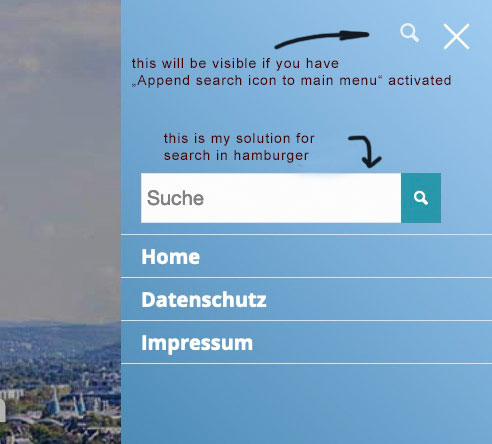
    Just for the record: here is complete instruction to make it work as I hate going through dozens of threads to search for the complete solution. You are welcome ;). The search form was hidden in my case.

    
    /* Mobile Search Form Magic */
    #top #searchform > div {
        display: block !important;
        opacity: 1 !important;
    }
    #avia-menu li.menu-search {
        display: none;
    }
    

    Functions.php

    
    /**
     * Show search bar on mobile menu
     */
     add_shortcode('avia_search', 'get_search_form');
    function ava_custom_script_mod_search_mobile()
    {
    ?>
    	<script>
    		(function($) {
    			$(document).ready(function() {		
    				var page   = window.location.href;
    				var search = '<form action="'+page+'" method="get" class=""><div><input type="submit" value="?" id="searchsubmit" class="button avia-font-entypo-fontello"><input type="text" id="s" name="s" value="" placeholder="Search"></div></form>';
    	
    				$('.av-burger-menu-main a').on('click', function() {
    					if($(".av-mobile-search").find('form').length == 1) return;
    					setTimeout(() => {
    						$("<li class='av-mobile-search av-active-burger-items'>" + search + "</div>").insertAfter('.menu-item-178580');
    					}, 300);	
    				});
    			});
    		})(jQuery);
    	</script>
    <?php
    }
    add_action('wp_footer', 'ava_custom_script_mod_search_mobile', 10000);
    
    #1329028
    SOLOMON GRANT
    Guest

    Hi guys, long time no speak.
    My website acting strangely. Every page can be edited apart from the home page.
    Clicking edit brings up the “critical error” message.

    Since WordPress 5.2 there is a built-in feature that detects when a plugin or theme causes a fatal error on your site, and notifies you with this automated email.

    In this case, WordPress caught an error with your theme, Enfold.

    First, visit your website (https://pitythem.org/) and check for any visible issues. Next, visit the page where the error was caught (https://pitythem.org/wp-admin/post.php?post=178&action=edit) and check for any visible issues.

    Please contact your host for assistance with investigating this issue further.

    If your site appears broken and you can’t access your dashboard normally, WordPress now has a special “recovery mode”. This lets you safely login to your dashboard and investigate further.

    To keep your site safe, this link will expire in 1 day. Don’t worry about that, though: a new link will be emailed to you if the error occurs again after it expires.

    When seeking help with this issue, you may be asked for some of the following information:
    WordPress version 5.8.2
    Current theme: Enfold (version 4.8.6.5)
    Current plugin: (version )
    PHP version 7.4.25

    #1328893

    Hi,
    Thank you for the link to your site and the explanation, for this one page /memory-care-learning-center/events/ page-id-2047
    we will use css to hide any masonry elements with the class tribe_events_cat-independent-living
    then we will use a jQuery script to check if no masonry elements are showing, and if so we will display a message.
    Please add this code in the General Styling ▸ Quick CSS field or in the WordPress ▸ Customize ▸ Additional CSS field:

    #top.page-id-2047 #av-masonry-1 .tribe_events_cat-independent-living {
    	display: none;
    }
    .nocat {
    	text-align: center;
        color: #fff;
        font-size: 20px;
    }

    Then add this code to the end of your functions.php file in Appearance ▸ Editor:

    function custom_nocat_script() { ?>
        <script>
    (function($) {
    var nocat = $('<div class="nocat">No Current Events</div>');
    if($('#top.page-id-2047 .av-masonry-entry').is(':hidden')){
    	$(nocat).appendTo('#av-masonry-1');
    }
    })(jQuery);
    </script>
        <?php
    }
    add_action('wp_footer', 'custom_nocat_script');
    

    Best regards,
    Mike

    #1328862
    Guenni007
    Participant

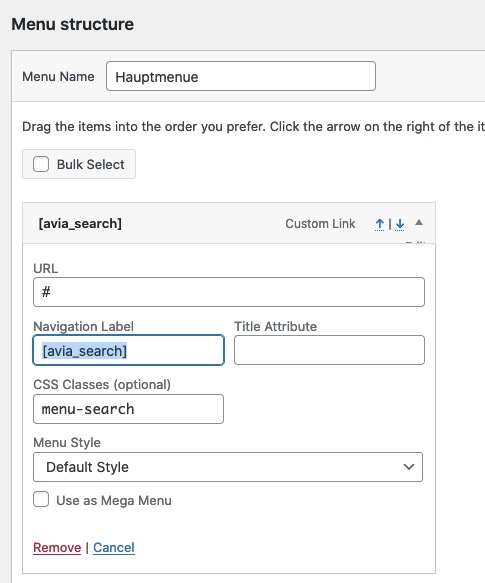
    Referring to : https://kriesi.at/support/topic/styling-search-bar-on-main-page-avia_search/#post-1327689

    your search menu-item gets out of line if you shrink your header; but that is not the worst.
    If you like to enter in the input field something and want to overwrite or correct the input the link on your menu-item search is disturbing. ( try to correct the text you put in the input field.)
    If you like to have it with more usability put this into your child-theme functions.php:

    function remove_href_from_search_input(){
    ?>
    <script type="text/javascript">
    (function($) {
    	$(document).ready(function(){ 
    		$('#menu-item-7484 > a').removeAttr("href");
    	});
    		$('#header').on('click', '.av-main-nav-wrap', function() {
    		$('#av-burger-menu-ul #menu-item-7484 > a:first-of-type').removeAttr("href");
    	});	
    })(jQuery);
    </script>
    <?php
    }
    add_action('wp_footer', 'remove_href_from_search_input');

    and for your quick css:

    #menu-item-7484 > a {
      display: flex;
      flex-flow: column nowrap;
    }
    
    #menu-item-7484 > a > .avia-menu-text {
      position: relative;
      top: calc(50% - 21px)
    }
    
    #menu-item-7484 > a #searchform {
      margin: 0 !important;
      padding: 0 !important;
      width: 300px;    /*** only if you like to have the same width with ajax response ***/
    }
    
    #menu-item-7484 .ajax_search_response {
      padding-top: 20px
    }
    #1328859

    but if you have that search on your main-navigation the magnifier symbol ( search ) is also on hamburger open visible !
    Maybe you only had to style the colors of that Search icon

    then you will not need anything else ? express your request a little more precisely.
    __________
    but if you want it like this: https://webers-web.info
    you can hide that custom link in your “non-hamburger” navigation by setting it to display none.
    Think of that custom class on that custom link:

    #avia-menu li.menu-search {
        display: none;
    }

    now we got a menu item search – to have the chance to write into that input field – the link on the item itself disturbs – we had to get rid of the href :
    this to child-theme functions.php:

    function remove_href_from_search_input(){
    ?>
    <script type="text/javascript">
    (function($) {
    	$('#header').on('click', '.av-main-nav-wrap', function() {
    			$('#av-burger-menu-ul .menu-search > a:first-of-type').removeAttr("href");
    	});	
    })(jQuery);
    </script>
    <?php
    }
    add_action('wp_footer', 'remove_href_from_search_input');

    on my testinstallation i got this in my quick css – but you had to adjust it to your settings and needs:

    #avia-menu li.menu-search {
    	display: none;
    }
    
    #av-burger-menu-ul li.menu-search a:hover {
    	background-color: transparent !important;
    }
    
    #av-burger-menu-ul li.menu-search a:hover {
    	opacity: 1 !important
    }
    
    #av-burger-menu-ul li.menu-search .ajax_search_response {
    	margin-top: 30px !important;
    }
    
    #av-burger-menu-ul li.menu-search .ajax_search_response  * {
    	color: #fff;
    }
    
    #av-burger-menu-ul li.menu-search .ajax_search_response .av_ajax_search_content .av_ajax_search_title {
    	font-size: 16px
    }
    
    #av-burger-menu-ul li.menu-search .ajax_search_response  .av_ajax_search_entry:hover .av_ajax_search_title {
    	letter-spacing:0.4px;
    	color: #004e7f
    }
    
    #av-burger-menu-ul li.menu-search .av_ajax_search_image {
    	background-color: #fff;
    	border-radius: 0;
    	color: #000 !important
    }
    #1328788
    bluebubble
    Participant

    Hi guys, long time no speak.

    I have a clients website acting strangely. Every page can be edited apart from the home page.
    Clicking edit brings up the “critical error” message.
    I have deactivated all plugins and tried editing, same issue.

    This happened a few months back, I rebuilt the homepage again using a fresh page and saved templates, this solved the issue for a while.
    Its now returned and Im stumped as to why its only effecting the home page.

    All plugins currently activated. These can be deactivated if needs be.
    PHP is 7.3 (Highest version hosing can provide currently)
    Enfold ver 4.8.7.1

    This is the error message generated by WordPress

    If your site appears broken and you can’t access your dashboard normally, WordPress now has a special “recovery mode”. This lets you safely login to your dashboard and investigate further.
    (private content)

    To keep your site safe, this link will expire in 1 day. Don’t worry about that, though: a new link will be emailed to you if the error occurs again after it expires.

    When seeking help with this issue, you may be asked for some of the following information:
    WordPress version 5.8.2
    Current theme: Dreamtex Ltd (version 1.0)
    Current plugin: (version )
    PHP version 7.3.31

    Error Details
    =============
    An error of type E_ERROR was caused in line 3751 of the file /home/cluster-sites/2/d/dreamtexltd.com/public_html/wp-content/themes/enfold/config-templatebuilder/avia-template-builder/php/class-element-templates.php. Error message: Uncaught TypeError: Argument 1 passed to aviaElementTemplates::set_locked_attributes() must be of the type array, string given, called in /home/cluster-sites/2/d/dreamtexltd.com/public_html/wp-content/themes/enfold/config-templatebuilder/avia-shortcodes/slideshow_fullscreen/slideshow_fullscreen.php on line 988 and defined in /home/cluster-sites/2/d/dreamtexltd.com/public_html/wp-content/themes/enfold/config-templatebuilder/avia-template-builder/php/class-element-templates.php:3751
    Stack trace:
    #0 /home/cluster-sites/2/d/dreamtexltd.com/public_html/wp-content/themes/enfold/config-templatebuilder/avia-shortcodes/slideshow_fullscreen/slideshow_fullscreen.php(988): aviaElementTemplates->set_locked_attributes(”, Object(avia_sc_slider_fullscreen), ‘av_fullscreen_s…’, Array, Array, ”)
    #1 /home/cluster-sites/2/d/dreamtexltd.com/public_html/wp-content/themes/enfold/config-templatebuilder/avia-template-builder/php/class-shortcode-template.php(1123): avia_sc_slider_fullscreen->shortcode_handler(Array, ‘\n[av_f

    Hoping someone can shed some light. Temp login provided.

    Thanks

    • This topic was modified 4 years, 5 months ago by bluebubble. Reason: adding info

    Hi,

    Thank you for the info.

    Did you create different directories for each language or just different domains? If there is only one directory for all languages, then they will share the same upload directory using the default path or the WordPress Address (URL) as base URL.

    For installation with different directories, we may need to adjust the origin_url of the fonts in the enfold/framework/php/font-management/class-avia-type-fonts.php file around line 998.

    
    $url = trailingslashit( $font_info[‘origin_url’] . $font_info[‘folder’] ) . $file;
    

    Best regards,
    Ismael

    #1328759

    Oh yes, it works again! I can’t tell why.
    Since it works again on the live site, could it be because of the server? As requested by Enfold Support, we have temporarily switched to PHP 7.4. It is currently PHP 8 again

    #1328699

    Hi Rikard,

    That is very special. PHP 8 is still active, so not reverted to PHP 7.4.
    But I found the error; when the language converts to Dutch it generates an error as I showed in my first post. So it is language related.

    In the meantime I have heard the same from two of our customers (Dutch) and I have changed them back to PHP 7.4.

    Regards,
    Frans

    #1328690
    newmediologo
    Participant

    Hi.. My client have built a Gallery with images linked to tags. She have configured the Gallery to open links in a new window as provided screenshot but links always opens in the same window.

    Can You help us..?

    Thank You Very much
    https://www.dropbox.com/s/9482ua284bs7hqz/Gallery-Links.png?dl=0

    WP 5.8.2 PHP 8.0 – Reproducing the issue on another site using Enfold and PHP 8,0 Links opens regularly in a new window

    #1328685

    In reply to: Victor Manuel

    Hi Victor,

    Thanks for contacting us!

    You are currently using a very old version of the theme which is probably not compatible with your WordPress and PHP versions. Updating the theme would fix the issue.

    Please refer to this post – https://kriesi.at/documentation/enfold/theme-update/ and update Enfold to the latest version 4.8.7.1.

    Then, please generate a Personal Token by referring to this post – https://kriesi.at/documentation/enfold/theme-registration/#how-to-generate-a-envato-personal-token and insert it in Enfold theme options to receive auto updates :)

    If you have any other questions or issues, please register to our support forum – https://kriesi.at/support/register/ using your purchase code and start new threads under Enfold sub forum :)

    Best regards,
    Yigit

    #1328673
    VierZwoDesign
    Participant

    Hey there,

    i ran into a problem with enfold and woocommerce. As soon as i activate woocommerce i get the following error/warning.

    Warning: Creating default object from empty value in /homepages/1/d287971727/htdocs/clickandbuilds/RathmerKerzenDieKerzedieewigBrennt/wp-content/themes/enfold/config-templatebuilder/avia-template-builder/php/class-asset-manager.php on line 904

    I really don’t get what happens here since this is my second project with enfold and the first one using enfold & woocommerce.

    i hope u have an idea or a solution for this.

    with kind regards
    Domenic

    #1328592

    Hi,

    Thanks for the update. I can access Appearance fine, but I wanted to check your PHP version, which you can do in the Enfold theme options. Anyway, I activated Enfold and it working as it should, without any error messages. I’m guessing that you are currently running PHP 7.4?

    Best regards,
    Rikard

    #1328577

    Hi, when I change the theme, the error doesn’t exists anymore. I see, that the error according to the Query Monitor is in theme:
    https://sibirica.de/wp-content/uploads/dynamic_avia/avia-merged-styles-123dadef3441ce90f55d2a36525ed9fd—618c2565e5e03.css

    cURL error 28: Connection timed out after 5001 milliseconds

    component: Parent-Theme

    aviaAssetManager->generate_file()
    wp-content/themes/enfold/config-templatebuilder/avia-template-builder/php/class-asset-manager.php:588
    aviaAssetManager->merge()
    wp-content/themes/enfold/config-templatebuilder/avia-template-builder/php/class-asset-manager.php:214
    aviaAssetManager->try_minifying_scripts()
    wp-content/themes/enfold/config-templatebuilder/avia-template-builder/php/class-asset-manager.php:101
    do_action(‘wp_enqueue_scripts’)
    wp-includes/plugin.php:470
    wp_enqueue_scripts()
    wp-includes/script-loader.php:2083
    do_action(‘wp_head’)
    wp-includes/plugin.php:470
    wp_head()
    wp-includes/general-template.php:3015
    load_template(‘wp-content/themes/enfold/header.php’)
    wp-includes/template.php:770
    locate_template()
    wp-includes/template.php:716
    get_header()
    wp-includes/general-template.php:48

    bapadmin
    Participant

    Hello, I’m using Enfold 3.3.2 with WordPress version 5.8.1 and getting the following error:
    AH01071: Got error 'PHP message: PHP Fatal error: Uncaught Error: Access to undeclared static property: AviaHtmlHelper::$element in /var/www/vhosts/fhe.at/httpdocs/wp-content/themes/enfold/config-templatebuilder/avia-template-builder/php/html-helper.class.php:130\nStack trace:\n#0 /var/www/vhosts/fhe.at/httpdocs/wp-content/themes/enfold/config-templatebuilder/avia-template-builder/php/html-helper.class.php(32): AviaHtmlHelper::render_element()\n#1 /var/www/vhosts/fhe.at/httpdocs/wp-content/themes/enfold/config-templatebuilder/avia-template-builder/php/meta-box.class.php(140): AviaHtmlHelper::render_metabox()\n#2 /var/www/vhosts/fhe.at/httpdocs/wp-admin/includes/template.php(1395): MetaBoxBuilder->create_meta_box()\n#3 /var/www/vhosts/fhe.at/httpdocs/wp-admin/edit-form-advanced.php(681): do_meta_boxes()\n#4 /var/www/vhosts/fhe.at/httpdocs/wp-admin/post.php(206): require('/var/www/vhosts...')\n#5 {main}\n thrown in /var/www/vhosts/fhe.at/httpdocs/wp-content/themes/enfold/config-templatebuilder/avia-template-builder/php/html-helper.c...', referer: https://www.fhe.at/wp-admin/edit.php?post_type=page

    Updating to newest version of the theme destroys the current look of the page. Is there any other way to fix this issue? Maybe use a previous theme version?

    Regards Max

    #1328502

    Hi,

    Thanks for the update. A license problem should not generate fatal errors, so I don’t think that is the problem. We have tested the theme with PHP 8 extensively, so I’m not sure what the problem is on your site unfortunately. If you should need further help with this problem, then please put the test site back, so that we can check the problem there. Otherwise, then please continue using PHP 7.4 on your live site, and don’t update the PHP version there, until you have verified that it’s working on a test or staging site.

    Best regards,
    Rikard

    #1328456
    This reply has been marked as private.
    #1328378

    Topic: PHP-error

    in forum Enfold
    Astrid_Voet
    Participant

    I set the PHP up to 7.4.

    But now I have an error-message.

    AH01071: Got error ‘PHP message: PHP Warning: Creating default object from empty value in /var/www/vhosts/eetkaamer.nl/httpdocs/wp-content/themes/enfold/config-templatebuilder/avia-shortcodes/slideshow_layerslider/slideshow_layerslider.php on line 28’, referer: https://eetkaamer.nl/

Viewing 30 results - 2,581 through 2,610 (of 16,898 total)