
-
AuthorSearch Results
-
February 3, 2022 at 3:16 am #1338579
Hi Manav,
PHP ZipArchive Extension is still disabled.
You can verify this if you go to LayerSlider then click on the three dots icon on the upper right portion of the page and click System Status, here’s the screenshot: https://imgur.com/p5ib76C or you can go to the link in private content, then find PHP ZipArchive Extension.
You can enable it via cPanel or you can request assistance from your hosting provider.Best regards,
NikkoFebruary 2, 2022 at 9:01 pm #1338533JM-Chemin
ParticipantHello,
I updated my site with WordPress in 5.9 and Enfold with the last version 4.8.9 (with infrastructure in PHP 7.4).
Now the recordings of the builder windows (text block, image block,…) no longer work.
And the closing cross no longer works!
Unable to close windows or save.
Note that I have no other extensions that could conflict.
Do you have a solution to be up to date.
Thank youFebruary 2, 2022 at 6:29 am #1338382In reply to: Force link to 'Open in Lightbox' in all EasySliders
Hey davidchristensen,
Thank you for the inquiry.
This is possible but you will have to modify the themes/enfold/config-templatebuilder/avia-shortcodes/slideshow/slideshow.php directly and set a default value to the settings. Look for this code around line 781.
	$c = array(
						array(
							'name' 	=> __( 'Apply a link to the slide?', 'avia_framework' ),
							'desc' 	=> __( 'You can choose to apply the link to the whole image', 'avia_framework' ),
							'id' 	=> 'link_apply',
							'type' 	=> 'select',
							'std' 	=> 'image',
							'lockable'	=> true,
							'required'	=> array( 'slide_type', 'is_empty_or', 'image' ),
							'subtype'	=> array(
												__( 'No Link for this slide', 'avia_framework' )	=> '',
												__( 'Apply Link to Image', 'avia_framework' )		=> 'image'
											)
						),

						array(
							'type'			=> 'template',
							'template_id'	=> 'linkpicker_toggle',
							'name'			=> __( 'Image Link?', 'avia_framework' ),
							'desc'			=> __( 'Where should the image link to?', 'avia_framework' ),
							'std' 	=> 'lightbox',
							'subtypes'		=> array( 'lightbox', 'manually', 'single', 'taxonomy' ),
							'target_id'		=> 'link_target',
							'lockable'		=> true,
							'required'		=> array( 'link_apply', 'equals', 'image' ),
							'no_toggle'		=> true
						)

				);
We already modified the code, so it is a bit different compare to the actual code in your file. If you noticed, we set the std of the Apply a link to the slide? to image, and the std of the Image Link? settings to lightbox. Also, please note that this modification will affect newly added slideshows in the site.
Best regards,
IsmaelFebruary 2, 2022 at 5:17 am #1338355In reply to: Masonry Blog Meta Elements
Hi,
That should be possible but you will have to add the modification directly inside config-templatebuilder/avia-shortcode-helpers/class-avia-masonry.php file because there are no filters available for this area. You can insert the categories output within this block, located on line 574.
$bg  = '<div class="av-masonry-outerimage-container">';
					$bg .=		$img_before;
					$bg .=		"<div class='av-masonry-image-container' {$img_style} {$outer_title} {$outer_alt}>";
					$bg .=			$img_html;
					$bg .=		'</div>';
					$bg .= '</div>';
Best regards,
IsmaelFebruary 1, 2022 at 6:22 pm #1338298In reply to: Add content to blog post element grid view
Hey,
Thanks for contacting us!
You could use “avf_post_slider_meta_content” filter. You can find an example here – https://github.com/KriesiMedia/enfold-library/blob/464dca16a6474401e9bd0e58929e6c440aa132fe/actions%20and%20filters/ALB%20Elements/Blog%20Posts/avf_post_slider_meta_content.php :)
Best regards,
YigitFebruary 1, 2022 at 4:50 pm #1338272Topic: Spelling mistake on Line 2077 of helper-privacy.php
in forum Enfoldwebservantnaoz
ParticipantYou guys spelt “refuseing” instead of “refusing”.
Please fix in the next update.February 1, 2022 at 4:31 pm #1338263In reply to: Get Latest Video in YouTube Playlist
@ismael & @guenni007 I cannot thank you enough for sharing your insights and assistance for my request.
I will definitely look into both approaches.
Fact or Fiction? I have other WordPress users tell me not to use too many plugins because they can conflict with one another and your site, etc. Now, I don’t have enough experience/knowledge on this to share my opinion. When should you use Plug-Ins vs coding (PHP, JavaScript, etc.)? Thoughts?
Thank you again for your help. I’m learning so very much…thanks to this forum and the Enfold Template.
Best Regards,
JulioFebruary 1, 2022 at 1:28 pm #1338216In reply to: font list for enfold
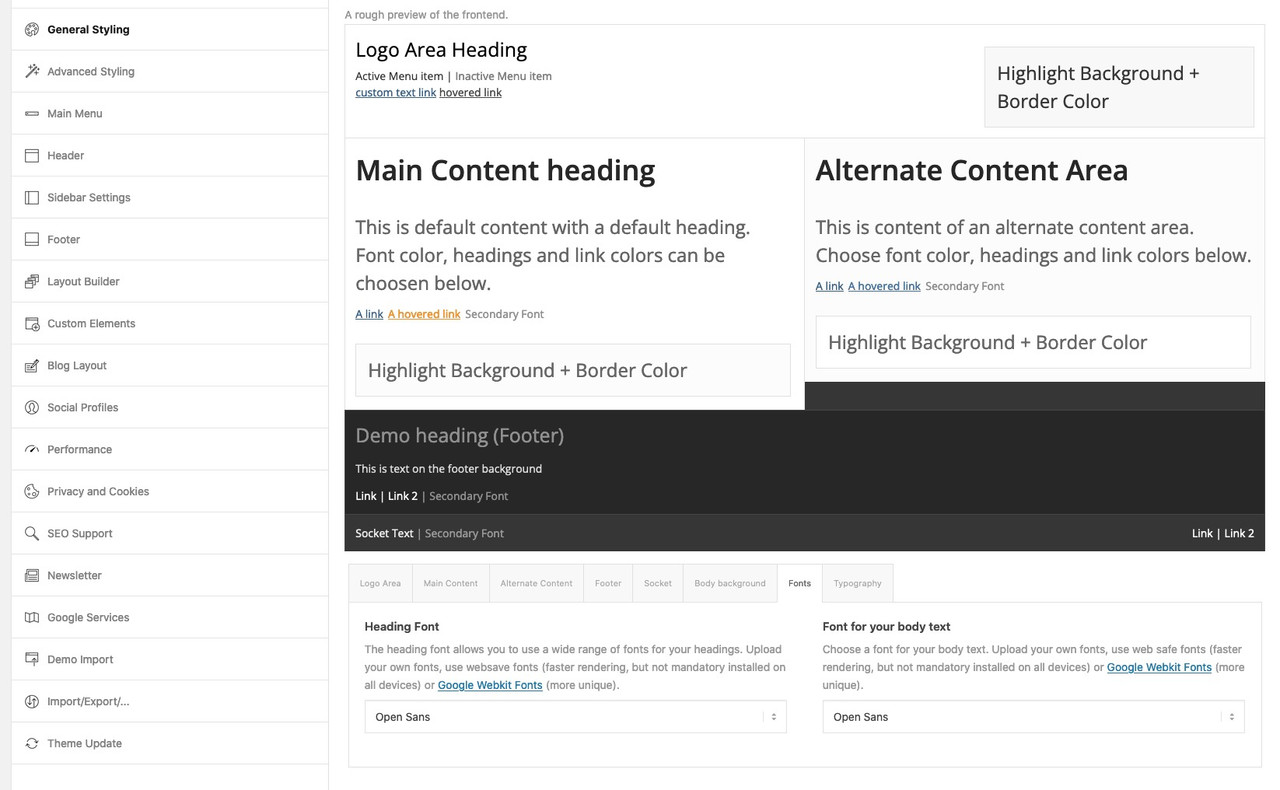
@sitesme: you see my image above – on Enfold Options Page.
These links work with the enfold integrated Google Fonts. But it will show the preview with a longer delay – because all fonts had to be loaded on that preview page.And as Ismael mentioned you can see the preview on top. – thats why this section has the topic: A rough preview of the frontend
btw. to better evaluate the font – you can increase the font-size by adding this to your child-theme functions.php:function admin_head_mod() { echo '<style type="text/css"> #avia_options_page .live_bg_wrap .main_h3 { font-size: 36px !important; } #avia_options_page .content_p, #avia_options_page .bg2 { font-size: 24px; } </style>'; } add_action('admin_head', 'admin_head_mod');__________________________
see font-size relation if you enter that snippet above:
 February 1, 2022 at 12:01 pm #1338196
In reply to: Redirect portfolio Page to Product Page
Hey Jason,
Thank you for the inquiry.
There is no easy way to do this because the product URL is quite different compare to the portfolio item URL. One solution that we could think of is to add the product URL as a custom field of the portfolio item and modify the themes\enfold\config-templatebuilder\avia-shortcode-helpers\class-avia-masonry.php file to retrieve this custom field and use it as the link in place of the default one.
The link of the masonry item is set around line 1097 of the mentioned file above.
//set the html tags. depending on the link settings use either an a tag or a div tag
				if( $set_link )
				{
					$lightbox_attr = Av_Responsive_Images()->html_attr_image_src( $this->loop[ $key ]['url'], false );
					$this->loop[ $key ]['html_tags'] = array( 'a ' . $lightbox_attr . ' ' . $aria_label_href . $target, 'a' ); //opening and closing tag for the masonry container
				}
				else
				{
					$this->loop[ $key ]['html_tags'] = array( 'div', 'div' );
				}
Best regards,
IsmaelFebruary 1, 2022 at 5:40 am #1338132In reply to: I cannot move a picture
Hey Kurt,
Thank you for the inquiry.
This is actually a known issue on the latest version of the theme. To fix the gallery sorting, please add this code in the functions.php file temporarily .
function ava_custom_css_admin_mod() {
    echo '<style>
      .wp-core-ui .attachments:after {
          visibility: hidden;
          display: block;
          font-size: 0;
          content: " ";
          clear: both;
          height: 0;
      }
    </style>';
 }
 add_action('admin_head', 'ava_custom_css_admin_mod');
Related thread: https://kriesi.at/support/topic/gallery-drag-and-drop-sort/#post-1337989
Best regards,
IsmaelJanuary 31, 2022 at 6:43 pm #1338073In reply to: Lazy Loading Question
Ismael,
This is a wordpress/theme topic.
Check this out: https://make.wordpress.org/core/2020/07/14/lazy-loading-images-in-5-5/#highlighter_892127
Copying certain interesting paragraphs:
By default, WordPress will add loading=”lazy” to all img tags that have width and height attributes present. Technically this is handled on page output, similar to how responsive images are facilitated in WordPress by adding srcset and sizes attributes. To improve server-side performance of the two features, a new wp_filter_content_tags() function has been introduced so that img tags only need to be parsed once while then deferring the modifications to more specific functions related to the feature.By default, WordPress will add a loading=”lazy” attribute to the following images:
images within post content (the_content)
images within post excerpts (the_excerpt)
images within text widgets (widget_text_content)
avatar images (get_avatar)
template images using wp_get_attachment_image() (wp_get_attachment_image)
Developers can customize this behavior through various filters, the most foundational one being wp_lazy_loading_enabled, which receives the following parameters:$default: The boolean default of true to filter.
$tag_name: An HTML tag name. While per current WordPress behavior this will always be img, it should be noted that the loading attribute is a generic attribute and may be expanded to support further elements, e.g. iframes, in the future.
$context: A context string as additional parameters, indicating where the image technically comes from, usually a WordPress hook name. Based on how WordPress itself uses lazy-loading, the context can be one of the five values in parentheses in the list above.And it gives you what the Enfold switch does. Which is great. But then it goes on:
In order to modify the loading attribute for very specific images, there are two different approaches, depending on the type of images:
For images that appear within a content blob (e.g. the_content, the_excerpt, widget_text_content), another new filter wp_img_tag_add_loading_attr can be used, which receives the following parameters:
$value: The loading attribute value, either “lazy” (default), “eager”, or false. If you want to disable lazy-loading for an image, it is strongly recommended to specify false so that the attribute is omitted altogether.
$image: The entire image HTML tag with its attributes.
$context: The context, similar as described for the other filter above.
For example, if you would like to disable lazy-loading for a specific attachment image with ID 42 in size “large” within post content, you could use the following code snippet:And it gives you the snippet – but doing this is similar to my workaround for a specific image (taking the HTML that is the output and changing lazy to eager)
Theme developers are recommended to granularly handle loading attributes for images anytime they rely on wp_get_attachment_image() or another function based on it (such as the_post_thumbnail() or get_custom_logo()), depending on where they are used within templates. For example, if an image is placed within the header.php template and is very likely to be in the initial viewport, it is advisable to skip the loading attribute for that image.
And the Core Web Vitals issue was actually identified by them but it seems that on their experiment they didn’t consider all the 3rd party calls and javascript running times that can delay the LCP image from being loaded, so they write:
“Experiments using Chrome for Android have shown that the impact of such loading=”lazy” images in the initial viewport on the Largest Contentful Paint metric is fairly small, with a regression of <1% at the 75th and 99th percentiles compared to non lazy-loaded images – yet it is a consideration to make where theme developers can apply some fine tuning for even better user experience.”So, maybe this could be a good new feature for Enfold? Allowing to Disable Lazy Loading on certain images from inside the Block Editor?
What concerns me is that you don’t see this on your installation. As it seems to solve mine with my HTML insertion/loading eager workaround. And Enfold is amazing when it comes to the ALB as it allows you to Enable/Disable Loading Lazy on an single image basis. All that’s missing is applying the same to a native or non-ALB image.
Please, let me know if my understanding of what is going on is correct. And if so, maybe this can help others who would like to implement my workaround or the one on functions.php that wordpress offers.
Thank you so much!
Havi
January 31, 2022 at 2:53 pm #1338054In reply to: old items color problem
for example this (but there are many others like this and it doesn’t seem to have a logic)
public article
same article on the admin side
https://isoladipatmos.com/wp-admin/post.php?post=14857&action=edit&classic-editor=1-
This reply was modified 4 years, 2 months ago by
Ismael. Reason: moved to private field
January 31, 2022 at 12:40 pm #1338040In reply to: Masonry excerpts when deleted show text
hi Ismael,
1) I don’t get an error in the Enfold > Theme Options > Theme Update panel but an error in the Envato Market plugin because more more fields are checked in the https://build.envato.com/create-token besides the
- View and search Envato sites
- Download the user’s purchased items
- List purchases the user has made
But on a other website where I use the Enfold it is the other way around, I created a token with ONLY
- View and search Envato sites
- Download the user’s purchased items
- List purchases the user has made
Here the Envato Market plugin gives no error message, but the Enfold > Theme Options > Theme Update panel gives an error upon validation.
See reply: #1337804But please forget this,because this is not why I opened this ticket.
The real issue is the masonry BUG I started this thread for, which has not been solved!
The theme is upgraded to the latest version.
The two masonry.php are put in place, so the load more button is working again.But the BUG is still there!
When I use the code you sent me,
add_filter("avf_masonry_entry_content", function($content, $entry, $atts) {
    return $entry->post_excerpt;
}, 10, 3);
it does not resolve the bug, it merely removes the excerpt everywhere.
But excerpts must be possible as well, that’s why we put the setting in the masonry on “Show tittle and element”.
When the owner puts in a text in the excerpts section of a portfolio item, it should appear, and it does.
But the BUG appears when the owner removes a text from the excerpts section of a portfolio item, see my former posts for screencaptures.
Please check the screencapture in the private content. The green checked items are correct excerpts, the red crosses are items that had previously added excerpts, that were removed later, but still persist in the masonry with extra breaks and content.I am sorry to say, I am using the Enfold themes for quite some customers and quite some years now, but the way this is handled is not very satisfactory.
thanks,
Karin-
This reply was modified 4 years, 2 months ago by
karinorage.
January 31, 2022 at 10:24 am #1338005In reply to: ContentUrl or url missing from rich snippets
Hey saschapi,
Thank you for the inquiry.
We can manually add the contentURL property to the avia-gallery container, but we have to directly edit the enfold/config-templatebuilder/avia-shortcodes/gallery/gallery.php. Around line 697, look for this code.
$output .= "<div {$meta['custom_el_id']} class='{$container_class} avia-gallery-" . self::$gallery . "' {$markup_gallery}>";Below, add the meta element with the contentURL property and the post title as content value.
$title = get_the_title(get_the_ID());
$output .=		"<meta itemprop='contentURL' content='{$title}'>{$title}</meta>";
Best regards,
IsmaelJanuary 31, 2022 at 10:15 am #1338004In reply to: Masonry excerpts when deleted show text
hi Ismael,
re 1: The envato market plugin still returns these error messages:
Incorrect token permissions, please generate another token or fix the permissions on the existing token.
Please ensure only the following permissions are enabled:- View and search Envato sites
- Download your purchased items
- List purchases you’ve made
Additional Error Details:
Found too many permissions on token..
sale:verifyUpdating with Thema Options > Thema Update is working.
For me that’s important enough, I don’t see the relevance of having the Envato Market plugin, so I will de-activate it.
It may be confusing for Enfold users to advise to use the Envato Market plugin as it gives error messages concerning checked boxes in the https://build.envato.com/create-token/ while Enfold advises/requires more boxes to be checked.
Here’s some info I found: https://forums.envato.com/t/token-error-found-too-many-permissions-on-token/278370re.2 : Please advise where exactly to put the php-files. I have upgraded to 4.8.9 and I am using the child-theme
thanks,
KarinJanuary 31, 2022 at 5:10 am #1337970Hi,
I don’t think your measurements are correct. The Book image I just measured is over 500px tall
We were referring to the featured images in the blog overview page. Please check screenshot 1 in the private field and look at the name of the thumbnail. FYI, WordPress automatically creates thumbnails of the original image and crops them based on the registered size of the thumbnails. The thumbnail that is used in the blog page is called “entry_without_sidebar“, which has a maximum size of 1210x423px. If you want to check how the size of the thumbnails are defined, edit the wp-content > themes > enfold > functions.php file and look for this code around line 223.
$avia_config['imgSize']['entry_with_sidebar'] 	= array('width'=>845, 'height'=>321);		            	// big images for blog and page entries
$avia_config['imgSize']['entry_without_sidebar']= array('width'=>1210, 'height'=>423 );						// images for fullsize pages and fullsize slider
Did you follow our suggestions above about thumbnail size adjustment using the Simple Image Sizes plugin ? You should also upload images with the same size and aspect ratio for every posts to get a much more consistent result.
I just measured it and it’s over 600px.
https://staging7.investforbetter.org/circling-back-invest-for-better-one-year-later/You are looking at the “rendered size”, which is different compare to the “intrinsic size” or the actual size of the image. The actual size of the image in that post is only 700x394px, but since the layout requires the image to be stretched full width, you are seeing a much larger “rendered size”. (see screenshot 2)
Best regards,
IsmaelJanuary 31, 2022 at 1:31 am #1337959Hi Guenni007, hi Mike,
I don’t understand the purpose of the filter, but whatever…If I use the php script as recommended
either the whole headline has disappeared or even a whole paragraph.
But the css works fine if I add an !important.try to deactivate ampersand via php
Thanks a lot for supporting me
Stefan
-
This reply was modified 4 years, 2 months ago by
steridhh.
January 30, 2022 at 3:08 pm #1337911Hi,
Thank you for the link to your page, as Guenni007 has pointed out the ampersand filter is being applied, please try adding this in your child-theme functions.php
add_filter('avia_ampersand','__return_false');Thanks Guenni007

Best regards,
MikeJanuary 29, 2022 at 12:03 am #1337809In reply to: Lightbox for Blog Post Element
try:
function posts_iframe_popup() {
?>
<script type="text/javascript">
(function($) {
	if (top === self) {
		// no frame
	} else { //frame
		$('#header, #footer, #socket').remove();
		$('#main').attr('style', 'padding-top: 0px !important');
	};

	$(window).on('load', function(){
	  $('.open-in-lightbox a.av-masonry-entry').magnificPopup({
	    type:'iframe',
	    disableOn: 768,
	    mainClass: 'spezial-masonries',
	  });

	  $('.open-in-lightbox a.slide-image, .open-in-lightbox .slide-entry-title > a').magnificPopup({
	    type:'iframe',
	    disableOn: 768,
	    mainClass: 'spezial-blogposts',
	  });
	});
})(jQuery);
</script>
<?php }
add_action('wp_footer', 'posts_iframe_popup');
play with the 768 value to get what you like to have f.e.:
if you take 769
you have that case where an ipad mini (1024×768) will open on portrait the new page without lightbox – if you tilt it to landscape – it will open the lightbox.
However, it will not undergo any change after the link is opened.January 28, 2022 at 7:39 pm #1337798Topic: Installation, Invalid Download
in forum Pre Sale QuestionsPreissss
ParticipantInstalliere Theme aus hochgeladener Datei: themeforest-Oihba6qx-enfold-responsive-multipurpose-theme.zip
Der Wartungsmodus ist aktiv. Bitte vergiss nicht, ihn zu deaktivieren, sobald du fertig bist.Entpacken des Pakets …
Das Theme wird installiert …
Das Paket konnte nicht installiert werden. Dem Theme fehlt das Stylesheet style.css.Theme-Installation fehlgeschlagen.
Warning: Illegal string offset ‘http_code’ in /users/preiss/www/wordpress/wp-content/themes/enfold/framework/php/auto-updates/class-envato-protected-api.php on line 307
Warning: Invalid argument supplied for foreach() in /users/preiss/www/wordpress/wp-content/themes/enfold/framework/php/auto-updates/class-pixelentity-theme-update.php on line 49
January 28, 2022 at 12:58 pm #1337708In reply to: Team Member Shortcode does not work anymore
Hi,
Thanks for the info.
The issue probably occurs in the gcst_board_members_shortcode_content function within the yc-wp-gcst/yourchoice-gcst.php file, around line 284. The value of the attachment attribute is statically set to “11198”. The value of this attribute should be ID of the image.
Best regards,
IsmaelJanuary 28, 2022 at 9:12 am #1337635In reply to: Advanded Layout Editor for The Events Calendar
Hi Yigit
So, i tested it with deactivating plugins.
First I deactivated one by one or groups (i.e. all Contact Form 7 Plugins), then I deactivated ALL plugins except the The Events Calendar plugin (because this is needed for the events).
Unfortunately the Advanced Layout Builder still did not work for this one user.
Have you any other idea?
Or should I send you the content of functions.php of the Enfold Child theme?
Best regards
MikeJanuary 27, 2022 at 7:13 pm #1337571In reply to: Lightbox for Blog Post Element
Perfect! Thanks a lot, Guenni007!
Any idea on how to hide the head and footer on those posts? In my case it is a custom post type. Should be possible with a modification to the single.php file of the CPT – what do you think?
Even better would be a script to hide head and footer only if the entry is shown inside an iframe? Do you think that is possible?
Best regards,
DanielJanuary 27, 2022 at 9:43 am #1337439In reply to: i cant see muy website
Hey eduardodelat,
Thanks for the login details. Could you try updating your PHP version to 7.4 or higher to see if that helps please?
Best regards,
RikardJanuary 27, 2022 at 6:52 am #1337411In reply to: Bug report with last update
Hi Ismael
You said with the class name “big-prev-fake”. The theme doesn’t generate this container
And just downloaded a enfold from themeforest
And it seem you use.
We didn’t add this class to our images.gallery.css line 69
.avia-gallery .big-prev-fake{
display: none;
}gallery.js line 77
// since 4.8.8.2 we have a hidden img to support scrset and sizes – fallback to old version if missing
var newPrev = _self.find( ‘.big-prev-fake img’ ).clone( true );
if( newPrev.length == 0 )gallery.php line 684
$thumbs .= “<div class=’big-prev-fake‘>{$prev_img_tag}</div>”;
$thumbs .= ‘‘;January 27, 2022 at 12:48 am #1337379In reply to: Couple Issues with Enfold Install
Hi,
Sorry, login should be good now.
I have turned off all the plugins and im still getting the same error. Also, debugging is turned on now.
Fatal error: Allowed memory size of 536870912 bytes exhausted (tried to allocate 16384 bytes) in /home/devcganet/public_html/wp-includes/formatting.php on line 486
-
This reply was modified 4 years, 3 months ago by
acscreativenew.
January 26, 2022 at 4:21 pm #1337321In reply to: Accordion title as h2 or h3
Hi,
It is not possible to put h2 or h3 tags inside a “p” tag which is the container for the title:
https://stackoverflow.com/questions/42890736/slim-h3-inside-p
I’ve added this problem to our dev repo and planned to address it for 4.9 – check the changelog or https://kriesi.at/support/topic/enfold-upcoming-fixes/
But for the moment there is no easy solution.
Currently the only way is to modify enfold\config-templatebuilder\avia-shortcodes\toggles\toggles.php around lines 1118 – 1124 and replace the p tag.
And add additional logic to identify the element to know how to update the p tag.Best regards,
GünterJanuary 26, 2022 at 5:50 am #1337211In reply to: Lazy Loading Question
Hi,
Thank you for the update.
The loading attribute is probably added automatically because WordPress enables lazy loading by default. If you want to disable this feature, you can add this filter in the functions.php file.add_filter( 'wp_lazy_loading_enabled', '__return_false' );You can also try and enable the Code Editor in the Options panel and remove the loading attribute manually. Please check the screenshot in the private field.
UPDATE: Looks like the lazy loading option in the theme also toggles the default lazy loading feature by using the same filter above, so you don’t have to add it. Just toggle the lazy loading option in the Performance panel. Let us know if you are able to edit the image block manually.
Best regards,
IsmaelJanuary 26, 2022 at 3:36 am #1337189In reply to: Add Custom Post Type inside link select
Hi,
Sorry for the confusion. It actually includes all post types in the list as long as it is public. If you want to modify the linkpicker, you have to edit the select_hierarchical_post_types function in the enfold/framework/php/class-htmlhelper.php around line 1547.
Best regards,
IsmaelJanuary 25, 2022 at 7:55 pm #1337155Topic: Couple Issues with Enfold Install
in forum Enfoldacscreativenew
ParticipantHi, so im running enfold and have run into a couple of issues on my website.
First when I try to save a page with the “social buttons” element the page will not save.
Second the search is a little messed up. When i use the search it will drop down the ajax search but when i view all results it throws an error.Can you help me take a look at these issues on my website?
I keep getting these errors within my logs
[25-Jan-2022 18:02:59 UTC] PHP Fatal error: Allowed memory size of 536870912 bytes exhausted (tried to allocate 16384 bytes) in /home/devcganet/public_html/wp-includes/formatting.php on line 486
Here are my PHP settings
display_errors = Off
max_execution_time = 90
max_input_time = 90
max_input_vars = 4000
memory_limit = 512M
post_max_size = 256M
session.gc_maxlifetime = 1440
session.save_path = “/var/cpanel/php/sessions/ea-php74”
upload_max_filesize = 60M
zlib.output_compression = OffThanks
-Dan-
This topic was modified 4 years, 3 months ago by
-
This reply was modified 4 years, 2 months ago by
-
AuthorSearch Results
-
Search Results
-
Hello,
I updated my site with WordPress in 5.9 and Enfold with the last version 4.8.9 (with infrastructure in PHP 7.4).
Now the recordings of the builder windows (text block, image block,…) no longer work.
And the closing cross no longer works!
Unable to close windows or save.
Note that I have no other extensions that could conflict.
Do you have a solution to be up to date.
Thank youInstalliere Theme aus hochgeladener Datei: themeforest-Oihba6qx-enfold-responsive-multipurpose-theme.zip
Der Wartungsmodus ist aktiv. Bitte vergiss nicht, ihn zu deaktivieren, sobald du fertig bist.Entpacken des Pakets …
Das Theme wird installiert …
Das Paket konnte nicht installiert werden. Dem Theme fehlt das Stylesheet style.css.Theme-Installation fehlgeschlagen.
Warning: Illegal string offset ‘http_code’ in /users/preiss/www/wordpress/wp-content/themes/enfold/framework/php/auto-updates/class-envato-protected-api.php on line 307
Warning: Invalid argument supplied for foreach() in /users/preiss/www/wordpress/wp-content/themes/enfold/framework/php/auto-updates/class-pixelentity-theme-update.php on line 49
Hi, so im running enfold and have run into a couple of issues on my website.
First when I try to save a page with the “social buttons” element the page will not save.
Second the search is a little messed up. When i use the search it will drop down the ajax search but when i view all results it throws an error.Can you help me take a look at these issues on my website?
I keep getting these errors within my logs
[25-Jan-2022 18:02:59 UTC] PHP Fatal error: Allowed memory size of 536870912 bytes exhausted (tried to allocate 16384 bytes) in /home/devcganet/public_html/wp-includes/formatting.php on line 486
Here are my PHP settings
display_errors = Off
max_execution_time = 90
max_input_time = 90
max_input_vars = 4000
memory_limit = 512M
post_max_size = 256M
session.gc_maxlifetime = 1440
session.save_path = “/var/cpanel/php/sessions/ea-php74”
upload_max_filesize = 60M
zlib.output_compression = OffThanks
-Dan


