Viewing 30 results - 211 through 240 (of 16,888 total)
  • Author
    Search Results
  • #1488047
    KJ Charles
    Guest

    Hi

    My website was set up for me about ten years ago by a third party. They used Enfold theme. The theme now gives me a critical error on php 7.4 and I need to update for at least 8.2.

    Can you let me know how I go about getting this? Do I need to buy it again?

    #1487806

    Hi Guenni007.
    The code inserted according to your instructions in the child-theme functions.php obviously displays the title on all pages.

    add_action(‘ava_after_main_title’, function() {
    echo ‘<div class=”main_color my_title_container”>’;
    echo ‘<h2 class=”page-title”>’. get_the_title() .'</h2>’;
    echo ‘</div>’;
    });

    Is it possible to hide it on a page?

    #1487786
    AJDesignCo
    Participant

    Good day all. I’ve recently migrated a few dozen sites from Plesk-based VPS hosting on GoDaddy to hosting with Plesk running on AWS. I have some sites that are behaving just fine. And I have a couple of sites that are throwing 502 errors consistently.

    Relationships
    FYI, I have access to AWS Business Support — they are working to analyze things from their end. In this situation, I am the hosting provider AND the designer / client service contact. I’m reaching out here for 1) specific theme-developer expertise and 2) guidance any other users who have experienced and overcome this issue.

    Symptoms/Behaviors
    The site (warriornations.org) loads just fine and fast in the front end. There are no apparent content or styling issues there, and there are no errors in the browser console.

    When I log in to WordPress admin, most areas look and work fine: Admin area, Pages list, Posts list, Settings, etc. But when I try to edit pages and Update them, I 502 Bad Gateway NGINX errors.

    I also see this error immediately upon trying to save a change to the Theme Options:
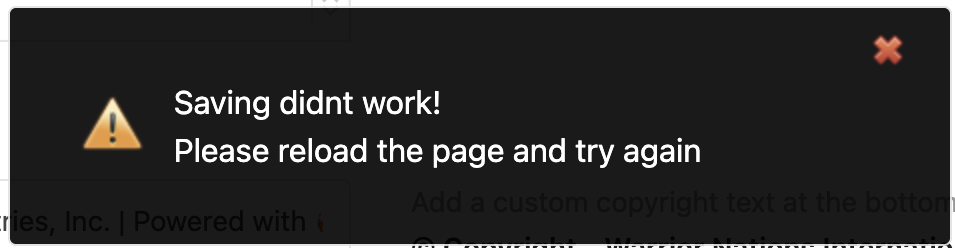
    Theme Options error

    In the console when that error was generated, I saw a 502 error for https://warriornations.org/wp-admin/admin-ajax.php that was being called from https://warriornations.org/wp-includes/js/jquery/jquery.min.js?ver=3.7.1:
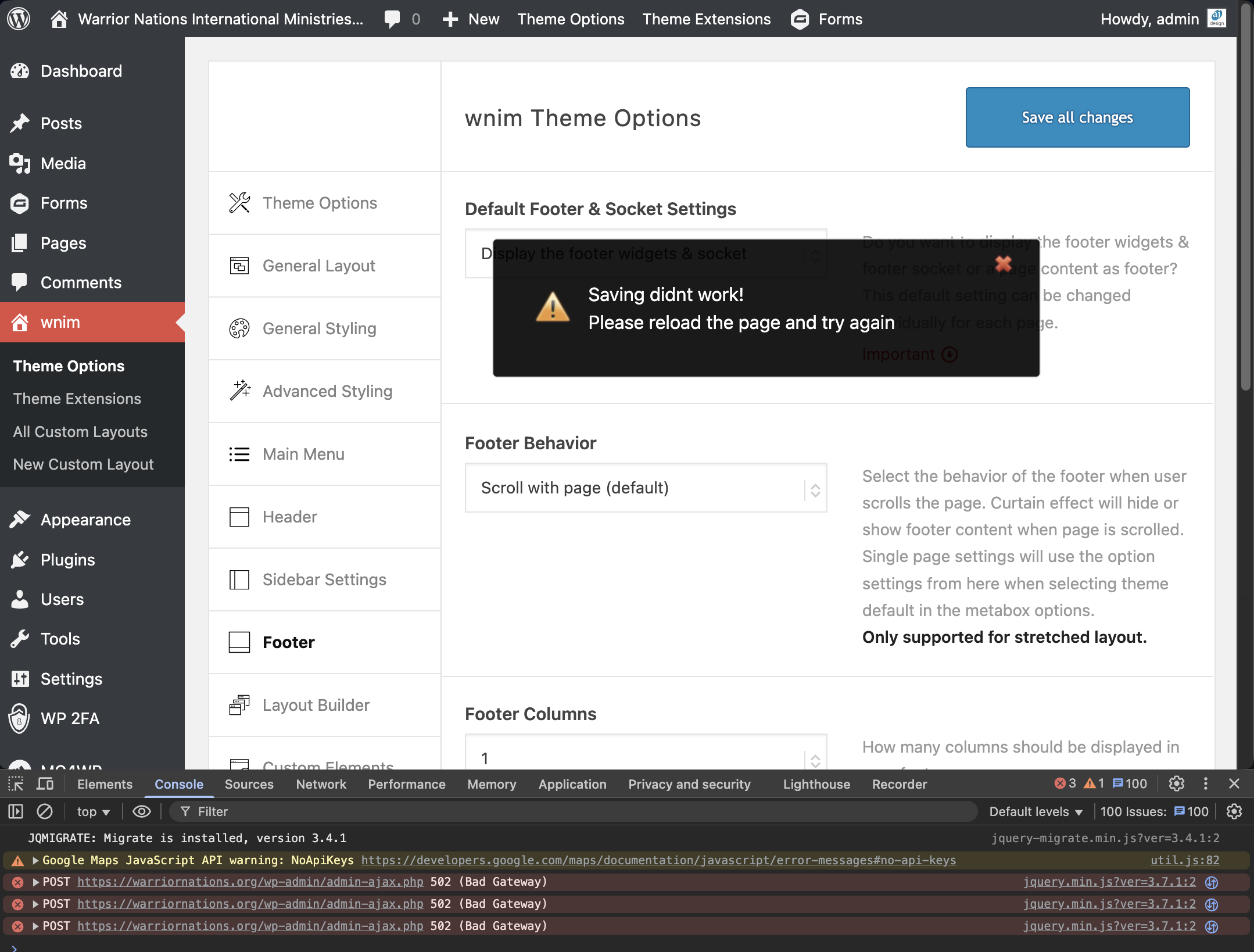
    Screenshot showing console errors

    Between AWS support and AI tools, I’m at a loss for understanding these issues or resolving them. Do you have any guidance or experience with these issues? I have full access to Plesk and PHP-FPM configuration — either in console or command line. I welcome your suggestions.

    This reply has been marked as private.
    #1487722
    Matthias Gruhn
    Guest

    Guten Tag,

    wir haben die Version 4.5.5 für unseren kleinen Waldkindergarten am laufen. Leider ist kein Update auf PHP 8.0 möglich, es kommen folgende Fehler:
    —————————————————————
    Deprecated: Optional parameter $condition declared before required parameter $handle is implicitly treated as a required parameter in /var/www/vhosts/wald-igel.de/httpdocs/wp-content/themes/enfold/framework/php/function-set-avia-frontend.php on line 1559

    Deprecated: Optional parameter $condition declared before required parameter $handle is implicitly treated as a required parameter in /var/www/vhosts/wald-igel.de/httpdocs/wp-content/themes/enfold/framework/php/function-set-avia-frontend.php on line 1582

    Notice: Die Funktion _load_textdomain_just_in_time wurde fehlerhaft aufgerufen. Das Laden der Übersetzung für die Domain avia_framework wurde zu früh ausgelöst. Das ist normalerweise ein Hinweis auf Code im Plugin oder Theme, der zu früh läuft. Übersetzungen sollten mit der Aktion init oder später geladen werden. Weitere Informationen: Debugging in WordPress (engl.). (Diese Meldung wurde in Version 6.7.0 hinzugefügt.) in /var/www/vhosts/wald-igel.de/httpdocs/wp-includes/functions.php on line 6121

    Deprecated: Creation of dynamic property avia_sidebar::$title is deprecated in /var/www/vhosts/wald-igel.de/httpdocs/wp-content/themes/enfold/framework/php/class-sidebar-generator.php on line 34

    Deprecated: Optional parameter $params declared before required parameter $overwrite_value is implicitly treated as a required parameter in /var/www/vhosts/wald-igel.de/httpdocs/wp-content/themes/enfold/config-woocommerce/config.php on line 1427

    Fatal error: Unparenthesized a ? b : c ? d : e is not supported. Use either (a ? b : c) ? d : e or a ? b : (c ? d : e) in /var/www/vhosts/wald-igel.de/httpdocs/wp-content/themes/enfold/functions-enfold.php on line 324
    ——————————————————————
    Würden Sie uns für etwas Geld ein Update ermöglichen, damit wir endlich wieder eine sichere Website haben können?

    Mit freundlichen Grüßen,
    Matthias Gruhn (Admin des Waldkindergartens)

    #1487695
    ebenanders
    Participant

    Hi,

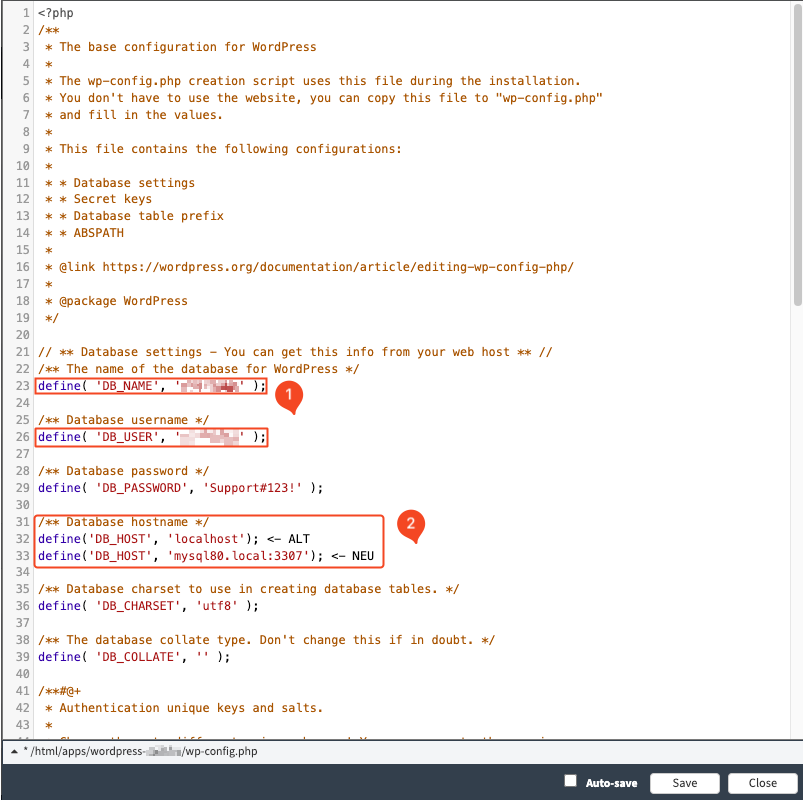
    I want to change my database to MySQL 8.0. My provider has these instructions: The host and database name must be adjusted. In the case of WordPress, you can do this in the “wp-config.php” file.

    https://faq.e137569.easyhosting.at/316/9.png
    Where can I find these settings?
    Thank you for your help.

    Kind regards,
    ebenanders

    saskia68
    Participant

    I have three sites running Enfold – all with separate valid licences. Unfortunately they are all Enfold 4.7.6.4 and I am needing to update them so that I can update the PHP. When I try to update I get the following message:

    >>
    Last time we checked the token we were not able to connected to Envato:
    Purchases could not be accessed
    Username could not be accessed (needed for your information only)
    E-Mail could not be accessed (needed for your information only)

    Following errors occurred:
    Purchases: Envato Rate Limit exceeded – Requests are blocked for 139 seconds. We are unable to get the download URL for your products.
    username Envato Rate Limit exceeded – Requests are blocked for 139 seconds. We are unable to get the download URL for your products.
    email Envato Rate Limit exceeded – Requests are blocked for 139 seconds. We are unable to get the download URL for your products.
    Purchases: A problem occurred accessing your purchases. Unable to check for updates.
    <<

    And now i don;t even get the update option….

    PS I have just bought six mnths support via Themeforest – I am unsure which licence i bought the support for…

    #1487620

    In reply to: Different menu

    read carefully – the first condition:

    Logo centered to the menu
    best presetting will be logo left – menu right

    (or logo right menu left – works aswell)

    this is best because on responsive case we do not need to take care of logo or burger placement.

    left code is for child-theme functions.php – right side codeblock is for quick css.

    css adjusted for your settings:

    @media only screen and (min-width: 768px) {
      #top .av-logo-container .logo {
        opacity: 0;
      }
      #top .main_menu {
        left: 0;
        width: 100%;
      }
      #top .main_menu .avia-menu.av-main-nav-wrap {
        position: relative;
        left: 50%;
        -webkit-transform: translateX(-50%);
        transform: translateX(-50%);
      }
      #top #menu-item-logo svg,
      #top #menu-item-logo img {
        max-height: 120px;   /**** depends on your choosen header height - on shrinking headers it will be set by that enfold shrink script ******/
        width: auto;
        position: relative;
        top: 50%;
        -webkit-transform: translateY(-50%);
        transform: translateY(-50%);
      }
    }
    
    #av-burger-menu-ul .menu-item-logo {
    	display: none
    }

    Hey amollde,

    Thank you for the inquiry.

    We’ll forward the issue to our channel. Temporarily, you can edit the themes\enfold\includes\classes\class-privacy-class.php file, around line 1782, and look for this code:

    $output .=		'<a class="avia-privacy-reload-tooltip-link" aria-hidden="true" href="#" rel="nofollow" data-avia-privacy-reload-tooltip="' . esc_attr( $reload ) . '"></a>';
    

    Replace it with:

    $output .=		'<span class="avia-privacy-reload-tooltip-link" aria-hidden="true" data-avia-privacy-reload-tooltip="' . esc_attr( $reload ) . '"></span >';
    

    Let us know if this resolves the issue.

    Best regards,
    Ismael

    #1487420

    Hey Jason Bolger,

    Thanks for sharing the problem with count(). I added a fix to next release.

    It is not easy to load backend without the builder.
    I started a try to use Enfold without the builder but stopped it as frontend would need a lot of changes e.g. in css.
    I did not check it for backend pages yet.

    See ..\config-templatebuilder\avia-template-builder\php\class-template-builder.php around line 472ff if you want to give it a try.

    Best regards,
    Günter

    #1487409

    ok – if you like to have on default a sidebar header – and on homepage only the header top position.
    ( for that scenario we need than a bit different css too if you like to have slide-out from left to right)

    1 set your enfold child to header top and make all your decisions you like to have for that header ( height, logo left or right, navigation position, shrink or not, etc pp )

    2 Go to your homepage editor and make your decision there – f.e. if it should have transparency etc.

    3 Look now to your homepage with dev tools of your browser. Note your ID of that page and look what classes are set on #header
    e.g.: ( all_colors header_color light_bg_color av_header_top av_logo_right av_main_nav_header av_menu_left av_custom av_header_sticky av_header_shrinking av_header_stretch av_mobile_menu_tablet av_header_searchicon av_header_unstick_top_disabled av_bottom_nav_disabled av_header_border_disabled )

    4 now switch back to your header left position.

    put this to your child-theme functions.php:

    (remove options you do not need – or replace – f.e. header_size and header_custom_size and replace by header_size: ‘slim’ / or large )
    you can find those corresponding header settings in : avia_header.php

    function av_change_header_style($header){
      if(is_page(array( 17, 123456))){ 
        $header['header_position']    = "header_top";
        $header['header_layout']      = 'logo_right main_nav_header menu_left';
        $header['header_size']        = 'custom';
        $header['header_custom_size'] =  140;
        $header['header_shrinking']   = 'header_shrinking';
        $header['header_sticky']      = 'header_sticky';
        $header['header_unstick_top']   = 'header_unstick_top';
        $header['header_stretch']     = 'header_stretch';
        $header['header_transparency']  = 'header_transparency header_glassy';
    
        $header['header_class'] = " all_colors header_color light_bg_color av_header_top av_logo_right av_main_nav_header av_menu_left av_custom av_header_sticky av_header_shrinking av_header_stretch av_mobile_menu_tablet av_header_searchicon av_header_unstick_top_disabled av_bottom_nav_disabled av_header_border_disabled";
      }
      return $header; 
    }
    add_filter('avf_header_setting_filter','av_change_header_style');

    here in this example there are two pages (ID’s) replaced with that different layout – adjust to your home page ID
    this filter has a lot more options. Enter on $header['header_class'] your noted classes from point 3.

    see example page: https://clean.webers-testseite.de/

    #1487315

    I don’t recall having added that folder and 2 files in enfold-child. But when I hide the folder, the warning notice goes away at the top of the page.
    However, I’m seeing a warning notice below the footer (that I had not seen before) (see screenshot):
    Notice: ob_end_flush(): Failed to send buffer of zlib output compression (0) in /home/dotorgw1/public_html/wp-includes/functions.php on line 5471

    Notice: ob_end_flush(): Failed to send buffer of zlib output compression (0) in /home/dotorgw1/public_html/wp-content/plugins/really-simple-ssl/class-mixed-content-fixer.php on line 107

    In the footer area, colummn 1, I had an icon list there which was generated using the “insert theme shortcodes” tool within the toolbar options. The iconlist still views, but above it is an error message. (See private for screenshot view).

    Hi,
    Thanks for the login, I found that you are adding the “K” logo in your child theme functions.php
    Screen Shot 2025 07 28 at 3.41.23 PM
    You should remove this function, I could not, you may need to do so via FTP

    Best regards,
    Mike

    Kati17
    Participant

    Hi,
    i have the problem with this website: berghof-agatharied.de

    The LayerSlider WP doesn’t works with the latest php-version. Only with php-version 7.4. not higher.
    The Theme Enfold is already updated to the latest version.

    Hope you can help.

    Best regard
    Kati

    #1487287
    Leonie van der Velde
    Guest

    Hello!

    Two years ago I took over a few websites from another webdesigner. They are built in the Envato theme. He forgot to give me the login for this, but I do have his username and e-mailadres. Except the e-mail doesn’t work anymore. Is there any way for me to get into the account?

    I have to update to a newer PHP-version. They still run on 7.4.33 and I have security issues now. But the PHP Compattability Checker says I get a 404 if I update the PHP. I do have private tokens for the websites if you need these?

    I hope you can help me out!

    Greetings,
    Leonie

    #1487265
    Oliver van den Brandt
    Guest

    Hi,
    I would like to know, if Enfold 7.1.1 would run with a PHP Version 8.x, when I would buy a new license. With the current license it runs only with PHP 7.4 and has many problems when changing to 8.x.
    Thank you

    #1487220
    laptophobo
    Participant

    Hi folks,

    When I turn Debug on I get the following error message (on top of home page, which is at: dotorgwebworks.org):

    Deprecated: Function av_icon is deprecated since version 7.0! Use Use avia_font_manager::get_frontend_icon() instead instead. in /home/dotorgw1/public_html/wp-includes/functions.php on line 6121

    I see that the issue is within the “functions.php” file, the one in wp-includes. Since I’ve never tampered with this file before, I’m seeking your advice.

    Perhaps this error message is telling me that one or more of my icons (e.g.: Fontello) is problematic?

    Any help you can offer would be appreciated. Thanks.

    #1487137

    Hi Mike,

    I added the login info to the private content. I tried upgrading to PHP 8.0 and got this error code which crashed the site again. I believe it’s the same code as before. (ended up reverting again back to 7.4). Thanks,

    An error of type E_ERROR was caused in line 32 of the file /home/88346.cloudwaysapps.com/dapmsxrmxu/public_html/wp-content/themes/enfold-child/functions.php. Error message: Uncaught Error: Undefined constant “THEMENAME” in /home/88346.cloudwaysapps.com/dapmsxrmxu/public_html/wp-content/themes/enfold-child/functions.php:32
    Stack trace:
    #0 /home/88346.cloudwaysapps.com/dapmsxrmxu/public_html/wp-content/themes/enfold-child/functions.php(32): avia_nav_menus()
    #1 /home/88346.cloudwaysapps.com/dapmsxrmxu/public_html/wp-settings.php(695): include(‘…’)
    #2 /home/88346.cloudwaysapps.com/dapmsxrmxu/public_html/wp-config.php(103): require_once(‘…’)
    #3 /home/88346.cloudwaysapps.com/dapmsxrmxu/public_html/wp-load.php(50): require_once(‘…’)
    #4 /home/88346.cloudwaysapps.com/dapmsxrmxu/public_html/wp-admin/admin-ajax.php(22): require_once(‘…’)
    #5 {main}
    thrown

    #1487080

    Guenni007,

    Thanks for the recommendation. I may try upgrading to an earlier PHP version and see what happens. Appreciate your help.

    #1487028
    Marieke
    Guest

    I’m working on a website built with Enfold 4.4.1. WordPress is recommending a PHP upgrade (current version is 7.4.33) but updating PHP causes a fatal error.

    If I buy a new Enfold license and install the latest version, will that fix the PHP issue? And will the site stay up and running?

    Just want to make sure before I make the purchase. Thanks in advance!

    #1487007

    I have now updated all of my installations to PHP 8.3 or higher. Some of my customer providers already offer PHP 8.4. I have never had any problems switching. Therefore, I assume there is high compatibility with current PHP versions. My overloaded test site runs under PHP 8.4.7. For example, the child-theme functions.php has over 5,000 lines, and the quick CSS is already over 9,700 lines long. (webers-testseite.de).

    Why don’t you try going back to smaller PHP versions one at a time? It may take a while for this to take effect. Then, see if your installation works with your provider.

    #1487005
    iveyeng
    Participant

    Hello,

    I recently upgraded the PHP version to 8.3 (from 7.4) and I received the “fatal error” message. I copied the message in the private content. In fact I was not able to log in to my WordPress dashboad. I also tried to restore my site but that didn’t work and made it worse—site completely crashed. I had to revert back to PHP 7.4 to get the site back up and running. I’m currently using Enfold Child theme 7.1.1. and WordPress 6.8.2. After reading several threads, I assumed that the Enfold theme was compatible with 8.3. But that doesn’t seem to be the case.

    I contacted my hosting provider and they said the theme was not compatible with PHP 8.3. Please advise what to do. I need to upgrade the PHP version so I get the security updates. I haven’t tried upgrading to 8.2 or 8.1.

    #1486914

    Hey dburton77,

    Thank you for the inquiry.

    It’s not necessarily required for the tracking code to be placed in the header, but if that’s what you need, you can add this code to the functions.php file.

    function ava_move_tracking_code_to_head() {
        remove_action( 'wp_footer', 'avia_print_tracking_code', 10000 );
        add_action( 'wp_head', 'avia_print_tracking_code', 10 );
    
    }
    add_action( 'init', 'ava_move_tracking_code_to_head', 20 );

    Best regards,
    Ismael

    onlineprodcontent
    Participant

    Hi,
    recently we migrated an Enfold site into our Docker environment where we deploy our wordpress sites using CI/CD tools. The move solved a problem we had with the builtin Layerslider, but now a one came up:

    After deployment, the site looks defaced due to missing dynamically generated CSS files. We then have to manually go to the theme option settings page wp-admin/admin.php?page=avia and save the settings (even without changing values) to resolve this.

    Our uploads folder is persistent, so the content of uploads/dynamic_avia/… with files like avia-merged-styles-ddf276684ae525538791a02cb0e618c9—687602ac906a5.css survives deployments, but it seems as if after deployment the old dynamic css are not being used so reset/regeneration is necessary.

    How can we ensure that the CSS are generated upon deployment, mabye using a WPCLI action to enforce CSS generation? Or can/should we simply delete the wp-content/uploads/dynamic_avia/ folder?

    Also, if we run more than one WordPress container (in case of high load) sharing a common uploads directory, will the dynamic file names interfere?

    REgards
    Ulrich

    • This topic was modified 8 months, 3 weeks ago by onlineprodcontent. Reason: typo fix
    #1486797
    Milan Krkoška
    Guest

    Good day, please help. When changing PHP from 7.4 to 8.2, the appearance of the checkout changes and payment in Enfold child does not work. When changing the theme to enfold, everything works.

    #1486790
    sdesign-web
    Participant

    Hello !
    I’m currently using the Enfold 7.1 theme for my WordPress site.
    My hosting provider has informed me that my current PHP version (7.4.33) is now obsolete and has not received security updates since the end of 2022 and that i must migrate to a more recent PHP version to ensure my site remains secure and compatible in the future.

    Could you please confirm which PHP versions are officially compatible with Enfold 7.1 (or a newer version)?
    Specifically, is the theme fully compatible with PHP 8.0/8.1 or even 8.2 / 8.3?

    Thank you very much for your help and any recommendations you can provide.

    Best regards,
    Stan

    #1486761

    Topic: GA4 blocking

    in forum Enfold
    dburton77
    Participant

    In version 7.1, there is an option for users to disable GA4 tracking using the Consent manager . How does that work? Does it matter how GA4 is implemented? We typically inject GA tracking code in our child theme’s functions.php. Do we have to use the Enfold option for adding GA code?

    Thank you.

    #1486758

    Hey karina yevenes hernandez,

    The version of the theme that you are running is not availble with newer PHP versions. Could you try to update to the latest version (7.1.1) to see if that helps please? The update to 7.1.1 has to be done manually from the version you are running, please refer to my replies in this thread: https://kriesi.at/support/topic/enfold-4-5-theme-update-update-failed-download-failed-a-valid-url-was-not-pro/#post-1021541
    You can either update manually via FTP: https://kriesi.at/documentation/enfold/how-to-install-enfold-theme/#theme-update, or upload the theme as if it was new under Appearance->Themes->Add New Theme.
    If that doesn’t work then please try to delete the whole theme folder, then replace it with the new version. Make sure that you have backups of the site before starting updating.
    Also please read this after you have updated: https://kriesi.at/documentation/enfold/theme-registration/

    Best regards,
    Rikard

    • This reply was modified 8 months, 3 weeks ago by Rikard.
    #1486718

    Hi,

    Thank you for the update.

    We simply mean that it may not work on email clients that do not support html. They should render correctly on major email clients such as Gmail or Outlook. You can test this by using the following filter in the functions.php file, sending a message, and checking whether the heading and test strings render properly with the html formatting applied.

    add_filter('avf_form_message', 'avf_form_message_mod', 10, 3);
    function avf_form_message_mod($message, $new_post, $form_params) {
        $message = "<h1>Heading</h1><strong>TEST</strong>" . $message;
        return $message;
    }
    

    – but i have no idea what to put there.

    You can manipulate the content of $message as shown in the previous examples. You can inject html into specific parts of the text or prepend/append additional content to the message. Unfortunately, this level of customization is beyond the scope of our support. If you’re not sure how to proceed, consider hiring a freelance developer or contact Codeable.

    https://kriesi.at/contact/customization

    Regarding the issue with “Print in email only”, which email client are you testing this with? Try to add the following code to the functions.php file to remove al line breaks from the message:

    add_filter( 'avf_form_mail_form_field', 'avf_form_mail_form_field_mod', 10, 7 );
    function avf_form_mail_form_field_mod( $form_field, $new_post, $form_elements, $form_params, $element, $key, $field_value ) {
        $form_field = preg_replace( '#<br\s*/?>#i', '', $form_field );
        return $form_field;
    }
    

    Best regards,
    Ismael

    #1486519
    swissfilm
    Participant

    The API connection can be established, but the forms won’t load. Tried it with a new API key but without success.
    Running Enfold 7.1.1
    PHP-Version ist: 8.0.30

Viewing 30 results - 211 through 240 (of 16,888 total)