Viewing 30 results - 2,161 through 2,190 (of 16,894 total)
  • Author
    Search Results
  • loumirak11
    Participant

    Hi,

    After updating to enfold 4.9.2.3 (from 4.8.8.1), pages with video background on color section generate error :

    E_ERROR on line 865 of /…/wp-content/themes/enfold/config-templatebuilder/avia-shortcode-helpers/class-avia-slideshow.php.
    Uncaught Error: Call to a member function get_subitem_styling_info() on null in /…/wp-content/themes/enfold/config-templatebuilder/avia-shortcode-helpers/class-avia-slideshow.php:865
    Stack trace:
    #0 /…/wp-content/themes/enfold/config-templatebuilder/avia-shortcode-helpers/class-avia-slideshow.php(579): avia_slideshow->html_advanced_slide()
    #1 /…/wp-content/themes/enfold-child/shortcodes/section.php(1392): avia_slideshow->html()
    #2 /…/wp-content/themes/enfold-child/shortcodes/section.php(1120): avia_new_section()
    #3 /…/wp-content/themes/enfold/config-templatebuilder/avia-template-builder/php/class-shortcode-template.php(1142): avia_sc_section->shortcode_handler()
    #4 /…/wp-includes/shortcodes.php(356): aviaShortcodeTemplate->shortcode_handler_prepare()
    #5 [internal function]: do_shortcode_tag()
    #6 /…/wp-includes/shortcodes.php(228): preg_replace_callback()
    #7 /var/ww

    #1353960

    if you are familiar with developer tools you can inspect even the admin window on your browser to get the selectors used there.
    with a snippet in your child-theme functions.php you can change the admin area as you like:

    f.e.:

    function admin_head_mod() {
    echo '<style type="text/css">
    	#adminmenu, #adminmenuback, #adminmenuwrap { background: #431781;}
    	// … and more rules
    </style>';
    }
    add_action('admin_head', 'admin_head_mod');
    #1353957

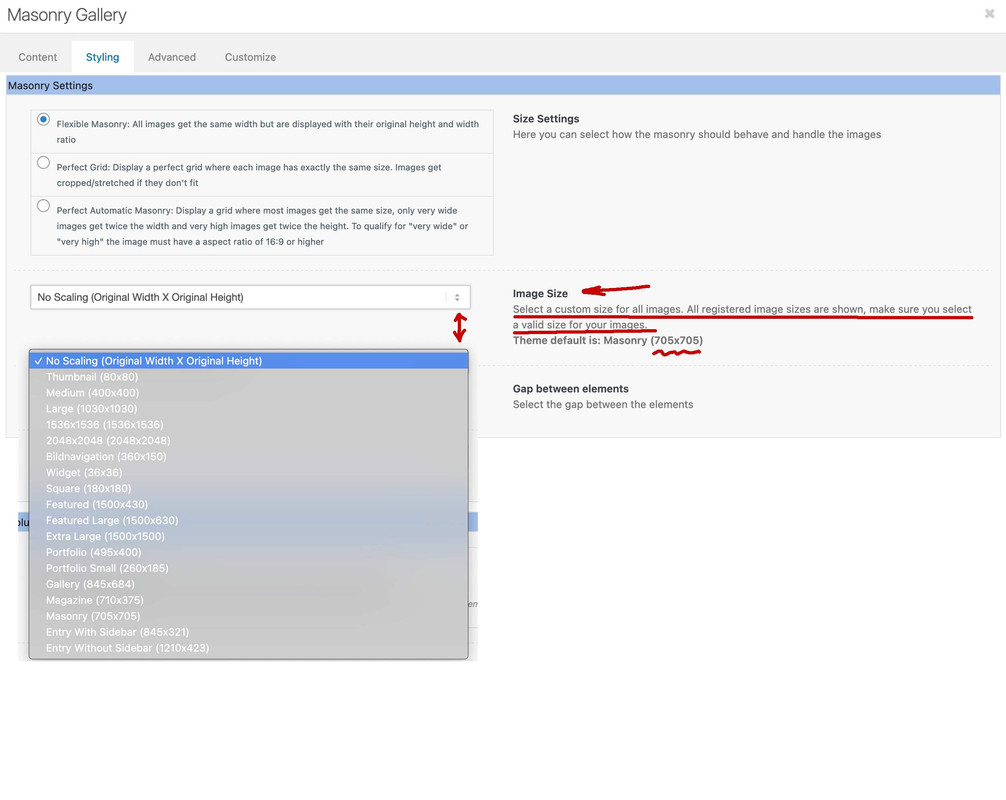
    Enfold provides some additional image sizes to have for their alb elements a better choice.
    in functions.php of enfold there are:

    $avia_config['imgSize']['widget'] 			 	= array('width'=>36,  'height'=>36);						// small preview pics eg sidebar news
    $avia_config['imgSize']['square'] 		 	    = array('width'=>180, 'height'=>180);		                 // small image for blogs
    $avia_config['imgSize']['featured'] 		 	= array('width'=>1500, 'height'=>430 );						// images for fullsize pages and fullsize slider
    $avia_config['imgSize']['featured_large'] 		= array('width'=>1500, 'height'=>630 );						// images for fullsize pages and fullsize slider
    $avia_config['imgSize']['extra_large'] 		 	= array('width'=>1500, 'height'=>1500 , 'crop' => false);	// images for fullscrren slider
    $avia_config['imgSize']['portfolio'] 		 	= array('width'=>495, 'height'=>400 );						// images for portfolio entries (2,3 column)
    $avia_config['imgSize']['portfolio_small'] 		= array('width'=>260, 'height'=>185 );						// images for portfolio 4 columns
    $avia_config['imgSize']['gallery'] 		 		= array('width'=>845, 'height'=>684 );						// images for portfolio entries (2,3 column)
    $avia_config['imgSize']['magazine'] 		 	= array('width'=>710, 'height'=>375 );						// images for magazines
    $avia_config['imgSize']['masonry'] 		 		= array('width'=>705, 'height'=>705 , 'crop' => false);		// images for fullscreen masonry
    $avia_config['imgSize']['entry_with_sidebar'] 	= array('width'=>845, 'height'=>321);		            	// big images for blog and page entries
    $avia_config['imgSize']['entry_without_sidebar']= array('width'=>1210, 'height'=>423 );						// images for fullsize pages and fullsize slider

    you see that there is featured and featured image and extra_large …

    Now is you put an image to your layout or insert to an alb element ( masonry gallery, gallery etc. ) there are default insertions for them.
    But you can allways change them by the alb options.
    See masonry gallery f.e.:

    #1353765
    Paul
    Participant

    Hello,

    I was talking to you in another thread and raised this issue. You replied with a solution and said if I had any other questions to raise a new thread.

    I want to alter the sub-menu with the categories below the slider in 3 ways:

    1) Can you tell me how I can rename it from “Menu” in mobile mode to say “Categories”?
    2) Also, I would like to left-align it when in mobile mode, but keep it centred in desktop mode?
    3) Lastly, can I change it to switch to mobile mode at 885px rather than what it lets me set it to? (trying to maximise the proper menu until it starts wrapping to two lines at 885px wide).

    You replied asking me to add the following to the functions.php:
    // additional custom scripts
    function ava_custom_script_mod() {
    ?>
    <script>
    (function($)
    {
    // replace fullwidth sub menu placeholder text
    $(".av-current-placeholder").text("Categories");
    })(jQuery);
    </script>
    <?php
    }
    add_action('wp_footer', 'ava_custom_script_mod');

    ===================================================================

    By functions.php I presume you mean: wp-content/themes/enfold/functions.php

    So I added it directly at the bottom and went to clear the wp-rocket cache but cannot login to the admin area with this code added. I just get an error at the admin area saying:
    There has been a critical error on this website. Please check your site admin email inbox for instructions.

    Learn more about troubleshooting WordPress.

    Logs indicate:
    [Wed Jun 01 13:52:09.363904 2022] [lsapi:error] [pid 1706026:tid 140660832917248] [client 81.xxx.xxx:0] [host http://www.mydomain.uk&#93; Backend fatal error: PHP Parse error: syntax error, unexpected token “?” in /home/blah/domains/mydomain.uk/public_html/wp-content/themes/enfold/functions.php on line 851\n, referer: https://www.mydomain.uk/wp-admin/

    Thanks

    • This topic was modified 3 years, 10 months ago by Paul.
    • This topic was modified 3 years, 10 months ago by Paul.
    • This topic was modified 3 years, 10 months ago by Paul.
    #1353475
    eXtremeHosting
    Participant

    Error Details
    =============
    An error of type E_ERROR was caused in line 3767 of the file %SRCDIR%/wp-content/themes/enfold/config-templatebuilder/avia-template-builder/php/class-element-templates.php. Error message: Uncaught TypeError: Argument 1 passed to aviaElementTemplates::set_locked_attributes() must be of the type array, string given, called in %SRCDIR%/wp-content/themes/enfold/config-templatebuilder/avia-shortcodes/slideshow_fullsize/slideshow_fullsize.php on line 1062 and defined in %SRCDIR%/wp-content/themes/enfold/config-templatebuilder/avia-template-builder/php/class-element-templates.php:3767
    Stack trace:
    #0 %SRCDIR%/wp-content/themes/enfold/config-templatebuilder/avia-shortcodes/slideshow_fullsize/slideshow_fullsize.php(1062): aviaElementTemplates->set_locked_attributes()
    #1 %SRCDIR%/wp-content/themes/enfold/config-templatebuilder/avia-shortcodes/slideshow_fullsize/slideshow_fullsize.php(1106): avia_sc_slider_full->get_element_styles()
    #2 %SRCDIR%/wp-content/themes/enfold/config-templatebuilder/avia-template-builder/php/class-shortcode-template.php(1142): avia_sc_slider_full->shortcod

    #1353449
    Fred
    Guest

    Hello,
    I cannot register on your support website as I cannot retrieve the purchase code.
    On behalf of my client, I’d like to recover the license details (purchase code and email address) used by the original Themeforest user which doesn’t possibly exist anymore.
    The website is running Enfold v4.4.1 on PHP v7.3. I am unable to update the theme from the WP console. The only way is to download the update from Themeforest.
    Also, upgrading PHP to anything above v7.3 on the current Enfold v4.4.1 triggers errors on the frontend for visitors.
    Thanks for your input.

    #1353411

    In reply to: woo commerce errror

    there were previous lines before my techies response – they were

    “Upon checking, We could see the that currently the domain “jindilli.com.au” was using the altphp7.4 version on the server. Further while loading the site throwing the theme “jindilli” error. It seems the php version is not supported to the theme.

    Further we have tried to change the domain php version to altphp7.2 and then the domain was loading fine but while loading the website throwing the same below theme error.”

    #1353288

    In reply to: Image oddities

    Hi,
    You can disable the linked image overlay at: Enfold theme options > Advanced Styling > Linked Image Overlay
    2022-05-28_007.jpg
    You can remove the Titles on mouse-over by adding this code to the end of your child theme functions.php file in Appearance ▸ Editor:

    function custom_remove_title_script() { 
    ?>
        <script>
    (function($){
        $("*").hover(function(){
          $(this).removeAttr("title");
        });  
      })(jQuery);
      </script>
        <?php
    }
    add_action('wp_footer', 'custom_remove_title_script');

    Best regards,
    Mike

    #1353256

    ? no – i will look for that
    edit: on helper-social-media.php there is on line: 167

    $display_name = ucfirst( $icon['social_icon'] );
    

    but this should only change the first letter to a big Letter. i don’t know if it changes the rest to lower case.

    Nevertheless maybe a mod could tell us to use for example the filter: avf_social_media_icon_display_name and avf_social_media_icon_aria_label_value to change those existing values.

    GWS
    Participant

    Hi,
    I’ve just taken over maintenance of a website that has Enfold 4.7.4 installed and is in desperate need of updates. They have the following script in functions.php to remove the ecommerce sales badge, I presume. When I upgrade to 4.9.2.3 will this script need to be replaced? If so, what would it need to be? Thank you.

    // Removing sales badge
    // custom script
    add_action(‘wp_footer’, ‘ava_custom_script’);
    function ava_custom_script(){
    ?>
    <script>
    (function($){
    function h() {
    $(‘#top .product’).each(function() {
    var onsale = $(this).find(‘.onsale’),
    thumb = $(this).find(‘.woocommerce-LoopProduct-link’);
    onsale.appendTo(thumb);
    });
    }
    h();
    })(jQuery);
    </script>
    <?php
    }

    #1353143

    Godaddy have disabled the control files on their end and we have tried to install the demo again but the same error

    I have checked the error log files and this error is appearing

    [25-May-2022 10:21:31 UTC] PHP Warning: Use of undefined constant ‘avia_demo_store_downloaded_files’ – assumed ‘‘avia_demo_store_downloaded_files’’ (this will throw an Error in a future version of PHP) in /home/d7cczkcpi1gz/public_html/giocavalliconcierge.co/wp-content/themes/enfold/functions-enfold.php on line 568

    Have you seen this before?

    #1352933

    Topic: PHP Fatal Error

    in forum Enfold
    zimbo
    Participant

    I have PHP logging enabled to try to fix a problem but the following appeared in the log.

    [22-May-2022 21:30:44 UTC] PHP Fatal error:  Uncaught TypeError: Argument 1 passed to aviaElementTemplates::set_locked_attributes() must be of the type array, string given, called in /var/www/web/wp-content/themes/enfold/config-templatebuilder/avia-shortcodes/tabs/tabs.php on line 574 and defined in /var/www/web/wp-content/themes/enfold/config-templatebuilder/avia-template-builder/php/class-element-templates.php:3751
    Stack trace:
    #0 /var/www/web/wp-content/themes/enfold/config-templatebuilder/avia-shortcodes/tabs/tabs.php(574): aviaElementTemplates->set_locked_attributes('', Object(avia_sc_tab), 'av_tab', Array, Array, '')
    #1 /var/www/web/wp-includes/shortcodes.php(356): avia_sc_tab->av_tab('', '', 'av_tab')
    #2 [internal function]: do_shortcode_tag(Array)
    #3 /var/www/web/wp-includes/shortcodes.php(228): preg_replace_callback('/\\[(\\[?)(av_tab...', 'do_shortcode_ta...', '<br />\n[av_tab ...')
    #4 /var/www/web/wp-content/themes/enfold/config-templatebuilder/avia-template-builder/php/class-shortcode-helper.php(506): do_shortcode('<br />\n[av_tab ...')
    #5 / in /var/www/web/wp-content/themes/enfold/config-templatebuilder/avia-template-builder/php/class-element-templates.php on line 3751

    It’s not – that I know of – giving me any issues and it has not occurred since, but I thought you might like to investigate if this is an error or just a one-off fluke.

    #1352905

    In reply to: WordPress 6.0

    no experience so far – sorry

    I have changed my test site, which is already very bloated with code ( 3400 lines of child-theme functions.php and 7500 lines of quick css ) – and so far I have not found any problems.

    #1352831

    Hi,
    To make your grid row element sticky you can use the same script that was given in another thread:

    function custom_collant_script() { ?>
        <script>
    window.addEventListener('DOMContentLoaded', function() {
    (function($){
      $(function() {       
         var scroll_start = 0;
         var startchange = $('.avia-section.collant');
         var offset = startchange.offset();
         var width = $(window).width()
          if (startchange.length){
         $(document).scroll(function() { 
            scroll_start = $(this).scrollTop();
            if((width >= 990) && (scroll_start > offset.top - 117)) {
              document.querySelector('.avia-section.collant').classList.add('sticky-top');
             } else {
              document.querySelector('.avia-section.collant').classList.remove('sticky-top');
             }
         });
          }
      });
    })(jQuery);
    });
    </script>
        <?php
    }
    add_action('wp_footer', 'custom_collant_script');

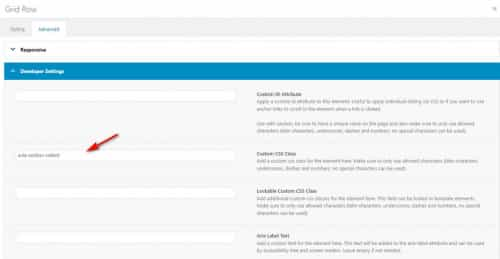
    I added this custom class to the grid row for you avia-section collan
    2022-05-24_003.jpg
    and now the grid row sticks near the top, the only thing is that this function sticks 117px from the top because on the other page you had a sticky header, but for product pages it looks like you want to remove the sticky header, is this correct or are you going to use a sticky header on your product pages too?

    Best regards,
    Mike

    #1352587

    Rectification: where can I find the version v4.9.2.3 ?
    Cause I just checked underneath the token info, it sais:
    Theme Updates
    No Updates available. You are running the latest version! (4.7.3)
    Check Manually
    Your PHP version: 7.4.28

    #1352540

    Hi,
    Thank you for the link to your site, I found that your youtube link was incorrect so I adjusted it, see the Private Content area below for the correct video format, but your video is still showing the “this video is unavailable” error, I tested this on my demo site and it does work correctly so I believe the issue is that you are using and old version of the theme: v4.7.3 we are now at v4.9.2.3 so please try updating.
    I see that you have not added a valid Envato private token so you will need to do this to update.
    I also see that your PHP version: 7.3.33, WordPress recommends a minimum of 7.4
    2022-05-22_002.jpg
    so you should probably ask your webhost to update your PHP first then update your theme.

    Best regards,
    Mike

    #1352436

    Hi Mike

    Your modification works well so far.

    But I ran into several new issues because the scrolling script affects now every link/anchor with a # on my website. For example there is a link with a # that opens the lightbox containing a contact form. While the lightbox is opening in the foreground, the page scrolls back to the top in the background instead of staying in place.

    I fixed these issues in completing your code with a if(is_page(PAGE ID)) conditional.

    function custom_offset_script_with_width() {
    if(is_page(972)) {
    ?>
        <script>
    (function($) {
      $('a[href*=#]:not([href=#])').click(function() {
      	var width = $(window).width()
        if (location.pathname.replace(/^\//,'') == this.pathname.replace(/^\//,'') 
    && location.hostname == this.hostname) {
    
          var target = $(this.hash);
          target = target.length ? target : $('[name=' + this.hash.slice(1) +']');
          if (target.length) {
          	if ($(window).width() < 768) {
            $('html,body').animate({
              scrollTop: target.offset().top - 10 //offset if header isn't sticky
            }, 1000);
            return false;
          } else {
          	$('html,body').animate({
              scrollTop: target.offset().top - 100 //offset if header is sticky
            }, 1000);
            return false;
          }
          } 
        }
      });
      //Executed on page load with URL containing an anchor tag.
      if($(location.href.split("#")[1])) {
          var target = $('#'+location.href.split("#")[1]);
          if (target.length) {
          	if ($(window).width() < 768) {
            $('html,body').animate({
              scrollTop: target.offset().top - 10 //offset if header isn't sticky here too.
            }, 1000);
            return false;
          } else {
          	$('html,body').animate({
              scrollTop: target.offset().top - 100 //offset if header is sticky here too.
            }, 1000);
            return false;
          }
          } 
        }
    }(jQuery));
    </script>
        <?php
    }
    }
    add_action('wp_footer', 'custom_offset_script_with_width');

    The script runs now only on the specific page where it is needed. That works fine for me.

    Another approach might be that your initial script affects only a specific anchor – #webcams in my case – instead of affecting every anchor with a #. How can this be achieved?

    Kind regards
    Ueli

    László Rajkai
    Guest

    I want to register to support forum with purchase code (388cc671-86f3-42c3-abf0-25e6806e4686), but the email with password cannot arrived.

    I would need Enfold 4.5.1 original functions.php because it was modified by the previous developer. I want to move the changes to another location that doesn’t affect the theme’s upgradability

    #1352278

    In reply to: PHP 7.4

    Hey amyteslin,

    Enfold is compatible with PHP 7.4. Please make sure that you are running the latest version of the theme: https://kriesi.at/documentation/enfold/how-to-install-enfold-theme/#theme-update.

    Best regards,
    Rikard

    #1352269

    Topic: PHP 7.4

    in forum Enfold
    amyteslin
    Participant

    Hi, I keep getting wordpress errors saying I need to upgrade to php 7.4 but when I do it breaks my site. I have spoken to my host and they say the theme is not compatible, do you have a solution to this?

    #1352239

    Hey Christian,

    Thank you for the inquiry.

    You may need to modify the enfold/framework/php/widgets/widget-classes/class-avia-combo.php file directly and adjust the widget tab title in this code around line 47.

    
    			$this->form_tabs = array(
    								0				=> __( 'No content', 'avia_framework' ),
    								'popular'		=> __( 'Popular posts', 'avia_framework' ),
    								'recent'		=> __( 'Recent posts', 'avia_framework' ),
    								'comments'		=> __( 'Newest comments', 'avia_framework' ),
    								'tagcloud'		=> __( 'Tag cloud', 'avia_framework' )
    							);
    

    You can also use this plugin if editing a file is not an option.

    // https://wordpress.org/plugins/say-what/

    Best regards,
    Ismael

    #1352134

    Hi,
    Glad to hear, try this instead

    function custom_offset_script_with_width() { ?>
        <script>
    (function($) {
      $('a[href*=#]:not([href=#])').click(function() {
      	var width = $(window).width()
        if (location.pathname.replace(/^\//,'') == this.pathname.replace(/^\//,'') 
    && location.hostname == this.hostname) {
    
          var target = $(this.hash);
          target = target.length ? target : $('[name=' + this.hash.slice(1) +']');
          if (target.length) {
          	if ($(window).width() < 768) {
            $('html,body').animate({
              scrollTop: target.offset().top - 10 //offsets for fixed header
            }, 1000);
            return false;
          } else {
          	$('html,body').animate({
              scrollTop: target.offset().top - 80 //offsets for fixed header
            }, 1000);
            return false;
          }
          } 
        }
      });
      //Executed on page load with URL containing an anchor tag.
      if($(location.href.split("#")[1])) {
          var target = $('#'+location.href.split("#")[1]);
          if (target.length) {
          	if ($(window).width() < 768) {
            $('html,body').animate({
              scrollTop: target.offset().top - 10 //offset height of header here too.
            }, 1000);
            return false;
          } else {
          	$('html,body').animate({
              scrollTop: target.offset().top - 80 //offset height of header here too.
            }, 1000);
            return false;
          }
          } 
        }
    }(jQuery));
    </script>
        <?php
    }
    add_action('wp_footer', 'custom_offset_script_with_width');

    Best regards,
    Mike

    #1352082

    Hi,

    The warning you are getting after updating PHP is likely not caused by Enfold. This might help you out though: https://wordpress.stackexchange.com/questions/296937/constant-wp-cron-lock-timeout-already-defined-in-htdocs-wp-config-php

    Best regards,
    Rikard

    • This reply was modified 3 years, 11 months ago by Rikard.
    #1352004
    admin3prime
    Participant

    I am having the same problem as other users, Enfold theme (v. 4.9.2.3, php v 7.4.29) only shows default WordPress footer widgets. I have tried taking out the child theme custom footer file, with no effect. Please advise. I will furnish logins upon request.

    #1351972

    Hi, I am facing same issue for deslaperij.nl
    Other website modeo.nl does not face this problem.
    both enfold 4.9.2.3 and PHP version 7.4.29

    I use enfold child theme: footer with socket and footer widgets

    I do not understand your recommendation: “If so, then please replace those files with the parent theme files, then add your customisations back in after that.” I do not program in the backend myself, I only use the installed child theme of Enfold.

    Hope you can help me

    #1351873

    Looked deeper:

    This is what i added:

    This is what i get and this is definitely not what it supposed to be
    One image added, got 4 different in my HTML that bloats my pageload

    <a href="http://127.0.0.1/wp-content/uploads/testimage-97-1.jpg" data-rel='gallery-1' data-prev-img='http://127.0.0.1/wp-content/uploads/testimage-97-1.jpg' class='lightbox ' data-onclick='4' title='' itemprop="thumbnailUrl" ><img loading="lazy" class="wp-testimage-27902 avia-img-lazy-loading-27902" data-avia-tooltip='' src="https://127.0.0.1/wp-content/uploads/testimage-97-1-260x185.jpg" width="260" height="185" title='' alt='' /><div class='big-prev-fake'><img loading="lazy" class="wp-testimage-27902 avia-img-lazy-loading-27902" width="1583" height="800" src="https://127.0.0.1/wp-content/uploads/testimage-97-1.jpg" title='' alt='' srcset="http://127.0.0.1/wp-content/uploads/testimage-97-1.jpg 1583w, http://127.0.0.1/wp-content/uploads/testimage-97-1-1030x521.jpg 1030w, http://127.0.0.1/wp-content/uploads/testimage-97-1-80x40.jpg 80w, http://127.0.0.1/wp-content/uploads/testimage-97-1-768x388.jpg 768w, http://127.0.0.1/wp-content/uploads/testimage-97-1-1536x776.jpg 1536w, http://127.0.0.1/wp-content/uploads/testimage-97-1-1500x758.jpg 1500w, http://127.0.0.1/wp-content/uploads/testimage-97-1-705x356.jpg 705w" sizes="(max-width: 1583px) 100vw, 1583px" /></div></a>

    1: When i add a masonry gallery with “portfolio smalll 260 x 185” i see a gallery with thumbnails.
    Every thumb should be 260 x 185. Right?

    2: When the thumbnail is linked via lightbox with the big image, the image should be loaded when a user clicks on it (because this is what a link does)
    Not before, Right?

    Weird:
    – About 50% of all images do not show the original image like i defined in my functions.php
    They are like image-1500×710.jpg” or 1500×550″ or “1500×786″ or 1500×758”

    This is absolutely not understandable

    This is the code i found in some other thread where the user wanted to see the images in the lightbox in original size and so i want too:

    // Bilder in Galerie in Lightbox in Originalgröße anzeigen
    function avia_change_gallery_thumbnail_link($link, $attachment, $atts, $meta){
        $link = wp_get_attachment_image_src($attachment->ID, "full");
        return $link;
    }
    add_filter('avf_avia_builder_gallery_image_link', 'avia_change_gallery_thumbnail_link', 10, 4);
    
    function avia_change_masonry_thumbnail_link($size) {
      return "full";
    }
    add_filter('avf_avia_builder_masonry_lightbox_img_size', 'avia_change_masonry_thumbnail_link', 10, 1);
    #1351845

    Hi,
    Thank you for your patience, perhaps this solution will help in your case, you can try this by adding this code to the end of your child theme functions.php file in Appearance ▸ Editor:

    function custom_offset_script() { ?>
        <script>
    (function($) {
      $('a[href*=#]:not([href=#])').click(function() {
        if (location.pathname.replace(/^\//,'') == this.pathname.replace(/^\//,'') 
    && location.hostname == this.hostname) {
    
          var target = $(this.hash);
          target = target.length ? target : $('[name=' + this.hash.slice(1) +']');
          if (target.length) {
            $('html,body').animate({
              scrollTop: target.offset().top - 125 //offsets for fixed header
            }, 1000);
            return false;
          }
        }
      });
      //Executed on page load with URL containing an anchor tag.
      if($(location.href.split("#")[1])) {
          var target = $('#'+location.href.split("#")[1]);
          if (target.length) {
            $('html,body').animate({
              scrollTop: target.offset().top - 125 //offset height of header here too.
            }, 1000);
            return false;
          }
        }
    }(jQuery));
    </script>
        <?php
    }
    add_action('wp_footer', 'custom_offset_script');

    I tested this on your page by injecting the code in my browser and it seemed to work well, instead of trying to land on the anchor while the page is still loading and adjusting it’s height, this script waits for the page to load and then scrolls to the anchor.

    Best regards,
    Mike

    #1351767

    Hey spygames,
    Thank you for your patience, I believe the Header Phone Number changed from a “span” tag to a “div”, so try this script:

    function add_custom_script(){
    ?>
    <script>
    (function($){
    function change_topinfo() {
    $('.page-id-12131 .phone-info div').text('CALL NOW: 01604 946 543');
    $('.page-id-28924 .phone-info div').text('CALL NOW: 01604 267 522');
    }
    change_topinfo();
    })(jQuery);
    </script>
    <?php
    }
    add_action('wp_footer', 'add_custom_script');

    Best regards,
    Mike

    #1351671
    Alwin
    Participant

    I am building a new website with a lot of photos and to save storage space I want to reduce the number of photo sizes created by Enfold.

    I don’t need these sizes:

    – 36×36 widget and other square image sizes
    – 260×185 portfolio small
    – 845×684 gallery
    – 710×375 nagazine
    – 845×321 entry with sidebar
    – 1210×423 entry without sidebar
    – 1500×430 featured
    – 1500×630 featured large

    If I understood correctly I should then add the following code to my functions.php file (in my Child theme):

    function ava_image_sizes() {
    	remove_image_size('magazine');
    	remove_image_size('widget');
    	remove_image_size('featured');
    	remove_image_size('featured_large');
    	remove_image_size('portfolio_small');
    	remove_image_size('gallery');
    	remove_image_size('entry_with_sidebar');
    	remove_image_size('entry_without_sidebar');
            remove_image_size('square');
    }
    add_action( 'after_setup_theme', 'ava_image_sizes', 11 );

    – Is that above code correct like this?
    – After adding this code I have read the advice to use the Regenerate Thumbnails plugin, but this plugin is not updated for a year, so is it still recommended?

    Thanks for your help!

    #1351571

    Hi,
    Thank you for your patience, I tested this function in my functions.php:

    
    add_filter('avf_logo_subtext', 'kriesi_logo_addition');
    function kriesi_logo_addition($sub) {
    	$sub .= '<span class="bloginfo name">' .get_bloginfo( 'name', 'display' ).'</span>';
    	$sub .= '<span class="bloginfo description">' .get_bloginfo( 'description', 'display' ).'</span>';
    	return $sub;
    }

    it gets the site title and description from the WordPress settings, and I uploaded a small 80px red logo as the regular logo and small 80px white logo as the transparent logo in the theme options:
    2022-05-12_084016.jpg
    Then I added this css:

    #top .logo,
    #top .logo a {
      overflow: visible;
    	display:flex;
    	max-height: 80px;
    	color:red;
    	text-decoration: none;
    }
    @media only screen and (min-width: 990px) { 
    #top #header.av_header_transparency .logo a {
    	color:#fff;
    }
    }
    .logo .subtext {
      font-size: 20px;
    	padding-left: 20px;
        font-weight: 600;
    	display: flex;
      flex-direction: column;
      align-items: flex-start;
    	justify-content: center;
    }
    .bloginfo {
    line-height:22px
    }
    @media only screen and (max-width: 820px) { 
    .logo .subtext {
    	font-size: 12px;
    }
    .bloginfo {
    line-height:14px
    }
    }
    @media only screen and (max-width: 610px) {
    .responsive #top #wrap_all #header_main .main_menu {
        display: flex;
        position: relative;
        width: 100%;
        justify-content: center;
    }
    .responsive #top #header_main .logo {
        display: flex;
        width: 100%;
        justify-content: center;
    }
    #header_main .inner-container {
    	display: flex;
        flex-direction: column;
        align-items: flex-start;
    }
    }

    my header size is the default “Slim”, with a “Sticky Header”
    2022-05-12_001.jpg
    Desktop before and after scroll:
    2022-05-12_084805.jpg
    Laptop:
    2022-05-12_004.jpg
    For mobile (425px) I stacked the logo & text over the mobile menu and centered them, this seems to work better than making the text so small that I couldn’t really read it:
    2022-05-12_005.jpg
    This is how the smallest mobile (375px) looks:
    2022-05-12_006.jpg
    Please give this a try, I linked to my test site below.

    Best regards,
    Mike

Viewing 30 results - 2,161 through 2,190 (of 16,894 total)