Viewing 30 results - 151 through 180 (of 16,897 total)
  • Author
    Search Results
  • #1490822
    felix_frank
    Participant

    Hallo zusammen!

    Ich habe die Schritte wie in https://kriesi.at/support/topic/pop-up-lightbox/#post-1429407 beschrieben umgesetzt und dann den Shortcode von einem Formular eingefügt. Mein Ziel ist es, ein Formular in einem Popup anzuzeigen, wenn man auf einen Button klickt.

    Also:

    
    function magnific_popup_with_no_scroll_and_button() { ?>
      <script>
    (function($) {
      $(window).on('load', function(){
    	$('.open-popup-button a').addClass('open-popup-link');
        $('.open-popup-link').addClass('no-scroll');
        $('.open-popup-link').magnificPopup({
          type:'inline',
          midClick: true,
          callbacks: {
            beforeOpen: function () {
              $('body').css("overflow-y", "hidden");
            },
            close: function() {
              $('body').css("overflow-y", "auto");
            },
          },
        });
      });
      })(jQuery);
    </script>
      <?php
    }
    add_action( 'wp_footer', 'magnific_popup_with_no_scroll_and_button', 99 );
    

    Das in die functions.php eingesetzt.

    Eine Code-Box mit folgendem Inhalt erstellt:

    
    <div id="open-popup" class="popup mfp-hide">
    <p>[av_layout_template template_id='popform']</p>
    </div>
    

    Und auch das im Quick-CSS hinzugefügt:

    
    .popup {
    position: relative;
    background: #FFF;
    padding: 20px;
    width: auto;
    max-width: 500px;
    margin: 20px auto;
    }
    

    Weil es nicht funktioniert hat habe ich auch das noch hinzugefügt:

    
    add_filter('avia_allow_shortcodes_in_codeblock', '__return_true');
    add_filter('avf_alb_support_modal_templates', '__return_true');
    

    Leider funktioniert es nicht. Es öffnet sich ein Modal aber darin steht nur der Shortcode. Ich bin ratlos. Kann mir bitte jemand dabei helfen das hinzubekommen.

    Link zur Testseite im PC.

    • This topic was modified 5 months, 3 weeks ago by felix_frank.
    • This topic was modified 5 months, 3 weeks ago by felix_frank.
    #1490801

    Hi,

    The filter we recommended was placed in the style.css file instead of the functions.php file. We removed it and added the following script instead. The text will still display with a slight delay, but the transition should now be disabled.

    add_action('wp_footer', function() {
        ?>
        <script>
        jQuery(document).ready(function($) {
            $(".avia-fold-unfold-section").each(function() {
                var $section = $(this);
                var $container = $section.find(".av-fold-unfold-container");
    
                if ($container.length) {
                    $container.css({
                        "max-height": "none",
                        "transition": "none"
                    }).removeClass("folded").addClass("unfolded");
                }
    
                var $buttonWrapper = $section.find(".av-fold-button-wrapper");
    
                if ($buttonWrapper.length) {
                    $buttonWrapper.css("display", "none");
                }
            });
        });
        </script>
        <?php
    }, 999);


    We also edited the modification in the Quick CSS field.

    @media only screen and (max-width: 768px) {
      .av-fold-unfold-container {
        max-height: none !important;
        transition: none !important;
        opacity: 1 !important;
      }
    
      .avia-fold-unfold-section .av-fold-button-wrapper,
      .av-fold-button-container {
        display: none !important;
      }
    
      #top .avia-fold-unfold-section .av-fold-unfold-container:after {
        display: none !important;
      }
    
      .avia-fold-init,
      .avia-fold-init-done {
        display: block !important;
        max-height: none !important;
        opacity: 1 !important;
      }
    }
    

    Best regards,
    Ismael

    #1490800

    Edit: here is the solution with working separators on those color-sections

    the color-section that should react like this:
    give a custom class to it: av-video-section
    give a background-color to it that does not disturb your video switch (not white – something that fits to your video content
    place a codeblock element on top of your color-section ( codeblock to content – not as codesnippet)

    <video class="responsive-background-video" 
            autoplay muted loop playsinline
            data-video-mobile="path/to/mobile.mp4"
            data-video-desktop="path/to/desktop.mp4">
        <source src="" type="video/mp4">
    </video>
    

    this to your quick css:

    .responsive #top #wrap_all .avia-section.av-video-section {
      position: relative;
      overflow: hidden; 
      min-height: initial; /* taken from Enfold section setting  */
    }
    .responsive #top #wrap_all .avia-section.av-video-section .container {
      position: relative;
      z-index: 1;
      max-width: 100% !important;
      width: 100% !important;
      padding: 0 !important;
    }  
    .responsive #top #wrap_all .avia-section.av-video-section .responsive-background-video {
      position: absolute;
      top: 0;
      left: 0;
      width: 100%;
      height: 100%;
      object-fit: cover !important;
      z-index: 0;
      min-height: inherit; /* transfer from Enfold section setting  */
    }
    .responsive #top #wrap_all .avia-section.av-video-section .avia-divider-svg {
      z-index:2;
    }
    .responsive #top #wrap_all .avia-section.av-video-section .avia-divider-svg.avia-to-front {
      z-index:100;
    }

    the snippet for child-theme functions.php

    function custom_responsive_background_video_script() {
    ?>
    <script>
    (function($) {
        "use strict";
    
        $(document).ready(function() {
            $('.responsive-background-video').each(function() {
                const video = this;
                const $video = $(video);
                const source = video.querySelector('source');
                const win = $(window);
                
                // Get video paths from data attributes
                const mobileVideo = $video.data('video-mobile');
                const desktopVideo = $video.data('video-desktop');
                
                if (!mobileVideo || !desktopVideo) return;
                
                function updateVideoSource() {
                    const isMobile = win.width() < 768;
                    const newSrc = isMobile ? mobileVideo : desktopVideo;
                    
                    if (source.src.indexOf(newSrc) === -1) {
                        source.src = newSrc;
                        video.load();
                    }
                }
                
                // Initial load
                updateVideoSource();
                
                // Resize handling
                win.on('debouncedresize', updateVideoSource);
            });
        });
    })(jQuery);
    </script>
    <?php
    }
    add_action('wp_footer', 'custom_responsive_background_video_script', 999);

    see example page with divider : https://webers-testseite.de/background-video/

    #1490730

    I found this in the header.php

    ?><!DOCTYPE html>
    <html <?php language_attributes(); ?> class="<?php echo $html_classes; ?>">
    <head>
    	<script id="Cookiebot" src="https://consent.cookiebot.com/uc.js" data-cbid="eb73297c-1583-47c6-a2fd-5b6c01c438eb" data-blockingmode="auto" type="text/javascript"></script>
    <meta charset="<?php bloginfo( 'charset' ); ?>" />
    <?php
    
    /*
     * outputs a rel=follow or nofollow tag to circumvent google duplicate content for archives
     * located in framework/php/function-set-avia-frontend.php
     */
     if( function_exists( 'avia_set_follow' ) )
     {
    	 echo avia_set_follow();
     }
    
    ?>

    What part should I take out?

    • This reply was modified 5 months, 4 weeks ago by Munford.
    #1490647
    swatstudio
    Participant

    Hello,

    I get a new website to manage (updates and so on), made by another web agency in 2019.
    The website is currently using an old 4.5.7 Enfold version but they made customizations directly in the Javascript and PHP files of Enfold.
    In fact, they didn’t use a child theme for it.
    So I’d like to compare files with the original 4.5.7 version before updating to the last version.

    Is it possible to get an old 4.5.7 version for me to manage theses customizations ?

    Waiting for your answer,
    Sincerely,
    François

    #1490626
    yalbarzawi
    Participant

    I don’t receive updates for the theme. This is always shown:
    Theme Updates
    No Updates available. You are running the latest version! (4.7.6.3)
    Your PHP version: 7.4.33
    Last successful check was on 2025/10/27 15:13.

    This version has security vulnerabilities and I need to update it. How can I automate this?

    Hey Patrycja,
    Thanks for your question, glad to hear that you have a full backup prepared, including the database, while we don’t expect any issues updating from v4.8.3 to v7.1.3 (lastest version) since Enfold mantins a good backward compatibly, we would note that your PHP version, 7.4.33 is quite old and some plugins (if any) may not work well with PHP v8+ Enfold now uses PHP v8+ as well as WordPress so you should expect to also update this.
    I recommend creating a staging site to test the update on.
    Then on the staging site, disable all plugins including any caching plugin and server caching & the Enfold theme caching in the Performance theme settings.
    Then update to v7.1.3, and reload the site on the frontend using the browser “hard reload” to clear the browser cache. This will help clear the “post-css” files which serve the css background images in the color sections (if used).
    Then update your PHP to v8+, I recommend  the lower end like v8.2 or such, not the “bleeding edge” highest version like v8.5, you can test this later if you wish.
    If you are using a child theme and have modified header.php, footer.php or any other core theme files in the child theme, please save these to your computer and remove them from the child theme, these will be different in the current version & will most likely cause an error when updating.
    When you update, you may not be able to update though the theme panel “update” feature as just about v4.8.3 Envato (Themeforest) changed from the API key to the Token key, so the best approach is to download the latest installable WP version from your Theme Forest account and upload it to your WordPress ▸ Appearance ▸ Themes ▸ Add Themes ▸ Add New, after you choose the zip file and click install, you will see a This theme is already installed message because you are updating, you can continue. Then you will see the Theme updated successfully message.
    After updating see our documentation for creating an Envato Token so future updates can be done in the theme panel.
    If you try to update via FTP, do not try to overwrite the theme files, as this will leave old files behind and cause errors, you would need the delete the old theme directory and then upload the new one, using the WordPress ▸ Appearance ▸ Themes ▸ Add Themes ▸ Add New is the easiest solution.

    Best regards,
    Mike

    Patrycja
    Guest

    Hi Enfold Support Team,
    I’m working on a client’s website and need your guidance before proceeding with a major update.
    Current situation:

    Enfold version: 4.8.3 (last updated around 2020)
    WordPress: 5.9.12
    PHP: 7.4.33
    The site has been running without major updates for approximately 5 years

    What needs to be updated:

    Enfold: 4.8.3 → latest version (6.0+)
    WordPress: 5.9.12 → 6.8.3
    PHP: 7.4.33 → 8.3

    My concerns:
    I’m worried about such a large version jump potentially breaking the website. The site is live and actively used by my client, so I need to minimize any risks and downtime.
    My questions:

    Is it safe to update directly from Enfold 4.8.3 to the latest 6.0+ version, or should I update incrementally through intermediate versions?
    Are there any known breaking changes or compatibility issues between version 4.8.3 and 6.0+ that I should be aware of?
    What is the recommended update sequence? Should I update Enfold first, then WordPress, then PHP?
    Will existing layouts built with Avia Layout Builder continue to work after the update?
    Are there any specific settings, customizations, or files I should backup or document before updating?
    Should I expect any visual or functional changes that might require adjustments after the update?

    I have a full backup prepared, but I want to understand potential issues and the safest approach before starting the update process.
    Thank you very much for your help and guidance!
    Best regards,

    #1490416
    This reply has been marked as private.
    #1490384

    Hi,

    Thank you for the update.

    We adjusted the filter in the functions.php file.

    add_filter( 'avia_blog_post_query', 'ava_blog_post_query_mod', 10, 2 );
    
    function ava_blog_post_query_mod( $query, $params ) {
        if (is_page(1230)) {
            $query['orderby'] = 'date';
            $query['order']   = 'DESC';
        }
    
        if (is_page(574)) {
            $query['orderby'] = 'modified';
            $query['order']   = 'DESC';
        }
    
        return $query;
    }
    

    Screenshot-2025-10-20-at-12-53-18-PM

    Best regards,
    Ismael

    #1490224

    @ismael, I had a similar script in functions.php but replaced it with your recommendation. Unfortunately, it did not correct the sort order issue.


    @guenni007
    , I had already changed the settings to Perfect Grid to no avail. Other masonry settings didn’t work either. I’m stumped.

    Any other thoughts or ideas?

    #1490091

    Hey milkrow,

    Thank you for the inquiry.

    There is no built-in option for this by default. You’ll need to edit each portfolio entry manually, switch to the Advanced Layout Builder and add the custom element template. There is a workaround, but it requires manually adding a code to your functions.php file and adjust it according to your requirements.

    https://kriesi.at/support/topic/importing-lots-of-data-to-scf-custom-posts-all-having-same-template/#post-1473195

    Best regards,
    Ismael

    #1490041

    Hi,
    The PHP version is 8.3. We just updated Enfold through our webhost to 7.1.3. We are now getting a different error:

    Fatal error: Cannot redeclare av_countdown_events_fallback() (previously declared in /home2/arvidson/public_html/christmasdecor.arvidsons.com/wp-content/themes/enfold/config-templatebuilder/avia-shortcodes/events_countdown/events_countdown.php:16) in /home2/arvidson/public_html/christmasdecor.arvidsons.com/wp-content/themes/enfold/config-templatebuilder/avia-shortcodes/events_countdown.php on line 8

    Any help would be much appreciated. We also can’t get into our back end at the moment and are doing updates through the host.

    We also have a website at arvidsons.com, and there is as of today a critical error on this one as well.
    Thank you,
    Justine

    #1490020
    BlutVampir
    Participant

    I have a custom shortcode:

    <?php
    
    if ( ! defined( 'ABSPATH' ) ) {  exit;  }    // Exit if accessed directly
    
    if ( ! class_exists( 'avia_sc_portfolio_kacheln' ) )
    {
    	class avia_sc_portfolio_kacheln extends aviaShortcodeTemplate
    	{
    		/**
    		 * Create the config array for the shortcode button
    		 */
    		function shortcode_insert_button()
    		{
    			$this->config['version']		= '1.0';
    			$this->config['self_closing']	= 'no';
    			$this->config['base_element']	= 'yes';
    
    			$this->config['name']			= 'Portfolio Kachel';
    			$this->config['tab']			= 'wuk Elements';
    			$this->config['icon']			= AviaBuilder::$path['imagesURL'] . 'sc-image.png';
    			$this->config['order']			= 1;
    			$this->config['target']			= 'avia-target-insert';
    			$this->config['shortcode'] 		= 'av_portfoliokachel';
    //			$this->config['modal_data']     = array( 'modal_class' => 'mediumscreen' );
    			$this->config['tooltip'] 	    = __( 'Inserts an image of your choice', 'avia_framework' );
    			$this->config['preview'] 		= 1;
    			$this->config['disabling_allowed'] = true;
    			$this->config['id_name']		= 'id';
    			$this->config['id_show']		= 'yes';
    		}
    
    		function popup_elements()
    		{
    			$template_url = get_stylesheet_directory_uri();
    			$this->elements = array(
    
    				array(
    						'type' 	=> 'tab_container',
    						'nodescription' => true
    					),
    
    				array(
    						'type' 	=> 'tab',
    						'name'  => __( 'Kachel', 'avia_framework' ),
    						'nodescription' => true
    					),
    
    					array(
    							'type' 	=> 'toggle_container',
    							'nodescription' => true
    						),
    
    					array(
    									"name" 	=> __("Choose Image",'avia_framework' ),
    									"desc" 	=> __("Either upload a new, or choose an existing image from your media library",'avia_framework' ),
    									"id" 	=> "bild",
    									"type" 	=> "image",
    									"title" => __("Insert Image",'avia_framework' ),
    									"button" => __("Insert",'avia_framework' ),
    									"std" 	=> "",
    						),
    
    						array(
    							"name" 	=> __("Title", 'avia_framework' ),
    							"id" 	=> "title",
    							"std" 	=> "",
    							"type" 	=> "input"
    						),
    
    						array(
    							"name" 	=> __("Text", 'avia_framework' ),
    							"id" 	=> "text",
    							"std" 	=> "",
    							"type" 	=> "textarea"
    						),
    
    						array(
    							"name" 	=> __("Button Text", 'avia_framework' ),
    							"id" 	=> "button_text",
    							"std" 	=> "",
    							"type" 	=> "input"
    						),
    
    						array(
    							'name'	=> __( 'Image Link?', 'avia_framework' ),
    							'desc'	=> __( 'Where should your image link to?', 'avia_framework' ),
    							'id'	=> 'link',
    							'type'	=> 'linkpicker',
    							'fetchTMPL'	=> true,
    							'std'		=> '',
    							'lockable'	=> true,
    							'subtype'	=> array(
    											__( 'No Link', 'avia_framework' )	=> '',
    											__( 'Lightbox', 'avia_framework' )	=> 'lightbox',
    											__( 'Set Manually', 'avia_framework' )	=> 'manually',
    											__( 'Single Entry', 'avia_framework' )	=> 'single',
    											__( 'Taxonomy Overview Page', 'avia_framework' )	=> 'taxonomy',
    										)
    						),
    
    						array(
    							'name'	=> __( 'Open new tab/window', 'avia_framework' ),
    							'desc'	=> __( 'Do you want to open the link url in a new tab/window?', 'avia_framework' ),
    							'id'	=> 'target',
    							'type'	=> 'select',
    							'std'	=> '',
    							'lockable'	=> true,
    							'required'	=> array( 'link', 'not_empty_and', 'lightbox' ),
    							'subtype'	=> AviaHtmlHelper::linking_options()
    						),
    
    					array(
    							'type' 	=> 'toggle_container_close',
    							'nodescription' => true
    						),
    
    				array(
    						'type' 	=> 'tab_close',
    						'nodescription' => true
    					),
    
    				array(
    						'type' 	=> 'tab',
    						'name'  => __( 'Advanced', 'avia_framework' ),
    						'nodescription' => true
    					),
    
    					array(
    							'type' 	=> 'toggle_container',
    							'nodescription' => true
    						),
    
    						array(
    								'type'			=> 'template',
    								'template_id'	=> 'screen_options_toggle',
    								'lockable'		=> true
    							),
    
    						array(
    								'type'			=> 'template',
    								'template_id'	=> 'developer_options_toggle',
    								'args'			=> array( 'sc' => $this )
    							),
    
    					array(
    							'type' 	=> 'toggle_container_close',
    							'nodescription' => true
    						),
    
    				array(
    						'type' 	=> 'tab_close',
    						'nodescription' => true
    					),
    
    				array(
    						'type'			=> 'template',
    						'template_id'	=> 'element_template_selection_tab',
    						'args'			=> array(
    												'sc'	=> $this
    											)
    					),
    
    				array(
    						'type' 	=> 'tab_container_close',
    						'nodescription' => true
    					),
    
    				array(
    						'id'	=> 'av_element_hidden_in_editor',
    						'type'	=> 'hidden',
    						'std'	=> '0'
    					)
    			);
    
    		}
    
    		/**
    		 * Editor Element - this function defines the visual appearance of an element on the AviaBuilder Canvas
    		 * Most common usage is to define some markup in the $params['innerHtml'] which is then inserted into the drag and drop container
    		 * Less often used: $params['data'] to add data attributes, $params['class'] to modify the className
    		 *
    		 *
    		 * @param array $params this array holds the default values for $content and $args.
    		 * @return $params the return array usually holds an innerHtml key that holds item specific markup.
    		 */
    		function editor_element( $params )
    		{
    			extract( $params['args'] );
    
    			global $KACHELINDEX;
    			$KACHELINDEX++;
    
    			if (strstr($link,"manually,")) { $url = str_replace("manually,","",$link); }
    			elseif (strstr($link,",")) {
    				$tmp = explode(",",$link);
    				$url = get_the_permalink($tmp[1]);
    			}
    
    			$out = '<div class="portfolio_kacheln sameheight"'.((empty($button_text) && !empty($link)) ? ' onclick="location.href='.$url.'"' : '').'>
    				<div class="bg2">'.str_pad($KACHELINDEX, 2, "0", STR_PAD_LEFT).'</div>
    				<div class="pic" style="">'.
    					'<img src="'.$bild.'" />'.
    					'<h3>'.$title.'</h3>'.
    				'</div>'.
    				(!empty($text) ? '<p>'.$text.'</p>' : '').
    				((!empty($link) && !empty($button_text)) ? '<p class="action"><a href="'.$url.'" class="button">'.$button_text.'</a></p>' : '').
    			'</div>';
    
    			$params['innerHtml'] = $out;
    
    			return $params;
    		}
    
    		/**
    		 * Frontend Shortcode Handler
    		 *
    		 * @param array $atts array of attributes
    		 * @param string $content text within enclosing form of shortcode element
    		 * @param string $shortcodename the shortcode found, when == callback name
    		 * @return string $output returns the modified html string
    		 */
    		function shortcode_handler( $atts, $content = '', $shortcodename = '', $meta = '' )
    		{
    			extract( $atts );
    			global $KACHELINDEX;
    			$KACHELINDEX++;
    
    			if (strstr($link,"manually,")) { $url = str_replace("manually,","",$link); }
    			elseif (strstr($link,",")) {
    				$tmp = explode(",",$link);
    				$url = get_the_permalink($tmp[1]);
    			}
    
    			$out = '<div class="portfolio_kacheln sameheight"'.((empty($button_text) && !empty($link)) ? ' onclick="'.($target == '' ? 'location.href='.$url.'"' : 'window.open(\''.$url.'\', \'_blank\');') : '').'>
    				<div class="bg2">'.str_pad($KACHELINDEX, 2, "0", STR_PAD_LEFT).'</div>
    				<div class="pic" style="">'.
    					'<img src="'.$bild.'" />'.
    					'<h3>'.$title.'</h3>'.
    				'</div>'.
    				(!empty($text) ? '<p>'.$text.'</p>' : '').
    				((!empty($link) && !empty($button_text)) ? '<p class="action"><a'.($target != '' ? ' target="'.$target.'"' : '').' href="'.$url.'" class="button">'.$button_text.'</a></p>' : '').
    			'</div>';
    
    			return $out;
    		}
    
    	}
    }
    

    taht generates a shortcode like:

    [av_portfoliokachel bild='https://xexadeti.cyon.site/wp-content/uploads/2025/08/sta-schweisstechnische-ausbildung-mag-schweissen.jpg' attachment='277' attachment_size='full' title='MAG' text='(135 - Metall-Aktivgas-Schweissen)	Unverändert: [av_portfoliokachel bild='https://xexadeti.cyon.site/wp-content/uploads/2025/08/sta-schweisstechnische-ausbildung-mag-schweissen.jpg' attachment='277' attachment_size='full' title='MAG' text='(135 - Metall-Aktivgas-Schweissen)
    Gelöscht: MAG – das Arbeitstier unter den Schweissverfahren! Wir zeigen dir, wie’s richtig geht!' button_text='Infos zu MAG' link='portfolio_entries,5' target='' id='' custom_class='' template_class='' av_element_hidden_in_editor='0' av_uid='av-mebf8h83' sc_version='1.0' admin_preview_bg=''][/av_portfoliokachel]

    everything working fine, except oine thing, the ‘ Character.

    array(
    							"name" 	=> __("Text", 'avia_framework' ),
    							"id" 	=> "text",
    							"std" 	=> "",
    							"type" 	=> "textarea"
    						),

    If I enter a ‘ char in this “Text” field, it doesnt get escaped as it should
    as example: text=’test’s’ will be the endresult and not text=’test\’s’. Is there a hook or filter where I can “correctly apply escaping to a field?

    Strangly, I did setup the page and that did work. I did update to latest enfold version and now, that is not working anymore. Is that a new bug that the encoding is not correctly working?

    It dows work, when changing the field name from “text” to “content”. But what, if I want more than 1 “content” field?
    Normal textarea should equallless its name escaped correctly in enfold…

    Thanks for aour advice or fix.

    #1489997

    Hey jnightingale,

    Thank you for the inquiry.

    We tried to access the site but got blocked by a firewall or another security feature on your server. What is the current version of the theme, and which PHP version did you upgrade the server to? Please make sure that the theme is updated to version 7.1.2.

    Screenshot-2025-10-10-at-12-32-40-PM

    Best regards,
    Ismael

    #1489991
    jnightingale
    Participant

    Hi,
    Our webhost is telling us that the latest version of php must not be compatable with Enfold because it crashed the site, and we can’t seem to get it back. Can you please advise? Here is the error code. Thanks!

    Notice: Function _load_textdomain_just_in_time was called incorrectly. Translation loading for the avia_framework domain was triggered too early. This is usually an indicator for some code in the plugin or theme running too early. Translations should be loaded at the init action or later. Please see Debugging in WordPress for more information. (This message was added in version 6.7.0.) in /home2/arvidson/public_html/christmasdecor.arvidsons.com/wp-includes/functions.php on line 6121

    Fatal error: Unparenthesized a ? b : c ? d : e is not supported. Use either (a ? b : c) ? d : e or a ? b : (c ? d : e) in /home2/arvidson/public_html/christmasdecor.arvidsons.com/wp-content/themes/enfold/functions-enfold.php on line 265

    There has been a critical error on this website. https://christmasdecor.arvidsons.com/

    Hi Ismael

    I have already tried all if the above suggestions. The execution time is set to 2048M for memory limit, execution time upload file size and the above thumbnails are already removed. And only the minimum file sizes are being created

    ;+StackCP
    asp_tags = 1
    auto_append_file = 
    auto_prepend_file = 
    display_errors = 0
    error_reporting = E_ALL & ~E_DEPRECATED & ~E_STRICT
    file_uploads = 1
    max_execution_time = 300
    max_file_uploads = 16
    max_input_time = 60
    max_input_vars = 2500
    memory_limit = 2048M
    output_buffering = 0
    post_max_size = 2048M
    short_open_tag = 1
    upload_max_filesize = 2048M
    zlib.output_compression = 1
    ;-StackCP
    #EOF

    The site is with 20i. Would there be something in the server setup that needs turning off/on that is clashing with the enfold theme?

    SERVER
    Server architecture	Linux 5.14.0-570.25.1.el9_6.x86_64 x86_64
    Web server	Apache
    PHP version	8.3.26 (Supports 64bit values)
    PHP SAPI	fpm-fcgi
    PHP max input variables	2500
    PHP time limit	300
    PHP memory limit	2048M
    Max input time	60
    Upload max filesize	2048M
    PHP post max size	2048M
    cURL version	8.1.2 OpenSSL/1.1.1t-fips
    Is SUHOSIN installed?	No
    Is the Imagick library available?	Yes
    Are pretty permalinks supported?	Yes
    .htaccess rules	Custom rules have been added to your .htaccess file.
    robots.txt	Your site is using the dynamic robots.txt file which is generated by WordPress.
    Current time	2025-10-06T07:39:04+00:00
    Current UTC time	Monday, 06-Oct-25 07:39:04 UTC
    Current Server time	2025-10-06T08:38:59+01:00
    
    DATABASE
    Database Extension	mysqli
    Server version	10.6.18-MariaDB-log
    Client version	mysqlnd 8.3.26
    Database username	W7-RUgbyB0aTs-1724-353037373107
    Database host	wpdb-32.hosting.stackcp.net
    Database name	W7-RUgbyB0aTs-1724-353037373107
    Table prefix	gko86fse9kn6r_
    Database charset	latin1
    Database collation	
    Maximum allowed packet size	134217728
    Maximum connections number	1024
    
    IMAGE HANDLING
    Active editor	WP_Image_Editor_Imagick
    ImageMagick version number	1809
    ImageMagick version string	ImageMagick 7.1.1-43 Q16-HDRI x86_64 22550 https://imagemagick.org
    Imagick version	3.7.0
    File uploads	Enabled
    Maximum size of post data allowed	2048M
    Maximum size of an uploaded file	2048M
    Maximum effective file size	2 GB
    Max simultaneous file uploads	16
    Imagick Resource Limits	
    area: 502 GB
    disk: 9.2233720368548E+18
    file: 768
    map: 251 GB
    memory: 126 GB
    thread: 1
    time: 0
    ImageMagick-supported file formats	3FR, 3G2, 3GP, AAI, AI, APNG, ART, ARW, ASHLAR, AVCI, AVI, AVIF, AVS, BAYER, BAYERA, BGR, BGRA, BGRO, BIE, BMP, BMP2, BMP3, BRF, CAL, CALS, CANVAS, CAPTION, CIN, CIP, CLIP, CMYK, CMYKA, CR2, CR3, CRW, CUBE, CUR, CUT, DATA, DCM, DCR, DCRAW, DCX, DDS, DFONT, DJVU, DNG, DOT, DPX, DXT1, DXT5, EPDF, EPI, EPS, EPS2, EPS3, EPSF, EPSI, EPT, EPT2, EPT3, ERF, EXR, FARBFELD, FAX, FF, FFF, FILE, FITS, FL32, FLV, FRACTAL, FTP, FTS, FTXT, G3, G4, GIF, GIF87, GRADIENT, GRAY, GRAYA, GROUP4, GV, HALD, HDR, HEIC, HEIF, HISTOGRAM, HRZ, HTM, HTML, HTTP, HTTPS, ICB, ICO, ICON, IIQ, INFO, INLINE, IPL, ISOBRL, ISOBRL6, J2C, J2K, JBG, JBIG, JNG, JNX, JP2, JPC, JPE, JPEG, JPG, JPM, JPS, JPT, JSON, JXL, K25, KDC, KERNEL, LABEL, M2V, M4V, MAC, MAP, MASK, MAT, MATTE, MDC, MEF, MIFF, MKV, MNG, MONO, MOS, MOV, MP4, MPC, MPEG, MPG, MPO, MRW, MSL, MSVG, MTV, MVG, NEF, NRW, NULL, ORA, ORF, OTB, OTF, PAL, PALM, PAM, PANGO, PATTERN, PBM, PCD, PCDS, PCL, PCT, PCX, PDB, PDF, PDFA, PEF, PES, PFA, PFB, PFM, PGM, PGX, PHM, PICON, PICT, PIX, PJPEG, PLASMA, PNG, PNG00, PNG24, PNG32, PNG48, PNG64, PNG8, PNM, POCKETMOD, PPM, PS, PS2, PS3, PSB, PSD, PTIF, PWP, QOI, RADIAL-GRADIENT, RAF, RAS, RAW, RGB, RGB565, RGBA, RGBO, RGF, RLA, RLE, RMF, RSVG, RW2, RWL, SCR, SCT, SFW, SGI, SHTML, SIX, SIXEL, SPARSE-COLOR, SR2, SRF, SRW, STEGANO, STI, STRIMG, SUN, SVG, SVGZ, TEXT, TGA, THUMBNAIL, TIFF, TIFF64, TILE, TIM, TM2, TTC, TTF, TXT, UBRL, UBRL6, UIL, UYVY, VDA, VICAR, VID, VIFF, VIPS, VST, WBMP, WEBM, WEBP, WMF, WMV, WMZ, WPG, X, X3F, XBM, XC, XCF, XPM, XPS, XV, XWD, YAML, YCBCR, YCBCRA, YUV
    GD version	2.3.3
    GD supported file formats	GIF, JPEG, PNG, WebP, BMP, AVIF, XPM
    Ghostscript version	9.54.0

    Regards
    Colin

    Hi Mike,
    but if the remove_action is already integrated in the config-woocommerce/config.php (line 476+477) why doesn’t it work?

    Regards Biggy

    #1489763

    or if you only like to have those buttons if the link goes to a certain string:

    function custom_entry_link_if_biljetter_link(){
    ?>
    <script>
    (function($){
        $(document).ready(function(){
            const triggerString = "juliusbiljettservice";
            $('.avia-content-slider .slide-entry').each(function() {
                var readMore = $(this).find('.read-more-link'),
                    biljetterLink = $(this).find('.slide-image').attr('href');
                    if (biljetterLink && biljetterLink.includes(triggerString)) { 
                        biljetterButton = $('<div class="biljetter"><a href="'+biljetterLink+'" class="biljett-link">Biljetter<span class="more-link-arrow avia-svg-icon avia-font-svg_entypo-fontello" data-av_svg_icon="right-open-big" data-av_iconset="svg_entypo-fontello"><svg version="1.1" xmlns="http://www.w3.org/2000/svg" width="15" height="32" viewBox="0 0 15 32" preserveAspectRatio="xMidYMid meet" role="graphics-symbol" aria-hidden="true"><path d="M0.416 27.84l11.456-11.84-11.456-11.904q-0.832-0.832 0-1.536 0.832-0.832 1.536 0l12.544 12.608q0.768 0.832 0 1.6l-12.544 12.608q-0.704 0.832-1.536 0-0.832-0.704 0-1.536z"></path></svg></span></a></div>');
                        $(this).closest('.slide-entry').find('.entry-footer').prepend($(biljetterButton));
                    }
                    $(this).closest('.slide-entry').find('.entry-footer').prepend($(readMore));        
            });
        });
    })(jQuery);
    </script>
    <?php
    }
    add_action('wp_footer', 'custom_entry_link_if_biljetter_link');

    in this case only a second link is added if it goes to a page with juliusbiljettservice inside the link

    .entry-footer {
      display: flex;
      flex-flow: row wrap;
      gap: 20px;
      justify-content: flex-start;
    }
    
    .entry-footer a {
      display: inline-block;
      padding: 3px 8px;
    }
    
    .entry-footer .read-more-link a {
      background-color: #000;
      color: #FFF !important;
    }
    
    .entry-footer .biljetter a {
      background-color: #bf2e11;
      color: #FFF !important;
    }
    
    .entry-footer a path {
      fill: #FFF;
    }
    #1489761

    if you have on all Images the link to your biljetter you can do it this way.

    for styling the “buttons” you may be able to do this too:
    maybe a custom class on those post-sliders would be a good idea – not to influence all post-sliders

    put this to your child-theme functions.php:

    function custom_entry_link(){
    ?>
    <script>
    (function($){
        $(document).ready(function(){
            $('.avia-content-slider .slide-entry').each(function() {
                var readMore = $(this).find('.read-more-link'),
                    biljetterLink = $(this).find('.slide-image').attr('href'),
                    biljetterButton = $('<div class="biljetter"><a href="'+biljetterLink+'" >Biljetter<span class="more-link-arrow avia-svg-icon avia-font-svg_entypo-fontello" data-av_svg_icon="right-open-big" data-av_iconset="svg_entypo-fontello"><svg version="1.1" xmlns="http://www.w3.org/2000/svg" width="15" height="32" viewBox="0 0 15 32" preserveAspectRatio="xMidYMid meet" role="graphics-symbol" aria-hidden="true"><path d="M0.416 27.84l11.456-11.84-11.456-11.904q-0.832-0.832 0-1.536 0.832-0.832 1.536 0l12.544 12.608q0.768 0.832 0 1.6l-12.544 12.608q-0.704 0.832-1.536 0-0.832-0.704 0-1.536z"></path></svg></span></a></div>');
                $(this).closest('.slide-entry').find('.entry-footer').prepend($(biljetterButton));
                $(this).closest('.slide-entry').find('.entry-footer').prepend($(readMore));        
            }); 
        });
    })(jQuery);
    </script>
    <?php
    }
    add_action('wp_footer', 'custom_entry_link');

    with minimal styling:

    .entry-footer {
      display: flex;
      flex-flow: row wrap;
      gap: 20px;
      justify-content: flex-start;
    }

    it looks this way:

    #1489697
    aussiedropbear
    Participant

    Hi support.

    I have noticed this error over a few of my sites in that I am unable to proceed further onto PHP 8.x – I am upgrading from v 7.4

    In the last attempt, the site is completely up to date (theme, plugins etc. ) with the usual error returned:

    Your PHP installation appears to be missing the MySQL extension which is required by WordPress.

    Please check that the mysqli PHP extension is installed and enabled.

    If you are unsure what these terms mean you should probably contact your host. If you still need help you can always visit the WordPress support forums.

    Could you tell me how I am to proceed to rectify this? Is this something my host needs to look at or is it something in the WordPress Core or Enfold theme?

    Cheers
    John

    #1489679
    Kern
    Guest

    Für unsere Homepage (WP 6.8.2, strahlenhterapie-augsburg.de) hat vor vielen Jahren “fizzy mint” ein Theme auf Basis von Enfold Version: 4.0.7 erstellt.
    Die alte Enfold Version verhindert leider ein Update auf PHP 8.
    Kann ich davon ausgehen, dass die neue Enfold Version abwärtskompatibel ist und mit dem alten „child-Theme“ funktioniert?
    Eine „Regular License“ dürfte genügen, oder?
    Gerne kann ich Ihnen das Child Theme zusenden.

    #1489675

    Hi,

    Thank you for the update.

    What happens when you add this script in the functions.php file?

    add_action('wp_footer', 'ava_auto_resize');
    function ava_auto_resize() {
        if (!is_page(703)) {
            return;
        }
        ?>
        <script>
        (function($) {
            var resizeInterval = setInterval(function() {
                $(window).trigger('resize');
            }, 1500);
    
            $(window).on('load', function() {
                clearInterval(resizeInterval);
            });
        })(jQuery);
        </script>
        <?php
    }
    

    Please make sure to purge the cache before checking the page.

    Best regards,
    Ismael

    #1489649
    JPGlobal
    Participant

    I’ve added the following to quick CSS:
    .header_color .av-hamburger-inner, .header_color .av-hamburger-inner::after, .header_color .av-hamburger-inner::before {
    background-color: #22467f !important;
    }
    Recently updated the PHP version and had many issues with images. Had to re upload most of them to get them to appear. However, the hamburger menu is stubborn.

    #1489511

    Hi,

    Thank you for the update.

    There was actually a “Save” button html element in the editor — we’re not sure how it got there, but we have removed it.

    <a class="avia-modal-save button button-primary button-large" href="https://xxxxxxx.com/wp-admin/post.php?post=6549&action=edit#save">Save</a>
    

    Best regards,
    Ismael

    #1489481

    In reply to: .scroll-down-link

    ok – you are right that on that icon the down-open-mini is used ! – you can change it by code snippet inside your child-theme functions.php:

    function avia_replace_default_icons($icons){
     $icons['svg__scrolldown'] =  array( 'font' =>'svg_entypo-fontello', 'icon' => 'down-open');
     return $icons;
    }
    add_filter('avf_default_icons','avia_replace_default_icons', 10, 1);

    you find those settings including the filter in init-base-data.php
    there you see that the scrolldown icon is correlated with the down-open-mini svg.

    charmap can be found in: charmap-svg.php

    Isn’t it just a question of size? Wouldn’t specifying the width/height alone lead to the same result?
    PS: in your case you are already use the svg icons. if someone uses the font-icons the snippet will be different –
    and correlation is on default by:
    'scrolldown' => array( 'font' => 'entypo-fontello', 'icon' => 'ue877' ),

    #1489452

    Topic: Footer error

    in forum Enfold
    BenjaminSpeedtsberg
    Participant

    I get this:
    Warning: Undefined array key “footer_option” in /var/www/viborgvaskerimaskiner.dk/public_html/wp-content/themes/enfold/footer.php on line 35

    Warning: Undefined array key “footer_behavior” in /var/www/viborgvaskerimaskiner.dk/public_html/wp-content/themes/enfold/footer.php on line 37

    Any suggestions?

    #1489434

    Hey BlewWeb,
    You could download the icon here and upload it to your Enfold Theme Options ▸ Import/Export ▸ SVG Iconset and Iconfont Manager
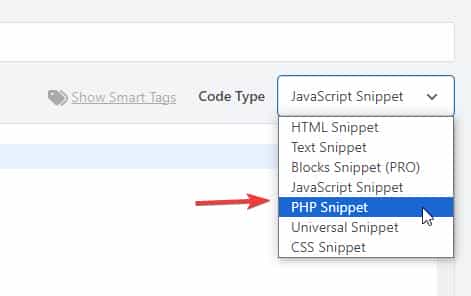
    Then add this snippet to your child theme function.php file or if you are not using a child theme you could use the WP Code plugin then add a new snippet, in the top right corner use the PHP snippet as the code type:
    Enfold_Support_2680
    then add this code and save.

    function avia_add_custom_icon($icons) {
    $icons['bluesky'] = array( 'font' =>'fontello', 'icon' => 'ue800');
    return $icons;
    }
    add_filter('avf_default_icons','avia_add_custom_icon', 10, 1);
    
    function avia_add_custom_social_icon($icons) {
    $icons['BlueSky'] = 'bluesky';
    return $icons;
    }
    add_filter('avf_social_icons_options','avia_add_custom_social_icon', 10, 1);
    add_filter('avia_social_share_link_arguments', 'avia_add_social_share_link_arguments', 10, 1);
    function avia_add_social_share_link_arguments($args){
        $bluesky = array('bluesky' => array("encode"=>true, "encode_urls"=>false, "pattern" => "https://bluesky.com/", 'label' => __("Share on BlueSky",'avia_framework')));
        $args = array_merge($bluesky, $args);
        return $args;
    }

    Then add this css to your Enfold Theme Options ▸ Quick CSS

    #top #wrap_all .av-social-link-bluesky:hover a {
    	  color: #fff;
        background-color: #1185FE;
    }

    Then choose the icon in your Enfold Theme Options ▸ Your Social Profiles
    You can also vote for this feature here.

    Best regards,
    Mike

    #1489398
    Martin
    Participant

    Dear All,

    since the update to Enfold 7.1.2 posts which are scheduled for a future publish date get published, but the read more link / link on the image / heading is linking to the blog page and not to the detail view of the corresponding post.
    Enfold 7.1.2
    php 8.2
    I’m using a child theme

    I’ve deactivated all other plugins, didn’t solve the problem. I also cleared the old css / js files via Theme Settings / Performance. I also installed a cache plugin WP Super Cache and deleted the Cache, the link on the scheduled post is still not working. Timezone WordPress installation and Server is synchronized. I also updated the permalink structure, but the issue remains.

    The link to the post detail view gets corrected if an editor is opening the post and save it again (which is a workaround but not a solution for scheduled posts).

    #1489357
    This reply has been marked as private.
Viewing 30 results - 151 through 180 (of 16,897 total)