Viewing 30 results - 121 through 150 (of 16,897 total)
  • Author
    Search Results
  • #1492367

    In reply to: Enfold Version 3.8

    Hello Rikard,
    thank you for your reply. I have some concerns about updating my site. My website currently only works on PHP 7.0, and if I switch to PHP 7.1 or higher, the whole site breaks and I cannot access the WordPress dashboard.
    I want to update to the latest Enfold theme version (7.1), but I am unsure if it will work properly on PHP 7.0. I am worried that if I update the theme while still on PHP 7.0, the dashboard might stop working and I will lose access.
    If the new theme does not work on PHP 7.0 and the site breaks, how can I then fix it or finish the update if I cannot access the dashboard? Is there a safe way to update without risking losing access to WordPress?
    Thank you very much for your guidance.

    Best regards

    #1492317

    In reply to: Enfold Version 3.8

    Hello Mike,
    thank you for your previous answer. I have a concern about updating Enfold on my site.
    Currently:
    The site is running PHP 7.0, WordPress 6.4.7, and Enfold 3.8.
    If I set PHP to 8.0 or higher, the site breaks completely, and I cannot access the WordPress dashboard.
    PHP 7.1 and higher also make the site not work.
    My plan:
    I would like to update the theme to the latest Enfold version (7.1) while still on PHP 7.0.
    Then I would switch to PHP 8.0 (because this is the free option provided by my host).
    After switching to PHP 8.0, would I then be able to access WordPress and continue updates safely?
    I want to make sure I don’t break the site while updating.
    Thank you for your advice,
    Best regards!

    #1492268

    Topic: Theme crashes site

    in forum Enfold
    SimplifiedIdeas
    Participant

    HI, we had a previous version of enflod (5.6.9), we bought the latest version of enfold, now when we activate the new version it crashes our site.

    Please can you help?! I have added user and password here

    The error we get is

    Warning: require_once(zip://#archive): Failed to open stream: operation failed in /wordpress/wp-includes/template.php on line 810 Fatal error: Uncaught Error: Failed opening required ‘zip://#archive’ (include_path=’.:/usr/share/php’) in /wordpress/wp-includes/template.php:810 Stack trace: #0 /www/wp-content/plugins/enfold-wp-plugin/enfold-wp-plugin.php(13): load_template(‘zip://#archive’, true) #1 /wordpress/wp-includes/class-wp-hook.php(324): wp_enfold_theme_load(”) #2 /wordpress/wp-includes/class-wp-hook.php(348): WP_Hook->apply_filters(NULL, Array) #3 /wordpress/wp-includes/plugin.php(517): WP_Hook->do_action(Array) #4 /wordpress/wp-settings.php(752): do_action(‘wp_loaded’) #5 /www/wp-config.php(107): require_once(‘/wordpress/wp-s…’) #6 /wordpress/wp-config.php(5): require(‘/www/wp-config….’) #7 /wordpress/wp-load.php(50): require_once(‘/wordpress/wp-c…’) #8 /wordpress/wp-admin/admin.php(35): require_once(‘/wordpress/wp-l…’) #9 /wordpress/wp-admin/themes.php(10): require_once(‘/wordpress/wp-a…’) #10 {main} thrown in /wordpress/wp-includes/template.php on line 810

    #1492267

    In reply to: Enfold Version 3.8

    Hey Angelika2017,
    A few years ago Theme Forest stopped using the API Key for updating, and now uses the Token. So you will need to manually update with the steps below. Also Enfold v3.8 is not PHP v8+ ready, which is the most likely reason you can not make changes. Updating should solve.
    We recommend creating a full site backup, including the database, please use your webhost tools for this and not a plugin, unless you are very conflict with the plugin. Another good approach would be to first create a staging site, most webhosts offer this as a single click option, if your webhost has the Softaculous script library that is available in cPanel & Plesk. If it lists your WordPress site you will see a button to create a staging site.
    While we don’t expect any issues updating your site, this is a practical approach for such an old site.
    If you don’t have a Theme Forest because a “developer” created this site for you using their own Theme Forest account, you may need to create your own account by purchasing your own license. Note that Theme Forest will not transfer licenses & we can not create licenses due to our contract with Theme Forest.

    To update your version of Enfold you will need to download the latest installable WP version from your Theme Forest account and upload it to your WordPress ▸ Appearance ▸ Themes ▸ Add Themes ▸ Add New
    after you choose the zip file and click install, you will see a This theme is already installed message because you are updating, you can continue,
    then you will see the Theme updated successfully message.
    After which you can go to your Theme Forest account and create a new Token for future automatic updates.

    Best regards,
    Mike

    Hello,

    There seems to be something wrong with my Enfold installation. When I try the following command,
    $ wp plugin update --all

    I get the following errors:

    PHP Warning:  Undefined array key "HTTP_X_FORWARDED_PROTO" in phar:///usr/local/bin/wp/vendor/wp-cli/wp-cli/php/WP_CLI/Runner.php(1277) : eval()'d code on line 87
    PHP Warning:  Attempt to read property "options" on null in /var/www/html/wp-content/themes/enfold/framework/php/function-set-avia-frontend.php on line 66
    Warning: Attempt to read property "options" on null in /var/www/html/wp-content/themes/enfold/framework/php/function-set-avia-frontend.php on line 66
    PHP Warning:  Trying to access array offset on value of type null in /var/www/html/wp-content/themes/enfold/framework/php/function-set-avia-frontend.php on line 74
    Warning: Trying to access array offset on value of type null in /var/www/html/wp-content/themes/enfold/framework/php/function-set-avia-frontend.php on line 74
    PHP Warning:  Attempt to read property "options" on null in /var/www/html/wp-content/themes/enfold/framework/php/function-set-avia-frontend.php on line 66
    Warning: Attempt to read property "options" on null in /var/www/html/wp-content/themes/enfold/framework/php/function-set-avia-frontend.php on line 66
    PHP Warning:  Trying to access array offset on value of type null in /var/www/html/wp-content/themes/enfold/framework/php/function-set-avia-frontend.php on line 74
    Warning: Trying to access array offset on value of type null in /var/www/html/wp-content/themes/enfold/framework/php/function-set-avia-frontend.php on line 74
    PHP Warning:  Attempt to read property "options" on null in /var/www/html/wp-content/themes/enfold/framework/php/function-set-avia-frontend.php on line 66
    Warning: Attempt to read property "options" on null in /var/www/html/wp-content/themes/enfold/framework/php/function-set-avia-frontend.php on line 66
    PHP Warning:  Trying to access array offset on value of type null in /var/www/html/wp-content/themes/enfold/framework/php/function-set-avia-frontend.php on line 74
    Warning: Trying to access array offset on value of type null in /var/www/html/wp-content/themes/enfold/framework/php/function-set-avia-frontend.php on line 74
    PHP Warning:  Attempt to read property "options" on null in /var/www/html/wp-content/themes/enfold/framework/php/function-set-avia-frontend.php on line 66
    Warning: Attempt to read property "options" on null in /var/www/html/wp-content/themes/enfold/framework/php/function-set-avia-frontend.php on line 66
    PHP Warning:  Trying to access array offset on value of type null in /var/www/html/wp-content/themes/enfold/framework/php/function-set-avia-frontend.php on line 74
    Warning: Trying to access array offset on value of type null in /var/www/html/wp-content/themes/enfold/framework/php/function-set-avia-frontend.php on line 74
    PHP Warning:  Attempt to read property "options" on null in /var/www/html/wp-content/themes/enfold/framework/php/function-set-avia-frontend.php on line 66
    Warning: Attempt to read property "options" on null in /var/www/html/wp-content/themes/enfold/framework/php/function-set-avia-frontend.php on line 66
    PHP Warning:  Trying to access array offset on value of type null in /var/www/html/wp-content/themes/enfold/framework/php/function-set-avia-frontend.php on line 74
    Warning: Trying to access array offset on value of type null in /var/www/html/wp-content/themes/enfold/framework/php/function-set-avia-frontend.php on line 74
    PHP Warning:  Attempt to read property "options" on null in /var/www/html/wp-content/themes/enfold/framework/php/function-set-avia-frontend.php on line 66
    Warning: Attempt to read property "options" on null in /var/www/html/wp-content/themes/enfold/framework/php/function-set-avia-frontend.php on line 66
    PHP Warning:  Trying to access array offset on value of type null in /var/www/html/wp-content/themes/enfold/framework/php/function-set-avia-frontend.php on line 74
    Warning: Trying to access array offset on value of type null in /var/www/html/wp-content/themes/enfold/framework/php/function-set-avia-frontend.php on line 74
    PHP Warning:  Attempt to read property "options" on null in /var/www/html/wp-content/themes/enfold/framework/php/function-set-avia-frontend.php on line 66
    Warning: Attempt to read property "options" on null in /var/www/html/wp-content/themes/enfold/framework/php/function-set-avia-frontend.php on line 66
    PHP Warning:  Trying to access array offset on value of type null in /var/www/html/wp-content/themes/enfold/framework/php/function-set-avia-frontend.php on line 74
    Warning: Trying to access array offset on value of type null in /var/www/html/wp-content/themes/enfold/framework/php/function-set-avia-frontend.php on line 74
    PHP Warning:  Attempt to read property "options" on null in /var/www/html/wp-content/themes/enfold/framework/php/function-set-avia-frontend.php on line 66
    Warning: Attempt to read property "options" on null in /var/www/html/wp-content/themes/enfold/framework/php/function-set-avia-frontend.php on line 66
    PHP Warning:  Trying to access array offset on value of type null in /var/www/html/wp-content/themes/enfold/framework/php/function-set-avia-frontend.php on line 74
    Warning: Trying to access array offset on value of type null in /var/www/html/wp-content/themes/enfold/framework/php/function-set-avia-frontend.php on line 74
    PHP Warning:  Attempt to read property "options" on null in /var/www/html/wp-content/themes/enfold/framework/php/function-set-avia-frontend.php on line 66
    Warning: Attempt to read property "options" on null in /var/www/html/wp-content/themes/enfold/framework/php/function-set-avia-frontend.php on line 66
    PHP Warning:  Trying to access array offset on value of type null in /var/www/html/wp-content/themes/enfold/framework/php/function-set-avia-frontend.php on line 74
    Warning: Trying to access array offset on value of type null in /var/www/html/wp-content/themes/enfold/framework/php/function-set-avia-frontend.php on line 74
    PHP Warning:  Attempt to read property "options" on null in /var/www/html/wp-content/themes/enfold/framework/php/function-set-avia-frontend.php on line 66
    Warning: Attempt to read property "options" on null in /var/www/html/wp-content/themes/enfold/framework/php/function-set-avia-frontend.php on line 66
    PHP Warning:  Trying to access array offset on value of type null in /var/www/html/wp-content/themes/enfold/framework/php/function-set-avia-frontend.php on line 74
    Warning: Trying to access array offset on value of type null in /var/www/html/wp-content/themes/enfold/framework/php/function-set-avia-frontend.php on line 74
    PHP Warning:  Attempt to read property "options" on null in /var/www/html/wp-content/themes/enfold/framework/php/function-set-avia-frontend.php on line 66
    Warning: Attempt to read property "options" on null in /var/www/html/wp-content/themes/enfold/framework/php/function-set-avia-frontend.php on line 66
    PHP Warning:  Trying to access array offset on value of type null in /var/www/html/wp-content/themes/enfold/framework/php/function-set-avia-frontend.php on line 74
    Warning: Trying to access array offset on value of type null in /var/www/html/wp-content/themes/enfold/framework/php/function-set-avia-frontend.php on line 74
    PHP Warning:  Attempt to read property "options" on null in /var/www/html/wp-content/themes/enfold/framework/php/function-set-avia-frontend.php on line 66
    Warning: Attempt to read property "options" on null in /var/www/html/wp-content/themes/enfold/framework/php/function-set-avia-frontend.php on line 66
    PHP Warning:  Trying to access array offset on value of type null in /var/www/html/wp-content/themes/enfold/framework/php/function-set-avia-frontend.php on line 74
    Warning: Trying to access array offset on value of type null in /var/www/html/wp-content/themes/enfold/framework/php/function-set-avia-frontend.php on line 74
    PHP Warning:  Attempt to read property "options" on null in /var/www/html/wp-content/themes/enfold/framework/php/function-set-avia-frontend.php on line 66
    Warning: Attempt to read property "options" on null in /var/www/html/wp-content/themes/enfold/framework/php/function-set-avia-frontend.php on line 66
    PHP Warning:  Trying to access array offset on value of type null in /var/www/html/wp-content/themes/enfold/framework/php/function-set-avia-frontend.php on line 74
    Warning: Trying to access array offset on value of type null in /var/www/html/wp-content/themes/enfold/framework/php/function-set-avia-frontend.php on line 74
    PHP Warning:  Attempt to read property "options" on null in /var/www/html/wp-content/themes/enfold/framework/php/function-set-avia-frontend.php on line 66
    Warning: Attempt to read property "options" on null in /var/www/html/wp-content/themes/enfold/framework/php/function-set-avia-frontend.php on line 66
    PHP Warning:  Trying to access array offset on value of type null in /var/www/html/wp-content/themes/enfold/framework/php/function-set-avia-frontend.php on line 74
    Warning: Trying to access array offset on value of type null in /var/www/html/wp-content/themes/enfold/framework/php/function-set-avia-frontend.php on line 74
    PHP Warning:  Attempt to read property "options" on null in /var/www/html/wp-content/themes/enfold/framework/php/function-set-avia-frontend.php on line 66
    Warning: Attempt to read property "options" on null in /var/www/html/wp-content/themes/enfold/framework/php/function-set-avia-frontend.php on line 66
    PHP Warning:  Trying to access array offset on value of type null in /var/www/html/wp-content/themes/enfold/framework/php/function-set-avia-frontend.php on line 74
    Warning: Trying to access array offset on value of type null in /var/www/html/wp-content/themes/enfold/framework/php/function-set-avia-frontend.php on line 74
    PHP Warning:  Attempt to read property "options" on null in /var/www/html/wp-content/themes/enfold/framework/php/function-set-avia-frontend.php on line 66
    Warning: Attempt to read property "options" on null in /var/www/html/wp-content/themes/enfold/framework/php/function-set-avia-frontend.php on line 66
    PHP Warning:  Trying to access array offset on value of type null in /var/www/html/wp-content/themes/enfold/framework/php/function-set-avia-frontend.php on line 74
    Warning: Trying to access array offset on value of type null in /var/www/html/wp-content/themes/enfold/framework/php/function-set-avia-frontend.php on line 74
    PHP Warning:  Attempt to read property "options" on null in /var/www/html/wp-content/themes/enfold/framework/php/function-set-avia-frontend.php on line 66
    Warning: Attempt to read property "options" on null in /var/www/html/wp-content/themes/enfold/framework/php/function-set-avia-frontend.php on line 66
    PHP Warning:  Trying to access array offset on value of type null in /var/www/html/wp-content/themes/enfold/framework/php/function-set-avia-frontend.php on line 74
    Warning: Trying to access array offset on value of type null in /var/www/html/wp-content/themes/enfold/framework/php/function-set-avia-frontend.php on line 74
    PHP Warning:  Attempt to read property "options" on null in /var/www/html/wp-content/themes/enfold/framework/php/function-set-avia-frontend.php on line 66
    Warning: Attempt to read property "options" on null in /var/www/html/wp-content/themes/enfold/framework/php/function-set-avia-frontend.php on line 66
    PHP Warning:  Trying to access array offset on value of type null in /var/www/html/wp-content/themes/enfold/framework/php/function-set-avia-frontend.php on line 74
    Warning: Trying to access array offset on value of type null in /var/www/html/wp-content/themes/enfold/framework/php/function-set-avia-frontend.php on line 74
    PHP Fatal error:  Uncaught Error: Attempt to modify property "config" on null in /var/www/html/wp-content/themes/enfold/config-templatebuilder/avia-shortcodes/slideshow_layerslider/slideshow_layerslider.php:28
    Stack trace:
    #0 /var/www/html/wp-content/themes/enfold/config-templatebuilder/avia-template-builder/php/shortcode-template.class.php(65): avia_sc_layerslider->shortcode_insert_button()
    #1 /var/www/html/wp-content/themes/enfold/config-templatebuilder/avia-template-builder/php/template-builder.class.php(1306): aviaShortcodeTemplate->__construct()
    #2 /var/www/html/wp-content/themes/enfold/config-templatebuilder/avia-template-builder/php/template-builder.class.php(428): AviaBuilder->createShortcode()
    #3 /var/www/html/wp-includes/class-wp-hook.php(341): AviaBuilder->init()
    #4 /var/www/html/wp-includes/class-wp-hook.php(365): WP_Hook->apply_filters()
    #5 /var/www/html/wp-includes/plugin.php(522): WP_Hook->do_action()
    #6 /var/www/html/wp-settings.php(742): do_action()
    #7 phar:///usr/local/bin/wp/vendor/wp-cli/wp-cli/php/WP_CLI/Runner.php(1317): require('...')
    #8 phar:///usr/local/bin/wp/vendor/wp-cli/wp-cli/php/WP_CLI/Runner.php(1235): WP_CLI\Runner->load_wordpress()
    #9 phar:///usr/local/bin/wp/vendor/wp-cli/wp-cli/php/WP_CLI/Bootstrap/LaunchRunner.php(28): WP_CLI\Runner->start()
    #10 phar:///usr/local/bin/wp/vendor/wp-cli/wp-cli/php/bootstrap.php(78): WP_CLI\Bootstrap\LaunchRunner->process()
    #11 phar:///usr/local/bin/wp/vendor/wp-cli/wp-cli/php/wp-cli.php(27): WP_CLI\bootstrap()
    #12 phar:///usr/local/bin/wp/php/boot-phar.php(11): include('...')
    #13 /usr/local/bin/wp(4): include('...')
    #14 {main}
      thrown in /var/www/html/wp-content/themes/enfold/config-templatebuilder/avia-shortcodes/slideshow_layerslider/slideshow_layerslider.php on line 28
    Fatal error: Uncaught Error: Attempt to modify property "config" on null in /var/www/html/wp-content/themes/enfold/config-templatebuilder/avia-shortcodes/slideshow_layerslider/slideshow_layerslider.php:28
    Stack trace:
    #0 /var/www/html/wp-content/themes/enfold/config-templatebuilder/avia-template-builder/php/shortcode-template.class.php(65): avia_sc_layerslider->shortcode_insert_button()
    #1 /var/www/html/wp-content/themes/enfold/config-templatebuilder/avia-template-builder/php/template-builder.class.php(1306): aviaShortcodeTemplate->__construct()
    #2 /var/www/html/wp-content/themes/enfold/config-templatebuilder/avia-template-builder/php/template-builder.class.php(428): AviaBuilder->createShortcode()
    #3 /var/www/html/wp-includes/class-wp-hook.php(341): AviaBuilder->init()
    #4 /var/www/html/wp-includes/class-wp-hook.php(365): WP_Hook->apply_filters()
    #5 /var/www/html/wp-includes/plugin.php(522): WP_Hook->do_action()
    #6 /var/www/html/wp-settings.php(742): do_action()
    #7 phar:///usr/local/bin/wp/vendor/wp-cli/wp-cli/php/WP_CLI/Runner.php(1317): require('...')
    #8 phar:///usr/local/bin/wp/vendor/wp-cli/wp-cli/php/WP_CLI/Runner.php(1235): WP_CLI\Runner->load_wordpress()
    #9 phar:///usr/local/bin/wp/vendor/wp-cli/wp-cli/php/WP_CLI/Bootstrap/LaunchRunner.php(28): WP_CLI\Runner->start()
    #10 phar:///usr/local/bin/wp/vendor/wp-cli/wp-cli/php/bootstrap.php(78): WP_CLI\Bootstrap\LaunchRunner->process()
    #11 phar:///usr/local/bin/wp/vendor/wp-cli/wp-cli/php/wp-cli.php(27): WP_CLI\bootstrap()
    #12 phar:///usr/local/bin/wp/php/boot-phar.php(11): include('...')
    #13 /usr/local/bin/wp(4): include('...')
    #14 {main}
      thrown in /var/www/html/wp-content/themes/enfold/config-templatebuilder/avia-shortcodes/slideshow_layerslider/slideshow_layerslider.php on line 28
    Error: There has been a critical error on this website.Learn more about troubleshooting WordPress. There has been a critical error on this website.

    Any help is appreciated!
    Thanks,
    Richard

    #1492263

    Topic: Enfold Version 3.8

    in forum Enfold
    Angelika2017
    Participant

    Hello,
    My website uses the Enfold theme, version 3.8. I purchased it in 2017 and maintained it for about one year, but since then it has not been updated. The website still works, but I can’t make any changes in WordPress.
    I tried to search for updates through the WordPress dashboard using my API key and username. However, after entering the data, WordPress says there are no updates available and that my theme is up to date.
    The problem is that I cannot edit anything. No changes are saved or shown on the website.
    I also can’t update PHP because the website stops working when I do. I would like to update my website and bring everything to the latest version so I can make changes again.
    Can someone please help me? I would really appreciate quick support.
    Kind regards,

    Hey ti2media,
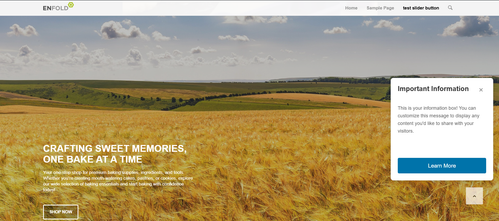
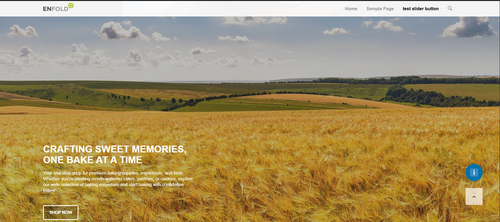
    Try adding this snippet to your child theme functions.php:

    function add_sticky_info_box() {
        ?>
        <style>
            .sticky-info-box {
                position: fixed;
                bottom: 120px;
                right: 20px;
                width: 300px;
                height: 300px;
                background: #ffffff;
                border: 1px solid #ddd;
                border-radius: 8px;
                box-shadow: 0 4px 12px rgba(0,0,0,0.15);
                z-index: 9999;
                display: flex;
                flex-direction: column;
                padding: 20px;
                box-sizing: border-box;
                transition: opacity 0.3s ease;
            }
            
            .sticky-info-box.hidden {
                display: none;
            }
            
            .sticky-info-box-header {
                display: flex;
                justify-content: space-between;
                align-items: flex-start;
                margin-bottom: 15px;
            }
            
            .sticky-info-box-title {
                font-size: 20px;
                font-weight: bold;
                color: #333;
                margin: 0;
                flex: 1;
            }
            
            .sticky-info-box-close {
                background: none;
                border: none;
                font-size: 24px;
                color: #999;
                cursor: pointer;
                padding: 0;
                width: 30px;
                height: 30px;
                display: flex;
                align-items: center;
                justify-content: center;
                transition: color 0.2s ease;
            }
            
            .sticky-info-box-close:hover {
                color: #333;
            }
            
            .sticky-info-box-message {
                flex: 1;
                color: #666;
                font-size: 14px;
                line-height: 1.6;
                margin-bottom: 20px;
                overflow-y: auto;
            }
            
            .sticky-info-box-button {
                background: #0073aa;
                color: white;
                border: none;
                padding: 12px 24px;
                border-radius: 4px;
                font-size: 16px;
                cursor: pointer;
                text-decoration: none;
                display: inline-block;
                text-align: center;
                transition: background 0.2s ease;
            }
            
            .sticky-info-box-button:hover {
                background: #005a87;
            }
            
            .sticky-info-toggle {
                position: fixed;
                bottom: 120px;
                right: 50px;
                width: 50px;
                height: 50px;
                background: #0073aa;
                color: white;
                border: none;
                border-radius: 50%;
                font-size: 24px;
                cursor: pointer;
                box-shadow: 0 4px 12px rgba(0,0,0,0.15);
                z-index: 9998;
                display: none;
                align-items: center;
                justify-content: center;
                transition: background 0.2s ease;
            }
            
            .sticky-info-toggle:hover {
                background: #005a87;
            }
            
            .sticky-info-toggle.visible {
                display: flex;
            }
        </style>
        
        <div class="sticky-info-box" id="stickyInfoBox">
            <div class="sticky-info-box-header">
                <h3 class="sticky-info-box-title">Important Information</h3>
                <button class="sticky-info-box-close" id="closeInfoBox" aria-label="Close">×</button>
            </div>
            <div class="sticky-info-box-message">
                <p>This is your information box! You can customize this message to display any content you'd like to share with your visitors.</p>
            </div>
            <a href="/your-page-url" class="sticky-info-box-button">Learn More</a>
        </div>
        
        <button class="sticky-info-toggle" id="infoToggle" aria-label="Show information">ℹ</button>
        
        <script>
            (function() {
                var infoBox = document.getElementById('stickyInfoBox');
                var closeBtn = document.getElementById('closeInfoBox');
                var toggleBtn = document.getElementById('infoToggle');
                
                // Close the info box
                closeBtn.addEventListener('click', function() {
                    infoBox.classList.add('hidden');
                    toggleBtn.classList.add('visible');
                });
                
                // Show the info box again
                toggleBtn.addEventListener('click', function() {
                    infoBox.classList.remove('hidden');
                    toggleBtn.classList.remove('visible');
                });
            })();
        </script>
        <?php
    }
    add_action('wp_footer', 'add_sticky_info_box');
    

    Then adjust the title, message, buttone text & link to suit. You can also adjust the CSS to change colors, etc.
    It places the box & info button 120px from the bottom so they are above the scroll-top button, ratio than have them move if the scroll-top shows, which would not be so good.
    fIPHs99.md.png
    fIPJ6iv.md.png

    Best regards,
    Mike

    #1492100

    Hey colince742,

    Thank you for the inquiry.

    Looks like there are many PHP errors, which may be related to the currently installed version. Please make sure that PHP is upgraded to version 8.0 or later. You can also hide the warnings by adding the following code to your wp-config.php file.

    define('WP_DEBUG', false);
    define('WP_DEBUG_DISPLAY', false);
    define('WP_DEBUG_LOG', false);
    

    If you need help upgrading PHP, you can contact your hosting provider for assistance. Please let us know the result.

    Best regards,
    Ismael

    #1492097

    In reply to: Arabic font Change

    Hi,

    Thank you for the link.

    Add this code in the functions.php file to load the Cairo font:

    function av_load_google_fonts() {
        wp_enqueue_style(
            'google-fonts-cairo',
            'https://fonts.googleapis.com/css2?family=Cairo:wght@300;400;600;700&display=swap',
            array(),
            null
        );
    }
    add_action('wp_enqueue_scripts', 'av_load_google_fonts');

    After that, add the following css to make the font the default body text:

    #top, body, p, span, li, a, h1, h2, h3, h4, h5, h6, input, textarea, button {
        font-family: 'Cairo', sans-serif;
    }

    Let us know the result.

    Best regards,
    Ismael

    Thanks for your input. And yes, I know the issue was caused by the Enfold theme, I had already tried debugging with fallback themes where the Hivepress listing search worked just fine. Unfortunately, we had to stick with the Enfold theme as the whole website was already fully built with it and its ALB visual editor, making it impossible to switch themes just for Hivepress compatibility.

    However, yesterday I took a full day to investigate the Enfold theme files, and I am happy to report that I have found the cause, and thus could fix the problem. Enfold developers might want to read on to understand and fix this potentially problematic code, as it might cause incompatibility issues with not just Hivepress but also other WordPress extensions that use their own search logic.

    The file causing the Hivepress search problem is found in the Enfold theme file structure, namely

    /themes/enfold/includes/helper-template-logic.php

    In this file exists a function called “avia_search_query_filter”, starting around line 37. Its purpose is to “make sure that empty searches are sent to the search page as well”. Empty searches would mean standard text searches without a keyword (search term).

    Unfortunately, this function does not check for custom post_types, it just addresses all searches. The URL https://wiras.dora.group/?post_type=hp_listing&s= should definitely display the search results for the custom “Listing” post type, which is Hivepresses’ own custom post_type (since the parameter is in the URL after clicking Search), and not be treated as a standard text search.

    The problem is that most Hivepress searches would be considered “empty” searches as they don’t have a keyword parameter, but are searches by checkbox, select menue or radio button values (these are generated by the listings “custom fields”). Thus, the above mentioned function of the Enfold theme hijacks those searches and instead of handing them over to Hivepress, redirects them to the themes’ own “Nothing found” search result page.

    All I had to do now is to comment out the whole function in the file “helper-template-logic.php”, starting from line 41 until line 66:

    41 if(!function_exists(‘avia_search_query_filter’))
    42 {
    43 function avia_search_query_filter($query)
    […]
    64 add_filter(‘pre_get_posts’, ‘avia_search_query_filter’);
    65 }

    For now this works for us, as we don’t use a standard text search on the site anyway. We just have to be careful when updating the theme.

    You might consider finetuning your function to check for “custom post types” and exclude them from the search redirecting, as it seems your current approach is a bit too general and has the potential to hijack other plugins custom search patterns.

    Best regards,
    Sebastian

    #1491671

    just for understanding – these are the default values from loop-author.php:

    // Default arguments for Author Loop
    $default_args = array(
        'type'              => 'grid',
        'columns'           => 4,
        'items'             => get_option('posts_per_page', 12), // WordPress setting, fallback: 12
        'contents'          => 'excerpt_read_more',
        'preview_mode'      => 'auto',
        'image_size'        => 'portfolio',
        'paginate'          => 'no',
        'class'             => '',
        'show_modified_date' => 'no',  // 'yes' or 'no' - shows "Updated: XX" if post was modified
        'orderby'           => 'date',  // 'date', 'modified', 'title', 'rand', 'comment_count', 'menu_order'
        'order'             => 'DESC',  // 'DESC' (newest first) or 'ASC' (oldest first)
        'fallback_image'    => 'placeholder',      //  'placeholder'  or URL to fallback image 
        'post_types'        => array('post'), // Array: array('post'), array('portfolio'), or array('post', 'portfolio')
    );
    
    // Content Options for 'contents' parameter:
        // 'title'                  - Title only
        // 'title_read_more'        - Title and Read More button
        // 'only_excerpt'           - Excerpt only (no title)
        // 'only_excerpt_read_more' - Excerpt and Read More button (no title)
        // 'excerpt'                - Title and Excerpt
        // 'excerpt_read_more'      - Title, Excerpt and Read More button (default)


    if you like to have it this way (grid, 4columns, exerpt with readmore, only posts ordered by date – newest first) you do not need to set the filter.
    Then only the second part is needed inside functions.php.

    The filter could do more – you can even differ between authors – f.e by author name. :

    // 1. Layout for different authors by ID
    add_filter( 'avf_author_loop_args', function( $atts, $context ) {
        if( $context == 'author' ) {
            // Common settings for all author pages
            $atts['items']             = -1;
            $atts['image_size']        = 'gallery';
            $atts['contents']          = 'excerpt_read_more';
            $atts['post_types']         = array('post', 'portfolio'); 
    		
    	// Fallback-Image from Media Library (Attachment-ID)
            $fallback_id = 2052;  // Your image ID from Media Library
            $fallback_img = wp_get_attachment_image_src($fallback_id, $atts['image_size']);
            $atts['fallback_image'] = $fallback_img ? $fallback_img[0] : 'placeholder';
            
            $author_slug = get_query_var( 'author_name' );
    
            // Individual configuration for a specific author
            if( $author_slug == 'guenni007' ) {
                $atts['type']              = 'grid';
                $atts['columns']           = 3;
            } 
            else {
                // default setting for the rest
                $atts['type']              = 'list';
            }
        }
        return $atts;
    }, 10, 2);

    the fallback image i get from media-library with the attachment ID
    Advantage of this solution – the fallback image is based on the selected image size setting.

    see:
    grid for guenni007: https://basis.webers-testseite.de/author/guenni007/
    list for johndoe: https://basis.webers-testseite.de/author/johndoe/

    #1491667

    now my final solution is – to upload 3 files to the child-theme includes folder:

    /wp-content/themes/enfold-child/
    └── includes/
      └── loop-author.php ← PHP Loop (loads the css once)
      └── loop-about-author.php
      └── loop-author.css ← all Styles (Grid + List)

    loop-author.php: https://pastebin.com/yaXj5Zfw
    loop-about.php: https://pastebin.com/QQ84LGaw
    loop-author.css: https://pastebin.com/zTJMtth9

    to style the author page now are two entries for child-theme functions.php

    // 1. Configure layout and settings
    add_filter( 'avf_author_loop_args', function( $atts, $context ) {
        if( $context == 'author' ) {
            $atts['type']              = 'list';               // 'grid' or 'list' Layout
            $atts['columns']           = 4;                    // columns count
            $atts['image_size']        = 'gallery';            //  image-size
            $atts['contents']          = 'excerpt_read_more';  // Content-Type
            $atts['items']             = -1;                   // Posts per page
            $atts['paginate']          = 'no';                // Pagination  on/off  (yes or no)
            $atts['show_modified_date'] = 'yes';               // 'yes' = shows  "Updated: XX"
            $atts['orderby']           = 'date';               // orderby : 'date', 'modified', 'title', 'rand', 'comment_count'
            $atts['order']             = 'DESC';               // order: 'DESC' (newest or Z-A) or 'ASC' (oldest or A-Z)
    	$atts['fallback_image']     = get_stylesheet_directory_uri() . '/includes/fallback.jpg';  // an url or  'placeholder'
    	$atts['post_types'] 		= array('post', 'portfolio');    	// 	count posts or portfolios or both
        }
        return $atts;
    }, 10, 2);
    
    // 2.  IMPORTANT: Customise query for pagination, sorting and post types
    add_action( 'pre_get_posts', function( $query ) {
        if( ! is_admin() && $query->is_main_query() && is_author() ) {
            // Get the filtered arguments from above
            $default_args = array(
                'items'      => get_option('posts_per_page', 12),
                'orderby'    => 'date',
                'order'      => 'DESC',
                'post_types' => array('post')
            );
            $atts = apply_filters( 'avf_author_loop_args', $default_args, 'author' );
            
            // Set Query-Parameters
            $query->set( 'posts_per_page', $atts['items'] );
            $query->set( 'orderby', $atts['orderby'] );
            $query->set( 'order', $atts['order'] );
            
            // Set post types - IMPORTANT: even if there is only one type
            if( ! empty( $atts['post_types'] ) && is_array( $atts['post_types'] ) ) {
                // WordPress requires 'any' or an array with multiple types
                if( count( $atts['post_types'] ) == 1 ) {
                    $query->set( 'post_type', $atts['post_types'][0] );
                } else {
                    $query->set( 'post_type', $atts['post_types'] );
                }
            }
        }
    }, 999 );

    see result page : https://basis.webers-testseite.de/author/guenni007/
    Unfortunately, no translation for But we are proud to say that %s contributed %s entries already. has been added to the (at least German) lang files yet. That is why it is in English on my example page.

    i tested all 3 blog styles – it works on all of them.

    #1491663

    Hey Tony T,
    Thanks for your question, since you state that the site was built by a developer long ago, I assume that it was built using their Envato (Theme Forest) account and not your friend’s, unfortunately this occurs. So you will need to purchase a license though a new account with your friend’s email address so they have future updates. Then you can download the latest installable WP version from your Theme Forest account and upload it to your WordPress ▸ Appearance ▸ Themes ▸ Add Themes ▸ Add New
    after you choose the zip file and click install, you will see a This theme is already installed message because you are updating, you can continue,
    then you will see the Theme updated successfully message.
    After which you can go to your Theme Forest account and create a new Token for future automatic updates.
    This will not interfere with your child theme modifications.
    Please note that while we don’t expect any errors, the best course of action for such an old version is to create a stagging site, most webhost have this option, then update it first to see if you have errors. If it works fine then create a full backup, with your webhost options, and try the update on your live site.
    Please also note that Enfold 3.0.4 is not PHP v8+ ready, so you will need to switch back to the v7 version before updating the theme.

    Best regards,
    Mike

    #1491641

    In reply to: PHP update

    Hey Robert,

    I’m not sure I understand what you are referring to. PHP is server software, it’s not included in Enfold. If you are asking if Enfold is compatible with PHP versions beyond PHP 7.4, then the answer to that is yes.

    Best regards,
    Rikard

    #1491626

    Topic: PHP update

    Robert Koopman
    Guest

    Hi, by the end of this year PHP 7.4 becomes end of life with my websitehost. Is there an update available? I bought the template a couple of years ago and thought it was a life-time template.

    #1491612

    Hey Mariann_m,

    Thank you for the inquiry.

    The theme should be compatible with the latest PHP versions (8.3 and above). The current site is running version 6.0.8, which is quite outdated. Please make sure that the theme is updated to version 7.1.3.

    https://kriesi.at/documentation/enfold/theme-update/#update-via-ftp

    Best regards,
    Ismael

    #1491580

    Looked at the plugins on the Dashboard, and know the answer:

    Contact Form 7
    Cannot Activate | Delete
    Just another contact form plugin. Simple but flexible.

    Version 6.1.3 | By Rock Lobster Inc. | View details
    Disable auto-updates
    This plugin does not work with your version of PHP. Learn more about updating PHP.

    #1491579

    Actually, one more. I checked the contact form, that uses Contact-Form-7 and this is still showing. Is that because PHP hasn’t been upgraded yet, or something else?

    Questions: Please fill out our Contact form. Remember, you are welcome to attend our next meeting.

    [contact-form-7 id=”106″ title=”Contact form 1″]

    Or just email the CWRTO pres., (Email address hidden if logged out)
    We also have a facebook page. A simple search will find us.

    #1491534

    Hi,
    Sorry that you are having issues, but I see a couple of different issues with your site. First, you site is using v4.1.2, which uses the old Envato (theme forest) API key, I also note that you wrote that your API key is not working. This will not work because Envato has changed to a “token” tha you must login to your Envato account and create.
    You should download the latest installable WP version from your Theme Forest account and upload it to your WordPress ▸ Appearance ▸ Themes ▸ Add Themes ▸ Add New
    after you choose the zip file and click install, you will see a This theme is already installed message because you are updating, you can continue
    then you will see the Theme updated successfully message.
    Please do this type of install instead of FTP, unless you delete all files and upload fresh via FTP, otherwise old files will be left behind and cause errors.
    I also note that you are using PHP (7.3.33), WordPress requires v8+ now, so after to update the theme, also update your PHP. Please ensure that you create a full backup of yoursite files & database first, we don’t expect issues, but a full backup is the best course of action.
    I hope this helps, plase let us know if you need further assistance.

    Best regards,
    Mike

    #1491503

    Thank you!
    For everybody this worked for me:

    add_action(‘wp_footer’, function() {
    ?>
    <script>
    jQuery(function($){

    function moveGTranslate() {
    if ($(window).width() > 768) return;

    var targetLi = $(‘.menu-item-3651’); // Ziel-Menu-Punkt
    var gtrans = $(‘.gtranslate_wrapper’);

    // Nur verschieben, wenn beide vorhanden sind
    if (targetLi.length && gtrans.length && !targetLi.find(‘.gtranslate_wrapper’).length) {
    gtrans.appendTo(targetLi);
    }
    }

    // 1) Wiederholen bis GTranslate geladen ist
    var waitGT = setInterval(function(){
    if ($(‘.gtranslate_wrapper’).length) {
    clearInterval(waitGT);
    moveGTranslate();
    }
    }, 300);

    // 2) Wenn Burger-Menü geöffnet wird
    $(document).on(‘click’, ‘.av-hamburger’, function(){
    setTimeout(moveGTranslate, 200);
    });

    // 3) Bei Resize (z. B. Rotation)
    $(window).on(‘resize’, function(){
    setTimeout(moveGTranslate, 150);
    });

    });
    </script>
    <?php
    }, 999);

    This topic can be closed :))

    Best regards
    Barbara

    #1491455

    Hi again,

    I managed to fix it. For those with the same problem, here’s a code snippet to add to the functions.php file that will flush both WP Rocket’s cache and object cache automatically, right after pressing Enfold’s “Save all changes” button.

    // Clear WP Rocket cache and Object Cache when Enfold Theme Options are saved
    add_action( 'avia_ajax_after_save_options_page', function( $new_options ) {
    	
    	// Object Cache Pro: flush object cache
        if ( function_exists( 'wp_cache_flush' ) ) {
            wp_cache_flush();
        }
    	
    	// WP Rocket: full cache purge
        if ( function_exists( 'rocket_clean_domain' ) ) {
            rocket_clean_domain();
        }
    
    }, 20 );


    @Ismael
    , I suggest you forward this to your team, as there is clearly something wrong here:
    – The checkbox “Delete Old CSS And JS Files” is confusing. One expects to not have the CSS deleted if it’s unchecked.
    – If there’s object cache in place, even when all caches are flushed after saving Enfold’s settings, the new CSS is not generated. Object cache needs to be cleared too.

    By the way, the ver=ver-1763353330 parameter is not something of our website. Even Enfold’s demo has it: https://kriesi.at/themes/enfold-2017/

    Thank you.

    #1491440

    Hey walhai,

    Thank you for the update.

    The theme doesn’t natively support the translation plugin, but you can try this script in the functions.php file to move the translation flags inside the mobile menu.

    add_action('wp_footer', function() {
        ?>
        <script>
        jQuery(function($) {
            function moveGTranslate() {
                if ($(window).width() <= 768) {
                    var targetLi = $('.menu-item-3651.av-active-burger-items');
                    if (!targetLi.find('.gtranslate_wrapper').length) {
                        var gtranslate = $('.gtranslate_wrapper');
                        if (gtranslate.length && targetLi.length) {
                            gtranslate.appendTo(targetLi);
                        }
                    }
                }
            }
    
            moveGTranslate();
    
            $(window).on('resize', moveGTranslate);
        });
        </script>
        <?php
    }, 999);
    

    Best regards,
    Ismael

    #1491421

    With PHP 8.3.27 ist all OK. Puhhhh

    #1491217

    Hi,

    Thank you for the update.

    Add the following code to your functions.php file to display an instagram icon next to the mobile menu:

    add_action( 'ava_inside_main_menu', function() {
        $instagram_url = 'https://www.instagram.com/yourusername/';
        echo '<a class="av-custom-header-icon" href="' . esc_url( $instagram_url ) . '" target="_blank" rel="noopener noreferrer">';
        echo do_shortcode('[av_font_icon icon="instagram" font="svg_entypo-fontello" size="30px" av_uid="av-mhvfocn7"]');
        echo '</a>';
    });

    Then add this css code:

    .av-custom-header-icon {
        position: absolute;
        left: 0;
        top: 20px;
        display: none;
    }
    
    @media (max-width: 768px) {
        .av-custom-header-icon {
            display: inline-block;
        }
    }

    Best regards,
    Ismael

    Thanks sir,

    1. I know i cna make my own custome HTML,but that is why I asked about the refund. Making that much custom HTML defeats the purpose of having a template.
    2. I have many test pages. They all do the same thing. login info below.
    3-4. I did this as I stated. I appended the customer copyright with your shortcode. It’s there now. Has no effect.
    5. I am sorry but I need a higher level of support. I can’t post screnshots here so I am not going to waste my time usng workarounds for support tickets to get you screenshots. If you want to email me directly I will give you screenshots. You don’t need this to check the footer.php file. Youwill see at the end it has this code: “‘ id=’scroll-top-link’ class=’avia-svg-icon avia-font-svg_entypo-fontello’ <?php echo $icon_top[‘attr’]; ?> tabindex=’-1′ aria-hidden=’true’>
    <?php echo $icon_top[‘svg’]; ?>
    <span class=”avia_hidden_link_text”><?php echo $icon_title; ?></span>

    <div id=”fb-root”></div>”
    6. what change was this supposed to have? I don’t see any change from this.
    7. You can recreate this. Make color section rox. Add bg image. Next add columns to fill row. Pick any column and add a bg-image to the column. It displays the column under the row and not on top of it. When you modify the higlight option it pushed the bg image off the bottom of the screen.
    8. You can check my home page. I have two independent color sections both with text blocks that have only hedings. The same exact headings. Yet it shows two differnt things. How is that even possible? If it won’t display the same code twice on one page I am noit sure what I can do.

    nearly every element I have to make custom inline because the global options to not seem to work. I really think I need to find a new theme. It’s not about getting used to it, right? It’s about this theme taking me more time to configure than it would be to just write the site from scratch, because the options are severely limited. I did not even know they made themes templates this limited.

    Take a look. Tell me what you think after you see for yourself. Hopefully you can see what is wrong because I am wasting so much time with this theme I could have built three sites. Please sir. I made a mistake. I think it would be best to offer a refund as you do not have the resources to help me resolve this in a way that will work for it’s intended purpose. I can’t even modify image sizes or blog posts. It’s very frustrating. It’s my fault for buying the theme because I did not know it was missing the normal options you find in other themes. It’s great for your purpose, but I need a theme I can customize.

    I can buy another theme and same myself over 70% of the labor costs your theme requires for basic styles. Let me know what you think. I am not trying to give you a hard time, I doubt you will fix any of this stuff and the answer will be the same -“make custome html”. I am just trying to be realistic. I feel like I lost a lot of money using this theme. Please help me cut my losses and move on.

    TasmaniaBV
    Participant

    Hi,

    We have a very old version (3.0.6) of the Enfold theme and we need to upgrade our PHP version from 5.6.40 to the neweset version PHP 8.4.

    However when we tried we also needed to update the theme which we couldn’t find in our themeforest account so now we have bought the newest version.

    I am trying to fix the issues with our IT partner and he tried updating it while running a localhost version on his laptop but he got a lot of errors.

    Also as soon as we try to update through FTP we get a never ending stream of error messages for example:

    Fatal error: Access level to av_email_spam::shortcode_insert_button() must be public (as in class aviaShortcodeTemplate) in ******\htdocs\*******\wp-content\themes\enfold\config-templatebuilder\avia-shortcodes\email_spam.php on line 16

    To be smart i thought to just exclude it from the php file just to have it move on to the next 50 similar error messages.

    Please let me know how to update the theme. As I found on your forums it was suggested you first needed to update to a version 4.5. or something and that would allow auto updates. However we now only have version 3.0.6. and the newest 7.1.3.

    Kind regards

    #1491115

    i’m participant as you are – so i do not see any private content area.

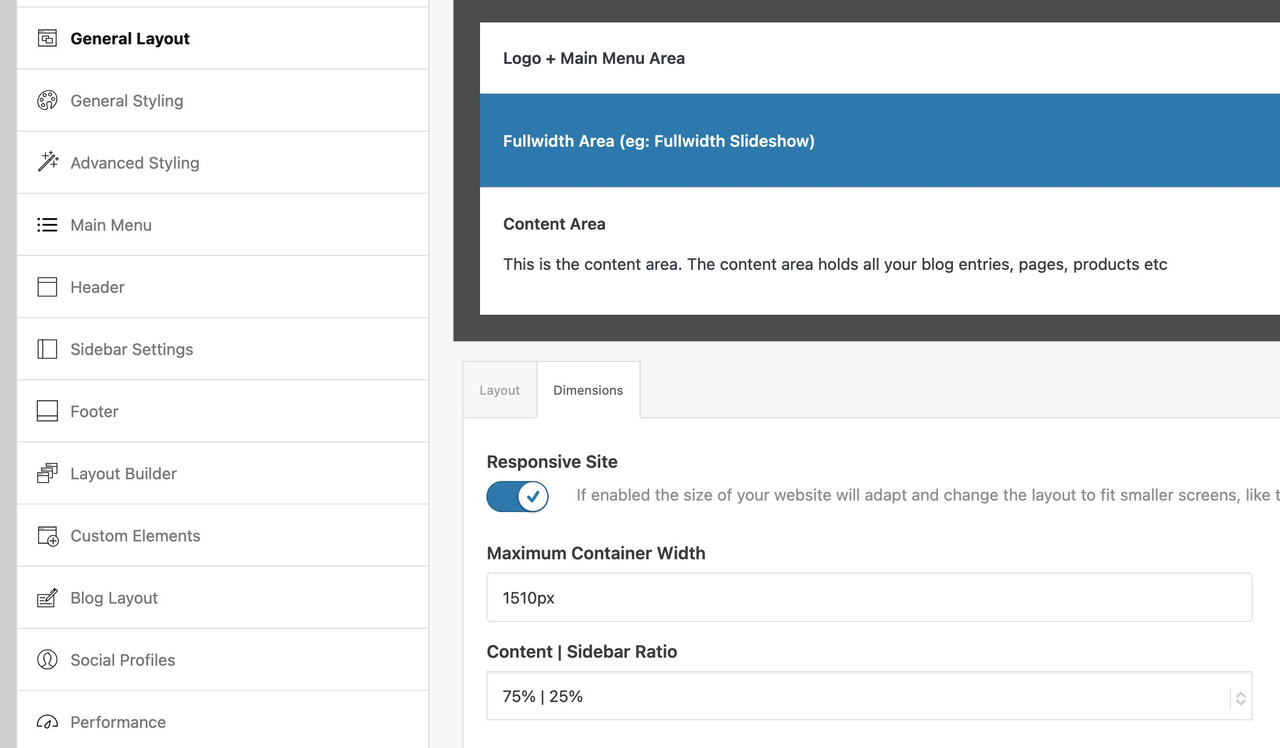
    on general layout – Maximum Container Width – this is the value i pull out in the snippet for the setting

    $responsive_size = avia_get_option('responsive_size');
    

    If you have there a 100% width set – then it wil be synchronized in the snippet too.
    If that is the case – you have to use the other snippet with the “hard-coded” width and replace th 1310px with your 1400px now:

    function grid_layout_notfull(){
    ?>
    <script>
    (function($){
    	$('.av-layout-grid-container.grid-notfull' ).each(function() {
    		var notfullID = $(this).attr('id');
    		$(this).hasClass('main_color') ? $(this).wrap('<div class="main_color notfullsize '+notfullID+'"></div>') : '';
    		$(this).hasClass('alternate_color') ? $(this).wrap( '<div class="alternate_color notfullsize '+notfullID+'"></div>') : '';
    	});
    	$('.notfullsize').css({"clear": "both", "width": "100%" , "float": "left" , "position": "static" , "min-height": "100px" });
    	$('.grid-notfull').css({"max-width": "1400px", "margin": "0 auto" , "padding": "0 50px"});
    })(jQuery);
    </script>
    <?php
    }
    add_action('wp_footer', 'grid_layout_notfull');
    #1490964

    can we influence the image shown in the ajax preview ( that img insided avia-gallery-big ) – it seems to use the recalculated “large” image.
    But as you know this might be bigger in file size than the original uploaded image!
    I can not find a filter to adjust it.

    or could we influence it by
    $params['preview_size'] = apply_filters( 'avf_ajax_preview_image_size', 'gallery' );

    i can find this in portfolio.php

    //	create array with responsive info for lightbox
    	$img = Av_Responsive_Images()->responsive_image_src( $attachment->ID, 'large' );

    bring it to full will often reduce file-size – as you know that Enfold standard compression leads to bigger file-sizes on large image.

    ok – i found the place to change in gallery.php (line 757)
    $prev = wp_get_attachment_image_src( $attachment->ID, $preview_size );

    if we would use :
    $prev = wp_get_attachment_image_src( $attachment->ID, 'full' );

    looking to his page f.e.:
    the krebs-treppen-systeme-gelaender-system30-3.jpg is 121kb
    but krebs-treppen-systeme-gelaender-system30-3-1030×839.jpg is 268kb

    the whole page got over 112MB images – and could be reduced to a half size.

    you can find the defintions of standard icons on enfold/includes/config-enfold/init-base-data.php

    Easy Slider is on default using:

    'svg__next_big'  	=> array( 'font' => 'svg_entypo-fontello', 'icon' => 'right-open-big' ),
    'svg__prev_big'  	=> array( 'font' => 'svg_entypo-fontello', 'icon' => 'left-open-big' ),

    The Filter you can use to change these icons is: avf_default_icons

    you can use it like this in your child-theme functions.php:

    function avia_replace_default_icons($icons){
    // e.g.: changed by uploaded svg files - using the ID's and the font-name is svg_wp-media-library
    	$icons['svg__prev_big'] =  array( 'font' =>'svg_wp-media-library', 'icon' => '50913');
    	$icons['svg__next_big'] =  array( 'font' =>'svg_wp-media-library', 'icon' => '50591');     
    	return $icons;
    }
    add_filter('avf_default_icons','avia_replace_default_icons', 10, 1);


    but
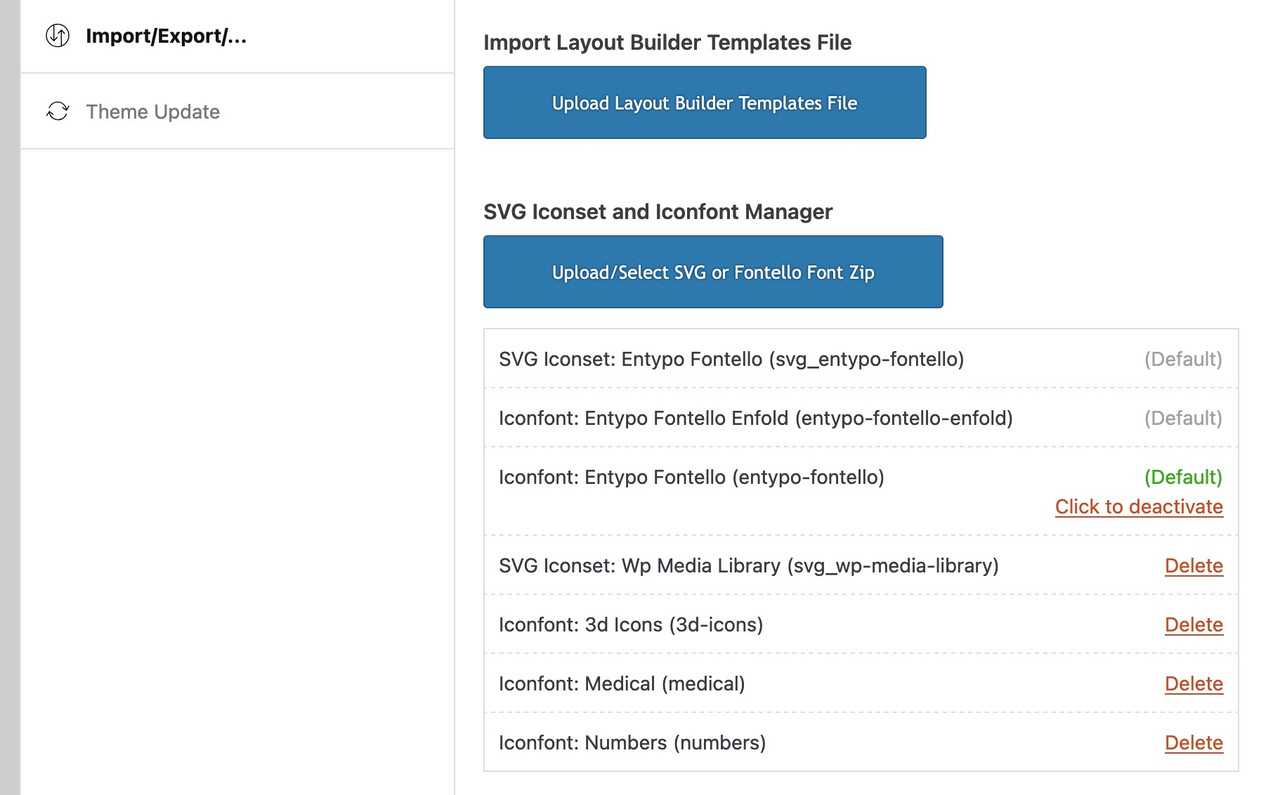
    : What is the font-name of your uploaded icon-set

    you find that information on :

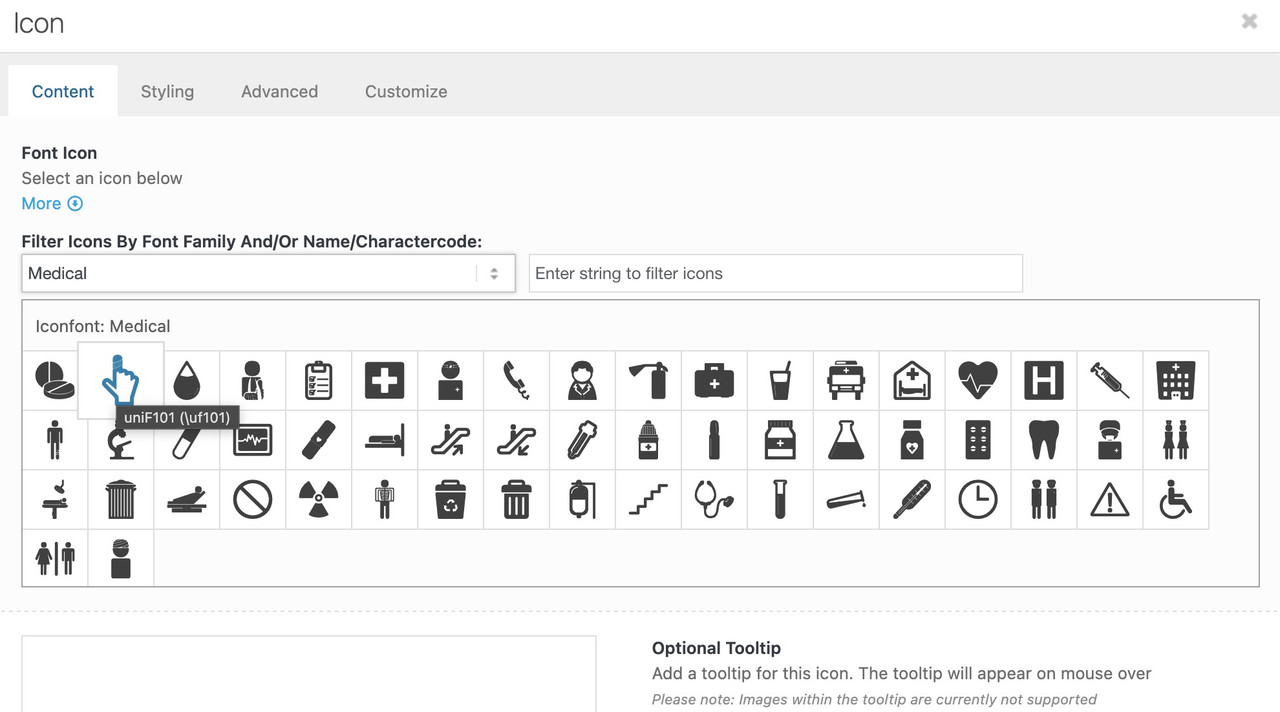
    now f.e. if you like to replace these standard icons by icons of the iconset : medical

    function avia_replace_default_icons($icons){
    	$icons['svg__prev_big'] =  array( 'font' =>'medical', 'icon' => 'uf101');
    	$icons['svg__next_big'] =  array( 'font' =>'medical', 'icon' => 'uf135');     
    	return $icons;
    }
    add_filter('avf_default_icons','avia_replace_default_icons', 10, 1);

    you can find those font icon codes f.e. on trying to place that icon you like to have and hover it :
    ( it is the value inside the brackets – without that backslash)

    #1490901

    Hi,

    We adjusted the script slightly and added a condition so it only applies when the screen width is equal to or less than 767px. Please edit the functions.php file and replace the script with this code:

    add_action('wp_footer', function() {
        ?>
        <script>
        jQuery(document).ready(function($) {
            if (window.innerWidth <= 767) {
                $(".avia-fold-unfold-section").each(function() {
                    var $section = $(this);
                    var $container = $section.find(".av-fold-unfold-container");
    
                    if ($container.length) {
                        $container.css({
                            "max-height": "none",
                            "transition": "none"
                        }).removeClass("folded").addClass("unfolded");
                    }
    
                    var $buttonWrapper = $section.find(".av-fold-button-wrapper");
    
                    if ($buttonWrapper.length) {
                        $buttonWrapper.css("display", "none");
                    }
                });
            }
        });
        </script>
        <?php
    }, 999);
    

    Best regards,
    Ismael

Viewing 30 results - 121 through 150 (of 16,897 total)