Viewing 30 results - 1,051 through 1,080 (of 16,891 total)
  • Author
    Search Results
  • #1423780
    paulcline
    Participant

    Hi,

    I’ve finally had to bite the bullet and update PHP. I’ve chosen 8.1 to be safe and it seems to be working fine except this warning in the error log:

    [26-Oct-2023 10:19:10 UTC] PHP Warning: Undefined array key “desktop” in /home/blah/public_html/wp-content/themes/enfold/config-templatebuilder/avia-template-builder/php/base-classes/class-popup-templates-responsive.php on line 460
    [26-Oct-2023 10:19:10 UTC] PHP Warning: Undefined array key “desktop” in /home/blah/public_html/wp-content/themes/enfold/config-templatebuilder/avia-template-builder/php/base-classes/class-popup-templates-responsive.php on line 462
    [26-Oct-2023 10:19:16 UTC] PHP Warning: Undefined array key “desktop” in /home/blah/public_html/wp-content/themes/enfold/config-templatebuilder/avia-template-builder/php/base-classes/class-popup-templates-responsive.php on line 460
    [26-Oct-2023 10:19:16 UTC] PHP Warning: Undefined array key “desktop” in /home/blah/public_html/wp-content/themes/enfold/config-templatebuilder/avia-template-builder/php/base-classes/class-popup-templates-responsive.php on line 462
    [26-Oct-2023 10:19:35 UTC] PHP Warning: Undefined array key “desktop” in /home/blah/public_html/wp-content/themes/enfold/config-templatebuilder/avia-template-builder/php/base-classes/class-popup-templates-responsive.php on line 460
    [26-Oct-2023 10:19:35 UTC] PHP Warning: Undefined array key “desktop” in /home/blah/public_html/wp-content/themes/enfold/config-templatebuilder/avia-template-builder/php/base-classes/class-popup-templates-responsive.php on line 462
    [26-Oct-2023 10:19:49 UTC] PHP Warning: Undefined array key “desktop” in /home/blah/public_html/wp-content/themes/enfold/config-templatebuilder/avia-template-builder/php/base-classes/class-popup-templates-responsive.php on line 460
    [26-Oct-2023 10:19:49 UTC] PHP Warning: Undefined array key “desktop” in /home/blah/public_html/wp-content/themes/enfold/config-templatebuilder/avia-template-builder/php/base-classes/class-popup-templates-responsive.php on line 462
    [26-Oct-2023 10:20:57 UTC] PHP Warning: Undefined array key “desktop” in /home/blah/public_html/wp-content/themes/enfold/config-templatebuilder/avia-template-builder/php/base-classes/class-popup-templates-responsive.php on line 460
    [26-Oct-2023 10:20:57 UTC] PHP Warning: Undefined array key “desktop” in /home/blah/public_html/wp-content/themes/enfold/config-templatebuilder/avia-template-builder/php/base-classes/class-popup-templates-responsive.php on line 462
    [26-Oct-2023 10:20:58 UTC] PHP Warning: Undefined array key “desktop” in /home/blah/public_html/wp-content/themes/enfold/config-templatebuilder/avia-template-builder/php/base-classes/class-popup-templates-responsive.php on line 460
    [26-Oct-2023 10:20:58 UTC] PHP Warning: Undefined array key “desktop” in /home/blah/public_html/wp-content/themes/enfold/config-templatebuilder/avia-template-builder/php/base-classes/class-popup-templates-responsive.php on line 462

    Is there something I’m missing? I’ve flushed caches, compiled CSS, JS, etc.

    Thanks,
    Paul.

    #1423762

    i think ismaels code should work.
    on looking for this from docu:

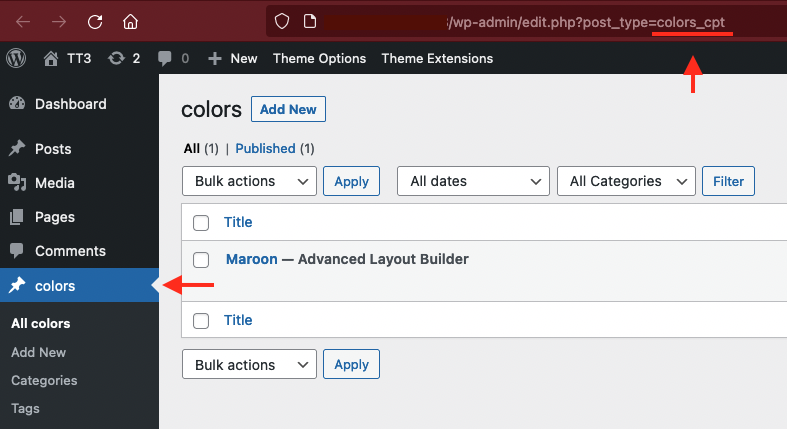
    click on your CPT on dashboard and look to the url window on top – what post-type you see there

    f.e. on portfolio ( which is a CPT too ). you see: edit.php?post_type=portfolio

    try a shortform – then with the info you get from that url window

    add_filter("avia_post_slide_query", function($query) {
        unset($query["post_type"]["vacature"]);
        return $query;
    }, 10, 1);
    #1423751

    Hi,

    Thank you for the update.

    As you can check the image dimensions placed on that Blog Posts element are 724px x 724px larger than the 655px

    We forgot to mention that the default thumbnail used by the Blog Posts element is called portfolio, which has a maximum width and height of 495px. You can increase the size of this thumbnail by using the avf_modify_thumb_size filter in the functions.php file.

    add_filter( 'avf_modify_thumb_size', 'avf_modify_thumb_size_mod', 10, 1 );
    function avf_modify_thumb_size_mod( $size ) {
       $size['portfolio'] = array('width'=>1000, 'height'=>1000);
       return $size;
    }

    After adding the filter, you have to regenerate the thumbnails with this plugin.

    // https://wordpress.org/plugins/regenerate-thumbnails/

    To adjust the background color of the image container, please add this css code.

    .main_color .avia-content-slider .slide-image {
        background: transparent;
    }

    Best regards,
    Ismael

    #1423644

    Hey integritive,

    Thank you for the inquiry.

    The author template has its own layout and loop for posts, which can’t be modified through a filter and needs to be edited directly. If you want to display the posts in a grid layout, you can copy the content of the archives.php file, starting from around line 54.

    if( $avia_config['blog_style'] == 'blog-grid' )
    {
     ... more code here
    }
    

    Best regards,
    Ismael

    #1423640

    In reply to: blog sidebar

    Hey gfriend70,

    Thank you for the inquiry.

    You can add this code in the functions.php file to change the sidebar of the blog page.

    add_filter('avf_custom_sidebar','avf_custom_sidebar_mod');
    function avf_custom_sidebar_mod($sidebar) {
    	if ( is_archive() || is_blog() ) {
    		$sidebar = "Sidebar Pages";
    	}
    	return $sidebar; 
    }
    

    Best regards,
    Ismael

    agencymabu
    Participant

    Hello,

    Enfold is overriding some of our templates provided by The Events Calendar and preventing some options from being selected in the admin dashboard. Can you kindly tell me how to fix these issue?

    In Event Settings, we’re unable to select the Default Events Template and save changes, it does not allow us to select and use this template. We’re trying to remove the sidebar.
    example: https://ncuih.org/event/vax-chat-2023-paths-to-equity/

    The Event Series template is the one that seems to be overridden by Enfold. You can see the duplicate upcoming events block in the footer. We’re trying to remove the sidebar and remove the footer events section on this page here:
    example: https://ncuih.org/series/ncuih-uio-focus-groups-setting-policy-priorities-for-2024/

    We are using the Enfold child theme with these plugins:

    The Events Calendar
    The Events Calendar Pro
    The Events Calendar: Filter Bar
    The Events Calendar: Virtual Events

    Screenshot of the page as-is (broken, extra event listing in footer) https://my.theeventscalendar.com/wp/index.php?gf-download=2023%2F08%2Fncuih.org_series_ncuih-uio-focus-groups-setting-policy-priorities-for-2024.png&form-id=48&field-id=4&hash=5b0ab2f0a742e6b7324e9ad2231be885e53f74c3ccc97d4fc499771000ac0555

    #1423395

    In reply to: Image Issues

    Hi,
    The second code goes in your child theme functions.php file, I added it for you:
    Enfold_Support_3769.jpeg
    please clear your browser cache and check.

    Best regards,
    Mike

    #1423343

    In reply to: Image Issues

    Hey steveorrmedia,
    Thank you for your patience and the link to your site, for your first issue I found that between 1340px & 1799px you were seeing the four images appear in one horizontal row and two in a row underneath with a big grey space next to it, try this CSS in your Enfold Theme Options ▸ General Styling ▸ Quick CSS field t correct:

    @media only screen and (min-width: 989px) and (max-width: 1799px) {
    .responsive .av-masonry-col-flexible .av-masonry-entry {
        width: 33.3%;
    }
    }

    For your second issue, having good titles for your images is good for SEO, but I notice that your titles are not very good, for example see the first screenshot below: “Steve5 In Action – Copy” try going to your media library and check each image and make the titles something that you would want to see on google like: “Award winning broadcaster Steve teaches”
    Ok, then I know you don’t want to see the titles when you mouse-over the images, so to correct try adding this code to the end of your child theme functions.php file in Appearance ▸ Editor:

    function custom_remove_title_on_mouse_over_script() { ?>
      <script>
    (function($){
      $('img').hover(function(e){
          $(this).attr('data-title', $(this).attr('title'));
          $(this).removeAttr('title');
      },
      function(e){
          $(this).attr('title', $(this).attr('data-title'));
      }); 
      $('.av-masonry-image-container').hover(function(e){
          $(this).attr('data-title', $(this).attr('title'));
          $(this).removeAttr('title');
      },
      function(e){
          $(this).attr('title', $(this).attr('data-title'));
      }); 
      $('a').hover(function(e){
          $(this).attr('data-title', $(this).attr('title'));
          $(this).removeAttr('title');
      },
      function(e){
          $(this).attr('title', $(this).attr('data-title'));
      }); 
    })(jQuery);
    </script>
      <?php
    }
    add_action('wp_footer', 'custom_remove_title_on_mouse_over_script', 99);

    Then clear your browser cache and check.

    Best regards,
    Mike

    Hi Rikard,

    theme version is 5.6.6. as I have told. However, I have solved the problem just now myself, since I was in exploration mode since this morning … It was a PHP issue. Until now I was running the site network on PHP8.0.30. Upgrading PHP to 8.1 removed the issue.

    I still have this issue one one independent single site which runs on PHP 7.4, which deploys a critical error when switched to PHP 8.0 or 8.1. – However, I will have to find a solution to switching that site to PHP 8 anyway, so there is no more need to find a solution for the Woo product backend issue from my side …

    Anyway, the issue might come up for other users below PHP 8.1, since I was able to reproduce it on two different sites.

    Best
    Michael

    #1423225

    In reply to: Upgrading to PHP 8.2

    Hi,
    WordPress doesn’t support PHP v5.6.40 any more, please update to at least PHP v7.4

    Best regards,
    Mike

    #1423218

    Hi,
    Thank you for the link to your site, I found that you were getting the error: Uncaught SyntaxError: Unexpected string I believe from this script in a widget:
    Enfold_Support_3734.jpeg
    once I removed it and cleared your cache you site showed correctly.
    I added the code into your child theme functions.php:
    Enfold_Support_3736.jpeg
    so now it shows with no errors:
    Enfold_Support_3738.jpeg
    I see that you have an empty avia-style.min.css css file in your child theme, I recommend removing this as it may cause a conflict in the future.
    Enfold_Support_3740.jpeg
    Best regards,
    Mike

    #1423171

    Hi,
    SEE NEXT MESSAGE PLEASE
    https://web-13-tests.fr/wp-admin/post.php?post=75&action=edit&lang=fr when I try to add a block text

    https://web-13-tests.fr/wp-admin/post.php?post=66&action=edit&lang=fr when I try to modify a block text

    for example
    Best regards,
    Rolland

    • This reply was modified 2 years, 5 months ago by RollandH.
    #1423152

    Hi again
    So, for text blocks I can use the shortcode mentionned by @Guenni007
    For buttons I have to change the code in enfold/config-templatebuilder/avia-template-builder/php/class-generic-helper.php and I have to do it after every Enfold update again, correct?
    Or can you recommend a plugin that prevent all emails in text blocks, buttons and so on?
    Best regards
    Mike

    #1422994

    on that php you mentioned – the if-clause:
    if( strpos( $link[1], '@' ) !== false
    eachtime for $link[0] == 'manually'
    we had 3 times that check.

    and maybe it is better to replace it to:
    return 'mailto:' . antispambot($link[1],1);
    because i do not see any difference in the DOM when applying it without. Or does even the sourcecode show then transformed html entities
    with the 1 i see:

    the shortcode i have for emails inside text blocks :

    function obfuscate_emails($atts, $content = null) {
        if (!is_email($content)) {
            return;
        }
        return '<a href="mailto:' . antispambot($content,1) . '">' . antispambot($content) . '</a>';
    }
    add_shortcode('email', 'obfuscate_emails');

    i had to use then as [email] (Email address hidden if logged out) [/email]

    #1422867

    Hey mmetzger1987,

    Thank you for the inquiry.

    There is no option for this by default, but you can use the avf_builder_elements filter to assign a default value to the “Header visibility and transparency” settings.

    add_filter('avf_builder_elements', function($elements) {
        foreach ($elements as $key => $el) {
            if ($el['id'] == 'header_transparency') {
    			$elements[$key]['std'] = 'header_transparent';
            }
        }
    
        return $elements;
    }, 10, 1);
    

    The code above should go to the functions.php file. Please note that only new pages will be affected by this modification.

    Best regards,
    Ismael

    #1422761
    chuepfner
    Participant

    Hi, when I try to edit any site on my homepage following error occurs :

    Using actual ENFOLD 3.8 – the theme tell me hat this is the actual Version ???
    in WordPress 6.3.2

    thanks in advance !

    WordPress hat eine eingebaute Funktion, die erkennt, wenn ein Plugin oder ein Theme einen fatalen Fehler auf deiner Website verursacht, und dich deswegen mit dieser automatisierten E-Mail benachrichtigt.

    In diesem Fall hat WordPress einen Fehler in deinem Theme „Enfold“ abgefangen.

    Besuche zunächst deine Website (http://schabmann.at/) und überprüfe sie auf sichtbare Probleme. Besuche als nächstes die Seite, auf der der Fehler aufgetreten ist (http://schabmann.at/wp-admin/post.php?post=405&action=edit) und prüfe, ob es sichtbare Probleme gibt.

    Bitte kontaktiere dein Hosting-Unternehmen, um Unterstützung bei der weiteren Untersuchung dieses Problems zu erhalten.

    Wenn deine Website fehlerhaft zu sein scheint und du nicht mehr wie gewohnt auf dein Dashboard zugreifen kannst, hat WordPress jetzt einen speziellen „Wiederherstellungsmodus“. Auf diese Weise kannst du dich sicher in deinem Dashboard anmelden und weitere Untersuchungen durchführen.

    http://schabmann.at/wp-login.php?action=enter_recovery_mode&rm_token=uWO0jZ1RkRUWZE3YTGqzij&rm_key=GBLg739bDG5d2t51jh0ocL

    Um deine Website zu schützen, läuft dieser Link in 1 Tag ab. Aber keine Sorge: Ein neuer Link wird dir per E-Mail zugeschickt, wenn der Fehler nach Ablauf der Frist erneut auftritt.

    Wenn du Hilfe bei diesem Problem suchst, wirst du möglicherweise nach einigen der folgenden Informationen gefragt:
    WordPress-Version 6.3.2
    Aktives Theme: Enfold (Version 3.8)
    Aktuelles Plugin: (Version )
    PHP-Version 7.4.33

    Fehler-Details
    ==============
    Ein Fehler vom Typ E_ERROR wurde in der Zeile 489 der Datei /home/at8556/web/schabmann.at/public_html/wp-content/themes/enfold/config-templatebuilder/avia-template-builder/php/shortcode-template.class.php verursacht. Fehlermeldung: Uncaught Error: Cannot use string offset as an array in /home/at8556/web/schabmann.at/public_html/wp-content/themes/enfold/config-templatebuilder/avia-template-builder/php/shortcode-template.class.php:489
    Stack trace:
    #0 /home/at8556/web/schabmann.at/public_html/wp-content/themes/enfold/config-templatebuilder/avia-template-builder/php/shortcode-template.class.php(443): aviaShortcodeTemplate->create_sortable_editor_element(Array)
    #1 /home/at8556/web/schabmann.at/public_html/wp-content/themes/enfold/config-templatebuilder/avia-template-builder/php/template-builder.class.php(397): aviaShortcodeTemplate->prepare_editor_element()
    #2 /home/at8556/web/schabmann.at/public_html/wp-includes/class-wp-hook.php(310): AviaBuilder->js_template_editor_elements(”)
    #3 /home/at8556/web/schabmann.at/public_html/wp-includes/class-wp-hook.php(334): WP_Hook->apply_filters(”, Array)
    #4 /home/at8556/web/schabmann.at/public_html/wp-includes/plugin.php(517): WP_Hook->do_action(Array)
    #5 /home/at8556/web/schabmann.at/public_html/wp-in

    #1422743

    In reply to: Bilder Speicher

    Hey janbornemann44,

    Thank you for the inquiry.

    We can disable some of the registered thumbnails or image sizes using the remove_image_size function in order to save some storage space. Please add this code in the functions.php file.

    // Disable loads of Enfold & WP image sizes upon upload
    // do image sizes manually, double-size with high compression for retina screens
    // use Photoshop to set exact double size and quality between Q30 and Q40
    add_action('init', 'remove_enfold_image_sizes');
    function remove_enfold_image_sizes() {
    // do NOT remove widget size, is used in backend portfolio items!
    // remove_image_size('widget');
      remove_image_size('square');
      remove_image_size('featured');
      remove_image_size('featured_large');
      remove_image_size('portfolio');
      remove_image_size('portfolio_small');
      remove_image_size('gallery');
      remove_image_size('magazine');
      remove_image_size('masonry');
      remove_image_size('entry_without_sidebar');
      remove_image_size('entry_with_sidebar');
      remove_image_size('shop_thumbnail');
      remove_image_size('shop_catalog');
      remove_image_size('shop_single'); 
        remove_image_size('shop_gallery_thumbnail');
    }
    // Remove unneeded WP image sizes
    add_filter( 'intermediate_image_sizes_advanced', 'prefix_remove_default_images' );
    // Remove default image sizes here. 
    function prefix_remove_default_images( $sizes ) {
    // do NOT remove small and medium sizes, they are used in backend Media Library!
    // unset( $sizes['small']); // 150px
    // unset( $sizes['medium']); // 300px
     unset( $sizes['large']); // 1024px
     unset( $sizes['medium_large']); // 768px
     return $sizes;
    }
    

    After adding the code, use the following plugin to regenerate the thumbnails.

    // https://wordpress.org/plugins/force-regenerate-thumbnails/

    IMPORTANT: Please make sure to create a site backup or a restore point before proceeding with the steps above.

    Related threads:

    // https://kriesi.at/support/topic/enfold-image-sizes-3/#post-1108904
    // https://kriesi.at/support/topic/still-fighting-with-managing-default-image-sizes/#post-1418393

    Best regards,
    Ismael

    #1422665

    Hey rixi,

    Please try updating your PHP version to 7.4 or higher.

    Best regards,
    Rikard

    #1422655
    annevoelkel
    Participant

    Dear Kriesis,
    Since today a big problem with the LayerSlider has appeared. We are running different websites with Enfold and LayerSlider plugin and it blocks the creation of new posts and pages in the backend at all these installations. The LayerSlider metabox shows this error message:

    Fatal error: Uncaught TypeError: in_array(): Argument #2 ($haystack) must be of type array, null given in /kunden/674919_10117/webseiten/landingpages/wp-content/plugins/LayerSlider/assets/wp/templates.php:76Stack trace: #0 /kunden/674919_10117/webseiten/landingpages/wp-content/plugins/LayerSlider/assets/wp/templates.php(76): in_array() #1 /kunden/674919_10117/webseiten/landingpages/wp-admin/includes/template.php(1443): LS_CustomPageTemplates->render_meta_box() #2 /kunden/674919_10117/webseiten/landingpages/wp-admin/edit-form-advanced.php(681): do_meta_boxes() #3 /kunden/674919_10117/webseiten/landingpages/wp-admin/post-new.php(75): require(‘…’) #4 {main} thrown in /kunden/674919_10117/webseiten/landingpages/wp-content/plugins/LayerSlider/assets/wp/templates.php on line 76

    After disabling the plugin everything works normal but this is not the solution. Existing posts are editable and for a quick solution we are creating new posts with DuplicatePost.

    What to do? Waiting for a theme or plugin update?
    Best regards
    Anne

    Hi,

    We aren’t noticing any problems on the frontend, but when we try to access the error logs in the WP Engine panel, we encounter this error. Is it possibly restricted in some way?”

    [Mon Oct 16 01:10:42.087656 2023] [autoindex:error] [pid 16742] [client .....:0] AH01276: Cannot serve directory /nas/..../live/..../wp-includes/: No matching DirectoryIndex (index.html,index.cgi,index.pl,index.php,index.xhtml,index.htm) found, and server-generated directory index forbidden by Options directive
    [Mon Oct 16 02:42:23.368566 2023] [autoindex:error] [pid 19213] [client ....] AH01276: Cannot serve directory /.../content/live/..../wp-includes/: No matching DirectoryIndex (index.html,index.cgi,index.pl,index.php,index.xhtml,index.htm) found, and server-generated directory index forbidden by Options directive
    

    Thank you for your patience.

    Best regards,
    Ismael

    #1422574

    In reply to: code block trouble

    Hi,
    Thanks for your question, I tried to recreate this error with a Google Map iframe for Boston Ma in a code block element,
    <iframe src="https://www.google.com/maps/embed?pb=!1m18!1m12!1m3!1d188820.5492695243!2d-70.97028399999999!3d42.31434995!2m3!1f0!2f0!3f0!3m2!1i1024!2i768!4f13.1!3m3!1m2!1s0x89e3652d0d3d311b%3A0x787cbf240162e8a0!2sBoston%2C%20MA!5e0!3m2!1sen!2sus!4v1697385152217!5m2!1sen!2sus" width="600" height="450" style="border:0;" allowfullscreen="" loading="lazy" referrerpolicy="no-referrer-when-downgrade"></iframe>
    I also tested in a text element and tried to edit the page many times, make changes and save and view the frontend and then edit again, but I was not able to create an error.
    My test site has no plugins, so perhaps yo can try disabling your plugins. If that resolves the issue, reactivate each one individually until you find the cause.
    Sometimes javascript in a code block element will run in the backend (editor) and cause errors, if you have any other code blocks on the page with javascript try removing them and checking again.
    If you find it’s a plugin or something else that you can’t do without, you can try to add the map iframe as a shortcode as a workaround.
    For example, try adding this code to the end of your child theme functions.php file in Appearance ▸ Editor:

    function custom_iframe_shortcode($atts) {
        $iframe_src = esc_url($atts['src']);
        if (!$iframe_src) {
            return 'Please provide a valid src URL in the shortcode.';
        }
        $iframe_html = '<iframe src="' . $iframe_src . '"width="100%" height="600px" frameborder="0" allowfullscreen="" loading="lazy" referrerpolicy="no-referrer-when-downgrade"></iframe>';
        return $iframe_html;
    }
    add_shortcode('iframe', 'custom_iframe_shortcode');

    notice in the code above I set the iframe width to 100% and the height to 600px, you can adjust to suit.
    Then in your code block add this shortcode: [iframe src="https://www.example.com"] I added my map url like this:
    [iframe src="https://www.google.com/maps/embed?pb=!1m18!1m12!1m3!1d188820.5492695243!2d-70.97028399999999!3d42.31434995!2m3!1f0!2f0!3f0!3m2!1i1024!2i768!4f13.1!3m3!1m2!1s0x89e3652d0d3d311b%3A0x787cbf240162e8a0!2sBoston%2C%20MA!5e0!3m2!1sen!2sus!4v1697385152217!5m2!1sen!2sus"]
    Perhaps this will help you.

    Best regards,
    Mike

    #1422553

    Hi Gunter,

    For those looking to add auto infinite scroll from WP Intense to their Enfold site:

    Auto Infinite Scroll Settings:
    Set the distance to 1000px
    css wrapper: .products, .yourcustomclassfornewspage
    Pagination wrapper: .pagination
    Next Page Selector: next_page

    Css for the load more button: (plus hide the pagination on the blog page)

    #isw-load-more-button {
    border: none;
    padding: 20px 50px 20px 50px;
    background-color: #007a74;
    color: #ffffff;
    font-size: 18px;
    font-weight: bold;
    transition-duration: 1s;
    }
    #isw-load-more-button:hover {
    border: none;
    background-color: #39a6a1;
    color: #000000;
    }
    .yourcustomclassfornewspage .pagination {
    display:none !important;
    }

    Snippet for functions.php to insert the new CSS class to just the blog page:

        add_filter( 'avf_custom_main_classes', 'custom_avf_custom_main_classes', 10, 2 );
    	function custom_avf_custom_main_classes( $class_string = '', $context = 'index.php' )
    {
    	//	fallback check
    	if( ! is_string( $class_string ) )
    	{
    		$class_string = '';
    	}
    
    	// e.g. add custom class to index.php Make sure there is a space before the class!
    	if( 'index.php' == $context )
    	{
    		$class_string .= ' yourcustomclassfornewspage';
    	}
    	return $class_string;
    }
    • This reply was modified 2 years, 5 months ago by thinkjarvis.
    • This reply was modified 2 years, 5 months ago by thinkjarvis.
    • This reply was modified 2 years, 5 months ago by thinkjarvis.
    #1422546

    Hi,
    Please note that the /xmlrpc.php is not public use, see this post. So you don’t want it to show as a backlink, and it should correctly show as broken.
    You didn’t say where you are seeing the backlink to /xmlrpc.php, I assume that it is in your Google search console, if so you can just ingore these.
    If you follow the steps above then it will take time for Google to stop looking at this link.
    According to this post the /xmlrpc.php 405 error doesn’t effect SERPS.

    Best regards,
    Mike

    #1422511

    In reply to: Upgrading to PHP 8.2

    Hi,
    Thanks for the login, I see that you have many plugins that are reporting updates available. On my test site Enfold is working correctly with PHP v8.2 with no errors.
    On your staging site please try disabling all of your plugin and then update the PHP to v8.2 and see if this works for you.
    If not check your PHP extensions and compare the v7.4 & v8.2 enabled extensions, some servers don’t have all of the extension needed enabled in v8.2 suce as the “zip” extension, so perhaps there is one that you need to enable, this is an example of the panel in a cPanel host, yours may be different.
    php_v8.jpeg
    If this doesn’t help perhaps a screenshot of the error that you see would help.

    Best regards,
    Mike

    #1422457

    In reply to: Upgrading to PHP 8.2

    Hi,

    Thanks for that. The SFTP details are not working, please check and verify. Also, I see that you are running PHP 7.4 on the staging site, could you update the PHP version on the staging site so that we can see the actual error please? You could also share server error logs with us instead.

    Best regards,
    Rikard

    #1422423

    This is the code that I inserted into the functions.php it caused a critical error on my site:

    /**
    * add submenu to product pages
    */
    function ava_woocommerce_before_main_content() {
    if ( is_product() ) {
    echo do_shortcode(‘[av_submenu which_menu='' menu='49' position='left' sticky='aviaTBsticky' color='alternate_color' mobile='disabled' mobile_switch='av-switch-768' alb_description='' id='' custom_class='' template_class='' av_uid='av-lnbxc8ss' sc_version='1.0']
    [av_submenu_item title='Menu Item 1' button_style='' link='' linktarget='' av_uid='av-fdyw7' sc_version='1.0']
    [av_submenu_item title='Menu Item 2' button_style='' link='' linktarget='' av_uid='av-70t2n' sc_version='1.0']‘);
    }
    }
    add_action( ‘woocommerce_before_main_content’, ‘ava_woocommerce_before_main_content’, 10 );

    Can you please let me know where the issue is? I’m just learning PHP and am not sure where the error is at. Thank you.

    #1422330

    In reply to: New Icon Twitter to X

    Hey slikslok,

    Thank you for the inquiry.

    The new twitter icon is not yet available on fontello.com but it will be included in the next patch, 5.6.7. In the meantime, you can upload the following zip file to the Enfold > Import/Export > Iconfont Manager.

    Twitter icon zip file: https://1drv.ms/u/s!AjjTfXSRbKTvgrYyRsyZmmpebkKtVg?e=GTgWGW

    Then add the this filter in the functions.php file to replace the default twitter icon with the new icon.

    function avf_default_icons_mod($icons) {
    	$icons['twitter'] = array( 'font' =>'twitter', 'icon' => 'ue801');
    	return $icons;
    }
    add_filter('avf_default_icons','avf_default_icons_mod', 10, 1);
    

    Best regards,
    Ismael

    #1422235

    Thank you. I have enabled debug mode and I see the shortcode for the sub menu. My question is, where do I put that template hook? In the functions.php or in the single page template for a woocommerce product? I am also confused as to how much of the shortcode to put into the function. In debug mode, this is the shortcode that I see:

    [av_submenu which_menu='' menu='49' position='left' sticky='aviaTBsticky' color='alternate_color' mobile='disabled' mobile_switch='av-switch-768' alb_description='' id='' custom_class='' template_class='' av_uid='av-lnbxc8ss' sc_version='1.0']
    [av_submenu_item title='Menu Item 1' button_style='' link='' linktarget='' av_uid='av-fdyw7' sc_version='1.0']
    [av_submenu_item title='Menu Item 2' button_style='' link='' linktarget='' av_uid='av-70t2n' sc_version='1.0']
    [/av_submenu]

    Should I be grabbing all of that shortcode and adding it to the function?

    #1422133

    Topic: PHP8 don’t work

    in forum Enfold
    licencjezpm
    Participant

    Hi,
    I using latest Enfold version:
    Enfold version

    After switch to PHP8
    My website view error like this:
    Fatal error: Unparenthesized a ? b : c ? d : e is not supported. Use either (a ? b : c) ? d : e or a ? b : (c ? d : e) in /usr/home/zbychpol/domains/restauracjaboss.pl/public_html/functions-enfold.php on line 293
    W witrynie wystąpił błąd krytyczny.
    website error

    Best regards
    Paweł

    #1422126
    licencjezpm
    Participant

    Hi,
    After added Short entries module to my editor, site display wrong view.

    Log:
    Fatal error: Uncaught Error: Call to undefined function avia_wp_get_the_title() in /usr/home/zbychpol/domains/restauracjaboss.pl/public_html/wp-content/themes/enfold/includes/helper-markup.php:460 Stack trace: #0 /usr/home/zbychpol/domains/restauracjaboss.pl/public_html/wp-content/themes/enfold/includes/loop-index.php(608): av_blog_entry_markup_helper(2929) #1 /usr/home/zbychpol/domains/restauracjaboss.pl/public_html/wp-includes/template.php(787): require(‘/usr/home/zbych…’) #2 /usr/home/zbychpol/domains/restauracjaboss.pl/public_html/wp-includes/template.php(720): load_template(‘/usr/home/zbych…’, false, Array) #3 /usr/home/zbychpol/domains/restauracjaboss.pl/public_html/wp-includes/general-template.php(206): locate_template(Array, true, false, Array) #4 /usr/home/zbychpol/domains/restauracjaboss.pl/public_html/wp-content/themes/enfold/config-templatebuilder/avia-shortcodes/blog/blog.php(719): get_template_part(‘includes/loop’, ‘index’) #5 /usr/home/zbychpol/domains/restauracjaboss.pl/public_html/wp-content/themes/en in /usr/home/zbychpol/domains/restauracjaboss.pl/public_html/wp-content/themes/enfold/includes/helper-markup.php on line 460
    W witrynie wystąpił błąd krytyczny.

    website view

    Bets regards
    Paweł

    • This topic was modified 2 years, 6 months ago by licencjezpm.
Viewing 30 results - 1,051 through 1,080 (of 16,891 total)