Hey Oriano,
Users with “edit_published_posts” permissions such as Administrators, Editors and Authors can view the site.

You could edit line 304 in /enfold/includes/classes/class-avia-custom-pages.php
but there is not a way to change this in your child theme, so you would need to update this file for each version update.
Your best option would be to use a plugin instead.
Best regards,
Mike
Hey Martin,
To add a red border to items that you tab to, you can add this css:
a:focus,button:focus {
  border:1px solid red !important;
}
adjust the color and size to suit.
Your accessibility plugin is at the bottom of the page in the DOM, so you would need to tab the whole page to get to it, perhaps the plugin settings has an option to move it to the top of the DOM? The plugin button also has a tabindex of -1 so you can’t tab to it, check the plugin settings.
If you can’t change these in the settings, try adding this code to the end of your child theme functions.php file in Appearance ▸ Editor:
function custom_script() { ?>
  <script>
document.addEventListener('DOMContentLoaded', function() {
	const accessibilityButton = document.querySelector('#accessibility-trigger-button');
    const messageBar = document.querySelector('#accessibility-button');
    const body = document.querySelector('body#top');
    body.prepend(messageBar);
    accessibilityButton.setAttribute('tabindex', '1');
});
</script>
  <?php
}
add_action( 'wp_footer', 'custom_script', 99 );
Please ensure to copy the code from the forum and not an email notification so the symbols are not converted.
This javascript will move the accessibility-button in the DOM to the top of the page so it is the first tab, the icon will still show at the bottom of the page, it will also change the tabindex so you can tab to it. With the css above to add a red border, the first tab will show this:

and then if you hit the enter key it will open:

Best regards,
Mike
hail brave new AI world
New snippet
see in Action here: https://webers-testseite.de/impressum/
it is a draggable Window:
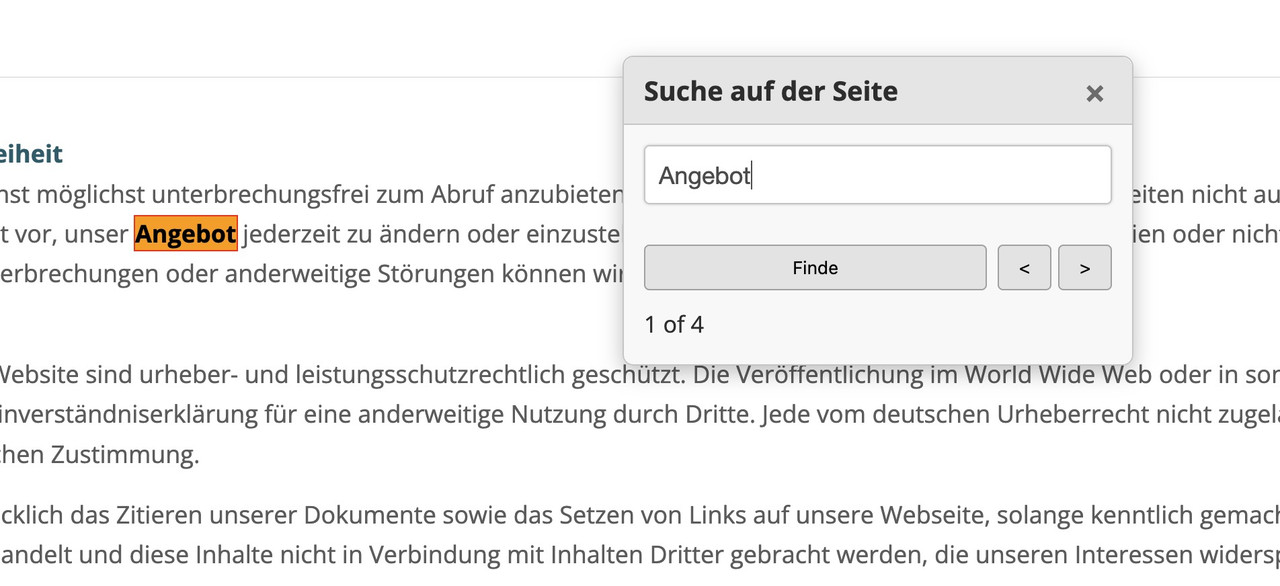
this is for child-theme functions.php:
see code here on paste bin: https://pastebin.com/zc4fvX1w
because of a innerHtml (lines 158-176) it is not possible to post it here – (maybe mod knows how)

and here is the style for quick css
/* --- Draggable Search Window --- */
#gcmSearchUIContainer { /* Changed ID for clarity */
  position: fixed;
  top: 100px; /* Initial position from the top */
  left: 50%;  /* Start horizontally centered */
  transform: translateX(-50%); /* Adjust for true centering */
  width: 380px; /* A suitable width for a small window */
  background-color: #f9f9f9;
  border: 1px solid #ccc;
  border-radius: 8px;
  box-shadow: 0 5px 15px rgba(0,0,0,0.25);
  z-index: 100001; /* Ensure it's on top, slightly higher than before if needed */
  overflow: hidden; /* To contain rounded corners with header */
}

#gcmSearchUIContainer.hidden {
  display: none;
}

#gcmSearchUIHeader {
  padding: 10px 15px;
  background-color: #e8e8e8;
  border-bottom: 1px solid #ccc;
  cursor: move; /* Indicates this area is draggable */
  border-top-left-radius: 8px; /* Match container's radius */
  border-top-right-radius: 8px; /* Match container's radius */
  display: flex;
  justify-content: space-between;
  align-items: center;
}

#gcmSearchUIHeader .gcm-title {
  font-weight: bold;
  font-size: 1.1em;
  color: #333;
}

#gcmSearchUIHeader #gcmCloseSearchBtnDraggable { /* Specific ID for close button in this context */
  background: none;
  border: none;
  font-size: 1.3em;
  font-weight: bold;
  color: #777;
  cursor: pointer;
  padding: 0 5px;
}
#gcmSearchUIHeader #gcmCloseSearchBtnDraggable:hover {
  color: #000;
}

#gcmSearchUIBody {
  padding: 15px;
  display: flex;
  flex-direction: column; /* Stack elements vertically */
  gap: 10px; /* Space between elements in the body */
}

#gcmSearchUIBody #gcmSearchInputDraggable { /* Specific ID for input */
  width: 100%;
  padding: 10px;
  border: 1px solid #ccc;
  border-radius: 4px;
  box-sizing: border-box;
}

#gcmSearchUIBody .gcm-controls-row {
  display: flex;
  justify-content: space-between; /* Space out controls */
  align-items: center;
  gap: 8px; /* Space between buttons in a row */
}

#gcmSearchUIBody .gcm-navigation {
    display: flex;
    gap: 5px;
}

#gcmSearchUIBody button {
  padding: 8px 12px;
  border: 1px solid #aaa;
  border-radius: 4px;
  background-color: #e7e7e7;
  cursor: pointer;
  min-width: 40px; /* For Next/Prev buttons */
  text-align: center;
}

#gcmSearchUIBody button:hover {
  background-color: #d7d7d7;
}

#gcmSearchUIBody #gcmSearchBtnDraggable { /* Specific ID */
    flex-grow: 1; /* Allow Find button to take more space if needed */
}

#gcmSearchUIBody .gcm-results-count-draggable { /* Specific ID */
  font-size: 0.95em;
  color: #333;
  white-space: nowrap; /* Prevent wrapping */
}

/* --- Highlighting Styles (remain the same) --- */
.custom-highlight {
  background-color: yellow;
  color: black;
  font-weight: bold;
}

.custom-highlight.current-custom-highlight {
  background-color: orange;
  outline: 1px solid red;
}
Do not forget to remove the leading php on that downloaded snippet before you insert it to your child-theme functions.php
Download: https://pastebin.com/dl/zc4fvX1w
Pretty sure there’s a newer version. I already purchased a new license (7.1). I activated the license in the theme options. So why would it tell me this is the newest version?
Additional info;
Currently on PHP: 7.4
Currently on WordPress: 6.7.2
Currently on Enfold: 4.2.6
Can’t update php as Enfold 4.2.6 won’t run 8.2 php
Tried to update wordpress but Installation failed
Received the following error message…
Could not copy file.: wordpress/xmlrpc.php
Installation failed.
Not sure what else to try. Thoughts?
Hi @Ismael, @Guenni007 thanks for your help.
@Guenni007
I have try to your code (on child theme function.php), but don’t worg. :(
@Ismael
Have you tried removing the condition if( $show_meta_tags && has_tag() )?
I’m working on MAMP, so I can get an acces :(
This is the Blog settings that I’m using.
But I can also change the setting of the blog.
Important for me is to have the tags below the meta line Date, categories etc…
Best regards,
Oriano
Hey epkdesign,
Thank you for the inquiry.
Do the portfolio entries share the same category aside from commercial or residential? If they do, sorting by category will not be possible since they are all grouped under the same category. If that’s not the case, you can use the following filter in the functions.php file.
add_filter( 'avf_post_nav_settings', 'avf_post_nav_settings_mod', 10, 1);
function avf_post_nav_settings_mod($settings)
{
    $settings['same_category'] = true;
    return $settings;
}
Best regards,
Ismael
Hallo @kriesi, ich habe vom WordPress Support eine E-mail erhalten, dass etwas in meinem Theme fehlerhaft sei und ich beim Anbieter Hilfe suchen soll.
WordPress-Version 6.8.1
Aktives Theme: Enfold (Version 7.1)
Aktuelles Plugin: (Version )
PHP-Version 7.4.30
Fehler-Details
==============
Ein Fehler vom Typ E_ERROR wurde in der Zeile 182 der Datei /var/www/html/wp-content/themes/enfold/framework/php/widgets/widget-classes/class-avia-instagram.php verursacht. Fehlermeldung: Allowed memory size of 134217728 bytes exhausted (tried to allocate 4096 bytes)
Das Instagram Widget wollte ich tatsächlich schon des Öfteren nutzen im Blog z.B., es lädt aber nie die 3 aktuellsten Beiträge und zeigt dann an, man solle es später versuchen. Später funktioniert es aber auch nicht. Ich dachte eigentlich, ich hätte das Widget dann nicht genutzt. Aber vielleicht ist das eine Spur.
Ich freue mich über eine Kontaktaufnahme und Hilfe hier.
Danke und viele Grüße, Sandra
Getting this in debug.log
[06-May-2025 23:25:05 UTC] PHP Notice: Function _load_textdomain_just_in_time was called incorrectly. Translation loading for the it-l10n-ithemes-security-pro domain was triggered too early. This is usually an indicator for some code in the plugin or theme running too early. Translations should be loaded at the init action or later. Please see Debugging in WordPress for more information. (This message was added in version 6.7.0.) in /var/www/vhosts/conoverlawllc.com/httpdocs/wp-includes/functions.php on line 6121
Hey Oriano,
Thank you for the inquiry.
You can modify the includes > loop-index.php file and look for this code around line 573:
if( $show_meta_tags && has_tag() )
							{
								$meta_tags  = '<span class="blog-tags-header minor-meta">';
								$meta_tags .=		get_the_tag_list( __( 'Tags:', 'avia_framework' ) . ' <span> ', ', ', '</span>' );
								$meta_tags .= '</span>';

								$meta_info['tags'] = $meta_tags;
							}
You can move it below this block of code (526):
if( 'blog-meta-category' == avia_get_option( 'blog-meta-category' ) )
						{
							if( ! empty( $cats ) )
							{
								$meta_cats  = '<span class="blog-categories minor-meta">' . __( 'in', 'avia_framework') . ' ';
								$meta_cats .=	trim( $cats );
								$meta_cats .= '</span>';

								$meta_info['categories'] = $meta_cats;
							}
						}
Or you can remove the is_single() condition and the if ( $show_meta_tags && has_tag() ) block.
Best regards,
Ismael
put this to your child-theme functions.php:
function only_one_toggle_open_at_the_same_time(){
?>
<script>
window.addEventListener("DOMContentLoaded", function () {
(function($){
    $('.toggler').on('click', function(){
        $('.toggler').not(this).next('.toggle_wrap').removeClass('active_tc');
        $('.toggler').not(this).removeClass('activeTitle');
    });
})(jQuery);
});
</script>
<?php
}
add_action('wp_footer', 'only_one_toggle_open_at_the_same_time');
if you like to have that only for that page – use conditional tags – and insert instead:
function only_one_toggle_open_at_the_same_time(){
if ( is_page(719) ) {
?>
<script>
window.addEventListener("DOMContentLoaded", function () {
(function($){
    $('.toggler').on('click', function(){
        $('.toggler').not(this).next('.toggle_wrap').removeClass('active_tc');
        $('.toggler').not(this).removeClass('activeTitle');
    });
})(jQuery);
});
</script>
<?php
}
}
add_action('wp_footer', 'only_one_toggle_open_at_the_same_time');
Hi,
Thank you for the update.
Try to use this shortcode instead:
function avia_search_cb() {
    ob_start();
    ?>
    <span id="menu-item-search" class="noMobile menu-item menu-item-search-dropdown menu-item-avia-special" role="menuitem">
        <a class="avia-svg-icon avia-font-svg_entypo-fontello"
        aria-label="Search"
        href="?s="
        rel="nofollow"
        title="Click to open the search input field"
        data-avia-search-tooltip='<?php echo esc_attr("
    <search>
        <form role='search' action='" . home_url() . "' id='searchform' method='get'>
<div>
                <span class='av_searchform_search avia-svg-icon avia-font-svg_entypo-fontello' data-av_svg_icon='search' data-av_iconset='svg_entypo-fontello'>
                    <svg version='1.1' xmlns='http://www.w3.org/2000/svg' width='25' height='32' viewBox='0 0 25 32' preserveAspectRatio='xMidYMid meet' role='graphics-symbol' aria-hidden='true'>
                        <title>Search</title>
                        <desc>Search</desc>
                        <path d='M24.704 24.704q0.96 1.088 0.192 1.984l-1.472 1.472q-1.152 1.024-2.176 0l-6.080-6.080q-2.368 1.344-4.992 1.344-4.096 0-7.136-3.040t-3.040-7.136 2.88-7.008 6.976-2.912 7.168 3.040 3.072 7.136q0 2.816-1.472 5.184zM3.008 13.248q0 2.816 2.176 4.992t4.992 2.176 4.832-2.016 2.016-4.896q0-2.816-2.176-4.96t-4.992-2.144-4.832 2.016-2.016 4.832z'></path>
                    </svg>
                </span>
                <input type='submit' value='' id='searchsubmit' class='button' title='Enter at least 3 characters to show search results in a dropdown or click to route to search result page to show all results' />
                <input type='search' id='s' name='s' value='' aria-label='Search' placeholder='Search' required /></div>
</form>
    </search>
    "); ?>'
        data-av_svg_icon="search"
        data-av_iconset="svg_entypo-fontello">
            <svg version="1.1" xmlns="http://www.w3.org/2000/svg" width="25" height="32" viewBox="0 0 25 32" preserveAspectRatio="xMidYMid meet" role="graphics-symbol" aria-hidden="true">
                <title>Click to open the search input field</title>
                <desc>Click to open the search input field</desc>
                <path d="M24.704 24.704q0.96 1.088 0.192 1.984l-1.472 1.472q-1.152 1.024-2.176 0l-6.080-6.080q-2.368 1.344-4.992 1.344-4.096 0-7.136-3.040t-3.040-7.136 2.88-7.008 6.976-2.912 7.168 3.040 3.072 7.136q0 2.816-1.472 5.184zM3.008 13.248q0 2.816 2.176 4.992t4.992 2.176 4.832-2.016 2.016-4.896q0-2.816-2.176-4.96t-4.992-2.144-4.832 2.016-2.016 4.832z"></path>
            </svg>
            <span class="avia_hidden_link_text">Search</span>
        </a>
    </span>
    <?php
    return ob_get_clean();
}
add_shortcode('avia_search', 'avia_search_cb');
Best regards,
Ismael
In addition: My current Parent Theme (Enfold) version number is 6.0. 6 and PHP version: 7.4. 33.
Sorry for the confusion.
Looking forward to your reply,
best,
Marjo
Hello Everybody,
For some unexplained reason, the sidebar PHP file was not updated during the latest update (7.1). Does anyone have the file or just the code and could send me a copy here?
herzliche Grüße
Tomek
 Marci Rosen
Guest
Hi there,
I have a token for a theme that was purchased 6 years ago and I am trying to update it inside WordPress Admin Dashboard, but it’s saying that there are NO updates in the dashboard. Looks like the Child theme is Version: 4.5.7.1561765787 and the parent theme is 4.5.7, but our hosting company is saying that there is a severe security risk at this version of the theme. How do I get the latest update so that I can then update the PHP to 8.2?
 Lion Speer
Guest
Dear Enfold Support Team,
I am currently running a WordPress website using Enfold version 3.5.4. After updating WordPress to version 6.8, I began experiencing errors when attempting to edit pages. The WP-Admin dashboard and the public-facing website continue to work normally.
However, when using the layout builder, certain blocks report errors and a message like the following briefly appears:
Warning: Illegal string offset ‘shortcodehandler’ in /var/www/s7web485/apps/wp2016/wp-content/themes/enfold/config-templatebuilder/avia-template-builder/php/shortcode-template.class.php on line 480
I suspect this issue is due to incompatibility between the old theme version and the current WordPress/PHP version.
I would like to know if updating to the latest version of Enfold would resolve this issue. Unfortunately, I cannot update the theme directly, as it was originally set up by someone else and I do not have access to the purchase key.
Could you please advise me on the best way to proceed?
Is there an option to re-register or purchase a new license to receive updates?
Thank you very much for your support.
Hi,
This is what we see on a clean installation of version 7.1.
View post on imgur.com
And only –enfold-font-size-theme-content is declared in the themes/enfold/css/dynamic-css.php file, line 108.
Best regards,
Ismael
 Margot
Guest
I am encountering a significant issue with the Avia Layout Builder on my website.
When I try to edit a page or post, the Avia Builder does not load at all — the editing area remains completely blank, with no elements or options visible.
Here are the details of my situation:
WordPress version: 6.8
Enfold theme version: 5.6.9
PHP version: 8.1.32
Website URL: https://6et7.fr/
Hosting provider: OVH
What I have already tried:
Deactivated all plugins except Enfold, and the problem persisted.
Cleared all caches (WordPress cache, browser cache, server cache if applicable).
Checked for JavaScript errors in the browser console (I can provide error logs if needed).
Re-installed the Enfold theme with the latest version.
Confirmed that the server meets the theme requirements (memory limit, PHP version, etc.).
Symptoms observed:
Avia Layout Builder does not display any elements when opening a page or post.
No loading spinner or error message visible in the WordPress dashboard.
Additional Information:
The issue started occurring two weeks ago.
No new plugins or major updates were installed immediately before the problem appeared.
I am ready to provide admin credentials privately if you need to access the dashboard for further investigation.
I would appreciate your support and any troubleshooting guidance you can offer to help resolve this as soon as possible.
Thank you very much in advance for your assistance.
Problem after enfold theme update. Timeline content element is displayed incorrectly on small screens. Every second date is missing. https://diraweb.de/blog/
WP 6.8
enfold 7.1
php 8.1
Thx
I’m using NameCheap hosting, have an SSL certificate, have chatted with NameCheap hosting and they modified my php.ini and tested a variety of things and told me I needed to reach out to “kriesi.at” as that’s where the issue is coming from.
No matter what demo I try to install, I get the following error:
Error accessing file for download:
cURL error 28: Connection timed out after 10002 milliseconds
I’ve tried the instructions from the following URL to try to manually install the demos (URL: https://kriesi.at/documentation/enfold/import-demos/ )
“Please add following line to Functions.php file in Appearance > Editor
add_theme_support( ‘avia_demo_store_downloaded_files’ );
Download the zip file of the demo you would like to import from https://github.com/KriesiMedia/enfold-library/tree/master/demos
Extract it in \uploads\avia_demo_files\ folder. If you are importing Enfold 2017 demo, files should be extracted inside \enfold-2017\ so it should look as \uploads\avia_demo_files\enfold-2017\
Go to Enfold theme options > Demo Import and import the demo”
I’m absolutely pulling my hair out…this shouldn’t be this difficult and I have no idea what is wrong….I’ve installed WordPress and themes hundreds of times and NOTHING is working.
Can you offer some assistance? I’ve included both admin credentials to my wordpress installation along with cPanel login details.
-
This topic was modified 11 months, 2 weeks ago by
 coleen15.
Hi,
How exactly did you increase the memory? I’m asking since some hosting provider has fixed memory, and increasing it in wp-config will not change it.
Ive spoke to Bluehost and they say its in the scripting of the theme.
That sounds extremely vague, try asking them what “scripting” is wrong please. I’m running a test installation with only 128mb memory and it’s working without any problems.
Error messages will change depending on what is requesting memory. Also note that everything on your WordPress installation will consume memory, not only the active theme. This for example is a default WordPress file:
Fatal error: Allowed memory size of 41943040 bytes exhausted (tried to allocate 196608 bytes) in /home/goldbet4/public_html/wp-includes/class-wp-block-metadata-registry.php on line 175
Best regards,
Rikard
PHP has been increased to 1048mb it’s still doing it. The error changes all the time. Sometimes it will load sometimes not.
About every 3rd refresh it will work. Ive spoke to Bluehost and they say its in the scripting of the theme. If I disable the theme and just use a default it works fine. No plugins are activated. it generates different error each time.
Fatal error: Allowed memory size of 41943040 bytes exhausted (tried to allocate 196608 bytes) in /home/goldbet4/public_html/wp-includes/class-wp-block-metadata-registry.php on line 175
Fatal error: Allowed memory size of 41943040 bytes exhausted (tried to allocate 8192 bytes) in /home/goldbet4/public_html/wp-content/themes/enfold/config-templatebuilder/avia-template-builder/php/base-classes/class-popup-templates-base.php on line 104
Fatal error: Allowed memory size of 41943040 bytes exhausted (tried to allocate 32768 bytes) in /home/goldbet4/public_html/wp-content/themes/enfold/config-layerslider/LayerSlider/assets/wp/actions.php on line 1974
I have spoke to my hosting and they told be this
I have tried increasing the Memory limit I could see that there seems to be issue with the theme as it is not supporting the memory limit so I suggest you to check with the theme vendor and also the PHP requirements of the website.
Now site is saying this
Fatal error: Allowed memory size of 41943040 bytes exhausted (tried to allocate 12288 bytes) in /home/goldbet4/public_html/wp-content/themes/enfold/config-templatebuilder/avia-template-builder/php/base-classes/class-modal-elements.php on line 3107
PHP version: 7.3.6
All plugins have been disabled.
Hi,
Try using this code to the end of your child theme functions.php file instead in Appearance ▸ Editor:
function my_woocommerce_catalog_orderby( $orderby ) {
    unset($orderby["menu_order"]);
	unset($orderby["rating"]);
	unset($orderby["rand"]);
	unset($orderby["id"]);
	unset($orderby["category"]);
	unset($orderby["title"]);
	unset($orderby["price"]);
	unset($orderby["popularity"]);
	unset($orderby["relevance"]);
	unset($orderby["default"]);

        return $orderby;
}
add_filter( "avf_wc_product_order_dropdown_frontend", "my_woocommerce_catalog_orderby", 20 );
Please ensure to copy the code from the forum and not an email notification so the symbols are not converted.
Without the code, my test site shows this:

with the code my test site shows only the date and it works correctly:

Best regards,
Mike
Hello,
I’m using Enfold 7.1 on a OVH shared webserver.
The easy way to import a demo by clicking the download button does not work for a while (cURL timeout) as it the seems that OVH is blocking.
Adding “add_theme_support( ‘avia_demo_store_downloaded_files’ ); ” to functions php and respect the path was working fine.
But now with Enfold 7.1 and PHP 8.2.21 the « 3 step process with buttons to download, to import and to delete » does not work anymore, the system still tries to DOWNLOAD and I get a cURL timeout.
I’ve tried the XML import method which timeouts before loading enfold-2017.
Please can you fix the 3 steps import process which was working fine ?
Best regards,
Trying to update a page on my website. Get an error that says “There has been a critical error on this website. Please check your site admin email inbox for instructions.”
Admin email says:
Your Site is Experiencing a Technical Issue
Howdy!
WordPress has a built-in feature that detects when a plugin or theme causes a fatal error on your site, and notifies you with this automated email.
In this case, WordPress caught an error with your theme, Enfold.
First, visit your website (https://www.magnificentu.com/) and check for any visible issues. Next, visit the page where the error was caught _____ and check for any visible issues. (I am not making the specific dashboard page visible here in the public forum).
WordPress version 6.8
Active theme: Enfold (version 7.1)
Current plugin: (version )
PHP version 8.1.32
Wordpress and enfold are up to date. So are all plugins.
The website is up and running. I can log into the dashboard. The error shows up when I try to edit a page or post. It is VITAL that I update a specific page. I’m about to launch a new book and it’s the book sales page. I have to udpate the links, etc.
Hello!
The following global setting via style.css and/or functions.php is required
1) All links in the text should be underlined
2) No underlining on the following elements and pages
Footer page (page entered as footer)
Pages with WooCommerce components: Category, product, shopping cart
Menus
Buttons
Headlines (H1-H6)
How can I implement this?
Examples:
https://www.pflanzenkuebel.eu/
https://www.pflanzenkuebel.eu/shop/agb/
https://www.pflanzenkuebel.eu/shop/pflanzkuebel/pflanzkuebel-27×35/
Best regards, Christian
I Have this same problem on two projects with Enfold theme:
First one:
Your current Enfold Theme Version Number is 6.0.6
Your PHP version: 8.4.4
Second one:
Your current Enfold Theme Version Number is 6.0.6
Your PHP version: 8.0.30
Problem apeears after update WP from 6.7.2 to 6.8.
Temporarily I change option i theme options:
From: Use Block Editor
To: Use Classic Editor
This problem is only with pages with signature: Advanced Layout Builder.
Without this block editor works properly (on WP 8.2)
How to repait it?

.


