-
Search Results
-
The featured image of my most recent blog post, while the same dimensions as the other featured images in past blog posts, is cropped. I set up the posts the same way and I can’t figure out why this featured image is cropped while the others weren’t. What am I missing? Thank you!
Dear team,
on my draft page below I need to play a video which is hosted on AWS. I is placed below the hero image, left columnvideo URL: https://2026-02-eins.s3.eu-north-1.amazonaws.com/Ronald-Video.MP4
it starts by clicking on the preview image (below hero image), where I have inserted the AWS file link url.
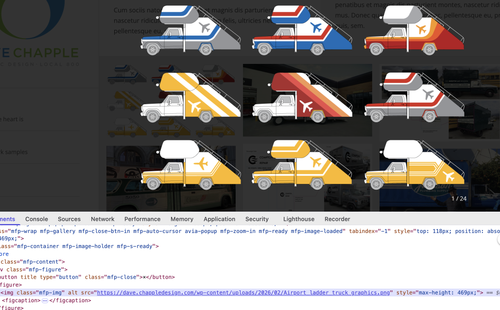
i want to play it to play on the page in a way that page itself is still visible. Presently the whole page is getting dark and only the video plays. you nedd to go back to the page with arrow left.
–>how to get play within the ½ width column sized frame of the preview pic? So that the page itself ist still visible?
I tried to use the video element instead on the right column, but this seems not to work using the a.m. url.
would be great to know woich setting / element i need to use & configure acc.
Thx a lot and best regards
TilmanHello,
I have a problem with the “Blog Posts” content module, which displays the three, four, or five most recent posts on the home page in a grid. While the display works with one, two, and three columns, it does not work with a four- or five-column display. Although the grid creates the appropriate space for a fourth or fifth column (the other columns become smaller), the content is missing. In column 4 or columns 4 and 5, no post
(headline, image, text excerpt, and “read more” link) is displayed; the area is completely empty.I have also checked the posts and their categories. Everything is fine here.
I also increased the page width to be sure, that there is enough space for 4 or five columns.
But only the first three columns were filled with content, column four and five were empty.Why is the four- and five-column display not working in the blog module?
Thanks & best regards,
MartinHello, I have a website with just Enfold 7.1.3 + latest Woocommerce installed where the problem can be seen, but before giviing you access please note this bug affects also your own demo site too. please check:
if you select (white) the picture will not change at all.
Perhaps some of the latest changes on the theme did broke something…
Are you guys seeing multiple error messages on the posts and pages WP pages?
Enfold: 7.1.3
WordPress 6.9.1
Chrome Browser 144.0.7559.133 (Official Build) (arm64)
Safari Version 26.2 (21623.1.14.11.9)
Vivaldi Version 7.8.3925.62 (Official Build) (arm64), Chromium Version 144.0.7559.167
Firefox 147.0.2 (aarch64)
Running on a Mac Mini M2 (Tahoe 26.2)Error Messages when opening Posts and Pages (but similar error seen on e.g. the Plugins page):
Notice: WP_Styles::add(): The style with the handle “avia-module-audioplayer” was enqueued with dependencies that are not registered: avia-layout. (This message was added in version 6.9.1.) Please see Debugging in WordPress for more information. in /homepages/1/d4297824949/htdocs/wordpress/wp-includes/functions.php on line 6163
Notice: WP_Styles::add(): The style with the handle “avia-module-blog” was enqueued with dependencies that are not registered: avia-layout. (This message was added in version 6.9.1.) Please see Debugging in WordPress for more information. in /homepages/1/d4297824949/htdocs/wordpress/wp-includes/functions.php on line 6163
Notice: WP_Styles::add(): The style with the handle “avia-module-postslider” was enqueued with dependencies that are not registered: avia-layout. (This message was added in version 6.9.1.) Please see Debugging in WordPress for more information. in /homepages/1/d4297824949/htdocs/wordpress/wp-includes/functions.php on line 6163
Notice: WP_Styles::add(): The style with the handle “avia-module-button” was enqueued with dependencies that are not registered: avia-layout. (This message was added in version 6.9.1.) Please see Debugging in WordPress for more information. in /homepages/1/d4297824949/htdocs/wordpress/wp-includes/functions.php on line 6163
Notice: WP_Styles::add(): The style with the handle “avia-module-buttonrow” was enqueued with dependencies that are not registered: avia-layout. (This message was added in version 6.9.1.) Please see Debugging in WordPress for more information. in /homepages/1/d4297824949/htdocs/wordpress/wp-includes/functions.php on line 6163
Notice: WP_Styles::add(): The style with the handle “avia-module-button-fullwidth” was enqueued with dependencies that are not registered: avia-layout. (This message was added in version 6.9.1.) Please see Debugging in WordPress for more information. in /homepages/1/d4297824949/htdocs/wordpress/wp-includes/functions.php on line 6163
Notice: WP_Styles::add(): The style with the handle “avia-module-catalogue” was enqueued with dependencies that are not registered: avia-layout. (This message was added in version 6.9.1.) Please see Debugging in WordPress for more information. in /homepages/1/d4297824949/htdocs/wordpress/wp-includes/functions.php on line 6163
Notice: WP_Styles::add(): The style with the handle “avia-module-comments” was enqueued with dependencies that are not registered: avia-layout. (This message was added in version 6.9.1.) Please see Debugging in WordPress for more information. in /homepages/1/d4297824949/htdocs/wordpress/wp-includes/functions.php on line 6163
Notice: WP_Styles::add(): The style with the handle “avia-module-contact” was enqueued with dependencies that are not registered: avia-layout. (This message was added in version 6.9.1.) Please see Debugging in WordPress for more information. in /homepages/1/d4297824949/htdocs/wordpress/wp-includes/functions.php on line 6163
Notice: WP_Styles::add(): The style with the handle “avia-module-slideshow” was enqueued with dependencies that are not registered: avia-layout. (This message was added in version 6.9.1.) Please see Debugging in WordPress for more information. in /homepages/1/d4297824949/htdocs/wordpress/wp-includes/functions.php on line 6163
Notice: WP_Styles::add(): The style with the handle “avia-module-countdown” was enqueued with dependencies that are not registered: avia-layout. (This message was added in version 6.9.1.) Please see Debugging in WordPress for more information. in /homepages/1/d4297824949/htdocs/wordpress/wp-includes/functions.php on line 6163
Notice: WP_Styles::add(): The style with the handle “avia-module-dynamic-field” was enqueued with dependencies that are not registered: avia-layout. (This message was added in version 6.9.1.) Please see Debugging in WordPress for more information. in /homepages/1/d4297824949/htdocs/wordpress/wp-includes/functions.php on line 6163
Notice: WP_Styles::add(): The style with the handle “avia-module-gallery” was enqueued with dependencies that are not registered: avia-layout. (This message was added in version 6.9.1.) Please see Debugging in WordPress for more information. in /homepages/1/d4297824949/htdocs/wordpress/wp-includes/functions.php on line 6163
Notice: WP_Styles::add(): The style with the handle “avia-module-maps” was enqueued with dependencies that are not registered: avia-layout. (This message was added in version 6.9.1.) Please see Debugging in WordPress for more information. in /homepages/1/d4297824949/htdocs/wordpress/wp-includes/functions.php on line 6163
Notice: WP_Styles::add(): The style with the handle “avia-module-gridrow” was enqueued with dependencies that are not registered: avia-layout. (This message was added in version 6.9.1.) Please see Debugging in WordPress for more information. in /homepages/1/d4297824949/htdocs/wordpress/wp-includes/functions.php on line 6163
Notice: WP_Styles::add(): The style with the handle “avia-module-heading” was enqueued with dependencies that are not registered: avia-layout. (This message was added in version 6.9.1.) Please see Debugging in WordPress for more information. in /homepages/1/d4297824949/htdocs/wordpress/wp-includes/functions.php on line 6163
Notice: WP_Styles::add(): The style with the handle “avia-module-rotator” was enqueued with dependencies that are not registered: avia-layout. (This message was added in version 6.9.1.) Please see Debugging in WordPress for more information. in /homepages/1/d4297824949/htdocs/wordpress/wp-includes/functions.php on line 6163
Notice: WP_Styles::add(): The style with the handle “avia-module-hr” was enqueued with dependencies that are not registered: avia-layout. (This message was added in version 6.9.1.) Please see Debugging in WordPress for more information. in /homepages/1/d4297824949/htdocs/wordpress/wp-includes/functions.php on line 6163
Notice: WP_Styles::add(): The style with the handle “avia-module-icon” was enqueued with dependencies that are not registered: avia-layout. (This message was added in version 6.9.1.) Please see Debugging in WordPress for more information. in /homepages/1/d4297824949/htdocs/wordpress/wp-includes/functions.php on line 6163
Notice: WP_Styles::add(): The style with the handle “avia-module-icon-circles” was enqueued with dependencies that are not registered: avia-layout. (This message was added in version 6.9.1.) Please see Debugging in WordPress for more information. in /homepages/1/d4297824949/htdocs/wordpress/wp-includes/functions.php on line 6163
Notice: WP_Styles::add(): The style with the handle “avia-module-iconbox” was enqueued with dependencies that are not registered: avia-layout. (This message was added in version 6.9.1.) Please see Debugging in WordPress for more information. in /homepages/1/d4297824949/htdocs/wordpress/wp-includes/functions.php on line 6163
Notice: WP_Styles::add(): The style with the handle “avia-module-icongrid” was enqueued with dependencies that are not registered: avia-layout. (This message was added in version 6.9.1.) Please see Debugging in WordPress for more information. in /homepages/1/d4297824949/htdocs/wordpress/wp-includes/functions.php on line 6163
Notice: WP_Styles::add(): The style with the handle “avia-module-iconlist” was enqueued with dependencies that are not registered: avia-layout. (This message was added in version 6.9.1.) Please see Debugging in WordPress for more information. in /homepages/1/d4297824949/htdocs/wordpress/wp-includes/functions.php on line 6163
Notice: WP_Styles::add(): The style with the handle “avia-module-image” was enqueued with dependencies that are not registered: avia-layout. (This message was added in version 6.9.1.) Please see Debugging in WordPress for more information. in /homepages/1/d4297824949/htdocs/wordpress/wp-includes/functions.php on line 6163
Notice: WP_Styles::add(): The style with the handle “avia-module-image-diff” was enqueued with dependencies that are not registered: avia-layout. (This message was added in version 6.9.1.) Please see Debugging in WordPress for more information. in /homepages/1/d4297824949/htdocs/wordpress/wp-includes/functions.php on line 6163
Notice: WP_Styles::add(): The style with the handle “avia-module-hotspot” was enqueued with dependencies that are not registered: avia-layout. (This message was added in version 6.9.1.) Please see Debugging in WordPress for more information. in /homepages/1/d4297824949/htdocs/wordpress/wp-includes/functions.php on line 6163
Notice: WP_Styles::add(): The style with the handle “avia-module-sc-lottie-animation” was enqueued with dependencies that are not registered: avia-layout. (This message was added in version 6.9.1.) Please see Debugging in WordPress for more information. in /homepages/1/d4297824949/htdocs/wordpress/wp-includes/functions.php on line 6163
Notice: WP_Styles::add(): The style with the handle “avia-module-magazine” was enqueued with dependencies that are not registered: avia-layout. (This message was added in version 6.9.1.) Please see Debugging in WordPress for more information. in /homepages/1/d4297824949/htdocs/wordpress/wp-includes/functions.php on line 6163
Notice: WP_Styles::add(): The style with the handle “avia-module-masonry” was enqueued with dependencies that are not registered: avia-layout. (This message was added in version 6.9.1.) Please see Debugging in WordPress for more information. in /homepages/1/d4297824949/htdocs/wordpress/wp-includes/functions.php on line 6163
Notice: WP_Styles::add(): The style with the handle “avia-siteloader” was enqueued with dependencies that are not registered: avia-layout. (This message was added in version 6.9.1.) Please see Debugging in WordPress for more information. in /homepages/1/d4297824949/htdocs/wordpress/wp-includes/functions.php on line 6163
Notice: WP_Styles::add(): The style with the handle “avia-module-menu” was enqueued with dependencies that are not registered: avia-layout. (This message was added in version 6.9.1.) Please see Debugging in WordPress for more information. in /homepages/1/d4297824949/htdocs/wordpress/wp-includes/functions.php on line 6163
Notice: WP_Styles::add(): The style with the handle “avia-module-notification” was enqueued with dependencies that are not registered: avia-layout. (This message was added in version 6.9.1.) Please see Debugging in WordPress for more information. in /homepages/1/d4297824949/htdocs/wordpress/wp-includes/functions.php on line 6163
Notice: WP_Styles::add(): The style with the handle “avia-module-numbers” was enqueued with dependencies that are not registered: avia-layout. (This message was added in version 6.9.1.) Please see Debugging in WordPress for more information. in /homepages/1/d4297824949/htdocs/wordpress/wp-includes/functions.php on line 6163
Notice: WP_Styles::add(): The style with the handle “avia-module-portfolio” was enqueued with dependencies that are not registered: avia-layout. (This message was added in version 6.9.1.) Please see Debugging in WordPress for more information. in /homepages/1/d4297824949/htdocs/wordpress/wp-includes/functions.php on line 6163
Notice: WP_Styles::add(): The style with the handle “avia-module-post-metadata” was enqueued with dependencies that are not registered: avia-layout. (This message was added in version 6.9.1.) Please see Debugging in WordPress for more information. in /homepages/1/d4297824949/htdocs/wordpress/wp-includes/functions.php on line 6163
Notice: WP_Styles::add(): The style with the handle “avia-module-progress-bar” was enqueued with dependencies that are not registered: avia-layout. (This message was added in version 6.9.1.) Please see Debugging in WordPress for more information. in /homepages/1/d4297824949/htdocs/wordpress/wp-includes/functions.php on line 6163
Notice: WP_Styles::add(): The style with the handle “avia-module-promobox” was enqueued with dependencies that are not registered: avia-layout. (This message was added in version 6.9.1.) Please see Debugging in WordPress for more information. in /homepages/1/d4297824949/htdocs/wordpress/wp-includes/functions.php on line 6163
Notice: WP_Styles::add(): The style with the handle “avia-sc-search” was enqueued with dependencies that are not registered: avia-layout. (This message was added in version 6.9.1.) Please see Debugging in WordPress for more information. in /homepages/1/d4297824949/htdocs/wordpress/wp-includes/functions.php on line 6163
Notice: WP_Styles::add(): The style with the handle “avia-module-slideshow-accordion” was enqueued with dependencies that are not registered: avia-layout. (This message was added in version 6.9.1.) Please see Debugging in WordPress for more information. in /homepages/1/d4297824949/htdocs/wordpress/wp-includes/functions.php on line 6163
Notice: WP_Styles::add(): The style with the handle “avia-module-slideshow-ls” was enqueued with dependencies that are not registered: avia-layout. (This message was added in version 6.9.1.) Please see Debugging in WordPress for more information. in /homepages/1/d4297824949/htdocs/wordpress/wp-includes/functions.php on line 6163
Notice: WP_Styles::add(): The style with the handle “avia-module-social” was enqueued with dependencies that are not registered: avia-layout. (This message was added in version 6.9.1.) Please see Debugging in WordPress for more information. in /homepages/1/d4297824949/htdocs/wordpress/wp-includes/functions.php on line 6163
Notice: WP_Styles::add(): The style with the handle “avia-module-tabsection” was enqueued with dependencies that are not registered: avia-layout. (This message was added in version 6.9.1.) Please see Debugging in WordPress for more information. in /homepages/1/d4297824949/htdocs/wordpress/wp-includes/functions.php on line 6163
Notice: WP_Styles::add(): The style with the handle “avia-module-table” was enqueued with dependencies that are not registered: avia-layout. (This message was added in version 6.9.1.) Please see Debugging in WordPress for more information. in /homepages/1/d4297824949/htdocs/wordpress/wp-includes/functions.php on line 6163
Notice: WP_Styles::add(): The style with the handle “avia-module-tabs” was enqueued with dependencies that are not registered: avia-layout. (This message was added in version 6.9.1.) Please see Debugging in WordPress for more information. in /homepages/1/d4297824949/htdocs/wordpress/wp-includes/functions.php on line 6163
Notice: WP_Styles::add(): The style with the handle “avia-module-team” was enqueued with dependencies that are not registered: avia-layout. (This message was added in version 6.9.1.) Please see Debugging in WordPress for more information. in /homepages/1/d4297824949/htdocs/wordpress/wp-includes/functions.php on line 6163
Notice: WP_Styles::add(): The style with the handle “avia-module-testimonials” was enqueued with dependencies that are not registered: avia-layout. (This message was added in version 6.9.1.) Please see Debugging in WordPress for more information. in /homepages/1/d4297824949/htdocs/wordpress/wp-includes/functions.php on line 6163
Notice: WP_Styles::add(): The style with the handle “avia-module-timeline” was enqueued with dependencies that are not registered: avia-layout. (This message was added in version 6.9.1.) Please see Debugging in WordPress for more information. in /homepages/1/d4297824949/htdocs/wordpress/wp-includes/functions.php on line 6163
Notice: WP_Styles::add(): The style with the handle “avia-module-toggles” was enqueued with dependencies that are not registered: avia-layout. (This message was added in version 6.9.1.) Please see Debugging in WordPress for more information. in /homepages/1/d4297824949/htdocs/wordpress/wp-includes/functions.php on line 6163
Notice: WP_Styles::add(): The style with the handle “avia-module-video” was enqueued with dependencies that are not registered: avia-layout. (This message was added in version 6.9.1.) Please see Debugging in WordPress for more information. in /homepages/1/d4297824949/htdocs/wordpress/wp-includes/functions.php on line 6163
Notice: WP_Scripts::add(): The script with the handle “avia-module-audioplayer” was enqueued with dependencies that are not registered: avia-shortcodes. (This message was added in version 6.9.1.) Please see Debugging in WordPress for more information. in /homepages/1/d4297824949/htdocs/wordpress/wp-includes/functions.php on line 6163
Notice: WP_Scripts::add(): The script with the handle “avia-module-chart-js” was enqueued with dependencies that are not registered: avia-shortcodes. (This message was added in version 6.9.1.) Please see Debugging in WordPress for more information. in /homepages/1/d4297824949/htdocs/wordpress/wp-includes/functions.php on line 6163
Notice: WP_Scripts::add(): The script with the handle “avia-module-chart” was enqueued with dependencies that are not registered: avia-shortcodes. (This message was added in version 6.9.1.) Please see Debugging in WordPress for more information. in /homepages/1/d4297824949/htdocs/wordpress/wp-includes/functions.php on line 6163
Notice: WP_Scripts::add(): The script with the handle “avia-module-contact” was enqueued with dependencies that are not registered: avia-shortcodes. (This message was added in version 6.9.1.) Please see Debugging in WordPress for more information. in /homepages/1/d4297824949/htdocs/wordpress/wp-includes/functions.php on line 6163
Notice: WP_Scripts::add(): The script with the handle “avia-module-slideshow” was enqueued with dependencies that are not registered: avia-shortcodes. (This message was added in version 6.9.1.) Please see Debugging in WordPress for more information. in /homepages/1/d4297824949/htdocs/wordpress/wp-includes/functions.php on line 6163
Notice: WP_Scripts::add(): The script with the handle “avia-module-countdown” was enqueued with dependencies that are not registered: avia-shortcodes. (This message was added in version 6.9.1.) Please see Debugging in WordPress for more information. in /homepages/1/d4297824949/htdocs/wordpress/wp-includes/functions.php on line 6163
Notice: WP_Scripts::add(): The script with the handle “avia-module-gallery” was enqueued with dependencies that are not registered: avia-shortcodes. (This message was added in version 6.9.1.) Please see Debugging in WordPress for more information. in /homepages/1/d4297824949/htdocs/wordpress/wp-includes/functions.php on line 6163
Notice: WP_Scripts::add(): The script with the handle “avia-module-gallery-hor” was enqueued with dependencies that are not registered: avia-shortcodes. (This message was added in version 6.9.1.) Please see Debugging in WordPress for more information. in /homepages/1/d4297824949/htdocs/wordpress/wp-includes/functions.php on line 6163
Notice: WP_Scripts::add(): The script with the handle “avia-module-rotator” was enqueued with dependencies that are not registered: avia-shortcodes. (This message was added in version 6.9.1.) Please see Debugging in WordPress for more information. in /homepages/1/d4297824949/htdocs/wordpress/wp-includes/functions.php on line 6163
Notice: WP_Scripts::add(): The script with the handle “avia-module-icon-circles” was enqueued with dependencies that are not registered: avia-shortcodes. (This message was added in version 6.9.1.) Please see Debugging in WordPress for more information. in /homepages/1/d4297824949/htdocs/wordpress/wp-includes/functions.php on line 6163
Notice: WP_Scripts::add(): The script with the handle “avia-module-icongrid” was enqueued with dependencies that are not registered: avia-shortcodes. (This message was added in version 6.9.1.) Please see Debugging in WordPress for more information. in /homepages/1/d4297824949/htdocs/wordpress/wp-includes/functions.php on line 6163
Notice: WP_Scripts::add(): The script with the handle “avia-module-iconlist” was enqueued with dependencies that are not registered: avia-shortcodes. (This message was added in version 6.9.1.) Please see Debugging in WordPress for more information. in /homepages/1/d4297824949/htdocs/wordpress/wp-includes/functions.php on line 6163
Notice: WP_Scripts::add(): The script with the handle “avia-module-image-diff” was enqueued with dependencies that are not registered: avia-shortcodes. (This message was added in version 6.9.1.) Please see Debugging in WordPress for more information. in /homepages/1/d4297824949/htdocs/wordpress/wp-includes/functions.php on line 6163
Notice: WP_Scripts::add(): The script with the handle “avia-module-hotspot” was enqueued with dependencies that are not registered: avia-shortcodes. (This message was added in version 6.9.1.) Please see Debugging in WordPress for more information. in /homepages/1/d4297824949/htdocs/wordpress/wp-includes/functions.php on line 6163
Notice: WP_Scripts::add(): The script with the handle “avia-module-magazine” was enqueued with dependencies that are not registered: avia-shortcodes. (This message was added in version 6.9.1.) Please see Debugging in WordPress for more information. in /homepages/1/d4297824949/htdocs/wordpress/wp-includes/functions.php on line 6163
Notice: WP_Scripts::add(): The script with the handle “avia-module-isotope” was enqueued with dependencies that are not registered: avia-shortcodes. (This message was added in version 6.9.1.) Please see Debugging in WordPress for more information. in /homepages/1/d4297824949/htdocs/wordpress/wp-includes/functions.php on line 6163
Notice: WP_Scripts::add(): The script with the handle “avia-module-menu” was enqueued with dependencies that are not registered: avia-shortcodes. (This message was added in version 6.9.1.) Please see Debugging in WordPress for more information. in /homepages/1/d4297824949/htdocs/wordpress/wp-includes/functions.php on line 6163
Notice: WP_Scripts::add(): The script with the handle “avia-module-notification” was enqueued with dependencies that are not registered: avia-shortcodes. (This message was added in version 6.9.1.) Please see Debugging in WordPress for more information. in /homepages/1/d4297824949/htdocs/wordpress/wp-includes/functions.php on line 6163
Notice: WP_Scripts::add(): The script with the handle “avia-module-numbers” was enqueued with dependencies that are not registered: avia-shortcodes. (This message was added in version 6.9.1.) Please see Debugging in WordPress for more information. in /homepages/1/d4297824949/htdocs/wordpress/wp-includes/functions.php on line 6163
Notice: WP_Scripts::add(): The script with the handle “avia-module-portfolio” was enqueued with dependencies that are not registered: avia-shortcodes. (This message was added in version 6.9.1.) Please see Debugging in WordPress for more information. in /homepages/1/d4297824949/htdocs/wordpress/wp-includes/functions.php on line 6163
Notice: WP_Scripts::add(): The script with the handle “avia-module-progress-bar” was enqueued with dependencies that are not registered: avia-shortcodes. (This message was added in version 6.9.1.) Please see Debugging in WordPress for more information. in /homepages/1/d4297824949/htdocs/wordpress/wp-includes/functions.php on line 6163
Notice: WP_Scripts::add(): The script with the handle “avia-module-slideshow-video” was enqueued with dependencies that are not registered: avia-shortcodes. (This message was added in version 6.9.1.) Please see Debugging in WordPress for more information. in /homepages/1/d4297824949/htdocs/wordpress/wp-includes/functions.php on line 6163
Notice: WP_Scripts::add(): The script with the handle “avia-module-slideshow-accordion” was enqueued with dependencies that are not registered: avia-shortcodes. (This message was added in version 6.9.1.) Please see Debugging in WordPress for more information. in /homepages/1/d4297824949/htdocs/wordpress/wp-includes/functions.php on line 6163
Notice: WP_Scripts::add(): The script with the handle “avia-module-slideshow-ls” was enqueued with dependencies that are not registered: avia-shortcodes. (This message was added in version 6.9.1.) Please see Debugging in WordPress for more information. in /homepages/1/d4297824949/htdocs/wordpress/wp-includes/functions.php on line 6163
Notice: WP_Scripts::add(): The script with the handle “avia-module-tabsection” was enqueued with dependencies that are not registered: avia-shortcodes. (This message was added in version 6.9.1.) Please see Debugging in WordPress for more information. in /homepages/1/d4297824949/htdocs/wordpress/wp-includes/functions.php on line 6163
Notice: WP_Scripts::add(): The script with the handle “avia-module-tabs” was enqueued with dependencies that are not registered: avia-shortcodes. (This message was added in version 6.9.1.) Please see Debugging in WordPress for more information. in /homepages/1/d4297824949/htdocs/wordpress/wp-includes/functions.php on line 6163
Notice: WP_Scripts::add(): The script with the handle “avia-module-testimonials” was enqueued with dependencies that are not registered: avia-shortcodes. (This message was added in version 6.9.1.) Please see Debugging in WordPress for more information. in /homepages/1/d4297824949/htdocs/wordpress/wp-includes/functions.php on line 6163
Notice: WP_Scripts::add(): The script with the handle “avia-module-timeline” was enqueued with dependencies that are not registered: avia-shortcodes. (This message was added in version 6.9.1.) Please see Debugging in WordPress for more information. in /homepages/1/d4297824949/htdocs/wordpress/wp-includes/functions.php on line 6163
Notice: WP_Scripts::add(): The script with the handle “avia-module-toggles” was enqueued with dependencies that are not registered: avia-shortcodes. (This message was added in version 6.9.1.) Please see Debugging in WordPress for more information. in /homepages/1/d4297824949/htdocs/wordpress/wp-includes/functions.php on line 6163
Notice: WP_Scripts::add(): The script with the handle “avia-module-video” was enqueued with dependencies that are not registered: avia-shortcodes. (This message was added in version 6.9.1.) Please see Debugging in WordPress for more information. in /homepages/1/d4297824949/htdocs/wordpress/wp-includes/functions.php on line 6163
Notice: WP_Scripts::add(): The script with the handle “avia_analytics_js” was enqueued with dependencies that are not registered: avia_builder_js. (This message was added in version 6.9.1.) Please see Debugging in WordPress for more information. in /homepages/1/d4297824949/htdocs/wordpress/wp-includes/functions.php on line 6163
+++
Here’s Gemini’s Research result of looking at the functions.php code:
The error in this code is a logic and implementation mismatch related to how the WordPress function wp_trigger_error() handles message formatting.
Specifically, there are two issues in the final line:
wp_trigger_error( ”, $message );
1. Redundant Formatting (The Main Issue)
In WordPress 6.4+, wp_trigger_error() was introduced to standardize how “Doing it wrong” and “Deprecated” notices are handled.
Inside wp_trigger_error(), WordPress automatically prepends the text:
“Function %s was called incorrectly…”
However, your code manually builds that exact same string in the lines above:
$message = sprintf(
__( ‘Function %1$s was called incorrectly. %2$s %3$s’ ),
$function_name,
$message,
$version
);
The Result: If this code runs, the error output will look like a stuttering mess:“Function was called incorrectly. Function my_function_name was called incorrectly. [Actual Message] [Version]”
2. Empty First Parameter
The first parameter of wp_trigger_error( $function_name, $message ) is intended to be the name of the function that was called incorrectly. By passing an empty string (”), you are preventing wp_trigger_error from correctly identifying the culprit in its own automated prefix.+++
What I tried:
Enfold > Performance > Disabled all file merging and compression (Enfold > Performance), cleared all caches (very few plugins and no cacheing on the website).
Enfold > Performance > Unused features > changed to ‘Always load all elements’
Checked for /wp-content/uploads/dynamic_avia and its permissions.
Temp. emptying of dynamic_avia reset the website visually.These are warnings, so the website seems to work OK, but it looks like it needs to be fixed elsewhere (loading of avia-layout).