-
Search Results
-
Hi,
I’m creating a one page layout and in my widget section I can see a widget that shows the pages of my website, however i have not inserted this widget and I have no idea where it is coming from.
Image of the extra widget on the website –
Widget Area –
.
Kindly help me remove the extra widget, I’ve been unable to do so thus far.
Thanks.
Hi,
1
I have used EasySlider on my Enfold test site. As each new image appears in the slider, it makes text and images below, in the main content area of the page, nudge very slightly to left and then back.Once all of the image in EasySlider have run through once, this problem doesn’t happen any more. But if I leave the page and return to it, then the same problem happens.
I have tried using over and under-sized images in EasySlider, as well as exactly sized images. I have also used slide and fad options. But the problem still happens in each case.
2
The second question is regarding the caption in EasySlider. By default it appears in white, in a dark grey box, on the left side of the image. Is it possible to change the position to the right side, change the colour of the box and the font size and colour?Thanks.
————
Had another look at the first question, and see now that the slight shift in the main content area of the page, nudges down and up (before it was left, then right) – or both.
I also noticed that this shift of the main content does not happen if I click the left/right advance/back arrows in the main slider image – only when EasySlider plays automatically.
My Enfold test site is here: http://enamellers.org/bsoe/
————-
Another update on the odd EasySlider behaviour – the page content movement issue described only affects Chrome (I’m on version 30 on a Mac). EasySlider seems to behave well in Firefox, Safari and Opera.
Topic: Advanced Layerslider
Greetings good people of Planet Enfold!
Recently we updated our galactic home page with a new banner. It looks great on a desktop, however when viewed on an iPad /iPhone there’s a ‘white’ gap at the top and bottom of the banner (the image in the slider does not reach the edge) and star fleet command are concerned this may be an issue…
The site is http://www.marsmarketing.com.au
Would you be able to assist our stricken vessel?
Topic: Can't find page in back end
Hi.
I imported demo data into our website.
I can’t find this page in the back end.
There is a Hompage, and a Homepage v3, but not a Homepage v2:
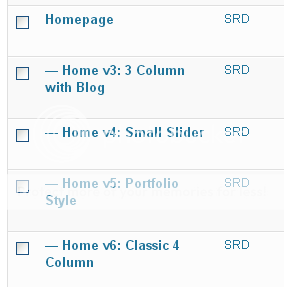
Why is this page invisible in the back end?
Thanks.
Topic: 100% Full Width Pages
How can I create 100% page content?
Like the images are here: http://theme-fusion.com/avada/full-width-100/
I am trying to use the Justified Image Grid plugin with this template but I am not sure how.
I’d like ‘Portfolio’ posts to show, and be able to filter by my categories.
Any thoughts on how to do this?
I have a very simple placeholder blog at the moment and a design issue I can’t figure out.
Using the Enfold Theme Options menus I created a simple style with a boxed layout and a custom uploaded background image. This produces a white text box with black text on a white background on top of the background image I uploaded.
Here’s my design issue.
I would like the text box to be partially transparent so that the background image shows through the text box.Is there a setting for this?
Is there code that I could add the style sheet somewhere?
Here’s the web site as it is now: http://www.williamkannberg.com.
There is no Set Featured image on the portfolio pages console. I have done all that you have told me to do and it’s still not working.
Very frustrating. Please help me resolve this
Screenshot of portfolio post: http://memecommunications.com/wp-content/uploads/2013/09/Screen-Shot-2013-09-07-at-11.58.57-AM.png
And still getting this: http://memecommunications.com/wp-content/uploads/2013/09/Screen-Shot-2013-09-07-at-11.58.36-AM.png
Viewing 30 results - 101,551 through 101,580 (of 106,417 total)