-
Search Results
-
Hello,
I’m trying to run a BigCommerce store using the Enfold theme, but there’s a critical error that’s giving the white screen of death when I try to view the homepage. The back-end stays up and running, but when the BigCommerce plugin is active, the site doesn’t exist. I’d love to keep using the Enfold theme and would hate to have to use something else for this site. Any help would be greatly appreciated!
WordPress version 6.8.1
Active theme: Enfold Child (version 1.0) Current plugin: (version ) PHP version 8.2.18Error Details
=============
An error of type E_ERROR was caused in line 1602 of the file /home1/enginendo/public_html/cjm/wp-content/themes/enfold/config-templatebuilder/avia-shortcode-helpers/class-avia-masonry.php. Error message: Uncaught Error: Call to undefined function avia_wc_clear_catalog_ordering_args_filters() in /home1/enginendo/public_html/cjm/wp-content/themes/enfold/config-templatebuilder/avia-shortcode-helpers/class-avia-masonry.php:1602
Stack trace:
#0 /home1/enginendo/public_html/cjm/wp-content/themes/enfold/config-templatebuilder/avia-shortcodes/masonry_entries/masonry_entries.php(753): avia_masonry->query_entries(Array, false)
#1 /home1/enginendo/public_html/cjm/wp-content/themes/enfold/config-templatebuilder/avia-shortcodes/masonry_entries/masonry_entries.php(810): avia_sc_masonry_entries->get_element_styles(Array)
#2 /home1/enginendo/public_html/cjm/wp-content/themes/enfold/config-templatebuilder/avia-template-builder/php/class-shortcode-template.php(1178): avia_sc_masonry_entries->shortcode_handler(Array, ”, ‘av_masonry_entr…’, Array)
#3 /home1/enginendo/public_html/cjm/wp-includes/shortcodes.php(434): aviaShortcodeTemplate->shortcode_handler_prepare(Array, ”, ‘av_masonry_entr…’)
#4 [internal function]: do_shortcode_tag(Array)
#5 /home1/enginendo/public_html/cjm/wp-includes/shortcodes.php(273): preg_replace_callback(‘/\\[(\\[?)(av_but…’, ‘do_shortcode_ta…’, ‘[av_slidesho…’)
#6 /home1/enginendo/public_html/cjm/wp-includes/class-wp-hook.php(324): do_shortcode(‘[av_slidesho…’)
#7 /home1/enginendo/public_html/cjm/wp-includes/plugin.php(205): WP_Hook->apply_filters(‘[av_slidesho…’, Array)
#8 /home1/enginendo/public_html/cjm/wp-content/plugins/wordpress-seo/src/builders/indexable-link-builder.php(137): apply_filters(‘the_content’, ‘I am getting a flood of deprecation warnings in my error_log file and it is slowing down our server’s performance, especially noticeable when editing posts and pages.
It appears the offending functions are:
av_icon_char
av_icon_class
av_icon_stringI cannot find information on what the correct replacements are. Is this something you can help me with?
Here are some samples of how we are currently using these functions.
av_icon_char
$icon = av_icon_char( ‘search’ );av_icon_string
$class = av_icon_class( ‘search’ );Here are some examples from the error_log file:
[21-May-2025 18:26:12 UTC] PHP Deprecated: Function av_icon_char is deprecated since version 7.0! Use No longer used by Enfold instead. in /home/maritimetravel/public_html/wp-includes/functions.php on line 6121
[21-May-2025 18:26:12 UTC] PHP Deprecated: Function av_icon_class is deprecated since version 7.0! Use No longer used by Enfold instead. in /home/maritimetravel/public_html/wp-includes/functions.php on line 6121
[21-May-2025 18:26:12 UTC] PHP Deprecated: Function av_icon_char is deprecated since version 7.0! Use No longer used by Enfold instead. in /home/maritimetravel/public_html/wp-includes/functions.php on line 6121
[21-May-2025 18:26:12 UTC] PHP Deprecated: Function av_icon_class is deprecated since version 7.0! Use No longer used by Enfold instead. in /home/maritimetravel/public_html/wp-includes/functions.php on line 6121Our error_log file grows about 200 MB per day.
Can you please direct me on how we can update our child theme to address these deprecation warnings?
Can you advise how to re-size a the woocommerce single product page image? Using Appearance>Customize>Woocommerce settings does nothing. My images are uploaded at 300×300 and are being resized to a much larger image. I am guessing the Enfold theme is overriding Woo. Any help would be greatly appreciated
Hi Enfold support team,
I’m using Enfold with a child theme and I’m trying to completely remove the H1 page title from single blog posts. I’m not looking to just hide it via CSS – I want it not to be rendered at all in the HTML source code.
The heading I’m referring to looks like this in the frontend:
<h1 class=”post-title entry-title” itemprop=”headline”>My Blog Title</h1>
I’ve already tried using the avf_title_args filter and even added this to my functions.php:
add_filter(‘avf_title_args’, ‘remove_post_title_in_single’, 10, 2);
function remove_post_title_in_single($args, $id) {
if (is_single()) {
$args[‘title’] = ”;
}
return $args;
}But the H1 is still showing up in the source code of the post.
Can you please confirm:
Which template or hook is responsible for rendering this H1?
What is the best way to remove it completely from the markup (e.g. via remove_action() or overriding a template in the child theme)?
Is there an officially supported way to do this for blog posts?
Thanks in advance for your help!
– AndreasI’m currently working on a webshop and want to use the advanced layout editor for the product pages.
I’m working with variable products and when I’m changing to advanced layout editor instead of standard editor, the variable product options (like select fields) aren’t shown on the product page anymore. When I’m switching to standard editor again, it shows.
Is there a possibility to make variable products work with advanced layout editor from enfold?
Thank u in advance!
AnnaTopic: Paypal Button code changes
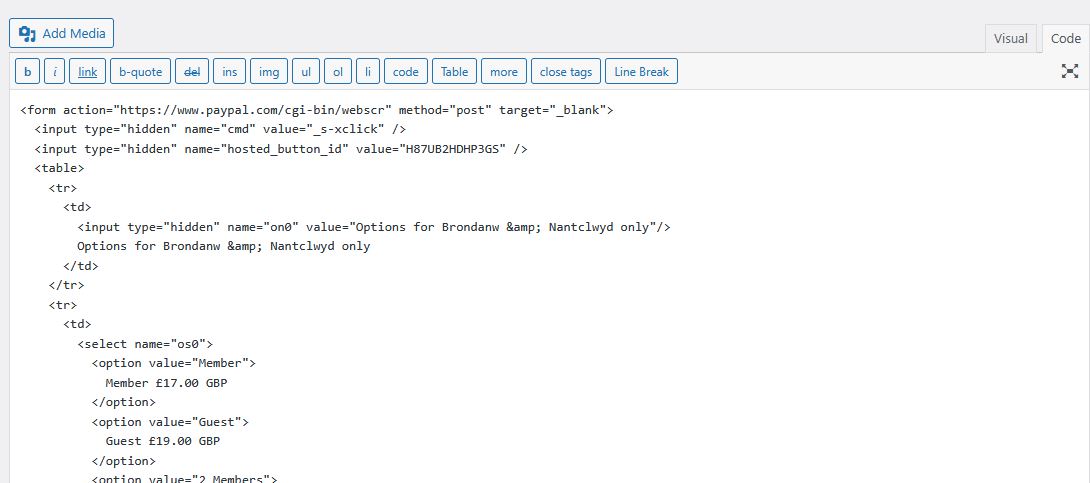
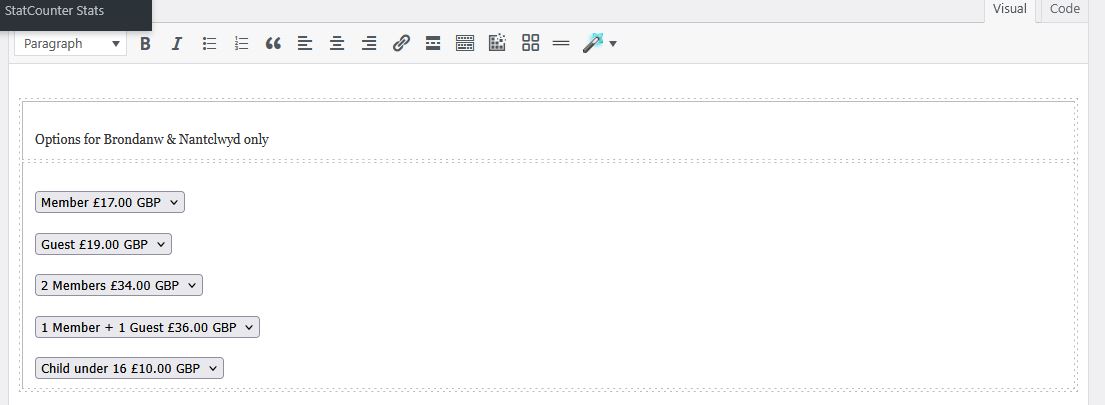
I often use Paypal to generate a code and then paste it into my website on the code tab. However, recently somehting has been scrambling the code such that it no longer produces the desired result. I’ve copy and pasted the code into Word and it copies as it should. However when I paste it into my Enfold themed page it adds extra code which I then have to manually delete. What’s going on here?:
Here’s the relevant part of the code as generated by Paypal:
<table>
<tr>
<td>
<input type=”hidden” name=”on0″ value=”Options for Brondanw & Nantclwyd only”/>
Options for Brondanw & Nantclwyd only
</td>
</tr>
<tr>
<td>
<select name=”os0″>
<option value=”Member”>
Member £17.00 GBP
</option>
<option value=”Guest”>
Guest £19.00 GBP
</option>
<option value=”2 Members”>
2 Members £34.00 GBP
</option>
<option value=”1 Member + 1 Guest”>
1 Member + 1 Guest £36.00 GBP
</option>
<option value=”Child under 16″>
Child under 16 £10.00 GBP
</option>
</select>
</td>
</tr>
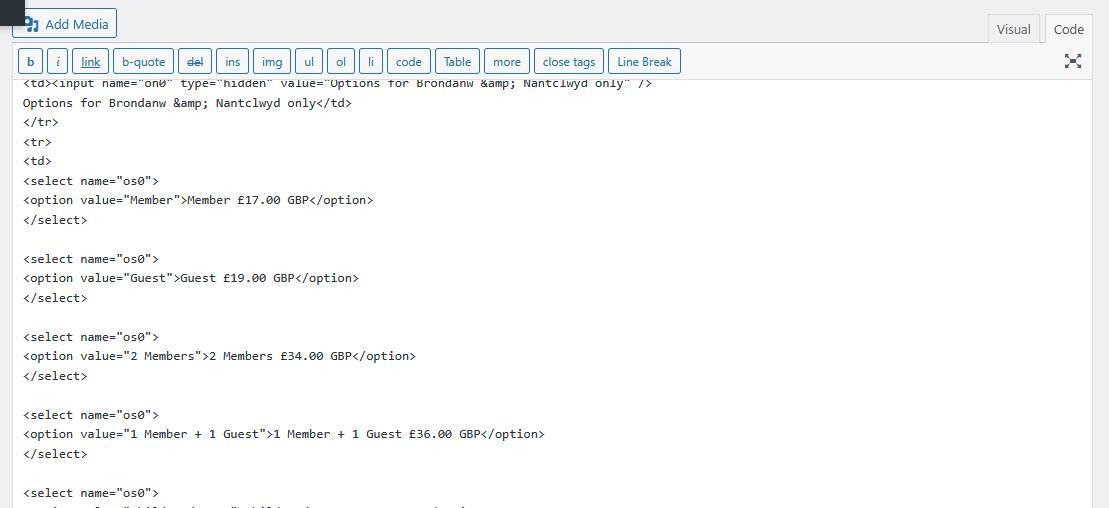
</table>And after pasting it into my website:
<table>
<tbody>
<tr>
<td><input name=”on0″ type=”hidden” value=”Options for Brondanw & Nantclwyd only” />
Options for Brondanw & Nantclwyd only</td>
</tr>
<tr>
<td>
<select name=”os0″>
<option value=”Member”>Member £17.00 GBP</option>
</select><select name=”os0″>
<option value=”Guest”>Guest £19.00 GBP</option>
</select><select name=”os0″>
<option value=”2 Members”>2 Members £34.00 GBP</option>
</select><select name=”os0″>
<option value=”1 Member + 1 Guest”>1 Member + 1 Guest £36.00 GBP</option>
</select><select name=”os0″>
<option value=”Child under 16″>Child under 16 £10.00 GBP</option>
</select></td>
</tr>
</tbody>
</table>See all those <select name = “os0”> lines before each button choice? How did they get there and how can I prevent them from being added?
Viewing 30 results - 2,701 through 2,730 (of 244,613 total)