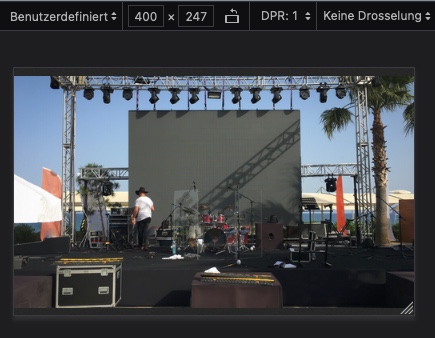
well – open your image in a browser – just pure: https://artlifestudiosproductions.com/wp-content/uploads/2022/04/On-Stage-Sound-System-Setup2.jpg
and size your browser window to at least that dimension you have in your homepage.
This is not an enfold problem – it is the way browsers do render a resized image
this will be the was your full-size image looks without enfold influence on a firefox browser:
Thank you Nikko. I host with Godaddy an noticed a couple of other posts on 04/28/22 that sounded like the same issue. I took the above steps to increase WP mem and PHP mem during the issue that had no immediate effect. As of today 04/29 I can update the pages I was having issues with. Possible Goddady DB server issues I can only assume. I experienced this issue over a 24hr period very randomly. When a page would lock on update the whole domain and sub domains would go offline of a brief period of time. All seems working ATM. The page I was dealing with was very simple standard html content with the Enfold wrap.
 Bobtown Brewery
220 W Main St. Roberts WI. 54023
Tel: (715) 338-1046
Web: bobtownbrewhouse.menufy.com
Availability: Dine In
<hr />
 Yoerg Brewing
378 Maria Ave St Paul MN. 55106
Tel: (651) 330-2076
Web: http://www.yoergbeer.com
Availability: Dine In
<hr />
 Roma Restaurant – Brewery – Market
310 Stillwater Rd Willernie MN. 55090
Tel: (651) 653-4733
Web: http://www.romarestaurantbrewery.com
Availability: Take-n-Bake
<hr />
American Legion Post 98
328 Broadway Ave, St Paul Park, MN 55071
Tel: (651) 459-8016
Web: richarddinglepost98.com
Availability: Dine In
<hr />
VFW Post 806 Club Princeton MN
133 Rum River Dr. North Princeton MN. 55371
Tel: (763) 389-9959
Web: vfw-post-806-princeton-minnesota.business.site
Availability: Dine In
<hr />
 Octopus College Hill
2205 College Street Cedar Falls, IA 50613
Tel: (319) 242-7789
Web: http://www.octopuscollegehill.com
Availability: Dine In
<hr />
 Brothers Market Denver
1022 Skylar St, Denver, IA 50622
Tel: (319) 406-0004
Web: shopbrothersmarket.com
Availability: Take-n-Bake
<hr />
 QC Pizza Mahtomedi
3150 Century Ave N Mahtomedi MN. 55115
Tel: (651)777-1200
Web: http://www.qc.pizza
Availability: Take-n-Bake
<hr />
QC Pizza South Minneapolis
5501 34th Avenue S Minneapolis MN. 55417
Tel: (612)259-7132
Web: http://www.qc.pizza
Availability: Take-n-Bake
<hr />
 GoldBelly Nationwide Shipping
Shipping: UPS Next Day Air Shipping
Availability: 48 contiguous states
Web: https://www.goldbelly.com/qc-pizza
<hr />
Hi,
Thanks for letting us know, I’ll close this thread for now then. Please open a new thread if you should have any further questions or problems.
Best regards,
Rikard
 wohlenberg
Guest
Hallo – Ich habe vor 4 Jahren eine Website per Enfold-Theme aufgesetzt und habe leider eine Weile nichts dran gemacht – … habe aber jetzt WordPress und das Theme aktualisiert.
Leider ist es so, dass im Backend sobald ich eine Seite zum Bearbeiten öffne, oben alles im Classic-Modus steht und man immer weit runter scrollen muss, um zu den Contentelementen zu kommen. Gibt es daür eine Lösung?
Ich komme leider auch nicht mehr auf die Support-Seite
Gruß
Jan Wohlenberg
Hi,
Glad Nikko was able to help, if you have any further questions please create a new thread and we will gladly try to help you. Thank you for using Enfold.
Best regards,
Mike
Hi,
Thanks for that. Please try the following in Quick CSS under Enfold->General Styling:
h4.av-milestone-title {
    font-family: 'Montserrat';
}

.avia-timeline .milestone_icon {
    height: 100px;
    width: 100px;
    line-height: 100px;
}

.avia-timeline-vertical .av-milestone-icon-wrap:after {
    border-left-style: solid;
}
Best regards,
Rikard
Hi,
Could you please explain why there are always issues when installing Woccommerce booking alongside Enfold?
If I look at our page https://guideaujapon.fr/produit/tokyo compared to https://kriesi.at/themes/enfold-travel/product/day-trip-london/ the Quantity Buttons are totally different.
We bought the plugin following your demo and have never been able to use it properly.
See my previous post https://kriesi.at/support/topic/woocommerce-bookings-option-to-display-calendar-on-click-not-working/
Do you reimburse the USD249 or fix it.
How to we get the -/+ buttons?
Thank you
X.
Hi kimhoegcit,
Please open a new thread and include WordPress admin login details in private, so that we can have a closer look at your site.
Best regards,
Rikard
Hi tammiviestinta,
We’re happy to hear that :)
Thanks for using Enfold and have a great day!
Best regards,
Nikko
Hey Rikard, Thanks so much for the prompt reply. You guys are awesome!
I managed to get it sorted with this CSS which might be useful for any else using YITH WooCommerce Ajax Product Filter with ENFOLD.
.yith-wcan-filters .yith-wcan-filter .filter-items .filter-item.hierarchy-collapsable .toggle-handle, h4.collapsable:after {
    background-size: 50% auto;
    background-position: center center;
    background-repeat: no-repeat;
    cursor: pointer;
    display: block;
    height: 20px;
    position: absolute;
    right: -7%;
    top: 5px;
    width: 20px;
}

.yith-wcan-filters .yith-wcan-filter h4.collapsable:after {
    right: -15px;
    top: 5px;
}
.yith-wcan-filter:not(.filter-price-slider) .filter-content {
	overflow: hidden;
}
Cheers!
Hi Enfold team,
using the following css code I was able to enlarge the images of the ajax portfolio preview to full width:
#top .av_table_col.first.portfolio-preview-image,
#top .portfolio-preview-content {
width: 100% !important;
display: block !important;
}
}
Also, I’ve made some other changes learned from the Enfold forums, like removing the lightbox, borders, the navigation etc.
Unfortunately, I couldn’t remove the area surrounding the closing “X”. So please let me know how to do.
In addition, please let me know how to close he gap between the images (imgae list) and how to enlarge them to full width on mobile devices (smartphones).
Please see screenshots.
Thank you very much in advance.
Best regards, fkm
Hey funk_doobie,
I think the issue on that specific page is listed here: https://kriesi.at/documentation/enfold/intro-to-layout-builder/#layout-builder-is-not-loading-properly (under this heading, Troubleshoot: Text Block element not loading)
Please enable debug mode on your site: https://kriesi.at/documentation/enfold/intro-to-layout-builder/#debug-mode and you should see a bunch of shortcodes, copy all of it and make a backup then try to add those shortcodes by section so you can identify which section is causing the issue and try to narrow down the cause of the issue.
Best regards,
Nikko
Hi dschneekloth,
I think the issue on that specific page is listed here: https://kriesi.at/documentation/enfold/intro-to-layout-builder/#layout-builder-is-not-loading-properly (under this heading, Troubleshoot: Text Block element not loading)
I tried to login however we’ll need an administrator level of permission.
Please enable debug mode on your site: https://kriesi.at/documentation/enfold/intro-to-layout-builder/#debug-mode and you should see a bunch of shortcodes, copy all of it and make a backup then try to add those shortcodes by section so you can identify which section is causing the issue.
Best regards,
Nikko
yes – i think that your code above:
jQuery('.fdm-ordering-sidescreen #fdm-ordering-contact-details .fdm-ordering-contact-item').each((idx, x) => {jQuery(x).find('input[name="fdm_ordering_email"]').length == 1 || jQuery(x).find('input[name="fdm_ordering_phone"]').length == 1 ? jQuery(x).hide() : ''; });
is your custom.js file
if you have a child theme – you had to upload that custom.js to your enfold-child/js folder ( on default there is no js folder – create one )
now this snippet comes to functions.php of your child theme and loads that external script.
function add_customjs() {
	wp_enqueue_script( 'customjs', get_stylesheet_directory_uri().'/js/custom.js', array('jquery'), 2, true );
}
add_action( 'wp_enqueue_scripts', 'add_customjs', 100 );
_______
but
1st: in your custom.js file (maybe it is only because you do not use the code function on posting the code) there is a double quote – but it had to be an empty double single quoute:
jQuery('.fdm-ordering-sidescreen #fdm-ordering-contact-details .fdm-ordering-contact-item').each((idx, x) => {jQuery(x).find('input[name="fdm_ordering_email"]').length == 1 || jQuery(x).find('input[name="fdm_ordering_phone"]').length == 1 ? jQuery(x).hide() : ''; });
it is the last: ''
2nd: for such a small script you can insert this directly via your child-theme functions.php without having an external script to upload.
Try this in your child-theme functions.php:
function fdm_ordering_custom_script(){
?>
<script type="text/javascript">
(function($) {
	$('.fdm-ordering-sidescreen #fdm-ordering-contact-details .fdm-ordering-contact-item').each((idx, x) => {$(x).find('input[name="fdm_ordering_email"]').length == 1 || $(x).find('input[name="fdm_ordering_phone"]').length == 1 ? $(x).hide() : ''; });
})(jQuery);
</script>
<?php
}
add_action('wp_footer', 'fdm_ordering_custom_script');
For some reason the left & right margins on a new website of mine are larger than my other sites (on desktop). How do I make the margin size consistent with my other enfold sites?
Hello, my enfold theme seems to be broken, is not working fine. It didn’t show advanced avia editor in the pages, I have had to install classical editor to show advanced avia builder, but still is not working fine, I can’t type text in the blocks like text block. Also in the theme section, it tell me that the theme is broken and is missing style sheet. I attach an image:

Please, can you help me?
Thanks and Best Regards.
 len
len
My client is using Enfold Version: 4.0.4 on their website – timetoplay.com. When I updated the theme I’m now getting Depreciated errors. Do we have to repurchase to update the theme?
Hi,
Thanks for letting us know, I’ll go ahead and close this thread for now then. Please open a new thread if you should have any further questions or problems.
Best regards,
Rikard
Hi,
Thanks letting us know. Please open a new thread if you should have any further questions or problems.
Best regards,
Rikard
I had a Godaddy tech support working on the site at the time… Please recheck… he said he could see the builder and it was saving on his end… But still no luck for me. It can’t be a cache issue since he made updates and saved no problem and I could see them on my end happening… But Enfold theme updates and the builder still will not load on my end…Any suggestions?
Hi,
Great, I’m glad that you got it working. I’ll close this thread for now then, please open a new thread if you should have any further questions or problems.
Best regards,
Rikard
Hi,
Thanks for the update. I’m seeing this on your site now:
Fatal error: Allowed memory size of 2097152 bytes exhausted (tried to allocate 20480 bytes) in /var/www/wp-content/themes/enfold/config-templatebuilder/avia-shortcodes/grid_row/cell.php on line 969
Please try to increase the memory allocated to PHP on your installation: https://wordpress.org/support/article/editing-wp-config-php/. If you need help with that, then please try reaching out to your hosting provider.
Best regards,
Rikard
Hi,
What exactly will not allow you to install anything? I see that you don’t even have Enfold installed on the site now?
Best regards,
Rikard
Hey NicoleVA,
You can remove that under Enfold->Header->Extra Elements.
Best regards,
Rikard
Hi,
Great, I’m glad that we could help. I’ll close this thread for now then, please open a new thread if you should have any further questions or problems.
Best regards,
Rikard
Nope it will not allow me to upload or install anything at all… fails every time. I deactivated and deleted the Enfold theme to start over and now I can not get it to upload back into themes… fail after fail… website is now down… please help ASAP
Hi.. On a client site when click on a tag the Archive Page display the results two times..
The results, the pagination controls and again the results and the pagination controls
Did You can help..?
Thank You Very much
WordPress 5.9.3
Enfold 4.9.2.1 WPML
Hi Ismael,
thank you so much for your reply – the css code works fine.
This also allowed me to make a couple of other small styling changes on my own. :)
There are still a handful things I´d like to change within this topic – I tried myself, unfortunately without success.
So I´d be very grateful for your help (please also see screenshot):
1. remove the loading icon in the search field
-> I already removed the magnifying glass in the search filed using the Enfold Forums with the following css code:
#searchsubmit {
display:none;
}
2. reduce the height of the search result items
3. remove the light grey background color of the search result items
4. reduce the size of the magnifying glass next to the burger menu on mobile devices
5. disable the funktion/link of being redirected to the search results page by clicking the magnifying glass or enter
Thank you very much in advance for another reply.
Best regards, fkm



