-
AuthorSearch Results
-
June 18, 2022 at 2:48 pm #1355689
In reply to: avia layout gone!
if i go more responsive than this the buttons and text wont show correctly
https://snipboard.io/olD0uW.jpgI saw that there was a fix here: https://github.com/KriesiMedia/enfold-library/commit/944318e25cb1336935c0f8850db94ec4436a6ace
tried to add the content to wp-content
themes/enfold/config-templatebuilder/avia-shortcodes/slideshow/slideshow.js
but that didnt fix the issueJune 18, 2022 at 12:13 pm #1355683Hi Rikard,
Thank you very much, I have pasted your code in the Qucik CSS and settled the maximum width of the site at 917px in Enfold->General Layout->Dimensions, but it still doesn’t work… :-(
Any other idea?
Thank you so much,
Best regards,
Olivier
June 18, 2022 at 10:54 am #1355681In reply to: Layerslider 7 add h1 title
Hi,
Thanks for letting us know, I’ll close this thread for now then. Please open a new thread if you should have any further questions or problems.
Best regards,
RikardJune 18, 2022 at 10:45 am #1355675Hi,
Great, I’m glad that we could help. I’ll close this thread for now then, please open a new thread if you should have any further questions or problems.
Best regards,
RikardJune 18, 2022 at 10:33 am #1355674In reply to: Mobile "stutter" when scrolling page
Hey JP,
Could you try updating the theme to the latest version (5.0) to see if that helps please? https://kriesi.at/documentation/enfold/how-to-install-enfold-theme/#theme-update.
Best regards,
RikardJune 18, 2022 at 10:27 am #1355673In reply to: Anchors for Color Sections
Hey reidmccallhhi,
Could you try updating the theme to the latest version (5.0) to see if that helps please? https://kriesi.at/documentation/enfold/how-to-install-enfold-theme/#theme-update.
Best regards,
RikardJune 18, 2022 at 10:08 am #1355670In reply to: Change logo when page scroll
Next – big advantage of that inline svg logo.
What if you got a transparent dark header ? You can have now white letters for it – just by quick css.
You only had to know that enfold sets on header classes for that : av_header_transparency#top.page-id-3228 #header:not(.header-scrolled).av_header_transparency .mir1, #top.page-id-3228 #header:not(.header-scrolled).av_header_transparency .mir2 { fill: #FFF; }see: https://enfold.webers-webdesign.de/dark-header/
Edit : i switched back a logo of mine. But with the info above and the download of the svg i provided it has to work now.June 18, 2022 at 9:35 am #1355668In reply to: Change logo when page scroll
how to prepare the svg file:
Layout it in a vectorbased graphic program of your choice. Most will do it with Adobe Illustrator.
Group to your needs parts of the logo – in your case i have three first level groups – and i named the level as you can see ( icon, miretta, interior ).
The level names are transformed from illustrator to group ID’s.
you see the structure of that svg – and i set the fill-opacity to the icon inside to zero:

Since Enfold supports for the logo inline svg we now can address the ID’s and Classes via CSS Rules.
Only some properties are svg specific ( fill for the background-color, fill-opacity etc. pp. – you can google that )June 18, 2022 at 8:51 am #1355667In reply to: Change logo when page scroll
ok now the font – do you have from the letters an info. …
The Miretta Letters i do not find but we have a good png file of it to vectorize – see your footer.
the Interiors Letter fits well with Mrs Eaves Font.see now the Logo: https://enfold.webers-webdesign.de/wp-content/uploads/Miretta-Logo.svg
We had one thing to do before you put in as logo file.
Enfold adds this preserveAspectRatio attribute to the logo, because that’s what few people know about svg creation. However, they set it so that x and y value shrink to the left center. But we don’t want to overwrite our statement inside the svg. Therefore Günter set a filter to avoid this overwriting. This comes as a snippet in the child theme functions.php
( if you like to shrink the logo to the left – then you don’t need that snippet – the position of the icon in the middle of the logo will be untouched of that )function custom_svg_images_get_html( $svg, $attachment_id, $url, $preserve_aspect_ratio, aviaSVGImages $obj_svg_img, $svg_original ){ $return_default_svg = false; if($return_default_svg){ return $svg; } return $svg_original; } add_filter( 'avf_svg_images_get_html', 'custom_svg_images_get_html', 10, 6 );#header.header-scrolled #icon { fill-opacity: 1 !important; transition: 1s all ease; } #header.header-scrolled #miretta, #header.header-scrolled #interiors { fill-opacity: 0 !important; transition: 1s all ease; } #header:not(.header-scrolled) #icon, #header:not(.header-scrolled) #miretta, #header:not(.header-scrolled) #interiors { transition: 1s all ease; } /*** only if you like to see that the logo is shrinking inside its container to the middle ***/ .av-contains-svg, .av-contains-svg svg { width: 500px !important; }June 18, 2022 at 4:54 am #1355661In reply to: Product pages not showing and can't access wp-admin
Hi,
Glad Rikard could help, if you have any further questions please create a new thread and we will gladly try to help you. Thank you for using Enfold.Best regards,
MikeJune 18, 2022 at 4:51 am #1355659Hi,
Glad Guenni007 could help, if you have any further questions please create a new thread and we will gladly try to help you. Thank you for using Enfold.
Thanks Guenni007 for sharing.Best regards,
MikeJune 18, 2022 at 4:45 am #1355657In reply to: Fatal Error after Url Change
Hi,
Glad to hear that you have this sorted out, if you have any further questions please create a new thread and we will gladly try to help you. Thank you for using Enfold.Best regards,
MikeJune 18, 2022 at 4:44 am #1355655In reply to: Allow the plus symbol in email addresses
Hi,
Glad Guenni007 could help, if you have any further questions please create a new thread and we will gladly try to help you. Thank you for using Enfold.
Thanks Guenni007 for sharing.Best regards,
MikeJune 17, 2022 at 9:55 pm #1355646In reply to: Copyright without Kriesi
I also tried the option in enfold/theme option/footer (only footer with no socket) I tried with and without nolink, but nothing chages. Can you please check ?
Thanks
Regards
HulaSlimJune 17, 2022 at 9:46 pm #1355644In reply to: Centering /centring columns not working
Hi @Rikard
The issue is not that they’re not centred, it’s that the code provided in the example does not maintain the specified relative column sizes. The output in the documentation (https://kriesi.at/documentation/enfold/example-of-center-align-columns/) is what I’m looking for, but in my case, the columns continue to occupy the full width by expanding past their designated 1/4 or 1/3 size.
In the documentation, the centred columns keep their width designation. When I use the same code, the columns fill the available space, at least in any browser on my machine. Please see screenshots:
https://drive.google.com/drive/folders/1Ez2QQ4T8EKkUHMnqDP9oZULRORoPUhYG?usp=sharingI notice that the example code is using an older version of Enfold, so does the CSS snippet need to be updated with a new selector?
June 17, 2022 at 9:44 pm #1355643In reply to: Change logo when page scroll
I have now rebuilt this in a quick procedure (very unprecise: Link ). Of course, it is better to have the original layout template. And the font would be good to know, then you can save the part of rebuilding already times. It is only meant as a demo.
Look again at the svg in the DOM.
#header.header-scrolled #icon {
  fill-opacity: 1 !important;
  transition: 1s all ease;
}
#header.header-scrolled #miretta,
#header.header-scrolled #interiors {
  fill-opacity: 0 !important;
  transition: 1s all ease;
}
#header:not(.header-scrolled) #icon,
#header:not(.header-scrolled) #miretta,
#header:not(.header-scrolled) #interiors {
  transition: 1s all ease;
}
and you see each group got his own class – so your can colorize it you like by fill option – and to see the preserveaAspectRatio Effect you had to hamper width shrinking of logo and logo container
#header #miretta .mir0 {
  fill: green
}
.av-contains-svg, .av-contains-svg svg {
  width: 500px !important;
}
see example page: https://enfold.webers-webdesign.de/
June 17, 2022 at 7:13 pm #1355638In reply to: Post Featured Image
Hello again Nikko,
I just tried the child theme and unfortunately it completely altered all my site so have changed back to the other Enfold theme but all my CSS changes have now been deleted. How am I able to retrieve these please?
EJune 17, 2022 at 5:08 pm #1355625In reply to: Change logo when page scroll
does the logo exist in a vector format. svg is one but illustrator etc. too.
We need this.
You don’t need to update – it is pure layout and a bit css.
PS: what is the name of the font
( click the image to enlarge )
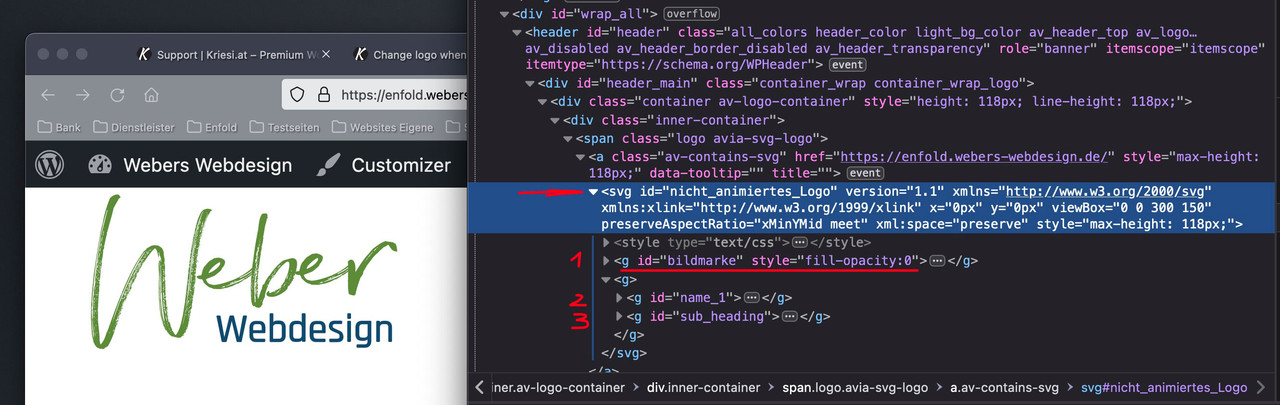
if you inspect my logo on that page you see that the xml based notation of a svg graphic is nearby a html programming.
it could have parts like style infos and tags. see 1, 2, 3 i have that “bildmarke” in a group tag and the “letters” in different ones. I can address them with css. so my Groups got ID’s. You see on the inspection – that i set the fill-opacity of that “bildmarke” directly to zero.This is the look of it all seen without fill-opacity zero inside the svg:

Now i can use the enfold class header-scrolled to switch the visibility.
Css code here is:.header-scrolled #bildmarke { fill-opacity: 1 !important; transition: 1s all ease; } .header-scrolled #name_1, .header-scrolled #sub_heading { fill-opacity: 0 !important; transition: 1s all ease; } #header:not(.header-scrolled) #bildmarke, #header:not(.header-scrolled) #name_1, #header:not(.header-scrolled) #sub_heading { transition: 1s all ease; }June 17, 2022 at 5:01 pm #1355623In reply to: Product pages not showing and can't access wp-admin
Hi,
You could try to remove all your customisations, then add them back one by one, to see which function is causing the problem. I think this is something you shouldn’t need at all:
/*
Woocommerce 3.0.0 Compatibility Fix
Remove Enfold’s custom functions that conflict with the new image display in WooCommerce 3.0.0
*/
global $woocommerce;
if( version_compare( $woocommerce->version, ‘3.0.0’, “>=” ) ) {
function avia_woocommerce_gallery_thumbnail_description($img, $attachment_id, $post_id, $image_class ) {
return $img;
}
function avia_woocommerce_post_thumbnail_description($img, $post_id){
return $img;
}
}
Best regards,
RikardJune 17, 2022 at 4:00 pm #1355617In reply to: Image with hotspots that open image in lightbox
Hi Mike and Guenni007
Thanks a lot for your help and contributions.
Reply on Mike’s https://kriesi.at/support/topic/image-with-hotspots-that-open-image-in-lightbox/#post-1355277
This solution also works well.Your new approach in using the tooltip text is a very nice idea. It’s more convenient to write and edit this text within the hotspot element than editing it in the child’s functions.php. WP authors without access to the functions.php would not able to edit this text if I used the initial approach.
I implemented Mike’s version (https://kriesi.at/support/topic/image-with-hotspots-that-open-image-in-lightbox/#post-1355413) on my website:
function popup_tooltips_with_links_erdgeschoss() {
if(is_page(559)) {
?>
<script type="text/javascript">
window.addEventListener('DOMContentLoaded', function() {
(function($){
   $('#top.page-id-559 .av-image-hotspot_inner').each(function () {
   	var toolTip = $(this).closest('.av-image-hotspot').attr('data-avia-tooltip');
    var cleanTitle =  $(toolTip).text();
	$(this).attr('title', cleanTitle );
	$(this).magnificPopup({
    type: 'image',
    image: {
        titleSrc: 'title'
    }
});
});
})(jQuery);
});
</script>
<?php }
									 }
add_action('wp_footer', 'popup_tooltips_with_links_erdgeschoss');

function popup_tooltips_with_links_obergeschoss() {
if(is_page(561)) {
?>
<script type="text/javascript">
window.addEventListener('DOMContentLoaded', function() {
(function($){
   $('#top.page-id-561 .av-image-hotspot_inner').each(function () {
   	var toolTip = $(this).closest('.av-image-hotspot').attr('data-avia-tooltip');
    var cleanTitle =  $(toolTip).text();
	$(this).attr('title', cleanTitle );
	$(this).magnificPopup({
    type: 'image',
    image: {
        titleSrc: 'title'
    }
});
});
})(jQuery);
});
</script>
<?php }
									 }
add_action('wp_footer', 'popup_tooltips_with_links_obergeschoss');

function popup_tooltips_with_links_dachgeschoss() {
if(is_page(563)) {
?>
<script type="text/javascript">
window.addEventListener('DOMContentLoaded', function() {
(function($){
   $('#top.page-id-563 .av-image-hotspot_inner').each(function () {
   	var toolTip = $(this).closest('.av-image-hotspot').attr('data-avia-tooltip');
    var cleanTitle =  $(toolTip).text();
	$(this).attr('title', cleanTitle );
	$(this).magnificPopup({
    type: 'image',
    image: {
        titleSrc: 'title'
    }
});
});
})(jQuery);
});
</script>
<?php }
									 }
add_action('wp_footer', 'popup_tooltips_with_links_dachgeschoss');
Actually, there are three floor plans. That’s why I use the script three times (with slightly different function names) and address it to the corresponding page id.
For all of those who want to see how a house tour with floor plans might be realized with Enfold’s image with hotspots media element, here is the link:
http://www.ferienhaus-alpina.ch/hausbesichtigung
@Guenni007: I’ve also tried your version (https://kriesi.at/support/topic/image-with-hotspots-that-open-image-in-lightbox/#post-1355426) but it didn’t work. Like Mike’s report, the lightbox opens but no image is shown. Any idea how your version could run on my site?Kind regards
UeliJune 17, 2022 at 2:59 pm #1355611In reply to: Change logo when page scroll
Yes, I would like it exactly like this site but in the middle
How do I achieve this? Is this a default enfold feature? If you can tell me the steps, that would be great.
Also, I know this is a new enfold 5.0 template but can I apply those animations to my existing site https://alexandere77.sg-host.com/ if i update to enfold 5.0? I love the animations
June 17, 2022 at 1:52 pm #1355608In reply to: Product pages not showing and can't access wp-admin
Hi Rikard,
I have tried restoring but I get critical errors. The host 123-reg say the problem is with the child theme I created for Enfold. Please can you look at my child theme functions,php code and see if it has errors. Apparently it is line 23. My child theme is called Orion I.T. Theme:
<?php/*
* Add your own functions here. You can also copy some of the theme functions into this file.
* WordPress will use those functions instead of the original functions then.
*/
//set builder mode to debug
add_action(‘avia_builder_mode’, “builder_set_debug”);
function builder_set_debug()
{
return “debug”;
}/* Add Custom class to all ALB elements */
add_theme_support(‘avia_template_builder_custom_css’);/*
Woocommerce 3.0.0 Compatibility Fix
Remove Enfold’s custom functions that conflict with the new image display in WooCommerce 3.0.0
*/
global $woocommerce;
if( version_compare( $woocommerce->version, ‘3.0.0’, “>=” ) ) {
function avia_woocommerce_gallery_thumbnail_description($img, $attachment_id, $post_id, $image_class ) {
return $img;
}
function avia_woocommerce_post_thumbnail_description($img, $post_id){
return $img;
}
}add_action( ‘woocommerce_single_product_summary’, function() {
echo ” – FREE SHIPPING IN THE UK!”;
}, 10);June 17, 2022 at 1:51 pm #1355607In reply to: Equal products height in Woocommerce Shop Page
Hey thijmens,
Please try the following in Quick CSS under Enfold->General Styling:
@media only screen and (min-width: 768px) {
div.inner_product.av-product-class- {
    min-height: 780px;
}
}
Best regards,
RikardJune 17, 2022 at 1:43 pm #1355605In reply to: Odd Mega Menu Hover
Hi,
Glad Nikko was able to help, if you have any further questions please create a new thread and we will gladly try to help you. Thank you for using Enfold.Best regards,
MikeJune 17, 2022 at 1:21 pm #1355602In reply to: Change logo when page scroll
i would realize it by creating the logo as svg.
Shouldn’t be too difficult with fonts and a figurative mark.
Depending on where you want your image mark to appear after scrolling, I would then place it on the left or in the center directly inside the svg, and set the fill-opacity of this group to zero.
Then you can even change the fill-opacity animated with the class header-scrolled.By the way – what font is it – i found similar fonts – but not exactly the same.
see here : https://enfold.webers-webdesign.de/June 17, 2022 at 12:29 pm #1355592are you familiar with inspecting the DOM? Look what is your portfoliobox-ID
use this to get influence on image source as a snippet in your child-theme functions.php:
function my_avf_newsbox_image_size( $image_size, array $args, array $instance ){
  if( $args['widget_id'] == ( 'portfoliobox-3' || 'newsbox-2' || 'newsbox-4' ) ){
    $image_size = 'full';
  }
  return $image_size;
}
add_filter( 'avf_newsbox_image_size', 'my_avf_newsbox_image_size', 10, 3 );
______________
just for INFO:
change full to what you like to have ( small, medium, large etc. pp.) you can find the names of the enfold image-sizes on functions.php lines 211ff:$avia_config['imgSize']['widget'] = array('width'=>36, 'height'=>36); // small preview pics eg sidebar news $avia_config['imgSize']['square'] = array('width'=>180, 'height'=>180); // small image for blogs $avia_config['imgSize']['featured'] = array('width'=>1500, 'height'=>430 ); // images for fullsize pages and fullsize slider $avia_config['imgSize']['featured_large'] = array('width'=>1500, 'height'=>630 ); // images for fullsize pages and fullsize slider $avia_config['imgSize']['extra_large'] = array('width'=>1500, 'height'=>1500 , 'crop' => false); // images for fullscrren slider $avia_config['imgSize']['portfolio'] = array('width'=>495, 'height'=>400 ); // images for portfolio entries (2,3 column) $avia_config['imgSize']['portfolio_small'] = array('width'=>260, 'height'=>185 ); // images for portfolio 4 columns $avia_config['imgSize']['gallery'] = array('width'=>845, 'height'=>684 ); // images for portfolio entries (2,3 column) $avia_config['imgSize']['magazine'] = array('width'=>710, 'height'=>375 ); // images for magazines $avia_config['imgSize']['masonry'] = array('width'=>705, 'height'=>705 , 'crop' => false); // images for fullscreen masonry $avia_config['imgSize']['entry_with_sidebar'] = array('width'=>845, 'height'=>321); // big images for blog and page entries $avia_config['imgSize']['entry_without_sidebar'] = array('width'=>1210, 'height'=>423 ); // images for fullsize pages and fullsize sliderJune 17, 2022 at 11:35 am #1355588In reply to: Masonry gallery magnific popup not working/enabled
Hi,
Glad we were able to help, if you have any further questions please create a new thread and we will gladly try to help you. Thank you for using Enfold.Best regards,
MikeJune 17, 2022 at 11:22 am #1355587In reply to: Video – no sound & other issues
Hi Elvira,
For #2, please replace the content of enfold\config-templatebuilder\avia-shortcodes\slideshow\slideshow.js with this slideshow.js file.
Make sure to clear your browser cache once you have replaced the content as it might still be fetching older js files.
It should be fixed on the next Enfold updates.Best regards,
NikkoJune 17, 2022 at 10:54 am #1355581In reply to: picture filter on masonry grid
Hi Nikko,
thx fory lour quick reply – I´ve tried e.g. Envira Gallery, Portfolio Filter gallery and other plugins. But they either they don´t have a good masonry display option or they do not to work with Enfold. Another WP plugin, “cube portfolio” did the job, but is not longer available. Also a workaround via portfolio like described here https://kriesi.at/support/topic/gallery-with-category-filter/ does not work for my purpose. I still need to filter just pics, not portfolio entries.A simple filter function for the masonry portfolio is what I still need. And I know a lot of other enfold users who would really appreciate this as well. Would be great if you / somebody else can provide a solution acc.
In this context a question/idea: I use the plugin “Real Media Gallery” from devowl.io. With this I can assign images to multiple folder collections. May be there is a way to define within enfold masonry: “Use onle pics allocated to RM Gallery xyz”?
Thx again for your efforts & best regards Tilman
-
This reply was modified 3 years, 9 months ago by
oestersund.
-
This reply was modified 3 years, 9 months ago by
June 17, 2022 at 10:23 am #1355574In reply to: Transparent header turning white
-
This reply was modified 3 years, 9 months ago by
-
AuthorSearch Results