Viewing 30 results - 23,881 through 23,910 (of 244,520 total)
  • Author
    Search Results
  • Tobias
    Participant

    Hi Support,

    after Update to Enfold 5.1.1. we get following error on our site: avia-template-builder/php/base-classes/class-popup-templates-responsive.php on line 220

    How can we get this?

    We use WordPress 6.1 and PHP 7.4, Memory Limit 256M

    Best regards!

    Tobias

    #1361235

    In reply to: Close Button

    Hey finchkelsey,
    Thanks for your question, if you have the accordion set to “open one at a time” then each time you click the title the accordion open or closes, and you should be seeing a plus or minus icon next to the title, this could be your button? The full title is basically a button. You can also added more text to the title, I don’t think there is a limit.
    Perhaps if you could link to a mockup we could understand better.
    If you find the accordion too limiting in style you could use jQuery to toggle visibility of an element, here is an example.
    Perhaps this could work if you added a button and image inside of a text element and on load only the button and text showed with clicking the button shows the image?
    If you think that using other elements would help then try linking to a test page and explain the behavior and perhaps we could help or understand better.

    Best regards,
    Mike

    #1361230

    Hi,
    Glad to hear that you have this sorted out, if you have any further questions please create a new thread and we will gladly try to help you. Thank you for using Enfold.

    Best regards,
    Mike

    #1361220

    Hi,

    Thanks for the video. I can’t reproduce the problem on a test installation though, check the Destinations menu here: https://wpexpert.se/enfold/. If you need further help, then we would need access the actual site where this happens.

    Best regards,
    Rikard

    #1361217

    In reply to: enfold

    Hey Jeff,

    Thanks for reaching out to us. What exactly is Guenthimer? If you are referring to the Gutenberg editor, then yes, it can be used when running Enfold.

    Best regards,
    Rikard

    #1361206

    Topic: enfold

    Jeff
    Guest

    Is enfold Guenthimer ready

    #1361203

    Here are some admin credentials as well.

    [moved to private content]

    I don’t want to create another thread, so if you wouldn’t mind….Can you please look (SEE PRIVATE DATA)

    I’ve deleted and recreated that page several times and the content container is underneath the header, so you can’t see the part of the page at all, but it only happens on mobile. It only happens on this main page.

    Originally, it worked fine. Then I wanted to use the colored section but since it’s a woo commerce page, the enfold editor is disabled. So the option (per the documentation) was to add code to enable it, which worked but caused other problems, so I removed it. So I, tried option 2 which was to create a normal page and used the woo grid shortcode to display items and use that as the default shop page. While that worked in part, woo commerce had a fit and it caused issues. So I deleted that page and just set everything back to default. Only, now, the menu overlaps the contents of the page on mobile devices.

    Thanks!

    • This reply was modified 3 years, 8 months ago by Nikko.
    • This reply was modified 3 years, 8 months ago by Sozo. Reason: *edited because) I had originally set the whole post to private, but that was remove and I didn't want the link shared publically
    #1361201

    Hey Nikko,
    Thanks for the code, unfortunately, it didn’t do anything. Let me make sure I’m understanding everything correctly. After I’ve added the code, these icons should appear in the “Social Profiles” tab, of the enfold menu correct? Enable the icons we’ve just added etc, Go to the footer tab, make your selection and the icons should appear on site.

    They’re not appearing in the Social Profiles tab at all.

    Hi ellamac,

    I’m glad that Rikard could help you :)
    Thanks for using Enfold and have a great day!

    Best regards,
    Nikko

    #1361195

    In reply to: Time line dont work

    Hi eduardodelat,

    We’re happy to hear that you were able to find out the cause of the issue :)
    Thanks for using Enfold and have a great day!

    Best regards,
    Nikko

    #1361192

    Hi caw67,

    I’m glad that Ismael could help you :)
    Thanks for using Enfold and have a great day!

    Best regards,
    Nikko

    #1361188

    Hey FreshAirExhaust,

    Thank you for the inquiry.

    We noticed that the site contains an older version (4.6.2) of the theme. Upgrading the theme should help fix the issue or remove the warning related to the layer slider. After the theme update, please make sure to toggle or temporarily disable the Enfold > Performance > File Compression settings and purge the cache.

    Best regards,
    Ismael

    #1361180

    In reply to: custom related entries

    Hey dweddell,

    Thank you for the inquiry.

    The theme has a post navigation by default, it’s the arrows with semi transparent background located at both edge of the screen. You can enable it by adjusting the Enfold > Single Post Options > Single Post Navigation settings.

    But if you want to create your own custom shortcode, the following documentation should help.

    // https://developer.wordpress.org/reference/functions/get_previous_post/
    // https://developer.wordpress.org/reference/functions/get_next_post/
    // https://codex.wordpress.org/Shortcode_API

    Best regards,
    Ismael

    #1361178

    Hi,

    Thank you for the inquiry.

    If you haven’t found the mobile menu option yet, please go to the Enfold > Main Menu > General panel and look for the Menu Items For Mobile settings. You can set the menu switch below 990px (e.g tablet devices).

    Best regards,
    Ismael

    brucegust
    Participant

    I love “Featured Images!” I love the way they translate to a thumbnail on things like the “Recent News” section on the Footer.

    What drives me nuts, however, is the way the same image will show up at the top of the post in the context of the way it’s listed with every other article that falls under the same category.

    At that point, the Featured Image has been enlarged to the point where it’s pixelated and it looks unprofessional.

    What I’d like to do is be able to use the “Featured Image” for the thumbnails in the way I referenced earlier, but avoid the way it’s used when it’s enlarged in the context of a list of posts.

    I would be happy to provide some screenshots if that would help better describe my quandary. Otherwise, if you could share with me a piece of syntax I can incorporate into my functions.php or if there’s a setting that I’m overlooking, that would be wonderful.

    I’m using the Enfold theme (https://themeforest.net/item/enfold-responsive-multipurpose-theme/4519990).

    Thanks so much!

    #1361171
    FreshAirExhaust
    Participant

    I have an error code I cannot make away. Here is the code:
    `bject from empty value in /home/customer/www/freshairexhaust.com/public_html/wp-content/themes/enfold/config-templatebuilder/avia-shortcodes/slideshow_layerslider/slideshow_layerslider.php on line 28

    Not sure if it’s related, but I cannot edit Gravity Forms anymore. All of my plug-ins run great when I run a troubleshooting test. Which leads me to believe it’s the theme.
    Please help…

    Thanks for your time.

    #1361163

    In reply to: Iframe not working

    Hi,

    Great, I’m glad that you got it working. I’ll close this thread for now then, please open a new thread if you should have any further questions or problems.

    Best regards,
    Rikard

    #1361159

    Hi,
    I’m running Enfold 4.9.2.1. My settings are connect to envato via the private token but I’m not getting the updates. I have revalidated my token several times and no new updates are found even though I know there is an update. This is happening with a few of my sites that are running this theme. Any insight on why no updates are being found? I’m aware I can manually update via FTP.

    #1361158

    In reply to: Time line dont work

    Hey eduardodelat,

    Thanks for the login details. It works on a test page I created, please see private. I’m not sure what exactly what is causing the problem, but we could move the content to a test page to check it further. Please enable debug mode so that we can copy the shortcodes to a new page: https://kriesi.at/documentation/enfold/intro-to-advanced-layout-builder/#debug-mode, we can do it for you if you give us permission to do so.

    Best regards,
    Rikard

    Hi,

    I can see the problem on your actual site, but I can’t reproduce it on a test site: https://wpexpert.se/enfold/. Could you try to temporarily deactivate all plugins, or activate the parent theme, to see if that makes any difference? You could also try setting a different menu under Enfold->Main Menu->Alternate Menu For Mobile.

    Best regards,
    Rikard

    #1361152
    HavilahMedia
    Participant

    Tried loading “Shop Demo”. Received error “Download of files for demo Shop Demo didn’t work!
    You might want to try reloading the page and then try again.”

    Tried to do manual install from directions at:

    Could not get this to work either.

    Thanks… TP

    #1361149
    enclosuresurveying
    Participant

    But I would like to use enfold mobile menu as I am having no luck styling/formatting the max menu for mobile. How do I turn off max mega menu for mobile and use enfold mobile menu instead? I have tried many things but nothing is working.

    #1361146

    Topic: Time line dont work

    in forum Enfold
    eduardodelat
    Participant

    Hi! I´m trying to put a time line in my page named ” empresa” https://grupoempresa.com.mx/empresa/ , but it doesnt work… I put the time line element and save the page and it doesnt work

    I already hace the last wordpress version, the last enfold theme version and also I tried changing my PHP version from Cpanel , I tried with version 7.3, 7.4 and 8.0 (current)

    Can you help me please?

    #1361136

    hm – how did you manage it without that snippet before?
    The CPT’s aren’t included to advanced layout builder before Enfold 5.0 too …

    #1361131

    Hi,

    Thanks for letting us know, I’ll close this thread for now then. Please open a new thread if you should have any further questions or problems.

    Best regards,
    Rikard

    #1361130

    In reply to: How to upload icons

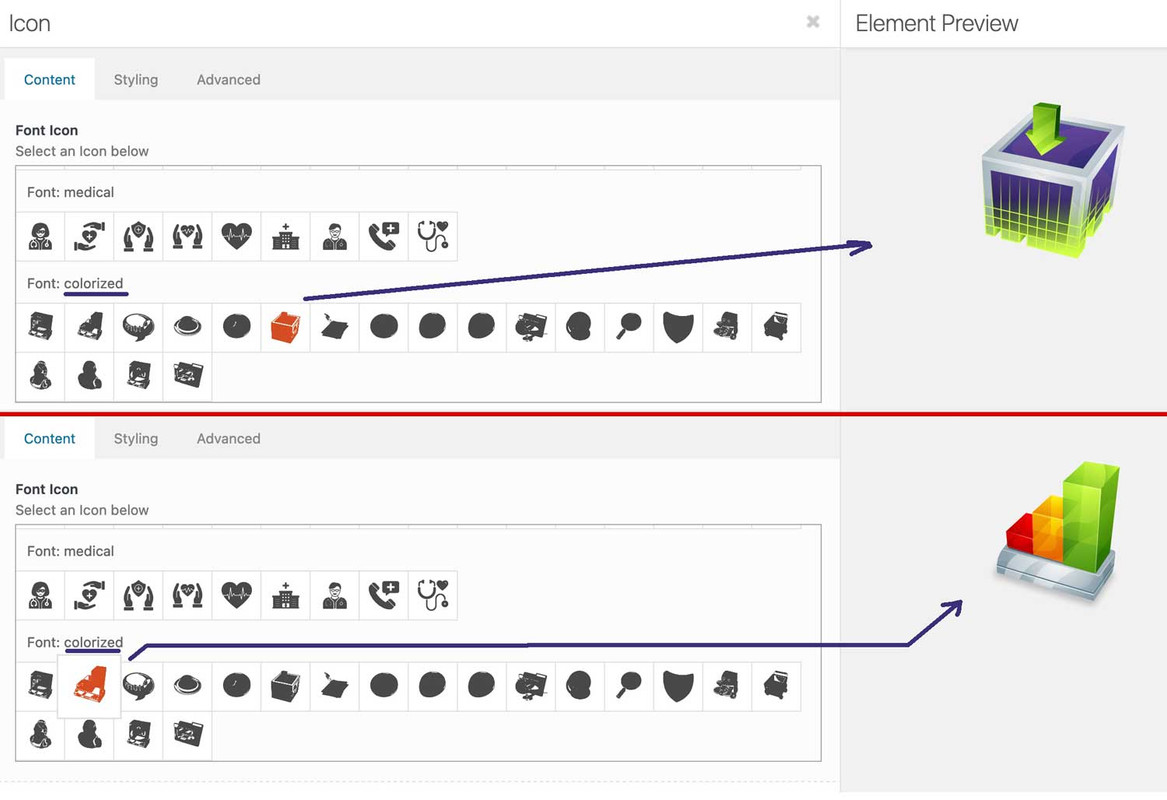
    did you read further on: https://kriesi.at/support/topic/ajout-dicones-dans-enfold/#post-1356658

    you can upload your svg files to media-library and replace existing font-icons. So you can use the enfold insertion of font-icons – and replace them by css:
    f.e. with an unimated svg or gif: https://webers-testseite.de/

    webdesing column

    after my posting i recognized that some icons are in span etc. you had to adjust the replacement code then

    [data-av_icon="\e837"] {
    	content: " ";
    	background-image: url(/wp-content/uploads/ezgif-4-64b6614e32.gif);
    	background-size: contain;
    	background-repeat: no-repeat;
           font-size: 0 !important
    }

    _______
    Yes – it’s a bit of work, but it’s worth doing this way.
    You convert your colored svgs in icomoon app to black svgs – upload them to fontello and then import them into Enfold. Then you replace the black pendents with the colored svgs via css. Then you have the advantage to use these colored icons like font-icons everywhere where they can be positioned in Enfold Alb elements.

    and btw. if you only like to have colorized icons f.e. with gradient:
    ( You need to be more specific with this selector here – to not address all icons on the page )

    [data-av_icon]:before {
     background: linear-gradient(135deg,rgb(74,234,220) 0%,rgb(151,120,209) 20%,rgb(207,42,186) 40%,rgb(238,44,130) 60%,rgb(251,105,98) 80%,rgb(254,248,76) 100%);
      -webkit-background-clip: text;
      background-clip: text;
      -webkit-text-stroke: 0px blue;   /*** you even can have strokes on the icons ***/
      -webkit-text-fill-color: transparent;
    }

    for example: https://enfold.webers-webdesign.de/colorized-font-icons/
    i named the svgs analog to the code the black icons have on the fontello font

    in edit mode:

    #1361116

    Hey albnetvlore,

    Please try the following in Quick CSS under Enfold->General Styling:

    @media only screen and (max-width: 1024px) {
    #header_main_alternate {
      display: none; 
    }
    }

    Best regards,
    Rikard

    Hi,
    Glad we were able to help, if you have any further questions please create a new thread and we will gladly try to help you. Thank you for using Enfold.

    Best regards,
    Mike

    Hi,
    Glad to hear that you have this sorted out, if you have any further questions please create a new thread and we will gladly try to help you. Thank you for using Enfold.

    Best regards,
    Mike

    #1361088

    Hi Tim,

    Updating via FTP doesn’t mean that you have to have two theme folder, but it’s the most secure way of updating, as @thinkjarvis pointed out. If I update via FTP, then I create a new folder called enfold_new for example, then I upload all the files. After that I change the old folder to enfold_old, and the new one to only enfold, then I check if the site is working as it should. If it’s working as expected, then I delete the old version under Appearance in the WordPress menu.

    Best regards,
    Rikard

Viewing 30 results - 23,881 through 23,910 (of 244,520 total)