
-
AuthorSearch Results
-
September 12, 2022 at 11:16 am #1364699
Hey Michael,
Thanks for contacting us!
We have tested the Telegram button but it only shows up when it is enabled in Enfold theme options > Blog Layout > Profile Links At The Bottom Of Your Blog Post. Could you please check if it is enabled in your theme options? If not, could you please simply save theme options and check if that helps?
Best regards,
YigitSeptember 12, 2022 at 11:00 am #1364694In reply to: Host Web Font yourself … some info
yes it is a bit more complex – but you will be rewarded with more styling options.
i do always transform the downloaded ttf variable fonts to woff2 fonts – because these files do have the best compression level of all font mime types.
All browsers that support variable font files do support woff2.
if you open the mentioned page : https://wakamaifondue.com/ and drag your ttf ( or in my case the woff2 to that circle with the rotating letters. you can see on variable section for open sans font:
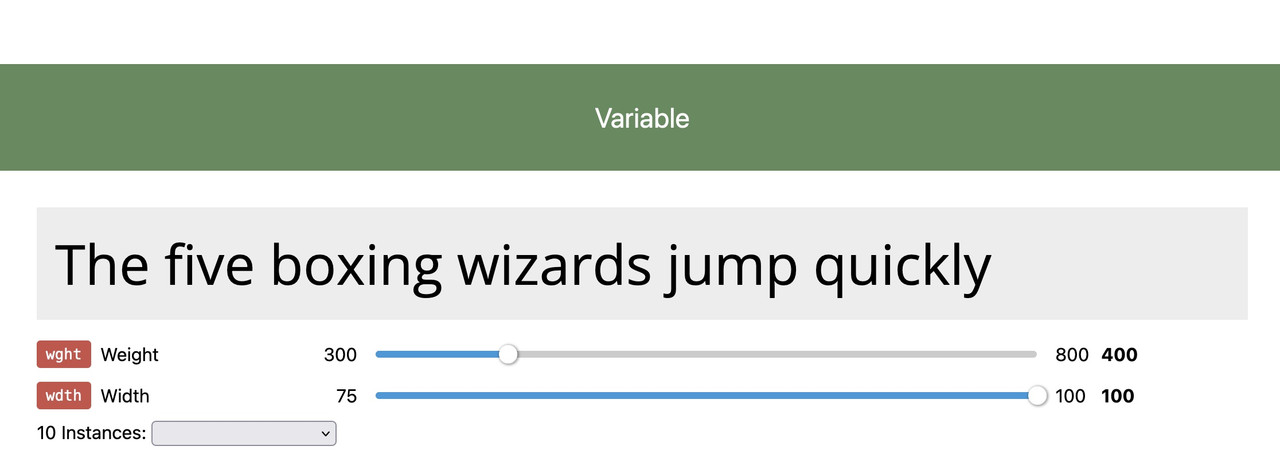
here you can see the layout options on that variable font – so my more detailled @import rule will be:
( btw i do place the fonts in the same directory as the enfold custom font manager fonts and that css rule to style.css of my child theme )
on my style.css i have:@font-face { src: url('/wp-content/uploads/avia_fonts/type_fonts/opensans-variable.woff2') format('woff2'); font-family:'Open Sans Variable'; font-weight: 300 800; font-stretch: 75 100; font-style: normal; }on my quick css
f.e.:#top #wrap_all .av-special-heading-tag { font-family:'open-sans',Helvetica,Arial,sans-serif font-weight: 400; } @supports (font-variation-settings: normal) { #top #wrap_all .av-special-heading-tag { font-family: 'Open Sans Variable', sans-serif; font-stretch: 100%; font-weight: 350; } }this is because : if the browser supports variable fonts – that font will be taken – if not the normal open-sans (uploaded via custom font manager) is in place as fallback.
Very nice tool on firefox ( i got the developer edition installed – but maybe the normal one has it too ) on developer tools is the fontstyle tab:
enlarge the image on click
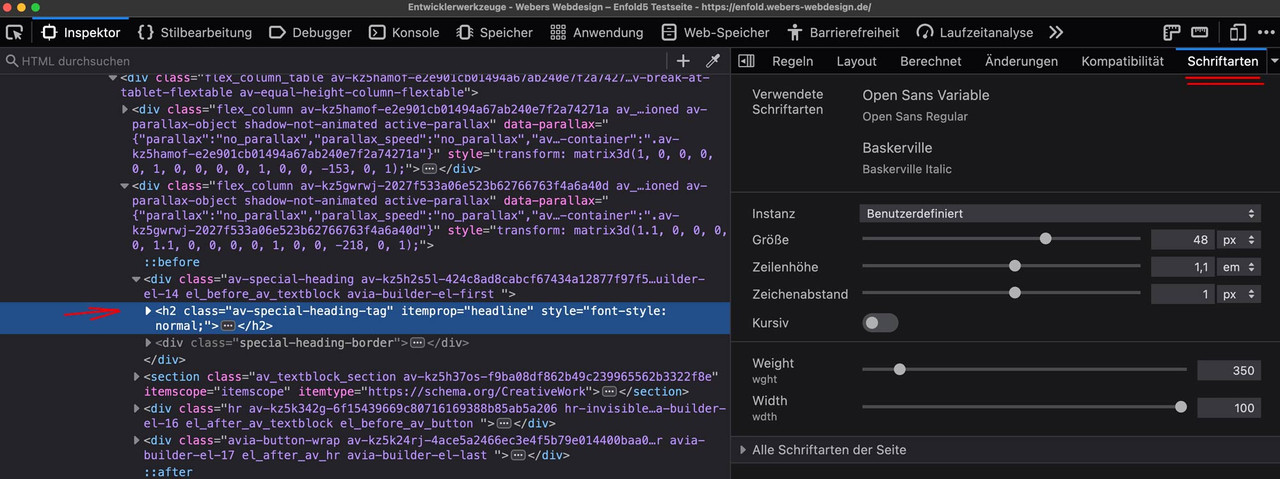
you see that the font is working under its variable layout options.
you can adjust the existing sliders until you like the layout – and then note these settings and transfer them to css.i do not see that options on your page –
so that was my assumption, that a variable font loses its properties via the Custom Font Manager.
Now do you realy need those layout options – or maybe it is enough to have a normal and a bold variant?
see file-size comparison:
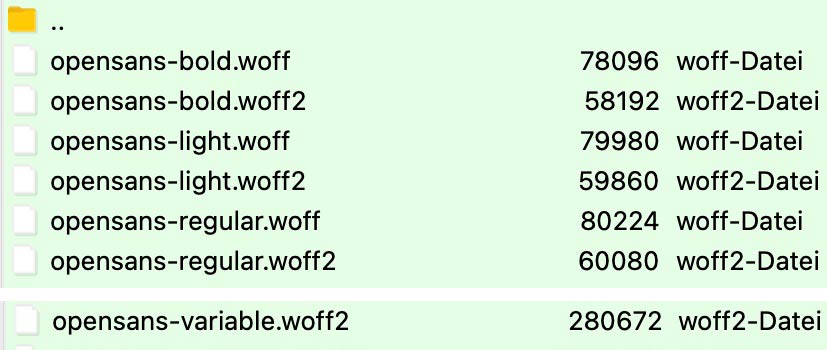
you can compare those file-sizes now – think of performance of your page – perhaps it is enough to have two fixed font-weights only for selection.
and on gtmetrix the font-loading times:
 September 12, 2022 at 10:55 am #1364692
Topic: Problems with updates and token
in forum EnfoldJoStudioDeRijp
ParticipantHi Kriesli Support,
I’ve search already a lot un other threads but still cannot find the right solution for my problem.
We have made about 45-50 websites in Enfold, always very satisfied with it :-)))
But now the last months we have problems on a few sites with the Enfold-updates.
It looks like the tokens on several websites don’t want to communicate with the updates.
I send you the links and login credentials of 1 of them. Can you please help me?
This one we’ve just started a few weeks ago, so the Enfold version is not that old. But I also have one still in 4.9.2.2 and offcourse I want to update that one also as soon as possible.
Kind regards, JolandaSeptember 12, 2022 at 10:55 am #1364691In reply to: Bullet points font larger than rest of paragraph
Hey larademartino,
Thank you for the inquiry.
Looks like the font of the text in the list is set to 13px by default. To adjust it, please add this css code.
#top ul li {
    font-size: 10px;
}
You may need to toggle or temporarily disable the Enfold > Performance > File Compression settings after adding the css.
Best regards,
IsmaelSeptember 12, 2022 at 10:07 am #1364678In reply to: Problematic resolution in image dimensions preview
Hey HulaSlim,
Thank you for the inquiry.
Did you add this css code?
.avia-fullscreen-slider .avia-slideshow>ul>li {
    background-size: 100vw 100vh !important;
    background-repeat: no-repeat !important;
}
The css forces the slides to inherit the width of the browser screen, which distorts the images. Please remove the css code, then toggle or temporarily disable the Enfold > Performance > File Compression settings. Purge the cache, then hard refresh the page.
Best regards,
IsmaelSeptember 12, 2022 at 10:03 am #1364677In reply to: Titles font instable
Hey HulaSlim,
Thank you for the inquiry.
You can globally set the body and heading font in the Enfold > General Styling > Fonts panel. Which font are you trying to use? The heading is currently set to Open Sans when we checked.
Best regards,
IsmaelSeptember 12, 2022 at 9:25 am #1364668In reply to: Host Web Font yourself … some info
Hello Guenni007,
Thank you for your help! A lot of recommendations and unfortunately I do not understand everything you saying.
I have installed a variable font on one of my websites now, which is https://www.greenconnections.nl
– I have uploaded the variable font Open Sans, via Custom Font Manager in Enfold settings.
– It’s the only font I use on this website
– I have uploaded 2 files opensans-variablefont_wdthwght-webfont.woff and opensans-variablefont_wdthwght-webfont.woff2 in one folder named “Open Sans”
– In Custom Font Manager it is listed as: Font: Open Sans ( font-family: open-sans ) normal: 400
– Set Open Sans (400) as my default font in Enfold settingsIf you please could take a look at my website, for my eyes everything is working fine, and different styles of Open Sans are working good? Or am I overlooking some issue here, and do I have to insert the code you advised me about?
Some questions about your advice. To keep it simple for me let’s start with the first part about specify the font-weights for variable fonts (let’s talk about the fall-back option later…):
– The fact that the font is listed as “Open Sans ( font-family: open-sans ) normal: 400” in Custom Font Manager means that only the style 400 is available or working good? Is that why you recommend to specify the font-weights for variable fonts in a way that min and max values are included? The different font-weights are not included at all on greenconnections.nl now?
– Why do you recommend to upload the variable font with FTP instead of Custom Font Manager? What’s the difference?
Thanks a lot for all your help!
Best Wishes,
Alwin– Why do you advice to upload via ftp instead of via Custom Font Manager, what is the difference?
September 12, 2022 at 7:42 am #1364660Topic: Fatal Error php-memory (maybe after WP-Update 6.0.2)
in forum Enfoldbernhardk3
ParticipantHi,
I am receiving a fatal error since some weeks regarding the memory size. In my opinion it could correlate with an automatic update to WordPress 6.0.2 on 04.09.2022. I tried several ways of fixing it but all failed. I contacted already my hoster (netcup) for an upgrade because the package includes just 64 MB php memory (what using other themes hasn’t been a problem so far). At the moment it’s still the original package as it probably is just a error of a plugin I guess. Last week I also got an automatic mail with a error description regarding enfold but couldn’t find a good fix for it.I tried to manually override wordpress and enfold files for a clean update but this has not had any positive effect.
ERROR MESSAGE WHEN UPDATING THE HOME SITE:
Fatal error: Allowed memory size of 268435456 bytes exhausted (tried to allocate 131072 bytes) in …/httpdocs/wp/wp-includes/wp-db.php on line 2135MAIL:
WordPress-Version 6.0.2
Aktives Theme: enfold (Version )
Aktuelles Plugin: (Version )
PHP-Version 7.4.30Fehler-Details
==============
Ein Fehler vom Typ E_COMPILE_ERROR wurde in der Zeile 185 der Datei …/httpdocs/wp/wp-content/themes/enfold/functions.php verursacht. Fehlermeldung: require_once(): Failed opening required ‘includes/helper-privacy.php’ (include_path=’.:/usr/local/php74/share/php74′)Wordpress-Admin-Details in the private section. Tell me, if you need access to the hoster’s backend.
Kind regards
September 12, 2022 at 7:27 am #1364658In reply to: Host Web Font yourself … some info
contrary to my expectations, a variable font also seems to be uploadable through the Custom Font Manager.
The resulting enfold @import rule, however, does not comply with the recommendations for such fonts. So you should probably specify the font-weights for variable fonts in a way that min and max values are included. So e.g. for Quicksand this would be :
@font-face {
    font-family: 'Quicksand Variable';
    font-weight: 200 700;
	src: url('../fonts/Quicksand-VariableFont_wght.woff2') format('woff2');
    font-display: swap
}
however, it is integrated as:
@font-face {
    font-family: 'Quicksand Variable';
    src: url('../fonts/Quicksand-VariableFont_wght.woff2') format('woff2');
    font-weight: 400;
    font-style: normal;
    font-display: swap
}
i don’t know if that will end in the wanted Usage of the fonts.
_
so if you try to use variable fonts :
i recommend to upload the variable font separatly from the corresponding normal font each in an extra zip file .
so you will have then in Custom Font Manager:

because you will then have the possiblilty to set in your quick css a fall-back option if the browser does not support variable fonts:
for example:#top #wrap_all .av-special-heading-tag { font-family: 'quicksand', sans-serif; font-weight: 400; } @supports (font-variation-settings: normal) { #top #wrap_all .av-special-heading-tag { font-family: 'quicksand-variable', sans-serif; font-variation-settings: "wght" 525; } }you see there are other defintions to set the css rules for variable fonts.
____________By the way, if you want to know what the variable font brings to the table (layout features), you can read about it under : https://wakamaifondue.com by uploading the variable font file via drag&drop to that circle.
Not All Variable Fonts have all layout options: you can see on : https://v-fonts.com/
that there are big differences ( see Roboto – or Helvetica Now )September 11, 2022 at 11:06 pm #1364648In reply to: Button text colour out of easy slider
Hey woogie07,
Thanks for the link to your site, please try this css in your Enfold Theme Options ▸ General Styling ▸ Quick CSS field.home a.avia-slideshow-button.avia-color-white.avia-slideshow-button-2 { color: #000; }After applying the css, please clear your browser cache and check.
Best regards,
MikeSeptember 11, 2022 at 11:01 pm #1364647In reply to: Short horizontal spacer
Hey woogie07,
Thanks for your question, in the Construction Demo the yellow space is a color section with a background color:


Best regards,
MikeSeptember 11, 2022 at 10:54 pm #1364646In reply to: Breakpoints
Hi,
To add a caption below your gallery items, you can use this css from our documentation:/* Display caption below thumbnail */ #top .avia-gallery .avia-gallery-thumb a:after { content: attr(title); margin: 10px 0; position: relative; display: block; width: 100%; font-size: 14px; text-align: center; }adjust the css font size and margin to suit, after applying the css clear your browser cache.
and use the caption field:

the expected results:

Or try using the masonry gallery element for both galleries, the first one without captions and the second one with captions, again use the caption field:
then choose to show the caption excerpt always:

the expected results:

Best regards,
MikeSeptember 11, 2022 at 9:38 pm #1364643Topic: Button text colour out of easy slider
in forum Enfoldwoogie07
ParticipantHi,
I need to make the text Black in the 2nd link White button on my homepage banner. There do not seem to be any styling or Enfold settings for this.
Please advise
Thanks
September 11, 2022 at 7:57 pm #1364637In reply to: Remove unused CSS?
Mike, thank you again for your fast and great support.
But… I am back at using the JS & CSS file merging and compression in the Enfold performance settings, and not using it in WP-Rocket, because after a lot of testing tis seems to be the best option after all.
Now, can you please answer me this (last) question:
With JS & CSS file merging and compression enabled in the Enfold performance settings, and JS & CSS file merging and compression disabled in WP-Rocket., do I have to enable or disable Delete old CSS and JS files in Enfold performnce settings?
September 11, 2022 at 7:33 pm #1364635In reply to: Page locked, can't get in anymore
Hi,
Thanks for that. I tried to edit the page in question, but it throws the same error on my end. Please enable debug mode, so that we can try to move the shortcodes to a new page: https://kriesi.at/documentation/enfold/intro-to-advanced-layout-builder/#debug-mode. We can do it for if you give us permission to do so.
Best regards,
RikardSeptember 11, 2022 at 7:31 pm #1364634In reply to: Remove unused CSS?
Hi,
Sorry, I don’t mean to confuse you, let’s go back to the opening post, where you thought from your GTmetrix report that this file was unused and wanted to remove it:
dynamic_avia/avia-merged-styles-5208a9f…—6311e96e03a09.css
which is created with Enfold Theme Options ▸ Performance ▸ JS & CSS file merging and compression
to remove it please disable Enfold Theme Options ▸ Performance ▸ JS & CSS file merging and compression
then to flush this now unused old file from your cache also enable the option: Enfold Theme Options ▸ Performance ▸ Delete old CSS and JS files.Now going forward all of your caching will be controlled by WP-Rocket, and the GTmetrix report will not show any unused files from dynamic_avia/avia-merged-styles
Then you asked why there is a message in the Enfold performance that you should not enable Enfold Theme Options ▸ Performance ▸ Delete old CSS and JS files when using a caching plugin.
This only assumes that you are using Enfold Theme Options ▸ Performance ▸ JS & CSS file merging and compression with a caching plugin, which you are not going to because it will defeat removing the dynamic_avia/avia-merged-styles file from your GTmetrix report.
If you want to disable the option: Enfold Theme Options ▸ Performance ▸ Delete old CSS and JS files again then please fee free to to also, it should have no effect either way because Enfold Theme Options ▸ Performance ▸ JS & CSS file merging and compression is disabled.Hopefully this makes sense.
Best regards,
MikeSeptember 11, 2022 at 7:05 pm #1364629In reply to: Delay Javascript Execution in WP-Rocket, font issues
Hi,
Glad to hear that you have this sorted out, if you have any further questions please create a new thread and we will gladly try to help you. Thank you for using Enfold.Best regards,
MikeSeptember 11, 2022 at 6:20 pm #1364623In reply to: Footer widget elements
Hey woogie07,
You can create your own footer in a page, then set it as your custom footer under Enfold->Footer. You can use the Mailchimp and Social Buttons elements for your content.
Best regards,
RikardSeptember 11, 2022 at 5:13 pm #1364615In reply to: Remove unused CSS?
Hello Mike,
I am getting more confused, sorry…
Okay, I am using Enfold and WP-Rocket, and therefore I have 2 options for JS & CSS file merging and compression:
– Option 1: I enable JS & CSS file merging and compression in the Enfold performance settings and disable JS & CSS file merging and compression in WP-Rocket.
– Option 2: I enable JS & CSS file merging and compression in WP-Rocket and disable it in Enfold performance settings.
Now with option 1, I need to disable or enable Delete old CSS and JS files in Enfold performnce settings?
And with option 2, disable or enable Delete old CSS and JS files in Enfold Performance settings?
Thanks,
AlwinHey Manuela,
Please try the following in Quick CSS under Enfold->General Styling:
.services-icon-cont h4 a {
    width: 80%;
    float: right;
}
Best regards,
RikardSeptember 11, 2022 at 2:10 pm #1364607In reply to: Breakpoints
Hi,
You can enable the “scroll to top” button for mobile this this css in your Enfold Theme Options ▸ General Styling ▸ Quick CSS field:@media only screen and (max-width: 767px) { .responsive #scroll-top-link { display: block; } }After applying the css, please clear your browser cache and check.
Best regards,
MikeSeptember 11, 2022 at 2:05 pm #1364606In reply to: Remove unused CSS?
Hi,
Sorry, that I was not clear, in the theme options that says you should not enable the Enfold Theme Options ▸ Performance ▸ Delete old CSS and JS files when using a caching plugin, this assumes that you are going to use the Enfold Theme Options ▸ Performance ▸ JS & CSS file merging and compression with your caching plugin, in your case you are going to disable Enfold Theme Options ▸ Performance ▸ JS & CSS file merging and compression to not cache cached files, that is the cache in WP Rocket contains the merged and compressioned theme files.
Once you disable this option you would want to clear these files so the WP Rocket cache is the only file, you could enable it again but since merging and compression is disabled there should be no files so it would not matter one way or the other.Best regards,
MikeSeptember 11, 2022 at 1:45 pm #1364603In reply to: Some font questions
Hi,
Glad we were able to help, if you have any further questions please create a new thread and we will gladly try to help you. Thank you for using Enfold.Best regards,
MikeSeptember 11, 2022 at 1:45 pm #1364601In reply to: Private request for help
Hi,
Glad we were able to help, if you have any further questions please create a new thread and we will gladly try to help you. Thank you for using Enfold.Best regards,
MikeSeptember 11, 2022 at 11:26 am #1364597Hey tvbuzz,
I tried it out on a test installation, and it seems to be working as expected there: https://wpexpert.se/enfold/. Does the same thing happen if you activate a default WordPress theme?
Best regards,
RikardSeptember 11, 2022 at 9:50 am #1364593In reply to: Remove unused CSS?
Hello Mike,
Thank you for your hel!
When I disbale Enfold Theme Options ▸ Performance ▸ JS & CSS file merging and compression, and enable these options in WP-Rocket instaed, you say I have to enable Enfold Theme Options ▸ Performance ▸ Delete old CSS and JS files .
However, in the Enfold settings I read that you should not enable Enfold Theme Options ▸ Performance ▸ Delete old CSS and JS files when using a caching plugin.
Can you please explain why you say I have to enable Enfold Theme Options ▸ Performance ▸ Delete old CSS and JS files? Do I have to enable it once, save to delete the old CSS and JS files, and after that disable this option again, because I use a cache plugin?
September 11, 2022 at 12:19 am #1364585In reply to: How to disable all tooltips of the Related Entries
Hi,
Glad to hear that you have this sorted out, if you have any further questions please create a new thread and we will gladly try to help you. Thank you for using Enfold.Best regards,
MikeSeptember 11, 2022 at 12:10 am #1364584In reply to: Elementor + Enfold
Hey dvalansi,
Thank you for your question, Enfold will work fine with PHP v8 on its own, but Enfold is not designed to work with other custom editors like Elementor, so we can not predict any errors or support them. Enfold has its own built-in custom editor (Advanced Layout Builder) which can not be disabled as it is at the core of the theme.
If everything works for you with PHP v7.4 and you want to use the Elementor plugin, then this would be your best option.Best regards,
MikeSeptember 10, 2022 at 11:56 pm #1364583In reply to: Shoutbox Magazine
Hi,
Thank you for using the Shoutbox theme and hope that you will consider the Enfold theme for your future project.Best regards,
MikeSeptember 10, 2022 at 11:53 pm #1364582In reply to: Remove unused CSS?
Hey Alwin,
Thanks for your question, I have not seen any solutions to block the CSS loaded for Gutenberg, so if this works for you then please use. The Block Editor (Gutenberg) is a core WordPress element.
The file:
dynamic_avia/avia-merged-styles-5208a9f…
is created with Enfold Theme Options ▸ Performance ▸ JS & CSS file merging and compression
You could disable this since you are using WP Rocket, letting WP Rocket do all of the caching.
If you do disable also enable the option: Enfold Theme Options ▸ Performance ▸ Delete old CSS and JS files to clear the old files.Best regards,
Mike -
AuthorSearch Results
-
Search Results
-
Hi Kriesli Support,
I’ve search already a lot un other threads but still cannot find the right solution for my problem.
We have made about 45-50 websites in Enfold, always very satisfied with it :-)))
But now the last months we have problems on a few sites with the Enfold-updates.
It looks like the tokens on several websites don’t want to communicate with the updates.
I send you the links and login credentials of 1 of them. Can you please help me?
This one we’ve just started a few weeks ago, so the Enfold version is not that old. But I also have one still in 4.9.2.2 and offcourse I want to update that one also as soon as possible.
Kind regards, JolandaHi,
I am receiving a fatal error since some weeks regarding the memory size. In my opinion it could correlate with an automatic update to WordPress 6.0.2 on 04.09.2022. I tried several ways of fixing it but all failed. I contacted already my hoster (netcup) for an upgrade because the package includes just 64 MB php memory (what using other themes hasn’t been a problem so far). At the moment it’s still the original package as it probably is just a error of a plugin I guess. Last week I also got an automatic mail with a error description regarding enfold but couldn’t find a good fix for it.I tried to manually override wordpress and enfold files for a clean update but this has not had any positive effect.
ERROR MESSAGE WHEN UPDATING THE HOME SITE:
Fatal error: Allowed memory size of 268435456 bytes exhausted (tried to allocate 131072 bytes) in …/httpdocs/wp/wp-includes/wp-db.php on line 2135MAIL:
WordPress-Version 6.0.2
Aktives Theme: enfold (Version )
Aktuelles Plugin: (Version )
PHP-Version 7.4.30Fehler-Details
==============
Ein Fehler vom Typ E_COMPILE_ERROR wurde in der Zeile 185 der Datei …/httpdocs/wp/wp-content/themes/enfold/functions.php verursacht. Fehlermeldung: require_once(): Failed opening required ‘includes/helper-privacy.php’ (include_path=’.:/usr/local/php74/share/php74′)Wordpress-Admin-Details in the private section. Tell me, if you need access to the hoster’s backend.
Kind regards


