Hi,
Great, I’m glad that Ismael could help you out. Please open a new thread if you should have any further questions or problems.
Best regards,
Rikard
Hi,
Great, I’m glad to hear that you got things working. Please open a new thread if you should have any further questions or problems.
Best regards,
Rikard
Hi Kreisi team,
I’ve tried everything: perplexity, forums, trial and error: I’m not getting anywhere. I have been embedding annual reports as posts on the homepage of the http://www.kms-kleve.de website for a few years now. This year, the post image of the 2024 annual report is suddenly cut off at the top and bottom.
I have tried the following so far:
– Duplicating the 2022 annual report in the backend and simply replacing the images (in the same format and size)
– Tried various settings in the Enfold blog settings
– In WordPress, set the image sizes for import in height to ‘0’
– Deleted image and reloaded
– Deleted and reloaded the entire post
– Deleted, deleted, deleted caches
– Post recreated with Avia
– Post recreated with the standard editor
The image of the annual report 2024 is not displayed in the desired size – as with the other annual reports. The image should be displayed in full size like the others. What is the error? Thank you for your help!
Best regards, Lutz
Hi everyone,
I’m an amateur WordPress user and currently working with the Enfold theme.
I’m having trouble with the automatic import, so I would really appreciate a step-by-step guide to manually import the “Construction” demo.
Could you please help me with the following:
Which files I need to download and where to find them
How and where to upload them (via FTP or WordPress backend)
Any settings I should adjust to make the demo work properly
Thank you very much in advance for your support! 🙏
Tommaso
Hey Darren Dittrich,
Thank you for the inquiry.
And one more: is this v4.0 Enfold compatible with the latest WP 6.8.1 and PHP7.4?
The latest version of the theme is 7.1.1, so the version currently installed is a bit outdated. You may need to download the latest version from your ThemeForest account and update the theme manually via FTP.
— https://kriesi.at/documentation/enfold/theme-update/#update-via-ftp
It would also be good if we could register a support account, and possibly have this purchase tranferred to (Email address hidden if logged out) since the person who bought this plugin is no longer associated with this site.
Unfortunately, we don’t handle any sales-related inquiries in the forum. You will need to forward this issue to the ThemeForest team.
Let us know if you need more info.
Best regards,
Ismael
Hi,
Glad Ismael could help, if you have any further questions please create a new thread and we will gladly try to help you. Thank you for using Enfold.
Best regards,
Mike
 Darren Dittrich
Guest
Hi, thanks for your help many years ago (see my email support from (Email address hidden if logged out) )!
We’ve updated this old client to v4.0 of Enfold, which has helped with PHP errors. But we’re still getting this error on every Save or Save Settings button:
[Back Popup] : Saving didnt work!
Please reload the page and try again
It would also be good if we could register a support account, and possibly have this purchase tranferred to (Email address hidden if logged out) since the person who bought this plugin is no longer associated with this site.
And one more: is this v4.0 Enfold compatible with the latest WP 6.8.1 and PHP7.4? We’d like to move this to a more modern hosting platform. Thanks!
I find the side arrows for the navigation are working in reverse order here:
https://anthonyi34.sg-host.com/portfolio-item/boulder-garden/
I don;t need them to loop but te order is reveresd.
I see this in my chid themes functions php now, how can i get the order to be correct? thanks:
<?php
/*
* Add your own functions here. You can also copy some of the theme functions into this file.
* WordPress will use those functions instead of the original functions then.
*/
add_filter( ‘avia_post_nav_entries’, ‘enfold_customization_postnav’, 10, 2);
function enfold_customization_postnav($entries, $settings)
{
if($settings[‘type’] == ‘portfolio’)
{
$settings[‘same_category’] = true;
$entries[‘prev’] = get_previous_post($settings[‘same_category’], $settings[‘excluded_terms’], $settings[‘taxonomy’]);
$entries[‘next’] = get_next_post($settings[‘same_category’], $settings[‘excluded_terms’], $settings[‘taxonomy’]);
}
return $entries;
}
function remove_title_attr(){
?>
<script>
jQuery(window).load(function(){
jQuery(‘#wrap_all a’).removeAttr(‘title’);
jQuery(‘#wrap_all img’).removeAttr(‘title’);
});
</script>
<?php
}
add_action(‘wp_footer’, ‘remove_title_attr’);
see here an example page ( only with a color-section on that page that represents the footer-page )
https://webers-web.info/navigation/
for that menu item in the main nav i gave a custom-class to that menu-item: pseudoburger and used the label :
<span class="av-hamburger custom-burger av-hamburger--spin"><span class="av-hamburger-box"><span class="av-hamburger-inner"></span></span></span> – this is exactly the usage of the enfold burger icon – plus a custom-class (custom-burger).
the color-section got the ID: pseudoburger. (#pseudoburger)
( or if you use the footer-page for that – then you had to adjust all to that ID : #footer-page )
i placed now a snipptet to my child-theme functions.php:
function a_pseudo_burger_menu(){
?>
<script type="text/javascript">
	(function($) {
		$('body').on('click', '.pseudoburger > a',  function() {
			$('#pseudoburger').toggleClass('visible-page');
			$('.custom-burger').toggleClass('is-active');
		});
	})(jQuery);
</script>
<?php
}
add_action('wp_footer', 'a_pseudo_burger_menu');
and on quick css:
#top #pseudoburger {
  position: fixed;
  top: var(--enfold-header-height);
  left: 0;
  z-index: 50;
  height: 100%;
  opacity: 0;
  visibility: hidden;
  transition: opacity 1s ease;
}

#top #pseudoburger.visible-page {
  opacity: 1;
  visibility: visible;
  transition: opacity 1s ease;
}

#top .header_color .custom-burger.is-active .av-hamburger-inner,
#top .header_color .custom-burger.is-active .av-hamburger-inner::before,
#top .header_color .custom-burger.is-active .av-hamburger-inner::after {
  background-color: darkblue !important;
}
to get a “footer-page” with dynamically feed menues – you can use the menu shortcode :
function custom_named_menu_shortcode( $atts ) {
    extract( shortcode_atts( array(
        'name'  => '', // Default to an empty menu name
        'class' => 'custom-menu', // Default CSS class
        'depth' => 0, // Default depth (0 for unlimited)
        'title' => '', // New: Default to an empty title
        'title_tag' => 'h2', // New: Default title HTML tag
        'title_class' => 'menu-title', // New: Default title CSS class
    ), $atts ) );

    $output = ''; // Initialize output variable

    // If a title is provided, add it to the output
    if ( ! empty( $title ) ) {
        $output .= '<' . esc_attr( $title_tag ) . ' class="' . esc_attr( $title_class ) . '">' . esc_html( $title ) . '</' . esc_attr( $title_tag ) . '>';
    }

    if ( ! empty( $name ) ) {
        $output .= wp_nav_menu( array(
            'menu'            => $name,
            'menu_class'      => $class,
            'container'       => 'nav', // You can change this to 'div', false, etc.
            'container_class' => $class . '-container',
            'echo'            => false, // Important: returns the menu HTML instead of printing it
            'depth'           => $depth,
        ) );
    }
    return $output; // Return the accumulated output
}
add_shortcode( 'named_menu', 'custom_named_menu_shortcode' );
it is used like this:
[named_menu name="your-menu-name" class="my-custom-menu" depth="2" title="Our Main Menu"]
then you can setup your layout with codeblock elements – each of them represents a menu ( or different shortcode – f.e. social-media )
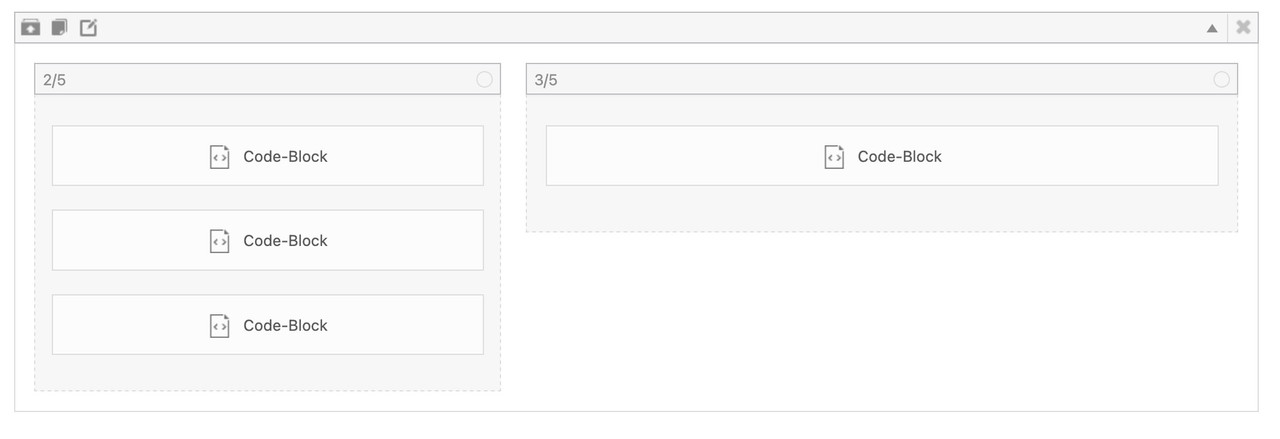
but for that i wouldn’t use the enfold burger icon – instead i would place a custom Button – perhaps a fixed button to toggle a class to hide/show this page.
Look to your example page of thedive.com – its footer is exactly the burger content ;)
so maybe styling a footer-page and redeclare the hamburger icon with a different event that brings that footer to fullscreen and to fixed position ( left: 0 ; top: var(–enfold-header-height) ) is a possible solution. ( no automatic menü – but that way you like to have it)
Hi,
Thanks for the update. Please open a new thread if you should have any further questions or problems.
Best regards,
Rikard
Hey Soulshakin,
Please refer to thisw: https://kriesi.at/documentation/enfold/theme-registration/
Best regards,
Rikard
Hey Alex,
You can still use the same license. If you want to receive updates on the backend, then please refer to this: https://kriesi.at/documentation/enfold/theme-registration/
Best regards,
Rikard
Hey Alex,
You can still use the same license. If you want to receive updates on the backend, then please refer to this: https://kriesi.at/documentation/enfold/theme-registration/
Best regards,
Rikard
 Alex
AlexGuest
Hi, I moved my webpage to a new webhosting and decided to rebuild the page from scratch for a cleaner setup. It is the identical project though, the other installation has been deleted. Unfortunately, my enfold-license doesn’t work anymore. Is there a chance I can still use the license?
Thanks in advance!
Hi, I moved my webpage to a new webhosting and decided to rebuild the page from scratch for a cleaner setup. It is the identical project though, the other installation has been deleted. Unfortunately, my enfold-license doesn’t work anymore. Is there a chance I can still use the license?
Thanks in advance!
Hi! I m not be able to install the Enfold theme. Are any special server parameters required? What mysql version is required?
Hey agus,
Thank you for the inquiry.
There is no element that exactly matches the layout of the page in the private field, but you might be able to recreate it with some modifications using the Magazine or Blog Posts element set to Grid Layout. Please check the links below for reference.
— https://kriesi.at/themes/enfold-2017/elements/magazine/
— https://kriesi.at/themes/enfold-2017/elements/blog-posts/
Best regards,
Ismael
 agus
agusGuest
Hi,
just check your enfold demos, and when i check the blog sections i dont find layout that i want to use.
is it possible to have blog layout like the link below or i need to hire a freelance to customize the enfold theme?
many thanks
Hey jkos,
Thank you for the inquiry.
You can configure the Main Menu > Main Menu Links in the Enfold > Advanced Styling panel. Please check the screenshot below.
View post on imgur.com
Best regards,
Ismael
Hi,
Glad we were able to help, if you have any further questions please create a new thread and we will gladly try to help you. Thank you for using Enfold.
Best regards,
Mike
Hi,
Glad Guenni007 could help, thank you Guenni007, if you have any further questions please create a new thread and we will gladly try to help you. Thank you for using Enfold.
Best regards,
Mike
have you refreshed all cachings (maybe you got a caching/optimization plugin) – did you “Delete Old CSS And JS Files?” on Enfold – Performance?
Next Hint:
These settings are nearly the last that are loaded – even after quick css – so if you got a mistake on quick css ( missing closing brackets , komma instead of semicolon etc. they will be not loaded. So check your quick css.
If you got a link to that page – we can check what happens.
Hi,
Glad Guenni007 could help, thank you Guenni007, if you have any further questions please create a new thread and we will gladly try to help you. Thank you for using Enfold.
Best regards,
Mike
Hi,
Thanks for the update, we’ll close this thread for now then. Please open a new thread if you should have any further questions or problems.
Best regards,
Rikard
Hey John,
Try this CSS in your Enfold Theme Options ▸ General Styling ▸ Quick CSS field:
.page-id-4128 #after_section_1 {
	 padding-top: 50px;
}
adjust to suit.
Best regards,
Mike
Hi,
Try this CSS in your Enfold Theme Options ▸ General Styling ▸ Quick CSS field:
#top #main .avia-gallery.av-mb6m8z6a-b9f99ac9fd31fe48d94c453aabd891f1 .avia-gallery-thumb a {
    width: 50%;
}
Then disable Enfold Theme Options ▸ Performance ▸ JS & CSS file merging and compression
and enable Enfold Theme Options ▸ Performance ▸ Delete old CSS and JS files
Then clear your browser cache and any cache plugin, and check.
Best regards,
Mike
 Ernst Grubbauer
Guest
Ich habe vor einigen Jahren die Betreuung der Website su-hartpurgstall.at übernommen. Zum Käufer und ursprünglichen Administrator von Enfold zur Website, Sonja Winkelbauer, gibt es keinen Kontakt mehr. Die Website ist bei Easyname registriert. Nun soll ein Upgrade der PHP-Version auf 8.x erfolgen. Dazu wird die aktuelle Version des Themes benötigt, laut Beschreibung https://kriesi.at/support/topic/fatal-error-unparenthesized-a-b-c-d-e/ !
Wo und wie erhalte ich die neue Version?
Müssen wir eine neue Lizenz erwerben?
Für das Kriesi-Supportteam wurde ein temporärer WordPress-User angelegt.
MfG Ernst Grubbauer
Rückmeldungen an (Email address hidden if logged out) – +43 664 4051545



