Hi Angelo,
Please try to go to Enfold > Performance, then disable Responsive Images.
See if it helps.
Best regards,
Nikko
there are different settings that can be done by that filter: avf_post_nav_settings
See: https://github.com/KriesiMedia/enfold-library/blob/master/actions%20and%20filters/Layout/avf_post_nav_settings.php
this is the common setting to get what you want in child-theme functions.php:
function enfold_customization_postnav($settings){
  $settings['skip_output'] = false;
  $settings['same_category'] = true;
  return $settings;
}
add_filter('avf_post_nav_settings','enfold_customization_postnav', 10, 1);
but you can have different settings for post or portfolio – you can exclude categories etc. pp
f.e.:
function enfold_customization_postnav($settings){
	$settings['skip_output'] = false;
	$settings['same_category'] = true;
	$settings['is_fullwidth'] = false;
	// exclude "category-id" 64 from post-navigation
	if('portfolio' == $settings['type']){
		$settings['excluded_terms'] = '64';
	}
	// posts will not have post-navigation
	if('post' == $settings['type'] ){
		$settings['skip_output'] = true;
	}
  return $settings;
}
add_filter('avf_post_nav_settings','enfold_customization_postnav', 10, 1);
 Abdulrahman Omar
Guest
Hi, the previous developer who purchased the enfold child theme for unfortunately passed away and we needed to update the theme to the latest version (the version currently on the website is 4.5.2, could you please send us the steps to update the theme taking into consideration that we are not able to reach the envato account used by the previous developer?
Well the text alb element is still there. If you open the text-block element and write your Text you can place the cursor to every place you like.
F.e. Just in Front of a text-block – then press “Add media” – (some settings could be done directly.
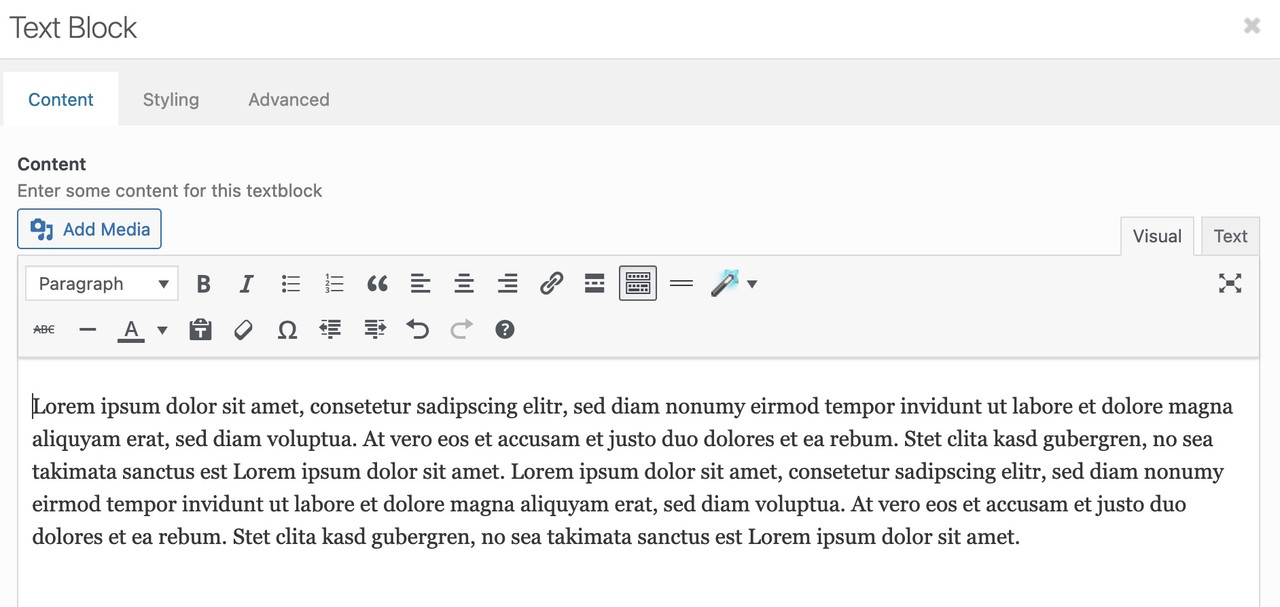
after the image is placed – you can drag the edges to enlarge/reduce the image. On double click you can open a popup with different settings.:
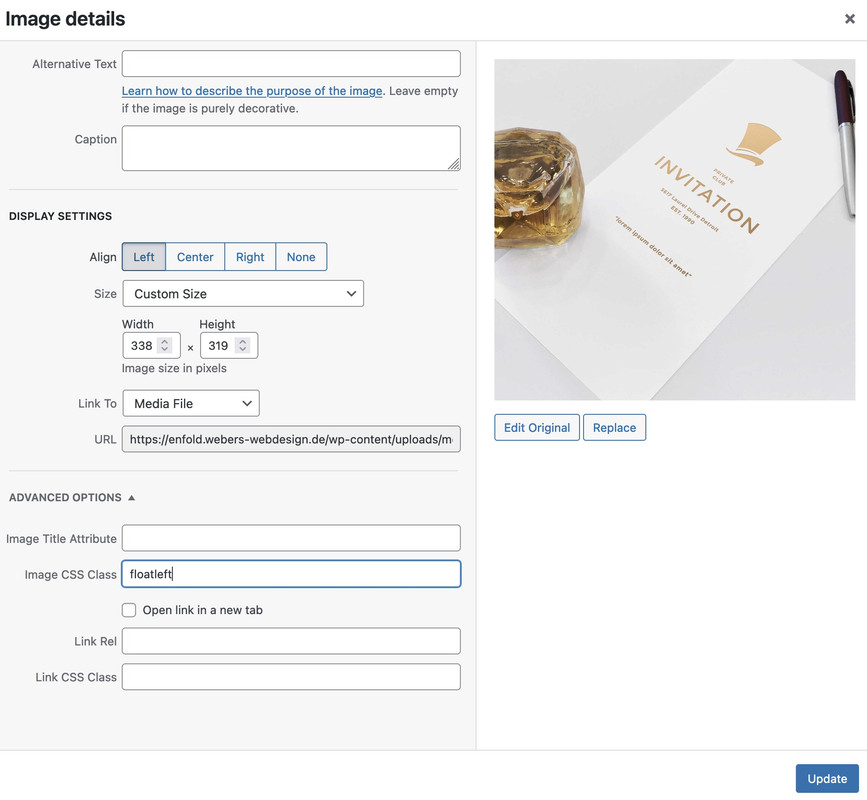
Here are size, link, classes and floating options aswell. If you like to influence a bit more in detail – you should give a custom-class to the image.
PS: align left images will have on the parent container the class: alignleft
align right images : alignright
.alignleft img {
  padding-right: 30px
}
.alignright img {
  padding-left: 50px
}
see result: https://enfold.webers-webdesign.de/evas/
PPS: sometimes ( on some screenwidth this could lead to unwanted effects. F.e. only one word besides the images.
You can avoid it f.e. by setting a nonbreaking space between two longer words. On my example it is the left side – i put a between Lorem ipsum.
Dear team.
I have in a file called debug.log more than 2000 lines of this:
[06-Oct-2022 19:25:14 UTC] PHP Warning: Use of undefined constant THEMENAME – assumed ‘THEMENAME’ (this will throw an Error in a future version of PHP) in /home/wp/disk/wordpress/wp-content/themes/enfold-child/functions.php on line 65
I have included the code in the private content for you to check. It is the code I used in order to activate the mobile menu and the entry is for sure 5 years old.
Is there anything I can do for this to resolve the error?
Best
Asterios
Hi,
I need to create a page which has a product comparison table.
The 7 col table will have approx:
Left Col – main headings
6 columns – A column for each product with inclusions, ticks and crosses, text relating to column 1
I want to make this look nice and be responsive on mobile.
Is there an ALB element that best suits the above for styling etc.
I can’t see anything on the demo other than the pricing which may work OK but could it be done as 7 columns?
Please advise
Hi Guys,
I am having problems with my images on mobile (iphone and samsung). They are a little blurry, while they are on my laptop pretty sharp.
It only happens with the product raster from enfold. If i click on the photo and go to the product page, it becomes sharp again and also when i click on the icon to make it bigger its a good quality.
I don’t know how to fix this.
Hi,
I doing some test with the parallax demo, I have an issue with the Headline Rotator. When I change the text in it and open the preview, everything works fine. However whe I publish it, the paragraph get reduce and disordered. i have attached links to screenshots.
No plugins or custumization, is a plain new wordpress instance with just enfold.
Thanks Mike for confirmation I’ve did this properly. I learned this at the end :) I’ve used following to put it only for blog pages and works nicely.
However issue is that the main menu is not transparent and needs to be manually set to be transparent+glassy for each blog page. How can I make this transparent option to be always transparent+glassy for my Enfold pages?
Currently I need to go to Post/Page and set it in options there manually. Is there some way how to make this transparent+glassy menu by default for every new page/post?
EDIT:
I’ve found this code on docs page https://kriesi.at/documentation/enfold/header/#toggle-id-3-closed + support forum https://kriesi.at/support/topic/set-transparent-header-as-default-header-style/ and seems to set my option to default to transparent and glassy for new pages.
add_action( 'after_setup_theme', 'ava_enfold_builder_layout_mod' );
function ava_enfold_builder_layout_mod(){
  add_filter('avf_builder_elements', 'avf_enfold_builder_layout_settings_mod');
}

function avf_enfold_builder_layout_settings_mod($elements)
{
  $counter = 0;
    foreach($elements as $element)
    {
    // Layout > Header visibility and transparency
    if($element['id'] == 'header_transparency')  {
			$elements[$counter]['std'] = 'header_transparent header_glassy';
        }
        $counter++;
    }
  return $elements;
}
Problem is however that once I create some page + save (it is glassy) and then edit it and save without changing anything the glassy effect is gone and the menu is transparent + border instead. I can’t set it back again to glassy with anything anymore. I can set everything else just not glassy anymore. It just ignores that setting. Now even with the above function I don’t see glassy header to be default anymore..
Can you please provide proper function which will make this option default in options and will preserve on page updates?
If you want to reproduce please login and do following:
1. Create new test page with glassy header
2. Check the page it won’t have glassy effect.
I’m not sure what happened here but something seems to be doing strange stuff to my glassy header now
Thanks
Hi,
Thanks for the update, I’ll go ahead and close this thread for now then. Please open a new thread if you should have any further questions or problems.
Best regards,
Rikard
Hi,
Great, I’m glad that you could solve the problem, and thanks for the update. I’ll close this thread for now then, please open a new thread if you should have any further questions or problems.
Best regards,
Rikard
Ismael,
Any luck to check this one please? I planned to migrate to this Enfold web over weekend and this seems to be the biggest but last blocker for me.
I would really appreciate if you can have a look and somehow unblock me. I’ve tried to play with hooks today but it seems to be too much for me to understand how to achieve expected scenario. Would really help to have Enfold skilled person to unblock me :)
I’ve tried to use following hook to insert it .However it always ends up under or top of the header. The image never ends up with transparent menu.
Thanks a lot
Hi,
Glad to hear that you have this sorted out, if you have any further questions please create a new thread and we will gladly try to help you. Thank you for using Enfold.
Best regards,
Mike
Hi,
Glad Ismael could help, if you have any further questions please create a new thread and we will gladly try to help you. Thank you for using Enfold.
Best regards,
Mike
Hi,
Thanks for letting us know, I’ll close this thread for now then. Please open a new thread if you should have any further questions or problems.
Best regards,
Rikard
This reply has been marked as private.
After updating Enfold and TEC, problems started. The countdown disappeared on both pages it was showing previously PPM Home and Startup Home (published pages). Went to settings to reset it and WOW – the dropdown “Which Entries” to select what data to use is not there. It’s just blank space. No error, no notice no nothing. I also checked Chrome developer tools for front-end errors- NONE.
WP Admin and FTP credentials posted private.
Hi,
Thanks for letting us know, I’ll close this thread for now then. Please open a new thread if you should have any further questions or problems.
Best regards,
Rikard
Hi fkm,
I’m glad that we could help you :)
Thanks for using Enfold and have a great day!
Best regards,
Nikko
Hi Samuel,
You’re welcome :)
Thanks for using Enfold and have a great day!
Best regards,
Nikko
Hi Ed,
Thanks for giving us access.
Unfortunately, I don’t know of a quicker way unless a js error appears which makes it easier to figure out which file is causing the issue.
I tried to change the settings of WP Rocket however even if I tried to disable all settings from WP Rocket it does not show up if you’re not logged in.
It seems to show up just fine when you’re logged in even if the plugin is activated and has all the settings but when the cached version is served on visitors then it does not seem to show up on page load unless you disable WP Rocket. I’m not sure if Asset Cleanup plays a role in the issue as well but I had seen some Enfold users who are using WP Rocket but I never encountered the same issue as your site. I think the most reasonable way to resolve this without spending a lot of time is to add the CSS code I mentioned.
Best regards,
Nikko
hallo
Das heisst die Bilder sind in der Datenbank. Ich kann den Enfold Ordner komplett löschen und dann wieder neu rüberkopieren?
Gruss Fred
 Klaus
Klaus
Hi Rikard,
So your account was brand new, and they cancelled your account before you had a chance to purchase anything?
Yes, exactly like that. First I put the Enfold theme in the shopping cart. Then I created the account according to the requirement. In the payment process, I then selected credit card as the payment method and entered the credit card details. I clicked on the payment button and the next thing I knew, a message appeared saying that my account was locked.
Best regards,
Klaus
Hi,
Thank you for the update.
We added the css code again and disabled the Enfold > Performance > File Compression settings but the css modification is still not loading correctly. The css works when we apply it directly in the browser.
Did you install any cache or compression plugins? Please disable them temporarily.
// https://1drv.ms/u/s!AjjTfXSRbKTvyTGrV4GuWZO9B9Jv?e=RnIVwz
Best regards,
Ismael
Hi fabioloutfi,
Please try to add this CSS code in Enfold > General Styling > Quick CSS:
#top .av_minimal_header .header_bg {
    opacity: 0.8;
}
Just adjust the values from 0 to 1, 0 means fully transparent while 1 is fully white.
Hope this helps.
Best regards,
Nikko
Hi,
Thank you for the inquiry.
Did you select the Roboto font in the Enfold > General Styling > Fonts panel, or did you add a layer slider? if there is a layer slider in the page, you can disable the Google Fonts in the layer slider settings. We were not able to check the page above because it is private and requires a password.
Best regards,
Ismael
Hi Chris Brooks,
Thanks for contacting us!
Can you give us more context on the topic?
404 pages on Enfold is only a single page however if the URL on the browser is pointed to non-existing pages then it redirects to that page.
Best regards,
Nikko
Hi rixi,
Please try to add this CSS code in Enfold > General Styling > Quick CSS:
@media only screen and (max-width:767px) {
  .responsive #top .logo {
    width: 60%;
  }
}
Best regards,
Nikko
Ich habe vor 2 Tagen eine zusätzliche Lizenz von Enfold erworben, um Support zur Sicherstellung des Datenlecks zu erhalten.
Bitte helfen Sie mir, das Problem zu lösen oder lassen Sie mich wenigstens wissen, wohin ich mich mit meinem gekauften Support wenden kann.
Freue mich über jede hilfreiche Information.
Danke.



