Hi,
..and then rename the old folder to enfold_old for example, and the new folder to only enfold.
Best regards,
Rikard
Hey Tom,
The update to 5.1.2 has to be done manually from the version you are running, please refer to my replies in this thread: https://kriesi.at/support/topic/enfold-4-5-theme-update-update-failed-download-failed-a-valid-url-was-not-pro/#post-1021541
You can either update manually via FTP: https://kriesi.at/documentation/enfold/how-to-install-enfold-theme/#theme-update, or use a plugin to upload the theme zip file: https://wordpress.org/plugins/update-theme-and-plugins-from-zip-file/
If that doesn’t work then please try to delete the whole theme folder, then replace it with the new version. Make sure that you have backups of the site before starting updating, or update on a staging version of the site first.
Also please read this after you have updated: https://kriesi.at/documentation/enfold/theme-registration/
Best regards,
Rikard
Hello, yes I was working, sorry. A couple of notes – I don’t know if your review noted:
1) TEC Upcoming Events and Enfold event widgets, post listing using events were already working fine. Each uses “all” if category(s) not selected. I had tested in the blog sidebar and home page.
2) The sidebar countdown widget also was working fine
3) The Animated Countdown (manually enter date) I also had tested fine (Content Elements)
Setting categories for the active events:
1) DID fix the missing dropdown however…
2) NO CHANGE with Enfold’s Plugin Additions > Events Countdown not showing (set to show countdown to next event automatically)
I really hope you can help – REALLY critical to my client promoting their events.
 Tom van Riemsdijk
Guest
Hello!
I am currently running a wordpress website on Enfold version 3.4.7 and it’s really not working anymore.
Is it possible to update the website ‘as is’ to the new software version 5? Or do i need to rebuild everything then?
Thank you for your answer!
Greetings,
Tom
Hey Lene,
7.3 is bundled with the latest version of the theme. If you are not seeing that version, then please update to version 5.1.2: https://kriesi.at/documentation/enfold/how-to-install-enfold-theme/#theme-update.
Best regards,
Rikard
Hi Rikard,
thanks for your prompt answer.
Ref your solution: At no risk for the current theme settings? My customer likes things to be perfect and i do not want to take any risk regarding the existing site updating the theme. I’m a bit ill at ease to be honest.
I use enfold with a child theme. The which should i replace?
Thanks
-
This reply was modified 3 years, 6 months ago by
 Ad-Min747.
-
This reply was modified 3 years, 6 months ago by Ad-Min747.
you can even take the whole slider with all settings made by enfold.
Sometimes these settings are made with classes on parent containers. So you had to find the correct container for html copy.
For images enfold starts with a div.avia-image-container – try to copy that whole outer-html
Hi,
Enfold uses classic widgets and not block widgets and it seems like classic widgets do not display comments on the widget. So I am afraid we do not have a code snippet that we could share that would display the comments on the widget :/
Best regards,
Yigit
Hi support
On client site under plugins, there is a banner fra LayerSlider.
The text on the baner is
“LayerSlider Security Update Recommended
Several security issues were fixed in the latest versions of LayerSlider. If you haven’t done it already, please update to LayerSlider 7.2.1.”
As this a bundle package with Layerslider, I don’t have any access to layerslider, so when do you reckon that Enfold make an update with regards to LayerSlider?
Best regards
Lene Sahcs
Hey Ad-Min747,
The update to 5.1.2 has to be done manually from the version you are running, please refer to my replies in this thread: https://kriesi.at/support/topic/enfold-4-5-theme-update-update-failed-download-failed-a-valid-url-was-not-pro/#post-1021541
You can either update manually via FTP: https://kriesi.at/documentation/enfold/how-to-install-enfold-theme/#theme-update, or use a plugin to upload the theme zip file: https://wordpress.org/plugins/update-theme-and-plugins-from-zip-file/
If that doesn’t work then please try to delete the whole theme folder, then replace it with the new version. Make sure that you have backups of the site before starting updating.
Also please read this after you have updated: https://kriesi.at/documentation/enfold/theme-registration/
Best regards,
Rikard
Hey,
That is because it was not translated in language files. Looking at the other social share icons, I translated it as “Compartir en WhatsApp”. Is that correct translation?
If there are other missing translations, please translate them and contribute on – https://kriesi.at/support/topic/please-contribute-and-translate-enfold/ so we can update language files in Enfold.
Best regards,
Yigit
Hi,
Please use the code as following
#top #header .av-main-nav > li > a:hover,
#top #header .av-main-nav > li.current-menu-item > a {
    background-image: url(https://kriesi.at/themes/enfold-2017/wp-content/uploads/sites/66/2017/02/logosquare-layer-mini.jpg);
    background-size: 20px 20px;
    background-repeat: no-repeat;
    background-position: bottom center;
}
Best regards,
Yigit
Hey Dick,
Thanks for contacting us!
The issue seems to be related to Revolution Slider. You can go to /wp-content/plugins/ and rename “revslider” folder to “old-revslider”. That would de-activate the plugin and you should be able to login after that. You can also try setting WP debug to false – https://codex.wordpress.org/WP_DEBUG
If you have recently upgraded your PHP version, please update Enfold (https://kriesi.at/documentation/enfold/theme-update/) and WordPress to the latest versions as well.
I hope that helps :)
Regards,
Yigit
I want to use PiwikPro analytics. There is a PiwikPro WordPress plugin but I try to avoid installing unnecessary plugins. I want to install the PiwikPro code in my header, can I do that like this in my Child themes functions.php file:
function piwik_analytics_header(){
?>
<script type="text/javascript">
put pwikpro code here
</script>
<?php
}
add_action('wp_head', 'piwik_analytics_header');
Thanks for the help!
Alwin
Hi,
Thank you for the link to your site, I see an error for “rocket-loader” on your site but I don’t see a plugin for this, this sounds like a caching script but I’m not sure, do you recognize it? Does your server use a “object” cache such as Memcached, Redis, Varnish, Litespeed?

I’m not sure if it is related. I didn’t find any errors in your child theme style.css, but I did find that if you enable CSS File Merging And Compression your style.css works.
Or if you change the Enfold Theme Options ▸ General Layout ▸ Alternate Content Secondary Font Color to white the form text & placeholders become white, but I don’t think that you wanted the placeholders white.
I tested the child theme style.css on my demo site but couldn’t reproduce this issue, so by default the child theme style.css is working correctly.
Best regards,
Mike
Hi,
I’m relifting one of my website dated 2018.
When I want to update-upgrade enfold it says that I’m running 4.3 and that it’s the current version even when I’m checking manually.
On my other sites, Enfold is running 4.9.3.
How can I do to update enfold at no risk for my website?
Thanks
Best regards
 Dick Jones
Guest
Hi
I can’t find any other way to contact you
Hopefully simple
Foliodevelopments.com
Is an enfold website, quite old now
Clients hosting lapsed and then reinstated
The/WP-login no longer works so we we can’t access WP to edit
Can you help – don’t know what else to do
Thanks
I’m just working on a new site – have purchased the enfold token. But the layout tab is missing in the back end with the ability to change the header and footer layout etc on individual pages.
Hi,
Glad we were able to help, if you have any further questions please create a new thread and we will gladly try to help you. Thank you for using Enfold.
Best regards,
Mike
Hey karmenka,
Thanks for the login details. I toggled the CSS file compression option under Enfold->Performance, and that seems to have helped. Please review your site.
Best regards,
Rikard
 Sascha Halpape
Guest
Hallo Kriesi Team,
eine Bekannte von mir (Friedhild Eck-Madé) hat 2017 von der Agentur Sergio Sanchez eine Website auf Basis von WordPress erstellt bekommen.
Die Zusammenarbeit wurde kurz darauf beendet, da die Agentur sehr unzuverlässig arbeitet.
Nun ist es so, dass Ihr Enfold Theme zur Erstellung der Seite genutzt wurde und wir leider keine Möglichkeit haben das Theme auf eine, mit der aktuellen WordPress Version kompatiblen, Version zu aktualisieren.
Daher ist meine Frage, ob Sie nachvollziehen können, dass Frau Eck-Madé Ihr Theme in 2017 gekauft hat, oder ob wir es noch einmal kaufen müssen? Sollten wir es noch einmal kaufen müssen ist die zweite Frage, ob Themeforest die einzige Möglichkeit zum Kauf ist.
Viele Grüße
Sascha Halpape
Thanks Ismael.
I’ve tested the above code and nothing really changed for me. I’ve also tried to disable File Compression (both css, javascript) but no change.
1. This gives lot of empty space between these two widgets which is not proper
2. The default comments text is too big. See image:

Also if possible I would like to not turn off any performance options in favor of this or install additional plugins.
The default wordpres widget should support this nicely https://wordpress.com/support/widgets/recent-comments-widget/ Is there way how to overwrite the one Enfold has? I’m not sure why Enfold would choose to not use this default wordpres widget when it has much better options.
Hi,
Thank you for the update.
1.) Above the combo widget, you can add another text or html widget and use it as the title of the widget below.
2.) Which fonts or text? The font size of the text inside the combo widget is actually quite small. You can adjust it with this css code if you like.
#top .news-content {
    padding: 7px 0 3px 0;
    line-height: 1.7em;
    position: relative;
    overflow: hidden;
    font-size: 1em;
    display: block;
    clear: both;
    margin: 0;
}
You may need to toggle or temporarily disable the Enfold > Performance > File Compression settings afterwards.
Best regards,
Ismael
Hi,
Thank you for the update.
One of the fonts is coming from the Layer Slider plugin, so we edited the layer slider settings and disabled Google Fonts. The default Dosis font was also selected for the elements in the Enfold > Advanced Styling panel, which we adjusted. The site should now pass the google font checker.
Best regards,
Ismael
I have just installed a new wordpress site on a siteground hosting environment. (I have many sites working perfectly in this environment.)
For some reason whenever I set Section Height to anything option OTHER THAN no minimum height.
The content in the section is not visible.
I have disabled all plugins and flushed cache to no avail.
All wordpress and enfold versions are up to date.
Any help much appreciated. Logins included in private content
Hi,
Yes, go to Enfold Theme Options ▸ Layout Builder ▸ Integrated (Bundled) LayerSlider Plugin
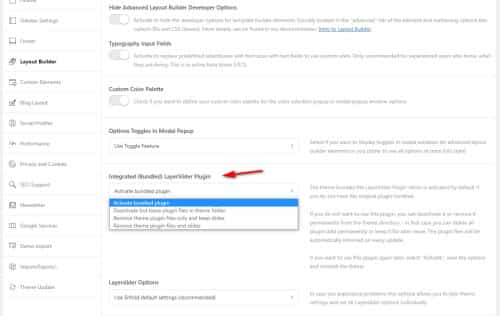
Best regards,
Mike
Hi,
Glad to hear that you have this sorted out, if you have any further questions please create a new thread and we will gladly try to help you. Thank you for using Enfold.
Best regards,
Mike
I can’t thank you enough, Guenni007. That’s the answer I was looking for. I can do that with Text elements both in the main page layout as well as in widgets (like in my footer). Wonderful! (Wunderbar!)
(Vielen Dank! (meine Eltern kommen aus Deutschland, damit ich etwas deutsch sprechen kann–ein bisschen)
(Many thanks, my parents come from Germany, so I can speak some German–a little bit))
Enfold Support: You can close this topic if you wish. Thank you.
All the best,
Gary
i see on your inserted code that there is a space behind header_glassy – and that is important !
if i remove that space – the presetting will not work.
______________
for the devs and mods:
by the way: on functions-enfold.php on line 1335 there is:
$header['header_transparency'] = 'header_transparency';
is that correct ? why is it not
 …
__( 'Transparent Header', 'avia_framework')	=> 'header_transparent',
as in meta.php line 377 ???
Hi Jasper,
Please try to add this CSS code in Enfold > General Styling > Quick CSS:
(just change the image URL and and background size as you see fit)
#top #header .av-main-nav > li > a:hover {
    background-image: url(https://kriesi.at/themes/enfold-2017/wp-content/uploads/sites/66/2017/02/logosquare-layer-mini.jpg);
    background-size: 20px 20px;
    background-repeat: no-repeat;
    background-position: bottom center;
}
Best regards,
Nikko



