
-
Search Results
-
I was testing the upgrade to WP 3.9 on a testing site with just the original WP installation and after the upgrade all I see is a blank white page. If I look at the source code for the page all I see is “1.” at the top and that’s all.
Also the thumbnail for the Enfold theme within WP is all blank, just white.
All of the other themes work fine and are able to pull up the sample page and sample post that are there with the original install.
No one else seems to be having an issue with WP 3.9, what can my issue be? I have deleted the Enfold theme a couple of times and reuploaded and nothing and I am using Version 2.7.1.
Hi Team of Kriesi,
i have a minor question. Is it possible to hide the | or “|” charater – which is automaticly generated to seperate subpages – if you are on the frontpage? So only for the frontpage i would like to hide it.
Ah another question. Funnly in chinese thinking there is also a more or less negative cultural connotation to that character – another project i im working on. Is it possible to change it?
Gruß Sebastian.
Hello,
I really like how easy it is to show the location in google maps in enfold. But unfortunately it also show the regular google maps companies that have an entry in google maps.
And here is the problem that it also shows the competitors on the same map. So it doesn’t make much sense to advert for the competitors on your website. Is there a way to hide that one or at least to don’t show any companies on the google map?Thanks.
Greetings,
I’m working on http://192.185.4.114/~castweb/media/sermons/ and can’t figure out how to get rid of the date, category, and author texts that keep showing up under the post title. I’ve turned them all off in the “Blog Layout” section of the Enfold child theme. This turns them off for individual post pages, but not for this compilation page which is drawing from my “sermon” category. Is there any way to do this? I’m a newby at this.
Thanks,
NickTopic: Table cell size control
Hi guys,
I have an issue with the tables in enfold. I have a ‘product specification’ page which is a series of tables with tech data.
I would like the table cells to have a constant size so the tables ‘line up’ with each other. Right now every table cell has an arbitrary size
Screenshot here: http://www.heaven11audio.com/sceens/tablelineup.png
I’m using the enfold Child Theme so I can insert custom CSS if need be.
Cheers,
Itai
Hi,
I am having problems with the Layer slider:Posted the following under comments:
1. My layer slider is not working properly. Most of the functions are not active – is there something (a lisence or something) I need to pay or activate? It worked when I installed the template..
2. There are more options not working – screen options drop-down menus is not active.. Should I reinstall the template?
3. I reinstalled the template, no change.. Please advice:)
4. I rolled back to version 3.8.3 and it all workes with old database – where do I go from here?
5. So I installed (bought) the slider to get the newest version – still does not work..
6. Updates to latest Enfold version, still not working
Need help….:)
Elise
Topic: Hover box over picture link
At the demo (http://kriesi.at/themedemo/?theme=enfold) all featured images of the blog posts are 220px height – and original image has 1030x686px. It automatically takes just a part of image from inside.
I can not reproduce this effect at my site.
It always just resize width to 100% of column and height is proportionally. If I upload an almost square image 1200x915px – and the column width is 569px (just like in the demo) – featured image height is proportionally 441px. I want it to be just 220px – a part of image (like in the demo page).
What can i do?
Hi,
I am experiementing with the a height increase so I may display a larger logo (116px to 150px). I have increased it, but now I can see the page content behind it on the lower border. I know this is probably an easy fix, but I honestly cannot find an answer. Would appreciate it if you can help me out asap.
url: pvatestsite.com/420
look at the lower edge of the header and you can see what I mean. the very top of the slider shows through even though there is no scrolling. and becaause the logo has a white background, it really looks bad. I do not want this to show through no matter what height i adjust the header. on a side note, this did not occur in old versions of Enfold. Thanks.
tjr3217
Hi guys,
I’m having some trouble with Analytics in my Enfold ‘One Page’ website. I’m using a menu with a couple of color sections with specific ID’s like #contact and #cases. It would be great to have GA be able to recognise these sections.
Unfortunately if have yet to find a way to get this done. I’ve found some plugins, but none of them seem to do exactly this. You can use multiple GA ID’s by adding some shortcodes, but I just want to be able to know which of the visitors get all the way to the bottom…
Any thoughts on how to achieve this? Or maybe an out-of-the box solution to get similar data? :)
Best regards,
Bas
Hi,
After i updated to 2.7.1. I noticed a little Bug with the Post-Slider-Element: The Overlay effect on the featured Image has a different size than the underlaying picture and therefore produces little glitches:
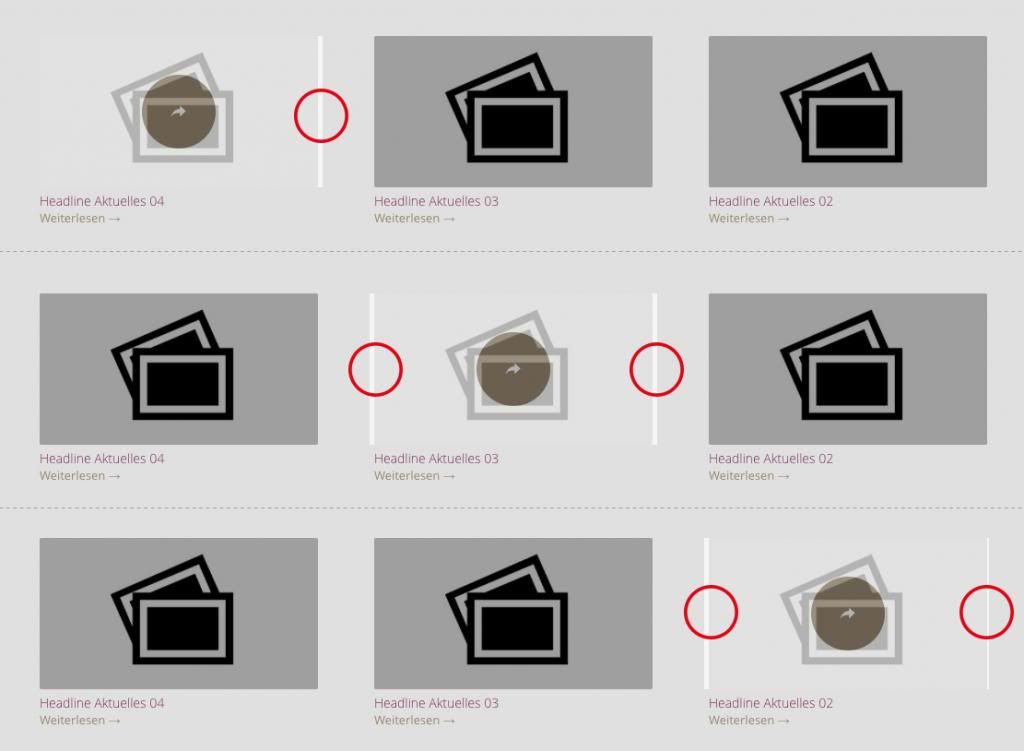
Maybe you could give me a hint how to fix this.
Best Regards,
Marcus
Hello,
I just created a site using Enfold theme. My praise to the developers!
Now I have a slight problem with it, as I moved the site from home host to a live server. They both work (see http://kristijonas.myetrayz.net and http://www.kremeratabaltica.com) but when I go to administration in the new server, I cannot edit or create text blocks normally – there is no text in the “visual”part, I can only see it in the “text” part, which makes administration to last longer and complex…
By the way, to migrate the page I used “WP MigrateDB or WP MigrateDB PRO” plugin, and later moved the “uploads” folder and “enfold” theme folder using MuCommander.
Any ideas on where the problem is and how to fix it?Topic: Switching between menus
I have an Enfold themed page. I want to use this page in 2 different languages. Main one will be Turkish and the second one will be English.
I prepared 2 different pages for each languages and orginezed their contents but there is a problem that couldn’t solve yet, menu. Although i prepared different menus for each languages, i’m not able to swich to English menu in my English page.
How can i swich between 2 menus? Is there another way to show menu items in English?
My web page is http://www.handekarayaka.com/blog/
Thanks
Topic: Site password protected.
Hello.
I bought your template and I have a problem with the site password protected.
I created the page but page after entering the correct password is not open.
Please help me.Wordpress 3.9
Enfold: 2.7
http://plan2.pl/client_478/ password: plan2Regards
QeeQac
Viewing 30 results - 222,061 through 222,090 (of 244,547 total)


