Hi!
Try using WPML (which is compatible with Enfold).
Best regards,
Josue
Hi!
Are you using the latest version of Enfold (2.7.1)?
Best regards,
Josue
 Anonymous
Hello Josue,
I found the problem. I am using an Enfold child theme and I had the old version of header.php in the child theme folder. I replaced it with the one from the updated version of the theme.
However, I have a new problem because in the old version of header.php I replaced the image logo with a custom text logo. But in the new version there is less code and nowhere that makes sense to put my custom text logo. Where can I put my code in the new version of the theme?
P.S. My code is: echo "<site-title>The <green>Village</green> of Field</site-title>";
Thanks
Hallo Enfold Team,
1. Bei Blog.Eintraegen, in denen ich Textauschnitt angebe, erscheinen nie die Shortcodes. Da ich Produkte vorstellen moechte, wuerde ich aber auch schon in den Textausschnitten gerne Buttons wie “Hier geht es zum Deal” einfuegen. Laesst sich das realisieren?
2. Ist es moeglich beim Eintraege Slider eine Fixe Hoehe festzuschreiben. Irgendwie stoert es, das je nach Laenge der Ueberschriften/Texte sich die Hoehe insgesamt verschiebt.
Danke.
Gruesse Thomas
Hi Enfold Team,
i would like to create my posts in the Enfold Theme like in the Coalition Theme Blog External. Is that possible? That means the image also left or right side. An Alternativ could be, if it would be possible to enlarge the Magazin Element (bigger picture and not only title also Text).
Danke/Thanks
Gruesse Thomas
Hi,
Is there an events Calendar that works well with Enfold.
Thanks
Flikk…thanks for the reply…
I am using safari with developer mode and cache disabled… So the cache was my first inclination too but can not be it…
Is there some sort of corruption possible in enfolds release of the last week or so or with my install…. Or a conflict with the current version of word press… I just upgraded today…
The help and feedback is much appreciated and enfold is a truely awesome theme
This is the second tine I purchased Enfold. I had no installation issues three months ago installing on WP 3.8.1
I downloaded Enfold this week — unzipped to find the actual 13 meg zip theme folder – and went for the one click install with the zip folder.
I am attempting to load to WP 3.9.1 on Hostmonster ? VPN
When I try — it fails, pauses and asks if I really want to do this… and it WILL NOT load.
Suggestions please ??????
Hey!
It seems you have updated Enfold but not WP, try updating it to 3.9.1.
Best regards,
Josue
First thing that comes to my mind is the web browser cache.
http://en.wikipedia.org/wiki/Wikipedia:Bypass_your_cache
Since i did not see any additions in the enfold.css, i thought about the file permissions.
So please check those two things and confirm that:
- You bypass or deactivate the browser cache.
- The file permissions are set as followed:
/wp-content/uploads/dynamic_avia/ 755
/wp-content/uploads/dynamic_avia/enfold.css 644
You also can create a temp account for the support so they can log in and test it themselves.
You should post the login as a private reply so that only the support can see it.
WP Version: 3.9.1
Theme: Enfold
Website: http://liquorstore.maximfactory.com/
In my mega menu under Guide the Wine Guide column is centered, how do I get it to align to the left like the other columns?
Thanks for your help
AnonymousInactive
Hello,
I am having a problem with the menu using the latest version of Enfold. The menu is being displayed vertically for some reason. Please visit http://www.fieldbc.ca to see what I mean.
Thanks for the help!
Hey There,
Whenever I do an autopost to facebook, the picture shows up, and the title is correct, but in the description, all I get is code. (see below)
[av_heading heading='BMW Soundtree Case Study' tag='h2' color='' custom_font='' style='' size='' subheading_active='' subheading_size='15' padding='10'][/av_heading] [av_video src='https://vimeo.com/95786411' format='16-9' width='16' height='9']… [ 180 more words. ]
I’m using Jetpack’s publicize in order to autopost, so I don’t know if it’s an Enfold issue or a Jetpack issue.
Anyone else having this issue?
Hi Enfold Crew,
Any ideas to help both of us? Best, Adrien
Hi Yigit,
Since updating to the most recent version of Enfold, I can no longer update my widgets. I have to make a tiny change to some text in a footer widget and there is no longer an opportunity to do so.
Can you help?
Thanks, Amy
this is the issue I am having…as I have said before, styling changes are not making it through to the site and even after deleting the dynamic_avia folder changes are not flowing through to the theme…
Unless I am misunderstanding a color family specified in general styling should apply on a menu and should propagate to most of the interface objects and text appropriately. THIS IS NOT HAPPENING…and its not just for me several other people I recommended enfold to are having the same issue and can not get the general styling to reflect though a site. I do not want to make all sorts of manual overrides to css if at all possible.
https://dl.dropboxusercontent.com/u/4309835/blog/screenshots/2014-05-20_1327_Enfold_Detail.png
in the below image…I have chosen the black and white color scheme…and as you can see from the screenshot the cyan belongs nowhere in that schema.
https://dl.dropboxusercontent.com/u/4309835/blog/screenshots/2014-05-20_1145_EnfoldIsssue.png
If I change to Orange Color Schema…nothing happens at all…and I still have the same whacky strong text formatting
https://dl.dropboxusercontent.com/u/4309835/blog/screenshots/2014-05-20_1344_EnfoldOrange.png
As I indicated…I know THREE people unable to get styling to work properly…
I’ve deactivated WPML…and then i can edit portfolio items. I need to use WPML for translate theme and content. There was not problem in previous version of enfold.
How can i solve this? Thanks a lot.
Hi!
Apply this:
http://kriesi.at/documentation/enfold/turn-on-custom-css-field-for-all-alb-elements/
Then simply add a class to the icon you want to customize and this to the Quick CSS:
.custom_icon_1 .iconbox_icon {
    background: red !important;
}
.custom_icon_2 .iconbox_icon {
    background: green !important;
}
.custom_icon_3 .iconbox_icon {
    background: peru !important;
}
Tweak as needed.
Regards,
Josue
Hello,
I’ve updated to the latest version of Enfold and have noticed that icons for the Icon Boxes, as well as the arrows for the Partner/Logo Element are not appearing. If I set the location of the icon to “Center,” only a green circle appears (oddly).
Also, changing the colors in General Settings does not appear to have any effect. Setting the header to Sticky also has no effect. Other changes do show up, like changing the footer text. And if I change the header to “Logo center, Menu below” it doesn’t change the logo position from Left, nor place the menu to center. The menu just appears inside the advanced slider.
I don’t think this is a cache issue, because I’ve tested on multiple browsers and waited a day to see if any changes would show.
Any help is greatly appreciated! The main issues are the icons not showing up and the changes to the general settings not showing up. Thank you for helping out a newbie…
Hi,
Thanks @Flikk for suggestion.
I think it’s the best approach at the moment to have “stored” testimonials, also try requesting here, if more users like it it will be added as a feature in the future.
Best regards,
Josue
Hey!
Can you try deactivating all active plugins and check if that helps?
If not, please add following code to Quick CSS in Enfold theme options under General Styling tab
div.gm-style > div > div > div > div > div > img {
height: 258px!important; }
Best regards,
Yigit
Thank you peter…I backed up my avia folder…and removed it. I set a bunch of different general styling parameters…and this is what I got…
https://dl.dropboxusercontent.com/u/4309835/blog/screenshots/2014-05-20_1145_EnfoldIsssue.png
The cyan white boxed are left over tests I was trying to see it any formatting was flowing through by using the advanced styling options…now I can not get rid of these even though I have no advanced styling and deleted the avia folder several time…perhpas this css is stored somewhere else…and is it possible that the advanced styling may have broken things? I would like to change the theme colors and for the icons to go with it…but nothing I am doing seems to flow through to the front end.
AND i need to put a disclaimer in the footer for my client will to be complying with regulations…
Hi!
Please add following code to Quick CSS in Enfold theme options under General Styling tab
.tabcontainer { margin-top: 0; }
Regards,
Yigit
Hi!
I checked in and the problem occurred because there was no page selected that should show the blog under enfold->theme options. once i set it the option to “Microstock Blog” everything started to work fine :)
Regards,
Kriesi
the best solution i can think of, is to place the shortcode of the testimonials in a text widget.
Have not test it.
But as far as i know, you have to turn on the debug mode to get the shortcode of some elements: https://kriesi.at/support/topic/copyingmoving-elements-to-different-pages-enfold-theme/#post-173375
Then when you placed the testimonial element you change back to the standard editor.
Copy the shortcode for the testimonial and go to appeareance -> widgets.
There you create a new widget area and put in a text widget with the testimonial shortcode.
Then you can place this widget as a widget everywhere you want it.
Only theory, not tested and not easy to edit the testimonials.
But you can give it a try if you want.
edit: there is no built in easy way to do that. as far as i know
Hey!
The quick css code is added to the dynamic stylesheet located in wp-content/uploads/dynamic_avia/enfold.css. Try to delete the entire dynamic_avia folder and re-save the theme options. Enfold should create the folder again and also regenerate the dynamic stylesheet.
Best regards,
Peter
Hi!
Glad you solved the problem. The default form stylings can be found in enfold/css/base.css below this headline
/* #Forms
================================================== */
Cheers!
Peter
Hi!
You can login on ThemeForest with the account you have purchased Enfold and go to Downloads section to download it. If you are not able to access WordPress backend, you can replace the file via FTP. Please take a look at updating via FTP video for instructions – http://vimeo.com/67209750
Best regards,
Yigit
Hello,
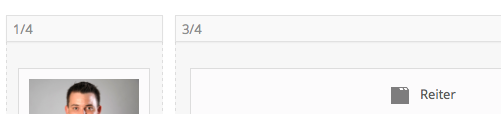
sorry but I have the same Problem between “Team-Mitglied” and “Reiter”. In the left row I have a “Team-Mitglied” an in the right row a “Reiter”.
Please give a solution
https://dl.dropboxusercontent.com/s/m76dzfy7xjc5udf/Bildschirmfoto%202014-05-20%20um%2010.22.12.png
https://dl.dropboxusercontent.com/s/6a0ewuv1tqeh3om/Bildschirmfoto%202014-05-20%20um%2010.23.01.png
Enfold is great!!!!!
Thanks