Hi,
I added this css from Ismael to your Enfold Theme Options ▸ General Styling ▸ Quick CSS field so your images show on mobile:
@media only screen and (max-width: 767px) {
    .av-inner-masonry-content.site-background {
        display: none;
    }
}
Please clear your browser cache and check.
Best regards,
Mike
Hi Mike,
That’s crazy. The solution to this must lie somewhere else. M or F do not mean anything as a label for the field. I understand someone requesting to force a selection but I disagree with those people who want to do that.
If someone does not want to disclose their gender, it should be respected. Let them choose the Field Label Value. Then I would have to add (Do not want to disclose) why piss people off?
Now if I put my IT hat on, the Field label should not be selectable but still render as it is the Field label and denotes what people are choosing. Otherwise, this field makes no sense at all.
I am going to add one more choice to the list Called “Sexo” so that it displays on top.
Will all of these issues be corrected on the next release of Enfold? I would appreciate knowing this so I can plan removing all of this extra code.
Thank you so much (and BTW, love the new Performance Option that I am assuming – before testing it – it minifies and only loads those elements we use on the site, right?)
Best regards,
Havi
Ooops. I spoke too soon. Now all of the forms are aligned in the center also it should show the field name not the first option
Live site shows you what it looks like now (same URI)
This form should be left aligned and should show the field name not the first option
Somehow, the form code changed and shows it as Disabled?
<select name=”avia_3_1″ class=”select is_empty” id=”avia_3_1″><option class=”av-placeholder” disabled=”disabled” value=””>Sexo*</option><option value=”M”>M</option><option value=”F”>F</option></select>
`
This is the code on the previous version of Enfold:
<select name=”avia_3_1″ class=”select is_empty” id=”avia_3_1″><option value=””>Sexo*</option><option value=”M”>M</option><option value=”F”>F</option></select>
Thank you in advance!!
Havi
-
This reply was modified 3 years, 5 months ago by
 havi.
havi.
Ok. Fixed it!! ;)
form.av-light-form input::placeholder, form.av-light-form textarea::placeholder {
color: #fff;
text-align: center;
}
Now it works. Quick question. Will you add this to the next Enfold release (so I make myself a note to remove this CSS – the cleaner the code, the less problems later, right?)
Hey conlcoa,
Could you try updating the theme to the latest version (5.2.1) to see if that helps please? https://kriesi.at/documentation/enfold/how-to-install-enfold-theme/#theme-update.
Best regards,
Rikard
Hi,
But if, on one of these websites, I activate the code editor, I see the page shortcodes instead, like this:
https://eu-augsburg.de/wp-content/uploads/2022/10/Enfold-Code-editor-active.jpg
My problem is that on the eu-augsburg.de site I NEVER see the shortcodes, regardless of changing the mode from Visual to Code Editor. Do you see them?
No I don’t, and that is not supposed to happen in any case. That is why I’m asking you how to reproduce the problem? Or is it that you actually want to see the box in the screenshot in my quoted text?
I do see the shortcode box on the page in private though, but like I said, that is not supposed to happen. Please try updating the site in question to 5.2.1.
The shortcode processor is not an error message, it’s functionality in the theme which offers shortcode debugging.
Best regards,
Rikard
Thanks both Guenni007 and Mike.
I get it now. Didn’t really think of that option or that it existed.
Guenni007, your comment, i guess, is more for the developers of Enfold – I guess.
Best,
Chrilles
Hi,
Glad we were able to help, Thank you for using Enfold.
Best regards,
Mike
Hi,
Just to inform all users: Enfold 5.2.1 had been released and fixes the problem.
@Guenni007
Reason could be, that the css file is enqueued in several files. If the fullsize slider is the last then the wrong url overrides previous correct urls. That’s why we did not catch it during testing.
Best regards,
Günter
This reply has been marked as private.
Hello Support,
we have received a warning and have installed and activated all relevant reloaded Googlefonts locally in the theme Enfold according to the instructions, after that we had eliminated these problems due to basic reloading of Googlefonts according to DSGVO.
But in all tools that check websites for DSGVO, a reload still appears in a sytlesheet, but I can’t analyse where this is happening.
I have also deactivated all external tools such as GoogleMaps or reCapture…
Where could this be called…? is there a way to basically ban googlefonts?
Error message in the :
Stylesheet
https://fonts.googleapis.com/css?family=montserrat:100
regards
Alexander
Hi,
recently I had a weird situation with enFold child. Let me explain everything.
Working with enfold and enfold child. Enfold is updated on the latest version (5.2.1). After the update I worked on the website for almost a day (10-12 hours) working on the child theme. It’s good to mention that child theme has only a custom font file and nothing else like php code. Everything was setup from the dashboard -> Enfold child, like custom css and different options that you are giving with your theme.
So after 10-12 hour the website stopped working, I couldn’t login into dashboard. Spoke with my hosting provider and he said that everything looks fine except that we hit the limit of php workers which is normally never happened. None of their clients ever hit the limit, if there is not a situation like DDdS attack. So provider thought that the issue was about multiple requests etc. I have php code with the plugin snippets but we disabled after the first time that the website get down
I disabled every plugin and try to open everything one by one and see which one causes the issue but no luck. I disabled the child theme and active the normal enfold. With the normal enfold everything was almost fine, full access to the front end and to the dashboard. The weird thing is when I was trying to active the child theme again, the site was going down, no access at all. I tried the couple of times and I realised that was the issue, so I moved all of my settings to the main enfold.
Do you have in your mind what could cause the issue ?
Should I download and add again the enfold child theme ?
What do you suggest ?
Note: In a few day we are about to go live and people will start making orders so we don’t want anything like that to happen.
Thank you and I hope to explained it properly.
Hi,
Thanks for that. I can’t reproduce that on my end though, I get the same results using both code and visual editor. Could you let us know how to reproduce this problem? If you are expecting the Enfold layout editor to go into different modes depending on your selection in the Block editor, then it won’t. If you want to enable debug mode (shortcode editing), then please refer to this: https://kriesi.at/documentation/enfold/intro-to-advanced-layout-builder/#debug-mode
Best regards,
Rikard
This reply has been marked as private.
Hi,
Great, I’m glad that you found a solution, and thanks for the update. I’ll close this thread for now then, please open a new thread if you should have any further questions or problems.
Best regards,
Rikard
Hi Rikard,
I created a TEST page for testing, but it doesn’t matter which page I call up. Could you check the last four images I put in the Mediathek? (they all start with Enfold). You’ll see that the Code Editor view works on a different website (shows the wp-shortcode blocks) and how the same setting on the eu-… website shows no change when switched – it looks just like in Visual Editor mode. I hope that illustrates the issue better.
Best regards
Andrew
Hi,
Please try the following in Quick CSS under Enfold->General Styling:
form.av-light-form input::placeholder {
  color: #fff;
}
Best regards,
Rikard
but you know that you can nest columns in a grid-row cell?
To have the grid-row not as full-width – you can add a snippet to your child-theme functions.php.
See result and all code you need: https://enfold.webers-webdesign.de/grid-row-special/
PS: with no gap – there will be no gap !
I prefer to have here 1/4 cells besides each other and style them by grid layout.
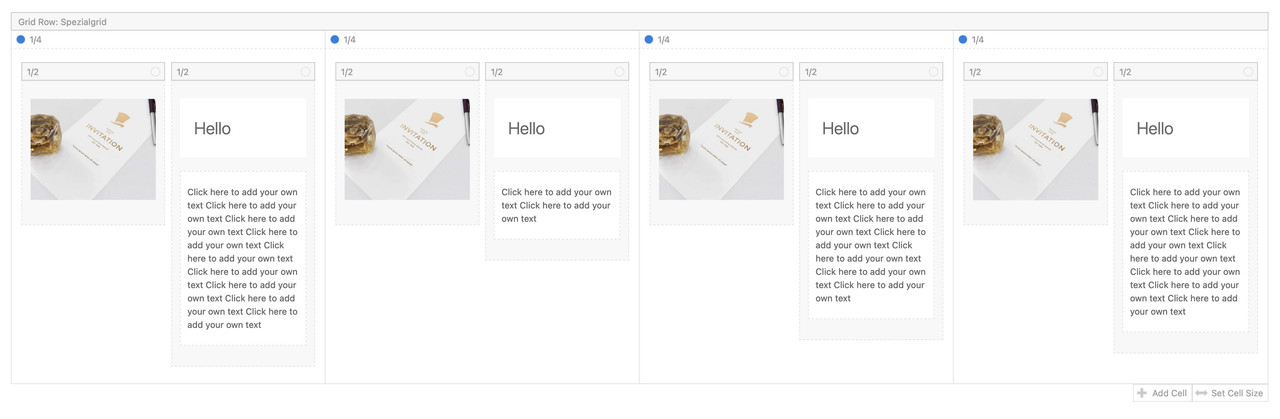
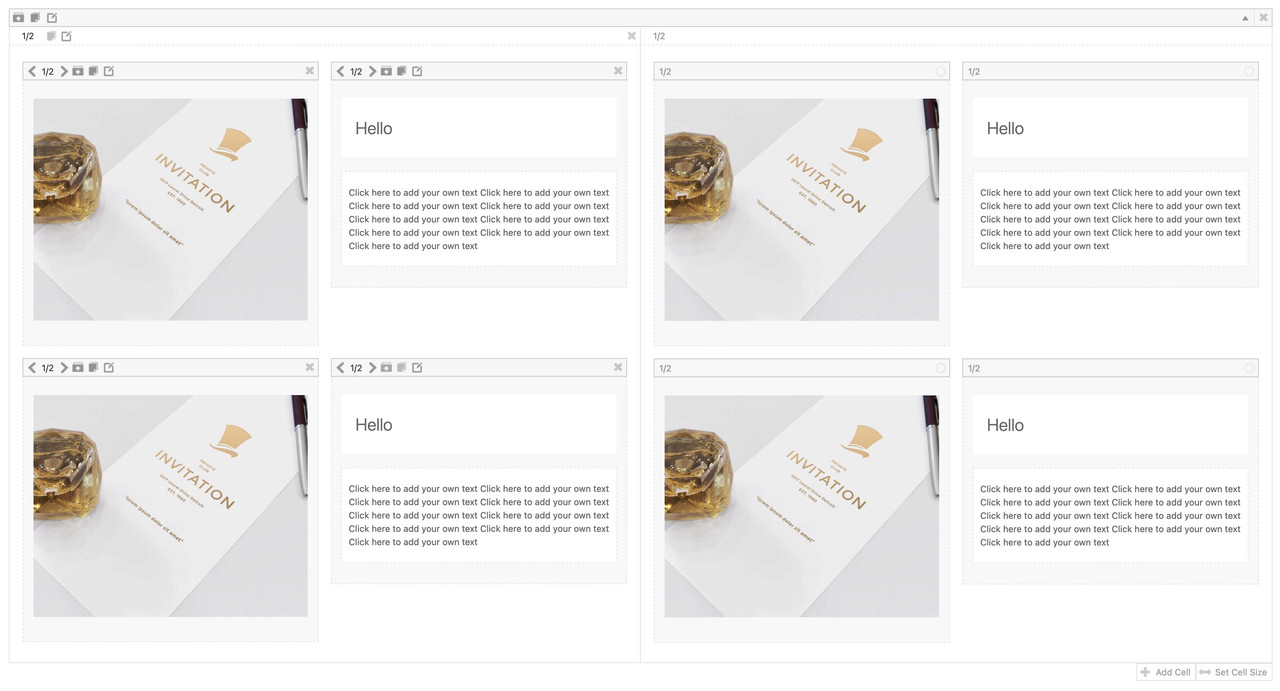
but you can also style it as 1/2 Cells this way:
This reply has been marked as private.
Hey Werner Steiner,
Thanks for the link to your site, I see that you are using an old version that uses the old Envato API key, Envato (Theme Forest) stopped using this a few years ago and switched to a Token systemand all users needed to go to their Envato account and create a new Token. So you will need to ask your developer to create a Token for you as the license is in his account, you will also need to ask him for the latest version so you can manually update because your version will not update. Unfortunately Envato doesn’t transfer licenses.
We can not issue licenses or sell the theme directly, we have an exclusive contract with Envato and they control all aspects of the licenses.
I believe that your developer can push the license to your Envato account from his dashboard, but I could be wrong about that, typically developers are advised to purchase licenses through the client account to avoid this issue after they stop working together.
I would advise purchasing a new license through your Envato account, the benefit is that it includes 6 months of free support on our forum.
Best regards,
Mike
 Werner Steiner
Guest
Dear Kriesi Team
We are using your Enfold Ttheme for our website.
Well, everything is fine so far but we cannot update.
The reason might be that muthmedia GmbH | Film- und Medienproduktion, Seehofstr. 13, 60594 Frankfurt am Main has purchased the theme from Envato. They built the website on our behalf.
Then we took over and maintain the website ourselves.
But even we have got the Envato License Certificate from muhtmedia and we entered valid private Envato key in our dashboard, it still it does not work.
Probably because the theme is not displayed in our purchases.
So what can we do?
Thanks for the help.
Kind regards
Werner Steiner
On the latest release (5.01 works fine) of Enfold, the Labels on the forms where style is chosen as Light (on dark background) show either black or gray inline labels on each field. They should show as Light (white #fff).
See: Staging Site – updated < you cannot see the field labels (this would be a serious conversion issue for a lawyer)
Sending you the same page on the Live Site in Private content (Enfold 5.0.1) and one more URL from another site I just updated as well.
I tried adding style to that text but it overrides it:
<p class=” first_form form_element form_element_half” id=”element_avia_1_1″>
<label for=”avia_1_1” style=”
color: #fff !important;“>Nombre <abbr class=”required” title=”requerido”>*</abbr></label> <input name=”avia_1_1″ class=”text_input is_empty” type=”text” id=”avia_1_1″ value=”” placeholder=”Nombre*”></p>
Please, help!!
Thank you!
Havi
Hi,
Glad Yigit was able to help, if you have any further questions please create a new thread and we will gladly try to help you. Thank you for using Enfold.
Best regards,
Mike
Hi Andrew,
It’s not a know problem with the theme. First off, could you try updating the theme to the latest version (5.2) to see if that helps please? https://kriesi.at/documentation/enfold/how-to-install-enfold-theme/#theme-update. If not, then please post admin WordPress login details in private.
Best regards,
Rikard
Hi,
Thanks to you both for the code and help. It worked now :-)
I still have a lot of problems when I set the positions and padding for mobile and tablet in Enfold, doesn’t seem to work the new way. So I code with css instead.
On my iPad it gets the same look like laptop, and it doesn’t fit right. When I edit the positions with paddings/margins in px on desptop version, it works on desktop, but then it seems like it’s stuck like that on mobile and tablet as well even if I edit it all different when I press the mobile and tablet etc icon to det the positions?. Maybe a bug?
Another problem is that when I get the css for a content with specific code like: #top .av_textblock_section.av-1o8x9-95bc785c2e9fb80ef953c8d68d0a55a9 .avia_textblock {
color: #ffffff;
}
It works perfectly, but after I have edited a bit on the text or something else in enfold in that same content, the code number changes, and I have to get a new one for each time. Anything I can do to keep it?
Thanks and kindly regards, Mathilde
Hey,
Our devs have fixed the issue and included it in Enfold 5.2.1. Please update the theme :)
Regards,
Yigit
Hi there
I think this is a well known issue: I have to update a whole WP Site, so I cloned the client site to a Staging Subdomain for Testings, and started to update all older AddOns and Themes there. As I don’t want to update on the Live site because of Failes and Errors.
After Updating ENFOLD from 4.7 to 5.2 the 4 Widgets in Footer section now are missing. Showing now 4 placeholder widgets instead, like «Categores» and «Archives»
Testing Clone: https://cleanhouse.webagentur-aarau.ch
Original: https://www.cleanhouse.ch
(Scroll all way down to FOOTER Section).
How can I get back the 4 original widgets (which are still there under WIDGETS)?
I run a Child theme Copy from ENFOLD theme.
Somehow, the theme can’t find the Orignal widgets… something wrong with the footer.php in Enfold Child?
 Joan
JoanGuest
Hello. In the past I used your Enfold theme (enfold-3.3.1). Now I’m in a new projects with low cost budget and want ask to you if there is a time when you offer the possibility to buy the theme at a low price as other developers do (as example like Arbees do in black friday…).
Waiting your answer ;-)
JC



