Hi,
Thanks for the update, we’ll close this thread for now then. Please open a new thread if you should have any further questions or problems.
Best regards,
Rikard
Hi,
Glad we were able to help, if you have any further questions please create a new thread and we will gladly try to help you. Thank you for using Enfold.
Best regards,
Mike
NICE! That was exactly the issue. I didnt have any Enfold performance settings turned on, but I deactivated the cache plugin and that worked. I had purged the cache before, but it clearly wasn’t enough. Now the settings are working. Thank you!!
Adding the below file paths to the “Excluded” files for the JS Delay and JS Deferred in the WP Rocket settings did not work.
— enfold/js/avia-snippet-cookieconsent.min.js
— enfold/js/avia-snippet-cookieconsent.js
I will need to clone the live site to staging to test disabling the Enfold > Performance > File Compression settings. If I try that and it doesn’t work, I will provide temp login details for staging so you can troubleshoot.
Thanks!
Hello,
We need to create a page with the portfolio content and a side menu to search and filter the grid content.
I’ve attached a screenshot of what we want to do in this download link: https://we.tl/t-n4UVsEjvWc
This is the page you’re building, but we don’t know how to add a side menu for searching and filtering: https://limousin.eus/website2025/aaa-pruebas/
What would the solution be with Enfold?
Thank you.
Obviously, you have more faith in a moderator than in an experienced participant. There is no danger of trying one of them – and if that doesn’t work, testing the other solution.
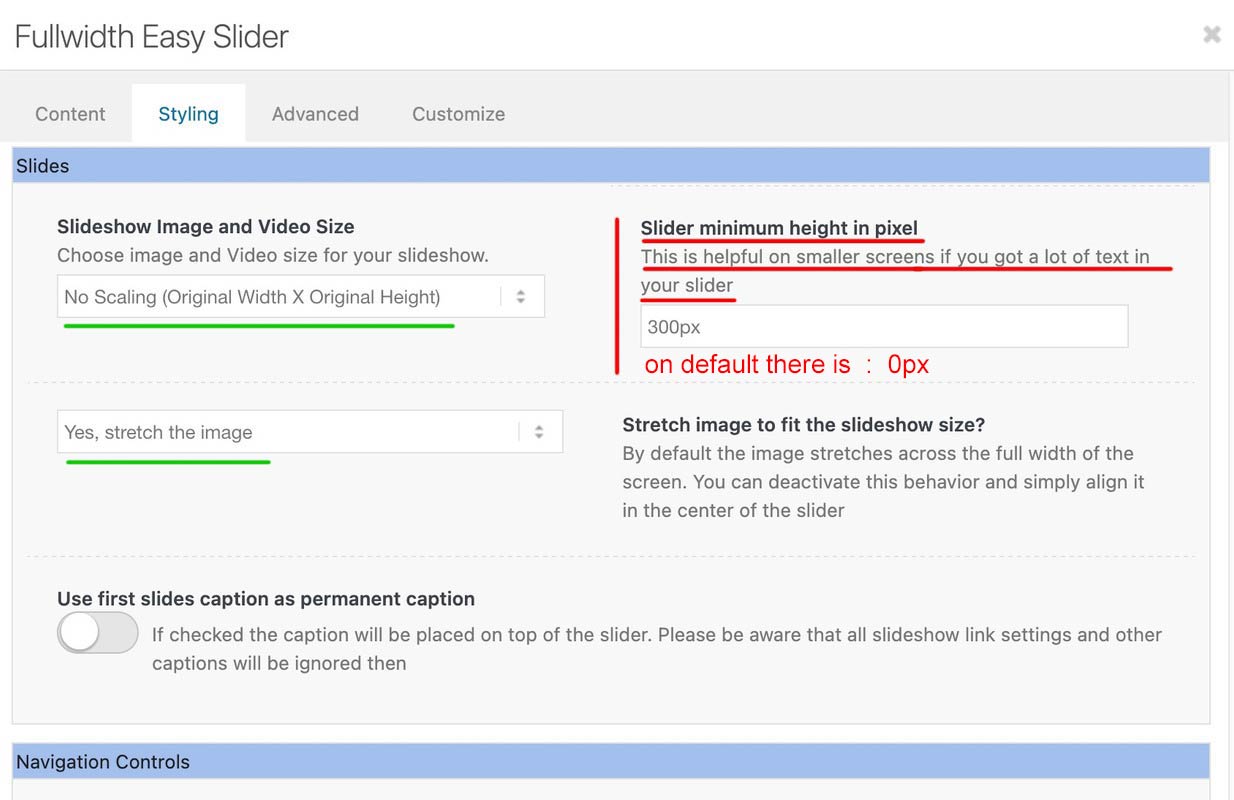
A full-width slider is responsive by default, so there’s no reason to define heights or minimum heights here. Only if the content of the color section gets bigger in height than the height of the background-video (or background-image). See here for example – there a min-height would be nice: https://kriesi.at/themes/enfold-wedding/
I can’t provide any more proof of this than the video, which shows a screen width of 320px.
So if you say that you have removed this minimum height from the color section, and have removed this one rule from the quick css; have saved everything, then it can actually only be due to a caching tool or to the Enfold own (merged or minified css) settings that I still see these settings in your source code.
I’m going to take a break from here.
Last hint – you can force my results if you place inside your quick css instead:
#top.home #wrap_all #full_slider_1,
#top.home #wrap_all #full_slider_1 .avia-slideshow,
#top.home #wrap_all #full_slider_1 .avia-slideshow-inner,
#top.home #wrap_all #full_slider_1 .avia-slide-wrap {
  min-height: unset !important;
  height: unset !important;
}
 Kevin
KevinGuest
I am looking to upgrade the ENFOLD theme I have on a client website – it is 3.8.5 and I want to update to the latest one. I wanted to know if this will work without issues as the versions are so far apart? I am happy to buy support. I just wanted to enquire.
You added some extra CSS for me in order to make the side menu function differently, will this functionality work without issue?
Hello Kriesi Team,
I have a question regarding accessiblity:
According to the European Accessibility Act (EAA), we and some of our customers will be legally obliged to make their websites accessible from June 2025. Is the new Enfold version accessible according to (WCAG) 2.1, Level AA?
Thank you for your time
Kind regards
but you have read the instruction:
this is the content of my code-block element inside a color-section
custom class on that color-section is: html5-video
the css code isn’t all needed if you do not want to have an overlay over the video ( other enfold elements )
this is then sufficient:
#top .html5-video .responsive-video {
  width: 100%;
  height: auto;
  display: block;
}

.responsive #top #wrap_all .html5-video .container {
  max-width: 100% !important;
  width: 100%;
  padding: 0;
}

#top .html5-video .content {
  padding: 0;
}
But i will make a color-section solution with background video and the needed css for you now
Hey Michael,
Thank you for the inquiry.
Please check if the Enfold > Layout Builder > Disable Advanced Layout Builder Preview In Backend is toggled.
View post on imgur.com
Let us know if the issue persists.
Best regards,
Ismael
When editing an element such as “Special Heading” in the backend, within the popup on the right there is usually an “Element Preview” that shows what the changes might look like, and at the bottom, you can change the background color from dark to neutral to light. I don’t have that right side panel. New WordPress install, new theme install, (although I did import the settings from an older Enfold project). This is my first site to use GoDaddy’s WordPress Pro Managed Hosting. I have the latest version of Enfold as of this writing: 7.1.1
Hey leosaraceni,
Thank you for the inquiry.
You may need to toggle or temporarily disable the Enfold > Performance > File Compression settings and the cache plugin to ensure that the changes take effect. By disabling the file compression settings, you will be able to make the necessary adjustments and updates without any conflicts. Once you have made the required modifications, you can re-enable the file compression settings to optimize the performance of your website.
Let us know the result.
Best regards,
Ismael
Hey envisageiam,
Thank you for the inquiry.
You can use the avf_portfolio_cpt_args filter to make the portfolio post type hierarchical. You will also find the full post type registration in the enfold/includes/admin/register-portfolio.php file.
function avf_portfolio_cpt_args_mod( $args ) {
    $args['hierarchical'] = true;

    return $args;
}
add_filter( 'avf_portfolio_cpt_args', 'avf_portfolio_cpt_args_mod' );
The default portfolio templates don’t support this out of the box, so you may need to customize them if needed.
Best regards,
Ismael
Hello,
I’m working on a new design for an existing site currently running Enfold 7.1.1 but when I try to edit style options within certain elements, like uploading a custom background image for a row or a cell container, or editing the padding or font size for a button, none of the styles appear in the frontend.
Hi,
Glad we were able to help, and thanks for posting your solution. If you have any further questions please create a new thread and we will gladly try to help you. Thank you for using Enfold.
Best regards,
Mike
That actually worked like a charm, thank you so much! I modifyed it a bit so the h1 stays at the top and it moves only the rest of the description:
I know why i still stay with enfold after all those years :D
function custom_script() { ?>
<script>
document.addEventListener('DOMContentLoaded', function () {

	/* --- Grab required elements ---------------------------------------- */
	const termDescription = document.querySelector('.archive .term-description');
	const productsGrid    = document.querySelector('.archive .products');   // works for columns-3/4/5 …

	if (!termDescription || !productsGrid) return;

	/* --- 1) Create wrapper for the moved text -------------------------- */
	const movedDesc = document.createElement('div');
	movedDesc.className = 'moved-term-description';
	movedDesc.style.cssText = 'clear:both;margin-top:4rem;';

	/* --- 2) Move everything except the first <h1> into movedDesc ------- */
	const h1 = termDescription.querySelector('h1');   // stays in place
	[...termDescription.childNodes].forEach(node => {
		// Keep the H1 where it is, move the rest
		if (h1 && node === h1) return;
		movedDesc.appendChild(node);
	});

	/* --- 3) Insert movedDesc AFTER the product grid -------------------- */
	productsGrid.parentNode.insertBefore(movedDesc, productsGrid.nextSibling);

});
</script>
<?php }
add_action( 'wp_footer', 'custom_script', 99 );
Hi,
Try adding this code to the end of your child theme functions.php file in Appearance ▸ Editor, If you are not using a child theme you could use the WP Code plugin then add a new snippet, in the top right corner use the PHP snippet as the code type:

and ensure that it is activated, then add the bellow code and save.
Please ensure to copy the code from the forum and not an email notification so the symbols are not converted.
function custom_script() { ?>
  <script>
  document.addEventListener("DOMContentLoaded", function () {
  const termDescription = document.querySelector(".archive .term-description");
  const productsGrid = document.querySelector(".archive .products.columns-3");

  if (termDescription && productsGrid && productsGrid.parentNode) {
    productsGrid.parentNode.insertBefore(termDescription, productsGrid.nextSibling);
  }
});
</script>
  <?php
}
add_action( 'wp_footer', 'custom_script', 99 );
Sorry, I don’t read your language in the screenshot, now that I can translate your live page it does make sense. :)
Best regards,
Mike
Hi,
Perhaps this will be easier, try adding this code to the end of your child theme functions.php file in Appearance ▸ Editor, If you are not using a child theme you could use the WP Code plugin then add a new snippet, in the top right corner use the PHP snippet as the code type:
and ensure that it is activated, then add the below code and save.
function custom_menu_by_page_name($args) {
    // Only modify the main header menu
    if ($args['theme_location'] != 'avia') {
        return $args;
    }

    // Get current page object
    if (is_page()) {
        global $post;
        $page_slug = $post->post_name;

        // Map of page slugs to custom menu names
        $menu_switches = array(
            'about-us'     => 'rick-sherman',
            'faq'     	   => 'rick-sherman',
            'contact'      => 'sherman-sound',
            'help'         => 'sherman-sound',
            // Add more as needed
        );

        // Check if the current page slug is in our list
        if (array_key_exists($page_slug, $menu_switches)) {
            $menu_name = $menu_switches[$page_slug];
            $menu_obj = wp_get_nav_menu_object($menu_name);

            if ($menu_obj) {
                $args['menu'] = $menu_obj->term_id;
            }
        }
    }

    return $args;
}
add_filter('wp_nav_menu_args', 'custom_menu_by_page_name');
in the code under $menu_switches = array( you see four page names with the menu name, such as:
'about-us' => 'rick-sherman',
change the page “slugs” or names to suit and the menu names, whatever pages or posts that you don’t add to the code will use your default menu.
Please ensure to copy the code from the forum and not an email notification so the symbols are not converted.
Best regards,
Mike
is there any way to add <br/>‘s and <strong>‘s in the email that is generated from the contact form submissions withOUT having to alter theme file(s)???
would be nice to bold the field labels & colons and also add an extra line break between them in the emails.
if it can’t be done without modifying any theme files (unless it can be a Child Theme file?), then nevermind. but please put it in a wishlist for future versions. to have something in the Enfold settings interface where we could customize how the emails look (no matter how many form fields or labels it has).
thanks.
Hi,
Thanks for the update, we’ll close this thread for now then. Please open a new thread if you should have any further questions or problems.
Best regards,
Rikard
Hi : ) I need to enable parent-child hierarchy for portfolio entries. I tried using plugins like custom post type UI but they seem to be conflicting with the already existing Enfold portfolio entry hierarchy.
How do I setup the portfolio items entries, so that the entries can have the parent-child hierarchy option, the same as it is for a page to have a parent-child hierarchy with another page?
Hi,
Thanks for the update, we’ll close this thread for now then. Please open a new thread if you should have any further questions or problems.
Best regards,
Rikard
All you need is to get rid of the min-height option – the fullwidth slider is a responsive slider !
for the caption it might be neccessary to have for very small screens smaller font-sizes – or to set a part (f.e. the avia-caption-content to display:none )
you got a rule :
@media only screen and (max-width: 489px) {
  .avia-slideshow li img {
    width: 100%;
    background-size: cover;
    height: 200px;
    object-fit: cover;
    left: 30px !important;
    position: relative;
    overflow: visible;
  }
}
Remove the rules given to you by ismael first because …
remove the left position – and height – otherwise you will have a gray bar on the left ;)
then there are some min-height properties:
inline-styles
@media only screen and (max-width: 489px) {
  .home #full_slider_1, .home #full_slider_1 .avia-slideshow,
  .home #full_slider_1 .avia-slideshow-inner, .home #full_slider_1 .avia-slide-wrap {
    min-height: 200px;
    height: 200px !important;
  }
}
and enfold css:
@media only screen and (max-width: 479px) {
  .home #full_slider_1,
  .home #full_slider_1 .avia-slideshow,
  .home #full_slider_1 .avia-slideshow-inner,
  .home #full_slider_1 .avia-slide-wrap {
    min-height: 300px;
  }
}
don’t know where they come from. But if you like to see the full width of the image – these settings are suboptimal.
The API connection can be established, but the forms won’t load. Tried it with a new API key but without success.
Running Enfold 7.1.1
PHP-Version ist: 8.0.30
Hi Mike,
Just sticking with your way for the time being, so I have converted the favicon to the .ico and then installed File Manager, uploaded to the root.
Weirdly when I went to upload it the file was already there so I removed and uploaded again.
If this doesn’t work I will try that other way, but just don’t understand why some seem to work without problem.
For future reference, is it best to upload the Favicon through appearance > customise or in the Enfold settings?
if you follow that little link on enfold options:
(these two cards icon)

you will see on that wiki page a good overview; and in detail a browser support. Best Format seems to be png.
a svg has a bad support.
you can manually add them if you put this to your child-theme functions.php:
function add_icons_to_head(){
?>
  <link rel="icon" type="image/png" href="/wp-content/uploads/icons/your-favicon-image.png">
  <link rel="apple-touch-icon" type="image/png" href="/wp-content/uploads/icons/your-apple-touch-icon.png">
<?php
}
add_action('wp_head', 'add_icons_to_head');
You are free to select the names and paths of your PNGs.
Hi MIke
No no. We use Enfold OR Elementor.
Most of our websites are with Enfold.
Newer websites we created with Elementor, because customer want to edit directly on the page.
Best regards
Mike
I’ve just switched my website to the new design, built under the Enfold Theme. Very happy with the result!
However, I notice that the Google Site Map for the site (when it comes up in a Google search) is out of date, and still referencing the old site. So some of the links in the old site map are going to 404, because the structure of the new Enfold site has changed.
Is Google Site Map refresh or config built into the Enfold Theme? If not, do you recommend either (a) a plugin that can update the sitemap file, or (b) a manual way to do it?
Thanks, Nick
Hey tonyiatridis,
Thanks for the inquiry.
You can use this css code to display the post navigation on mobile view:
@media only screen and (max-width: 789px) {

  /* Add your Mobile Styles here */
  .responsive #top .avia-post-nav {
    display: block;
  }
}
Make sure to toggle or temporarily disable the Enfold > Performance > File Compression settings and purge the cache.
Let us know the result.
Best regards,
Ismael



