Hi,
Glad Ismael could help, if you have any further questions please create a new thread and we will gladly try to help you. Thank you for using Enfold.
Best regards,
Mike
Hi,
Thanks for the update, I’ll close this thread for now then. Please open a new thread if you should have any further questions or problems.
Best regards,
Rikard
Hi,
Thanks for letting us know, I’ll close this thread for now then. Please open a new thread if you should have any further questions or problems.
Best regards,
Rikard
Hello Yigit
The gallery should be a slider not a gallery. Is there a plugin that you usually use with the Enfold theme to create sliders?
I cannot find the plugin to make the slider, although I found code in the carousel.css styles with Slick references. But even with the carousel.css the Slider is not working, which makes me think the plugin for this slider is missing.
Thanks
Makoto
Hey dimrat,
Thank you for using Enfold.
Seems one of the plugin is using the filter incorrect and returns a boolean value instead of an array.
What you can do:
config-gutenberg -> class-avia-gutenberg.php line 693:
public function handler_display_post_states( array $post_states, $post = null )
replace with:
public function handler_display_post_states( $post_states, $post = null )
And before
			if( ! $post instanceof WP_Post )
			{
				return $post_states;
			}
add:
			if( ! is_array( $post_states ) )
			{
				$post_states = array();
			}
Do not forget to make a copy of the original file for a fallback.
If you need help with this let us know.
Fix will be included in next release 5.3
Best regards,
Günter
Hi,
Thanks for that. This problem does not seem to be theme related, as the results are the same when the Enfold folder is renamed. Please try to restore a backup, or install WordPress again.
Best regards,
Rikard
Hey Eleina,
Thanks for the link to your example, try adding this code to your Enfold Theme Options ▸ Header ▸ Extra Elements ▸ Phone Number or small info text
<ul class="topbar-contact"><li class="map"><span class="inline"><a href="#">[av_font_icon icon='ue842' font='entypo-fontello' size='20px'][/av_font_icon]Pet Street 123 - New York</a></span></li> <li class="phone"><span class="inline"><a href="tel://1-555-555-5555">[av_font_icon icon='ue854' font='entypo-fontello' size='20px'][/av_font_icon]555-555-5555</a></span></li> <li class="mail"><span class="inline"><a href="mailto: (Email address hidden if logged out) ">[av_font_icon icon='ue805' font='entypo-fontello' size='20px'][/av_font_icon] (Email address hidden if logged out) </a></span></li></ul>
and add this css to your Enfold Theme Options ▸ General Styling ▸ Quick CSS field
#header_meta .inline {display: inline-block;}
#header_meta .topbar-contact ul {list-style: none; list-style-type: none;}
#header_meta ul.topbar-contact li {display: inline;}
#header_meta ul.topbar-contact li a {vertical-align: middle;}
#header_meta ul.topbar-contact {margin-bottom: 0;}
this is the expected results:

Best regards,
Mike
I am not registered to mailchimp, or there is some kind of automatic registration over enfold theme, then the credentials are the same as website credentials?
Hi,
Please try this approach, assuming that you have made a full backup of your site with the backup feature of your webhost, please don’t use a backup plugin unless you have specific knowledge on restoring it. Many backup plugins fail on restore.
and the site PHP is v5.6 and the theme v3.1 and you are using a child theme.
First login and download a copy of the theme export file, at Enfold Theme Options ▸ Import/Export ▸ Export Theme Settings File and save should you need it later, then change your PHP to v7.4
and delete the parent theme directory /enfold/ via FTP and save any custom header.php or footer.php from the child theme, and remove them from the child theme directory, they will not be compatible with the new theme version.
Then upload the new version parent theme directory /enfold/ via FTP
Please do not try to overwrite the old parent theme directory as this will leave old files behind and cause errors.
Now you should be able to login and your site should work without errors, assuming you have no outdated plugins.
Please check your site carefully, if all is well you can update to PHP v8 if you wish and check again.
Best regards,
Mike
Hallo, ich habe leider ein Problem bei der Installation des Template ENFOLD
Wordpress Version: 6.0.3
PHP-Version: 8.1
Enfold Version: Oct. 22th, 2022 – Version 5.2.1
Ich installiere ein neues WordPress und möchte dann Euer Template ENFOLD installieren.
Leider kommt nach der Installation immer eine Fehlermeldung:
Es gib einen kritischen Fehler auf deiner Webseite.
Das Template hatte ich früher immer ohne Probleme installiert. Woran kann es jetzt liegen?
Vielen lieben Dank für eine Rückmeldung.
Grüße, Peter
—————————————-
Hello, unfortunately I have a problem installing the template ENFOLD
WordPress version: 6.0.3
PHP version: 8.1
Enfold Version: Oct. 22th, 2022 – Release 5.2.1
I am installing a new WordPress and would then like to install your ENFOLD template.
Unfortunately, after the installation, an error message always appears:
There is a critical error on your website.
I used to install the template without any problems. What can it be now?
Thank you very much for your feedback.
greetings peter
Hi,
Glad Nikko was able to help, if you have any further questions please create a new thread and we will gladly try to help you. Thank you for using Enfold.
Best regards,
Mike
Hey Jens,
Thank you for the update.
There are minor changes in the partner/logo element in the recent update, so you need to adjust the css a bit. Please try this code instead.
#top .avia-logo-element-container .slide-entry-wrap .slide-entry .av-partner-fake-img {
  filter: grayscale(100%);
  -webkit-filter: grayscale(100%);
  -moz-filter: grayscale(100%);
  -o-filter: grayscale(100%);
  filter: gray;
  -webkit-transition: all .6s ease;
  transition: all .6s ease;
  -moz-transition: all .6s ease;
  -o-transition: all .6s ease;
}

#top .avia-logo-element-container .slide-entry-wrap .slide-entry:hover .av-partner-fake-img {
  filter: grayscale(0%);
  -webkit-filter: grayscale(0%);
  -moz-filter: grayscale(0%);
  -o-filter: grayscale(0%);
  filter: none;
}
You may need to toggle or temporarily disable the Enfold > Performance > File Compression settings after adding the css.
Best regards,
Ismael
Hi,
Thank you for the info.
The font Muli is still selected as the base font for the elements in the Enfold > Advanced Styling panel. Please make sure to adjust the selection or removed the modified elements.
Best regards,
Ismael
Hi,
Thank you for the update.
The adjustment or css is for the masonry content container only and it can be adjusted as you please. Please try to toggle or temporarily disable the Enfold > Performance > File Compression settings, then purge the cache. Let us know if this works.
Best regards,
Ismael
Hi,
Thank you for the update.
You can try to disable the avia_smoothscroll function in the js/avia.js file but we doubt if this will work because this function is only triggered when the element contains a hash. The slider or gallery navigation is an anchor element but it doesn’t have an href attribute or it doesn’t contain a hash.
Try to remove this code around line 102, then toggle or temporarily disable the Enfold > Performance > File Compression settings.
//smooth scrooling
		if( $.fn.avia_smoothscroll )
		{
			$('a[href*="#"]', container).avia_smoothscroll(container);
		}
Please note that we don’t provide support for third party plugins as stated on our support policy. You may need to keep in touch with the plugin developers and ask them for additional assistance regarding the issue.
Best regards,
Ismael
Hi,
Thank you for the inquiry.
There seems to be an issue with your SSL Certificate, which might be the reason why the font files are not loading correctly. Please try to renew the SSL certificate.
You should also check if the font files actually exist in the wp-content/uploads/avia_fonts/type_fonts folder. If the files are missing, remove the font entry in the Enfold > Import/Export > Custom Font Manager, then try to upload the font package again.
Best regards,
Ismael
Hey, thanks for your feedback.
Yes, I did include it in a demo.html. Not in an standard template of wordpress.
Therefore, the code of the plugin works. It must be include in the right positions. And for this I would like to have support from the theme developers – and that is your company. The developer of the plugin says nearly the same as you: My Plugin works, aks the template developers.
And as a software developer I understand the points of you both. But because the template code is generated with a little bit of “magic” I think now more help should be given by you.
In the plugin, there are only 4 Lines of code. It is really easy. But I have to understand where and how I have to include it into the Enfold Template. It is not so easy to open the php-page and add some code to the header and some to the body. There ist the template configuration, the function.php, the page creator and the blocks itself.
From my side difficult to understand – but it works and thats great.
Now, I need some help from you to include these 4 lines of code into your template.
Perhaps we can do this on a Zoom-Call and discuss it directly.
Hi Yigit!
Thx for your answer and please apologize my late reply.
Yes, I could give you the Logins, but let me ask some questions before:
– I think the main problem is (just realized that), that the site/domain uses php 5.6 at the moment.
Of course the new theme will not work with that.
So I must/can update – maybe try Version 7.4? Or better 8? (Not sure all the plugins work with it)
But when I update PHP the old version does not work and I cannot login ;-)
– The other thing I do not understand: we use a child theme at the moment.
In my new download of enfold I cannot see a child theme… how about that?
So: how do we start this task?
Maybe I give you logins and you tell me when to change the php version? (I must do that in the admin interface of the server)
Andere Frage: sprecht ihr Deutsch?
Bzw. Wo befindet ihr euch? Ich bin hier in Österreich.
Greetings
Alex
Hi jb84,
Please try adding this CSS code in Enfold > General Styling > Quick CSS:
#top .widget .news-time {
    display: none;
}
Best regards,
Nikko
Hi sundara88,
Please make sure you have the correct permission:
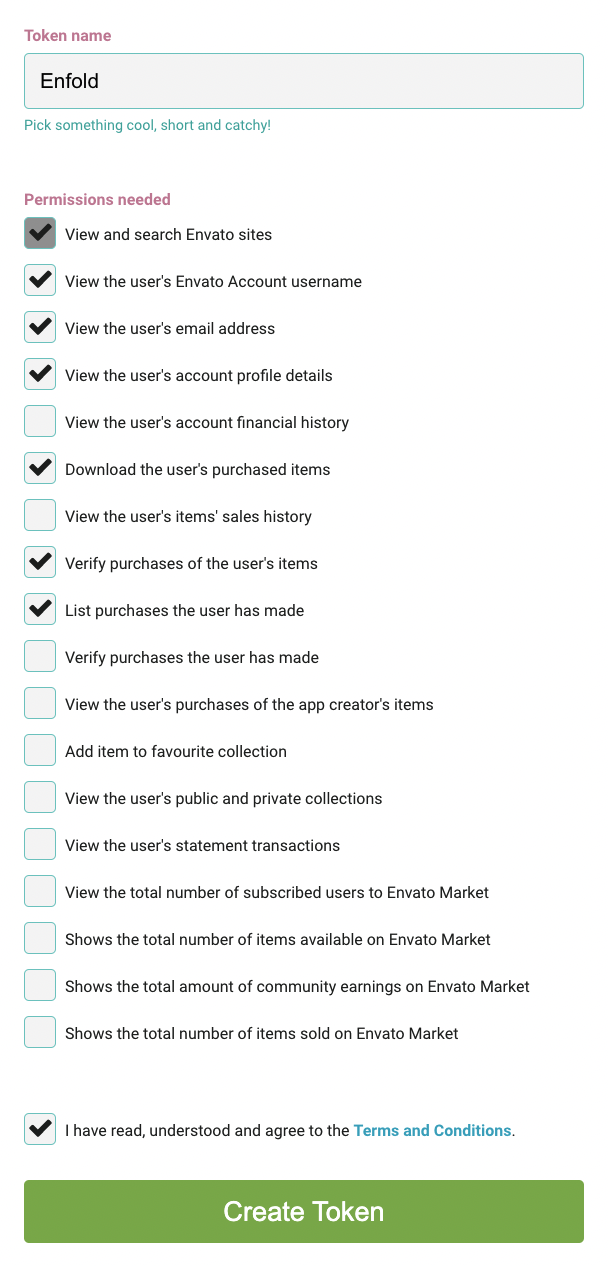
For further information please follow the instructions in our documentation: https://kriesi.at/documentation/enfold/theme-registration/#how-to-generate-a-envato-personal-token
Best regards,
Nikko
Hi,
I had an older version of Enfold installed but just bought another new version and I would like to add the private token of the new theme to the old theme so I don’t manually have to update the theme.
I clicked on the link in WordPress to create a new token but it might’ve taken me to the wrong token creation page because when I added this token, it said it was not valid. ( I think I might have 2 accounts..)
I got the following message:
Last time we checked the token we were not able to connected to Envato:
Purchases could not be accessed
Username could not be accessed (needed for your information only)
E-Mail could not be accessed (needed for your information only)
Following errors occured:
Purchases: Errorcode 403 returned by Envato: Forbidden:
– response_code: 403
– reason: scope-missing
username Errorcode 403 returned by Envato: Forbidden:
– code: not_authenticated
email Errorcode 403 returned by Envato: Forbidden:
– code: not_authenticated
Purchases: A problem occured accessing your purchases. Unable to check for updates.
Your help is appreciated :)
Thanks,
Lisa
Hi,
Glad we were able to help, if you have any further questions please create a new thread and we will gladly try to help you. Thank you for using Enfold.
Best regards,
Mike
After updating this site: https://www.dialhope.org/, we are now seeing this error on our Icegram plugin:
Argument 1 passed to Avia_Gutenberg::handler_display_post_states() must be of the type array, bool given, called in /home3/brighth7/public_html/dialhope/wp-includes/class-wp-hook.php on line 307 and defined in /home3/brighth7/public_html/dialhope/wp-content/themes/enfold/config-gutenberg/class-avia-gutenberg.php:693 Stack trace: #0 /home3/brighth7/public_html/dialhope/wp-includes/class-wp-hook.php(307): Avia_Gutenberg->handler_display_post_states(false, Object(WP_Post)) #1 /home3/brighth7/public_html/dialhope/wp-includes/plugin.php(191): WP_Hook->apply_filters(false, Array) #2 /home3/brighth7/public_html/dialhope/wp-admin/includes/template.php(2249): apply_filters(‘display_post_st…’, Array, Object(WP_Post)) #3 /home3/brighth7/public_html/dialhope/wp-admin/includes/template.php(2150): get_post_states(Object(WP_Post)) #4 /home3/brighth7/public_html/dialhope/wp-admin/includes/class-wp-posts-list-table.php(1107): _post_states(Object(WP_Post)) #5 /home3/brighth7/public_html/dialhope/wp-admin/ in /home3/brighth7/public_html/dialhope/wp-content/themes/enfold/config-gutenberg/class-avia-gutenberg.php on line 693
I have looked at several threads in this forum and it appears to be a known issue. i have tried to turn off all plugins, tried classic and block editor modes, cleared cache.
I went into to Enfold theme’s config-gutenberg -> class-avia-gutenberg.php file and changed the 99 to 5 on this line of code as seen in on of your threads (https://kriesi.at/support/topic/error-enfold-with-plugin-salon-booking-wordpress-plugin/).
LINE 210: add_filter( ‘display_post_states’, array( $this, ‘handler_display_post_states’), 99, 2 );
I even see that with your latest update, you have a snippet of code (LINES: 695 – 718) in this file to address this specific issue. But the error persists on my site.
This site is running on the following versions:
php 7.4.30
WP 6.0
Enfold Theme 5.2.1.
Can you please let me know if there is anything else I can try?
-
This topic was modified 3 years, 5 months ago by
 dimrat.
Hallo, nach dem letzten Update auf Enfold 5.21 funktioniert der aktualisierte Layerslider nicht mehr korrekt, und zwar bei den Layer Actions eines Videos das Action “Play Media” – was vorher auf click das Video erneut abspielt, tut es jetzt gar nichts mehr
Hi,
A token is not required to install the demos.
When I check your site I see that the Enfold Startup demo is installed and working correctly. Please clear your browser cache and check.

Best regards,
Mike
This reply has been marked as private.
Hi,
Thanks for letting us know, I’ll close this thread for now then. Please open a new thread if you should have any further questions or problems.
Best regards,
Rikard
Hey Margrubi,
1. Go to Enfold->Footer, then add this to the copyright field:
[nolink]
2. You can edit that under Appearance->Menus. Look for the menu assigned as Enfold Footer Menu.
Best regards,
Rikard
Hello, where to edit this part shown on print screen: https://snipboard.io/GcbSTm.jpg
1. I don’t want that says that is Enfold theme
2. Also I need to edit this part too
Hello,
I have, the plug-in author said it’s something with enfold and not the plug-in
Thanks



