Viewing 30 results - 21,601 through 21,630 (of 244,524 total)
  • Author
    Search Results
  • #1371433
    Sovietovic
    Participant

    Hi,
    I’m trying to rebuild one of my pages and it seems on latest version of Enfold new created buttons stopped properly working.

    I’ve created button my page but after publishing it there is no hover effect or click effect on my buttons.I’ve configured button to go to specific page but it does act like without effect.
    Can you please check why this is happening?
    See private content:

    #1371413

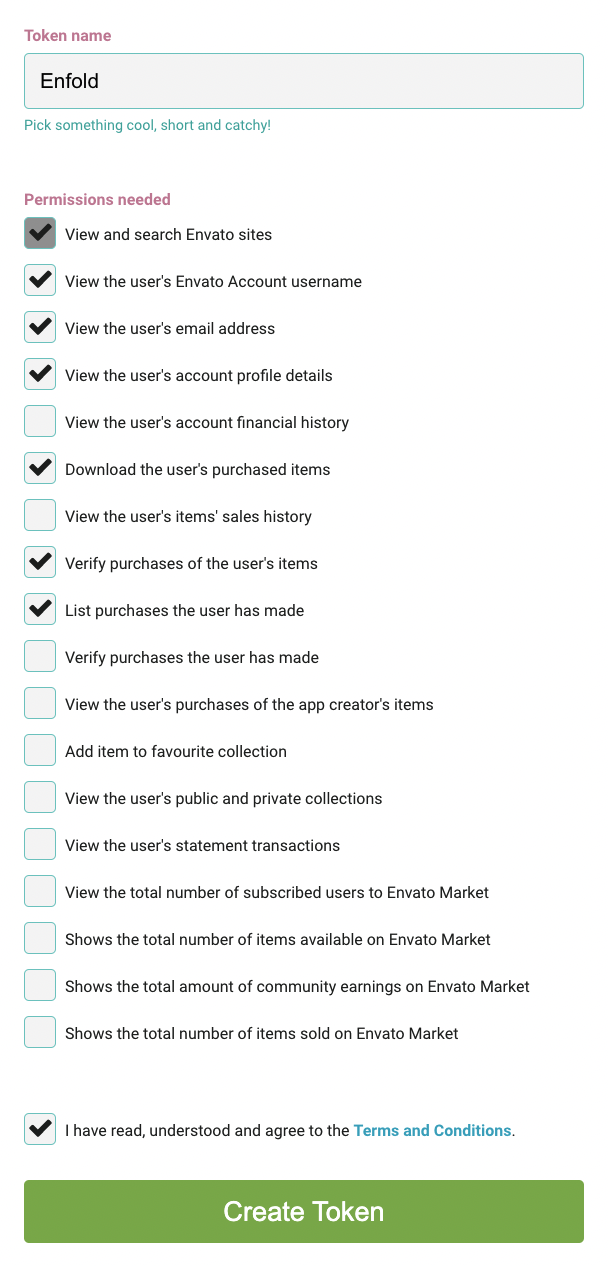
    Hi ribit,

    Please make sure that the token has the following permissions:

    Best regards,
    Nikko

    #1371411

    Hi B,

    Please try to add this CSS code in Enfold > General Styling > Quick CSS:

    #top .av-inner-tab-title {
        width: 120px;
    }

    Just change the width as you see fit (default is 90px).
    Hope this helps.

    Best regards,
    Nikko

    #1371407

    Hi Donkies11,

    We’re glad to hear that it is now working properly.
    Thanks for using Enfold and have a great weekend :)

    Best regards,
    Nikko

    #1371405

    Hi ttem,

    The undefined function shown is wc_get_notices however this function is defined in Woocommerce.
    There seem to be many files in your child theme and there maybe some code that cause it, try to temporarily switch to the parent theme (Enfold) then rename the log files and see if it helps.
    It maybe better if you use a staging site to troubleshoot the issue, since you might have visitors on your site.

    Best regards,
    Nikko

    Hi James,

    I see, you can remove those limit on widths via CSS.
    Please try to add this CSS code in Enfold > General Styling > Quick CSS:

    .responsive .page-template-template-acf .container {
        max-width: 100%;
    }

    If you want to remove the left and right padding, then use this CSS code:

    .responsive .page-template-template-acf .container {
        max-width: 100%;
        padding-left: 0;
        padding-right: 0;
    }

    Hope this helps.

    Best regards,
    Nikko

    #1371403

    In reply to: JS issue on my website

    Hi gruobes,

    I have deactivated Fusion et compression du fichier Javascript in Enfold > Performance and cleared cache from the plugin.
    Can you try to check if this helps on your end?

    Best regards,
    Nikko

    #1371397

    Hello,

    I’m just a regular participant like you, but your help request caught my eye. I visited your site on a phone, tablet, and desktop and couldn’t help but notice your mobile menu only activates on the smallest of screen sizes, which means when you view it on a tablet or turn your phone in landscape mode, your menus and logos do overlap.

    To help fix this, you might consider changing the following.

    From the enfold menu, Enfold>Main Menu
    Under the option “Menu For For Mobile”, change the drop down menu to “SmartPhones & Tablets below 990px”

    The option below that asks about Screen Mode in Landscape Mode, set that to “use current screen width”

    To move the logo to the furthest point left,
    Also, Enfold> Header
    Under the tab that says Header Behavior, at the bottom is a button option that says “Let Logo & Menu Change to Fit Browser window” turn that ON

    Making those changes should fix your issue.

    Hi Rickard,

    Thanks for your help.

    Can you be a bit more specific with what you want me to do?

    I added the Market Plugin you suggested and all it seemed to do was add 24 versions of the Enfold Theme to my Themes page?

    As I mentioned, the Enfold parent theme on my site is ALREADY showing as 2.5.1?

    What is the market plugin supposed to do, exactly? And what, exactly, are you suggesting I need to update? Enfold is already 2.5.1????

    Yeti
    Participant

    Hello at Kriesi,
    after updating, the Master Slider (by Averta) Element does not work anymore. The mouseover images and links are gone (in Firefox) and Chrome shows only an empty area. But in the BackEnd of Master Slider in WordPress, when I click at preview (in an iframe without Enfold surrounding), everything works fine as ever. But embedded via ALA with “Plugin Ergänzungen”, it isn’t shown anymore live in your theme.

    You can see the issue here: https://www.susanne-praetorius.com – it’s the first part of the page, and it’s white in Chrome and in Firefox the colored mouseover-images plus their links aren’t shown.

    Please help me…

    Stephan

    • This topic was modified 3 years, 5 months ago by Yeti.
    #1371380

    Hey LentzOtto,

    You can import the parent theme settings under Enfold->Import/Export when you have activated the child. Also make sure that you turn on the option to delete old CSS and JS files under Enfold->Performance, if things still should look broken after that. Also try to change a setting in the theme options, then save in order to regenerate CSS files.

    If you need further help, then please check the login details you posted, as they are not working.

    Best regards,
    Rikard

    #1371378

    Hi,

    Thanks for the update, I’ll close this thread for now then. Please open a new thread if you should have any further questions or problems.

    Best regards,
    Rikard

    #1371371
    DRONE-ARDECHE
    Participant

    Good evening,

    For some time now, contact forms have not worked properly with WP-Rocket.
    Bug : Contact form doesn’t work any more.

    The bug affects on all other contact form of the site.
    However the bug doesn’t appear immediatly.
    The bug appears after several hours when caching is enable.
    When purging the cache, the problem is fixed but remains again after time (even if I reduce the delay between automatic cache period below than 10 or 7 hours).

    Here is an explanation.

    _________________

    Hi,

    Nice to meet you :)

    Thanks for the details.

    From what you mention, this could be related to the form’s hidden values (screenshot in private).

    If you are using the hidden inputs to have different values in different situations, unfortunately this won’t work because the values are printed directly in the HTML, and as you know the HTML is cached.

    This is how this works:

    Cache is cleared

    A user visits a page (or if you have the preload function enabled, then the visit will be done by it to pre-cache the page)
    The PHP code is executed, and the values are created for the hidden inputs
    WP Rocket captures the resultant HTML and saves it for future visits
    A new user visits the same page, the saved / cached HTML is served to the new user, so the values in the hidden inputs will be the same as the previous visit, because the page is cached, and the same will happen for all the visits you have to that page, the same cache will be served for all of them until the cache is cleared, and the process is repeated.

    Here, the data will be very inconsistent, all the users will use the exact same values.
    As you see, the way you are using to manage this, is not compatible with cache.

    In this case, you have two options:
    You can ask your developers to use a different approach, compatible with caching, it could be cookie based for example: Create Different Cache Files with Dynamic and Mandatory Cookies
    You can disable page caching while keeping the optimizations, WP Rocket will still optimize your website, but the cache won’t be created: Disable Page Caching
    I hope this information is useful for you 😃

    ______________

    So can you make a fix in future version for this. Please?

    Best regards.

    #1371369
    Illingco
    Participant

    Hello. the Cusrev plugin is having a minor conflict with your plugin, I am guessing something to do with iconfonts with updates. See the page below, noting that left of the “(1 customer review)”, under the Part #, it should have 5 stars there, as well as down in the Reviews tab. It was working until recently, and if i switch to Storefront theme or others, the stars come back. Please advise, this is an important plugin for us. Thanks.

    Hi Rikard,

    unfortunately we can’t do it because of security reasons and mainly for a consisting bug in former versions of WooCommerce Bookings which effected the workflow of the booking system. That’s why we had to update and now have to deal with the issues in the frontend.

    The only way out right now seems to be to outsource the whole shop to a subdomain using a different theme and run the other part of the website with Enfold. That’s what we try out on another staging site, but it would be great to have a solution for the existing system on the live site.

    Best regards,
    Dirk

    #1371358

    Hi,

    If you are looking to change the menu colour in the transparent state, then please check under Enfold->Header->Transparency Options.

    You can change your typography settings under Enfold->General Styling->Typography.

    Best regards,
    Rikard

    i tested Ismaels advice – and there is a play/pause text on the video. with the css he provided – only one of them could be seen
    see: https://enfold.webers-webdesign.de/videobackground/

    on layerslider i could insert vimeo videos – on hovering those areas – the controls are there:
    https://webers-testseite.de/videobackground-2/
    even with video in video ;)

    #1371345

    Hi,

    Great, I’m glad that you found a solution, and thanks for sharing. I’ll close this thread for now then, please open a new thread if you should have any further questions or problems.

    Best regards,
    Rikard

    Hi Rikard,

    I guess the WooCommerce team didn’t see that the issues come from the “Product Video for WooCommerce” plugin. I’ll ask them again – whatever, we still get the issues and have to find a way to get rid of.

    Yes, we rolled back to Enfold 5.1.1 and the Woo plugins before the updates and don’t get any Booking calendar issues in the frontend or other errors. Please check the private link. I hope this helps clarifying?

    Best regards,
    Dirk

    #1371335

    you can begin here to read how to avoid that the big images have more filesize than the uploaded images – and how to get rid of unneeded formats.

    https://kriesi.at/support/topic/media-upload-and-enfolds-thumbnail-sizes/#post-1271713

    and follow the next posts too.

    https://kriesi.at/support/topic/media-upload-and-enfolds-thumbnail-sizes/#post-1271808

    Hi,

    I installed both Enfold parent and child theme via FTP. Could you please go to Appearance > Themes in WP dashboard and try activating Enfold child theme now? :)

    Best regards,
    Yigit

    Hi,

    I commented out your custom CSS code in Appearance > Customize > Additional CSS, then went to Enfold theme options > Main Menu > General and chose to display menu as icon in “Menu Items For Desktop”.

    Please review your website :)

    Regards,
    Yigit

    Hi Mike,
    Thanks for your quick response. When downloading the enfold theme i selected the installable version. I’ve mentioned the title of the zip file below, is that the right one?

    Hey Jainanvanmeteren,
    Please ensure that you are using the installable WP version of the theme from your Theme Forest account.
    The other zip file has extra directories in it so it won’t install correctly, you could extract it and use the enfold.zip this is inside it.

    Best regards,
    Mike

    #1371316

    Hi,

    You are welcome! :)

    For your information, you can take a look at Enfold documentation here – https://kriesi.at/documentation/enfold/

    If you have any other questions or issues, feel free to start a new thread under Enfold sub forum and we will gladly try to help you :)

    Enjoy the rest of your day!

    Best regards,
    Yigit

    Jainanvanmeteren
    Participant

    Hello,
    After installing enfold and enfold child theme i tried making changes to the general stylesheet but nothing worked. I disabled all the plugins and cleared the cache multiple times but nothing seemed to work. I’ve made a lot of sites using Enfold but never had this issue before.

    Then I stumbled upon an article of some user saying he deleted the theme and reinstalled it which fixed the same issue. So i deleted both the general and the child theme, dowloaded it again from my envato account and tried to reinstall it. When i try to reinstall i get the message ‘The link you followed has expired.’

    So now Iam left with no working theme at all and a client who is waiting for results. Is it possible to receive a new download or something so i can reinstall and see if the general stylesheet is working again?

    #1371311

    Hey Peter,

    Thanks for contacting us!

    Have you enabled CSS and JS file merging and compression options in Enfold theme options > Performance tab? If you have, please refer to this post – https://kriesi.at/documentation/enfold/optimization/#troubleshoot and disable unique timestamps :)

    Regards,
    Yigit

    #1371302
    notenbeurs
    Participant

    Hi thanx for your reply.
    attached below login credentials

    #1371298

    Hey schwabino,

    Thank you for the inquiry.

    You can use this css code to adjust the style of the social icons in the top header.

    #top #header_meta .social_bookmarks li a {
        width: 60px;
        line-height: 60px;
        min-height: 60px;
        height: 100%;
        font-size: 20px;
    }
    
    #header_meta .container {
        min-height: 60px;
    }

    Please make sure to toggle or temporarily disable the Enfold > Performance > File Compression settings after adding the css.

    Best regards,
    Ismael

    #1371292
    claugutierrezt
    Participant

    I am trying to use the yith request for quote plug in, but with avia it is not visible. How can I make visible this add to quote button with Avia? it is very important to be able to use it there, because of the type of images I want to use.

Viewing 30 results - 21,601 through 21,630 (of 244,524 total)