do not use that slant option on the color section – use the svg divider option ( in your case bottom )
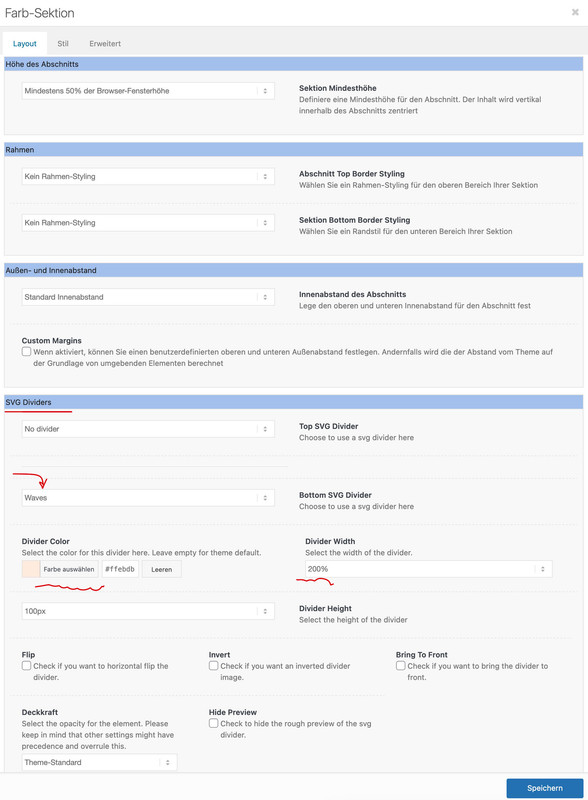
there are some waves in the predefined svg divider options – but if it has to be the exact wave on your example page – you can copy that svg there ( yes on your example page it is a svg too ) and import it as a custom svg divider. Tell us – then we will have instructions to do so – or read in the docu how to.
The color you choose for the svg divider color – should be the background-color of the next section ;)
see: https://enfold.webers-webdesign.de/svg-dividers/
Hey Guys,
I am trying to recreate this wavy line https://mgsportsplex.com
that appears above the countdown and also between the different sports.
We first build this in Hubspot but now we would rather have it in Enfold because Enfold is way better :)
I found the slanted border here, that I would love to have wavy.
Hope you can help
Thanks
Tina
I have a Layerslider where I have set some images to fly in and are positioned at a certain location on the page. When I preview it in Layerslider, it’s fine, but on the live site, they bunch up in the top left corner. I’m on Enfold 5.2.1
Hi,
Great, I’m glad to hear that it’s working again. I’ll close this thread for now then, please open a new thread if you should have any further questions or problems.
Best regards,
Rikard
Hey gabrimore98,
Please try the following in Quick CSS under Enfold->General Styling:
.av-tab-section-container .avia-content-slider .slide-entry-title {
    font-size: 18px;
}
Best regards,
Rikard
Hi,
Glad Nikko was able to help, if you have any further questions please create a new thread and we will gladly try to help you. Thank you for using Enfold.
Best regards,
Mike
Hi Enfold
How do i setup anchor points and how do I link to them.
Link in the private area
Alan ;)
Curious if anyone using Enfold & Gravity Forms have had any good/bad/otherwise experience with Fresh Forms for Gravity plugin. This plugin excludes Gravity Forms scripts from being combined and minified when using certain optimization technologies. I use Siteground Optimizer.
Just curious if anyone has any feedback for those using Enfold.
Hi Enfold
How do I setup my text like the one on this site, using taps and dots ?
https://full-beauty.dk/prisliste-full-beauty-herning-2/
Thanks
Alan )
Hi Chrilles,
We are glad to hear that :)
Thanks for using Enfold and have a great day!
Best regards,
Nikko
Hey plvsultra,
1. It depends on how you want to display it? Please try to explain your intentions a bit further, or post a screenshot highlighting what you would like to achieve.
2. Please add this to the copyright field under Enfold->Footer:
[nolink]
Best regards,
Rikard
Hi,
Please open a new thread for each of your new problems, this thread is already very long and difficult to follow.
Best regards,
Rikard
Hi Karin Leloux,
Try adding this CSS code in Enfold > General Styling > Quick CSS:
#header .logo {
    padding-top: 12px;
    padding-bottom: 12px;
}
Just adjust the value as you see fit and you may need to re-adjust the size of the logo again.
Best regards,
Nikko
Hi ussma,
We’re glad that we could help you :)
Thanks for using Enfold and have a great day!
Best regards,
Nikko
Hi Chrilles,
We’re glad that we could help you :)
Thanks for using Enfold and have a great day!
Best regards,
Nikko
Hey Florian,
Thanks for contacting us!
It seems like you have inserted your purchase code instead of a Personal Token. Please refer to this post – https://kriesi.at/documentation/enfold/theme-registration/#how-to-generate-a-envato-personal-token to generate a Personal Token and insert it :)
You can use your purchase code to register to our support forums – https://kriesi.at/support/register/. After logging in, you can start new threads under Enfold sub forum – https://kriesi.at/support/forum/enfold
Regards,
Yigit
 Florian Rosenkranz
Guest
Hello,
I have purchased a new Enfold license to day on ThemeForest to upgrade an existing system with Enfold Theme on PHP. 8.0. To do this, I deleted the existing Enfold folder on the SFTP server and then replaced it with the Enfold folder provided with the new licence. When entering the licence code, I get an error message that the licence is invalid. What can be done so that the licence is recognised by the system?
With best regards,
Florian Rosenkranz
Hi
Is it possible to mix Enfold built product pages with standard woo product pages? The variable image swap (when a user selects a different flavour) doesn’t seem to work with Enfold modules. So could I keep the simple products created in Enfold and use with variable products (created without Enfolds modules)?
Or do they all have to be one or the other?
Cheers
Steve
Hello,
I’m using a iconbox and have set the the link to be “Yes, apply link to icon and title”, but i need it to be on the whole button.
I tried to use the guide “How to make icon box clickable?” on https://kriesi.at/documentation/enfold/icon-box/ but that open it on in a new tab, and i need it to open in the iframe.
I do it when i click on the play button and the title.
What should i change from the guide or do i need another solution?
Two questions, the first, what would be the correct size for an image to fit well in the footer?
And second question, how can I remove the information that comes by default from the socket: “powered by Enfold WordPress Theme”
I have tried to remove it from Enfold > Footer > Copyrithg >
But it keeps showing up on the socket.
Thanks!!
Hi Jing,
Thanks for contacting us!
The license number is not used for updating the theme, you’ll need to generate a personal token first from envato/themeforest.
You can find further information in our documentation: https://kriesi.at/documentation/enfold/theme-registration/
Then go to How to generate a Envato Personal Token? and follow the instructions.
Hope this helps. :)
Best regards,
Nikko
Ciao Rikard. I was out for 3 days, I couldn’t check it earlier.
I’ve just connected to production, and I still cannot save it. I thought “maybe Rikard was able to save it because he connected using the user I’ve created for Kriesi”, and I tried again connecting with your user. See below the result:
https://imgur.com/GAZtX8X
Let me repeat the steps:
1) I connect here https://www.sentierigressoney.it/wp-admin/
2) I go to “Enfold Child” / “Theme Options”
3) the button “Save all changes” is enabled already (and this is strange: it is normally disabled, if there are no changes left. In staging it is disabled, indeed).
4) I click on it, I have the issue you see in the screenshot.
It is not browser related: I’ve just tried with Edge, same result. I’ve just tried with Chrome, incognito mode: same result.
In STAGING environment it is working as expected (https://staging.sentierigressoney.it/wp-admin)
Thanks for your help!
Bye,
A.-
 Jing
JingGuest
Hello,
I bought the license for the wordpress ENFOLD license on 10.27.2022 at envatomarket. But the licensenumber is not correct, always the error Warning at “Enfold Theme Option”. Can you check the license?
Best regard
Jing
JingGuest
Hello,
I bought the license for the wordpress ENFOLD license on 10.27.2022 at envatomarket. But the licensenumber is not correct, always the error Warning at “Enfold Theme Option”. Can you check the license?
Best regard
Jing
Hi ussma,
You should be able to change it in Enfold > Header > Transparency Options (tab) > Transparency Logo.
Hope it helps.
Best regards,
Nikko
Hi Nancy,
Can you try to go to Enfold > Performance > Self Hosted Videos And Audio Features (WP-Mediaelement Scripts) and set this to Always load media features (= WP default behaviour)? and see if it helps.
Best regards,
Nikko
Hi Steph,
We’re glad that Mike could help you :)
Thanks for using Enfold and have a great day!
Best regards,
Nikko
Enfold has this nice docu – and if this is not enough to manage it – please tell us here where the problems are:
https://kriesi.at/documentation/enfold/child-theme/#how-to-install-the-child-theme
Hi
I am using a demo theme and the google maps icon shows as the enfold icon, how do I change this?
Thanks,
Ussma
Hi Yigit, thank you for looking into this.
Re. contacting TEC: we are just using the free version of the plug-in with the built-in integration provided by Enfold. We don’t have a direct support relationship with them.
You will see if you investigate ../enfold/config-events-calendar/ in a standard Enfold installation that there is quite a bit of custom integration and theming for TEC provided by Enfold. This is used specifically in the Enfold Church Demo (on which our site is based). I made the assumption that the behavior we are relying on here was a custom optimization for the tribe-events custom taxonomy provided by Enfold (to support displaying events in the Blog Posts element).
Hopefully, your developers will be able to restore this behavior, or, if they have a relationship with TEC, they may be able to reach out to them to see if a fix could be worked out on their end… Thanks in advance!
Best,
Gary



