
-
AuthorSearch Results
-
March 10, 2026 at 8:05 pm #1495924
In reply to: Impossible to publish page / post with the Editor
Hey newki75,
Thanks for the login, when I tested I was able to publish your test page with no errors.
To manually update Enfold you will need to download the latest installable WP version from your Theme Forest account and upload it to your WordPress ▸ Appearance ▸ Themes ▸ Add Themes ▸ Add New
after you choose the zip file and click install, you will see a This theme is already installed message because you are updating, you can continue,
then you will see the Theme updated successfully message.Best regards,
MikeMarch 10, 2026 at 7:48 pm #1495923Topic: Parallax mobile view cropped and wrongly placed pictures
in forum Enfolddebbiepeverelli
ParticipantI’ve built my website with the Enfold Parallax theme. I’m very happy with the results! However, on mobile view there are a few pictures (4 in total, at 2 different positions) that are cropped and placed wrongly, which I can’t seem to fix. On desktop view they are perfect. There’s a larger picture and a smaller one overlaps. In mobile view the larger picture appears smaller than the original smaller one. This way it doesn’t look nice at all. Could you please help me fix this issue?
Additionally, I have a question about the contact form. When I fill in an address, the space turns light blue and when I press send, the form turns green. These colors don’t match the colors of my website at all. Also, the text that appears after sending a message isn’t the typography I chose for my website and it also doesn’t match the rest of my website.Looking forward to your response.
March 10, 2026 at 7:45 pm #1495922In reply to: Update from version 5.0.1
Hey Koster,
You can update and we do not expect any issues, but some things to keep in mind, if you have a custom header.php or footer.php in your child theme, you should remove these first, as they have changed. After you update you can review the new version of these files and make copies with your customizations into your child theme. I recommend tring to find a different way to add your customizations without using these files, or you will run into this issue again in the future.
The same is for any custom elements that you have in your child theme. If your child theme only has a style.css & functions.php & screenshot.png then you are fine.
If you have added any custom code to any parent theme files, you should save the code as it will be lost when you update.
You will not be able to automatically update via the theme options, as Theme Forest has changed since your version, after you manually update you will be able to update via the theme options for future updates.
A good practice is to use your web host options to create a stagging site and update it first to ensure your site looks & works the same, and then update your live site. If you are not able to do this, at least ask your web host to create a full backup, including the database for a fallback just in case.
To update your version of Enfold you will need to download the latest installable WP version from your Theme Forest account and upload it to your WordPress ▸ Appearance ▸ Themes ▸ Add Themes ▸ Add New
after you choose the zip file and click install, you will see a This theme is already installed message because you are updating, you can continue,
then you will see the Theme updated successfully message.
After which you can go to your Theme Forest account and create a new Token for future automatic updates.Best regards,
MikeMarch 10, 2026 at 3:42 pm #1495912In reply to: Display Issues on iPhone (13)
Hi Ismael, you’re right about the invisible separator. I added it so the content just above the footer will not be cut on the iPhone. There was even another invisible separator of 100px height just above the one you mentioned. When I delete those, the situation on the iPhone gets even worse. I now deleted both of them so they will not confuse our testing any longer.
Hallo Guenni007, danke, dass du dich der Sache annimmst.
Ich habe jetzt WP Rocket deaktiviert (vorher den Cache aufgefrischt). In Enfold ist und war die Optimierung von JS und CSS deaktiviert, von daher habe ich dort jetzt nichts weiter getan.
Eine eigene Color-Section möchte ich nicht, weil es dann nicht mehr full width ist.
Übersehe ich etwas, ist das nicht die einzige Seite mit dieser Art full width Button auf der Website?Mein Problem ist, dass ich leider kein iPhone zur Verfügung habe und nach jeder Änderung umständlich organisieren muss, dass es jemand testet. Bisher ohne Erfolg und ich fange an, den Leuten auf die Nerven zu gehen.
March 10, 2026 at 2:35 pm #1495911Topic: Template ENFOLD-DJ Bug
in forum Pre Sale QuestionsSteve
GuestHi.
I purchased ENFOLD using Template ENFOLD-DJ and found a bug:
– In Desktop View: Flex Cell «Greatest Hits Vol2» appears
– In Mobile View: Flex Cell «Greatest Hits Vol2» disappears, not shown any more.How can I achieve to show this flex cell on Mobile view? Need some #ID CSS?
Thank you
March 10, 2026 at 7:27 am #1495907In reply to: Display Issues on iPhone (13)
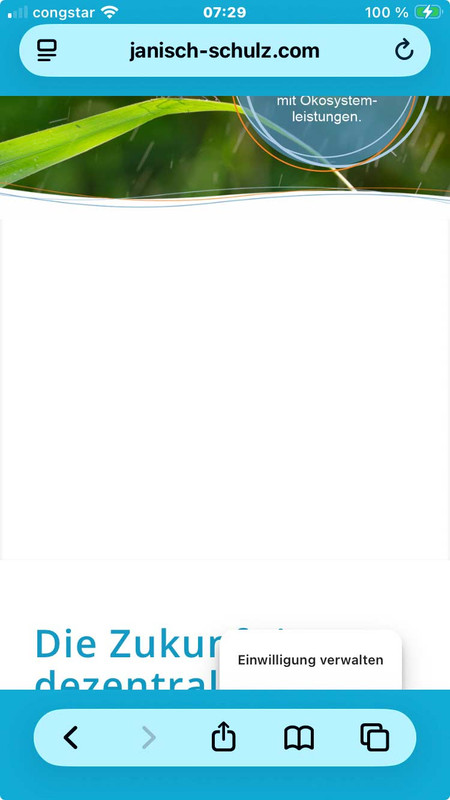
Sicher, dass es nicht nur ein Caching ist? Du hast WP-Rocket am Start. Cleare mal den Cache dort. Und deaktiviere dann WP-Rocket temporär.
Dann – falls aktiv, mach noch einen Refresh der css und js files in Enfold ( Enfold-Child / Performance ) ganz unten “Delete Old CSS And JS Files?”Aus irgendeinem Grund ( und auch nur auf realen iPhones ) wird dieser full-width button den du am Desktop zeigst trotzdem mit berücksichtigt. Es wird nur der Anchor ausgeblendet – die Wrapper bleiben sichtbar. Daher:
Versuche mal folgendes : setze den Full-Width button in eine eigene Color-Section und blende diese dann für kleine Screens aus.
PS: das ganze ist übrigens auf allen seiten dann auch der Fall – wo du unterhalb der Slider auch immer einen Full-Screen Button setzt.dies wird auch auf realen iPhones gezeigt:
 March 10, 2026 at 5:53 am #1495906
In reply to: Page editor loading VERY slowly – difficulty editing
Hey,
Thank you for the inquiry.
We didn’t find the link to the video anywhere. The slow loading of the ALB is usually caused by one or a combination of the following factors, a large number of elements on the page or heavy third-party scripts loading in the admin.
Here are some things we recommend trying:
1. Check if any caching or performance plugins (like WP Rocket, W3 Total Cache etc.) are interfering with the admin. Some aggressive caching configurations can actually slow down the backend. Try temporarily to disable them to see if the builder becomes more responsive.
2. If the affected pages have a very large number of ALB elements, consider splitting content across multiple pages or using the Custom Layout feature to modularize sections. This reduces how much the builder needs to parse at once.
Please refer to the Enfold optimization documentation for more details on the performance settings:
— https://kriesi.at/documentation/enfold/optimization/
Let us know the result and feel free to share any additional details such as which hosting provider you are using.
Best regards,
IsmaelMarch 9, 2026 at 10:01 pm #1495903Hi,
Glad that Ismael could help, if you have further questions please open a new thread and we will try to help. Thanks for using Enfold.Best regards,
MikeMarch 9, 2026 at 8:20 pm #1495897Hi,
Great, I’m glad that Mike could help you out. Please open a new thread if you should have any further questions or problems.
Best regards,
RikardMarch 9, 2026 at 8:19 pm #1495895In reply to: Disable focussing masonry gallery
Hi,
Great, I’m glad that Ismael could help you out. Please open a new thread if you should have any further questions or problems.
Best regards,
RikardMarch 9, 2026 at 12:31 pm #1495879In reply to: obtaining updates
Hey,
Thank you for the inquiry.
Unfortunately, we are not able to provide theme update files directly through support. Since Enfold is sold through Themeforest, the license and download are tied to the original purchaser’s Envato account. To get access to updates, you will need to obtain the purchase code and Envato account credentials from the original developer.
If the original developer is unreachable and you cannot recover the license, the recommended path would be to purchase a new license from Themeforest. Once purchased, you can download the latest version from the Downloads section of the buyer’s Envato account and install it manually via FTP.
— https://help.market.envato.com/hc/en-us/articles/202501014-How-to-download-your-items
Here is our documentation on how to update the theme via FTP:
— https://kriesi.at/documentation/enfold/theme-update/#update-via-ftp
For more details on Themeforest licensing, please refer to their license FAQ:
— https://themeforest.net/licenses/faq
Let us know if you have more questions.
Best regards,
IsmaelMarch 9, 2026 at 12:26 pm #1495878Hi Mike
As of now, I think to fix our wordpress/enfold installation on our servers, i.e. uninstall and reinstall after staging/saving our website content.
Do you think this is a promising approach? Are you offering such extra paid services?
Before that I need to be sure – I belief you – but may I ask you to send me a quick vimeo, showing me the export of my page to your test site works with no bounces?
Thank you for your help.
Kind regards
PhilippMarch 9, 2026 at 12:13 pm #1495877In reply to: wpo-minify folder
Hey nioperik2,
Thank you for the inquiry.
The wpo-minify folder is created and managed by the WP-Optimize plugin, so this is not something directly related to the Enfold theme itself.
We found a support thread that addresses your exact question, but we’re not sure if this is still accurate.
— https://wordpress.org/support/topic/can-i-delete-minify-folder/
For more details, please refer to the WP-Optimize documentation.
— https://teamupdraft.com/documentation/wp-optimize/getting-started/
For any further questions specifically about WP-Optimize, we recommend reaching out to the WP-Optimize support team directly.
Best regards,
IsmaelMarch 9, 2026 at 12:04 pm #1495876Hey oestersund,
Thank you for the update.
You’re right, the issue is that the previous css uses display: none !important; without scoping it to a specific page, so it ends up hiding #layer_slider_2 on all pages, not just the homepage.
The fix is to wrap those rules in a page-specific selector. The easiest way to do this is to use the unique body class that WordPress adds for each page. For example, if your homepage has the slug “home”, the body class would be something like page-id-123 or home. You can check the exact class by inspecting the body tag in your browser’s dev tools.
Once you have the body class for your homepage, update the css like this:
/*Homepage Slider Laptop Mobile*/
@media only screen and (min-width: 768px) {
    .page-id-123 #layer_slider_1 { display: block !important; }
    .page-id-123 #layer_slider_2 { display: none !important; }
}
@media only screen and (max-width: 767px) {
    .page-id-123 #layer_slider_2 { display: block !important; }
    .page-id-123 #layer_slider_1 { display: none !important; }
}
Replace .page-id-123 with the actual page ID class from your homepage body tag. This way the hide/show rules only apply on the homepage and all other pages with layer sliders will display normally on mobile again. This documentation should help.
— https://kriesi.at/documentation/enfold/add-custom-css/#how-to-inspect-an-element-on-the-page
Please make sure to purge the cache before testing. Let us know if the issue persists.
Best regards,
IsmaelMarch 9, 2026 at 11:38 am #1495875In reply to: page speed test
Hey Munford,
Thank you for the inquiry.
The “Make fewer HTTP requests” and “Add Expires headers” recommendations from speed testing tools are server-level optimizations and are not something we can control directly from the theme side. These are handled by your hosting server configuration.
For the Expires headers issue, this typically requires adding rules to your .htaccess file or asking your host to enable browser caching on the server. Here is an example of what you can add to your .htaccess file:
<IfModule mod_expires.c>
ExpiresActive On
ExpiresByType image/jpg "access plus 1 year"
ExpiresByType image/jpeg "access plus 1 year"
ExpiresByType image/gif "access plus 1 year"
ExpiresByType image/png "access plus 1 year"
ExpiresByType text/css "access plus 1 month"
ExpiresByType application/javascript "access plus 1 month"
</IfModule>
For reducing HTTP requests, the “Merge and compress files” option you already have enabled in Enfold > Performance is the main thing the theme can do on its end. Beyond that, reducing the number of active plugins and removing any unnecessary scripts loaded by third-party plugins will help.
We also recommend using a caching plugin like W3 Total Cache or WP Rocket, as these can handle both browser caching and HTTP request reduction more comprehensively. For more details, please refer to the W3 Total Cache documentation.
— https://wordpress.org/plugins/w3-total-cache/
Let us know if you have more questions.
Best regards,
IsmaelMarch 9, 2026 at 11:19 am #1495873In reply to: Style the excerpt
Hey Erwin,
Thank you for the inquiry.
Yes, it is possible to add inline html to the post excerpt. You can go to Posts > All Posts, edit the post you want to modify, and add your custom html directly in the excerpt field. For example, you can wrap certain words in a span tag with a custom class, like this:
This is the <span class="av-highlight">highlighted word</span> in the excerpt.Then you can style that class using custom css in Enfold > General Styling > Quick CSS or via Appearance > Customize > Additional CSS:
.av-highlight {
    color: orange;
}
Just keep in mind that the excerpt field in WordPress does not show a visual editor by default, so you would need to type the html directly in the plain text field. Also, some themes or plugins may strip html tags from the excerpt, but Enfold generally allows basic inline html tags like span to pass through.
Let us know if you have more questions.
Best regards,
IsmaelMarch 9, 2026 at 11:02 am #1495871In reply to: Disable focussing masonry gallery
Hey Erwin,
Thank you for the inquiry.
You can disable the hover/focus effect on the masonry gallery images by adding the following css to Enfold > General Styling > Quick CSS:
#top .av-masonry-item .av-masonry-image-container:before,
#top .av-masonry-item .av-masonry-image-container:after {
    display: none !important;
}

#top .av-masonry-item:hover .av-masonry-image-container img {
    opacity: 1 !important;
    filter: none !important;
    transform: none !important;
}
If you only want to target a specific masonry gallery on the page and leave the others unaffected, you can wrap it in a section or cell with a Custom CSS Class and then use that class as the parent selector in the code above.
— https://kriesi.at/documentation/enfold/add-custom-css/#enable-custom-css-class-name-support
Let us know if the issue persists.
Best regards,
IsmaelMarch 9, 2026 at 10:56 am #1495870In reply to: Header – SVG Logo – Burger Menu left, Logo center
Hey cktanju,
Thank you for the update.
To set the sticky header background to black on mobile, you can add the following to the Quick CSS field in Enfold > General Styling > Quick CSS:
@media only screen and (max-width: 767px) {
    .html_header_sticky #header .header_bg {
        background-color: #000;
    }
}
If the header is using transparency before scrolling, you may also need to target the scrolled state specifically:
@media only screen and (max-width: 767px) {
    #header .header_bg {
        background-color: #000;
    }
}
Please make sure to purge the cache before testing. Let us know if the issue persists.
Best regards,
IsmaelMarch 9, 2026 at 3:01 am #1495866Topic: obtaining updates
in forum Pre Sale QuestionsJon Morby
GuestHi
The guy who originally designed our client’s site has vanished, and it doesn’t look like he ever actually registered Enfold … certainly the auto updates aren’t configured.
Is there any way we can get access to the updates as their site is still running Enfold 4.1.2
The website in question is http://www.crescentsigns.co.uk
March 8, 2026 at 4:25 pm #1495865Hi,
Glad that we could help, if you have further questions please open a new thread and we will try to help. Thanks for using Enfold.Best regards,
MikeMarch 8, 2026 at 4:24 pm #1495864In reply to: license renewal doesn’t work
Hi,
Glad that Ismael could help, if you have further questions please open a new thread and we will try to help. Thanks for using Enfold.Best regards,
MikeMarch 8, 2026 at 3:07 pm #1495861Hi,
Glad that we could help, if you have further questions please open a new thread and we will try to help. Thanks for using Enfold.Best regards,
MikeMarch 8, 2026 at 12:37 pm #1495853In reply to: Vulnerability finding
Hey Daniel,
Please see this thread: https://kriesi.at/support/topic/cve-2022-48285-on-jszip-3-6-0/#post-1470007
If you wish, you can request the Dev Team to consider this again on our Feature Request: https://github.com/KriesiMedia/Enfold-Feature-Requests/issues
Note that at the time the updated version was buggy and did not work as it should, perhaps there is a newer update at this time? The Dev Team would need to review though the Feature Request link above.
See https://kriesi.at/support/topic/cve-2022-48285-on-jszip-3-6-0/#post-1469608Best regards,
MikeMarch 8, 2026 at 12:16 pm #1495850Hi,
Glad that we could help, if you have further questions please open a new thread and we will try to help. Thanks for using Enfold.Best regards,
MikeMarch 7, 2026 at 8:54 pm #1495844In reply to: Manage WP Layer slider appearance laptop mobile
Hi,
Glad that we could help, if you have further questions please open a new thread and we will try to help. Thanks for using Enfold.Best regards,
MikeMarch 7, 2026 at 1:31 pm #1495831Hey ivancazzol,
Please note that the Grid element gets it’s height from the elements inside of it, so on mobile, when the top grid row is stacked the right side cell that only has a background image, that shows below the first cell, will have no height. In our demo it has has another image element in it the “Parallax” text
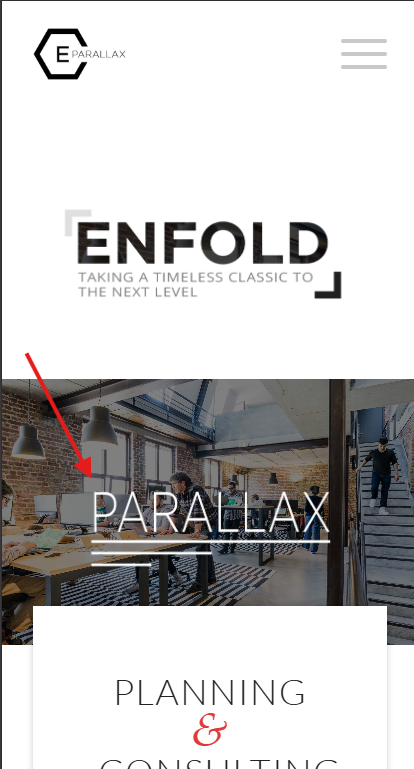
To correct yours, add a Whitespace (hr) element with a min-height that you want it to be, perhaps 200px or so.Best regards,
MikeMarch 7, 2026 at 11:18 am #1495829Topic: Different layout between desktop and mobile on Aliko.it
in forum Enfoldivancazzol
ParticipantHello,
I am experiencing an issue with my website http://www.aliko.it. The issue is that when accessing the site from a mobile device, the website seems to load a different page as the homepage rather than displaying the same homepage with responsive adjustments. The desktop version shows the correct layout, while the mobile version appears to load another layout.The website is built with the Enfold theme, and I am using the Advanced Layout Builder. I would like the layout to remain consistent across devices, with only the standard responsive adjustments. Could you please help me understand what might be causing this issue and how to fix it?
If needed, I can provide screenshots or access to the backend.
Thank you in advance for your support.
Best regards,
Ivan CazzolMarch 6, 2026 at 9:18 pm #1495828In reply to: Icon Tooltip using Theme Shortcode
Hi,
Glad to hear that you have this sorted out, if you have further questions please open a new thread and we will try to help. Thanks for using Enfold.Best regards,
MikeMarch 6, 2026 at 9:07 pm #1495824Hi,
Version 7.15.1 is the correct version in Enfold 7.1.4, version 8.2.0 came available on Mar 2, 2026, after our last update.
The bundled version of LayerSlider can only be updated with theme updates, which we do depending on our own release cycle and depending on critical updates, and what the LayerSlider team shares with us, as it is a special “bundled version”. Users cant update the bundled version of the layerslider, even if actived.
However, if a user wishes to update before the next theme update, they can simply purchase a full version of the layerslider and upload it as a plugin and activate it.See our documentation here: How LayerSlider Updates work in Enfold
Best regards,
MikeMarch 6, 2026 at 8:36 pm #1495822Hi,
Glad that Ismael could help, if you have further questions please open a new thread and we will try to help. Thanks for using Enfold.Best regards,
Mike -
AuthorSearch Results
-
Search Results
-
I’ve built my website with the Enfold Parallax theme. I’m very happy with the results! However, on mobile view there are a few pictures (4 in total, at 2 different positions) that are cropped and placed wrongly, which I can’t seem to fix. On desktop view they are perfect. There’s a larger picture and a smaller one overlaps. In mobile view the larger picture appears smaller than the original smaller one. This way it doesn’t look nice at all. Could you please help me fix this issue?
Additionally, I have a question about the contact form. When I fill in an address, the space turns light blue and when I press send, the form turns green. These colors don’t match the colors of my website at all. Also, the text that appears after sending a message isn’t the typography I chose for my website and it also doesn’t match the rest of my website.Looking forward to your response.
Topic: Template ENFOLD-DJ Bug
Hi.
I purchased ENFOLD using Template ENFOLD-DJ and found a bug:
– In Desktop View: Flex Cell «Greatest Hits Vol2» appears
– In Mobile View: Flex Cell «Greatest Hits Vol2» disappears, not shown any more.How can I achieve to show this flex cell on Mobile view? Need some #ID CSS?
Thank you
Topic: obtaining updates
Hi
The guy who originally designed our client’s site has vanished, and it doesn’t look like he ever actually registered Enfold … certainly the auto updates aren’t configured.
Is there any way we can get access to the updates as their site is still running Enfold 4.1.2
The website in question is http://www.crescentsigns.co.uk
Hello,
I am experiencing an issue with my website http://www.aliko.it. The issue is that when accessing the site from a mobile device, the website seems to load a different page as the homepage rather than displaying the same homepage with responsive adjustments. The desktop version shows the correct layout, while the mobile version appears to load another layout.The website is built with the Enfold theme, and I am using the Advanced Layout Builder. I would like the layout to remain consistent across devices, with only the standard responsive adjustments. Could you please help me understand what might be causing this issue and how to fix it?
If needed, I can provide screenshots or access to the backend.
Thank you in advance for your support.
Best regards,
Ivan Cazzol


