
Viewing 30 results - 20,701 through 20,730 (of 244,540 total)
  • Author
    Search Results
  • #1375275

    In reply to: contact form problems

    Hi, does anyone know if the enfold contact form works? I have placed it on a page but it does not send the messages to the mail

    #1375274

    Topic: PHP compatibility

    in forum Enfold
    LOPB-31
    Participant

    Hello,

    what are the PHP versions, Enfold is compatible with ?
    I have WordPress 6.1.1 and Enfold 5.2.1 and currently PHP 7.4.29.

    I initially tried PHP 8.0 (which I use with success on another site with another theme) : then I got a fatal error and I couldn’t even log in as an admin, I had to switch back to 7.4 which is supposed to get discontinued by end of the year.

    Regards
    Christian

    #1375268

    In reply to: PHP8

    Hey David,

    The version you are running is not compatible with newer PHP versions, updating should hopefully resolve the problem though. All you should have to do is to update the theme, you don’t have to rebuild the site. https://kriesi.at/documentation/enfold/how-to-install-enfold-theme/#theme-update.

    Best regards,
    Rikard

    #1375265

    In reply to: Hide main menu item

    Hi,

    Please try the following in Quick CSS under Enfold->General Styling:

    #menu-item-528 {
      display: none; 
    }

    Best regards,
    Rikard

    walhai
    Participant

    Hi,
    I have the same problem with some websites.
    If I change the image size of blog images for the sidebar, the images in the backend area are in the same size, what is not comfortable for working.
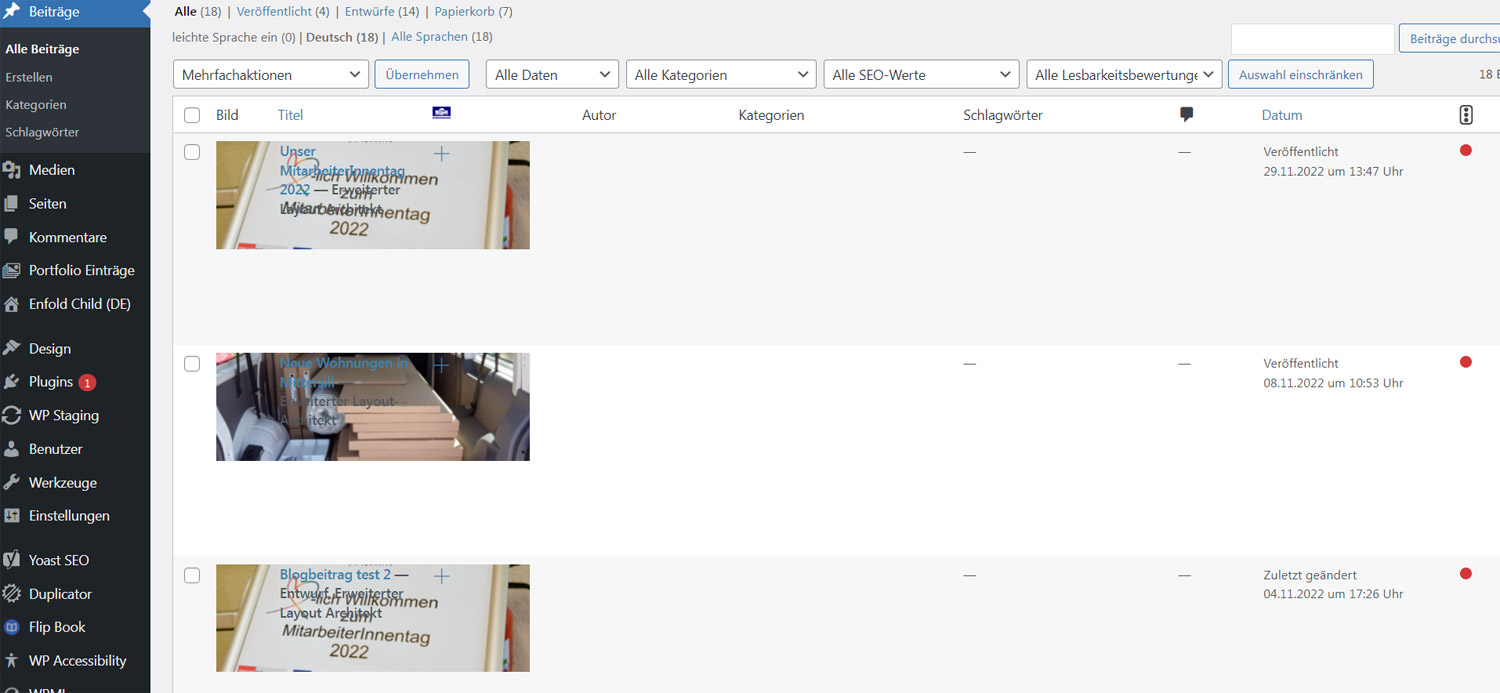
    blog
    Is there any possibility to solve this problem??

    The same problem, if I change the flag size of wpml language flags, the flags are over the content of the enfold change menu.

    Thank you Barbara

    #1375254

    Hi,
    Glad we were able to help, if you have any further questions please create a new thread and we will gladly try to help you. Thank you for using Enfold.

    Best regards,
    Mike

    #1375246

    Topic: PHP8

    David Haggett
    Guest

    I am currently using Enfold version 4.5. I was unaware that it was out of date (I’d left everything to a support team who haven’t done any updates or paid for theme support!)
    I’ve just updated my PHP to version 8 and the website has crashed with an error related to the theme.
    If I buy a new licence and install the latest version, will the site work again or will I need to start from scratch and build each page as new?

    #1375241

    Hey geektech-42,

    The easiest way would be to add your customs fonts to the “Websafe Font” section in the dropdown.

    You can do that and manipulate this array with the following filter:

    
    function custom_available_websafe_fonts( $fonts )
    {
    	$fonts['Montserrat'] = 'Montserrat';
    	$fonts['Aclonica'] = 'Aclonica';
    
    	return $fonts;
    }
    
    add_filter( 'avf_available_websafe_fonts', 'custom_available_websafe_fonts' );
    

    Then you have to load your @font-face declarations on all backend post types that support ALB and in frontend.

    As a start you could add it to enfold-child\style.css which will do it.

    To see a rough preview on theme options page you must also load it there. There is no special file in the child theme for that.
    You can use the following action hook only called on theme options page to enqueue your own backend file containing the @font-face declarations:

    
    			/**
    			 * Allows to add additional submenus
    			 *
    			 * @used_by				aviaElementTemplates::handler_ava_menu_page_added     10
    			 *
    			 * @since 4.8
    			 * @param string $top_level
    			 * @param avia_adminpages $this
    			 * @param string $the_title
    			 * @param string $menu_title
    			 */
    			do_action( 'ava_menu_page_added', $top_level, $this, $the_title, $menu_title );
    

    Example fo Font Face declarations:

    
    @font-face {
         font-family: 'montserrat';
         src:    url('https://localhost/wp56/wp-content/uploads/dynamic_avia/avia_type_fonts/custom/montserrat-black.ttf') format('truetype');
         font-style: normal;
         font-weight: 900;
         font-display: auto;
    }
    @font-face {
         font-family: 'montserrat';
         src:    url('https://localhost/wp56/wp-content/uploads/dynamic_avia/avia_type_fonts/custom/montserrat-blackitalic.ttf') format('truetype');
         font-style: italic;
         font-weight: 900;
         font-display: auto;
    }


    I hope this helps you.

    Best regards,
    Günter

    #1375240
    Flyingeye78
    Participant

    Hallo,

    leider ist meine Lizenz Okt. 2022 abgelaufen – ich hoffe ich bekomme trotzdem kurz Hilfe. Das Enfold Theme wurde gekauft und lange Zeit nicht benutzt – daher die abgelaufene Lizenz :-(

    Nun ist es so, das ein Child Theme erstellt wurde – dieses auch aktiviert werden kann – jedoch Code das im Child Theme geschrieben wird, nicht übernommen wird im Frontend. Ich hab
    Alles läuft lokal also über mamp – bevor dann irgendwann umgezogen wird.
    Ich hab schon so viele Sachen getestet – aber nichts funktioniert.
    Am Child kann es auch eigentl. nicht liegen da ich das Child auch auf anderen Themes habe und die funktionieren.

    Woran kann das liegen?
    Ich freu mich auf ein Feedback

    #1375239
    Nic_007
    Participant

    Hi,
    wie kann ich einzelne Elemente verändern und wo setze ich dann den Code rein?
    Wie zum Beispiel
    Es funktioniert mit diesem Code. Danke

    .js_active .tab {
    font-size: 14px;
    }
    (gefunden bei Enfold Support) zum Ändern der Schriftgröße des Reiters.
    Früher funktionierte das mit Quick Css, aber für die Anpassung von Elementen musste man irgendeinen Code einfügen ins Theme, um diese anpassungen machen zu können und so dass dort enstprechende Kästchen neben den Elementen sichtbar werden. Wie ist die Vorgehensweise?

    Beste Grüße

    #1375234
    AnnemarieDoolin
    Participant

    Hi,
    I can see from the topic thread below that the fix for allowing the stars on ratings to show has been fixed by your Devs… any idea when the Enfold update will be rolled out?

    We tried the fix as Yigit suggested to the class-asset-manager file but everything crashed. (
    See thread link: https://kriesi.at/support/topic/stars-not-showing-in-ratings-show-up-when-i-switch-themes/#post-1373110

    Regards,
    Annemarie
    HerbalCenter.dk

    Hi,

    There is already a new container class av-animated-when-visible-95 (see enfold\js\shortcodes.js – function activate_waypoints() since 5.0 ).

    I will add filter ‘avf_alb_element_animation’ (will try for 5.3) to elements.

    Best regards,
    Günter

    Hey Leonie,

    Could you try to update via FTP instead? https://kriesi.at/documentation/enfold/install-enfold-theme/#ftp-install

    Best regards,
    Rikard

    #1375212

    In reply to: PHP upgrade to PHP 8.0

    Hey Heather_Sm1thard,

    Could you try updating the theme to the latest version (5.2.1) to see if that helps please? https://kriesi.at/documentation/enfold/how-to-install-enfold-theme/#theme-update.

    Best regards,
    Rikard

    #1375210

    Hi,

    Great, I’m glad that you got things working. I’ll close this thread for now then, please open a new thread if you should have any further questions or problems.

    Best regards,
    Rikard

    Leonie
    Participant

    Good morning,

    Since yesterday I’ve been trying to update the theme of Enfold from 4.6.3.1 to 5.2.1, but every time it gives an error message (An error occurred while updating Enfold: Could not copy file. enfold/lang/es_ES.).

    We need to update the theme to the new version so that the video on the homepage can be used as a fullwidth video slider, because now there are black blocks next to it.

    Hopefully you can help me.
    Thanks in advance!

    #1375197

    Hi,

    Great, I’m glad that we could help. Please open a new thread if you should have any further questions or problems.

    Best regards,
    Rikard

    #1375195
    RENZCOM
    Participant

    Dear Enfold Team,
    for a new customer project we would like to use your theme. But the requirement is that the blog should be displayed as flipboxes. On the front should be an image with the title. When the user mouseover a post the box flips and on the back a small text or shortcode should be displayed.

    We didn’t find anything in your documentation how to realize this. Do you have an idea or a suggestion?

    #1375189

    Topic: PHP upgrade to PHP 8.0

    in forum Enfold
    Heather_Sm1thard
    Participant

    Hi I get the following errors after an upgrade to PHP 8.0

    Fatal error: Unparenthesized a ? b : c ? d : e is not supported. Use either (a ? b : c) ? d : e or a ? b : (c ? d : e) in /usr/www/users/kevinqyqpm/wp-content/themes/enfold/functions-enfold.php on line 293
    and
    wp-content\themes\enfold\config-templatebuilder\avia-shortcodes\slideshow_layerslider\slideshow_layerslider.php on line 28

    I have fixed the first error, but cannot solve the one below

    wp-content\themes\enfold\config-templatebuilder\avia-shortcodes\slideshow_layerslider\slideshow_layerslider.php on line 28

    #1375188

    In reply to: Blog Images

    Hey rackdc,

    Thank you for the inquiry.

    Are you tryint to add a placeholder for posts without featured images? We tried to check the site, but it is on maintenance mode and the login account above seems to be invalid, so we were not able to check the site. Please check the login info or provide another admin account. \

    To add a default placeholder for the featured images, you will have to modify the enfold\includes\loop-index.php file and edit this code around line 108 or use the avf_post_featured_image_link filter in the functions.php file.

    Best regards,
    Ismael

    #1375186

    Hi,

    Great, I’m glad that you got things working. I’ll close this thread for now then, please open a new thread if you should have any further questions or problems.

    Best regards,
    Rikard

    Nic_007
    Participant

    Hi,
    how do I figure out the perfect image sizes to use for the sliders etc in the Enfold Restaurant demo theme? For example, there is a photo in the slider on the about page, but only the top area is visible. How do I find out how big (high) the visible area is and what width the photo should have? It would actually make sense if the photo then only had the height that is also visible or do you need the entire height of the demo photo because of the mobile view (mobile phone)?

    Thanks in advance for the dimensions.

    best regards

    #1375174

    Thank you Rikard. That worked.

    In my case, using Enfold Child, the pages don’t find the custom css in Quick CSS under Enfold->General Styling: I have to add it via Appearance>Theme File Editor>style.css

    I don’t know why that is. I’m hoping that those custom settings in the Theme File Editor will remain after a theme update.

    #1375173

    We see these errors on the options pages of the RankMath plugin. Clearly it is a conflict between the Enfold theme and the plugin, because when we switch to another theme, the options and buttons of these pages work fine. The exports button you see in the screenshot is from the tools page of the rankmath pro plugin, we don’t use other plugins to export settings. We don’t see these errors when editing posts. Please advise.

    Sovietovic
    Participant

    Hi,
    I’m trying to fix this issue that google pagespeed reports (and others). However couldn’t so far find some easy fix for it and also why it loads those stuff.
    Error:
    https://freeimage.host/i/HCveBqXhttps://iili.io/HCveBqX.jpg
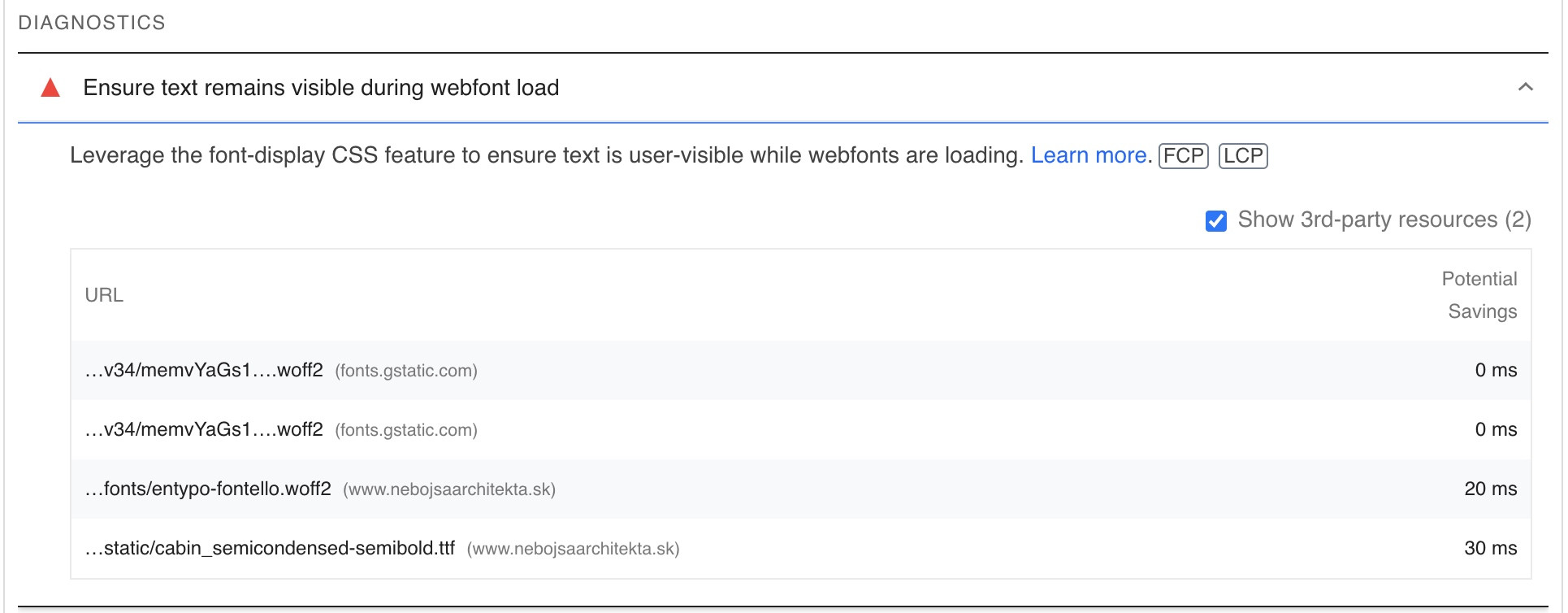
    Fonts mentioned there:
    https://fonts.gstatic.com/s/opensans/v34/memvYaGs126MiZpBA-UvWbX2vVnXBbObj2OVTS-mu0SC55I.woff2
    https://fonts.gstatic.com/s/opensans/v34/memvYaGs126MiZpBA-UvWbX2vVnXBbObj2OVTSGmu0SC55K5gw.woff2
    .PRIVATEURL.sk/wp-content/themes/enfold/config-templatebuilder/avia-template-builder/assets/fonts/entypo-fontello.woff2
    PRIVATEURL.sk/wp-content/uploads/avia_fonts/type_fonts/static/cabin_semicondensed-semibold.ttf

    The fonts I configured in Enfold are:
    – Open Sans
    – Cabin (locally uploaded)

    I’m not sure where entypo-fontello comes from.

    Is there some simple fix how to prevent this “issue” to be reported? Is there some best practive for fonts management or some function I need to use to make this dissapear?

    Thanks
    Jaro

    #1375164

    Topic: Will not download demo

    in forum Enfold
    my247restore
    Participant

    Just purchased theme and am trying to download some demos but getting the following message.

    Download of files for demo Enfold 2017 didn’t work!
    You might want to try reloading the page and then try again.

    #1375160

    Topic: contact form problems

    in forum Enfold
    plvsultra
    Participant

    Hello,
    Do you know why the enfold contact form does not send messages to the default email?

    #1375153

    Hey Jaro,

    Please try the following in Quick CSS under Enfold->General Styling:

    nav.sub_menu_socket ul a {
      font-size: 16px;
    }

    Best regards,
    Rikard

    #1375152

    Hi Patrick,

    Please try the following in Quick CSS under Enfold->General Styling:

    .html_av-overlay-side #top #wrap_all .av-burger-overlay li a {
        padding: 0 50px;
    }

    Best regards,
    Rikard

Viewing 30 results - 20,701 through 20,730 (of 244,540 total)