Hey Santiago,
Please go to Enfold theme options > Main Menu and disable “Append Search Icon To Main Menu”.
Best regards,
Yigit
Hey Heino,
Enfold 3.0.5 is a very old version of Enfold and is not compatible with WordPress 6.x and PHP 8.x.
You can log in on ThemeForest with the account you used when purchasing Enfold, go to the Downloads page to download the latest version, and update the theme: https://kriesi.at/documentation/enfold/theme-update/
If you don’t have access to the ThemeForest account, you’re going to need to create an account and purchase a new license.
I hope this helps. Let us know if you have any other questions!
Best regards,
Yigit
Hallo,
Ich habe gerade die neueste Version des Enfold Themes hochgeladen.
Die Webseite läuft, allerdings kann ich keine der Seiten in WordPress bearbeiten. Es kommt folgender Fehler:
Failed to initialize plugin: avia_builder_button
Ich habe alle Plugins deaktiviert. wordpress ist auf dem neuesten Stand.
Könnten Sie mir weiterhelfen?
Herzlichen Dank
Michael
If english language would be prefered I can post in english too………
-
This topic was modified 3 years, 1 month ago by
 siltalai.
Hey Tom,
This might be an incompatibility issue as the Abundance theme was discontinued back in 2018. I attached the latest available version in the private content field. Please note even the latest version of Abundance is not compatible with the most recent WordPress and PHP versions.
If you’d be interested in a more modern, flexible, and user-friendly theme, we’d recommend Enfold: https://kriesi.at/themes/enfold-overview/
Best regards,
Yigit
Hi Ismael,
no, only elements from Enfold are loaded. We added the “Custom Widget Area” item and selected Menu. But in general, the problem occurs on several pages.
Hey splatt4,
Thank you for the inquiry.
We are getting a script error from the merged script files. You may need to toggle or temporarily disable the Enfold > Performance > File Compression settings, and purge the cache. Let us know this helps.
avia-footer-scripts-209f21b71e6454416ab634sdfsdfe8f3e5---640a83531f97f.js:20 Uncaught SyntaxError: Unexpected token '!' (at avia-footer-scripts-209f21b1171e6454416ab6340ce8f3e5---640a83531f97f.js:20:65284)
Best regards,
Ismael
Hi,
Thank you for the update.
We don’t really see any animations in the banner and the text field, so the only thing that could cause the layout shift in this case is the lazy loading. Did you disable lazy loading from the Enfold > Responsive Images And Lazy Loading > Lazy Loading option? You may also need to toggle or temporarily disable the Enfold > Performance > File Compression settings afterwards, and make sure to purge the cache.
Best regards,
Ismael
Hey Anna_Tewes,
Thank you for the inquiry.
What do you mean by “Reitersektion”? We cannot find the same text in the screenshot. To change the font size of an element, you can go to the Styling tab of the element and adjust the Font Sizes options, or you can go to the Enfold > Advanced Styling panel to edit the default styles of the elements.
Best regards,
Ismael
Hey how do I put a single page of my website on maintenance ? When I am doing that in theme settings , whole website is going on maintenance
Also please suggest a good plugin which is compatible with enfold theme.
Hey djordyr,
Thank you for the inquiry.
How can i connect it again to the same website?
What do you mean by connecting it again to the website? If you want to create a private token or register the theme, please check the documentation below.
// https://kriesi.at/documentation/enfold/theme-registration/
Best regards,
Ismael
Hey HERZBLUAT,
Thank you for the inquiry.
You can override the heading styles in the Enfold > Advanced Styling panel. In the dropdown, select the elements in the Headings section.
Best regards,
Ismael
Hey ditteditte,
Thank you for the inquiry.
You can disable the sidebar for the archive or category pages in the Enfold > Sidebar Settings panel. Set the Sidebar On Archive Pages settings to the third option (no sidebar).
Best regards,
Ismael
Hey maryenvato,
Thank you for the inquiry.
This issue has been fixed on version 5.4.1. Please download the latest version of the theme or do an automatic update in the Enfold > Theme Updates panel.
Best regards,
Ismael
Hi – a couple of problems that may be related. Enfold 5.4.1. WordPress 6.1.1, PHP 8.1.8.
1. Under ‘Enfold-Theme Options’, the ‘Save All Options’ under Enfold doesn’t work – I’m unable to click either one (neither the top nor bottom)…I click and nothing happens. I’ve tried multiple browsers and devices.
2. Additionally, under ‘Enfold-Theme Options’ I get “Notice: Your blog is currently disabled. You can enable it here” however, my blog is not disabled.
3. Finally, under ‘Enfold-Theme Options’ all of the options are being shown (nothing is collapsed) and they are in text format (they used to be graphical).
NOW FIXED
4. CSS problem – backgrounds on homepage not showing. (FIXED – copy the file into this folder: /wp-content/uploads/dynamic_avia/avia_posts_css/post-2146.css)
5. ahrefs showing this error: “404 file not found” for link (FIXED – same as #4)
-
This topic was modified 3 years, 1 month ago by
 enfold-nick.
-
This topic was modified 3 years, 1 month ago by enfold-nick.
-
This topic was modified 3 years, 1 month ago by enfold-nick.
 Heino Gamradt
Guest
Hallo,
ich habe auf meiner Homepage (www.gamradt.info) bei HostEurope unter WordPress das Theme Enfold 3.0.5.
Das läuft jetzt nicht mehr.
Kann ich das Theme Enfold updaten oder kaufe ich eine neue Version?
Freue mich auf eine Antwort.
Gruß
Heino Gamradt
 Rob Marlbrough
Guest
An update to Enfold recently broke the Circle CSS style on images, seen here:
Featured Speaker Headshot should be a circle, and has a circle shadow around it. It now displays as a rectangle.
This CSS is above the circle CSS but is more specific it seems:
.avia-image-container.av-img-box-shadow .avia-image-overlay-wrap .avia_image, .avia-image-container.av-img-box-shadow.av-styling-circle .avia-image-container-inner, .avia-image-container.av-img-box-shadow.av-styling-circle .avia_image {
overflow: visible;
}
than the circle CSS:
.av-styling-circle .avia-image-container-inner, .av-styling-circle .avia_image, .av-styling-circle .av-image-caption-overlay, .av-styling-circle div.av-caption-image-overlay-bg {
overflow: hidden;
-webkit-border-radius: 10000px;
-moz-border-radius: 10000px;
border-radius: 10000px;
}
Please fix. I will add some custom CSS to address the issue on other sites:
.av-styling-circle .avia-image-container-inner, .av-styling-circle .avia_image, .av-styling-circle .av-image-caption-overlay, .av-styling-circle div.av-caption-image-overlay-bg {
overflow: hidden !important;
}
Please let me know once you’re able to reproduce the issue and log the issue?
Hi,
Glad Guenni007 could help, thank you Guenni007, if you have any further questions please create a new thread and we will gladly try to help you. Thank you for using Enfold.
Best regards,
Mike
Hi,
Glad we were able to help, if you have any further questions please create a new thread and we will gladly try to help you. Thank you for using Enfold.
Best regards,
Mike
Thank you!
I tried a few things but i still have the problem, that I cant add a second background file.
At Enfold/General Styling/Main body area, I uploaded a tile for the Background
That works perfecly as you can see in the first Area.(see link)
But now, I want to add additionally at some places some extra Pictures on top of this Tile-background.
But as soon as I upload a background picture in my Color section, the color section replaces the Tile Background and takes just the new one instead. (see link, the second color section)
What can I do?
Cheers
Monika
Hi,
You are welcome! :)
For your information, you can take a look at Enfold documentation here – https://kriesi.at/documentation/enfold/
If you have any other questions or issues, feel free to start a new thread under Enfold sub forum and we will gladly try to help you :)
Enjoy the rest of your day!
Best regards,
Yigit
is there a special character inside that new text – for example a greater than or less than ?
These characters will be recognised as a starting/ending tag – and can destroy the rest of the html structure.
if you like to use such characters you had to use either html entities or – a little helper like: https://github.com/KriesiMedia/enfold-library/blob/master/integration%20plugins/Enfold/Special%20Character%20Translation/avia-special-characters_1_1_1.zip
thats why i mentioned it that the css is set to !important on enfold menu.css for responsive case.
It is not possible to overwrite such a setting via quick css – even if it is set to important too.
the other thing is the calculation if clause in menu.js
if( burger_menu.is(":visible") ){
	this.css({top: 'auto', position: 'absolute'}); fixed = false;
	return;
}
this has to be commented out – because that is the reason why it is set to position: absolute allthough the setting is fixed in alb.
es muss aber ja einen Grund haben warum das – was auch immer es ist – mit der Klasse: mce_SELRES_start.
Danach solltest du suchen – da es die Englische Versio nicht hat – ist es dann obsolete?
Dann entferne es von der deutschen Version. Dieser Kontainer p-tag inclusive des o.a. span-tags verursacht den weißen Hintergrund oben.
der Code im quick css sollte es aushebeln :
#top #main > p {
  height: 0px !important;
  margin: 0px !important;
}
jodoch ist die ursprüngliche Frage – ob der Container überhaupt benötigt wird.
__________
Das andere Problem habe ich nur bemerkt, da ich auch den mobilen Fall mir angeschaut habe.
Du willst den header – entgegen dem Enfold Default Verhalten – oben fixiert lassen. Das ist eben ob der verschiedenen Header Möglichkeiten ( transparent, glassy, nicht transparent ) nicht so trivial. Ein fixiertes Element ist sozusagen ausserhalb des DOM.
Mein Code im Link oben erledigt das – jedoch gibt es eine Regel, die von dir wohl erstellt wurde, was das padding-top von #main betrifft. Die ist schlicht falsch!
Du lässt den Hamburger bei 989px erscheinen, könntest das aber auch früher machen (1225px)
unterhalb der 767px hast du dann eine css setzung die eine Riesenabstand von #main zum header verursacht:
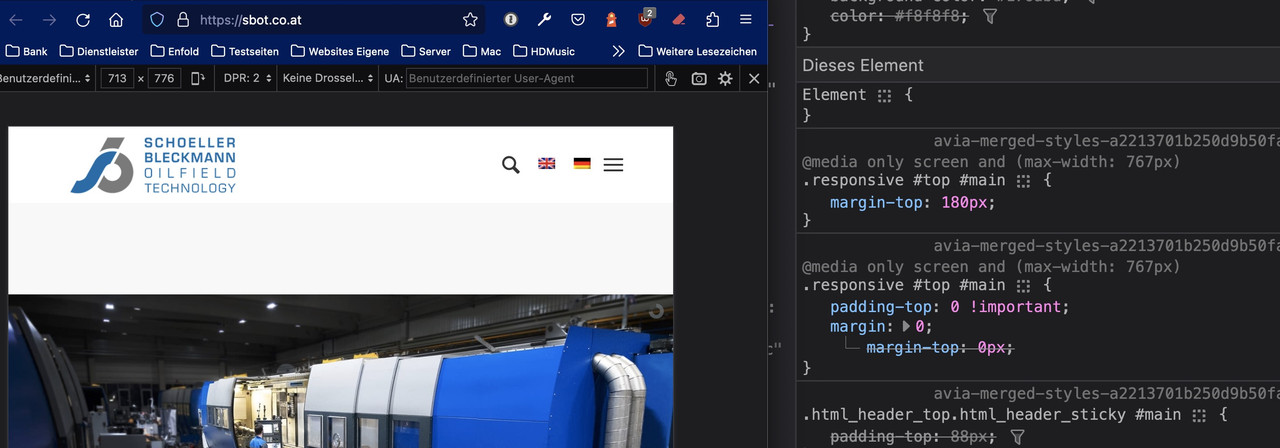
Hi, we would love to try and clean up how the “Search Results Page” displays the results (e.g. prioritising product pages, pages, blog posts). Do you know of a Search Results Plugin that is Enfold friendly?
Regards,
Annemarie
Hi,
I believe that your plugin Widget Options – Extended is overriding the widget style:

Try disabling the custom style in the widget or try disabling the plugin, Then clear your browser cache and any cache plugin, and check.
Best regards,
Mike
Good morning
I am very upset because I tried everything to import the parallax demo and other ENFOLD demos. I tried everything and got the following error code “cURL error 28: Connection timed out after 10000 milliseconds” I disabled all the extensions then I got the best coders who tried to install it in manual mode but there is always a problem now the site is crashed can you take the hand (mouse) and install the parallax demo and the possibility of changing demos in accordance with the general conditions of service and use related to the purchase of my ENFOLD theme. Come back to me quickly, it’s urgent I’m playing my career as a webmaster, it’s never happened to me to be in such a crisis situation. Thanks, I look forward to hearing from you. Bill.
This reply has been marked as private.
Hi,
To add a link to your footer page from the main menu, please add a custom link with the URL #footer-template

I did this for you, please check and adjust to suit.
Best regards,
Mike
Hi,
Glad we were able to help, if you have any further questions please create a new thread and we will gladly try to help you. Thank you for using Enfold.
Best regards,
Mike
Good morning,
after the last update of enfold, under the product images in the woocommerce shop page an unwanted tile appears.
I would like to have only the image of the product. How can this be done?
http://isoladeltesoro.mi.it/max/SCREEN.jpg

http://isoladeltesoro.mi.it/max/sample.jpg

i don’t know why images are not shown in this post, they can be viewed in your browser.
Thanks!



