first : i think the layerslider shortcodes will only work in different places – if you got the standalone layerslider registered.
but even if you got one – i wouldn’t do that on performance reasons.
But you can insert f.e. the shortcode for easy slider. You know how to style this easy slider on a page and get the enfold shortcode for that?
Next idea is : use the enfold option to show a page as footer. Then you can style that page with all the enfold elements – and with sliders too.
Hey dondela,
Thank you for the inquiry.
Have you tried using the preloader option? Please toggle the Enfold > Theme Options > Page Preloading option, then configure the settings as needed.
Best regards,
Ismael
Hi,
Thank you for the update.
You can adjust the Automated Schema.org HTML Markup option in the Enfold > SEO Support panel as shown in the screenshot below.
View post on imgur.com
Best regards,
Ismael
Hi,
Thank you for the info.
It seems to be an issue with the mega menu links. We edited the enfold/js/avia-snippet-hamburger-menu.js file and updated some blocks of code. This seemed to have fixed the issue.
— https://pastebin.com/ZKyBy7JZ
View post on imgur.com
Best regards,
Ismael
Hi,
I am looking into using structured data mark up / schema on my many Enfold sites. I can’t find up-to date info.
Firstly, do I need to disable Enfold automatic schema as some searches say? (Can’t see the mentioned drop down option: Automated Schema.org HTML Markup). Or do anything in settings?
Then I can easily add a plug in – do you have any recommended compatible plugins for Enfold?
Thanks,
Anne
Sorry for the delay. I think I sourced it to the Admin css stack for Enfold. It seems if I turn off Trebuchet MS from the font stack, everything works as expected. But, for some reason, having it on results in the tofu text. I verified that both machines tested on had Trebuchet MS loaded on them, so wondering if there is a specific version it is looking for. It seems to have the most problems with Chrome, but will occasionally show on Safari.
Is there a way to have Enfold default to the system font first in the font stack? Yes, Microsoft made it cross platform and available, but setting it to system with sans serif fallback should theoretically allow it to work on nearly anything.
Hey Otto,
The update to 7.1.2 has to be done manually from the version you are running, please refer to my replies in this thread: https://kriesi.at/support/topic/enfold-4-5-theme-update-update-failed-download-failed-a-valid-url-was-not-pro/#post-1021541
You can either update manually via FTP: https://kriesi.at/documentation/enfold/how-to-install-enfold-theme/#theme-update, or upload the theme as if it was new under Appearance->Themes->Add New Theme.
If that doesn’t work then please try to delete the whole theme folder, then replace it with the new version. Make sure that you have backups of the site before starting updating.
Also please read this after you have updated: https://kriesi.at/documentation/enfold/theme-registration/
Best regards,
Rikard
you know the absolute url of your svgs – what if you do open it in your browser – can you see them?
e.g.
https://your-domain.com/wp-content/uploads/avia_custom_shapes/waves-in-motion.svg
By the way, I now always upload these SVG files through the media library. In list view, I determine the ID of the attachment and add it to the array. As far as I know, neither the key nor the name needs to be specified then in the snippet.
SVG files in WordPress and Enfold are not converted to other sizes when uploaded to the media library. There are no disadvantages in this regard.
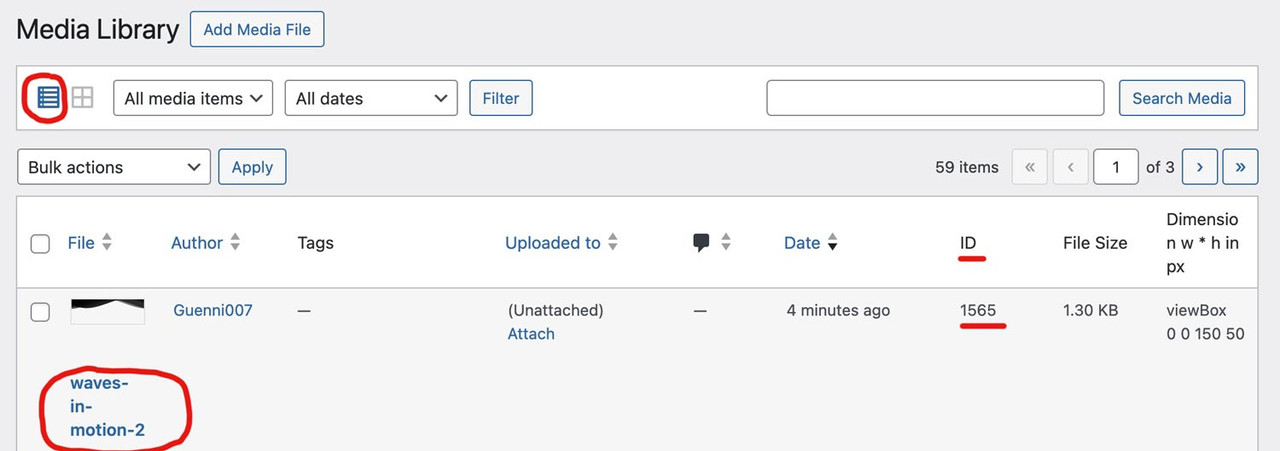
function custom_avf_custom_svg_shapes( array $custom_shapes ) {
  $custom_shapes = array(
    'waves-in-motion'       => array(
              'title'       => __( 'Waves in motion', 'avia_framework' ),
              'has_flip'    => true,
              'has_width'   => false,
              'attachment'  => 1562,
              ),
    'waves-in-motion-2' => array(
              'title'       => __( 'Waves in motion 2', 'avia_framework' ),
              'has_flip'    => true,
              'has_width'   => false,
              'attachment'  => 1565,
              ),
    );
    return $custom_shapes;
}
add_filter( 'avf_custom_svg_shapes', 'custom_avf_custom_svg_shapes', 10, 1 );
Dear support,
i want to show an fullscreen image for about 5 seconds and then go on with the main page. Like in this example: https://ibra-boxing.de
Is this possible with enfold?
Hi,
You could try to delete Enfold first, then upload the new version after that. Please make sure to keep backups of your site before doing this.
Best regards,
Rikard
Hey Chris,
Thank you for the inquiry.
What happens when you add this css code?
#top .avia_ajax_form .text_input, #top .avia_ajax_form .select, #top .avia_ajax_form .text_area {
    -webkit-appearance: none;
}
Please make sure to toggle or temporarily disable the Enfold > Performance > File Compression settings, then purge the cache to make sure that the changes take effect.
Best regards,
Ismael
Hi,
Thank you for the update.
Regarding the logo, you can use the avf_logo filter to display a different logo image on specific pages
function av_change_logo($logo) {
    if (is_page(9)) {
        $logo = 'http://kriesi.at/wp-content/themes/kriesi/images/logo.png';
    }
    return $logo;
}

add_filter('avf_logo', 'av_change_logo');
— https://developer.wordpress.org/reference/functions/is_page/
If you have more questions, please feel free to open another thread: https://kriesi.at/support/forum/enfold/#new-post
Best regards,
Ismael
Hey amollde,
Thank you for the inquiry.
Have you tried uploading the pub name or text as an image? You can create an image file using any image editor, such as Photoshop. Add the pub name as text, save the file as a PNG with a transparent or white background, then upload it as a logo in Enfold > Theme Options. Let us know the result.
Best regards,
Ismael
Hi,
Your blog page is designed using a shortcode that belongs to the Enfold theme ([av_blog]), and all parameters used in that shortcode are specific to Enfold — they are not related to Tutor LMS. This is why your custom blog layout is not reflected correctly when visiting a URL like:
This statement is not accurate either. If the category pages were using the archive.php file, which contains the avia_post_slider or the av_blog shortcode, they would display correctly, just as they do when the plugin is inactive. However, since the category pages are instead displaying as course pages, it’s clear that the plugin is forcing its layout onto the taxonomy or archive pages.
Once again, we recommend reaching out to the plugin developers to ask whether the plugin uses any filters or hooks to redirect to a different template.
Best regards,
Ismael
 Hugo
HugoGuest
Hi,
I purchased two Enfold licenses:
b36f27c2-ca7b-477e-9943-38785daff191 – 21 Aug 2025
17bdf7ef-b406-4996-9c3d-d9ed9a9dc9ab – 5 Feb 2015
Since I started using the second license on the website https://talentin1woord.nl, the colors changed to match those of the other license (https://droomvanzwolle.nl).
Please help me, as I am desperate for a solution.
Thank you.
Hi, I noticed on the mobile version of my website the mobile. In my enfold settings no matter what menu i select it does not work. Please advise :)
Hi,
but think about something else, the Tutor LMS plugin works with all themes, and I tested with many, only with Enfold things get confused, please take a look at the rest of the check that the authors of the plugin did, which I presented to you earlier…
Maybe there is a problem with the calling of the blog categories and the way the Enfold shortcode calls them:
“Your blog page is designed using a shortcode that belongs to the Enfold theme ([av_blog]), and all parameters used in that shortcode are specific to Enfold — they are not related to Tutor LMS. This is why your custom blog layout is not reflected correctly when visiting a URL like:”
BR
VK
This reply has been marked as private.
Hey rixi,
Thank you for the inquiry.
How did you load the font? Did you select the font in Enfold > General Styling > Fonts? Please provide the login details in the private field so we can check the settings.
Best regards,
Ismael
Hi,
In Tutor LMS, courses are stored as WordPress posts in the wp_posts table. The Enfold theme seems to override the default display of these post types and treats posts in that category (e.g. news) as courses, resulting in this unintended course-style layout.
If this statement is accurate, then the category pages shouldn’t display correctly when Tutor LMS is inactive. However, since the category pages display fine when the plugin is deactivated and only change when it’s active, it seems quite clear that the plugin is overriding something in the templates or redirecting the default templates to its own custom ones. We recommend reaching out to the plugin developers for clarification and to ask whether there are any functions in the plugin that enforce custom course styles or templates on the category pages.
Best regards,
Ismael
Hey sky19er,
The Contact Form element doesn’t support MailChimp, you can use the MailChimp Signup element, or the Enfold MailChimp Newsletter widget.

Best regards,
Mike
Hey solf,
Try this CSS in your Enfold Theme Options ▸ General Styling ▸ Quick CSS field:
#av-layout-grid-1 .avia-image-container .avia-image-container-inner img {
	height: 100%;
	width: 100% !important;
}
After applying the css, please clear your browser cache and check.
Best regards,
Mike
Hey Munford,
Try this CSS in your Enfold Theme Options ▸ General Styling ▸ Quick CSS field:
.slide-entry a.slide-image img {
filter: grayscale(100%);
-webkit-filter: grayscale(100%);
filter: grayscale(100%);
}

.slide-entry a.slide-image:hover img {
filter: grayscale(0%);
-webkit-filter: grayscale(0%);
filter: grayscale(0%);
}

#top .slide-entry .slide-content h3 a {
	color: #000;
}
#top .slide-entry .slide-content h3:hover a {
	color: #fff !important;
}
After applying the css, please clear your browser cache and check.
Best regards,
Mike
Hello ,
I am very happy with the concact form layout on Windows – Desktop – Mobile and tablet.
But I have noticed that on my iphone the date field doesn’t have the same layout as Enfold.
How can I change this?
Thanks for any tips.
Hello support!
I updated this website to 7.1.2 and now the portfolio on different pages doesn’t show the images anymore…:
Do you know what happened? I hope you can help me :)
Kind regards, Jolanda
Hi,
Glad Rikard could help, if you have any further questions please create a new thread and we will gladly try to help you. Thank you for using Enfold.
Best regards,
Mike
 Rob Marlbrough
Guest
My client using Enfold is on PHP 8.3, after updating Enfold the site died with a fatal error:
Got error ‘PHP message: PHP Fatal error: Uncaught ValueError: fread(): Argument #2 ($length) must be greater than 0 in /var/www/vhosts/domain.com/httpdocs/wp-content/themes/enfold/framework/php/function-set-avia-backend.php:1012
That line is:
$filecontent = fread( $handle, $fsize );
The error happens because in PHP 8.3, fread() now throws a ValueError if you pass a length of 0 or negative. In PHP 8.2 it would just return an empty string silently.
It should be changed to:
$filecontent = $fsize > 0 ? fread($handle, $fsize) : ”;
For now I just switched the client to PHP 8.2, and that was a quick fix. Please patch it so that others using PHP 8.3 don’t break their sites.
Hi, I’m working on a contact form in the footer of https://tccorgdev.wpenginepowered.com/ — I was able to connect to MailChimp with the API, I can see the many lists available in that same Enfold Options panel, and I see the lists available for selection in the Enfold MailChimp Newsletter widget, but I don’t see an option to select a list in the Contact Form element I’m using in the footer. I deleted the element, cleared the cache, and re-added the element, but still no luck — is list selection just not available in that element for some reason?
Hi. This seems to be the exact issue I am having. https://kriesi.at/support/topic/the-events-calendar-events-countdown-element-block-not-working/?utm_source=chatgpt.com
Ismael told me to start a new thread. I have Isolated this issue to happening only when pro is activated, but it appears to only be with the Enfold Theme.
The other thread on this was back in 2023, hoping that maybe you have figured out a fix or work around. I threw it into a test page. Details below. I am experiencing this issue on 3 different sites.
Hey psyvaleriepiloti,
Thanks for the login details. We activated debug mode under Enfold->Layout Builder->Show advanced options and copied the content shortcodes in for you. Please note that the demo settings and images are not included. Please review your site.
Best regards,
Rikard



