Hey emilconsor,
Falls Ihr mit einem child theme arbeitet, dann fügt in functions.php des child themes am Ende den folgenden Code ein:
add_theme_support( 'show_advanced_custom_element_options' );
Dann gibt es unter “Custom Elements” — “Show Advanced Options” die Selectbox “Custom Elements For Subitems” (Theme options page neu laden !!).
Dort dann “Individually select subitem custom element templates” auswählen.
Siehe auch https://kriesi.at/documentation/enfold/custom-element-templates/#custom-elements-advanced-options
Best regards,
Günter
This reply has been marked as private.
hi, on loading orders or products in the woo backend, the child enfold theme creates a bunch of errors/ script dependancies.. (see Private Content).
Any ideas what goes wrong here? Woo functionality is not broken,,
Best regards,
Peter
Hello Enfold team,
i also have the same warning for my website since i updated to 5.6.4. Warning: Undefined array key “term_rel” in /customers/a/c/7/survivalrunvollenhove.nl/httpd.www/wp-content/themes/enfold/config-templatebuilder/avia-shortcodes/blog/blog.php on line 562
I have already overwrite the PHP file and also removed the file, but the problem keeps coming. I run PHP version 8.2
Can you help me with this problem
Hey enfold-nick,
Thank you for the inquiry.
You may need to upgrade to version 5.6.4 in order to fix the issue with the slider. After the upgrade, please make sure to temporarily disable the file compression, then purge the cache. Let us know if this helps.
Best regards,
Ismael
Hey lfs360,
Thank you for the inquiry.
You can add the following css code to adjust the space between the header elements and reduce the size of the logo a bit. Adjust the values as necessary.
@media only screen and (max-width: 767px) {

  /* Add your Desktop Styles here */
  .responsive .logo img,
  .responsive .logo svg {
    height: 70px !important;
    max-height: 70px;
  }

  .responsive #top #wrap_all .main_menu {
    height: 60px;
  }

  .responsive #top #menu-item-shop.cart_dropdown {
    line-height: 60px;
    margin-left: -60px;
  }

  .responsive.html_cart_at_menu #top .main_menu .menu>li:last-child {
    margin-right: 30px;
  }

  .responsive #top #wrap_all .main_menu {
    margin-top: -15px;
    right: -40px;
  }
}
You may need to toggle or temporarily disable the Enfold > Performance > File Compression settings after adding the modification.
Best regards,
Ismael
Hi there! Having a little bit of trouble with The Events Calendar – has anyone else had this experience?
The events calendar feed looks just fine, but when you click on an event the page is just blank.
I did all the usual steps – updated the theme files, disabled all my plugins, etc., and I’ve been able to determine that the Enfold Child theme is the culprit (regular Enfold theme works).
From there, I replaced all of my Child theme files with a fresh download, but that didn’t have an effect. I also took out all my custom CSS coding in case there was something breaking things, but that doesn’t seem to be the culprit either.
Links are in the private content, any help is much appreciated!
Hi there,
I’m trying to move the navigation arrows outside of the image sliders if this is possible? Using Enfold Easy Slider.
Thank you :)
Hi Jay,
Thanks for contacting us!
We apologize for the inconvenience, please try to import the theme demo manually: https://kriesi.at/documentation/enfold/import-demos/#how-to-manually-import-a-theme-demo
As for posting in our forum, you’ll need to register first on the forum: https://kriesi.at/support/register/
Once registration is done and you have logged in to the forum, you can post here: https://kriesi.at/support/forum/enfold/#new-post
Best regards,
Nikko
Hi Kerstin Couch,
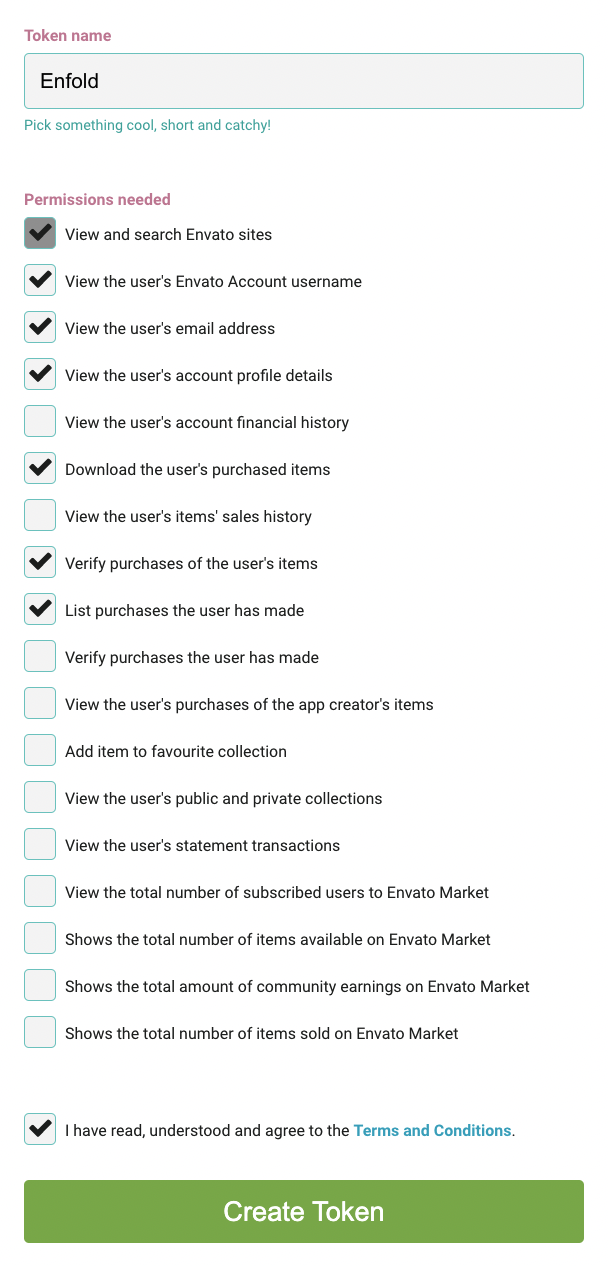
Please refer to our documentation: https://kriesi.at/documentation/enfold/theme-registration/#how-to-generate-a-envato-personal-token and generate a new Personal Token.
Please make sure to check all required permissions:
Best regards,
Nikko
Hi Obrmarketing,
Can you make the permissions for the enfold folder writable?
It seems adding is allowed but replacing or removing is not permitted.
I tried changing the permission but is denied by the server.
Some files in Enfold might be corrupted so I am trying to replace those files with new ones but it only results to failed transfers.
If we have verified that there are no corrupted files, we will need to debug some files so we would need the files to be writable.
Best regards,
Nikko
Hi Ascension,
Since you are using a child theme, I think you may have a modified footer.php and/or header.php.
Please update those files (basically you backup the file, copy the footer.php content of the updated Enfold theme and paste it to the child theme and add the modifications made on those files).
I hope this helps.
Best regards,
Nikko
Hi Monikafrick,
Unfortunately, that doesn’t quite fit mobile yet. The “screen_2x24.jpg” image is cropped.
Please add an image element inside grid and use the same image as the background image of the cell, and show it only on mobile (Advanced > Responsive > Element Visibility)
After “development processes” is a very large distance.
You have a very large cell padding, you’ll need to adjust it on mobile.
Edit the Cell, go to Styling > Padding > Cell Padding, click on the mobile icon and adjust the padding values.
“Human energetics” is cut off the “r” on my smartphone.
Can you provide a screenshot?
Also, please try to adjust the cell paddings for mobile and font sizes.
After “energies” there is also a very large gap.
Please add this CSS code in Enfold > General Styling > Quick CSS:
@media only screen and (max-width:767px) {
    #recent > .flex_cell {
        height: auto;
    }
}
Best regards,
Nikko
You’re awesome, that worked like a charm :)
Is there a library anywhere with those shortcodes? I’ve been an Enfold user for a number of years and have always wondered that.
Hi,
Try this CSS in your Enfold Theme Options ▸ General Styling ▸ Quick CSS field:
#top.page-id-1208 .main_color.container_wrap_first {
	 background-color: #e41d13;
}
After applying the css, please clear your browser cache and check.
Best regards,
Mike
Hello.
We loaded the latest version of Enfold theme v 5.6.3
An old issue has come up again. The preview button won’t show changes.
In the past, to fix we would switch to the wordpress block editor and
click the “Attempt Block Recovery” button
Save page
refresh browser
switch back to Advanced editor
save
This sometimes works temporarily, then after a couple more updates and saves, preview stops working and “unexpected or invalid content error appears
Hey michelleornest,
Thanks for the screenshot and the link to your site, try this CSS in your Enfold Theme Options ▸ General Styling ▸ Quick CSS field:
@media only screen and (min-width: 990px) and (max-width: 1439px) {
#top.home #best-rated .av-gridrow-cell.avia-builder-el-last {
	 background-position-x: 50%;
}
}
After applying the css, please clear your browser cache and check.
Best regards,
Mike
Hi,
Try this CSS in your Enfold Theme Options ▸ General Styling ▸ Quick CSS field:
#header.header_color .main_menu ul:first-child > li.current_page_item > a {
	color: #000;
}
#header.header_color .main_menu ul:first-child > li.current_page_item.current-menu-item > a {
	color: #0000fb;
}
After applying the css, please clear your browser cache and check.
Best regards,
Mike
if you like to preserve your column setting – do not place an empty 4/5 and an 1/5 – just use a 1/1 container
inside an image alb with image position right. Choose the image size on entering your media.
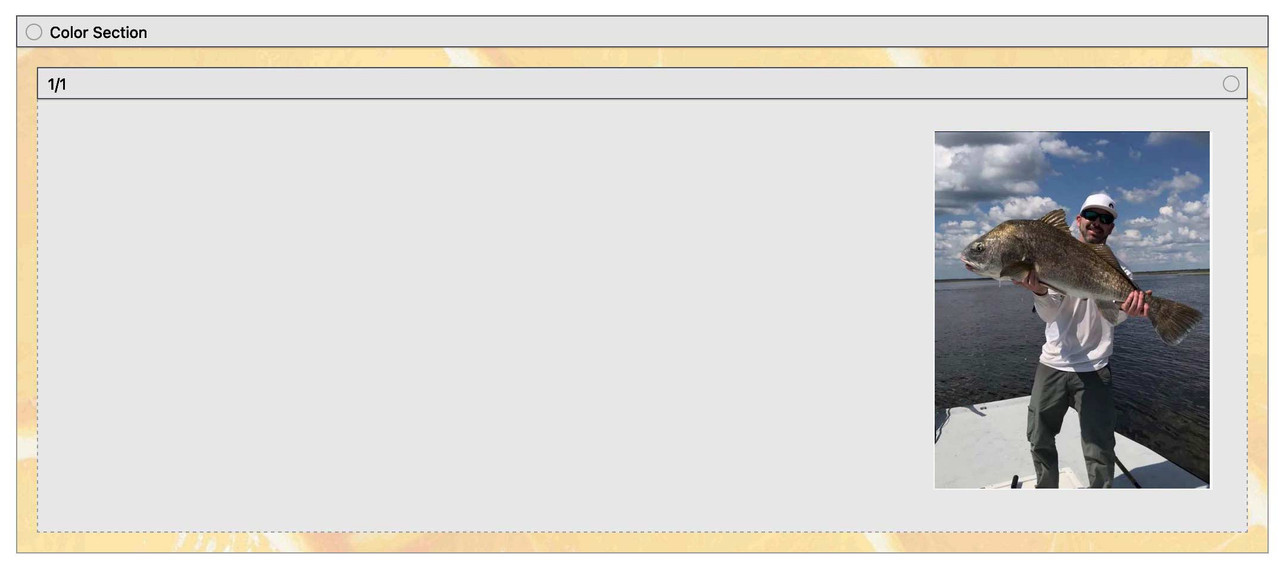
this is my css for that page : https://enfold.webers-webdesign.de/charlie/
in this case it might be the best to use a custom class – f.e.: image-right-top then:
#top .avia-section.image-right-top  .container {
  width: 100% !important;
  max-width: 100% !important;
  padding: 0;
}

#top .avia-section.image-right-top .content {
  vertical-align: top !important;
  padding: 0;
}
Hi,
When I login to wordpress.com with your details I don’t see a site with Enfold installed, I don’t think this is the correct site.
Please check.
Best regards,
Mike
 Kerstin Couch
Guest
How to get help with support for my theme? My purchase should come with 5 months of support.
I am getting an error and need help.
When I go to Enfold > Theme Update > I a getting
Following errors occurred:
username Errorcode 403 returned by Envato: Forbidden:
– code: not_authenticated
email Errorcode 403 returned by Envato: Forbidden:
– code: not_authenticated
Hi,
Please try adding it to the WP Code plugin that I installed for you, in the top right corner use the PHP snippet as the code type:

You can use this plugin for all of your future code snippets and you won’t lose them when you update.
Please refer to the Teams social profile code that I added for you earlier as an example.
Best regards,
Mike
PHP now 8.2.7 (previously PHP 8.0.x). WordPress 6.2.2. Enfold 5.4.7.
Problems:
Slider not showing on homepage.
Errors in server log (WPEngine host): (XXXXXX=my website directory)
AH01276: Cannot serve directory /nas/content/live/XXXXXX/wp-admin/css/: No matching DirectoryIndex (index.html,index.cgi,index.pl,index.php,index.xhtml,index.htm) found, and server-generated directory index forbidden by Options directive
I’ve tried clearing caches, returning to PHP 8.0.x (how that has the same problem), updating the theme manually via FTP (overwriting files), etc.
Hey Marc,
You can deactivate or remove the bundled version under Enfold->Layout Builder.
Best regards,
Rikard
Hi Brugmedia,
Please open a new thread and include your site login details there as well, we can’t help more than one user per thread.
Best regards,
Rikard
Hi,
Glad we were able to help, if you have any further questions please create a new thread and we will gladly try to help you. Thank you for using Enfold.
Best regards,
Mike
Hi Enfold team,
Hoping to get confirmation on this issue. I asked layerslider support about updating, and got this response. Can you confirm that I can proceed with the instructions I was provided?

Hi,
Thanks for the login, since you are not using a child theme I added the WP Code plugin for the customization of adding the Teams social profile. Then I add your new Teams social profile to Enfold Theme Options ▸ Social Profiles ▸ Your social profiles and then I enabled it at Enfold Theme Options ▸ Blog Layout ▸ Profile Links At The Bottom Of Your Blog Post and then I enabled it in your Social Buttons element

I then added this CSS in your Enfold Theme Options ▸ General Styling ▸ Quick CSS field for the Teams icon background color on hover:
#top #wrap_all .av-social-link-teams:hover a{
    color:#fff;
    background-color:#00f2ea;
}
Please adjust the color to suit.
Best regards,
Mike
I get a lot of downtime messages by Jackpack monitoring. I called my hosting provider and it was not a server problem. According to the error logs it is a php problem. Enfold and WP both are running on the latest version, all plugins are updated. I put some error log examples into the private content box below. Can someone from Kriesi team please help? Thx.



