
-
AuthorSearch Results
-
July 30, 2023 at 10:29 pm #1414973
Topic: Enfold error after import demo
in forum Enfoldrng28arg
ParticipantHello friends of Kriesi,
I have purchased a new license for a new project of mine, and after importing the official demo of enfold it does not look good on my domain, how can I solve that issue? Did I do something wrong?
Thanks for your help!
Rodolfo
July 30, 2023 at 8:44 pm #1414971Hi Guenni007,
Thanks a lot for helping hand. I am on parent theme not developing a child theme. however I paste the code in Enfold functions.php file and also add the css styel. but I didn’t find any new menu in burger menu field. only main menu is showed there. but now its showing right side.Hi,
I checked in a private browser window, and it shows up there. Please try the following in Quick CSS under Enfold->General Styling:
@media only screen and (max-width: 510px) {
.avia-cookie-consent .avia-button {
  margin-bottom: 15px;
}
}
Best regards,
RikardJuly 30, 2023 at 8:38 pm #1414969In reply to: PROBLEMS TO ADD THEME ENFOLD ON WORPRESS
Hi,
Thanks for that, those details did work. I see that Enfold was already uploaded, but not activated. I activated it for you, and everything seems to be working as expected. Please review your site.
Best regards,
RikardJuly 30, 2023 at 8:08 pm #1414961In reply to: Display portfolio categories one above the other
July 30, 2023 at 7:49 pm #1414954In reply to: Blog news as masonery but withput single post page
Hi,
Try using the Gallery element with a Text element below it:


In the gallery element choose Big image only, other images can be accessed via lightbox then each gallery element will only show the images you add to it.

Best regards,
MikeJuly 30, 2023 at 7:27 pm #1414951Hi,
Try this CSS in your Enfold Theme Options ▸ General Styling ▸ Quick CSS field:.avia-slideshow .avia-slideshow-button .av-siteloader { display: none; } .avia-slideshow .avia-slideshow-button .avia_loading_icon { background: transparent; }After applying the css, please clear your browser cache and check.
Best regards,
MikeJuly 30, 2023 at 7:13 pm #1414950In reply to: Templates from the upload?
Hey ledreisilker,
To install a demo template go to Enfold Theme Options ▸ Demo ImportBest regards,
MikeJuly 30, 2023 at 7:08 pm #1414948In reply to: Various adjustments in styling
Hey karinkropik,
Thanks for your patience and the link to your site.
1) after removing the circle from the active tab in the main menu, the lighter orange colour do you want it to be background color or the text color?
2) try unchecking the “use as mega menu” option from the “Triest and Crete” under Hiking retreats so it is a regular menu item

3) same as 2)
4)to create this warning you already have the Special Character Translation plugin installed:

so the code you would use to replace the HTML arrows > < is:###lt### => < ###gt### => >like this:

Our favourite ###lt###u class=special-type hiking###gt###selection###lt###/u###gt###
Please note that there are no quots around the class name, I did this for you on your /tours/ page

try this on your other pages and be sure to clear your cache plugin “purge cache”Best regards,
MikeJuly 30, 2023 at 6:39 pm #1414945In reply to: columns parallax effect – speed <10%?
Hi,
Unfortunately we don’t have a option for this but if you would like to request this feature the Dev Team has opened a new Github Feature Request for users to place requests and follow them as the Dev Team reviews them.Best regards,
MikeJuly 30, 2023 at 4:59 pm #1414940In reply to: critical error on this website
Hi,
I don’t see any errors on your site, but if you look at your WordPress dashboard you will see that your PHP needs to be updated

try asking your webhost to helpBest regards,
MikeJuly 30, 2023 at 4:41 pm #1414935In reply to: Banner from LayerSlider not showing
Hi,
Try updating to v5.6.5 and see if that helps. I see that you have not added a valid Envato Token so you can manually update if you wish.
To update Enfold manually you will need to download the latest installable WP version from your Theme Forest account and upload it to your WordPress ▸ Appearance ▸ Themes ▸ Add Themes ▸ Add New

after you choose the zip file and click install, you will see a This theme is already installed message because you are updating, you can continue

then you will see the Theme updated successfully message.

Best regards,
MikeJuly 30, 2023 at 4:31 pm #1414934there is no such option in enfold by default. Yes – that page is an enfold page – but there might be custom script combining overlay main menu with footer menu.
July 30, 2023 at 3:45 pm #1414924buket12
ParticipantHi Support team,
I want to display 2 menu in hamburger section. by default only Main menu is display there. but I want to display secondary menu too. can you please tell me the filename where i edit the menu. and please describe the main menu and secondary menu id too. here is the menu demo i want https://www.ikarus-festival.de in reference site when you click burger menu. there display 2 menu side by side. one is main menu another one is secondary menu. by default secondary menu display header top bar. but i want to display it inside burger menu along with main menu side by side. please help me to achieve this-
This topic was modified 2 years, 9 months ago by
buket12.
July 30, 2023 at 3:27 pm #1414919In reply to: Too many 301 forwards to privacy page
can you please have a look if on enfold settings page there is still a redirect page selected.
If you do not reset that entry – and only set the maintainance mode to disabled – there will be some settings preserved on enfold
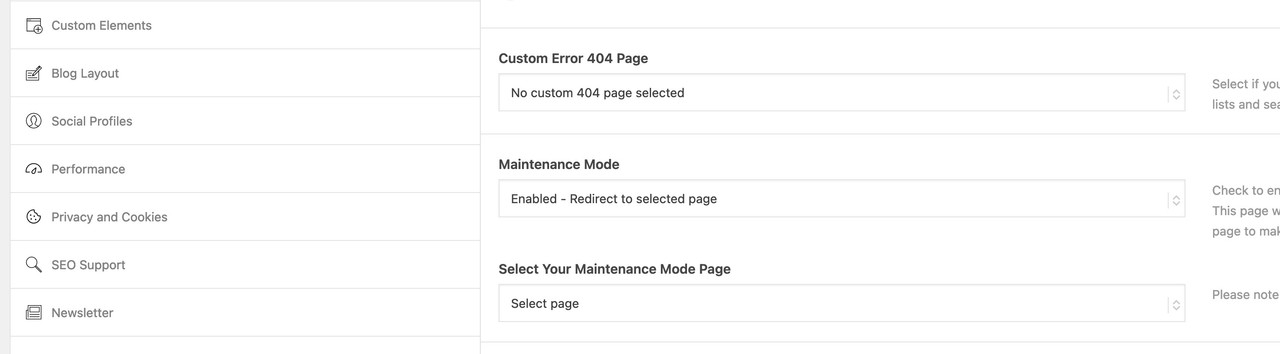
btw: same with custom 404 page and redirectJuly 30, 2023 at 2:03 pm #1414914In reply to: Saved table keeps disappearing! URGENT
Hi,
I understand that the table you are working on is on /miromar-lakes/
but is my test table /table-test/ what you are trying to do?
if so why not copy it to your /miromar-lakes/ page by making a template of it:

when I highlight link to remove, I am taken to main page and all is lost. Only happens sporadically, but, when it does all my work is lost.
this is true, if you try to edit the link in the table and you click it you will go to a new page and lose your work, so you just need to be careful.
Why are you adding these div’s to the links in your table?
On 55+ page I fixed your missing div in the Avia Layout Builder Debugger

once you forget to add a closing tag it is hard to fix.Best regards,
MikeJuly 30, 2023 at 1:44 pm #1414910In reply to: PROBLEMS TO ADD THEME ENFOLD ON WORPRESS
Hi,
Thanks for that. I created a new FTP account, please see private. Those details are working, and lead to the root folder. I can see that Enfold is uploaded there already though, so we would need access to the actual WordPress site in order to help you out further. I checked the previous WordPress login details that you posted, but they are still not working unfortunately.
Best regards,
RikardJuly 30, 2023 at 12:58 pm #1414905In reply to: PROBLEMS TO ADD THEME ENFOLD ON WORPRESS
This reply has been marked as private.July 30, 2023 at 3:33 am #1414894In reply to: social media icons in mobile menu
Hi,
sky19er I believe that you are mistaking, Guenni007 script is getting the social icons from the socket, your editing isHeading = “”, doesn’t change the location, check out the line below that:
social = $(‘#socket .social_bookmarks’).clone(true).addClass(‘sub-menu’).css(‘display’,’block’),
see #socket in the line, try disabling Enfold Theme Options ▸ Footer ▸ Social Icons

I’m only pointing this out for future readers so they understand where the icons are coming from and why this won’t work if Enfold Theme Options ▸ Footer ▸ Social Icons is disabled.
Thank you for sharing Guenni007
the css I had to use was different from above, I got it from your example site, perhaps it will help someone in the future.#av-burger-menu-ul .social_bookmarks.sub-menu li { display: block; margin: 3px 10px; float: left; } #av-burger-menu-ul .social_bookmarks.sub-menu li a { padding: 10px !important; border-radius: 0 !important; } .html_av-overlay-side-classic #top .av-burger-overlay li.menu-item-social a { border: none !important; } .responsive #top #av-burger-menu-ul .social_bookmarks.sub-menu { margin-left: 30px; margin-top: 0; overflow: visible; height: auto; } #top #av-burger-menu-ul .menu-item-social .avia-menu-text { display: block; width: 100% !important; padding: 15px 50px 5px; text-align: left !important; font-style: italic; }
Best regards,
MikeJuly 30, 2023 at 2:34 am #1414893In reply to: Saved table keeps disappearing! URGENT
Hi,
As I understand on your /fort-myers-55-plus/ page you are trying to change these table links

to be wrapped in a div<div class="neighborhood-link"> ... </div>like this

am I understanding correctly?
I created a test page linked below, and used the template a new 2023 Miromar and made this adjustment for you.
I saved the page and checked the frontend and then checked the backend again twice and the<div class="neighborhood-link"> ... </div>is still there for each one in the table. Please check and if this is what you wanted try saving it as the template.Best regards,
MikeJuly 29, 2023 at 10:38 pm #1414880In reply to: Saved table keeps disappearing! URGENT
I saved every link on miromar. All disappeared again. I hit save after every corrected link in table. There has to be something wrong on enfold side
July 29, 2023 at 10:14 pm #1414874Hey jamesbarrell,
Thank you for the link to your site, try this CSS in your Enfold Theme Options ▸ General Styling ▸ Quick CSS field:@media only screen and (max-width: 767px) { #top.page-id-30 .av-catalogue-container.avia-builder-el-10 .av-catalogue-list { border-top: none; } .responsive #top.page-id-30 #wrap_all .flex_column.avia-builder-el-7 { margin-bottom: 0; } .responsive #top.page-id-30 #wrap_all .av-catalogue-container.avia-builder-el-8 { padding-bottom: 0; } }After applying the css, please clear your browser cache and check.
Best regards,
MikeJuly 29, 2023 at 9:30 pm #1414867In reply to: Blog Post Using External Links
Hi,
Glad we were able to help, if you have any further questions please create a new thread and we will gladly try to help you. Thank you for using Enfold.Best regards,
MikeJuly 29, 2023 at 9:29 pm #1414866In reply to: social media icons in mobile menu
Hi,
Please try this solution instead and ensure that your Header Social Icons are set to Display in main header area

Best regards,
MikeJuly 29, 2023 at 9:05 pm #1414864In reply to: About menu font
Hi,
Glad Rikard could help, if you have any further questions please create a new thread and we will gladly try to help you. Thank you for using Enfold.Best regards,
MikeJuly 29, 2023 at 8:53 pm #1414861In reply to: Blog Post Using External Links
July 29, 2023 at 7:52 pm #1414855In reply to: Blog Post Using External Links
Hey steveorrmedia,
Try using the a column element with a image element and text element under it for your excerpt,

then use the column link option to link to your other sites:

Best regards,
MikeJuly 29, 2023 at 7:44 pm #1414852Oh sorry – to clarify, I’m making the plugin myself, just so I can use a shortcode to display the loop. There’s no real plugin website and no support, it’s just me trying to get a loop to work with pagination. Looking for the right code snippet. The custom post type was created for use with the previous theme (and not by me) and I’m trying to modify the use of it for Enfold. The previous setup used Custom Post Type Maker, and made a custom post type but didn’t use the taxonomy module.
Maybe the custom post type/taxonomy setup is what’s not done correctly?Here is the code from my attempt so far:
// Create Shortcode to display Past Issuesfunction wmnpress_shortcode_eedition_post_type(){ ?>
<?php
$args = array(
‘post_type’ => ‘eedition’,
‘posts_per_page’ => 12,
‘paginate’ => ‘yes’,
‘use_main_query_pagination’ => ‘yes’,
‘order’ => ‘DESC’,
‘orderby’ => ‘date’,
);
$the_query = new WP_Query( $args ); ?>
<?php if ( $the_query->have_posts() ) : ?>
<?php while ( $the_query->have_posts() ) : $the_query->the_post(); ?>
<div class=”past-editions flex_column av_one_third avia-builder-el-2 el_after_av_textblock el_before_av_one_third flex_column_div column-top-margin”>
<section class=”av_textblock_section “>
<div class=”avia_textblock” itemprop=”text”>
<p>
” target=”_blank” rel=”noopener”>” alt=”Newspaper cover page” width=”793″ height=”1024″ />” target=”_blank” rel=”noopener” data-wplink-edit=”true”><?php the_title(); ?>
</p>
</div>
</section>
</div>
<?php endwhile; ?><?php wp_reset_postdata(); ?>
<?php endif;
}
add_shortcode( ‘eedition-display’, ‘wmnpress_shortcode_eedition_post_type’ ); ?>July 29, 2023 at 7:30 pm #1414848In reply to: Parallax Overlay
Hey amanda-mdllc,
The slider is a Revolution Slider, so you could install that slider, or create a similar one using the LayerSlider that is included with Enfold.Best regards,
MikeJuly 29, 2023 at 7:10 pm #1414843In reply to: alphabetical sorting of posts
Hi,
Glad Ismael could help, if you have any further questions please create a new thread and we will gladly try to help you. Thank you for using Enfold.Best regards,
Mike -
This topic was modified 2 years, 9 months ago by
-
AuthorSearch Results
-
Search Results
-
Hello friends of Kriesi,
I have purchased a new license for a new project of mine, and after importing the official demo of enfold it does not look good on my domain, how can I solve that issue? Did I do something wrong?
Thanks for your help!
Rodolfo
Hi Support team,
I want to display 2 menu in hamburger section. by default only Main menu is display there. but I want to display secondary menu too. can you please tell me the filename where i edit the menu. and please describe the main menu and secondary menu id too. here is the menu demo i want https://www.ikarus-festival.de in reference site when you click burger menu. there display 2 menu side by side. one is main menu another one is secondary menu. by default secondary menu display header top bar. but i want to display it inside burger menu along with main menu side by side. please help me to achieve this


