Hi,
Try this CSS in your Enfold Theme Options ▸ General Styling ▸ Quick CSS field:
#top.post-type-archive-product .template-shop.content.av-content-full.alpha.units  {
	display: none;
}
After applying the css, please clear your browser cache and check.
Best regards,
Mike
Hi,
Try this CSS in your Enfold Theme Options ▸ General Styling ▸ Quick CSS field:
@media only screen and (max-width: 767px) {
	.responsive #top #wrap_all #main {
		padding-top: 90px !important;
	}
	.responsive #top.home #fullslider {
		margin-top: 90px;
	}
}
After applying the css, please clear your browser cache and check.
Best regards,
Mike
Hi,
Glad we were able to help, if you have any further questions please create a new thread and we will gladly try to help you. Thank you for using Enfold.
Best regards,
Mike
Hi,
Glad we were able to help, if you have any further questions please create a new thread and we will gladly try to help you. Thank you for using Enfold.
Best regards,
Mike
Hi “Enfold”,
recently a customer asked me if he could have the Dark/Light Mode switch on his site.
Could you tell me if I can hope that one of the next versions of Enfold will include the Dark/Light Mode switch?
While waiting for Enfold to add the native Dark/Light Mode switch, could you tell me if you know of a “Dark/Light Mode” plugin compatible with Enfold?
Best regards,
Oriano
Hi,
Great, I’m glad that Ismael could help you out. We’ll close this thread for now then, please open a new thread if you should have any further questions or problems.
Best regards,
Rikard
Hi,
It’s ok to use the token for a development site as well, or you could simply update manually via FTP: https://kriesi.at/documentation/enfold/install-enfold-theme/#ftp-install
Best regards,
Rikard
Hey Martin,
Please try the following in Quick CSS under Enfold->General Styling:
@media only screen and (max-width: 767px) {
.responsive #top #header .social_bookmarks {
    display: block !important;
}
}
Best regards,
Rikard
Hey joshuati,
Please try the following in Quick CSS under Enfold->General Styling:
.page-id-52 .slide-meta-time {
  display: none;
}
Best regards,
Rikard
Hi,
Glad we were able to help, if you have any further questions please create a new thread and we will gladly try to help you. Thank you for using Enfold.
Best regards,
Mike
Hi,
I see that you have placed the code that is causing problems in your WordPress ▸ Customize ▸ Additional CSS

This should not be there, please remove.
I also see that you have the same code in your WordPress ▸ Appearance ▸ Theme File Editor ▸ Enfold ▸ functions.php
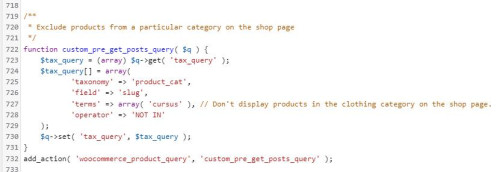
please also remove this and then check again.
If you are not using a child theme I recommend the WPcode plugin this plugin supports PHP code snippets, JavaScript code snippets, & CSS code snippets, because you will lose the custom code that you add to the enfold ▸ functions.php when you update next time.
Best regards,
Mike
Hi,
a while ago I asked how we can change the size of the thumbnails on our blog archive pages. We need to do this because we have text on our images which is cut off with the predefined images size. You gave me a reply which I have understood (see below) – but can I implement this change in the child theme? I´ve tried adding this code but it isn´t making any difference, which suggests that I am doing something wrong ;) I have to add that I don´t know much about php. I re-uploaded one of the thumbnails after adding the code but that also made no difference.
/* Resize portfolio thumbnails on archive/category pages in the blog */
$avia_config[‘imgSize’][‘portfolio’] = array( ‘width’ => 710, ‘height’ => 375 ); // images for portfolio entries (2,3 column)
You replied:
Hi,
Thank you for your patience and the links to your site, the portfolio size images on the archive pages is set by line 190 in the enfold/functions.php file
I didn’t find an easy way to adjust the image size on the archive page so I would recommend changing the portfolio size from array(‘width’=>495, ‘height’=>400 ); to mmatch the magazine size array(‘width’=>710, ‘height’=>375 ); and then you will need to regenerate your thumbnails and then check.
This would also change any other use of the portfolio thumbnails on your site, but it doesn’t look like this would be an issue for you.
Best regards,
Mike
Post Link: https://kriesi.at/support/topic/change-layout-number-of-columns-on-blog-category-pages/#post-1310490
Dear Folks and Support Team!
This is my Enfold code:
function misi_pdf_preview()
    {
echo "Hello Word - by content";

}
    add_filter("ava_after_content", "misi_pdf_preview", 10, 0);
I don’t know what happened because… it worked a few months ago… but not today…
Rendering was fine with wp debug, no errors displayed…
So, I had to changed the original Enfold code to the native WP method, this method works:
 function misi_pdf_preview2($content )
    {

         $before = '';
  after = "Hello Word - after the content";
  //modify the incoming content
  content = $before . content . after;

  return $content;
}
add_filter( 'the_content', 'misi_pdf_preview2' );
Do you have any suggestion to find out why the original Enfold method is not working?
Thanks for your help,
Mihály Földesi
I’m so sorry… it still does not work.
I placed in in the Appearance Editor. But still this “Not found field”.
There was already some info in the editor. Could that be the reason? Or could it be this text: “Don’t display products in the clothing category on the shop page.”
This is al the info there is in there:
@media only screen and (max-width: 768px) {
/* Add your Desktop Styles here */
.responsive #top .products .product:nth-child(odd) {
clear: none !important;
}
}
post-type-archive .woocommerce-no-products-found {
display: none;
}
function custom_pre_get_posts_query( $q ) {
$tax_query = (array) $q->get( ‘tax_query’ );
$tax_query[] = array(
‘taxonomy’ => ‘product_cat’,
‘field’ => ‘slug’,
‘terms’ => array( ‘cursus’ ), // Don’t display products in the clothing category on the shop page.
‘operator’ => ‘NOT IN’
);
$q->set( ‘tax_query’, $tax_query );
}
add_action( ‘woocommerce_product_query’, ‘custom_pre_get_posts_query’ );
For your information: This is in the Enfold Quick CSS. Could that be interfering?
.single-product-main-image {width: 66% !important;}
#top .product div.images img {
width: auto;
margin: 0 auto;
}
#top.archive .thumbnail_container img {
height: 324px;
}
@media only screen and (max-width:767px) {
.responsive #top #main .sidebar {
display: block !important;
width: 100% !important;
border: 0 !important;
}
.responsive #top #main .sidebar .inner_sidebar {
margin-left: 0 !important;
}
}
.avia-button {
background-color:gold!important;
}
.product_cat-cursus .single-product-main-image{
width: 30%!important;
}
add_action( ‘woocommerce_product_query’, ‘custom_pre_get_posts_query’ );
Hey Jables,
Thank you for the inquiry.
We have found a script error in the console which might be causing the issue with the events calendar. Please disable the cache and compression plugin temporarily, then upgrade the theme to version 5.6.6. Once the theme is updated, please temporarily disable the Enfold > Performance > File Compression settings to refresh the scripts and stylesheets.
This is the error.
Uncaught ReferenceError: AviaDatepickerTranslation is not defined
    at HTMLDocument.<anonymous> ((index):1833:16)
    at e (jquery.min.js?ver=3.7.0:2:26990)
    at t (jquery.min.js?ver=3.7.0:2:27292)
Best regards,
Ismael
Hey Michael F,
Thank you for the inquiry.
You can use the following css code to adjust the size of the product image.
.single-product-main-image {
    width: 50%;
    float: left;
    margin-right: 50px;
    overflow: hidden;
    padding-bottom: 50px;
}
Please make sure to toggle or temporarily disable the Enfold > Performance > File Compression settings to make sure that the changes take effect. By disabling the file compression settings, you will be able to make the necessary adjustments and updates without any conflicts. Once you have made the required modifications, you can re-enable the file compression settings to optimize the performance of your website.
Best regards,
Ismael
Hi,
Glad we were able to help, if you have any further questions please create a new thread and we will gladly try to help you. Thank you for using Enfold.
Best regards,
Mike
Hi,
Thank you for your patience, to make the header sticky on mobile try this CSS in your Enfold Theme Options ▸ General Styling ▸ Quick CSS field:
@media only screen and (max-width: 767px) {
  .responsive #top #wrap_all #header {
    position: fixed;
  }
}
For the mobile menu fonts try this css:
@media only screen and (max-width: 767px) {
	#av-burger-menu-ul a {
	font-family: kalam;
}
}
After applying the css, please clear your browser cache and check.
Best regards,
Mike
Hey mediafacto,
Thanks for the link to your site, in the popup the blue one was not correct, try this CSS in your Enfold Theme Options ▸ General Styling ▸ Quick CSS field to correct:
#top .mfp-content .avia-button.av-4pqcoe-31648334b4896fbdfea9d05f47606f6f,
#top .mfp-content .avia-button.av-eh4dwu-7ff5582dbec01723c9e3c0eb24a72468{
    background-color: #0e76a8;
    border-color: #0e76a8;
    color: #ffffff;
}
After applying the css, please clear your browser cache and check.
To stop your page from scrolling try adjusting your script to this solution.
Best regards,
Mike
Hey CharlieTh,
Try this CSS in your Enfold Theme Options ▸ General Styling ▸ Quick CSS field:
#top #main #commentform .comment-form-rating label[for=rating]{
	background:green;
	color:red;
	font-size: 25px;
}
After applying the css, please clear your browser cache and check.
Best regards,
Mike
Hey Yaphoon,
For your Gaode Map page try this CSS in your Enfold Theme Options ▸ General Styling ▸ Quick CSS field:
.responsive #top.page-id-53 #av_section_1 .container {
	max-width: 100%;
	padding: 0;
}
.responsive #top.page-id-53 #av_section_1 .container main {
	padding: 0;
}
the expected results:

as for your mega menu, it looks like each of your menu items is a column title which by defalt has a different color and font size than the regular menu items:

so perhaps you could adjust the mega menu items to correct your font size and color.
I don’t know what you mean by “adjust the square size”, if you mean the whole mega menu size, it is created by the number of items in it with js and not easy to change.
Best regards,
Mike
Hi,
I checked the IT site, In your custom footer page the CGA button has the preview link, it looks like you pasted the link this way, when I search your IT site there is no page conditions-generales-daffaires for which the preview link is for.

To correct this either create a conditions-generales-daffaires page, or select a different page and add the correct link to the button.
I checked your original site and the button is a preview link:

but you do have a conditions-generales-daffaires page, so I assume that all of your sites have the preview link, please adjust each one.
Best regards,
Mike
Hey Marc,
It looks like you are using the Fullwidth Easy Slider, so go to a slide in your slider and open it:

then go to Advanced ▸ Link Settings you have the option to add buttons:

If you want to modify the look of the button more than the options allow you to let us know and we will help with some css.
Best regards,
Mike
Hey schweg33,
To disable the lightbox go to the setting at Enfold Theme Options ▸ Lightbox Modal Window
Best regards,
Mike
Hi,
For your other issue your images are in a portrait size and the element is showing a landscape size, so you could change the image size of the image used.
The category page is using the “portfolio” image size, so try using the Simple Image Sizes plugin and change the image size in the WordPress ▸ Dashboard ▸ Settings ▸ Media ▸ Media Settings options, look for portfolio size and change the size and disable cropping:

and click the Save Changes button at the bottom of the page, then use the Regenerate Thumbnails plugin, to regenerate all of your images (thumbnails), this plugin works better than the built-in option of the other plugin, as it sometimes stalls if you have a lot of images.
Best regards,
Mike
Hi,
Glad we were able to help, if you have any further questions please create a new thread and we will gladly try to help you. Thank you for using Enfold.
Best regards,
Mike
Hi,
Glad we were able to help, if you have any further questions please create a new thread and we will gladly try to help you. Thank you for using Enfold.
Best regards,
Mike
Hi,
Yes this file worked:

unless there is anything else we can help with on this issue, shall we close this then?
Best regards,
Mike
Hi,
Glad we were able to help, feel free to ask all of the questions you want, we are happy to help. If you have any further questions please create a new thread and we will gladly try to help you. Thank you for using Enfold.
Best regards,
Mike



