No I have not tried modifying the template as the above PHP file I posted I didn’t see anything about the address layout in the PHP file.
I also want to modify the layout of the My Account page in WooCommerce now as well.
Possibly, there is a plugin that is recommended that works with Enfold to do simple modifications of the WooCommerce templates and emails so that I don’t have to handle the PHP coding that is over my head?
Hey Manfred,
Please try the following in Quick CSS under Enfold->General Styling:
th {
  text-transform: none;
}
Best regards,
Rikard
Hi Enfold Support Team,
i use a html table code for table Elements on mobile, because it needs less space. Unfortunately by default the text is uppercase – i prefer lowercase or simple the way I wrote, its easier to read and needs less space. (Example in the private section – on mobile)
How to style the regular html table code?
best regards
Manfred
Hello Enfold Support,
I am experiencing a problem with the combination of anchor links and section animations on my website.
When I use the main navigation to jump to an anchor link, for example here:
https://store-project.com/#steinbacher
the page scrolls too far down, so that the linked element is not directly visible. In my case, the section is animated upwards, and it seems that the browser does not take this movement into account when calculating the scroll position. As a result, the page always lands a bit too far down.
Without the animation, the anchor jump works correctly. With the animation enabled, this behavior occurs.
Is there a way to combine both – keeping the nice animation and still landing at the correct position when using anchor links?
Thank you very much in advance for your support.
Best regards,
Diana
Hi,
The style.css files you’re seeing are the following:
— https://site.it/wp-content/themes/enfold/wp-blocks/src/textblock/style.css
— https://site.it/wp-content/themes/enfold-child/style.css
— https://site.it/wp-content/themes/enfold/style.css
However, the required cached style.css file from the child theme is not loading when the query parameters are not set, meaning the cache is active:
— https://site.it/wp-content/cache/min/1/wp-content/themes/enfold-child/style.css?ver=1756284923
In your screenshot, the search field looks correct because you’ve added a query parameter. This is definitely an issue with a caching mechanism on your server. We recommend reaching out to your hosting provider for further assistance and ask them if Kinsta Cache can be disabled.
Best regards,
Ismael
I have updated to the latest version of Enfold. Please confirm that the newest version of the Enfold Child Theme can be downloaded from this website: https://kriesi.at/documentation/enfold/child-theme/#toggle-id-7-closed. If that is not correct, please send me a link to the site from which I can download the newest version.
Have you updated from a slightly older version of Enfold to the latest version?
And do you have on your child-theme custom header.php or footer.php ?
These would be extra files in your child theme folder. If you have updated from an older version, a lot has changed in these files. You would then need to know why they were placed there in order to reincorporate these reasons into a current header.php or footer.php.
or the arrow thought even more demanding ;)
:root {
  --burger-main-icon-width: 40px; /* === adjust to your needs === */
}

@media only screen and (max-width:1150px) {
  .av-hamburger {display: none}

  #header #avia-menu li.av-burger-menu-main.menu-item-avia-special,
  #top #wrap_all #header .av-small-burger-icon a:before{
    width: var(--burger-main-icon-width);
  }

  #top #wrap_all #header .av-small-burger-icon a {
    display: flex;
    justify-content: center;
    align-content: center;
    align-items: center;
  }

  #top #wrap_all #header .av-small-burger-icon a:before {
    content: "\e873";
    font-family: "entypo-fontello";
    font-size: var(--burger-main-icon-width);
    color: var(--enfold-main-color-primary);
    text-align: center;
  }

  .av-burger-overlay-active #top #wrap_all #header .av-small-burger-icon a:before{
    font-size: calc(1.5 * var(--burger-main-icon-width));  /* === only if you like it === */
    color: #FFF;
    content: "\e877 \A \e873";
    line-height: 0.35em;
    animation: avia_fade_move_down 2s ease-in-out infinite;
  }
}
Hi,
Thanks for the update. A child theme is a theme, not a plugin. A child theme is used to override the parent for various reasons, it’s WordPress standard and not specific to Enfold. And yes, that is recommended if you want to override the parent, otherwise you will lose your customisations during updates.
You can start off by activating the parent theme, then download the current child theme to your local machine. Then you can install a clean child theme and add your customisations back one by one to see when the problems starts.
Best regards,
Rikard
Hi,
The issue occurs when not logged in because the following cached file is not being loaded. We’ve tried disabling WP Rocket but it’s still the same.
https://site.it/wp-content/cache/min/1/wp-content/themes/enfold-child/style.css?ver=1756284923
Is there any other kind of caching enabled on your server? You may need to contact your hosting provider to confirm this.
Best regards,
Ismael
Hey tonyiatridis,
Thank you for the inquiry.
We have set the Enfold > Blog Layout > Blog Layout settings to “Use the Advanced Layout Builder”, so the blog now utilizes the content created in the builder. It should now correctly display posts that are configured or selected in the Blog Posts element.
Best regards,
Ismael
Hi Mike, I’m seeing exactly the same thing as you are seeing in mailchimp, yet on the front-end of the site nothing changes. I’m using the mailchimp signup blok of Enfold and the API key in the Enfold Child Theme options. You are referring to the same?
Hi,
Great, I’m glad that Mike could help you out. Please open a new thread if you should have any further questions or problems.
Best regards,
Rikard
I have been using the Enfold theme since 2017 and built my site with the Enfold Child Theme. My website, https://abridgetoachievement.com/, is currently experiencing a critical error that makes it unusable.
I have already disabled all plugins except the Child Theme plugin, which is required for my website to display correctly. BlueHost’s advanced technical team has confirmed that the Child Theme plugin is causing the error.
Although I use CodeGuard backups to restore the site, the website only remains active for a few hours before crashing again. This issue is urgent—I need immediate help repairing the Child Theme plugin so my website remains stable, functional, and accessible.
Please check the site quickly, as it will crash soon. Thank you for your prompt assistance.
Hey Valerie,
Try this CSS in your Enfold > Quick CSS:
.inner_sidebar .widget_media_image {
	text-align: center;
}
After adding, clear your browser cache and check.
Best regards,
Mike
You were right about the Columns on the Home page – Thank you.
Regarding the Widgets on the Right Sidebar
I tried that code, but it did not seem to fix the issues.
In this image you can see in the Right Sidebar the Sign Up for Our Newsletter for the Custom HTML Custom Widget and the ARTICLE CATEGORIES words are for the Categories Widget is being cutoff on smaller screens and tablets.
https://freeimage.host/i/enfold-screenshot-2025-09-23-141331.KcYwMWN
Can you please check all screen sizes and please help me fix this?
Thank you.
Dear Enfold team,
On https://schoonheidsinstituutdiane.nl/ I’ve added a content section for e-mailmarketing purposes, see the homepage. I’m using the mailchimp api connection and the mailchimp block. However, when I activate ‘birthday’ I see a regular text field entry , whilst I’d naturally rather have a date-entry (DD/MM/YYYY). How do I change that entry field to become a date entry field, perhaps even with some more user /ux friendly experience that allow you to select a date, month and year, if you know what i mean?
See a screenshot of the block here
https://drive.google.com/file/d/1eEZG22T5nkKn4sdSkj-g3pR_Ab8JPvRp/view?usp=sharing
Hi @dondela, so far, I’ve only tested dark-mode-toggle/ on local test sites. I haven’t used it on production sites yet because I’m afraid of unexpected malfunctions :(
If you’re using it on a production site (with Enfold), could you please give me the link so I can take a look?
Best regards,
Oriano
This reply has been marked as private.
Hi,
Glad to hear that you have this sorted out, if you have any further questions please create a new thread and we will gladly try to help you. Thank you for using Enfold.
Best regards,
Mike
Hi,
Thanks for the update. What happens if you completely delete the current theme files, then upload them again? You can do that via the WordPress dashboard, or FTP: https://kriesi.at/documentation/enfold/install-enfold-theme/#ftp-install
Best regards,
Rikard
I get this:
Warning: Undefined array key “footer_option” in /var/www/viborgvaskerimaskiner.dk/public_html/wp-content/themes/enfold/footer.php on line 35
Warning: Undefined array key “footer_behavior” in /var/www/viborgvaskerimaskiner.dk/public_html/wp-content/themes/enfold/footer.php on line 37
Any suggestions?
Hi,
Thank you for the inquiry.
Try to update theme to version 7.1.2, then toggle or temporarily disable the Enfold > Performance > File Compression settings. If the issue persists, you may need to add the “lightbox” class name (under Advanced > Developer Settings > Custom CSS Class) to the images using webp format.
Best regards,
Ismael
Hi,
Glad Guenni007 could help, thank you Guenni007, if you have any further questions please create a new thread and we will gladly try to help you. Thank you for using Enfold.
Best regards,
Mike
Hey BlewWeb,
You could download the icon here and upload it to your Enfold Theme Options ▸ Import/Export ▸ SVG Iconset and Iconfont Manager
Then add this snippet to your child theme function.php file or if you are not using a child theme you could use the WP Code plugin then add a new snippet, in the top right corner use the PHP snippet as the code type:
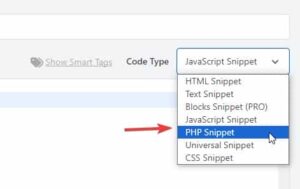
then add this code and save.
function avia_add_custom_icon($icons) {
$icons['bluesky'] = array( 'font' =>'fontello', 'icon' => 'ue800');
return $icons;
}
add_filter('avf_default_icons','avia_add_custom_icon', 10, 1);

function avia_add_custom_social_icon($icons) {
$icons['BlueSky'] = 'bluesky';
return $icons;
}
add_filter('avf_social_icons_options','avia_add_custom_social_icon', 10, 1);
add_filter('avia_social_share_link_arguments', 'avia_add_social_share_link_arguments', 10, 1);
function avia_add_social_share_link_arguments($args){
    $bluesky = array('bluesky' => array("encode"=>true, "encode_urls"=>false, "pattern" => "https://bluesky.com/", 'label' => __("Share on BlueSky",'avia_framework')));
    $args = array_merge($bluesky, $args);
    return $args;
}
Then add this css to your Enfold Theme Options ▸ Quick CSS
#top #wrap_all .av-social-link-bluesky:hover a {
	  color: #fff;
    background-color: #1185FE;
}
Then choose the icon in your Enfold Theme Options ▸ Your Social Profiles
You can also vote for this feature here.
Best regards,
Mike
Hey John,
Thanks for reaching out to us. We don’t handle licensing on our end, please try reaching out to Envato/Themeforest support and check if you can transfer your sites to a different account. There’s a regular and extended license as you can see here. Most customers select the single license, as they can purchase licenses for individual sites.
Best regards,
Rikard
Hi,
Thanks for update. In short a child theme is used to override the parent. The message you are referring to appears since you are overriding WooCommerce templates in your child theme, it has nothing to do with Enfold.
Best regards,
Rikard
Thanks Ismail,
“Delete Old CSS And JS Files” was and still is activated. I’ also played with deactivating the compression in Enfold, but it doesn’t do the trick.
I changed my caching plugin to autoptimize. Still the same: https://postimg.cc/8s3DQg5F
I dared to just delete the folder ingredients of wp-content/uploads/dynamic_avia after backing it up.
It doesn’t seem to have an effect on the page. I will now check if the masses of files reappear.
For now the problem seems to be solved,
Thanks!
Stefan
Okay, I’m slowly starting to understand how the ‘Parent Theme’ and the ‘Child Theme’ work. By adjusting the PHP, I can now edit products again.
Why is this text still at the top of the products page?
“Your theme (Enfold Child) contains outdated copies of several WooCommerce template files. These files may need to be updated to ensure compatibility with the current version of WooCommerce.”
That was actually the reason I purchased a new license, but apparently that doesn’t help solve the problem.
Hi,
We will leave this open to hear back from you, let us know if disabling WP Rocket solves.
WP Rocket is monitoring the user interaction, so you can’t exclude it.
WP Rocket use to have a doc on their site that listed different themes and the recommended exclusions for them, including Enfold, but my link to it doesn’t work anymore and I can’t find where they moved it to. Nonetheless the first step is to isolate the error, if disabling WP Rocket doen’t help, perhaps your CDN is contributing to this?
Best regards,
Mike